Table of Contents for
The Hitchhiker's Guide to Python
Version ebook / Retour

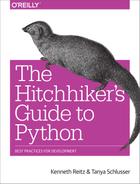
Cover image for bash Cookbook, 2nd Edition The Hitchhiker's Guide to Python by Tanya Schlusser Published by O'Reilly Media, Inc., 2016
  1. Cover
  2. nav
  3. The Hitchhiker’s Guide to Python
  4. The Hitchhiker’s Guide to Python
  5. Dedication
  6. Preface
  7. I. Getting Started
  8. 1. Picking an Interpreter
  9. 2. Properly Installing Python
  10. 3. Your Development Environment
  11. II. Getting Down to Business
  12. 4. Writing Great Code
  13. 5. Reading Great Code
  14. 6. Shipping Great Code
  15. III. Scenario Guide
  16. 7. User Interaction
  17. 8. Code Management and Improvement
  18. 9. Software Interfaces
  19. 10. Data Manipulation
  20. 11. Data Persistence
  21. A. Additional Notes
  22. Index
  23. About the Authors
  24. Colophon
  1. Preface
    1. Conventions Used in This Book
    2. Safari® Books Online
    3. How to Contact Us
    4. Acknowledgments
  2. I. Getting Started
  3. 1. Picking an Interpreter
    1. The State of Python 2 Versus Python 3
    2. Recommendations
    3. So…3?
    4. Implementations
      1. CPython
      2. Stackless
      3. PyPy
      4. Jython
      5. IronPython
      6. PythonNet
      7. Skulpt
      8. MicroPython
  4. 2. Properly Installing Python
    1. Installing Python on Mac OS X
      1. Setuptools and pip
      2. virtualenv
    2. Installing Python on Linux
      1. Setuptools and pip
      2. Development Tools
      3. virtualenv
    3. Installing Python on Windows
      1. Setuptools and pip
      2. virtualenv
    4. Commercial Python Redistributions
  5. 3. Your Development Environment
    1. Text Editors
      1. Sublime Text
      2. Vim
      3. Emacs
      4. TextMate
      5. Atom
      6. Code
    2. IDEs
      1. PyCharm/IntelliJ IDEA
      2. Aptana Studio 3/Eclipse + LiClipse + PyDev
      3. WingIDE
      4. Spyder
      5. NINJA-IDE
      6. Komodo IDE
      7. Eric (the Eric Python IDE)
      8. Visual Studio
    3. Enhanced Interactive Tools
      1. IDLE
      2. IPython
      3. bpython
    4. Isolation Tools
      1. Virtual Environments
      2. pyenv
      3. Autoenv
      4. virtualenvwrapper
      5. Buildout
      6. Conda
      7. Docker
  6. II. Getting Down to Business
  7. 4. Writing Great Code
    1. Code Style
      1. PEP 8
      2. PEP 20 (a.k.a. The Zen of Python)
      3. General Advice
      4. Conventions
      5. Idioms
      6. Common Gotchas
    2. Structuring Your Project
      1. Modules
      2. Packages
      3. Object-Oriented Programming
      4. Decorators
      5. Dynamic Typing
      6. Mutable and Immutable Types
      7. Vendorizing Dependencies
    3. Testing Your Code
      1. Testing Basics
      2. Examples
      3. Other Popular Tools
    4. Documentation
      1. Project Documentation
      2. Project Publication
      3. Docstring Versus Block Comments
    5. Logging
      1. Logging in a Library
      2. Logging in an Application
    6. Choosing a License
      1. Upstream Licenses
      2. Options
      3. Licensing Resources
  8. 5. Reading Great Code
    1. Common Features
    2. HowDoI
      1. Reading a Single-File Script
      2. Structure Examples from HowDoI
      3. Style Examples from HowDoI
    3. Diamond
      1. Reading a Larger Application
      2. Structure Examples from Diamond
      3. Style Examples from Diamond
    4. Tablib
      1. Reading a Small Library
      2. Structure Examples from Tablib
      3. Style Examples from Tablib
    5. Requests
      1. Reading a Larger Library
      2. Structure Examples from Requests
      3. Style Examples from Requests
    6. Werkzeug
      1. Reading Code in a Toolkit
      2. Style Examples from Werkzeug
      3. Structure Examples from Werkzeug
    7. Flask
      1. Reading Code in a Framework
      2. Style Examples from Flask
      3. Structure Examples from Flask
  9. 6. Shipping Great Code
    1. Useful Vocabulary and Concepts
    2. Packaging Your Code
      1. Conda
      2. PyPI
    3. Freezing Your Code
      1. PyInstaller
      2. cx_Freeze
      3. py2app
      4. py2exe
      5. bbFreeze
    4. Packaging for Linux-Built Distributions
    5. Executable ZIP Files
  10. III. Scenario Guide
  11. 7. User Interaction
    1. Jupyter Notebooks
    2. Command-Line Applications
    3. GUI Applications
      1. Widget Libraries
      2. Game Development
    4. Web Applications
      1. Web Frameworks/Microframeworks
      2. Web Template Engines
      3. Web Deployment
  12. 8. Code Management and Improvement
    1. Continuous Integration
    2. System Administration
      1. Server Automation
      2. System and Task Monitoring
    3. Speed
      1. Interfacing with C/C++/FORTRAN Libraries
  13. 9. Software Interfaces
    1. Web Clients
      1. Web APIs
    2. Data Serialization
    3. Distributed Systems
      1. Networking
    4. Cryptography
  14. 10. Data Manipulation
    1. Scientific Applications
    2. Text Manipulation and Text Mining
      1. String Tools in Python’s Standard Library
      2. Image Manipulation
  15. 11. Data Persistence
    1. Structured Files
    2. Database Libraries
  16. A. Additional Notes
    1. Python’s Community
      1. BDFL
      2. Python Software Foundation
      3. PEPs
    2. Learning Python
      1. Beginners
      2. Intermediate
      3. Advanced
      4. For Engineers and Scientists
      5. Miscellaneous Topics
      6. References
    3. Documentation
    4. News
  17. Index
Back to top