Table of Contents for
HTML5 Geolocation
 HTML5 Geolocation
Published by
O'Reilly Media, Inc., 2011
HTML5 Geolocation
Published by
O'Reilly Media, Inc., 2011
Chapter 6. What You Can Do with Geolocation
There is no doubt that geolocation will continue to grow for years to come—just look at the ever-increasing trends among the popular location-based services for mobile phones to see why. While Foursquare, Gowalla, Twitter, Glympse, and all the rest continue impressive growth (and will continue to do so for quite some time), the W3C Geolocation API will also continue to open ever more doors for native browser applications in this market. Consider some of the following:
Geolocation applications have gone from niche and novelty pieces of software to cultural and trendy “must-haves” in today’s mobile world.
Phones are becoming increasingly “smart,” with more and more people switching from basic cell phones to smart devices, and the smartphone market is growing around the world and tapping into new markets.
More smartphones equals more GPS-enabled devices to utilize geolocation technology.
Companies now recognize the huge earnings potential with advertising on the popular location-based services, particularly as advertisements can be directed to individuals and specific locals.
HTML5 and the W3C Geolocation API will allow for websites to add geolocation to their functionality, removing the native application-only nature geolocation software shared in the past.
Also, expect that the accuracy of a location will continue to improve with time. This will make geolocation more enticing to some, and scarier to others (those concerned with privacy, in particular). All of the existing methods for gathering a location will improve their precision, and perhaps new methods will be created that give better results from the start. Triangulation of a Cell ID will continue to improve due to the continuing additions of new and stronger cell towers (more towers means more signals from which to calculate). GPS will also continue to advance as new satellite systems are launched and due to improved cooperation amongst agencies and governments. Finally, techniques for IP address tracking are improving as research and interest grows in geolocation.
Note
A computer scientist at the University of Electronic Science and Technology of China in Chengdu, Yong Wong, along with colleagues at Northwestern University in Evanston, Illinois, developed a method to identify a device using only an IP address to within 100 meters (690 meters on average). This without any information from the user!
Geolocation became a buzz-word in 2009 as social media applications took off with the introduction of Foursquare. The following year, technology writers dubbed 2010 “the year of the check-in” and the “year of geolocation.” 2011 thus far has seen a continuation of this branding, as it is being referred to as “the mobile revolution.” This year and the years to come will see more businesses embracing geolocation and social media applications. The mashup of several types of mobile applications (geolocation, social media, augmented reality) and the merging of a few existing ones should bring a more robust, diverse, and mature market.
Geomarketing
Geomarketing is a term that refers to marketing based specifically on geolocation. Advertisements on Facebook have been using this type of marketing, relying on IP addresses to locate the user logged into their site, and then customizing advertising based on this information. Search engines like Google and Bing do the same thing. This is a passive approach to geomarketing, and it has proved to be very effective. Taking an active approach to geomarketing, however, is proving to be the future of advertising.
Specials and Offers
Thanks to social media and geolocation, companies are taking a much more active approach to geomarketing on mobile platforms. An example of this type of geomarketing is the Specials available at certain locations in Foursquare. These Specials are sometimes even further “specialized” for an individual, giving the “mayor,” the individual with the most check-ins, an exclusive deal or free perks.
Companies are beginning to realize, if they have not already, that there is a huge potential for gaining new customers with a business and advertising model similar to what the social media applications like Foursquare are currently doing. Geomarketing also creates the possibility for previously unseen customer loyalty, which increases revenue. In addition to the geomarketing potential in social media applications, there is also the rising coupon-based applications that also rely on geolocation. Groupon-like applications that benefit from knowing a user’s location also give companies the ability to personalize the offers they make available to a customer.
Geomarketing in the future will rely more on the customer’s current location, with applications that track the user’s movements playing a large part in allowing companies to promote specials that pertain to certain locations. A scenario like the following will be possible: A person turns his vehicle onto a busy road lined with stores. A text message, email, or some other form of notification suddenly appears on his smartphone with specials for three stores located down the road. The technology for this type of functionality already exists.
Crowdsourcing
Crowdsourcing blends together two words, “crowd” and “outsourcing”. Crowdsourcing has been defined as using the collective intelligence of a large and diverse group of people to complete tasks that would otherwise be done by an individual or small group. The Internet has greatly improved the idea of crowdsourcing as it has made it far easier to gain access to large numbers of people for collaborative efforts.
Thanks to crowdsourcing and geolocation technology, geographic information for natural disasters and conflicts from around the world is growing. Every day people are becoming geospatial analysts on the ground as events unfold. There have been examples of this with the earthquake in Haiti in 2010, the 2010 BP oil disaster, the unrest and revolutions in the Middle East in 2010 and 2011, and the earthquake in Japan in 2011. As a real-world instance of using crowdsourcing, ArcGIS Mobile projects were used for boom monitoring during the cleanup of the BP oil spill.
Companies have come to realize that utilizing crowdsourcing has benefits, including the following:
Ideas can be explored without incurring large costs.
A larger pool of talented people can be accessed to attack a problem.
Customers’ desires or feelings about brands and offers are discovered quickly.
Giving customers a “voice” can induce brand loyalty.
Yelp brought the idea of crowdsourcing to social media, allowing users to leave both Tips and Reviews for any business in its database. Many of the social media applications have since implemented similar ideas. Learning more about a business before visiting it has become easier with these applications, and more importantly, customers can develop a tangible connection with the businesses they review—giving them a sense of ownership with the brand or business in the process.
Marketing departments are now using the reviews and tips submitted by users to shape their advertisements and to create specials and offers to match the crowd’s input. In doing this, customers are receiving more personalized and relevant offers directly via their smartphones, reinforcing their feedback and brand loyalty.
Specialization
One of the goals of geomarketing, from a business’s point of view, is to be able to deliver marketing and advertisements that are specific for a location to the customer. Web-based advertisements are using geolocation to deliver content that is relevant to a city level. The location is most likely found based upon IP address, so it makes sense to only deliver content that is granular to this level. After all, desktop computers are usually being used in work or home environments which do not move, so there is no need to deliver content more specific than city-wide advertisements.
The story is different for smartphones, which may be moving while a user is browsing the Web or accessing a social media application to check in at a business. In this case, more specialized forms of advertisements are much more likely to be effective.
The future of geomarketing should see more of this granular advertisement that relies on geolocation for producing specialized content for the user. More mobile applications like Shopkick will enter the market to give users specialized offers and content based solely on where they are when using the application. Giving users a sense of individual attention will succeed in building brand and company loyalty.
Think back to the scenario in Specials and Offers. Now, instead of driving, the person is walking through a mall. He has an application on his smartphone that is configured to give him messages pertaining to sports. As he reaches a buffer of 100 meters from a sporting goods store specializing in soccer equipment, he receives an alert that the store has a special offer expiring in 30 minutes especially for him—authentic Bayern München shirts with Arjen Robben’s number 10, 25% off retail price. As he hurries to the store, he thinks to himself what an odd coincidence that he would get this offer when only an hour earlier he had tweeted on Robben’s fine performance and hat-trick against Hamburg. Odd indeed, right? This type of application will be here in the near future.
Geosocial
Geosocial is a term that refers to social media based on geolocation. It was because of social media applications using geolocation for social interaction that location-based services became popular in the first place. This market will be one to watch in the future because of the its current popularity. Geosocial applications will continue to give businesses new ways to advertise to users on a more personal level. I expect the geosocial environment will expand itself to new opportunities and groups of people, as developers take new spins at social media applications.
Continued Growth
The social media industry has grown from a few applications that were built for specific communities in the United States to a global, multibillion dollar industry. As the social media market continues to grow, it will face challenges that it must meet and resolve before it can go truly mainstream. Once it does, it will go from a multibillion dollar industry to a multi-?? dollar industry.
The security that is implemented by the application is also very important for the users of the application. When the user passes information to the application for keeping, some questions that come to mind are: what type of storage is used to hold the data, how is this storage secured from being discovered by outside parties, what kinds of security are on the operating system of the server, is the server’s operating system being patched from the latest security threats, and is Transport Layer Security (TLS) being used as the transportation protocol?
Security of private data is of utmost importance for any business dealing in sensitive user information. No one should ever give a program access to private data unless it is known to be trusted. Most businesses today understand the value of privacy, and go to great lengths to ensure that any private information is properly secured.
As for the future of social media applications, Ditto is one application that is forward-thinking, and appears to have what the social media genre needs to make it more practical and widely used. Ditto is a check-in social media application much like Foursquare. Where it differs from the traditional check-in application, though, is that Ditto asks your connected friends what they want to do, instead of what are you doing. In fact, Ditto’s tag line is “What are you up to?”
There will be other applications that build on what Ditto is doing, just as other applications today built on what Yelp and other early social media applications have done. When social media applications can address specific needs for groups of people, they will make social media more accepted and useful. When something is useful, it obviously will be used by more people. Eventually, social media will go mainstream.
Automatic Check-in
Look for location-based services to be more hands-free in the future. The traditional check-in applications should transform from the current model of the user searching for the business she just arrived at and checking in, to a smarter, automated model. The application may track your geolocation for you, and make suggestions based on that location and the database of businesses it has built up. This type of application can use crowdsourcing to refine a business’s location based upon the geolocation of volumes of users that check in to a particular place. By learning in this way, it will give better, more accurate suggestions the more frequently the application is used.
As technology improves and the accuracy of a geolocation gets better, applications will rely more on automatic check-ins at locations. Some applications may opt to provide a pop up on the phone to inform the user it is about to check him in at a location, possibly asking for verification. Depending on the purpose of the application, it could simply check the user in at the location without notifying him at all. Shopkick already takes advantage of the automatic check-in, and more applications will follow with time.
Two Way Street of Data
The data for a social media application flows from both the application and the user. The user provides information to the application, such as his current location and thoughts about a location (reviews and tips), etc. In return, the application may provide information like businesses in the vicinity of the user’s location and other users nearby, etc. As you can see, there is a need for information sharing in order for social media application to work.
One of the biggest challenges that growing social media companies must concentrate on is the issue of a user’s privacy. There are questions that must be addressed by any application in the social media market. How is a user’s location information protected? How will information be shared between users of an application? What information from the application is available to the public?
There will, of course, need to be some shift in the idea of privacy by the general public, especially as geolocation is integrated more and more into our daily lives. For example, should a person’s location in a public area be protected in the same way as a person’s bank account information? The idea of what is public and what is private needs to be revised.
The social media industry will not continue to grow and advance without a greater influx of data from users. What makes these applications useful to people is that they can enhance their life in some way. This is only accomplished by having data about the user available to an application that makes the most of it.
The idea of privacy for people who were born before the 1990s is different than that of those born after, the latter showing a greater understanding of what social media is capable of—perhaps unconsciously, as they have been texting and tweeting for most of their lives. This generation has been raised with a different concept of privacy. The rest of us will have to catch up and learn to relax the idea of what private information is in order to develop applications that have more meaning. Geosocial applications have the ability to be more than check-in applications that let your friends know where you are. They can become an integral part of a person’s social life.
Data is a two way street—it needs to flow in both directions in order for a social media application to function properly. The more data that an application is able to receive, the better an application it can be and the more useful it will be for a person’s daily life. Data must be given in order to be received.
Geotagging
Geotagging is defined as adding geospatial metadata to digital media such as photographs, videos, text messages, tweets, and web pages. The geospatial information usually captured in the metadata is latitude and longitude, altitude, accuracy, and heading. Other information may also be gathered based on the type of media in question. As you can see, the geospatial information captured is basically the same information gathered by the W3C Geolocation API.
Digital Media and Geotagging
Twitter added geotagging support in the summer of 2009, though full API support was not available until November 2009. It is turned off by default in a user’s profile—this creates an opt-in policy for geotagging tweets for the user. Turning on location can be done by going to the user settings, and checking the checkbox for Tweet Location under the Account tab. Twitter states that when a user turns on geotagging, it stores that location, though a user always has the option to delete their location history.
YouTube added geotagging support in the summer of 2007. This capability is available when a new video is uploaded to YouTube as an option after the Broadcast Options section of the Video Upload process. It is available under the Date and Map Options and can be added by either specifying the latitude and longitude coordinates or placing a point on the provided Google Maps map. When specifying the coordinates, they should be entered as follows:
geo:lat=38.624722 geo:lon=-90.185278
Many photo-sharing sites also support geotagging of the digital photographs that are shared on them. There are a lot of sites out there for photo-sharing: flickr, photobucket, picasa, photoworks, twitpic, snapfish, shutterfly, fotki—and there are many more. The major photo-sharing sites have realized the value of adding support for geotagging, as more and more of the photos being uploaded to them are coming from cameras that are built into smartphones with geotagging capabilities. As more cameras have built-in GPS capabilities, geotagging will become a standard feature on digital photographs.
Privacy and Geotagging
Privacy is naturally of concern to many people regarding geographic information shared with a tweet, video, or picture that will become publicly available to the entire Web. With tweets, where you were when you posted your 140-character thought is not quite as disconcerting as say, knowing where you were when you took the picture of the inside of your house. There are valid concerns for the privacy of information contained in videos or images especially. Proper security on public sites so that media content marked as private remains so is extremely important.
At some point, though, users will have to ask themselves whether they trust the providers to properly handle and secure their content. If the answer to that question is no, then these users should opt-out of geotagging their tweets and videos, and remove geographic information from photos that are uploaded to public sites. Media sites provide services, and it is up to the user to decide how much of the service they wish to utilize and be a part of.
Geo-applications
Geo-applications are applications that are built with one of their features relying on geolocation. The social media applications that I have been discussing are one example of geo-applications. There are many other applications that utilize geolocation. A great example is the CitySourced application, a program designed to foster civic responsibility and participation by allowing people to report issues like potholes in streets, graffiti, and trash. There will be a greater number of these applications that utilize geolocation as we move forward with technology for everyday life.
Safety/Tracking
One of the areas that will use geolocation in applications in the future is safety, especially the safety of children and young adults. There are programs now that can track where your child is at all times by the child carrying a GPS device which broadcasts her location. The parent then uses a program to monitor the child’s GPS location to make sure she is where she is supposed to be. Futuristic scenarios would allow for the child to carry a tiny device (maybe sewn into her clothing or subcutaneously injected into her skin).
There are other practical uses for this type of tracking technology. Hikers and skiers could have clothing with built in GPS transmitters. The benefit of this is obvious should they get lost or trapped in avalanches or other natural disasters. Then there is the reality of tracking troops in combat. A subcutaneous GPS device would allow for armed forces to track their soldiers in case they are captured or lost behind enemy lines. These types of devices could greatly aid in rescue efforts in both civilian and military capacities.
Taxi Services
Another good application for geolocation technology is trying to get a ride while out on the town—OK, or just getting a taxi anywhere. If you could send your geolocation to the taxi service, it could send its nearest available vehicle (because it is using GPS to track them), saving you wait time. This would not just have to be taxi services, though. The San Fransisco based start-up Uber connects people with limo drivers using an Android or iPhone application, finding the closest driver based on the user’s location. Services like this will be more commonplace in the future.
Search
Searching can become more personalized if it is supplemented with
geolocation. This can work with desktop computers as well, as it is not
specific to smartphones. When a user searches for something, when
relevant, the search engine could take into account the user’s
geolocation and return search results factoring in location. This could
give users the result they are looking for more quickly than if the
results had used a traditional weighting system. For example, you browse
to the latest search engine, GeoFind, and type in
family owned restaurant. The
search engine returns the results of your search with all of the family
owned restaurants in your area listed first. In a normal search engine,
you might get a Wikipedia entry for “family owned restaurants” first,
followed by other results you do not care about before an actual family
owned restaurant comes up in the results, and it is not even a
restaurant located in the same state as you. Searching will change when
geolocation is added as a parameter.
M-Commerce
Mobile commerce, also known as m-commerce, is the capability of doing commercial transactions using a mobile device such as a smartphone. Applications like Shopkick are already attempting to mash together geolocation and m-commerce. In time, there will be more mobile applications that take advantage of geolocation to allow consumers to make purchases based on where they are.
Other Applications
Other applications will also begin using geolocation in their functionality. It can be used as an accessory to navigation with trip tracking. It can be used as a location planning tool in conjunction with social media. Tools could be built to aid in fitness, such as by tracking your workout. If you can think of a use for geolocation, an application can be built supplement that use. The future will be filled with geolocation applications.
HTML5 and Geolocation
The future of HTML5 and the W3C Geolocation API is bright. Native geolocation applications are becoming more popular, and there are no signs of this trend changing—this is a good indication for web-based geolocation applications, as well. HTML5 is also becoming more popular, as its adoption is assured by all of the major browser makers, clearing the way for developers to create HTML5 content. Combining HTML5’s abilities for better browser applications with the W3C Geolocation API will allow developers to create browser applications that rival native applications.
Web Applications Supplementing LBS
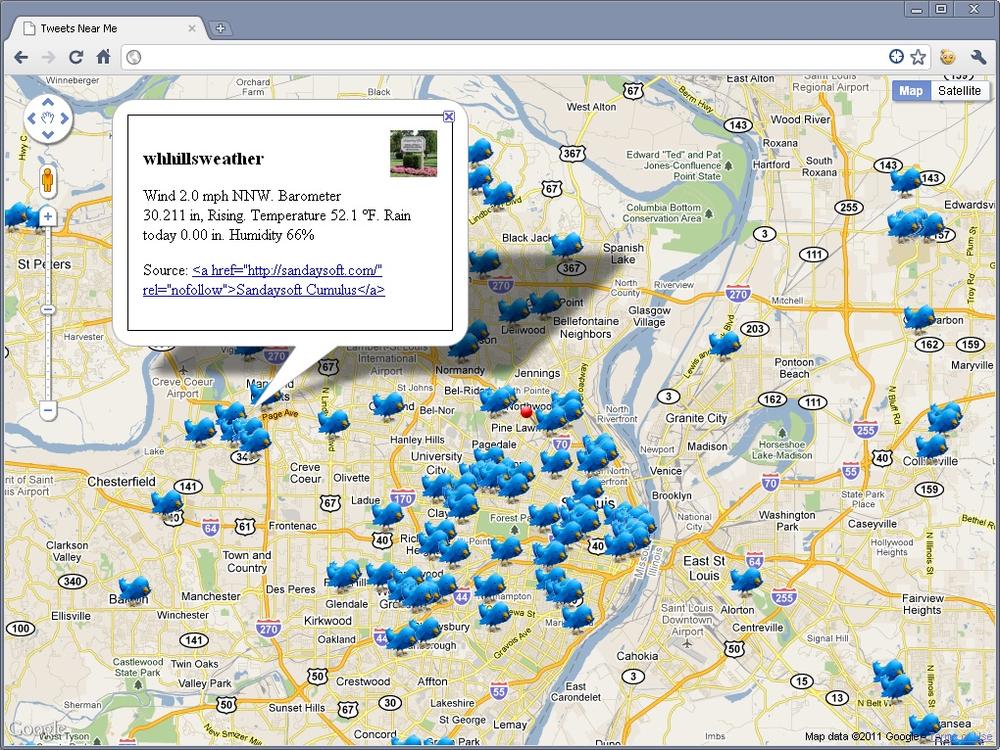
A good use of HTML5 is in supplementing mobile geolocation applications. Take Twitter, for example. It is possible to view a feed of all recent tweets within a certain buffer range of a specific coordinate. You could pick a coordinate by clicking on a map, and then displaying all tweets within 500 meters of that locations. Better yet, you could use the W3C Geolocation API to retrieve all tweets within 500 meters of your own location, as shown in Figure 6-1. Example 6-1 shows you an example.
<!DOCTYPE html>
<html lang="en">
  <head>
    <meta charset="utf-8"/>
    <meta http-equiv="X-UA-Compatible" content="IE=7"/>
    <meta http-equiv="viewport" content="initial-scale=1, maximum-scale=1,
        user-scalable=no"/>

    <title>Tweets Near Me</title>

    <style type="text/css">
      html { height: 100% }
      body { height: 100%; margin: 0; padding: 0 }
      #map { height: 100% }
      .tweet_info { border: 1px solid #000; padding: 15px; width: 300px }
      .tweet_info img { float: right; height: 48px; margin: 0 0 10px 10px;
          width: 48px }
      .tweet_info h3 { margin-bottom: 10px }
    </style>

    <script type="text/javascript"
        src="http://maps.google.com/maps/api/js?sensor=true"></script>
    <script type="text/javascript"
        src="https://ajax.googleapis.com/ajax/libs/jquery/1.5.2/jquery.min.js">
    </script>
    <script type="text/javascript" src="jquery.timer.js"></script>
    <script type="text/javascript">
      var map = null;
      var browserSupport = false;
      var attempts = 0;
      var tweets = [];
      var tweetsQ = [];
      var refreshQuery = '?q=';
      var infoWindow = new google.maps.InfoWindow();

      /* This is called once the page has loaded */
      function initMap() {
        /* Set all of the options for the map */
        var options = {
          zoom: 4,
          center: new google.maps.LatLng(38.6201, -90.2003),
          mapTypeId: google.maps.MapTypeId.ROADMAP
        };

        /* Create a new Map for the application */
        map = new google.maps.Map(document.getElementById('map'), options);

        /* Set up timers to collect tweets */
        $(document).everyTime('30s', acquireTweets);
        $(document).everyTime('100ms', parseTweetsQ);

        /* Add Geolocation */
        getLocation();
      }

      /*
       * If the W3C Geolocation object is available then get the current
       * location, otherwise report the problem
       */
      function getLocation() {
        /* Check if the browser supports the W3C Geolocation API */
        if (navigator.geolocation) {
          browserSupport = true;
          navigator.geolocation.getCurrentPosition(function(position) {
              plotLocation(new google.maps.LatLng(position.coords.latitude,
                  position.coords.longitude));
          }, reportProblem, { timeout: 45000 });
        } else
          reportProblem();
      }

      /* Create the URL that will call the Search API REST end point */
      function createTweetSearchURL() {
        var temp = map.getCenter();

        return 'http://search.twitter.com/search.json' + refreshQuery +
            '&geocode=' + temp.lat() + '%2C' + temp.lng() +
            '%2C50km&rpp=100&callback=?';
      }

      /* Plot the location on the map and zoom to it, then get tweets */
      function plotLocation(latLng) {
        attempts = 0;

        map.setCenter(latLng);
        map.setZoom(11);

        var marker = new google.maps.Marker({
          position: latLng,
          icon: 'http://geo.holdener.com/images/myloc.png',
          animation: google.maps.Animation.DROP
        });
        marker.setMap(map);

        acquireTweets();
      }

      /*
       * Call the Twitter Search API and cycle through results, pushing tweets
       * into the tweets queue
       */
      function acquireTweets() {
        $.getJSON(createTweetSearchURL(), function(data) {
          if (data.results)
            $.each(data.results, function(i, tweet) {
              if (tweet.geo || tweet.location)
                tweetsQ.push(tweet);
            });
          refreshQuery = data.refresh_url;
        });
      }

      /* Parse through the queue and plot any tweets that have coordinates */
      function parseTweetsQ() {
        if (tweetsQ.length > 0) {
          var tweet = tweetsQ.pop();

          /* Check to see if there are coordinates */
          if (tweet.geo) {
            tweet.latlng = new google.maps.LatLng(tweet.geo.coordinates[0],
                tweet.geo.coordinates[1]);
            plotTweet(tweet);
          }
        }
      }

      /* Create the content for the information pop up window */
      function createInfoContent(tweet) {
        var retval = '';

        retval += '<div class="tweet_info">';
        retval += '<img alt="' + tweet.from_user_id + '" src="' +
            tweet.profile_image_url + '" class="tweet_profile"/>';
        retval += '<h3>' + tweet.from_user + '</h3>';
        retval += '<p>' + tweet.text + '</p>';
        retval += '<p>Source: <a href="' + tweet.source + '"/>' +
            tweet.source + '</a></p>';
        retval += '</div>';
        return retval;
      }

      /*
       * Plot the tweet on the map, and add the /click/ event to show
       * the /infoWindow/
       */
      function plotTweet(tweet) {
        tweet.marker = new google.maps.Marker({
          position: tweet.latlng,
          icon: 'http://geo.holdener.com/images/tweet.png',
          animation: google.maps.Animation.DROP,
          title: tweet.from_user,
          html: createInfoContent(tweet)
        });
        google.maps.event.addListener(tweet.marker, 'click', function() {
          infoWindow.setContent(this.html);
          infoWindow.open(map, this);
        });
        tweet.marker.setMap(map);
        /*
         * If there are more than 100 tweets on the map, remove the oldest
         * one from the map
         */
        if (tweets.length > 100) {
          var tweet = tweets.shift();

          tweet.marker.setMap(null);
        }
      }

      /* Report any errors using this function */
      function reportProblem(e) {
        /* Is this a support issue or an API issue? */
        if (browserSupport) {
          switch (e.code) {
            case e.PERMISSION_DENIED:
              alert('You have denied access to your position. You will ' +
                  'not get the most out of the application now.');
              break;
            case e.POSITION_UNAVAILABLE:
              alert('There was a problem getting your position.');
              break;
            case e.TIMEOUT:
              /* Three changes to get the location before a true timeout */
              if (++attempts < 3) {
                navigator.geolocation.getCurrentPosition(plotLocation,
                    reportProblem);
              } else
                alert('The application has timed out attempting to get ' +
                    'your location.');
              break;
            default:
              alert('There was a horrible Geolocation error that has ' +
                  'not been defined.');
          }
        } else
          alert('Geolocation is not supported by your browser.');
      }

      $(document).ready(initMap);
    </script>
  </head>
  <body>
    <div id="map"></div>
  </body>
</html>
The code starts like the Google Maps examples in Chapter 4, though there are three new style rules that will be used by the application to style an information window. After loading the Google API, the latest jQuery core library is loaded from the Google Content Delivery Network (CDN). After that, the jQuery Timers plugin is loaded from a local file.
Once the page has loaded, the application creates a Google Maps
map with mostly default options. Afterwards, the acquireTweets() function is set to be called
every 30 seconds, while the parseTweetsQ() function is set to be called
every 100 milliseconds. The W3C Geolocation API is used like in the
other examples.
When a successful location has been retrieved by the API, the map
is centered and zoomed on those coordinates and a marker is created with
a custom image and a google.maps.Animation.DROP animation. Then
acquireTweets() is called manually
for the first time.
acquireTweets() uses the jQuery
$.getJSON() method to call the
Twitter Search API. The function passes the API the latitude and
longitude from the W3C Geolocation API through the geocode parameter, with a range of 50
kilometers. 100 results are returned by the call—this is set by the rpp
(results per page) parameter. The resulting tweets are put into the
tweetsQ array which acts as a queue
of tweets to be processed. All of the options available to pass to the
Search API can be found on the Twitter Search
API.
A JSON object is returned by the Twitter Search API. The JSON object is structured like the following:
{
  "results": [
    {
      "from_user_id_str" : "111111111",
      "location": "St. Louis, MO",
      "profile_image_url":
          "http://a1.twimg.com/profile_images/111111111/my_profile_pic.gif",
      "created_at": "Wed, 20 Apr 2011 16:11:05 +0000",
      "from_user": "geotagged01",
      "id_str": "99999999999999901",
      "metadata": {
        "result_type": "recent"
      },
      "to_user_id": 222222222,
      "text": "@geotagged02 Tweet for HTML5 #Geolocation",
      "id": 99999999999999901,
      "from_user_id": 111111111,
      "to_user": "geotagged02",
      "geo": null,
      "iso_language_code": "en",
      "to_user_id_str": "222222222",
      "source": "<a href="http://twitter.com/">web</a>"
    },
  .
  .
  .
    {
      "from_user_id_str": "222222222",
      "location": "STL",
      "profile_image_url":
          "http://a1.twimg.com/profile_images/222222222/my_profile_pic.jpg",
      "created_at": "Wed, 20 Apr 2011 16:11:05 +0000",
      "from_user": "geotagged02",
      "id_str": "99999999999999902",
      "metadata":{
        "result_type": "recent"
      },
      "to_user_id": 333333333,
      "text": "@geotagged03 Another HTML5 #Geolocation tweet",
      "id": 99999999999999902,
      "from_user_id": 222222222,
      "to_user": "geotagged03",
      "geo": null,
      "iso_language_code": "en",
      "to_user_id_str": "333333333",
      "source": "<a href="http://twitter.com/">Twitter \
          for Android</a>"
    }
  ],
  "max_id": 99999999999999909,
  "since_id": 99999999999999902,
  "refresh_url": "?since_id=99999999999999909&q=",
  "next_page": "?page=2&max_id=99999999999999909&rpp=100&geocode=38.111111%2C \
      -90.555555%2C50.0km&q=",
  "results_per_page": 100,
  "page": 1,
  "completed_in": 0.162742,
  "warning": "adjusted since_id to 99999999999999902 (), requested since_id \
      was older than allowed -- since_id removed for pagination.",
  "since_id_str": "99999999999999902",
  "max_id_str": "99999999999999909",
  "query": ""
}
The acquireTweets() function
loops through the data.results array
and pushes every tweet that has been geotagged or has a location set by
the user into the tweetsQ
queue.
The tweets are parsed by the parseTweetsQ function, which, remember, is
called every 100 milliseconds and pulls tweets off the tweets queue one
at a time. It checks to see if this tweet has been geocoded, and if it
has, it sends it to be plotted on the map. The plotTweet() places a custom image as a marker
where the tweet originated based on its coordinates. When clicked,
information about the tweet is displaying. If there are ever more than
100 tweets on the map at one time, the oldest of them is removed.
The reportProblem() function is
the same as in other Google Maps examples, reporting problems when the
Geolocation API cannot retrieve a location. The Twitter
API Documentation will give you more information on how you can
leverage Twitter in a mashup that is more useful than simply streaming
data back at a user.
More examples of what can be done with web applications as supplements to mobile applications are the projects dealing with Foursquare. Where Do You Go provides a heat map showing everywhere you go and 4mapper does something similar, as does weeplaces, though it adds a very useful timeline showing when check-ins occurred in conjunction with a map. Fourwhere combines searching through Foursquare, Yelp, and Gowalla, and displays locations on a map based on a buffer around a coordinate selected by clicking on the map.
Visualizing data is sometimes much easier for people who are wanting to digest a lot of information, especially when that data lends itself so well to being displayed on a map. HTML5 can also be used to display information in charts for another type of visualization of data. Overall, HTML5 web applications work well as a complement to their mobile counterparts. I expect to see more of these types of web applications in the future.
Web-Based LBS
Of all of the mobile applications that have been discussed in this book, there is no reason why most of them could not be written as web applications now that the W3C Geolocation API is available. Augmented reality is not really possible yet in a browser with JavaScript, but there is no reason why a social media application like Foursquare could not be written as a web application. It would serve no purpose to reinvent these existing applications as a web application version of themselves, but the development of new geolocation applications could most certainly be built for the browser.
Building for the web browser serves several purposes. Overall development costs should be lower since it can be programmed with only one code base (HTML, CSS, JavaScript, and a server-side scripting language) instead of a different code base for each platform that you wish it to run on. The client will not need special configurations, since the web application will run in the browser. Any updates are made in one place on the server and are automatically present when the user next loads the page in the browser. This means that the web application is always up-to-date.
There is also the possibility that in the future the browser will be the operating system of the device you are using, and everything done on the device will be through that browser. If this is the case, then you have positioned yourself well by creating your geolocation applications for the web browser. The W3C Geolocation API is still very new and it will take time, but more location-based services will be built for the browser. We can expect innovative geolocation applications utilizing HTML5 and the W3C Geolocation API in the future. Geolocation is here to stay.