Table of Contents for
Learning SQL, 2nd Edition
 Learning SQL, 2nd Edition
Published by
O'Reilly Media, Inc., 2009
Learning SQL, 2nd Edition
Published by
O'Reilly Media, Inc., 2009
- Cover
- Learning SQL
- O'Reilly Strata Conference
- Learning SQL
- A Note Regarding Supplemental Files
- Preface
- 1. A Little Background
- 2. Creating and Populating a Database
- 3. Query Primer
- 4. Filtering
- 5. Querying Multiple Tables
- 6. Working with Sets
- 7. Data Generation, Conversion, and Manipulation
- 8. Grouping and Aggregates
- 9. Subqueries
- 10. Joins Revisited
- 11. Conditional Logic
- 12. Transactions
- 13. Indexes and Constraints
- 14. Views
- 15. Metadata
- A. ER Diagram for Example Database
- B. MySQL Extensions to the SQL Language
- C. Solutions to Exercises
- Index
- About the Author
- Colophon
- Copyright
Chapter 6. Working with Sets
Although you can interact with the data in a database one row at a time, relational
databases are really all about sets. You have seen how you can create tables via queries
or subqueries, make them persistent via insert
statements, and bring them together via joins; this chapter explores how you can combine
multiple tables using various set operators.
Set Theory Primer
In many parts of the world, basic set theory is included in elementary-level math curriculums. Perhaps you recall looking at something like what is shown in Figure 6-1.
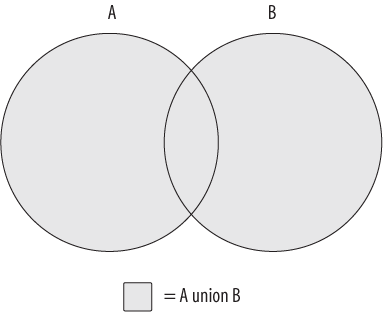
The shaded area in Figure 6-1 represents the union of sets A and B, which is the combination of the two sets (with any overlapping regions included only once). Is this starting to look familiar? If so, then you’ll finally get a chance to put that knowledge to use; if not, don’t worry, because it’s easy to visualize using a couple of diagrams.
Using circles to represent two data sets (A and B), imagine a subset of data that is common to both sets; this common data is represented by the overlapping area shown in Figure 6-1. Since set theory is rather uninteresting without an overlap between data sets, I use the same diagram to illustrate each set operation. There is another set operation that is concerned only with the overlap between two data sets; this operation is known as the intersection and is demonstrated in Figure 6-2.
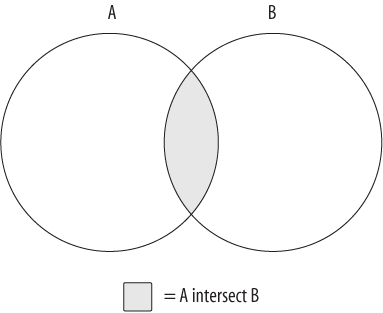
The data set generated by the intersection of sets A and B is just the area of overlap between the two sets. If the two sets have no overlap, then the intersection operation yields the empty set.
The third and final set operation, which is demonstrated in Figure 6-3, is known as the except operation.
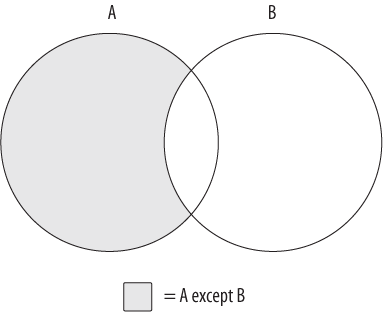
Figure 6-3 shows the results of A except B, which is the whole of set A minus any
overlap with set B. If the two sets have no overlap, then the operation A except B yields the whole of set A.
Using these three operations, or by combining different operations together, you can generate whatever results you need. For example, imagine that you want to build a set demonstrated by Figure 6-4.
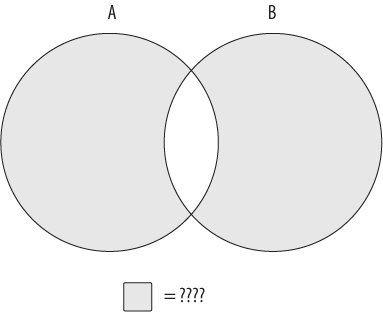
The data set you are looking for includes all of sets A and B
without the overlapping region. You can’t achieve this
outcome with just one of the three operations shown earlier; instead, you will need
to first build a data set that encompasses all of sets A and B, and then utilize a
second operation to remove the overlapping region. If the combined set is described
as A union B, and the overlapping region is
described as A intersect B, then the operation
needed to generate the data set represented by Figure 6-4
would look as follows:
(A union B) except (A intersect B)
Of course, there are often multiple ways to achieve the same results; you could reach a similar outcome using the following operation:
(A except B) union (B except A)
While these concepts are fairly easy to understand using diagrams, the next sections show you how these concepts are applied to a relational database using the SQL set operators.
Set Theory in Practice
The circles used in the previous section’s diagrams to represent data sets don’t
convey anything about what the data sets comprise. When dealing with actual data,
however, there is a need to describe the composition of the data sets involved if
they are to be combined. Imagine, for example, what would happen if you tried to
generate the union of the product table and the
customer table, whose table definitions are
as follows:
mysql>DESC product;+-----------------+-------------+------+-----+---------+-------+ | Field | Type | Null | Key | Default | Extra | +-----------------+-------------+------+-----+---------+-------+ | product_cd | varchar(10) | NO | PRI | NULL | | | name | varchar(50) | NO | | NULL | | | product_type_cd | varchar(10) | NO | MUL | NULL | | | date_offered | date | YES | | NULL | | | date_retired | date | YES | | NULL | | +-----------------+-------------+------+-----+---------+-------+ 5 rows in set (0.23 sec) mysql>DESC customer;+--------------+------------------+------+-----+---------+----------------+ | Field | Type | Null | Key | Default | Extra | +--------------+------------------+------+-----+---------+----------------+ | cust_id | int(10) unsigned | NO | PRI | NULL | auto_increment | | fed_id | varchar(12) | NO | | NULL | | | cust_type_cd | enum('I','B') | NO | | NULL | | | address | varchar(30) | YES | | NULL | | | city | varchar(20) | YES | | NULL | | | state | varchar(20) | YES | | NULL | | | postal_code | varchar(10) | YES | | NULL | | +--------------+------------------+------+-----+---------+----------------+ 7 rows in set (0.04 sec)
When combined, the first column in the table that results would be the combination
of the product.product_cd and customer.cust_id columns, the second column would be
the combination of the product.name and customer.fed_id columns, and so forth. While some of
the column pairs are easy to combine (e.g., two numeric columns), it is unclear how
other column pairs should be combined, such as a numeric column with a string column
or a string column with a date column. Additionally, the sixth and seventh columns
of the combined tables would include data from only the customer table’s sixth and seventh columns, since the product table has only five columns. Clearly, there
needs to be some commonality between two tables that you wish to combine.
Therefore, when performing set operations on two data sets, the following guidelines must apply:
Both data sets must have the same number of columns.
The data types of each column across the two data sets must be the same (or the server must be able to convert one to the other).
With these rules in place, it is easier to envision what “overlapping data” means in practice; each column pair from the two sets being combined must contain the same string, number, or date for rows in the two tables to be considered the same.
You perform a set operation by placing a set operator between
two select statements, as demonstrated by the
following:
mysql>SELECT 1 num, 'abc' str->UNION->SELECT 9 num, 'xyz' str;+-----+-----+ | num | str | +-----+-----+ | 1 | abc | | 9 | xyz | +-----+-----+ 2 rows in set (0.02 sec)
Each of the individual queries yields a data set consisting of a single row having
a numeric column and a string column. The set operator, which in this case is
union, tells the database server to combine
all rows from the two sets. Thus, the final set includes two rows of two columns.
This query is known as a compound query because it comprises
multiple, otherwise-independent queries. As you will see later, compound queries may
include more than two queries if multiple set operations are
needed to attain the final results.
Set Operators
The SQL language includes three set operators that allow you to perform each of the various set operations described earlier in the chapter. Additionally, each set operator has two flavors, one that includes duplicates and another that removes duplicates (but not necessarily all of the duplicates). The following subsections define each operator and demonstrate how they are used.
The union Operator
The union and union all operators allow you to combine multiple data sets. The
difference between the two is that union
sorts the combined set and removes duplicates, whereas union all does not. With union
all, the number of rows in the final data set will always equal
the sum of the number of rows in the sets being combined. This operation is the
simplest set operation to perform (from the server’s point of view), since there
is no need for the server to check for overlapping data. The following example
demonstrates how you can use the union all
operator to generate a full set of customer data from the two customer subtype
tables:
mysql>SELECT 'IND' type_cd, cust_id, lname name->FROM individual->UNION ALL->SELECT 'BUS' type_cd, cust_id, name->FROM business;+---------+---------+------------------------+ | type_cd | cust_id | name | +---------+---------+------------------------+ | IND | 1 | Hadley | | IND | 2 | Tingley | | IND | 3 | Tucker | | IND | 4 | Hayward | | IND | 5 | Frasier | | IND | 6 | Spencer | | IND | 7 | Young | | IND | 8 | Blake | | IND | 9 | Farley | | BUS | 10 | Chilton Engineering | | BUS | 11 | Northeast Cooling Inc. | | BUS | 12 | Superior Auto Body | | BUS | 13 | AAA Insurance Inc. | +---------+---------+------------------------+ 13 rows in set (0.04 sec)
The query returns all 13 customers, with nine rows coming from the individual table and the other four coming from
the business table. While the business table includes a single column to hold
the company name, the individual table
includes two name columns, one each for the person’s first and last names. In
this case, I chose to include only the last name from the individual table.
Just to drive home the point that the union
all operator doesn’t remove duplicates, here’s the same query as
the previous example but with an additional query against the business table:
mysql>SELECT 'IND' type_cd, cust_id, lname name->FROM individual->UNION ALL->SELECT 'BUS' type_cd, cust_id, name->FROM business->UNION ALL->SELECT 'BUS' type_cd, cust_id, name->FROM business; +---------+---------+------------------------+ | type_cd | cust_id | name | +---------+---------+------------------------+ | IND | 1 | Hadley | | IND | 2 | Tingley | | IND | 3 | Tucker | | IND | 4 | Hayward | | IND | 5 | Frasier | | IND | 6 | Spencer | | IND | 7 | Young | | IND | 8 | Blake | | IND | 9 | Farley | | BUS | 10 | Chilton Engineering | | BUS | 11 | Northeast Cooling Inc. | | BUS | 12 | Superior Auto Body | | BUS | 13 | AAA Insurance Inc. | | BUS | 10 | Chilton Engineering | | BUS | 11 | Northeast Cooling Inc. | | BUS | 12 | Superior Auto Body | | BUS | 13 | AAA Insurance Inc. | +---------+---------+------------------------+ 17 rows in set (0.01 sec)
This compound query includes three select
statements, two of which are identical. As you can see by the results, the four
rows from the business table are included
twice (customer IDs 10, 11, 12, and 13).
While you are unlikely to repeat the same query twice in a compound query, here is another compound query that returns duplicate data:
mysql>SELECT emp_id->FROM employee->WHERE assigned_branch_id = 2->AND (title = 'Teller' OR title = 'Head Teller')->UNION ALL->SELECT DISTINCT open_emp_id->FROM account->WHERE open_branch_id = 2;+--------+ | emp_id | +--------+ | 10 | | 11 | | 12 | | 10 | +--------+ 4 rows in set (0.01 sec)
The first query in the compound statement retrieves all tellers assigned to
the Woburn branch, whereas the second query returns the distinct set of tellers
who opened accounts at the Woburn branch. Of the four rows in the result set,
one of them is a duplicate (employee ID 10). If you would like your combined
table to exclude duplicate rows, you need to use the
union operator instead of union all:
mysql>SELECT emp_id->FROM employee->WHERE assigned_branch_id = 2->AND (title = 'Teller' OR title = 'Head Teller')->UNION->SELECT DISTINCT open_emp_id->FROM account->WHERE open_branch_id = 2;+--------+ | emp_id | +--------+ | 10 | | 11 | | 12 | +--------+ 3 rows in set (0.01 sec)
For this version of the query, only the three distinct rows are included in
the result set, rather than the four rows (three distinct, one duplicate)
returned when using union all.
The intersect Operator
The ANSI SQL specification includes the intersect operator for performing intersections. Unfortunately,
version 6.0 of MySQL does not implement the intersect operator. If you are using Oracle or SQL Server 2008,
you will be able to use intersect; since I am
using MySQL for all examples in this book, however, the result sets for the
example queries in this section are fabricated and cannot be executed with any
versions up to and including version 6.0. I also refrain from showing the MySQL
prompt (mysql>), since the statements
are not being executed by the MySQL server.
If the two queries in a compound query return nonoverlapping data sets, then the intersection will be an empty set. Consider the following query:
SELECT emp_id, fname, lname
FROM employee
INTERSECT
SELECT cust_id, fname, lname
FROM individual;
Empty set (0.04 sec)
The first query returns the ID and name of each employee, while the second query returns the ID and name of each customer. These sets are completely nonoverlapping, so the intersection of the two sets yields the empty set.
The next step is to identify two queries that do have
overlapping data and then apply the intersect
operator. For this purpose, I use the same query used to demonstrate the
difference between union and union all, except this time using intersect:
SELECT emp_id
FROM employee
WHERE assigned_branch_id = 2
  AND (title = 'Teller' OR title = 'Head Teller')
INTERSECT
SELECT DISTINCT open_emp_id
FROM account
WHERE open_branch_id = 2;
+--------+
| emp_id |
+--------+
|     10 |
+--------+
1 row in set (0.01 sec)
The intersection of these two queries yields employee ID 10, which is the only value found in both queries’ result sets.
Along with the intersect operator, which
removes any duplicate rows found in the overlapping region, the ANSI SQL
specification calls for an intersect all
operator, which does not remove duplicates. The only database server that
currently implements the intersect all
operator is IBM’s DB2 Universal Server.
The except Operator
The ANSI SQL specification includes the except operator for performing the except operation. Once again,
unfortunately, version 6.0 of MySQL does not implement the except operator, so the same rules apply for this
section as for the previous section.
Note
If you are using Oracle Database, you will need to use the
non-ANSI-compliant minus operator
instead.
The except operator returns the first table
minus any overlap with the second table. Here’s the example from the previous
section, but using except instead of intersect:
SELECT emp_id
FROM employee
WHERE assigned_branch_id = 2
  AND (title = 'Teller' OR title = 'Head Teller')
EXCEPT
SELECT DISTINCT open_emp_id
FROM account
WHERE open_branch_id = 2;
+--------+
| emp_id |
+--------+
|     11 |
|     12 |
+--------+
2 rows in set (0.01 sec)
In this version of the query, the result set consists of the three rows from
the first query minus employee ID 10, which is found in the result sets from
both queries. There is also an except all
operator specified in the ANSI SQL specification, but once again, only IBM’s DB2
Universal Server has implemented the except
all operator.
The except all operator is a bit tricky, so
here’s an example to demonstrate how duplicate data is handled. Let’s say you
have two data sets that look as follows:
The operation A except B yields the
following:
+--------+
| emp_id |
+--------+
|     11 |
|     12 |
+--------+
If you change the operation to A except all
B, you will see the following:
+--------+
| emp_id |
+--------+
|     10 |
|     11 |
|     12 |
+--------+
Therefore, the difference between the two operations is that except removes all occurrences of duplicate data
from set A, whereas except all only removes
one occurrence of duplicate data from set A for every occurrence in set
B.
Set Operation Rules
The following sections outline some rules that you must follow when working with compound queries.
Sorting Compound Query Results
If you want the results of your compound query to be sorted, you can add an
order by clause after the last query.
When specifying column names in the order by
clause, you will need to choose from the column names in the first query of the
compound query. Frequently, the column names are the same for both queries in a
compound query, but this does not need to be the case, as demonstrated by the
following:
mysql>SELECT emp_id, assigned_branch_id->FROM employee->WHERE title = 'Teller'->UNION->SELECT open_emp_id, open_branch_id->FROM account->WHERE product_cd = 'SAV'->ORDER BY emp_id;+--------+--------------------+ | emp_id | assigned_branch_id | +--------+--------------------+ | 1 | 1 | | 7 | 1 | | 8 | 1 | | 9 | 1 | | 10 | 2 | | 11 | 2 | | 12 | 2 | | 14 | 3 | | 15 | 3 | | 16 | 4 | | 17 | 4 | | 18 | 4 | +--------+--------------------+ 12 rows in set (0.04 sec)
The column names specified in the two queries are different in this example.
If you specify a column name from the second query in your order by clause, you will see the following
error:
mysql>SELECT emp_id, assigned_branch_id->FROM employee->WHERE title = 'Teller'->UNION->SELECT open_emp_id, open_branch_id->FROM account->WHERE product_cd = 'SAV'->ORDER BY open_emp_id;ERROR 1054 (42S22): Unknown column 'open_emp_id' in 'order clause'
I recommend giving the columns in both queries identical column aliases in order to avoid this issue.
Set Operation Precedence
If your compound query contains more than two queries using different set operators, you need to think about the order in which to place the queries in your compound statement to achieve the desired results. Consider the following three-query compound statement:
mysql>SELECT cust_id->FROM account->WHERE product_cd IN ('SAV', 'MM')->UNION ALL->SELECT a.cust_id->FROM account a INNER JOIN branch b->ON a.open_branch_id = b.branch_id->WHERE b.name = 'Woburn Branch'->UNION->SELECT cust_id->FROM account->WHERE avail_balance BETWEEN 500 AND 2500;+---------+ | cust_id | +---------+ | 1 | | 2 | | 3 | | 4 | | 8 | | 9 | | 7 | | 11 | | 5 | +---------+ 9 rows in set (0.00 sec)
This compound query includes three queries that return sets of nonunique
customer IDs; the first and second queries are separated with the union all operator, while the second and third
queries are separated with the union
operator. While it might not seem to make much difference where the union and union
all operators are placed, it does, in fact, make a difference.
Here’s the same compound query with the set operators reversed:
mysql>SELECT cust_id->FROM account->WHERE product_cd IN ('SAV', 'MM')->UNION->SELECT a.cust_id->FROM account a INNER JOIN branch b->ON a.open_branch_id = b.branch_id->WHERE b.name = 'Woburn Branch'->UNION ALL->SELECT cust_id->FROM account->WHERE avail_balance BETWEEN 500 AND 2500;+---------+ | cust_id | +---------+ | 1 | | 2 | | 3 | | 4 | | 8 | | 9 | | 7 | | 11 | | 1 | | 1 | | 2 | | 3 | | 3 | | 4 | | 4 | | 5 | | 9 | +---------+ 17 rows in set (0.00 sec)
Looking at the results, it’s obvious that it does make a difference how the compound query is arranged when using different set operators. In general, compound queries containing three or more queries are evaluated in order from top to bottom, but with the following caveats:
However, since MySQL does not yet implement intersect or allow parentheses in compound queries, you will need
to carefully arrange the queries in your compound query so that you achieve the
desired results. If you are using a different database server, you can wrap
adjoining queries in parentheses to override the default top-to-bottom
processing of compound queries, as in:
(SELECT cust_id
 FROM account
 WHERE product_cd IN ('SAV', 'MM')
 UNION ALL
 SELECT a.cust_id
 FROM account a INNER JOIN branch b
   ON a.open_branch_id = b.branch_id
 WHERE b.name = 'Woburn Branch')
INTERSECT
(SELECT cust_id
 FROM account
 WHERE avail_balance BETWEEN 500 AND 2500
 EXCEPT
 SELECT cust_id
 FROM account
 WHERE product_cd = 'CD'
  AND avail_balance < 1000);
For this compound query, the first and second queries would be combined using
the union all operator, then the third and
fourth queries would be combined using the except operator, and finally, the results from these two
operations would be combined using the intersect operator to generate the final result set.
Test Your Knowledge
The following exercises are designed to test your understanding of set operations. See Appendix C for answers to these exercises.
Exercise 6-1
If set A = {L M N O P} and set B = {P Q R S T}, what sets are generated by the following operations?
A union BA union all BA intersect BA except B
Exercise 6-2
Write a compound query that finds the first and last names of all individual customers along with the first and last names of all employees.