Table of Contents for
Cracking Codes with Python
 Cracking Codes with Python
Published by
No Starch Press, 2018
Cracking Codes with Python
Published by
No Starch Press, 2018
- Cover Page
- Cracking Codes with Python
- Title Page
- Copyright Page
- Dedication
- About the Author
- About the Technical Reviewers
- Brief Contents
- Contents in Detail
- Acknowledgments
- Introduction
- Chapter 1: Making Paper Cryptography Tools
- Chapter 2: Programming in the Interactive Shell
- Chapter 3: Strings and Writing Programs
- Chapter 4: The Reverse Cipher
- Chapter 5: The Caesar Cipher
- Chapter 6: Hacking the Caesar Cipher with Brute-Force
- Chapter 7: Encrypting with the Transposition Cipher
- Chapter 8: Decrypting with the Transposition Cipher
- Chapter 9: Programming a Program to Test Your Program
- Chapter 10: Encrypting and Decrypting Files
- Chapter 11: Detecting English Programmatically
- Chapter 12: Hacking the Transposition Cipher
- Chapter 13: A Modular Arithmetic Module for the Affine Cipher
- Chapter 14: Programming the Affine Cipher
- Chapter 15: Hacking the Affine Cipher
- Chapter 16: Programming the Simple Substitution Cipher
- Chapter 17: Hacking the Simple Substitution Cipher
- Chapter 18: Programming the Vigenère Cipher
- Chapter 19: Frequency Analysis
- Chapter 20: Hacking the Vigenère Cipher
- Chapter 21: The One-Time Pad Cipher
- Chapter 22: Finding and Generating Prime Numbers
- Chapter 23: Generating Keys for the Public Key Cipher
- Chapter 24: Programming the Public Key Cipher
- Appendix Debugging Python Code
- Index
- Resources
- Cracking Codes with Python
INTRODUCTION
“I couldn’t help but overhear, probably because I was eavesdropping.”
—Anonymous
If you could travel back to the early 1990s with this book, the contents of Chapter 23 that implement part of the RSA cipher would be illegal to export out of the United States. Because messages encrypted with RSA are impossible to hack, the export of encryption software like RSA was deemed a matter of national security and required State Department approval. In fact, strong cryptography was regulated at the same level as tanks, missiles, and flamethrowers.
In 1990, Daniel J. Bernstein, a student at the University of California, Berkeley, wanted to publish an academic paper that featured source code of his Snuffle encryption system. The US government informed him that he would need to become a licensed arms dealer before he could post his source code on the internet. The government also told him that it would deny him an export license if he applied for one because his technology was too secure.
The Electronic Frontier Foundation, a young digital civil liberties organization, represented Bernstein in Bernstein v. United States. For the first time ever, the courts ruled that written software code was speech protected by the First Amendment and that the export control laws on encryption violated Bernstein’s First Amendment rights.
Now, strong cryptography is at the foundation of a large part of the global economy, safeguarding businesses and e-commerce sites used by millions of internet shoppers every day. The intelligence community’s predictions that encryption software would become a grave national security threat were unfounded.
But as recently as the 1990s, spreading this knowledge freely (as this book does) would have landed you in prison for arms trafficking. For a more detailed history of the legal battle for freedom of cryptography, read Steven Levy’s book Crypto: How the Code Rebels Beat the Government, Saving Privacy in the Digital Age (Penguin, 2001).
Who Should Read This Book?
Many books teach beginners how to write secret messages using ciphers. A couple of books teach beginners how to hack ciphers. But no books teach beginners how to program computers to hack ciphers. This book fills that gap.
This book is for those who are curious about encryption, hacking, or cryptography. The ciphers in this book (except for the public key cipher in Chapters 23 and 24) are all centuries old, but any laptop has the computational power to hack them. No modern organizations or individuals use these ciphers anymore, but by learning them, you’ll learn the foundations cryptography was built on and how hackers can break weak encryption.
NOTE
The ciphers you’ll learn in this book are fun to play with, but they don’t provide true security. Don’t use any of the encryption programs in this book to secure your actual files. As a general rule, you shouldn’t trust the ciphers that you create. Real-world ciphers are subject to years of analysis by professional cryptographers before being put into use.
This book is also for people who have never programmed before. It teaches basic programming concepts using the Python programming language, which is one of the best languages for beginners. It has a gentle learning curve that novices of all ages can master, yet it’s also a powerful language used by professional software developers. Python runs on Windows, macOS, Linux, and even the Raspberry Pi, and it’s free to download and use. (See “Downloading and Installing Python” on page xxv for instructions.)
In this book, I’ll use the term hacker often. The word has two definitions. A hacker can be a person who studies a system (such as the rules of a cipher or a piece of software) to understand it so well that they’re not limited by that system’s original rules and can modify it in creative ways. A hacker can also be a criminal who breaks into computer systems, violates people’s privacy, and causes damage. This book uses the term in the first sense. Hackers are cool. Criminals are just people who think they’re being clever by breaking stuff.
What’s in This Book?
The first few chapters introduce basic Python and cryptography concepts. Thereafter, chapters generally alternate between explaining a program for a cipher and then explaining a program that hacks that cipher. Each chapter also includes practice questions to help you review what you’ve learned.
Chapter 1: Making Paper Cryptography Tools covers some simple paper tools, showing how encryption was done before computers.
Chapter 2: Programming in the Interactive Shell explains how to use Python’s interactive shell to play around with code one line at a time.
Chapter 3: Strings and Writing Programs covers writing full programs and introduces the string data type used in all programs in this book.
Chapter 4: The Reverse Cipher explains how to write a simple program for your first cipher.
Chapter 5: The Caesar Cipher covers a basic cipher first invented thousands of years ago.
Chapter 6: Hacking the Caesar Cipher with Brute-Force explains the brute-force hacking technique and how to use it to decrypt messages without the encryption key.
Chapter 7: Encrypting with the Transposition Cipher introduces the transposition cipher and a program that encrypts messages with it.
Chapter 8: Decrypting with the Transposition Cipher covers the second half of the transposition cipher: being able to decrypt messages with a key.
Chapter 9: Programming a Program to Test Your Program introduces the programming technique of testing programs with other programs.
Chapter 10: Encrypting and Decrypting Files explains how to write programs that read files from and write files to the hard drive.
Chapter 11: Detecting English Programmatically describes how to make the computer detect English sentences.
Chapter 12: Hacking the Transposition Cipher combines the concepts from previous chapters to hack the transposition cipher.
Chapter 13: A Modular Arithmetic Module for the Affine Cipher explains the math concepts behind the affine cipher.
Chapter 14: Programming the Affine Cipher covers writing an affine cipher encryption program.
Chapter 15: Hacking the Affine Cipher explains how to write a program to hack the affine cipher.
Chapter 16: Programming the Simple Substitution Cipher covers writing a simple substitution cipher encryption program.
Chapter 17: Hacking the Simple Substitution Cipher explains how to write a program to hack the simple substitution cipher.
Chapter 18: Programming the Vigenère Cipher explains a program for the Vigenère cipher, a more complex substitution cipher.
Chapter 19: Frequency Analysis explores the structure of English words and how to use it to hack the Vigenère cipher.
Chapter 20: Hacking the Vigenère Cipher covers a program for hacking the Vigenère cipher.
Chapter 21: The One-Time Pad Cipher explains the one-time pad cipher and why it’s mathematically impossible to hack.
Chapter 22: Finding and Generating Prime Numbers covers how to write a program that quickly determines whether a number is prime.
Chapter 23: Generating Keys for the Public Key Cipher describes public key cryptography and how to write a program that generates public and private keys.
Chapter 24: Programming the Public Key Cipher explains how to write a program for a public key cipher, which you can’t hack using a mere laptop.
The appendix, Debugging Python Code, shows you how to use IDLE’s debugger to find and fix bugs in your programs.
How to Use This Book
Cracking Codes with Python is different from other programming books because it focuses on the source code of complete programs. Instead of teaching you programming concepts and leaving it up to you to figure out how to make your own programs, this book shows you complete programs and explains how they work.
In general, you should read the chapters in this book in order. The programming concepts build on those in the previous chapters. However, Python is such a readable language that after the first few chapters, you can probably jump ahead to later chapters and piece together what the code does. If you jump ahead and feel lost, return to earlier chapters.
Typing Source Code
As you read through this book, I encourage you to manually type the source code from this book into Python. Doing so will definitely help you understand the code better.
When typing the source code, don’t include the line numbers that appear at the beginning of each line. These numbers are not part of the actual programs, and we use them only to refer to specific lines in the code. But aside from the line numbers, be sure to enter the code exactly as it appears, including the uppercase and lowercase letters.
You’ll also notice that some of the lines don’t begin at the leftmost edge of the page but are indented by four, eight, or more spaces. Be sure to enter the correct number of spaces at the beginning of each line to avoid errors.
But if you would rather not type the code, you can download the source code files from this book’s website at https://www.nostarch.com/crackingcodes/.
Checking for Typos
Although manually entering the source code for the programs is helpful for learning Python, you might occasionally make typos that cause errors. These typos can be difficult to spot, especially when your source code is very long.
To quickly and easily check for mistakes in your typed source code, you can copy and paste the text into the online diff tool on the book’s website at https://www.nostarch.com/crackingcodes/. The diff tool shows any differences between the source code in the book and yours.
Coding Conventions in This Book
This book is not designed to be a reference manual; it’s a hands-on guide for beginners. For this reason, the coding style sometimes goes against best practices, but that’s a conscious decision to make the code easier to learn. This book also skips theoretical computer science concepts.
Veteran programmers may point out ways the code in this book could be changed to improve efficiency, but this book is mostly concerned with getting programs to work with the least amount of effort.
Online Resources
This book’s website (https://www.nostarch.com/crackingcodes/) includes many useful resources, including downloadable files of the programs and sample solutions to the practice questions. This book covers classical ciphers thoroughly, but because there is always more to learn, I’ve also included suggestions for further reading on many of the topics introduced in this book.
Downloading and Installing Python
Before you can begin programming, you’ll need to install the Python interpreter, which is software that executes the instructions you’ll write in the Python language. I’ll refer to “the Python interpreter” as “Python” from now on.
Download Python for Windows, macOS, and Ubuntu for free from https://www.python.org/downloads/. If you download the latest version, all of the programs in this book should work.
NOTE
Be sure to download a version of Python 3 (such as 3.6). The programs in this book are written to run on Python 3 and may not run correctly, if at all, on Python 2.
Windows Instructions
On Windows, download the Python installer, which should have a filename ending with .msi, and double-click it. Follow the instructions the installer displays on the screen to install Python, as listed here:
Select Install Now to begin the installation.
When the installation is finished, click Close.
macOS Instructions
On macOS, download the .dmg file for your version of macOS from the website and double-click it. Follow the instructions the installer displays on the screen to install Python, as listed here:
When the DMG package opens in a new window, double-click the Python.mpkg file. You may have to enter your computer’s administrator password.
Click Continue through the Welcome section and click Agree to accept the license.
Select HD Macintosh (or the name of your hard drive) and click Install.
Ubuntu Instructions
If you’re running Ubuntu, install Python from the Ubuntu Software Center by following these steps:
Open the Ubuntu Software Center.
Type Python in the search box in the top-right corner of the window.
Select IDLE (using Python 3.6), or whatever is the latest version.
Click Install.
You may have to enter the administrator password to complete the installation.
Downloading pyperclip.py
Almost every program in this book uses a custom module I wrote called pyperclip.py. This module provides functions that let your programs copy and paste text to the clipboard. It doesn’t come with Python, so you’ll need to download it from https://www.nostarch.com/crackingcodes/.
This file must be in the same folder (also called directory) as the Python program files you write. Otherwise you’ll see the following error message when you try to run your programs:
ImportError: No module named pyperclip
Now that you’ve downloaded and installed the Python interpreter and the pyperclip.py module, let’s look at where you’ll be writing your programs.
Starting IDLE
While the Python interpreter is the software that runs your Python programs, the interactive development environment (IDLE) software is where you’ll write your programs, much like a word processor. IDLE is installed when you install Python. To start IDLE, follow these steps:
On Windows 7 or newer, click the Start icon in the lower-left corner of your screen, enter IDLE in the search box, and select IDLE (Python 3.6 64-bit).
On macOS, open Finder, click Applications, click Python 3.6, and then click the IDLE icon.
On Ubuntu, select Applications▸Accessories▸Terminal and then enter idle3. (You may also be able to click Applications at the top of the screen, select Programming, and then click IDLE 3.)
No matter which operating system you’re running, the IDLE window should look something like Figure 1. The header text may be slightly different depending on your specific version of Python.
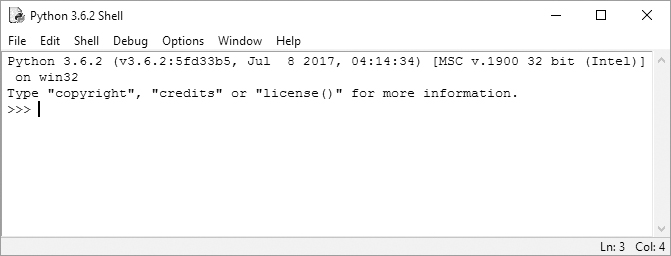
This window is called the interactive shell. A shell is a program that lets you type instructions into the computer, much like the Terminal on macOS or the Windows Command Prompt. Sometimes you’ll want to run short snippets of code instead of writing a full program. Python’s interactive shell lets you enter instructions for the Python interpreter software, which the computer reads and runs immediately.
For example, type the following into the interactive shell next to the >>> prompt:
>>> print('Hello, world!')
Press enter, and the interactive shell should display this in response:
Hello, world!
Summary
Before the introduction of computers ushered in modern cryptography, breaking many codes was impossible using just pencil and paper. Although computing made many of the old, classical ciphers vulnerable to attack, they’re still fun to learn about. Writing cryptanalysis programs that crack these ciphers is a great way to learn how to program.
In Chapter 1, we’ll start with some basic cryptography tools to encrypt and decrypt messages without the aid of computers.
Let’s get hacking.