Every variable in Python is actually an object. You don’t have to write object-oriented (OO) code to use Python, but the way Python is constructed encourages an OO approach.1
Object Types
All variables have a type that can be seen by using the built-in type() function.
>>> type(23)
<type 'int'>
>>> type('some more text')
<type 'str'>
>>> c=[1,2,'some more text']
>>> type(c)
<type 'list'>
Other types are 'class', 'module', 'function', 'file', 'bool', 'NoneType', and 'long'.
The special constants True and False are 'bool' types. The special constant None is a 'NoneType'.
To see a textual definition of any object, you can use the str() function; for example, the variable c can be represented as a string:
>>> str(c)
"[1,2,'some text']"
Factory Functions
There are a series of functions that create variable types directly. Here are the most commonly used ones.
int(4.0)
| Creates integer 4 |
str(4)
| Creates string '4' |
list(1, 2, 3, 4)
| Creates list [1,2,3,4] |
tuple(1, 2, 3, 4)
| Creates tuple (1,2,3,4) |
dict(one=1, two=2)
| Creates dictionary {'one':1,'two':2} |
Numbers
Integer numbers
have no realistic limit; you can store and manipulate numbers with 1,000 digits, for example. These are stored as “long” numbers, for example:
>>> 12345678901234567890
12345678901234567890
Real numbers
(i.e., those with decimal points) are stored with what is called double-precision. For example:
>>>1 / 7.0
0.14285714285714285
The actual degree of precision depends on the architecture of the hardware you use.
Very large or very small real numbers can be described using scientific notation.
>>> x = 1E20
>>> x / 7.0
1.4285714285714285e+19
>>> int(x/7.0)
14285714285714285714286592
>>> y = 1E-20
>>> y / 7.0
1.4285714285714285e-21
Arithmetic Operators
The four arithmetic operators
work as expected.
# Addition
2 + 3
2.0 + 3
# Subtraction
3 - 2
3.0 - 2
# Multiplication
3 * 2
3 * 2.0
3.0 * 2.0
# Division
3 / 2
-6 / 2
-6 / 4
3 / 2.0
|
# Integer 5
# Real 5.0 (if one or more operands
# are real)
# Integer 1
# Real 1.0
# Integer 6
# Real 6.0
# Real 6.0
All divisions produce real numbers
# 1.5
# -3.0
# -1.5
# 1.3
|
Other Operators
# Modulus
15 % 4
# Exponentiation
4 ** 3
-4 ** 3
4 ** -3
|
# Real 3.0 (remainder after
# dividing 15 by 4)
# Integer 64
# Integer -64 (the '–' applies to
# the result)
# Real 0.015625 (NB negative
# exponents force operand to real
# numbers
|
Conversion Functions
int(1.234)
int(-1.234)
long(1.234)
long(-1.234)
long('1234')
long('1.234')
long(float('1.234'))
float(4)
float('4.321')
|
# Integer 1
# Integer -1
# Long
1L
# Long -1L
# Long 1234L
# ** error ** needs 2
#
conversions
# Long 1L (after two
# conversions)
# Real 4.0
# Real 4.321
|
Boolean Numbers
Booleans
are actually held as integers but have a value of either True or False.
bool(23)
bool(0)
bool('any text')
bool('')
bool([])
|
# True - all nonzero integers # False -
zero
# True – any string
# False – zero length strings
# False – empty lists
|
Random Numbers
Two random number
generators are useful (you need to import the random module).
import random
random.randint(a,b)
random.random()
|
# Generates a random integer
# between a and b inclusive.
# Generates a random real
# number between 0.0 and 1.0
|
Sequences: Strings, Lists, and Tuples
So far, we have looked at variables that hold a single value. A sequence is a variable that holds multiple values as an array. Each element can be addressed by its position in the sequence as an offset from the first element. The three types of sequence are as follows:
- Strings : A sequence of characters that together form a text string.
- Lists : A sequence of values where each value can be accessed using an offset from the first entry in the list.
- Tuples : A sequence of values, very much like a list, but the entries in a tuple are immutable; they cannot be changed.
We’ll look at the Python features that are common to all sequences and then look at the three types separately.
Sequence Storage and Access
The elements of a sequence are stored as a contiguous series of memory locations. The first element in the sequence can be accessed at position 0 and the last element at position n – 1 where n is the number of elements in the sequence (see Figure 2-1).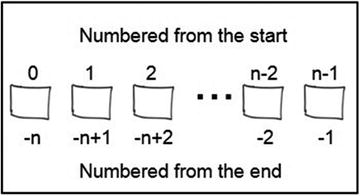
Figure 2-1.
Storage of elements of a sequence
You can iterate through the elements of a sequence x having n elements starting at element x[0] and adding +1 each time x[1], x[2] ¼ x[n-1], and so on. You can also iterate from the end and subtract 1 each time: x[n-1], x[n-2] ¼ x[0].
Membership
A common check is to determine whether a value exists in a sequence. For example:
'a' in 'track'
9 in [1,2,3,4,5,6]
|
# True
# False
|
'x' not in 'next'
'red' not in ['tan','pink']
|
# False
# True
|
Concatenation2
Two or more sequences can be added together to make longer sequences. The plus sign (+) is used to concatenate strings, lists, or tuples.
sequence1 + sequence2
|
# results in a new sequence
# that appends sequence2 to
# sequence1
|
'mr'+'joe'+'soap'
|
# 'mrjoesoap'
|
Sequence Elements and Slices
A sequence is an ordered list of elements, so a single element is identified by its offset from the first. A slice is a convenient way to select a subset of these elements in sequence, producing a new sequence. A slice
is identified using this notation:
[startindex:endindex]
The slice will consist of elements starting as the startindex up to but not including endindex.
Some examples will make it easier to understand:
mylist=['a','b','c','d','e']
mylist[0]
mylist[3]
mylist[5]
mylist[-1]
mylist[1:3]
mylist[:4]
mylist[3:]
|
# a list with five
# elements
# 'a'
# 'd'
# results in an error
# 'e'
# ['b','c']
# ['a','b','c']
# ['d','e']
|
Sequences can be nested and elements accessed using multiple indexes, for example:
mylist = [1,2,3,['a','b','c'],5]
mylist[2] # 3
mylist[3] # ['a','b','c']
mylist[3][1] # 'b'
Sequence Built-In Functions
mylist=[4,5,6,7,1,2,3]
len(seq)
len(mylist)
max(seq)
max(mylist)
min(mylist)
|
# the length of seq
# 7
# maximum value in
seq
# 7
# 1 – the minimum
|
Strings
A
string
is a sequence of characters that make up a piece of text. Strings are immutable, but you can update the value of a string by assigning a new string to the same string variable.
>>> mystr = 'Paddington Station'
>>> mystr=mystr.upper() # replaces mystr
>>> mystr
PADDINGTON STATION
Assignment
You can delimit strings with either single (') or double (") quotes, as long as they are matched. You can embed either quote inside the other.
>>> text = 'Hello World!'
>>> longtext = "A longer piece of text"
>>> print(text)
Hello World!
>>>longtext
'A longer piece of text'
>>> text = 'Paul said, "Hello World!"'
>>>print(text)
Paul said, "Hello World!"
Accessing Substring s
You access substrings with slices, of course:
text='Paul said, "Hi"'
text[:4]
text[-4:]
text[5:9]
text[0:4] + text[12:14]
|
# 'Paul'
# '"Hi"'
# 'said'
# 'PaulHi'
|
String Comparison
Strings can be compared3 as follows:
'mcr'>'liv'
'liv'>'tot'
'mcr'=='X'
'X'>'t'
|
# True
# False
# False
# False
|
Membership (Searching)
We can check whether a substring is in a string, character by character or using substrings. The outcome is a Boolean.
'a' in 'the task'
'w' in 'the task'
'as' in 'the task'
'job' not in 'the task'
'task' in 'the task'
|
# True
# False
# True
# True
# True
|
Special Characters and Escaping
A string can contain nonprinting and control characters (e.g., tab, newline, and other special characters) by “escaping
” them with a backslash (\). Common escape characters are the following:
\0 Null character
\t Horizontal tab
\n Newline character
\' Single quote
\" Double quote
\\ Backslash
>>> multiline='Line 1\nLine 2\nLine 3'
>>> print(multiline)
Line 1
Line 2
Line 3
Triple Quotes
Longer pieces of text with embedded newlines can be assigned using the triple quotes
notation; for example:
>>> multiline="""Line1
¼ Line 2
¼ Line 3"""
>>> multiline
'Line 1\nLine 2\nLine 3'
String Formatting
The percent (%) operator provides string formatting
functionality. This feature has a structure like this:
formatstring
% (arguments to format)
formatstring
is a string that contains text to be output with embedded conversion symbols denoted by a percent sign (%). These are the common conversion symbols:
%c
|
Single character/string of length 1
|
%s
|
String
|
%d
|
Signed decimal integer
|
%f
|
Floating point number
|
%%
|
Percent character
|
Here are some examples:
>>> ntoys = 4
>>> myname='Fred'
>>> length = 1234.5678
>>> '%s has %d toys' % (myname,ntoys)
'Fred has 4 toys'
>>> 'is %s playing?' % (myname)
'is Fred playing?'
>>> 'length= %.2f cm' % length
'length= 1234.56 cm'
>>> 'units are %6s meters' % length
In the preceding examples, the .2 in %.2f indicates the number of decimal places. The 6 in %6s implies a field width of 6 characters.
String Functions
There are a large number of built-in string functions. The most common ones are illustrated here. Note that these all return a new string; they do not make changes to strings because strings are immutable.
text = 'This is text'
nums = '123456'
# finding text
text.find('is')
text.find('your')
# Validation checks
text.isalpha()
text.isdigit()
nums.isdigit()
# concatenation
''.join((text,nums))
' '.join((text,nums))
# case changing
text.upper()
text.lower()
# splitting string
text.split(' ')
# substitution
text.replace('is','was')
# stripping
text.rstrip()
text.lstrip()
text.strip()
|
# returns
2
# returns -1
# all alphas?
True
# all digits? False
# True
#'This is text123456'
#'This is text 123456'
# 'THIS IS TEXT'
# 'this is text'
# list of strings: #['This','is','text']
# This was text
# remove trailing space
# remove leading space
# remove trailing and leading spaces
|
Lists
Lists
are widely used to store values that are collected and processed in sequence, such as lines of text read from or written to a text file, or where prepared values are looked up by their position or offset in the array.
Creating Lists
mylist = []
names=['Tom','Dick','Harry']
mixedlist = [1,2,3,'four']
elist = [1,2,3,[4,5,6]]
|
# an empty list
# list of strings
# list of mixed
# types
# embedded list
|
You can find the length of lists using the
len()
function. The length is the number of elements in the list. The last element index of a list mylist would be accessed as mylist[len(mylist)-1].
l = len(names)
|
# 3
|
Values in the preceding lists are accessed as shown in the following code fragments.
names[1]
mixedlist[0]
mixedlist[3]
mixedlist[2:4]
elist[2]
elist[3]
elist[3][1]
|
# 'Dick'
# 1
# 'four'
# [3,'four']
# 3
# [4,5,6]
# 5
|
If you try to access a nonexistent element in the list, you will get a 'list index out of range' error.
Updating Lists
Use the append() method to add entries to the end of a list. Use the del statement to delete an entry. For example:
mylist = []
mylist.append('Tom')
mylist.append('Dick')
mylist.append('Harry')
# Change an entry
mylist[1]='Bill'
# Delete an entry
del mylist[1]
|
# an empty list
# ['Tom']
# ['Tom','Dick']
# ['Tom','Dick','Harry']
# ['Tom','Bill','Harry']
# ['Tom','Harry']
|
Indexing
Whereas the membership (in, not in) operators return a Boolean True or False, the index() method finds an entry in your list and returns the offset of that entry. If the entry cannot be found, it returns an error.
mylist=['Tom','Dick','Harry']
mylist.index('Dick')
mylist.index('Henry')
|
# 1
# ValueError: Henry
# not in list
|
Sequence Operations and Functions
The sequence operators—comparisons, slices, membership, and concatenation—all work the same as they do with strings.
The sequence functions—
len()
, max(), min(), sum(), sorted() and reversed()—all work as expected.
Tuples
Like numbers and strings, tuples
are immutable. They are useful for preset lookups or validators you might reuse.
Creating Tuples
To distinguish a tuple from a list, Python uses parentheses () to enclose the entries in a tuple.
>>> mynumbers = (1,2,3,4,5,6,7)
>>> months=('Jan','Feb','Mar','Apr','May','Jun',
¼ 'Jul','Aug','Sep','Oct','Nov','Dec')
>>> mixed = ('a',123,'some text',[1,2,3,'testing'])
# accessing tuples
>>> mynumbers[3] # 4
>>> months[3:6] # ('Apr','May','Jun')
>>> mixed[2]+' '+mixed[3][3] # 'some text testing'
You can find the length of tuples using the
len()
function. The length is the number of elements in the list.
If you try to access a nonexistent element in the list, you will get a 'tuple index out of range' error.
Sequence Operations and Functions
The sequence operators—comparisons, slices, membership, and concatenation—all work as expected. The index() method works exactly as that for lists. The sequence functions—
len()
, max(), min(), sum(), sorted(), and reversed()—all work as expected.
Dictionaries
If we want our program to remember a collection of values, we can use lists and we can access the entries using the index to those values. To find the value we want, though, we must know the offset to that value (or search for it).
Dictionaries
provide a lookup facility based on key/value pairs. The order of the entries in a dictionary is not defined (in fact, it is somewhat random), but every entry can be retrieved by using its key. Keys must be unique; there can only be one entry in a dictionary for each key.
Creating a Dictionary
You can create a dictionary using a set of key/value pairs.
>>> # days of week – seven key-value pairs
>>> wdays={'M':'Monday','T':'Tuesday',
¼ 'W':'Wednesday','Th':'Thursday',
¼ 'F':'Friday','Sa':'Saturday',
¼ 'Su':'Sunday'}
>>> wdays['M']
'Monday'
>>> wdays['W']
'Wednesday'
>>> wdays['Su']
'Sunday'
>>> newdict = {} # empty dictionary
Updating a Dictionary
You can update dictionaries using the dict[key] convention.
>>> newdict = {} # empty dictionary
>>> newdict['1st'] = 'first entry' # add 1st entry
>>> newdict['2nd'] = 'second entry'# add 2nd entry
>>> newdict['1st'] = 'new value' # update 1st entry
>>> del newdict['2nd'] # delete 2nd entry
>>> len(newdict) # 1
Dictionary Operations
The sequence operators—comparisons, membership, and concatenation—all work as expected. Here are a few dictionary operations that you might find useful:
# days of week – seven key/value pairs
# key existence
>>> 'Sa' in wdays
True
>>> 'Sp' in wdays
False
# create list of keys
>>> wdays.keys()
['M','T','W','Th','F','Sa','Su']
# create an iterable list of values
>>> wdays.values()
dict_values(['Monday','Tuesday','Wednesday','Thursday','Friday','Saturday','Sunday'])
# look up a key with a default if key not found
>>> wdays.get('X','Not a day')
'Not a day'
Footnotes
2
It is recommended that you use the join() string method to join a list of strings or a tuple, as it is more efficient. For example:
>>> '-'.join(('a','b','c','d'))
'a-b-c-d'
3
You can see the ASCII collation sequence at
http://www.asciitable.com/
. Space precedes the numeric characters, which precede the uppercase letters; lowercase letters come last.