Table of Contents for
The Pragmatic Programmer: From Journeyman to Master
 The Pragmatic Programmer: From Journeyman to Master
Published by
Addison-Wesley Professional, 1999
The Pragmatic Programmer: From Journeyman to Master
Published by
Addison-Wesley Professional, 1999
- Cover Page
- What others in the trenches say about: The Pragmatic Programmer
- Title Page
- Copyright Page
- Dedication
- Contents
- Foreword
- Preface
- Chapter 1. A Pragmatic Philosophy
- Chapter 2. A Pragmatic Approach
- Chapter 3. The Basic Tools
- Chapter 4. Pragmatic Paranoia
- Chapter 5. Bend, or Break
- Chapter 6. While You Are Coding
- Chapter 7. Before the Project
- Chapter 8. Pragmatic Projects
- Appendix A. Resources
- Appendix B. Answers to Exercises
- Index
- Inside Front Cover
Inside Front Cover
The Pragmatic Programmer: Quick Reference Guide
This card summarizes the tips and checklists found in The Pragmatic Programmer. For more information about THE PRAGMATIC PROGRAMMERS LLC, source code for the examples, up-to-date pointers to Web resources, and an online bibliography, visit us at www.pragmaticprogrammer.com.
Why spend your life developing software unless you care about doing it well?
Turn off the autopilot and take control. Constantly critique and appraise your work.
3. Provide Options, Don't Make Lame Excuses 3
Instead of excuses, provide options. Don't say it can't be done; explain what can be done.
4. Don't Live with Broken Windows. 5
Fix bad designs, wrong decisions, and poor code when you see them.
5. Be a Catalyst for Change. 8
You can't force change on people. Instead, show them how the future might be and help them participate in creating it.
Don't get so engrossed in the details that you forget to check what's happening around you.
7. Make Quality a Requirements Issue 11
Involve your users in determining the project's real quality requirements.
8. Invest Regularly in Your Knowledge Portfolio 14
Make learning a habit.
9. Critically Analyze What You Read and Hear 16
Don't be swayed by vendors, media hype, or dogma. Analyze information in terms of you and your project.
10. It's Both What You Say and theWay You Say It 21
There's no point in having great ideas if you don't communicate them effectively.
11. DRY—Don't Repeat Yourself 27
Every piece of knowledge must have a single, unambiguous, authoritative representation within a system.
If it's easy to reuse, people will. Create an environment that supports reuse.
13. Eliminate Effects Between Unrelated Things 35
Design components that are self-contained, independent, and have a single, well-defined purpose.
14. There Are No Final Decisions 46
No decision is cast in stone. Instead, consider each as being written in the sand at the beach, and plan for change.
15. Use Tracer Bullets to Find the Target 49
Tracer bullets let you home in on your target by trying things and seeing how close they land.
Prototyping is a learning experience. Its value lies not in the code you produce, but in the lessons you learn.
17. Program Close to the Problem Domain 58
Design and code in your user's language.
18. Estimate to Avoid Surprises 64
Estimate before you start. You'll spot potential problems up front.
19. Iterate the Schedule with the Code. 69
Use experience you gain as you implement to refine the project time scales.
20. Keep Knowledge in Plain Text. 74
Plain text won't become obsolete. It helps leverage your work and simplifies debugging and testing.
21. Use the Power of Command Shells 80
Use the shell when graphical user interfaces don't cut it.
22. Use a Single Editor Well 82
The editor should be an extension of your hand; make sure your editor is configurable, extensible, and programmable.
23. Always Use Source Code Control 88
Source code control is a time machine for your work—you can go back.
24. Fix the Problem, Not the Blame 91
It doesn't really matter whether the bug is your fault or someone else's—it is still your problem, and it still needs to be fixed.
25. Don't Panic When Debugging 91
Take a deep breath and THINK! about what could be causing the bug.
It is rare to find a bug in the OS or the compiler, or even a third-party product or library. The bug is most likely in the application.
27. Don't Assume It—Prove It 97
Prove your assumptions in the actual environment with real data and boundary conditions.
28. Learn a Text Manipulation Language 100
You spend a large part of each day working with text. Why not have the computer do some of it for you?
29. Write Code That Writes Code 103
Code generators increase your productivity and help avoid duplication.
30. You Can't Write Perfect Software 107
Software can't be perfect. Protect your code and users from the inevitable errors.
31. Design with Contracts. 111
Use contracts to document and verify that code does no more and no less than it claims to do.
A dead program normally does a lot less damage than a crippled one.
33. Use Assertions to Prevent the Impossible 122
Assertions validate your assumptions. Use them to protect your code from an uncertain world.
34. Use Exceptions for Exceptional Problems 127
Exceptions can suffer from all the readability and maintainability problems of classic spaghetti code. Reserve exceptions for exceptional things.
35. Finish What You Start. 129
Where possible, the routine or object that allocates a resource should be responsible for deallocating it.
36. Minimize Coupling Between Modules 140
Avoid coupling by writing "shy" code and applying the Law of Demeter.
37. Con.gure, Don't Integrate 144
Implement technology choices for an application as configuration options, not through integration or engineering.
38. Put Abstractions in Code, Details in Metadata 145
Program for the general case, and put the specifics outside the compiled code base.
39. Analyze Work.ow to Improve Concurrency 151
Exploit concurrency in your user's workflow.
40. Design Using Services. 154
Design in terms of services—independent, concurrent objects behind well-defined, consistent interfaces.
41. Always Design for Concurrency 156
Allow for concurrency, and you'll design cleaner interfaces with fewer assumptions.
42. Separate Views from Models. 161
Gain flexibility at low cost by designing your application in terms of models and views.
43. Use Blackboards to Coordinate Work.ow. 169
Use blackboards to coordinate disparate facts and agents, while maintaining independence and isolation among participants.
44. Don't Program by Coincidence 175
Rely only on reliable things. Beware of accidental complexity, and don't confuse a happy coincidence with a purposeful plan.
45. Estimate the Order of Your Algorithms 181
Get a feel for how long things are likely to take before you write code.
Mathematical analysis of algorithms doesn't tell you everything. Try timing your code in its target environment.
47. Refactor Early, Refactor Often 186
Just as you might weed and rearrange a garden, rewrite, rework, and re-architect code when it needs it. Fix the root of the problem.
Start thinking about testing before you write a line of code.
49. Test Your Software, or Your Users Will. 197
Test ruthlessly. Don't make your users find bugs for you.
50. Don't UseWizard Code You Don't Understand 199
Wizards can generate reams of code. Make sure you understand all of it before you incorporate it into your project.
51. Don't Gather Requirements—Dig for Them. 202
Requirements rarely lie on the surface. They're buried deep beneath layers of assumptions, misconceptions, and politics.
52. Work with a User to Think Like a User 204
It's the best way to gain insight into how the system will really be used.
53. Abstractions Live Longer than Details. 209
Invest in the abstraction, not the implementation. Abstractions can survive the barrage of changes from different implementations and new technologies.
54. Use a Project Glossary 210
Create and maintain a single source of all the specific terms and vocabulary for a project.
55. Don't Think Outside the Box—Find the Box 213
When faced with an impossible problem, identify the real constraints. Ask yourself: "Does it have to be done this way? Does it have to be done at all?"
56. Start When You're Ready 215
You've been building experience all your life. Don't ignore niggling doubts.
57. Some Things Are Better Done than Described 218
Don't fall into the specification spiral—at some point you need to start coding.
58. Don't Be a Slave to Formal Methods 220
Don't blindly adopt any technique without putting it into the context of your development practices and capabilities.
59. Costly Tools Don't Produce Better Designs 222
Beware of vendor hype, industry dogma, and the aura of the price tag. Judge tools on their merits.
60. Organize Teams Around Functionality 227
Don't separate designers from coders, testers from data modelers. Build teams the way you build code.
61. Don't Use Manual Procedures 231
A shell script or batch file will execute the same instructions, in the same order, time after time.
62. Test Early. Test Often. Test Automatically. 237
Tests that run with every build are much more effective than test plans that sit on a shelf.
63. Coding Ain't Done 'Til All the Tests Run 238
'Nuff said.
64. Use Saboteurs to Test Your Testing. 244
Introduce bugs on purpose in a separate copy of the source to verify that testing will catch them.
65. Test State Coverage, Not Code Coverage 245
Identify and test significant program states. Just testing lines of code isn't enough.
Once a human tester finds a bug, it should be the last time a human tester finds that bug. Automatic tests should check for it from then on.
67. English is Just a Programming Language 248
Write documents as you would write code: honor the DRY principle, use metadata, MVC, automatic generation, and so on.
68. Build Documentation In, Don't Bolt It On. 248
Documentation created separately from code is less likely to be correct and up to date.
69. Gently Exceed Your Users' Expectations 255
Come to understand your users' expectations, then deliver just that little bit more.
Craftsmen of an earlier age were proud to sign their work. You should be, too.
Checklists
 Languages to Learn page 17
Tired of C, C++, and Java? Try CLOS, Dylan, Eiffel, Objective C, Prolog, Smalltalk, or TOM. Each of these languages has different capabilities and a different "flavor." Try a small project at home usingone or more of them.
The WISDOM Acrostic page 20
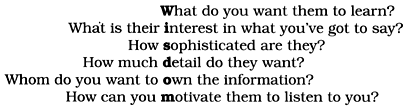
How to Maintain Orthogonality page 34
- Design independent, well-defined components
- Keep your code decoupled
- Avoid global data
- Refactor similar functions
Things to prototype page 53
- Architecture
- New functionality in an existing system
- Structure or contents of external data
- Third-party tools or components
- Performance issues
- User interface design
Architectural Questions page 55
- Are responsibilities well defined?
- Are the collaborations well defined?
- Is coupling minimized?
- Can you identify potential duplication?
- Are interface definitions and constraints acceptable?
- Can modules access needed data—when needed?
Debugging Checklist page 98
- Is the problem being reported a direct result of the underlying bug, or merely a symptom?
- Is the bug really in the compiler? Is it in the OS? Or is it in your code?
- If you explained this problem in detail to a coworker, what would you say?
- If the suspect code passes its unit tests, are the tests complete enough? What happens if you run the unit test with this data?
- Do the conditions that caused this bug exist anywhere else in the system?
Law of Demeter for Functions page 141
An object's method should call only methods belonging to:
- Itself
- Any parameters passed in
- Objects it creates
- Component objects
How to ProgramDeliberately page 172
- Stay aware of what you're doing.
- Don't code blindfolded.
- Proceed from a plan.
- Rely only on reliable things.
- Document your assumptions.
- Test assumptions as well as code.
- Prioritize your effort.
- Don't be a slave to history.
When to Refactor page 185
- You discover a violation of the DRY principle.
- You find things that could be more orthogonal.
- Your knowledge improves.
- The requirements evolve.
- You need to improve performance.
Cutting the Gordian Knot page 212
When solving impossible problems, ask yourself:
- Is there an easier way?
- Am I solving the right problem?
- Why is this a problem?
- What makes it hard?
- Do I have to do it this way?
- Does it have to be done at all?
Aspects of Testing page 237
- Unit testing
- Integration testing
- Validation and verification
- Resource exhaustion, errors, and recovery
- Performance testing
- Usability testing
- Testing the tests themselves