Companion Exercises for Introducing ClojureScript
Copyright © 2016 J. David Eisenberg. All rights reserved.
Printed in the United States of America.
Published by O’Reilly Media, Inc., 1005 Gravenstein Highway North, Sebastopol, CA 95472.
O’Reilly books may be purchased for educational, business, or sales promotional use. Online editions are also available for most titles (http://safaribooksonline.com). For more information, contact our corporate/institutional sales department: 800-998-9938 or corporate@oreilly.com.
See http://oreilly.com/catalog/errata.csp?isbn=9781491934890 for release details.
While the publisher and the author have used good faith efforts to ensure that the information and instructions contained in this work are accurate, the publisher and the author disclaim all responsibility for errors or omissions, including without limitation responsibility for damages resulting from the use of or reliance on this work. Use of the information and instructions contained in this work is at your own risk. If any code samples or other technology this work contains or describes is subject to open source licenses or the intellectual property rights of others, it is your responsibility to ensure that your use thereof complies with such licenses and/or rights.
978-1-491-93489-0
An étude, according to Wikipedia, is “an instrumental musical composition, usually short and of considerable difficulty, usually designed to provide practice material for perfecting a particular musical skill.”
In this book, you will find descriptions of programs that you can compose (write) in ClojureScript. The programs will usually be short, and each one has been designed to provide practice material for a particular ClojureScript programming area. Unlike musical études, these programs have not been designed to be of considerable difficulty, though they may ask you to stretch a bit beyond the immediate material and examples that you find in most ClojureScript books or online references.
These études are not intended to introduce you to individual ClojureScript concepts. That ground is covered quite nicely by ClojureScript Koans, 4Clojure, and ClojureScript Unraveled. Instead, these études take the form of small projects that do something that is (somewhat) useful. They are much along the lines of the programming katas given in chapter 10 of Living Clojure by Carin Meier (O’Reilly). If Koans, 4Clojure, and ClojureScript Unraveled ask you to write programs at the level of chemical elements, in this book, you are constructing simple molecules.
This book is open source, so if you’d like to contribute, make a correction, or otherwise participate in the project, check out https://github.com/oreillymedia/etudes_for_clojurescript for details. If we accept your work, we’ll add you to the contributors chapter.
Thanks to O’Reilly Media, Inc.’s Simon St. Laurent and Meghan Blanchette, who encouraged me to write this book. Thanks also to all the people
on the #clojurescript IRC channel who patiently answered my questions, and to Mike Fikes for his technical review. Any errors remaining in this document are mine, not theirs.
This chapter starts with a couple of “warm-up exercises” so that you can get comfortable with your ClojureScript development environment. First, a quick review of how to define functions. Here is the generic model for a function:
(defn function-name [parameters] function-body)
Here is a function that takes an acceleration and an amount of time as its parameters and returns the distance traveled:
(defn distance [accel time] (/ (* accel time time) 2.0)
You can also put a documentation string between the function name and parameter list:
(defn distance
  "Calculate distance traveled by an object moving
  with a given acceleration for a given amount of time."
  [accel time]
  (/ (* accel time time) 2.0)
Create a project named formulas (see “Creating a ClojureScript Project”) and start a browser REPL (read/evaluate/print/loop). If you haven’t yet installed ClojureScript, follow the instructions in Appendix B, and create a project to work with.
In the REPL, type the preceding distance function and test it.
Defining functions in the REPL is fine for a quick test, but it is not something you want to do on an application-level scale. Instead, you want to define the functions in a source file. In the formulas project, open the src/formulas/core.cljs file and create functions for these formulas:


Here is some sample output. (in-ns 'formulas.core) switches you to that namespace so that you can type the function name without having to specify the module that it is in. If you update the source, (require 'formulas.core :reload) will recompile the code:
cljs.user=> (in-ns 'formulas.core)
nil
formulas.core=> (require 'formulas.core :reload)
nil
formulas.core=> (distance 9.8 5)
122.5
formulas.core=> (kinetic-energy 35 4)
280
formulas.core=> (centripetal 30 2)
450
See a suggested solution: “Solution 1-2”.
The def special form lets you bind a symbol to a value. The symbol is globally available to all functions in the namespace where it is defined. Add a function named gravitational-force that calculates the gravitational force between two masses whose centers of mass are at a distance r from each other to your code:
, where the gravitational constant
Use a def for the gravitational constant.
Here is the calculation for two masses of 100 kg that are 5 m apart:
formulas.core=> (gravitational-force 100 100 5)
2.67136e-8
ClojureScript’s def creates an ordinary JavaScript variable. Note that it is possible
to rebind a symbol to a value with code like this:
(defx5)(defx6)(defx(+1x))
However, this is somewhat frowned upon. Global, shared, mutable (changeable) variables can be problematic, as described in this answer to a question on StackExchange. You will find that ClojureScript’s functional programming model makes the need for such global variables much less frequent. As a beginning programmer, when you create a variable with def, treat it as if it were an (unalterable) algebraic variable and do not change its value.
See a suggested solution: “Solution 1-3”
To create local bindings of symbols to values within a function, you use let. The let is followed by a vector of symbol and value pairs.1
In this étude, you will write a function named monthly-payment that calculates monthly payments on a loan. Your function will take the amount of the loan, the annual percentage rate, and the number of years of the loan as its three parameters. Calculate the monthly payment according to this formula:
Use let to make local bindings for:

To raise a number to a power, invoke the JavaScript pow function with code in this format:
(.powjs/Mathnumberpower);; Thus, to calculate 3 to the fifth power:(.powjs/Math35)
You can also use this shorthand:
(js/Math.pow35)
You will learn more about interacting with JavaScript in Chapter 2.
Here is some sample output for a loan of $1,000.00 at 5.5% for 15 years. You can also check the results of your function against the results of the PMT function in your favorite spreadsheet:
formulas.core=>(monthly-payment10005.515)8.17083454621138
See a suggested solution: “Solution 1-4”.
Here’s a somewhat more complicated formula―determining the amount of sunlight in a day, given the day of year and the latitude of your location.
Write a function named daylight with two parameters: a latitude in degrees and a Julian day. The function returns the number of minutes of
sunshine for the day, using the formula explained at the Ask Dr. Math website. The latitude is in degrees, but JavaScript’s trigonometric functions use radians, so you will need a function to convert degrees to radians, and I’ll give you that for free:
(defnradians"Convert degrees to radians"[degrees](*(/(.-PIjs/Math)180)degrees))
The expression (.-PI js/Math) gets the PI property of the JavaScript Math object.


The variable D holds the number of hours of daylight, so multiply that by 60 for your final result. If you feel that these formulas are a bit too complicated to type as single expressions (I certainly did!), break them down by using let for the parts.
On Mac OSX or Linux, you can get a Julian date with the date command:
$ date '+%j' # today
127
$ date -d '2015-09-15' '+%j' # arbitrary date
258
Your results should be very close to those generated by the National Oceanic and Atmospheric Administration spreadsheets, which use a far more complicated algorithm than the one given here.
See a suggested solution: “Solution 1-5”.
1 Technically, let is followed by a vector of binding forms and values. Binding forms include destructuring as well as simple symbols.
Since ClojureScript compiles to JavaScript, you need to have a way to interact with native JavaScript and with web pages. In this chapter, you will discover five different ways to do this:
All of these methods are fairly “old school.” As of this writing, all the Cool Kids™ are using libraries such as Facebook’s React to handle the user interface. I still think it is useful to have knowledge of the older methods, as they might sometimes be the right tool to solve a problem. Chapter 5 describes how to work with React.
You’ll be doing the same task with each of these: calculating the number of hours of daylight based on a latitude and Julian date, as in “Étude 1-5: More Practice with def and let”. Here is the relevant HTML:
<!DOCTYPE html><html><head><title>Daylight Minutes</title><metahttp-equiv="Content-Type"content="text/html; charset=utf-8"/></head><body><h1>Daylight Minutes</h1><p>Latitude:<inputtype="text"size="8"id="latitude"/>°<br/>Day of year:<inputtype="text"size="4"id="julian"/><br/><inputtype="button"value="Calculate"id="calculate"/></p><p>Minutes of daylight:<spanid="result"></span></p><scriptsrc="out/project_name.js"type="text/javascript"></script></body></html>
I suggest you create a new project for each of these études and copy the preceding HTML into the project’s index.html file. Remember to make the src attribute of the script element match your project name.
If your project name has a hyphen in it, such as my-project, Clojure and ClojureScript will convert the hyphens to underscores when creating directories, so you will end up with a src/my_project directory.
This is the most direct method to interact with a page, and is the least ClojureScript-like in its approach.
In order to invoke JavaScript methods directly, you use expressions of the general form:
(.methodnameJavaScriptobjectarguments)
Here are some examples you can try in the REPL:
;; call the sqrt function from JavaScript's Math object with an argument 3(.sqrtjs/Math3);; equivalent of window.parseFloat("3.5")(.parseFloatjs/window"3.5");; equivalent of "shouting".toUpperCase()(.toUpperCase"shouting");; equivalent of "ClojureScript".substr(2,3)(.substr"ClojureScript"23);; equivalent of document.getElementById("latitude")(.getElementByIdjs/document"latitude")
You can also use a different form for methods that belong to the special js namespace. (It is not a real ClojureScript namespace, as it references the underlying JavaScript structure rather than ClojureScript code.)
;; call the sqrt function from JavaScript's Math object with an argument 3(js/Math.sqrt3);; equivalent of window.parseFloat("3.5")(js/Window.parseFloat"3.5");; equivalent of document.getElementById("latitude")(js/document.getElementById"latitude")
To access an object’s properties, use .-. Before you try these in the browser REPL, type something into the latitude field in the form:
;; equivalent of Math.PI(.-PIjs/Math);; equivalent of "ClojureScript".length(.-length"ClojureScript");; equivalent of document.getElementById("latitude").value(.-value(.getElementByIdjs/document"latitude"));; setting properties: equivalent of;; document.getElementById("latitude").value = 23.5;(set!(.-value(.getElementByIdjs/document"latitude"))23.5)
This étude doesn’t need you to create any JavaScript objects, but if you are interacting with an existing library, you may need to do so. To create an object, give the class name followed by a period:
;; equivalent of d = new Date(defd(js/Date.));; now you can use it(.getHoursd);; if you need a true JavaScript Array object(defarr(js/Array.102030))(getarr2)
In JavaScript, if you want an HTML element to respond to an event, you add an event listener to that element, tell it what type of event you want to listen for, and give it the name of a function that handles the event. That event-handling function must have one parameter to hold the event object. In ClojureScript, you need to define functions before you use them, so you have to write the event handler first and then invoke addEventListener. Here is an example of what I did in the REPL (my project name was daylight-js):
cljs.user=> (in-ns 'daylight-js.core)
nil
daylight-js.core=> (defn testing [evt] (.alert js/window "You clicked me!!!"))
#'daylight-js/testing
daylight-js.core=> (let [btn (.getElementById js/document "calculate")]
(.addEventListener btn "click" testing))
nil
The first line switches to the correct namespace for the project. The second line defines the event handler, which calls JavaScript’s alert() function to display a message. The third line tells the “Calculate” button to listen for click events and call the testing function when they occur.
Given this information, complete the code for the project such that, when you click the “Calculate” button, the program will read the values from the latitude and Julian day field, calculate the number of daylight hours, and place the result in the <span id="result">. (Hint: use the innerHTML property.) You may also want to write a function that takes a form field name as its argument and returns the floating-point value from that field.
See a suggested solution: “Solution 2-1”.
Using JavaScript directly is all well and good; one advantage is that if you’re a JavaScript programmer, you already know this stuff. The bad news is that you have all the problems of getting JavaScript to work on multiple browsers and platforms. Enter Google Closure, a library of JavaScript utilities that has all of those nasty compatibility parts all figured out for you. In this étude, you’ll use Closure for the interaction.
To use Google Closure, you need to change the first lines of your core.cljs file to require the code that maniuplates the DOM and handles events. In this example, the project has been named daylight-gc:
(nsdaylight-gc.core(:require[clojure.browser.repl:asrepl][goog.dom:asdom][goog.events:asevents]))
In the REPL, type (require 'goog.dom :as dom) to access the code.
When accessing DOM elements, the main difference between Closure and pure JavaScript is that you use dom/getElement instead of .getElementById js/document. Thus, after starting the browser REPL and typing 55 into the latitude input area:
cljs.user=> (require 'daylight-gc.core)
nil
cljs.user=> (in-ns 'daylight-gc.core)
nil
daylight-gc.core=> (require '[goog.dom :as dom])
nil
daylight-gc.core=> (dom/getElement "latitude")
#<[object HTMLInputElement]>
daylight-gc.core=> (.-value (dom/getElement "latitude"))
"55"
daylight-gc.core=> (set! (.-value (dom/getElement "latitude")) -20)
-20
daylight-gc.core=> ;; Closure has its own way to set an element's text
daylight-gc.core=> (dom/setTextContent (dom/getElement "result")
"Here is some text")
nil
Again, the code is quite similar to what you would do with plain JavaScript; you use events/listener instead of .addListener. The following adds a listener to the “Calculate” button:
daylight-gc.core=> (defn testing [evt] (.alert js/window "Clickety-click"))
#'daylight-gc.core/testing
daylight-gc.core=> (events/listen (dom/getElement "calculate") "click" testing)
#<[object Object]>
After you test it, you may want to remove the listener so that it doesn’t interfere with the code you put in your source core.cljs file:
daylight-gc.core=> (events/unlisten (dom/getElement "calculate") "click" testing)
true
Given this information, complete the code for the project. Note: if you created a new project and just copy/pasted the index.html file, make sure you change the <script> element to refer to the right file.
See a suggested solution: “Solution 2-2”.
While Google Closure gives you a lot of great code, it’s still JavaScript, and it “feels” like JavaScript. What you would like is a library that gives you the capabilities, but in a more functional way. One of those libraries is dommy. In this étude, you will use dommy to interact with the web page.
To use dommy, you need to change the first lines of your core.cljs file to require the code that maniuplates the DOM and handles events. In this example, the project has been named daylight-dommy:
(nsdaylight-dommy.core(:require[clojure.browser.repl:asrepl][dommy.core:asdommy:refer-macros[selsel1]]))
The :refer-macros is new and beyond the scope of this book. The oversimplified explanation is that ClojureScript macros are like functions with extra superpowers. I will explain the sel and sel1 later.
You also need to change the project.clj file to specify dommy as one of your project’s dependencies. The additional code is highlighted:
  :dependencies [[org.clojure/clojure "1.7.0-beta2"]
                 [org.clojure/clojurescript "0.0-3211"]
                 [prismatic/dommy "1.1.0"]]
Dommy has two functions for accessing elements: sel1 and sel. sel1 will return a single HTML node; sel will return a JavaScript array of all matching elements. The index.html file has three <input/> elements. Compare the results:
cljs.user=> ;; set up namespaces
cljs.user=> (require 'daylight-dommy.core)
nil
cljs.user=> (in-ns 'daylight-dommy.core)
nil
daylight-dommy.core=> (require '[dommy.core :as dommy :refer-macros [sel sel1]])
nil
daylight-dommy.core=> ;; access the first <input> element
daylight-dommy.core=> (sel1 "input")
#<[object HTMLInputElement]>
daylight-dommy.core=> ;; access all the <input> elements
daylight-dommy.core=> (sel "input")
#js [#<[object HTMLInputElement]>
#<[object HTMLInputElement]> #<[object HTMLInputElement]>]
daylight-dommy.core=> ;; since IDs are unique, you use sel1 for them.
daylight-dommy.core=> (sel1 "#latitude")
#<[object HTMLInputElement]>
To access values of form fields, use dommy’s value and set-value! functions. (I typed 55 into the latitude field before doing these commands.) Similarly, text and set-text! let you read and write text content of elements. html and set-html! let you read and write HTML content of an element. Notice that you can use either a string or a keyword as an argument to sel:
daylight-dommy.core=> ;; retrieve and set form field
daylight-dommy.core=> (dommy/value (sel1 "#latitude"))
"55"
daylight-dommy.core=> (dommy/set-value! (sel1 "#latitude") 10.24)
#<[object HTMLInputElement]>
daylight-dommy.core=> ;; set and retrieve text content
daylight-dommy.core=> (dommy/set-text! (sel1 :#result) "some text")
#<[object HTMLSpanElement]>
daylight-dommy.core=> (dommy/text (sel1 :#result))
"some text"
daylight-dommy.core-> (dommy/set-html! (sel1 :#result) "<i>Yes!</i>")
Here is the code to add and remove an event listener. You may use either keywords or strings for event names. If you use a keyword for the event name, such as :click when you listen for events, you must use a keyword when you remove the listener:
daylight-dommy.core=> (defn testing [event] (.alert js/window "Clicked."))
#'daylight-dommy.core/testing
daylight-dommy.core=> (dommy/listen! (sel1 :#calculate) :click testing)
#<[object HTMLInputElement]>
daylight-dommy.core=> ;; the web page should now respond to clicks. Try it.
daylight-dommy.core=> ;; now remove the listener.
daylight-dommy.core=> (dommy/unlisten! (sel1 "#calculate") :click testing)
#<[object HTMLInputElement]>
daylight-dommy.core=>
Given this information, complete the code for the project. Note: if you created a new project and just copy/pasted the index.html file, make sure you change the <script> element to refer to the right file.
See a suggested solution: “Solution 2-3”.
The Domina library is very similar in approach to dommy. In this étude, you will use Domina to interact with the web page.
To use Domina, you need to change the first lines of your core.cljs file to require the code that maniuplates the DOM and handles events. In this example, the project has been named daylight-domina:
(nsdaylight-domina.core(:require[clojure.browser.repl:asrepl][domina][domina.events:asevents]))
You also need to change the project.clj file to specify Domina as one of your project’s dependencies. The additional code is highlighted:
  :dependencies [[org.clojure/clojure "1.7.0"]
                 [org.clojure/clojurescript "1.7.48"]
                 [domina "1.0.3"]]
In Domina, you can access an item by its ID, by a CSS class, or by an XPath expression. This étude only uses the first of these methods with the by-id function:
cljs.user=> ;; set up namespaces
cljs.user=> (require 'daylight-domina.core)
nil
cljs.user=> (in-ns 'daylight-domina.core)
nil
daylight-domina.core=> (require 'domina)
nil
daylight-domina.core=> (require '[domina.events :as events])
nil
daylight-domina.core=> (domina/by-id "latitude")
#<[object HTMLInputElement]>
To access values of form fields, use Domina’s value and set-value! functions. (I typed 55 into the latitude field before doing these commands.) Similarly, text and set-text! let you read and write text content of elements. html and set-html! let you read and write HTML content of an element. Notice that you can use either a string or a keyword as an argument to sel:
daylight-domina.core=> ;; retrieve and set form field
daylight-domina.core=> (domina/value (domina/by-id "latitude"))
"55"
daylight-domina.core=> (domina/set-value! (domina/by-id "latitude") 10.24)
#<[object HTMLInputElement]>
daylight-domina.core=> ;; set and retrieve text content
daylight-domina.core=> (domina/set-text! (domina/by-id :result) "Testing 1 2 3")
#<[object HTMLSpanElement]>
daylight-domina.core=> (def resultspan (domina/by-id :result)) ;; to save typing
#<[object HTMLSpanElement]>
daylight-domina.core=> (domina/text resultspan)
"Testing 1 2 3"
daylight-domina.core-> (domina/set-html! resultspan "<i>Yes!</i>")#
<[object HTMLSpanElement]>
daylight-domina.core=> ;; look at web page to see result
Here is the code to add and remove an event listener. You may use either keywords or strings for event names. You may use either a string or keyword when you remove the listener. The unlisten! function removes all listeners associated with the event type:
daylight-domina.core=> (defn testing [event]
(.alert js/window "You clicked me."))
#'daylight-domina.core/testing
daylight-domina.core=> (events/listen! (domina/by-id "calculate") :click testing)
#<[object HTMLInputElement]>
daylight-domina.core=> ;; the web page should now respond to clicks. Try it.
daylight-domina.core=> ;; now remove the listener.
daylight-domina.core=> (events/unlisten! (domina/by-id "calculate") "click")
#<[object HTMLInputElement]>
daylight-domina.core=>
Given this information, complete the code for the project. Note: if you created a new project and just copy/pasted the index.html file, make sure you change the <script> element to refer to the right file.
See a suggested solution: “Solution 2-4”.
The Enfocus library is very different from dommy and Domina.
To use Enfocus, you need to change the first lines of your core.cljs file to require the code that maniuplates the DOM and handles events. In this example, the project has been named daylight-enfocus:
(nsdaylight-dommy.core(:require[clojure.browser.repl:asrepl][enfocus.core:asef][enfocus.events:asev]))
You also need to change the project.clj file to specify Enfocus as one of your project’s dependencies. The additional code is highlighted:
  :dependencies [[org.clojure/clojure "1.7.0-beta2"]
                 [org.clojure/clojurescript "0.0-3211"]
                 [enfocus "2.1.0"]]
The idea behind Enfocus is that you select a node and then do transformations on it. This is a very powerful concept, but this étude will use only its simplest forms. First, set up namespaces:
cljs.user=> (require 'daylight-enfocus.core)
nil
cljs.user=> (in-ns 'daylight-enfocus.core)
nil
daylight-enfocus.core=> (require '[enfocus.core :as ef])
nil
daylight-enfocus.core=> (require '[enfocus.events :as ev])
nil
Enfocus lets you select an element by its ID either as a CSS selector, an Enlive selector, or an XPath Selector. In this case, let’s just stick with the old familar CSS form. To access values of form fields, use Enfocus’s from function to select the field, then use the get-prop transformation to extract the value. (I typed 55 into the latitude field before doing these commands.) Similarly, at selects an element you want to alter, and the content and html-content transformation lets you set an element’s content:
daylight-enfocus.core=> (ef/from "#latitude" (ef/get-prop :value))
"55"
daylight-enfocus.core=> (ef/at "#latitude" (ef/set-prop :value 10.24))
nil
daylight-enfocus.core=> (ef/at "#result" (ef/content "New text"))
nil
daylight-enfocus.core=> (ef/at "#result" (ef/html-content
"<i>Improved text</i>"))
nil
daylight-enfocus.core=> ;; look at web page to see result
Note: when you use the content transformation, the argument must be a string or a node. You can’t use a number―you must convert it to a string:
daylight-enfocus.core=> (ef/at "#result" (ef/content (.toString 3.14159)))
nil
Here is the code to add and remove an event listener:
daylight-enfocus.core=> (defn testing [evt] (.alert js/window "Click-o-rama"))
#'daylight-enfocus.core/testing
daylight-enfocus.core=> (ef/at "#calculate" (ev/listen :click testing))
nil
daylight-enfocus.core=> ;; the web page should now respond to clicks. Try it.
daylight-enfocus.core=> ;; now remove the listener.
daylight-enfocus.core=> (ef/at "#calculate" (ev/remove-listeners :click))
nil
Given this information, complete the code for the project. Note: if you created a new project and just copy/pasted the index.html file, make sure you change the <script> element to refer to the right file.
See a suggested solution: “Solution 2-5”.
In this chapter, you will work with lists and vectors, along with the map, filter, and reduce functions. All of these take functions as one of their arguments, and are thus higher-order functions.
This is a quick warm-up étude. Given a list of integers that have zeros interspersed throughout, move all the zeros to the end. Name the function move-zeros; it accepts a list as an argument and returns a new list with the zeros at the end. I saw the problem at this page, solved in Java, and wondered if I could do it in ClojureScript. Answer: yes, I could. And so can you. Hint: filter is useful. After I solved it, I realized just how much my thinking about functional programming had changed the way I look at imperative code. You may have the same experience:
move-zeros.core=> (move-zeros [1 0 0 2 0 3 0 4 5 0 6])
(1 2 3 4 5 6 0 0 0 0 0)
See a suggested solution: “Solution 3-1”.
Write a function named ordinal-day that takes a day, month, and year as its three arguments and returns the ordinal (Julian) day of the year. Bonus points if you return zero for invalid dates such as 29-02-2015 or 40-40-2015. Don’t worry about handling dates before the year 1584 correctly.
You will need to know if a year is a leap year or not. I’ll give you that one for free:
(defn leap-year?
  "Return true if given year is a leap year; false otherwise"
  [year]
  (or (and (= 0 (rem year 4)) (not= 0 (rem year 100)))
    (= 0 (rem year 400))))
Some sample output from the REPL:
formulas.core=> (ordinal-day 1 3 2015)
60
formulas.core=> (ordinal-day 1 3 2016)
61
formulas.core=> (ordinal-day 1 13 2015)
0
formulas.core=> (ordinal-day 29 2 2015)
0
formulas.core=> (ordinal-day 29 2 2016)
60
formulas.core=> (ordinal-day 31 9 2015)
0
Then, modify the daylight calculator from Chapter 2 to allow entry of a date in the form yyyy-mm-dd. You will need to split the input data into individual numbers. You can use either the split method for JavaScript strings or the split method from the clojure.string library. If you want to use the latter method, you will need to add
that library to your require:
(nsstats.core(:require[clojure.browser.repl:asrepl][clojure.string:asstr]))
To specify a regular expression for split, prefix a string with #. Here is some sample output from the REPL. Using JavaScript’s split returns a JavaScript array. Notice that you do not need to escape backslashes in patterns (see the last example):
formulas.core=> (require '[clojure.string :as str])
nil
formulas.core=> (.split "a:b:c:d" #":")
#js ["a" "b" "c" "d"]
formulas.core=> (str/split "a:b:c:d" #":")
["a" "b" "c" "d"]
formulas.core=> (str/split "abc123def456ghi789jkl" #"\d+")
["abc" "def" "ghi" "jkl"]
formulas.core=>
Bonus points: display the daylight as hours and minutes. Here is the relevant HTML to put in your index.html file:
<h1>Amount of Daylight</h1><p>Latitude:<inputtype="text"size="8"id="latitude"/>°<br/>Enter date in format<em>yyyy-mm-dd</em>:<inputtype="text"size="15"id="gregorian"/><br/><inputtype="button"value="Calculate"id="calculate"/></p><p>Amount of daylight:<spanid="result"></span></p>
See a suggested solution: “Solution 3-2”.
Create a project named stats and write these functions, each of which takes a list of numbers as its argument:
meanreduce or apply +) and dividing by the number of items in the list.mediansort).I used drop in my solution rather than nth.
stdev , which works out to this algorithm:
You could write two functions that use reduce: one to get the sum of the list and another to get the sum of squares, but, as a challenge, try to write a single function to get both numbers. Hint: there is no law that says the “accumulator” of the function that you give to reduce has to be a single number. It could just as well be a vector of two items. If you take this approach, you might want to make the reducing function a separate function rather than an anonymous function.
See a suggested solution: “Solution 3-3”.
Now that you have the functions working, connect them to a web page where people can enter a list of numbers and the program will display the resulting statistics when the input field changes. Here’s the HTML:
<!DOCTYPE html><html><head><title>Basic Statistics</title><metahttp-equiv="Content-Type"content="text/html; charset=utf-8"/></head><body><h1>Basic Statistics</h1><p>Enter numbers, separated by blanks or commas:<inputtype="text"size="50"id="numbers"/></p><p>Mean:<spanid="mean"></span><br/>Median:<spanid="median"></span><br/>Standard deviation:<spanid="stdev"></span></p><scriptsrc="out/stats.js"type="text/javascript"></script></body></html>
Once you have the individual items, you have to use js/window.parseFloat to convert them to numbers. You must do this because ClojureScript’s (and JavaScript’s) + operator works differently on strings than on numbers: (+ "12" "30") works out to "1230", not 42. Hint: use map.
Use whichever method of interacting with JavaScript (see Chapter 2) that you prefer. In this étude, you will listen for a change event, and you may want to use the JavaScript event.target property. Given a function like (defn handler [evt] ...), here is how you access the value of a form field via the target property:
| Library | ClojureScript |
|---|---|
| JavaScript Google Closure | (.-value (.-target evt)) |
| dommy | (dommy/value (.-target evt)) |
| Domina | (domina/value (domina.events/target evt)) |
| Enfocus | (ef/at (.-target evt) (ef/get-prop :value)) |
See a suggested solution: “Solution 3-4”.
OK, I’ll admit this is a fairly strange étude, but I couldn’t resist. Dentists check the health of your gums by checking the depth of the “pockets” at six different locations around each of your 32 teeth. The depth is measured in millimeters. If any of the depths is greater than or equal to four millimeters, that tooth needs attention. (Thanks to Dr. Patricia Lee, DDS, for explaining this to me.)
Your task is to write a function named alert that takes a vector of 32 vectors of six numbers as its input. If a tooth isn’t present, it is represented by the empty vector [] instead of the six numbers. The function produces a list of the tooth numbers that require attention. The numbers must be in ascending order.
Here’s a definition of a set of pocket depths for a person who has had her upper wisdom teeth, numbers 1 and 16, removed. Just copy and paste it into your project. Note that list entries may be separated by either a comma or by spaces:
(def pocket-depths
  [[], [2 2 1 2 2 1], [3 1 2 3 2 3],
  [3 1 3 2 1 2], [3 2 3 2 2 1], [2 3 1 2 1 1],
  [3 1 3 2 3 2], [3 3 2 1 3 1], [4 3 3 2 3 3],
  [3 1 1 3 2 2], [4 3 4 3 2 3], [2 3 1 3 2 2],
  [1 2 1 1 3 2], [1 2 2 3 2 3], [1 3 2 1 3 3], [],
  [3 2 3 1 1 2], [2 2 1 1 3 2], [2 1 1 1 1 2],
  [3 3 2 1 1 3], [3 1 3 2 3 2], [3 3 1 2 3 3],
  [1 2 2 3 3 3], [2 2 3 2 3 3], [2 2 2 4 3 4],
  [3 4 3 3 3 4], [1 1 2 3 1 2], [2 2 3 2 1 3],
  [3 4 2 4 4 3], [3 3 2 1 2 3], [2 2 2 2 3 3],
  [3 2 3 2 3 2]])
And here’s the output:
cljs.user=> (in-ns 'teeth.core)
nil
teeth.core=> (alert pocket-depths)
[9 11 25 26 29]
teeth.core=>
See a suggested solution: “Solution 3-5”.
How do you think I got the numbers for the teeth in the preceding étude? Do you really think I made up and typed all 180 of them? No, of course not. Instead, I wrote a ClojureScript program to create the vector of vectors for me, and that’s what you’ll do in this étude.
ClojureScript is luckily provided with the rand function. It generates a random floating-point number from 0 up to but not including 1 (if given no argument); or, if given a single argument n, returns a random floating value from 0 up to n. More useful for this étude is the rand-int function, which takes one argument n and returns a random integer from 0 up to but not including n.
Create a project named make_teeth and write a function
generate-pockets that takes two arguments. The first argument is a string consisting of the letters T and F. A T indicates that the tooth is present, and an F indicates a missing tooth. The second argument is a floating-point number between 0 and 1.0 (inclusive) that indicates the probability that a tooth will be a good tooth.
The result is a vector of vectors, one subvector per tooth. If a tooth is present, the subvector has six entries; if a tooth is absent, the sublist is empty: []. Here is some sample output from the REPL:
make_teeth.core=> (generate-pockets "TFTT" 0.75)
[[1 2 2 3 1 1] [] [2 3 1 1 3 2] [4 2 2 3 2 3]]
These are the helper functions I needed:
(generate-list teeth-present probability result)generate_pockets; the
third argument is the accumulated list. If a tooth isn’t present, add [] to the result; otherwise, add the return value of generate_tooth with the probability of a good tooth as its argument.
(one-tooth present probability)"T" or "F") to signiify the presence or absence of a tooth and the probability of a good tooth. If there’s no tooth, it returns []. Otherwise, it sets a “base depth” for all the pockets by generating a random number between 0 and 1. If that number is less than the probability
of a good tooth, base depth is 2; otherwise, it’s 3. It then generates a vector of six numbers, each time randomly adding an integer from -1 to 1 to the base depth.
I imagine that, with a great deal of effort, I could have found a way to use map and reduce to give me the results I wanted, but I was too lazy. Instead, I used recur in generate-list and loop/recur in one-tooth.
See a suggested solution: “Solution 3-6”.
This étude puts together a lot of the things you have been doing in this chapter into one rather large-ish project. The project name is daylight_summary, and it gives a table of average minutes of daylight per month for a given latitude or city (selected from a drop-down menu). Here is the HTML:
<!DOCTYPE html><html><head><title>Amount of Daylight</title><metahttp-equiv="Content-Type"content="text/html; charset=utf-8"/><styletype="text/css">th,td{border:1pxsolidgray;padding:0.5em;}</style></head><body><h1>Amount of Daylight</h1><p><inputtype="radio"name="locationType"id="menu"checked="checked"><selectid="cityMenu"><optionvalue="39.9075">Beijing</option><optionvalue="52.52437">Berlin</option><optionvalue="-15.77972">Brasília</option><optionvalue="30.06263">Cairo</option><optionvalue="-35.28346">Canberra</option><optionvalue="-17.82772">Harare</option><optionvalue="-12.04318">Lima</option><optionvalue="51.50853">London</option><optionvalue="55.75222">Moscow</option><optionvalue="-1.28333">Nairobi</option><optionvalue="28.63576">New Delhi</option><optionvalue="12.36566">Ouagadougou</option><optionvalue="59.91273">Oslo</option><optionvalue="48.85341">Paris</option><optionvalue="35.6895">Tokyo</option><optionvalue="38.89511">Washington, D. C.</option></select><inputtype="radio"id="userSpecified"name="locationType">Other latitude:<inputtype="text"size="8"id="latitude"/><inputtype="button"value="Calculate"id="calculate"/></p><h2>Monthly Average Daylight</h2><table><thead><tr><th>Month</th><th>Average</th></tr></thead><tbody><tr><td>January</td><tdid="m1"></td></tr><tr><td>February</td><tdid="m2"></td></tr><tr><td>March</td><tdid="m3"></td></tr><tr><td>April</td><tdid="m4"></td></tr><tr><td>May</td><tdid="m5"></td></tr><tr><td>June</td><tdid="m6"></td></tr><tr><td>July</td><tdid="m7"></td></tr><tr><td>August</td><tdid="m8"></td></tr><tr><td>September</td><tdid="m9"></td></tr><tr><td>October</td><tdid="m10"></td></tr><tr><td>November</td><tdid="m11"></td></tr><tr><td>December</td><tdid="m12"></td></tr></tbody></table><scriptsrc="out/daylight_summary.js"type="text/javascript"></script></body></html>
In this program, don’t worry about leap years; do the calculation based on a 365-day year.
To determine which of the radio buttons is selected, you use code like this in Enfocus, where ef is the abbreviation for the enfocus.core namespace:
(ef/from"input[name='locationType']"(ef/get-prop:checked)))
The selector is a CSS style selector, and the expression returns a list of the status of the two radio buttons, with true if selected and false if not.
If you are using Domina, use code like this, again using a CSS selector:
(defradio(domina/nodes(domina.css/sel"input[name='locationType']")))(domina/value(firstradio))
The result of the second expression is the string "on" if the radio button is selected, nil if not.
See a suggested solution: “Solution 3-7”.
In this chapter, you will work with maps (not to be confused with the
map function, though you can use map on a map). Also,
the études are designed to run on the server side with Node.js®, so you may want to see how to set that
up in Appendix D.
If you spend some time going through open datasets such as those from data.gov, you will find some fairly, shall we say, esoteric data. Among them is MyPyramid Food Raw Data from the Food and Nutrition Service of the United States Department of Agriculture.
One of the files is Foods_Needing_Condiments_Table.xml, which gives a list of foods and condiments that go with them. Here is what part of the file looks like, indented and edited to eliminate unnecessary elements, and placed in a file named test.xml:
<Foods_Needing_Condiments_Table>
  <Foods_Needing_Condiments_Row>
    <Survey_Food_Code>51208000</Survey_Food_Code>
    <display_name>100% Whole Wheat Bagel</display_name>
    <cond_1_name>Butter</cond_1_name>
    <cond_2_name>Tub margarine</cond_2_name>
    <cond_3_name>Reduced calorie spread (margarine type)</cond_3_name>
    <cond_4_name>Cream cheese (regular)</cond_4_name>
    <cond_5_name>Low fat cream cheese</cond_5_name>
  </Foods_Needing_Condiments_Row>
  <Foods_Needing_Condiments_Row>
    <Survey_Food_Code>58100100</Survey_Food_Code>
    <display_name>"Beef burrito (no beans):"</display_name>
    <cond_1_name>Sour cream</cond_1_name>
    <cond_2_name>Guacamole</cond_2_name>
    <cond_3_name>Salsa</cond_3_name>
  </Foods_Needing_Condiments_Row>
  <Foods_Needing_Condiments_Row>
    <Survey_Food_Code>58104740</Survey_Food_Code>
    <display_name>Chicken & cheese quesadilla:</display_name>
    <cond_1_name>Sour cream</cond_1_name>
    <cond_2_name>Guacamole</cond_2_name>
    <cond_3_name>Salsa</cond_3_name>
  </Foods_Needing_Condiments_Row>
</Foods_Needing_Condiments_Table>
Your task, in this étude, is to take this XML file and build a ClojureScript map whose keys are the condiments and whose values are vectors of foods that go with those condiments. Thus, for the sample file, if you run the program from the command line, the output would be this map (formatted and quotemarked for ease of reading):
[etudes@localhost nodetest]$ node condiments.js test.xml
{"Butter" ["100% Whole Wheat Bagel"],
"Tub margarine" ["100% Whole Wheat Bagel"],
"Reduced calorie spread (margarine type)" ["100% Whole Wheat Bagel"],
"Cream cheese (regular)" ["100% Whole Wheat Bagel"],
"Low fat cream cheese" ["100% Whole Wheat Bagel"],
"Sour cream" ["Beef burrito (no beans):" "Chicken & cheese quesadilla:"],
"Guacamole" ["Beef burrito (no beans):" "Chicken & cheese quesadilla:"],
"Salsa" ["Beef burrito (no beans):" "Chicken & cheese quesadilla:"]}
How do you parse XML using Node.js? Install the node-xml-lite module:
[etudes@localhost ~]$ npm install node-xml-lite
npm http GET https://registry.npmjs.org/node-xml-lite
npm http 304 https://registry.npmjs.org/node-xml-lite
npm http GET https://registry.npmjs.org/iconv-lite
npm http 304 https://registry.npmjs.org/iconv-lite
node-xml-lite@0.0.3 node_modules/node-xml-lite
└── iconv-lite@0.4.8
Bring the XML parsing module into your core.cljs file:
(def xml (js/require "node-xml-lite"))
The following code will parse an XML file and return a JavaScript object:
(.parseFileSync xml "test.xml")
And here is the JavaScript object that it produces:
  {:name "Foods_Needing_Condiments_Table", :childs [
    {:name "Foods_Needing_Condiments_Row", :childs [
      {:name "Survey_Food_Code", :childs ["51208000"]}
      {:name "display_name", :childs ["100% Whole Wheat Bagel"]}
      {:name "cond_1_name", :childs ["Butter"]}
      {:name "cond_2_name", :childs ["Tub margarine"]}
      {:name "cond_3_name", :childs ["Reduced calorie spread (margarine type)"]}
      {:name "cond_4_name", :childs ["Cream cheese (regular)"]}
      {:name "cond_5_name", :childs ["Low fat cream cheese"]}
    ]}
    {:name "Foods_Needing_Condiments_Row", :childs [
      {:name "Survey_Food_Code", :childs ["58100100"]}
      {:name "display_name", :childs ["Beef burrito (no beans):"]}
      {:name "cond_1_name", :childs ["Sour cream"]}
      {:name "cond_2_name", :childs ["Guacamole"]}
      {:name "cond_3_name", :childs ["Salsa"]}
    ]}
    {:name "Foods_Needing_Condiments_Row", :childs [
      {:name "Survey_Food_Code", :childs ["58104740"]}
      {:name "display_name", :childs ["Chicken & cheese quesadilla:"]}
      {:name "cond_1_name", :childs ["Sour cream"]}
      {:name "cond_2_name", :childs ["Guacamole"]}
      {:name "cond_3_name", :childs ["Salsa"]}
    ]}
  ]}
While you can hardcode the XML file name into your program, it makes the program less flexible. It would be much nicer if (as in the description of the étude) you could specify the file name to process on the command line.
To get command-line arguments, use the arg property of the global js/process variable. Element 0 is "node", element 1 is the name of the JavaScript file, and element 2 is where your command line arguments begin. Thus, you can get the file name with:
(nth (.-argv js/process) 2)
In my solution, I created two separate functions: the process-children function iterates through all the childs, calling the process-child function for each of them. However, a child element could itself have children, so process-child had to be able to call process-children. The term for this sort of situtation is that you have mutually recursive functions. Here’s the problem: ClojureScript requires you to define a function before you can use it, so you would think that you can’t have mutually recursive functions. Luckily, the inventor of Clojure foresaw this sort of situation and created the declare form, which lets you declare a symbol that you will define later. Thus, I was able to write code like this:
(declare process-child)

(defn process-children [...]
   (process-child ...))

(defn process-child [...]
   (process-children ...))
Just because I used mutually recursive functions to solve the problem doesn’t mean you have to. If you can find a way to do it with a single recursive function, go for it. I was following the philosophy of “the first way you think of doing it that works is the right way.”
There’s a lot of explanation in this étude, and you are probably thinking this is going to be a huge program. It sure seemed that way to me while I was writing it, but it turned out that was mostly because I was doing lots of tests in the REPL and looking things up in documentation. When I looked at the resulting program, it was only 45 lines. Here it is: “Solution 4-1”.
Now that you have the map from the previous étude, what can you do with it? Well, how many times have you been staring at that jar of mustard and asking yourself “What food would go well with this?” This étude will cure that indecision once and for all. You will write a server using Express, which, as the website says, is a “minimalist web framework for Node.js.” This article about using ClojureScript and Express was very helpful when I was first learning about the subject; I strongly suggest you read it.
Let’s set up a simple server that you can use as a basis for this étude. The server presents a form with an input field for the user’s name. When the user clicks the submit button, the data is submitted back to the server and it echoes back the form and a message: “Pleased to meet you, username.”
You will need to do the following:
[express "4.11.1"] to the :node-dependencies in your
project.clj file.[cljs.nodejs :as nodejs] to the (:require...) clause of the namespace declaration at the beginning of core.cljs.(def express (nodejs/require "express")) in your core.cljs fileMake your main function look like this:
(defn -main []
  (let [app (express)]
    (.get app "/" generate-page!)
    (.listen app 3000
             (fn []
               (println "Server started on port 3000")))))
This starts a server on port 3000, and when it receives a get request, calls the generate-page! function. (You can also set up the server to accept post requests and route them to other URLs than the server root, but that is beyond the scope of this book.)
To generate the HTML dynamically, you will use the html function of the hiccups library. The function takes as its argument a vector that has a keyword as an element name, an optional map of attributes and values, and the element content. Here are some examples:
| HTML | Hiccup |
|---|---|
| <h1>Heading</h1> | (html [:h1 “Heading"]) |
| <p id="intro">test</p> | (html [:p {:id “intro"} test]) |
| <p>Click to <a href="page2.html">go to page two</a>.</p> | (html [:p “Click to " [:a {:href “page2.html"} “go to page two"] “."]) |
You add [hiccups "0.3.0"] to your project.clj dependencies and modify your core.cljs file to require hiccups:
(ns servertest.core
  (:require-macros [hiccups.core :as hiccups])
  (:require [cljs.nodejs :as nodejs]
            [hiccups.runtime :as hiccupsrt]))
You are now ready to write the generate-page! function, which has two parameters: the HTTP request that the server received, and the HTTP response that you will send back to the client. The property (.-query request) is a JavaScript object with the form names as its properties. Consider a form entry like this:
<input type="text" name="userName"/>
You would access the value via (.-userName (.-query request)).
The generate-page! function creates the HTML page as a string to send back to the client; you send it back by calling (.send response html-string). The HTML page will contain a form whose action URL is the server root (/). The form will have an input area for the user name and a submit button. This will be followed by a paragraph that has the text “Pleased to meet you, username.” (or an empty paragraph if there’s no username). You can either figure out this code on your own or see a suggested solution. I’m giving you the code here because the purpose of this étude is to process the condiment map in the web page context rather than setting up the web page in the first place. (Of course, I strongly encourage you to figure it out on your own; you will learn a lot—I certainly did!)
Your program will use the previous étude’s code to build the map of condiments and compatible foods from the XML file. Then use the same framework that was developed in “Generating HTML from ClojureScript”, with the generated page containing:
<select> menu that gives the condiment names (the keys of the map). You may want to add an entry with the text “Choose a condiment” at the beginning of the menu to indicate “no choice yet.” When you create the menu, remember to select the selected="selected" attribute for the current menu choice.
Your code should alphabetize the condiment names and compatible foods. Some of the foods begin with capital letters, others with lowercase. You will want to do a case-insensitive form. (Hint: use the form of sort that takes a comparison function.)
See a suggested solution: “Solution 4-2B”. To make the program easier to read, I put the code for creating the map into a separate file with its own namespace.
This étude uses an excerpt of the Montgomery County, Maryland (USA) traffic violation database, which you may find at this URL. I have taken only the violations for July 2014, removed several of the columns of the data, and put the result into a tab-separated value file named traffic_july_2014_edited.csv, which you may find in the GitHub repository. (Yes, I know CSV should be comma-separated, but using the Tab key makes life much easier.)
Here are the column headings:
As you can see, you have a treasure trove of data here. For example, one reason I chose July is that I was interested in seeing if the number of traffic violations was greater around the July 4 holiday (in the United States) than during the rest of the month.
If you look at the data, you will notice the “Make” (vehicle manufacturer) column would need some cleaning up to be truly useful. For example, there are entries such as TOYOTA, TOYT, TOYO, and TOUOTA. Various other creative spellings and abbreviations abound in that column. Also, the Scion is listed as both a make and a model. Go figure.
In this étude, you are going to write a Node.js project named frequency. It will contain a function that reads the CSV file and creates a data structure (I suggest a vector of maps) for each row. For example:
[{:date "07/31/2014", :time "22:08:00" ... :gender "F", :driver-state "MD"},
  {:date "07/31/2014", :time "21:27:00" ... :gender "F", :driver-state "MD"},
   ...]
Hints:
For the map, define a vector of heading keywords, such as:
(defheadings[:date:time...:gender:driver-state])
If there are columns you don’t want or need in the map, enter nil in the vector.
zipmap to make it easy to construct a map for each row. You will have to get rid of the nil entry; dissoc is your friend here.
You will then write a function named frequency-table with two parameters:
You can take advantage of ClojureScript’s higher-order functions here. The specifier is a function that takes one entry (a “row”) in the data structure and returns a value. So, if you wanted a frequency table to figure out how many violations there are in each hour of the day, you would write code like this:
(defnhour[csv-row](.substr(csv-row:time)02))(defnfrequency-table[all-datacol-spec];; your code here);; now you do a call like this:(frequency-tabletraffic-datahour)
Note that, because keyword access to maps works like a function, you could get the frequency of genders by doing this call:
(frequency-tabletraffic-data:gender)
The return value from frequency-table will be a vector that consists of:
The return value from the call for gender looks like this: [["F" "M" "U"] [6732 12776 7] 19515].
Hint: build a map whose keys are labels and whose values are their frequency, then use seq.
Some frequency tables that might be interesting include the color of car (which colors are most likely to have a violation?) and the year of car manufacture (are older cars more likely to have a violation?). To be sure, there are other factors at work here. Car colors are not equally common, and there are fewer cars on the road that were manufactured in 1987 than were made last year. This étude is meant to teach you to use maps, not to make rigorous, research-ready hypotheses.
Reading a file one line at a time from Node.js is a nontrivial matter. Luckily for you and me, Jonathan Boston (Twitter/GitHub: bostonou), author of the ClojureScript Made Easy blog, posted a wonderful solution just days before I wrote this étude. He has kindly given me permission to use the code, which you can get at this GitHub gist. Follow the instructions in the gist, and separate the Clojure and ClojureScript code. Your src directory will look like this:
src
├── cljs_made_easy
│   ├── line_seq.clj
│   └── line_seq.cljs
└── traffic
    └── core.cljs
Inside the core.cljs file, you will have these requirements:
(nstraffic.core(:require[cljs.nodejs:asnodejs][clojure.string:asstr][cljs-made-easy.line-seq:ascme]))(deffilesystem(js/require"fs"));;require nodejs lib
You can then read a file like this, using with-open and line-seq very much as they are used in Clojure. In the following code, the call to .openSync has three arguments: the filesystem defined earlier, the filename, and the file mode, with "r" for reading:
(defnexample[filename](cme/with-open[file-descriptor(.openSyncfilesystemfilename"r")](println(cme/line-seqfile-descriptor))))
Note: you may want to use a smaller version of the file for testing. The code repository contains a file named small_sample.csv with 14 entries.
See a suggested solution: “Solution 4-3”.
Add to the previous étude by writing a function named cross-tab; it creates frequency cross-tabluations. It has these parameters:
Again, the row and column specifiers are functions. So, if you wanted a cross-tabulation with hour of day as the rows and gender as the columns, you might write code like this:
(defnhour[csv-row](.substr(csv-row:time)02))(defncross-tab[all-datarow-speccol-spec];; your code here);; now you do a call like this:(crosstabtraffic-datahour:gender)
The return value from cross-tab will be a vector that consists of:
The previous search on the full data set returns this result, reformatted to avoid excessively long lines:
(cross-tab traffic-data hour :gender)
[["00" "01" "02" "03" "04" "05" "06" "07" "08" "09" "10" "11" "12"
"13" "14" "15" "16" "17" "18" "19" "20" "21" "22" "23"] ["F" "M" "U"]
[[335 719 0] [165 590 0] [141 380 0] [96 249 0] [73 201 0] [63 119 0]
[129 214 2] [380 625 0] [564 743 1] [481 704 0] [439 713 1] [331 527 0]
[243 456 0] [280 525 0] [344 515 0] [276 407 0] [307 514 1] [317 553 0]
[237 434 1] [181 461 0] [204 553 1] [289 657 0] [424 961 0] [433 956 0]]
[1054 755 521 345 274 182 345 1005 1308 1185 1153 858 699 805 859 683
822 870 672 642 758 946 1385 1389] [6732 12776 7] 19515]
Here are some of the cross-tabulations that might be interesting:
Bonus points: write the code such that if you give cross-tab a nil for the column specifier, it will still work, returning only the totals for the row specifier. Then, re-implement frequency-table by calling cross-tab with nil for the column specifier. Hint: you will have to take the vector of vectors for the “cross-tabulation” totals and make it a simple vector. Either map or flatten will be useful here.
See a suggested solution: “Solution 4-4”.
Well, as you can see, the output from the previous étude is ugly to the point of being nearly unreadable. This rather open-ended étude aims to fix that. Your mission, should you decide to accept it, is to set up the code in an Express server to deliver the results in a nice, readable HTML table. Here are some of the things I found out while coming up with a solution, a screenshot of which appears in Figure 4-1:
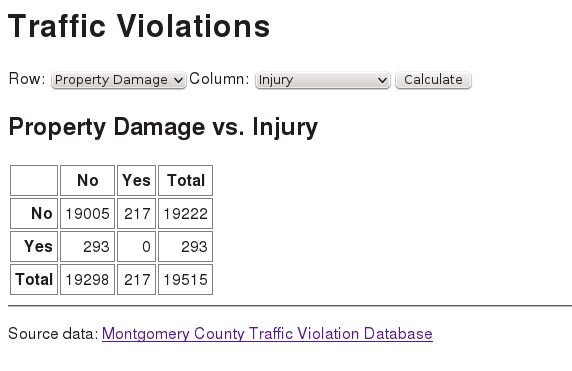
I wanted to use as much of the code from “Étude 4-2: Condiment Server” as possible, so I decided on drop-down menus to choose the fields. However, a map was not a good choice for generating the menu. In the condiment server, it made sense to alphabetize the keys of the food map. In this étude, the field names are listed by conceptual groups; it doesn’t make sense to alphabetize them, and the keys of a map are inherently unordered. Thus, I ended up making a vector of vectors.
I used map-indexed to create the option menu such that each option has a numeric value. However, when the server reads the value from the request, it gets a string, and 5 is not equal to "5". The fix was easy, but I lost a few minutes figuring out why my selected item wasn’t coming up when I came back from a request.
The source file felt like it was getting too big, so I put the cross-tabulation code into a separate file named crosstab.cljs in the src/traffic directory.
I wanted to include a CSS file, so I put the specification in the header of the hiccups code. However, to make it work, I had to tell Express how to serve static files, using "." for the root directory in:
(.useapp(.staticexpress"path/to/root/directory"))
Having the REPL is really great for testing.
I finished the program late at night. Again, “the first way you think of doing it that works is the right way,” but I am unhappy with the solution. I would really like to unify the cases of one-dimensional and two-dimensional tables, and there seems to be a dreadful amount of unnecessary duplication. To paraphrase Don Marquis, my solution “isn’t moral, but it might be expedient.”
See a suggested solution (which I put in a project named traffic): “Solution 4-5”.
Facebook®’s React JavaScript library is designed to make user interfaces easier to build and manage. React builds a virtual DOM to keep track of and render only the elements that change during user interaction. (As noted in Chapter 2, this is what all the Cool Kids™ are using.)
In this chapter, you will write études that use different ClojureScript libraries that interface with React. This blog post gives you a comparison of the libraries. The two we will use are Quiescent and Reagent.
These études will implement the same web page: a page that displays an image and lets you adjust its width, height, and (via CSS) its border width and style (Figure 5-1). In both libraries, you will build components, which are functions that, as the Quiescent documentation puts it, tell “how a particular piece of data should be rendered to the DOM.” Since they are functions, they can use all of ClojureScript’s computational power.
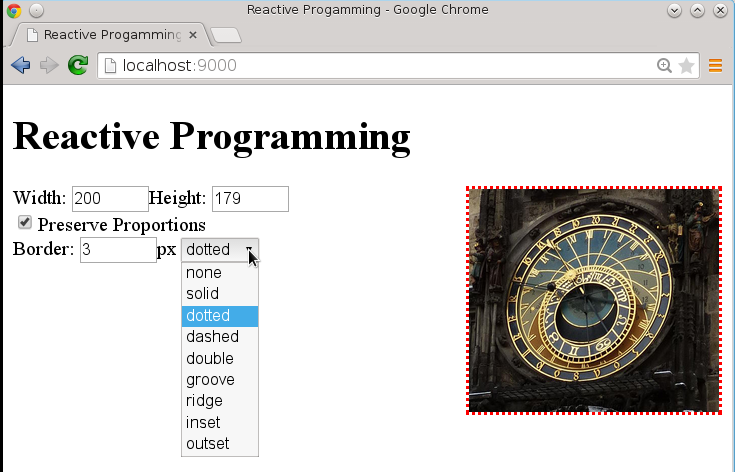
The HTML for the page will include a <div id="interface">, which is where the components will go.
Both versions of this étude will declare an atom (with a slight variation for Reagant) to hold the state of the application in a map. Let’s do a quick review of atoms by defining an atom with a single value:
(def quantity (atom 32))
cljs.user=> #<Atom:32>
To access the data in an atom, you must dereference it with the @ operator:
cljs.user=>@quantity
32
To update an atom’s data, use the swap! function (for individual map values) and reset! (for the entire value of the atom). The swap! function takes as its
arguments:
Thus, in the REPL:
cljs.user=> (swap! quantity inc)
33
cljs.user=> (swap! quantity * 2)
66
cljs.user=> (reset! quantity 47)
47
cljs.user=> quantity
#<Atom: 47>
cljs.user=> @quantity
47
However, in most ClojureScript programs, you do not create an atom for each part of the state you need to save. Instead, you will most often use a map:
cljs.user=> (def inventory (atom {:quantity 32 :price 3.75}))
#<Atom: {:quantity 32, :price 3.75}>
cljs.user=> (swap! inventory assoc :price 4.22)
{:quantity 32, :price 4.22}
cljs.user=> (swap! inventory update :quantity inc)
{:quantity 33, :price 4.22}
cljs.user=> @inventory
{:quantity 33, :price 4.22}
Back to the program for this étude. The page has to keep track of:
That gives us this atom:
(defoncestatus(atom{:w0:h0:proportionaltrue:border-width3:border-style"solid":orig-w0:orig-h0:src"clock.jpg"}))
To use Quiescent, add [quiescent "0.2.0-alpha1"] to your project’s dependencies, and add requirements to your namespace:
(:require[quiescent.core:asq][quiescent.dom:asd])
As an example, let’s define a simple component that displays an input area and some text that goes with the w field in the atom that was defined previously:
(q/defcomponentExample:name"Example"[status](d/div{}"Your input here: "(d/input{:type"text":value(:wstatus):size"5"})(d/br)"Your input, squared: "(d/span{}(*(:wstatus)(:wstatus)))))
The general format for creating an HTML element inside a component is to give its element name, a map of its attributes (or the empty map {} if there are no attributes, as on the div), and the element content, which may contain other elements. The :name before the parameter list gives the component a name for React to use. The key/value pairs before the parameter list make up the component configuration; this is described in detail in the Quiescent Documentation. The value of the input field and span are provided by the current value of the :w key in the status atom.
The only thing remaining to do is to render the component. In Quiescent, the q/render function renders a component once. If you want continuous rendering, you can use JavaScript’s requestAnimationFrame to repeat the process. Remember, when using React, only the components that have changed get rerendered, so you don’t need to worry that using requestAnimationFrame will eat your CPU alive:
(defnrender"Render the current state atom, and schedule a render on the next frame"[](q/render(Example@status)(aget(.getElementsByTagNamejs/document"body")0))(.requestAnimationFramejs/windowrender))(render)
Quiescent’s render function takes two arguments: a call to the component with its argument—in this case, the dereferenced atom—and the DOM node where you want the component rooted. For this example, that’s the first (and, we hope, only) <body> element.
If you compile this code and then load the index.html file, you will see a zero in the input and output area—but you will also find that you cannot type into the field. That is because Quiescent and React always keep the DOM value and the atom value synchronized, and since the value in the atom never changes, neither can the field. To fix that, add this code to the input element (it is in bold):
(d/input{:type"text":value(:wstatus):onChangeupdate-value:size"5"})
Next, write the update-value function, which takes the value from the event target and puts it into the atom that keeps the page’s state:
(defnupdate-value[evt](swap!statusassoc:w(.-value(.-targetevt))))
Voilà—your page now updates properly.
You will have to initialize the values for the image’s original width and height. To do this, you add an :onLoad clause to the properties of the image component. Its value is a function that handles the event by setting the width, height, original width, and original height. Use the naturalWidth and naturalHeight properties of the image. Those properties do not work with Internet Explorer 8 but will work in Intenet Explorer 9+.
Handling the checkbox also requires some extra care. The value of the checked attribute isn’t the checkbox’s value, so you will have to use :on-mount to initialize the checkbox, and you will have to directly change the checkbox status with code like this:
(set!(.-checked(.getElementByIdjs/document"prop"))
Here is an example of :on-mount to initialize the example’s input field to the current minute of the hour. :on-mount is followed by the definition of a function that has the current node as its argument:
(q/defcomponentExample:name"Example":on-mount(fn[node](swap!statusassoc:w(.getMinutes(js/Date.))))[status];; etc.
If you want to use a list to initialize the drop-down menu, you will need to define a component for menu options and then use apply and map cleverly. This took me a long time to get right, so I’m giving you the code for free with an abbreviated example:
(q/defcomponentOption[item](d/option{:valueitem}item));; then, in the component that builds the form:(applyd/select{:id"menu":onChangechange-border}(mapOption["none""solid""dotted""etc."]))
See a suggested solution: “Solution 5-1”.
To use Reagent, add [reagent "0.5.0"] to your project’s dependencies and add this requirement to your namespace:
(:require[reagent.core:asreagent:refer[atom])
Note the :refer [atom] clause; Reagent has its own definition of atom that plays nicely with React; it is defined so that you can use it exactly the way you would use a normal ClojureScript atom.
As an example, let’s define a simple component that displays an input area and some text that goes with the w field in the atom that was defined previously:
(defnexample[][:div"Your input here:"[:input{:type"text":value(:w@status):size"5"}][:br]"Your input, squared: "[:span(*(:w@status)(:w@status))]])
The general format for creating an HTML element inside a component is to create a vector whose first element is a keyword giving the HTML element name, a map of its attributes (if any), and the element content, which may contain other elements. The value of the input field and span are provided by the current value of the :w key in the status atom. Unlike Quiescent, you must dereference the atom.
The only thing remaining to do is to render the component. You don’t have to request animation frames; Reagent handles that for you:
(defnrun[](reagent/render[example](aget(.getElementsByTagNamejs/document"body")0)))(run)
Reagent’s render function takes two arguments: a call to the component and the DOM node where you want the component rooted, in this case, the first (and, we hope, only) <body> element.
If you compile this code and then load the index.html file, you will see a zero in the input and output area—but you will also find that you cannot type into the field. That is because Reagent and React always keep the DOM value and the atom value synchronized, and since the value in the atom never changes, neither can the field. To fix that, add this code to the input element (it is in bold):
(d/input{:type"text":value(:wstatus):on-changeupdate-value:size"5"})
Next, write the update-value function, which takes the value from the event target and puts it into the atom that keeps the page’s state:
(defnupdate-value[evt](swap!statusassoc:w(.-value(.-targetevt))))
Voilà—your page now updates properly.
You will have to initialize the values for the image’s original width and height. To do this, you add an :on-load clause to the properties of the image component. Its value is a function that handles the event by setting the width, height, original width, and original height. Use the naturalWidth and naturalHeight properties of the image. Those properties do not work with Internet Explorer 8, but will work in Intenet Explorer 9+.
Handling the checkbox also requires some extra care. The value of the checked attribute isn’t the checkbox’s value, so you will have to directly change the checkbox status with code like this:
(set!(.-checked(.getElementByIdjs/document"prop"))
Initializing the checkbox takes a bit more work in Reagent. You must define a symbol that adds meta-information to the example component. This information includes a function that does the initialization. Here is an example that initializes the example’s input field to the current minute of the hour. You then render the new component:
(definit-example(with-metaexample{:component-will-mount(fn[this](swap!statusassoc:w(.getMinutes(js/Date.))))}))
If you want to use a list to initialize the drop-down menu, you will need to define a component for menu options and then use for. This took me a long time to get right, so I’m giving you the code for free with an abbreviated example. React is not happy if each option does not have a unique key, so this code adds it:
(defnoption[item][:option{:valueitem:keyitem}item]);; then, in the component that builds the form:[:select{:id"menu":on-changechange-border}(for[item["none""solid""dotted""etc."]](optionitem))]])
See a suggested solution: “Solution 5-2”.
Once again, it’s time to put together what you have learned into a somewhat open-ended project. Presume you are an administrator at a college and need to know how well the classroom buildings are utilized. The github repostiory for this book has a file named roster.csv in the datafiles/chapter06/building_usage directory. The roster file contains data for a list of class sections at a community college. This is real data, except the room numbers have been changed to “anonymize” the data. The file consists of a series of lines like this:
24414;201;ACCTG;022;Payroll Accounting;TTH;06:30 PM;08:20 PM;N190
22719;201;ART;012;Two Dimensional Design;MW;01:45 PM;02:35 PM;P204
22719;201;ART;012;Two Dimensional Design;MW;02:45 PM;04:35 PM;P204
The columns are the registration ID number, the section number, department, course number, course title, days of the week when the course meets, beginning and ending time, and room number. In the field for the days of the week, Thursday is represented as TH, Saturday as S, and Sunday as SU (yes, there are some Sunday classes).1
The ultimate goal of this chapter is to produce a program that will let you visualize the percentage use of each building at a particular time and day of week. (If you like, you can expand this étude to visualize usage on a room-by-room basis, but building usage is more generally useful. This is because not all rooms are interchangeable. For example, a chemistry lab may appear underutilized, but you can’t put a history class in that room when it’s not in use.)
You have a lot of options in this étude. Phrasing them in the form of questions:
Unless you decide on a single level map or vector, you will want to look at the get-in and assoc-in functions for accessing and modifying data in a nested associative structure.
In order to calculate the percentage of utilization, you will also need to know the number of distinct rooms in each building. Note that the utilization could be more than 100%. For example, there may be classes that are concurrent in different disciplines; an “introduction to computer technology” might be listed under both BIS (business information systems) and CIT (computer and information technology). Or, an open writing lab may be shared by several English classes at the same time.
This is your implementation, so you get to make all these decisions. See what I came up with: “Solution 6-1”.
Now that you have the data in a format that you like, choose a visualization. The one I decided
on originally was to use a map of the campus, which is in a file named campus_map.svg in the datafiles folder in the github repository. The file has each building in a <g> element with an appropriate id; for example, the SVG for building B starts like this:
<g><titleid="group_B">0%</title><recttransform="matrix(0,1,-1,0,0,0)"y="-123.85256"x="906.50964"height="74.705124"width="102.70512"id="bldg_B"style="fill:green;fill-opacity:0;stroke:#000000;stroke-opacity:1"/>
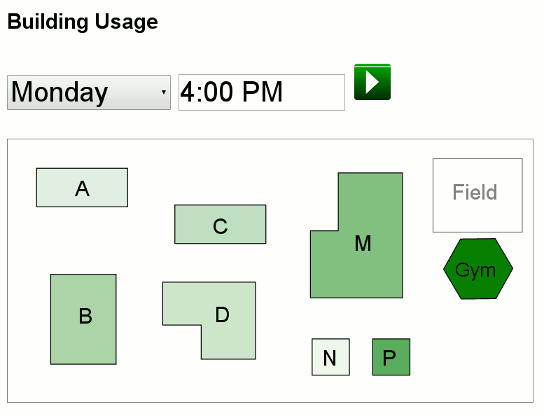
The program lets you choose a day and time of day; when either of those fields changes, the program calculates the percentage of usage of each building and adjusts the fill-opacity and <title> contents. (I used green for the fill color, because the more the building is in use, the better it is.) Figure 6-1 shows what the resulting page looks like. The “play” button will start advancing time 15 minutes every 1.5 seconds and updating the map automatically.
See a suggested solution: “Solution 6-2”.
I learned a lot of interesting things while writing the preceding étude, but, to be honest, it didn’t look anywhere near as exciting as I thought it would. A more traditional visualization—a bar chart—gives a lot more information in a very readable form, as you can see in Figure 6-2.
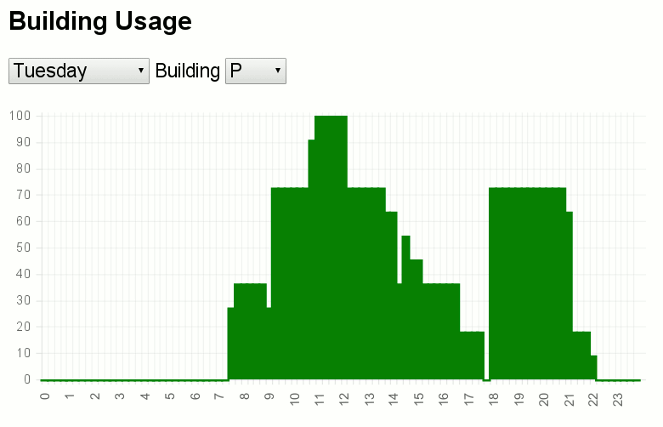
While it would be an interesting exercise to write a bar chart program, it is easier to use an existing library, so I downloaded Chart.js (version 1.0, not the alpha version 2.0 as of this writing) and installed the minimized JavaScript in the public directory. You may use any charting package you wish for your solution. If you feel tremendously ambitious, you may write your own.
See a suggested solution: “Solution 6-3”.
1 You may have noticed that the last two lines in the example have the same registration ID and section number. This is not an error. The first of the entries is the lecture part of the course and the second is the lab part. These are distinguished by an “instructional method” column that has not been included in the sample data.
In this chapter, you will write études that use defprotocol and defrecord to implement addition, subtraction, multiplication, and division of rational and complex numbers.
As an example, we will build a record that keeps track of a duration in terms of minutes and seconds, and implement a protocol that can add two durations and can convert a duration to a string. It is in a project named proto:
(defrecordDuration[minsec])
Once you have this record defined, you can use it as follows:
proto.core=> ;; Create a new duration of 2 minutes and 29 seconds
proto.core=> (def d (Duration. 2 29))
#proto.core.Duration{:min 2, :sec 29}
proto.core=> (:min d) ;; extract values
2
proto.core=> (:sec d)
29
Since a duration is a special kind of number, we will implement a protocol for handling special numbers. It has two methods: plus (to add two special numbers) and canonical (to convert the special number to “canonical form.” For example, the canonical form of 2 minutes and 73 seconds is 3 minutes and 13 seconds:
(defprotocolSpecialNumber(plus[thisother])(canonical[this]))
The plus method takes two parameters: this record and an other duration. When you define protocols, the first parameter of every method is the object you are interested in manipulating.
Now you can implement these methods by adding to defrecord. Here is the code for canonical:
(defrecordDuration[minsec]SpecialNumber(plus[thisother]"Just add minutes and seconds part,and let canonical do the rest."(let[m(+(:minthis)(:minother))s(+(:secthis)(:secother))](canonical(Duration.ms))))(canonical[this](let[s(mod(:secthis)60)m(+(:minthis)(quot(:secthis)60))](Duration.ms))))
And it works:
proto.core=> (canonical (Duration. 2 29))
#proto.core.Duration{:min 2, :sec 29}
proto.core=> (canonical (Duration. 2 135))
#proto.core.Duration{:min 4, :sec 15}
proto.core=> (plus (Duration. 2 29) (Duration. 3 40))
#proto.core.Duration{:min 6, :sec 9}
That’s all very nice, but what if you want to display the duration in a form that looks nice, like 2:09? You can do this by implementing the toString method of the Object protocol. Add this code to the defrecord:
Object(toString[this](let[s(:secthis)](str(:minthis)":"(if(<s10)"0""")s)))
And voilà! str will now convert your durations properly:
proto.core=> (str (Duration. 4 45))
"4:45"
Clojure has rational numbers; if you enter (/ 6 8) in the REPL, you get back 3/4. ClojureScript doesn’t do that, so you will implement rational numbers by adding the minus, mul, and div methods to the SpecialNumbers protocol. You will then define a record named Rational for holding a rational number using its numerator and denominator. Implement all the methods of the protocol for rational numbers (including canonical and toString).
The canonical form of a rational number is the fraction reduced to lowest terms, with the denominator always positive; thus:
proto.core=> (canonical (Rational. 6 8))
#proto.core.Rational{:num 3, :denom 4}
proto.core=> (canonical (Rational. 6 -9))
#proto.core.Rational{:num -2, :denom 3}
To reduce a fraction, you divide its numerator and denominator by the greatest common divisor (GCD) of the two numbers. The GCD is defined only for positive numbers. Here is Dijkstra’s algorithm for the GCD of numbers m and n:
The cool thing about this algorithm for finding the greatest common divisor is that it doesn’t do any division at all! Notice that it is recursively defined, so this is a wonderful place for you to learn to use recur. (Hint: cond is also quite useful here.)
When converting to canonical form, if you have a zero in the numerator, just keep the rational number exactly as it is.
See a suggested solution: “Solution 7-1”.
Extend this project further by adding a record and protocol for complex numbers. A complex number has the form a + bi, where a is the real part and b is the imaginary part. The letter “i” stands for the square root of negative 1.
Here are formulas for doing arithmetic on complex numbers:
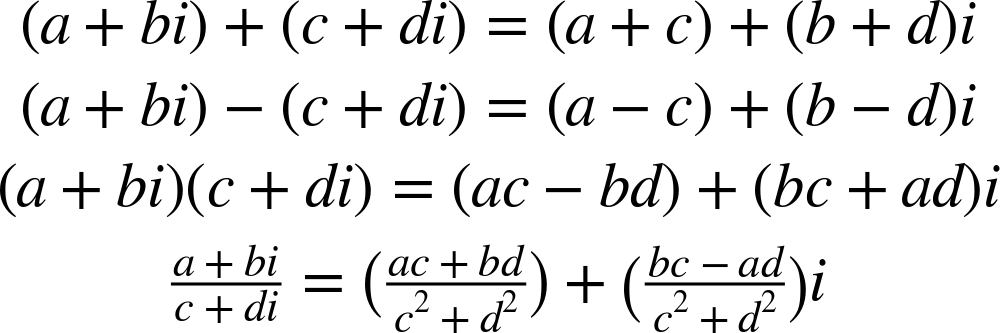
The canonical form of a complex number is just itself. Here is what conversion of complex numbers to strings should look like:
proto.core=> (str (Complex. 3 7))
"3+7i"
proto.core=> (str (Complex. 3 -7))
"3-7i"
proto.core=> (str (Complex. 3 0))
"3"
proto.core=> (str (Complex. 0 3))
"3i"
proto.core=> (str (Complex. 0 -3))
"-3i"
proto.core=> (str (Complex. 0 7))
"7i"
proto.core=> (str (Complex. 0 -7))
"-7i"
See a suggested solution: “Solution 7-2”.
Through the book so far, I have been very lax in writing unit tests for my code. At least for this chapter, that changes.
Many projects put their tests in a separate test folder, so you should create one now, and, inside of it, make a file named test_cases.cljs. Then give it these contents (they presume that your project is named proto):
(ns^:figwheel-alwaystest.test-cases(:require-macros[cljs.test:refer[deftestisare]])(:require[cljs.test:ast][proto.core:asp]))
Notice that the namespace is test-cases; the filename is translated to test_cases.
The ^:figwheel-always is metadata that tells Figwheel to reload the code on every change to the file.
The :require-macros is something new; macros are like functions, except that they generate ClojureScript code. The three macros that you will use are deftest, is, and are. First, let’s define a test that will check that the canonical form of 3 minutes and 84 seconds is 4 minutes and 24 seconds:
(deftestduration1(is(=(p/canonical(p/Duration.384))(p/Duration.424))))
The deftest macro creates the test, and the is macro makes a testable assertion; the body of is should yield a Boolean value. You can run tests from the REPL:
cljs.user=> (in-ns 'proto.core)
nil
proto.core=> (require '[cljs.test :as t])
nil
proto.core=> (t/run-tests 'test.test-cases)

Testing test.test-cases

Ran 1 tests containing 1 assertions.
0 failures, 0 errors.
nil
If you want to test several additions, you could write several different deftests; but if they all follow the same model, you can use are, which is followed by a vector of parameter names, an expression to evaluate (which can contain let), and then a series of sets of arguments to be evaluated. In the following example, the parameter names vector is on the first line, the second and third line are the expression to evaluate, and the remaining lines are sets of arguments to assert. (Thus, the first set will plug in 1 for m1, 10 for s1, and "1:10" for expected and then test the expression with those values.)
(deftestduration-str(are[m1s1expected](=(str(p/Duration.m1s1)expected))110"1:10"19"1:09"160"2:00"3145"5:25"00"0:00")
You cannot use destructuring in the arguments to are, but you can use destructuring in a let within the expression you are testing. Also, when you save the test file, you may have to do the (require '[cljs.test :as t]) in the REPL again in order to try your tests again.
In this étude, you will write a series of tests for the rational and complex numbers. As you will note, some of the tests I used for durations were designed to try “edge cases” in the hopes of making the algorithms fail. Here are some of the things you might consider testing:
| Expression | Expected result |
|---|---|
| gcd(3, 5) | 1 |
| gcd(12, 14) | 2 |
| gcd(35, 55) | 5 |
| 1/2 + 1/3 | 5/6 |
| 2/8 + 3/12 | 1/2 |
| 0/4 + 0/5 | 0/20 |
| 1/0 + 1/0 | 0/0 |
| 6/8 - 6/12 | 1/4 |
| 1/4 - 3/4 | -1/2 |
| 1/3 * 1/4 | 1/12 |
| 3/4 * 4/3 | 1/1 |
| 1/3 ÷ 1/4 | 4/3 |
| 3/4 ÷ 4/3 | 9/16 |
| (str (Complex. 3 7)) | “3+7i” |
| (str (Complex. 3 -7)) | “3-7i” |
| (str (Complex. -3 7)) | “-3+7i” |
| (str (Complex. -3 -7)) | “-3-7i” |
| (str (Complex. 0 7)) | “7i” |
| (str (Complex. 3 0)) | “3” |
| (1 + 2i) + (3 + 4i) | 4 + 6i |
| (1 - 2i) + (-3 + 4i) | -2 + 2i |
| (1 + 2i) - (3 + 4i) | -2 - 2i |
| (1 + 2i) * (3 + 4i) | -5 + 10i |
| 2i * (3 - 4i) | 8 + 6i |
| (3 + 4i) ÷ (1 + 2i) | 2.2 - 0.4i |
| (1 - 2i) ÷ (3 - 4i) | 0.44 -0.08i |
See a suggested solution: “Solution 7-3”.
In this chapter, you will write an étude that uses core.async to do asynchronous processing. Even though the JavaScript environment is single-threaded, core.async allows you to work with anything that needs to be handled asynchronously; this is a very nice feature indeed.
Here are two examples of using core.async. In the first example, Annie and Brian are going to send each other the numbers 5 down to zero, stopping at zero, in a project named async1. You will need to add some :require and :require-macro specifications to your namespace:
(ns^:figwheel-alwaysasync1.core(:require-macros[cljs.core.async.macros:refer[gogo-loop]])(:require[cljs.core.async:refer[<!>!timeoutalts!chanclose!]]))
Then, define a channel for both Annie and Brian:
(defannie(chan))(defbrian(chan))
Annie gets two processes: one for sending messages to Brian and another for receiving messages from him:
(defnannie-send[](go(loop[n5](println"Annie:"n"-> Brian")(>!briann)(when(pos?n)(recur(decn))))))(defnannie-receive[](go-loop[](let[reply(<!brian)](println"Annie:"reply"<- Brian")(if(pos?reply)(recur)(close!annie)))))
In the annie-send function, you see the go function, which asynchronously executes its body and immediately returns to the calling function. The >! function sends data to a channel. The loop continues until n equals zero, at which point the function returns nil.
Because go and loop occur together so often, ClojureScript has the go-loop construct, which you see in the annie-receive function. That function loops (but does not need the loop variable) until it has received the zero, at which point it performs a close! on the channel.
A similar pair of functions, brian-send and brian-receive, do Brian’s sending and receiving tasks (they are not shown here). You may have noticed there’s a lot of duplication here; we’ll get rid of it in the next example.
All that remains to be done is to write a function that invokes these processes:
(defnasync-test[](do(println"Starting...")(annie-send)(annie-receive)(brian-send)(brian-receive)))
Here is the console log output from invoking async-test. You can see that this is indeed asynchronous; the sends and receives are in no particular order:
Starting...
Annie: 5 -> Brian
Annie: 5 <- Brian
Brian: 5 -> Annie
Brian: 5 <- Annie
Annie: 4 -> Brian
Annie: 3 -> Brian
Brian: 4 -> Annie
Brian: 3 -> Annie
Annie: 4 <- Brian
Annie: 3 <- Brian
Brian: 4 <- Annie
Brian: 3 <- Annie
Annie: 2 -> Brian
Annie: 1 -> Brian
Brian: 2 -> Annie
Brian: 1 -> Annie
Annie: 2 <- Brian
Annie: 1 <- Brian
Brian: 2 <- Annie
Brian: 1 <- Annie
Annie: 0 -> Brian
Brian: 0 -> Annie
Annie: 0 <- Brian
Brian: 0 <- Annie
You can see the entire program here: “Sample core.async Program 1”.
The next example using core.async, in a project named async2, has processes that communicate with one another in a semi-synchronized manner. In this case, Annie will start off by sending Brian the number 8. He will send her a 7, she sends back 6, and so on, down to zero.
In this case, both people do the same thing: send the next lower number to their partner, then await the partner’s reply. Here is the function to activate the process for the two partners. The from-str and to-str parameters are used for the debug output:
(defndecrement![[from-strfrom-chan][to-strto-chan]&[start-value]](go-loop[n(orstart-value(dec(<!from-chan)))](printlnfrom-str":"n"->"to-str)(>!to-chann)(when-let[reply(<!from-chan)](printlnfrom-str":"reply"<-"to-str)(if(pos?reply)(recur(decreply))(do(close!from-chan)(close!to-chan)(println"Finished"))))))
There are several clever tricks going on in this function. The & [start-value] allows an optional starting value. There’s an asymmetry in the processes; Annie starts the sending, and Brian starts by receiving her data. Thus, Annie will start with 8 as her start-value; Brian will omit that argument. The completion of this bit of kabuki is in (or start-value (dec (<! from-chan))); if start-value is nil (which evaluates to false), you take one less than the received value as your starting value.
Similarly, the when-let clause is executed only when the reply from from-chan is true (i.e., not nil):
(defnasync-test[](let[annie(chan)brian(chan)](decrement!["Annie"annie]["Brian"brian]8)(decrement!["Brian"brian]["Annie"annie])))
Here is the output from invoking async-test:
Annie : 8 -> Brian
Brian : 7 -> Annie
Annie : 7 <- Brian
Annie : 6 -> Brian
Brian : 6 <- Annie
Brian : 5 -> Annie
Annie : 5 <- Brian
Annie : 4 -> Brian
Brian : 4 <- Annie
Brian : 3 -> Annie
Annie : 3 <- Brian
Annie : 2 -> Brian
Brian : 2 <- Annie
Brian : 1 -> Annie
Annie : 1 <- Brian
Annie : 0 -> Brian
Brian : 0 <- Annie
Finished
You can see the entire program here: “Sample core.async Program 2”.
In this étude, you’re going to write a program that lets the computer play the card game “War” against itself.
(Apologies to Sun Tzu.) These are the rules of the game as condensed from Wikipedia, adapted to two players, and simplified further.
Two players each take 26 cards from a shuffled deck. The players each put their top card face up on the table. Whoever has the higher value card wins that battle, takes both cards, and puts them at the bottom of her stack. What happens if the cards have the same value? Then the players go to “war.” Each person puts the next two cards from their stack face down in the pile and a third card face up. High card wins, and the winner takes all the cards for the bottom of their stack. If the cards match again, the war continues with another set of three cards from each person. If a person has fewer than three cards when a war happens, they put in all their cards.
Repeat this entire procedure until one person has all the cards. That player wins the game. In this game, aces are considered to have the highest value, and king > queen > jack.
A game can go on for a very long time, so I have added a new rule: if the game goes more than a predetermined maximum number of rounds (50 in my program), stop playing. The person who has fewer cards wins. If the number of cards is equal, it’s a tie.
Absolutely nothing. Well, almost nothing. War is possibly the most incredibly inane card game ever invented. It is a great way for children to spend time, and it’s perfect as an étude because:
When you purchase an item, if you pay cash on the spot, you often end up paying less than if you use credit. If you are cooking a meal, getting all of the ingredients collected before you start (pay now) is often less stressful than having to stop and go to the grocery store for items you found out you didn’t have (pay later). In most cases, “pay now” ends up being less expensive than “pay later,” and that certainly applies to most programming tasks.
So, before you rush off to start writing code, let me give you a word of advice: don’t. Spend some time with paper and pencil, away from the computer, and design this program first. This is a nontrivial program, and the “extra” time you spend planning it (pay now) will save you a lot of time in debugging and rewriting (pay later). As someone once told me, “Hours of programming will save you minutes of planning.”
Trust me, programs written at the keyboard look like it, and that is not meant as a compliment.
Note: this does not mean that you should never use the REPL or write anything at the keyboard. If you are wondering about how a specific part of ClojureScript works and need to write a small test program to find out, go ahead and do that right away.
Hint: do your design on paper. Don’t try to keep the whole thing in your head. Draw diagrams. Sometimes a picture or a storyboard of how the messages should flow will clarify your thinking. (If your parents ever asked you, “Do I have to draw you a diagram?” you may now confidently answer “Yes. Please do that. It really helps.”)
When I first started planning this, I was going to have just two processes communicating with each other, as it is in a real game. But let’s think about that. There is a slight asymmetry between the players. One person usually brings the cards and suggests playing the game. He shuffles the deck and deals out the cards at the beginning. Once that’s done, things even out. The game play itself proceeds almost automatically. Neither player is in control of the play, yet both of them are. It seems as if there is an implicit, almost telepathic communication between the players. Of course, there are no profound metaphysical issues here. Both players are simultaneously following the same set of rules. And that’s the point that bothered me: who makes the “decisions” in the program? I decided to sidestep the issue by introducing a third agent, the dealer, who is responsible for giving the cards to each player at the start of the game. The dealer then can tell each player to turn over cards, make a decision as to who won, and then tell a particular player to take cards. This simplifies the message flow considerably.
In my code, the dealer has to keep track of:
The dealer initializes the players and then is in one of the following states. I’m going to anthropomorphize and use “me” to represent the dealer:
Wait to receive the cards from the players.
If either player has sent me an empty list for their cards, then that player is out of cards, so the other player must be the winner. Send both players a message to quit looping for messages.
If I really have cards from both players, compare them. If one player has the high card, give that player the pile plus the cards currently in play, and go into “post-battle” state. Otherwise, the cards match. Add the cards currently in play to the pile, and go back to “pre-battle” state.
Note that this is my implementation; you may find an entirely different and better way to write the program.
Remember that the order in which a process receives messages may not be the same order in which they were sent. For example, if players Annie and Brian have a battle, and Annie wins, you may be tempted to send these messages:
This works nicely unless Annie had just thrown her last card down for that battle and message two arrives before message one. Annie will report that she is out of cards, thus losing the game, even though she’s really still in the game with the two cards that she hasn’t picked up yet.
I decided to represent the deck as a vector of the numbers 0 through 51 (inclusive); 0 through 12 are the ace through king of clubs, 13 through 25 are diamonds, then hearts, then spades. (That is, the suits are in English alphabetical order.) You will find ClojureScript’s shuffle function to be quite useful. I wrote a small module in a file named utils.cljs for functions such as converting a card number to its suit and name and finding a card’s value.
If you want to make a web-based version of the game, you will find a set of SVG images of playing cards in the datafiles/chapter08/images directory, with names 0.svg through 51.svg. These filenames correspond to the numbering described in the preceding paragraph. The file blue_grid_back.svg contains the image of the back of a playing card.
Note: you may want to generate a small deck with, say, only four cards in two suits. If you try to play with a full deck, the game could go on for a very long time.
Here is output from a game:
Starting Player 1 with [2 0 16 13 14 18]
Starting Player 2 with [1 4 3 15 17 5]
** Starting round 1
Player 1 has [2 0 16 13 14 18] sending dealer (2)
Player 2 has [1 4 3 15 17 5] sending dealer (1)
3 of clubs vs. 2 of clubs
Player 2 receives [2 1] add to [4 3 15 17 5]
** Starting round 2
Player 1 has [0 16 13 14 18] sending dealer (0)
Player 2 has [4 3 15 17 5 2 1] sending dealer (4)
Ace of clubs vs. 5 of clubs
Player 2 receives [0 4] add to [3 15 17 5 2 1]
** Starting round 3
Player 1 has [16 13 14 18] sending dealer (16)
Player 2 has [3 15 17 5 2 1 0 4] sending dealer (3)
4 of diamonds vs. 4 of clubs
** Starting round 4
Player 2 has [15 17 5 2 1 0 4] sending dealer (15 17 5)
Player 1 has [13 14 18] sending dealer (13 14 18)
6 of diamonds vs. 6 of clubs
** Starting round 5
Player 1 has [] sending dealer ()
Player 2 has [2 1 0 4] sending dealer (2 1 0)
nil vs. Ace of clubs
Winner: Player 1
See a suggested solution: “Solution 8-1”.
Here are suggested solutions for the études. Of course, your solutions may well be entirely different, and better.
(nsformulas.core(:require[clojure.browser.repl:asrepl]))(defonceconn(repl/connect"http://localhost:9000/repl"))(enable-console-print!)(defndistance"Calculate distance traveled by an object movingwith a given acceleration for a given amount of time"[acceltime](*acceltimetime))(defnkinetic-energy"Calculate kinetic energy given mass and velocity"[mv](/(*mvv)2.0))(defncentripetal"Calculate centripetal acceleration given velocity and radius"[vr](/(*vv)r))(defnaverage"Calculate average of two numbers"[ab](/(+ab)2.0))(defnvariance"Calculate variance of two numbers"[ab](-(*2(+(*aa)(*bb)))(*(+ab)(+ab))))
(defG6.6784e-11)(defngravitational-force"Calculate gravitational force of two objects ofmass m1 and m2, with centers of gravity at a distance r"[m1m2r](/(*Gm1m2)(*rr)))
(defnmonthly-payment"Calculate monthly payment on a loan of amount p,with annual percentage rate apr, and a given number of years"[papryears](let[r(/(/apr100)12.0)n(*years12)factor(.powjs/Math(+1r)n)](*p(/(*rfactor)(-factor1)))))
(defnradians"Convert degrees to radians"[degrees](*(/(.-PIjs/Math)180)degrees))(defndaylight"Find minutes of daylight given latitude in degrees and day of year.Formula from http://mathforum.org/library/drmath/view/56478.html"[lat-degreesday](let[lat(radianslat-degrees)part1(*0.9671396(.tanjs/Math(*0.00860(-day186))))part2(.cosjs/Math(+0.2163108(*2(.atanjs/Mathpart1))))p(.asinjs/Math(*0.39795part2))numerator(+(.sinjs/Math0.01454)(*(.sinjs/Mathlat)(.sinjs/Mathp)))denominator(*(.cosjs/Mathlat)(.cosjs/Mathp))](*60(-24(*7.63944(.acosjs/Math(/numeratordenominator)))))))
(nsdaylight-js.core(:require[clojure.browser.repl:asrepl]))(enable-console-print!)(defonceconn(repl/connect"http://localhost:9000/repl"))(defnradians"Convert degrees to radians"[degrees](*(/(.-PIjs/Math)180)degrees))(defndaylight"Find minutes of daylight given day of year and latitude in degrees.Formula from http://mathforum.org/library/drmath/view/56478.html"[daylat-degrees](let[lat(radianslat-degrees)part1(*0.9671396(.tanjs/Math(*0.00860(-day186))))part2(.cosjs/Math(+0.2163108(*2(.atanjs/Mathpart1))))p(.asinjs/Math(*0.39795part2))numerator(+(.sinjs/Math0.01454)(*(.sinjs/Mathlat)(.sinjs/Mathp)))denominator(*(.cosjs/Mathlat)(.cosjs/Mathp))](*60(-24(*7.63944(.acosjs/Math(/numeratordenominator)))))))(defnget-float-value"Get the floating point value of a field"[field](.parseFloatjs/window(.-value(.getElementByIdjs/documentfield))))(defncalculate[evt](let[lat-d(get-float-value"latitude")julian(get-float-value"julian")minutes(daylightlat-djulian)](set!(.-innerHTML(.getElementByIdjs/document"result"))minutes)))(.addEventListener(.getElementByIdjs/document"calculate")"click"calculate)
Much of the code is duplicated from the previous étude. Only new code is shown here, with ellipses to represent omitted code:
(nsdaylight-gc.core(:require[clojure.browser.repl:asrepl][goog.dom:asdom][goog.events:asevents]))...(defnradians...)(defndaylight...)(defnget-float-value"Get the floating point value of a field"[field](.parseFloatjs/window(.-value(dom/getElementfield))))(defncalculate[evt](let[lat-d(get-float-value"latitude")julian(get-float-value"julian")minutes(daylightlat-djulian)](dom/setTextContent(dom/getElement"result")minutes)))(events/listen(dom/getElement"calculate")"click"calculate)
Much of the code is duplicated from the previous étude. Only new code is shown here, with ellipses to represent omitted code:
(nsdaylight-dommy.core(:require[clojure.browser.repl:asrepl][dommy.core:asdommy:refer-macros[selsel1]]))...(defnradians...)(defndaylight...)(defnget-float-value"Get the floating point value of a field"[field](.parseFloatjs/window(dommy/value(sel1field))))(defncalculate[evt](let[lat-d(get-float-value"#latitude")julian(get-float-value"#julian")minutes(daylightlat-djulian)](dommy/set-text!(sel1"#result")minutes)))(dommy/listen!(sel1"#calculate"):clickcalculate)
Much of the code is duplicated from the previous étude. Only new code is shown here, with ellipses to represent omitted code:
(nsdaylight-domina.core(:require[clojure.browser.repl:asrepl][domina][domina.events:asevents]))...(defnradians...)(defndaylight...)(defnget-float-value"Get the floating point value of a field"[field](.parseFloatjs/window(domina/value(domina/by-idfield))))(defncalculate[evt](let[lat-d(get-float-value"latitude")julian(get-float-value"julian")minutes(daylightlat-djulian)](domina/set-text!(domina/by-id"result")minutes)))(events/listen!(domina/by-id"calculate"):clickcalculate)
Much of the code is duplicated from the previous étude. Only new code is shown here, with ellipses to represent omitted code:
(nsdaylight-enfocus.core(:require[clojure.browser.repl:asrepl][enfocus.core:asef][enfocus.events:asev]))...(defndaylight...)(defnget-float-value"Get the floating point value of a field"[field](.parseFloatjs/window(ef/fromfield(ef/get-prop:value))))(defncalculate[evt](let[lat-d(get-float-value"#latitude")julian(get-float-value"#julian")minutes(daylightlat-djulian)](ef/at"#result"(ef/content(.toStringminutes)))))(ef/at"#calculate"(ev/listen:clickcalculate))
(defnmove-zeros"Move zeros to end of a list or vector of numbers"[numbers](let[nonzero(filter(fn[x](not=x0))numbers)](concatnonzero(repeat(-(countnumbers)(countnonzero))0))))
(nsdaylight-by-date.core(:require[clojure.browser.repl:asrepl][clojure.string:asstr][domina][domina.events:asevents]))(enable-console-print!)(defonceconn(repl/connect"http://localhost:9000/repl"))(defnradians"Convert degrees to radians"[degrees](*(/(.-PIjs/Math)180)degrees))(defndaylight"Find minutes of daylight given latitude in degrees and day of year.Formula from http://mathforum.org/library/drmath/view/56478.html"[lat-degreesday](let[lat(radianslat-degrees)part1(*0.9671396(.tanjs/Math(*0.00860(-day186))))part2(.cosjs/Math(+0.2163108(*2(.atanjs/Mathpart1))))p(.asinjs/Math(*0.39795part2))numerator(+(.sinjs/Math0.01454)(*(.sinjs/Mathlat)(.sinjs/Mathp)))denominator(*(.cosjs/Mathlat)(.cosjs/Mathp))](*60(-24(*7.63944(.acosjs/Math(/numeratordenominator)))))))(defnget-float-value"Get the floating point value of a field"[field](.parseFloatjs/window(domina/value(domina/by-idfield))))(defnleap-year?"Return true if given year is a leap year; false otherwise"[year](or(and(=0(remyear4))(not=0(remyear100)))(=0(remyear400))))(defnordinal-day"Compute ordinal day given Gregorian day, month, and year"[daymonthyear](let[leap(leap-year?year)feb-days(ifleap2928)days-per-month[031feb-days31303130313130313031]month-ok(and(>month0)(<month13))day-ok(andmonth-ok(>day0)(<=day(+(nthdays-per-monthmonth))))subtotal(reduce +(takemonthdays-per-month))](ifday-ok(+subtotalday)0)))(defnto-julian"Convert Gregorian date to Julian"[](let[greg(domina/value(domina/by-id"gregorian"))parts(str/splitgreg#"[-/]")[ymd](map(fn[x](.parseIntjs/windowx10))parts)](ordinal-daydmy)))(defncalculate[evt](let[lat-d(get-float-value"latitude")julian(to-julian)minutes(daylightlat-djulian)](domina/set-text!(domina/by-id"result")(str(quotminutes60)"h "(.toFixed(remminutes60)2)"m"))))(events/listen!(domina/by-id"calculate"):clickcalculate)
(defnmean"Compute mean of a sequence of numbers"[x](let[n(countx)](/(apply +x)n)))(defnmedian"Compute median of a sequence of numbers"[x](let[n(countx)remainder(drop(-(int(/n2))1)(sortx))](if(odd?n)(secondremainder)(/(+(firstremainder)(secondremainder))2))))(defngetsums"Reducing function for computing sum and sum of squares.The accumulator is a two-vector with the current sum and sum of squares.Could be made clearer with destructuring, but that's not inthis chapter."[accitem](vector(+(firstacc)item)(+(lastacc)(*itemitem))))(defnstdev"Compute standard deviation of a sequence of numbers"[x](let[[sumsumsq](reducegetsums[00]x)n(countx)](.sqrtjs/Math(/(-sumsq(/(*sumsum)n))(-n1)))))
This solution uses the Domina library to interact with the web page. The ns special form needs to be updated to require the correct libraries:
(nsstats.core(:require[clojure.browser.repl:asrepl][clojure.string:asstr][domina:asdom][domina.events:asev]))
This is the additional code for interacting with the web page:
(defncalculate"Event handler"[evt](let[numbers(mapjs/window.parseFloat(str/split(domina/value(ev/targetevt))#"[, ]+"))](domina/set-text!(domina/by-id"mean")(meannumbers))(domina/set-text!(domina/by-id"median")(mediannumbers))(domina/set-text!(domina/by-id"stdev")(stdevnumbers))));; connect event handler(ev/listen!(domina/by-id"numbers"):changecalculate)
(nsteeth.core(:require[clojure.browser.repl:asrepl]))(defonceconn(repl/connect"http://localhost:9000/repl"))(enable-console-print!)(defpocket-depths[[0],[221221],[312323],[313212],[323221],[231211],[313232],[332131],[433233],[311322],[434323],[231322],[121132],[122323],[132133],[0],[323112],[221132],[211112],[332113],[313232],[331233],[122333],[223233],[222434],[343334],[112312],[223213],[342443],[332123],[222233],[323232]])(defnbad-tooth"Accumulator: vector of bad tooth numbersand current index"[[bad-listindex]tooth](if(some(fn[x](>=x4))tooth)(vector(conjbad-listindex)(incindex))(vectorbad-list(incindex))))(defnalert"Display tooth numbers where any of thepocket depths is 4 or greater."[depths](first(reducebad-tooth[[]1]depths)))
(nsmake_teeth.core(:require[clojure.browser.repl:asrepl]))(defonceconn(repl/connect"http://localhost:9000/repl"))(defnone-tooth"Generate one tooth"[presentprobability](if(=present"F")[](let[base-depth(if(<(rand)probability)23)](loop[n6result[]](if(=n0)result(recur(decn)(conjresult(+base-depth(-1(rand-int3))))))))))(defngenerate-list"Take list of teeth, probability, and current vector of vectors.Add pockets for each tooth."[teeth-presentprobabilityresult](if(empty?teeth-present)result(recur(restteeth-present)probability(conjresult(one-tooth(firstteeth-present)probability)))))(defngenerate-pockets"Take list of teeth present and probability of a good tooth,and create a list of pocket depths."[teeth-presentprobability](generate-listteeth-presentprobability[]))
This suggested solution uses the Enfocus library to interact with the web page:
(nsdaylight-summary.core(:require[clojure.browser.repl:asrepl][enfocus.core:asef][enfocus.events:asev]))(defonceconn(repl/connect"http://localhost:9000/repl"))(enable-console-print!)(defnradians"Convert degrees to radians"[degrees](*(/(.-PIjs/Math)180)degrees))(defndaylight"Find minutes of daylight given day of year and latitude in degrees.Formula from http://mathforum.org/library/drmath/view/56478.html"[lat-degreesday](let[lat(radianslat-degrees)part1(*0.9671396(.tanjs/Math(*0.00860(-day186))))part2(.cosjs/Math(+0.2163108(*2(.atanjs/Mathpart1))))p(.asinjs/Math(*0.39795part2))numerator(+(.sinjs/Math0.01454)(*(.sinjs/Mathlat)(.sinjs/Mathp)))denominator(*(.cosjs/Mathlat)(.cosjs/Mathp))](*60(-24(*7.63944(.acosjs/Math(/numeratordenominator)))))))(defnmake-ranges"Return vector of begin-end ordinal dates for a list of days per month"[mlist](reduce(fn[accx](conjacc(+x(lastacc))))[1](restmlist)))(defmonth-ranges"Days per month for non-leap years"(make-ranges'(0312831303130313130313031)))(defnto-hours-minutes"Convert minutes to hours and minutes"[m](str(quotm60)"h "(.toFixed(modm60)0)"m"))(defnget-value"Get the value from a field"[field](ef/fromfield(ef/get-prop:value)))(defnmean"Compute mean of a sequence of numbers"[x](/(apply +x)(countx)))(defnmean-daylight"Get mean daylight for a range of days"[startfinishlatitude](let[f(fn[x](daylightlatitudex))](mean(mapf(rangestartfinish)))))(defngenerate-averages"Generate monthly averages for a given latitude"[latitude](loop[rangesmonth-rangesresult[]](if(<(countranges)2)result(recur(restranges)(conjresult(mean-daylight(firstranges)(secondranges)latitude))))))(defncalculate[evt](let[fromMenu(first(ef/from"input[name='locationType']"(ef/get-prop:checked)))lat-d(iffromMenu(.parseFloatjs/window(get-value"#cityMenu"))(.parseFloatjs/window(get-value"#latitude")))averages(generate-averageslat-d)](doall(map-indexed(fn[nitem](ef/at(str"#m"(incn))(ef/content(to-hours-minutesitem))))averages))))(ef/at"#calculate"(ev/listen:clickcalculate))
(nscondiments.core(:require[cljs.nodejs:asnodejs]))(nodejs/enable-util-print!)(defxml(js/require"node-xml-lite"));; forward reference(declareprocess-child)(defnprocess-children"Process an array of child nodes, given a current food nameand an accumulated result"[[foodresult]children](let[[final-foodfinal-map](reduceprocess-child[foodresult]children)][final-foodfinal-map]))(defnadd-condiment"Add food to the vector of foods that go with this condiment"[resultfoodcondiment](let[food-list(getresultcondiment)new-list(iffood-list(conjfood-listfood)[food])](assocresultcondimentnew-list)))(defnprocess-child"Given a current food and result map, and an item,return the new food name and result map"[[foodresult]item];; The first child of an element is text - either a food name;; or a condiment name, depending on the element name.(let[firstchild(first(.-childsitem))](cond(=(.-nameitem)"display_name")(vectorfirstchildresult)(.test#"cond_._name"(.-nameitem))(vectorfood(add-condimentresultfoodfirstchild))(and(.-childsitem)(.-namefirstchild))(process-children[foodresult](.-childsitem)):else[foodresult])))(defn-main[](let[docmap(.parseFileSyncxml(nth(.-argvjs/process)2))](println(last(process-children[""{}](.-childsdocmap))))))(set!*main-cli-fn*-main)
This is a sample web server that simply echoes back the user’s input. Use this as a guide for the remainder of the étude:
(nsservertest.core(:require-macros[hiccups.core:ashiccups])(:require[cljs.nodejs:asnodejs][hiccups.runtime:ashiccupsrt]))(nodejs/enable-util-print!)(defexpress(nodejs/require"express"))(defngenerate-pageuser-name(ifquery(.-userNamequery)"")](.sendresponse(hiccups/html[:html[:head[:title"Server Example"][:meta{:http-equiv"Content-type":content"text/html":charset"utf-8"}]][:body[:p"Enter your name:"][:form{:action"/":method"get"}[:input{:name"userName":valueuser-name}][:input{:type"submit":value"Send Data"}]][:p(if(anduser-name(not=user-name""))(str"Pleased to meet you, "user-name".")"")]]]))))(defn-main[](let[app(express)](.getapp"/"generate-page!)(.listenapp3000(fn[](println"Server started on port 3000")))))(set!*main-cli-fn*-main)
This is a solution for the condiment matcher web page. It has separated the code for creating the condiment map from the XML page into a separate file to keep the code cleaner:
(nsfoodserver.mapmaker)(defxml(js/require"node-xml-lite"));; forward reference(declareprocess-child)(defnprocess-children"Process an array of child nodes, given a current food nameand an accumulated result"[[foodresult]children](let[[final-foodfinal-map](reduceprocess-child[foodresult]children)][final-foodfinal-map]))(defnadd-condiment"Add food to the vector of foods that go with this condiment"[resultfoodcondiment](let[food-list(getresultcondiment)new-list(iffood-list(conjfood-listfood)[food])](assocresultcondimentnew-list)))(defnprocess-child"Given a current food and result map, and an item,return the new food name and result map"[[foodresult]item];; The first child of an element is text - either a food name;; or a condiment name, depending on the element name.(let[firstchild(first(.-childsitem))](cond(=(.-nameitem)"display_name")(vectorfirstchildresult)(.test#"cond_._name"(.-nameitem))(vectorfood(add-condimentresultfoodfirstchild))(and(.-childsitem)(.-namefirstchild))(process-children[foodresult](.-childsitem)):else[foodresult])))(defnfoodmap[filename](let[docmap(.parseFileSyncxmlfilename)](last(process-children[""{}](.-childsdocmap)))))
Here is the main file:
(nsfoodserver.core(:require-macros[hiccups.core:ashiccups])(:require[cljs.nodejs:asnodejs][hiccups.runtime:ashiccupsrt][foodserver.mapmaker:asmapmaker][clojure.string:asstr]))(nodejs/enable-util-print!)(defexpress(nodejs/require"express"))(deffoodmap(mapmaker/foodmap"food.xml"))(defncase-insensitive[ab](compare(str/upper-casea)(str/upper-caseb)))(defncondiment-menu"Create HTML menu with the given selectionas the 'selected' item"[selection](map(fn[item][:option(if(=itemselection){:valueitem:selected"selected"}{:valueitem})item])(sortcase-insensitive(keysfoodmap))))(defncompatible-foods"Create unordered list of foods compatible with selected condiment"[selection](ifselection(map(fn[item][:liitem])(sortcase-insensitive(foodmapselection)))nil))(defngenerate-pagechosen-condiment(ifquery(.-condimentquery)"")](.sendresponse(hiccups/html[:html[:head[:title"Condiment Matcher"][:meta{:http-equiv"Content-type":content"text/html; charset=utf-8"}]][:body[:h1"Condiment Matcher"][:form{:action"http://localhost:3000":method"get"}[:select{:name"condiment"}[:option{:value""}"Choose a condiment"](condiment-menuchosen-condiment)][:input{:type"submit":value"Find Compatible Foods"}]][:ul(compatible-foodschosen-condiment)][:p"Source data: ";; URL split across two lines for book width[:a{:href(str"http://catalog.data.gov/dataset/""mypyramid-food-raw-data-f9ed6"))}"MyPyramid Food Raw Data"]" from the Food and Nutrition Service of the "" United States Department of Agriculture."]]]))))(defn-main[](let[app(express)](.getapp"/"generate-page!)(.listenapp3000(fn[](println"Server started on port 3000")))))(set!*main-cli-fn*-main)
Here is the code for reading a file line by line:
;; This is a macro, and must be in Clojure.;; Its name and location is the same as;; the cljs file, except with a .clj extension.(nscljs-made-easy.line-seq(:refer-clojure:exclude[with-open]))(defmacrowith-open[bindings&body](assert(=2(countbindings))"Incorrect with-open bindings")`(let~bindings(try(do~@body)(finally(.closeSynccljs-made-easy.line-seq/fs~(bindings0))))))
(nscljs-made-easy.line-seq(:requireclojure.string)(:require-macros[cljs-made-easy.line-seq:refer[with-open]]))(deffs(js/require"fs"))(defn-read-chunk[fd](let[length128b(js/Buffer.length)bytes-read(.readSyncfsfdb0lengthnil)](if(>bytes-read0)(.toStringb"utf8"0bytes-read))))(defnline-seq([fd](line-seqfdnil))([fdline](if-let[chunk(read-chunkfd)](if(re-find#"\n"(strlinechunk))(let[lines(clojure.string/split(strlinechunk)#"\n")](if(=1(countlines))(lazy-catlines(line-seqfd))(lazy-cat(butlastlines)(line-seqfd(lastlines)))))(recurfd(strlinechunk)))(ifline(listline)()))))
This is the code to create the frequency table:
(nsfrequency.core(:require[cljs.nodejs:asnodejs][clojure.string:asstr][cljs-made-easy.line-seq:ascme]))(nodejs/enable-util-print!)(deffilesystem(js/require"fs"));;require nodejs lib;; These keywords are the "column headers" from the spreadsheet.;; An entry of nil means that I am ignoring that column.(defheaders[:date:timenil:accident:injury:property-damage:fatalnil:vehicle:year:make:model:color:typenil:race:gender:driver-statenil])(defnzipmap-omit-nil"Does the same as zipmap, except when there's a nil in thefirst vector, it doesn't put anything into the map.I wrote it this way just to prove to myself that I could do it.It's easier to just say (dissoc (zipmap a-vec b-vec) nil)"[a-vecb-vec](loop[result{}aa-vecbb-vec](if(or(empty?a)(empty?b))result(recur(if-not(nil?(firsta))(assocresult(firsta)(firstb))result)(resta)(restb)))))(defnadd-row"Convenience function that adds a row from the CSV fileto the data map."[line](zipmap-omit-nilheaders(str/splitline#"\t")))(defncreate-data-structure"Create a vector of maps from a tab-separated value fileand a list of header keywords."[filenameheaders](cme/with-open[file-descriptor(.openSyncfilesystemfilename"r")](reduce(fn[resultline](conjresult(add-rowline)))[](rest(cme/line-seqfile-descriptor)))))(deftraffic(create-data-structure"traffic_july_2014_edited.csv"headers))(defnfrequency-table"Accumulate frequencies for specifier (a heading keywordor a function that returns a value) in data-map,optionally returning a total."[data-mapspecifier](let[result-map(reduce(fn[accitem](let[v(ifspecifier(specifieritem)nil)](assocaccv(+1(getaccv))))){}data-map)result-seq(sort(seqresult-map))freq(map lastresult-seq)][(vec(map firstresult-seq))(vecfreq)(reduce +freq)]))(defn-main[](println"Hello world!"))(set!*main-cli-fn*-main)
The code for reading the CSV file is unchanged from the previous étude, so I won’t repeat it here:
(nscrosstab.core(:require[cljs.nodejs:asnodejs][clojure.string:asstr][cljs-made-easy.line-seq:ascme]))(nodejs/enable-util-print!)(deffilesystem(js/require"fs"));;require nodejs lib;; These keywords are the "column headers" from the spreadsheet.;; An entry of nil means that I am ignoring that column.(defheaders[:date:timenil:accident:injury:property-damage:fatalnil:vehicle:year:make:model:color:typenil:race:gender:driver-statenil])(defnzipmap-omit-nil"Does the same as zipmap, except when there's a nil in thefirst vector, it doesn't put anything into the map.I wrote it this way just to prove to myself that I could do it.It's easier to just say (dissoc (zipmap a-vec b-vec) nil)"[a-vecb-vec](loop[result{}aa-vecbb-vec](if(or(empty?a)(empty?b))result(recur(if-not(nil?(firsta))(assocresult(firsta)(firstb))result)(resta)(restb)))))(defnadd-row"Convenience function that adds a row from the CSV fileto the data map."[line](zipmap-omit-nilheaders(str/splitline#"\t")))(defncreate-data-structure"Create a vector of maps from a tab-separated value fileand a list of header keywords."[filenameheaders](cme/with-open[file-descriptor(.openSyncfilesystemfilename"r")](reduce(fn[resultline](conjresult(add-rowline)))[](rest(cme/line-seqfile-descriptor)))))(deftraffic(create-data-structure"traffic_july_2014_edited.csv"headers))(defnmarginal"Get marginal totals for a frequency map. (Utility function)"[freq](vec(map last(sort(seqfreq)))))(defncross-tab"Accumulate frequencies for given row and column in data-map,returning row and column totals, plus grand total."[data-maprow-speccol-spec]; In the following call to reduce, the accumulator is a; vector of three maps.; The first maps row values => frequency; The second maps column values => frequency; The third is a map of maps, mapping; row values => column values => frequency(let[[row-freqcol-freqcross-freq](reduce(fn[accitem](let[r(ifrow-spec(row-specitem)nil)c(ifcol-spec(col-specitem)nil)][(assoc(firstacc)r(+1(get(firstacc)r)))(assoc(secondacc)c(+1(get(secondacc)c)))(assoc-in(lastacc)[rc](+1(get-in(lastacc)[rc])))]))[{}{}{}]data-map); I need row totals as part of the return, and I also; add them to get grand total - don't want to re-calculaterow-totals(marginalrow-freq)][(vec(sort(keysrow-freq)))(vec(sort(keyscol-freq)))(vec(for[r(sort(keysrow-freq))](vec(for[c(sort(keyscol-freq))](if-let[n(get-incross-freq(listrc))]n0)))))row-totals(marginalcol-freq)(reduce +row-totals)]))(defnfrequency-table"Accumulate frequencies for specifier in data-map,optionally returning a total. Use a call to cross-tabto re-use code."[data-mapspecifier](let[[row-labels_row-totals_grand-total](cross-tabdata-mapspecifiernil)][row-labels(vec(map firstrow-totals))grand-total]))(defn-main[](println"Hello world!"))(set!*main-cli-fn*-main)
The cross-tabulation functions from “Solution 4-4” are moved to a file named crosstab.cljs and the initial (ns...) changed accordingly:
(nstraffic.core(:require-macros[hiccups.core:ashiccups])(:require[cljs.nodejs:asnodejs][clojure.string:asstr][cljs-made-easy.line-seq:ascme][hiccups.runtime:ashiccupsrt][traffic.crosstab:asct]))(nodejs/enable-util-print!)(defexpress(nodejs/require"express"))(deffilesystem(js/require"fs"));;require nodejs lib;; These keywords are the "column headers" from the spreadsheet.;; An entry of nil means that I am ignoring that column.(defheaders[:date:timenil:accident:injury:property-damage:fatalnil:vehicle:year:make:model:color:typenil:race:gender:driver-statenil])(defnzipmap-omit-nil"Does the same as zipmap, except when there's a nil in thefirst vector, it doesn't put anything into the map.I wrote it this way just to prove to myself that I could do it.It's easier to just say (dissoc (zipmap a-vec b-vec) nil)"[a-vecb-vec](loop[result{}aa-vecbb-vec](if(or(empty?a)(empty?b))result(recur(if-not(nil?(firsta))(assocresult(firsta)(firstb))result)(resta)(restb)))))(defnadd-row"Convenience function that adds a row from the CSV fileto the data map."[line](zipmap-omit-nilheaders(str/splitline#"\t")))(defncreate-data-structure"Create a vector of maps from a tab-separated value fileand a list of header keywords."[filenameheaders](cme/with-open[file-descriptor(.openSyncfilesystemfilename"r")](reduce(fn[resultline](conjresult(add-rowline)))[](rest(cme/line-seqfile-descriptor)))))(deftraffic(create-data-structure"traffic_july_2014_edited.csv"headers))(defnday[entry](.substr(:dateentry)32))(defnhour[entry](.substr(:timeentry)02))(deffield-list[["Choose a field"nil]["Day"day]["Hour"hour]["Accident":accident]["Injury":injury]["Property Damage":property-damage]["Fatal":fatal]["Vehicle Year":year]["Vehicle Color":color]["Driver's Race":race]["Driver's Gender":gender]["Driver's State":driver-state]])(defntraffic-menu"Create a <select> menu with the given choice selected"[option-listselection](map-indexed(fn[nitem](let[menu-text(firstitem)][:option(if(=nselection){:valuen:selected"selected"}{:valuen})menu-text]))option-list))(defnfield-name[n](first(getfield-listn)))(defnfield-code[n](last(getfield-listn)))(defnadd-table-row[row-labelcountsrow-totalresult](conjresult(reduce(fn[accitem](conjacc[:tditem]))[:tr[:throw-label]](conjcountsrow-total))))(defnhtml-table[[row-labelscol-labelscountsrow-totalscol-totalsgrand-total]][:div[:table(if(not(nil?(firstcol-labels)))[:thead(reduce(fn[accitem](conjacc[:thitem]))[:tr[:th"\u00a0"]](conjcol-labels"Total"))][:thead[:tr[:th"\u00a0"][:th"Total"]]])(if(not(nil?(firstcol-labels)))(vec(loop[rlrow-labelsfreqcountsrtrow-totalsresult[:tbody]](if-not(empty?rl)(recur(restrl)(restfreq)(restrt)(add-table-row(firstrl)(firstfreq)(firstrt)result))(add-table-row"Total"col-totalsgrand-totalresult))))(vec(loop[rlrow-labelsrtrow-totalsresult[:tbody]](if-not(empty?rl)(recur(restrl)(restrt)(conjresult[:tr[:th(firstrl)][:td(firstrt)]]))(conjresult[:tr[:th"Total"][:tdgrand-total]])))))]])(defnshow-table[row-speccol-spec](cond(and(not=0row-spec)(not=0col-spec))[:div[:h2(str(field-namerow-spec)" vs. "(field-namecol-spec))](html-table(ct/cross-tabtraffic(field-coderow-spec)(field-codecol-spec)))](not=0row-spec)[:div[:h2(field-namerow-spec)](html-table(ct/cross-tabtraffic(field-coderow-spec)nil))]:elsenil))(defngenerate-pagecol-spec(ifquery(js/parseInt(.-columnquery))nil)row-spec(ifquery(js/parseInt(.-rowquery))nil)](.sendresponse(hiccups/html[:html[:head[:title"Traffic Violations"][:meta{:http-equiv"Content-type":content"text/html; charset=utf-8"}][:link{:rel"stylesheet":type"text/css":href"style.css"}]][:body[:h1"Traffic Violations"][:form{:action"http://localhost:3000":method"get"}"Row: "[:select{:name"row"}(traffic-menufield-listrow-spec)]"Column: "[:select{:name"column"}(traffic-menufield-listcol-spec)][:input{:type"submit":value"Calculate"}]](show-tablerow-speccol-spec)[:hr][:p"Source data: "[:a{:href"http://catalog.data.gov/dataset/traffic-violations-56dda"}"Montgomery County Traffic Violation Database"]]]]))))(defn-main[](let[app(express)](.useapp(.staticexpress"."))(.getapp"/"generate-page!)(.listenapp3000(fn[](println"Server started on port 3000")))))(set!*main-cli-fn*-main)
(nsreact_q.core(:require[clojure.browser.repl:asrepl][quiescent.core:asq][quiescent.dom:asd][quiescent.dom.uncontrolled:asdu]))(defonceconn(repl/connect"http://localhost:9000/repl"))(defoncestatus(atom{:w0:h0:proportionaltrue:border-width"3":border-style"none":orig-w0:orig-h0:src"clock.jpg"}))(enable-console-print!)(defonceborder-style-list'("none""solid""dotted""dashed""double""groove""ridge""inset""outset"))(defnresize"Resize the image; if proportional, determine which fieldhas changed and change the other accordingly."[evt](let[{:keys[whproportionalorig-worig-h]}@statustarget(.-targetevt)id(.-idtarget)val(.-valuetarget)](ifproportional(cond(=id"w")(swap!statusassoc:wval:h(int(*(/ valorig-w)orig-h)))(=id"h")(swap!statusassoc:hval:w(int(*(/ valorig-h)orig-w))):else(swap!statusassoc:horig-h:worig-w))(swap!statusassoc(keywordid)(.-valuetarget)))))(defnrecheck"Handle the checkbox. Since the checked property isn't thevalue of the checkbox, I had to set the property by hand"[evt](let[new-checked(not(:proportional@status))](swap!statusassoc:proportionalnew-checked)(set!(.-checked(.-targetevt))new-checked)))(defnchange-border[evt](let[{:keys[border-widthborder-style]}@statustarget(.-targetevt)id(.-idtarget)val(.-valuetarget)](cond(=id"menu")(swap!statusassoc:border-styleval)(=id"bw")(swap!statusassoc:border-widthval))))(defnset-dimensions"Set dimensions of the image once it loads"[evt](let[node(.getElementByIdjs/document"image")id(.-idnode)](swap!statusassoc:orig-w(.-naturalWidthnode):orig-h(.-naturalHeightnode):w(.-naturalWidthnode):h(.-naturalHeightnode))))(q/defcomponentImage"A component that displays an image":name"ImageWidget"[status](d/img{:id"image":src(:srcstatus):width(:wstatus):height(:hstatus):style{:float"right":borderWidth(:border-widthstatus):borderColor"red":borderStyle(:border-stylestatus)}:onLoadset-dimensions}))(q/defcomponentOption[item](d/option{:valueitem}item))(q/defcomponentForm"Input form":name"FormWidget":on-mount(fn[nodeval](set!(.-checked(.getElementByIdjs/document"prop"))(:proportionalval)))[status](d/form{:id"params"}"Width: "(d/input{:type"text":size"5":value(:wstatus):id"w":onChangeresize})"Height: "(d/input{:type"text":size"5":value(:hstatus):id"h":onChangeresize})(d/br)(du/input{:type"checkbox":id"prop":onChangerecheck:value"proportional"})"Preserve Proportions"(d/br)"Border: "(d/input{:type"text":size"5":value(:border-widthstatus):id"bw":onChangechange-border})"px "(applyd/select{:id"menu":onChangechange-border}(mapOptionborder-style-list))))(q/defcomponentInterface"User Interface":name"Interface"[status](d/div{}(Imagestatus)(Formstatus)))(defnrender"Render the current state atom, and schedule a render on the nextframe"[](q/render(Interface@status)(.getElementByIdjs/document"interface"))(.requestAnimationFramejs/windowrender))(render)
(nsreact_r.core(:require[clojure.browser.repl:asrepl][reagent.core:asreagent:refer[atom]]))(defonceconn(repl/connect"http://localhost:9000/repl"))(defoncestatus(atom{:w0:h0:proportionaltrue:border-width"3":border-style"none":orig-w0:orig-h0:src"clock.jpg"}))(enable-console-print!)(defonceborder-style-list'("none""solid""dotted""dashed""double""groove""ridge""inset""outset"))(defnresize"Resize the image; if proportional, determine which fieldhas changed and change the other accordingly."[evt](let[{:keys[whproportionalorig-worig-h]}@statustarget(.-targetevt)id(.-idtarget)val(.-valuetarget)](ifproportional(cond(=id"w")(swap!statusassoc:wval:h(int(*(/ valorig-w)orig-h)))(=id"h")(swap!statusassoc:hval:w(int(*(/ valorig-h)orig-w))):else(swap!statusassoc:horig-h:worig-w))(swap!statusassoc(keywordid)(.-valuetarget)))))(defnrecheck"Handle the checkbox. Since the checked property isn't thevalue of the checkbox, I had to set the property by hand"[evt](let[new-checked(not(:proportional@status))](swap!statusassoc:proportionalnew-checked)(set!(.-checked(.-targetevt))new-checked)))(defnchange-border[evt](let[{:keys[border-widthborder-style]}@statustarget(.-targetevt)id(.-idtarget)val(.-valuetarget)](cond(=id"menu")(swap!statusassoc:border-styleval)(=id"bw")(swap!statusassoc:border-widthval))))(defnset-dimensions"Set dimensions of the image once it loads"[evt](let[node(.getElementByIdjs/document"image")id(.-idnode)](swap!statusassoc:orig-w(.-naturalWidthnode):orig-h(.-naturalHeightnode):w(.-naturalWidthnode):h(.-naturalHeightnode))))(defnimage"A component that displays an image"[][:img{:id"image":src(:src@status):width(:w@status):height(:h@status):style{:float"right":borderWidth(:border-width@status):borderColor"red":borderStyle(:border-style@status)}:on-loadset-dimensions}])(defnoption[item][:option{:valueitem:keyitem}item])(defncbox[](do[:input{:type"checkbox":id"prop":on-changerecheck:value"proportional"}]))(defnform"Input form"[][:form{:id"params"}"Width: "[:input{:type"text":size"5":value(:w@status):id"w":on-changeresize}]"Height: "[:input{:type"text":size"5":value(:h@status):id"h":on-changeresize}][:br](cbox)"Preserve Proportions"[:br]"Border: "[:input{:type"text":size"5":value(:border-width@status):id"bw":on-changechange-border}]"px "[:select{:id"menu":on-changechange-border}(for[itemborder-style-list](optionitem))]])(defninterface-without-init[][:div(image)(form)])(definterface(with-metainterface-without-init{:component-did-mount(fn[this](set!(.-checked(.getElementByIdjs/document"prop"))(:proportional@status)))}))(defnrender"Render the current state atom"[](reagent/render[interface](.getElementByIdjs/document"interface")))(render)
In this étude, I named the project building_usage and had a module named roster.cljs to create the data structures. I also had a module named utils.cljs to handle conversion of time of day to number of minutes past midnight, which makes it easy to calculate durations. There is also a utility routine to convert that format to 24-hour time.
The roster.cljs file includes the raw CSV as a gigantic string (well, if you consider 72K bytes to be gigantic), including columns I am not using. The build-data-structure function creates:
For this very small subset of the data:
(def roster-string "W;01:00 PM;03:25 PM;C283
TH;06:30 PM;09:35 PM;D207
W;02:45 PM;05:35 PM;C244
TH;06:00 PM;09:05 PM;D208")
The resulting map:
{"Wednesday"
  {"C" {64 1, 65 1, 66 1, 67 1, 68 1, 69 1, 70 1, 52 1, 53 1, 54 1, 55 1, 56 1,
        57 1, 58 1, 59 2, 60 2, 61 2, 62 1, 63 1}},
"Thursday"
  {"D" {72 1, 73 1, 74 2, 75 2, 76 2, 77 2, 78 2, 79 2, 80 2, 81 2, 82 2, 83 2,
        84 2, 85 1, 86 1}}}
(nsbuilding_usage.roster(:require[clojure.string:asstr][building_usage.utils:asutils]));; many lines omitted(defroster-string"MW;01:00 PM;03:25 PM;C283TH;06:30 PM;09:35 PM;D207W;02:45 PM;05:35 PM;C244TH;06:00 PM;09:05 PM;D208")(defday-map{"M""Monday","T""Tuesday","W""Wednesday","R""Thursday""F""Friday","S""Saturday","N""Sunday"})(defnadd-entries"Increment the usage count for the building on the given days and times.If there is not an entry yet, created 96 zeros (24 hoursat 15-minute intervals)"[accdaybuildingintervals](let[current(get-inacc[(day-mapday)building])before(if(nil?current)(into[](repeat960))current)after(reduce(fn[accitem](assocaccitem(inc(getaccitem))))beforeintervals)](assoc-inacc[(day-mapday)building]after)))(defnbuilding-map-entry"Split incoming line into parts, then add entries into the count vectorfor each day and time interval for the appropriate building."[accline](let[[daysstart-timeend-timeroom](str/splitline#";")day-list(rest(str/split(str/replace(str/replacedays#"TH""R")#"SU""N")#""))start-interval(quot(utils/to-minutesstart-time)15)end-interval(quot(+14(utils/to-minutesend-time))15)building(str/replaceroom#"([A-Z]+).*$""$1")](loop[dday-listresultacc](if(empty?d)result(recur(restd)(add-entriesresult(firstd)building(rangestart-intervalend-interval)))))))(defnbuilding-usage-map[](let[lines(str/split-linesroster-string)](reducebuilding-map-entry{}lines)))(defnroom-list"Create a map building -> set of rooms in building"[accline](let[[___room](str/splitline#";")building(str/replaceroom#"([A-Z]+).*$""$1")current(accbuilding)](assocaccbuilding(if(nil?current)#{room}(conjcurrentroom)))))(defntotal-rooms[]"Create map with building as key and number of rooms in building as value."(let[lines(str/split-linesroster-string)room-list(reduceroom-list{}lines)](into{}(map(fn[[kv]][k(count(room-listk))])room-list))))
(nsbuilding_usage.utils)(defnto-minutes[time-string](let[[_hrminuteam-pm](re-matches#"(?i)(\d\d?):(\d\d)\s*([AP])\.?M\.?"time-string)hour(+(mod(js/parseInthr)12)(if(=(.toUpperCaseam-pm)"A")012))](+(*hour60)(js/parseIntminute))))(defnpad[n](if(<n10)(str"0"n)(.toStringn)))(defnto-am-pm[total-minutes](let[h(quottotal-minutes60)m(modtotal-minutes60)hour(if(=(modh12)0)12(modh12))suffix(if(<h12)"AM""PM")](strhour":"(padm)" "suffix)))(defnto-24-hr[total-minutes](str(pad(quottotal-minutes60))(pad(modtotal-minutes60))))
In this solution, I am using setInterval to advance the animation rather than requestAnimationFrame. This is because I don’t need smooth animation; I really want one “frame” every 1.5 seconds.
(ns^:figwheel-alwaysbuilding_usage.core(:require[building_usage.roster:asroster][building_usage.utils:asutils][goog.dom:asdom][goog.events:asevents]))(enable-console-print!)(defdays["Monday""Tuesday""Wednesday""Thursday""Friday""Saturday""Sunday"])(defbuildings["A""B""C""D""FLD""GYM""M""N""P"])(defsvg(.-contentDocument(dom/getElement"campus_map")));; define your app data so that it doesn't get overwritten on reload(defonceapp-state(atom{:day"Monday":interval24:usage(roster/building-usage-map):room-count(roster/room-count):runningfalse:interval-idnil}))(defnupdate-map[](let[{:keys[dayintervalusageroom-count]}@app-state](doseq[bbuildings](let[n(get-inusage[daybinterval])percent(/n(room-countb))](set!(.-fillOpacity(.-style(.getElementByIdsvg(str"bldg_"b))))percent)(set!(.-textContent(.getElementByIdsvg(str"group_"b)))(str(int(*100(min1.0percent)))"%"))))))(defnupdate-atom[evt](do(swap!app-stateassoc:day(.-value(dom/getElement"day")):interval(quot(utils/to-minutes(.-value(dom/getElement"time")))15))(update-map)))(defndisplay-day-time[dayinterval](set!(.-innerHTML(dom/getElement"show"))(strday" "(utils/to-am-pm(*15interval)))))(declareadvance-time)(defnplay-button[evt](if(@app-state:running)(do(.clearIntervaljs/window(@app-state:interval-id))(swap!app-stateassoc:runningfalse:interval-idnil)(set!(.-value(dom/getElement"time"))(utils/to-am-pm(*15(@app-state:interval))))(set!(.-className(dom/getElement"edit"))"visible")(set!(.-className(dom/getElement"show"))"hidden")(set!(.-src(dom/getElement"play"))"images/play.svg"))(do(swap!app-stateassoc:runningtrue:interval-id(.setIntervaljs/windowadvance-time1500))(display-day-time(@app-state:day)(@app-state:interval))(set!(.-className(dom/getElement"edit"))"hidden")(set!(.-className(dom/getElement"show"))"visible")(set!(.-src(dom/getElement"play"))"images/pause.svg"))))(defnadvance-time[dom-time-stamp](let[{:keys[daylastUpdateinterval]}@app-statenext-interval(incinterval)](if(>=next-interval96)(play-buttonnil)(do(update-map)(swap!app-stateassoc:intervalnext-interval)(display-day-timedaynext-interval)))))(do(events/listen(dom/getElement"time")"change"update-atom)(events/listen(dom/getElement"day")"change"update-atom)(events/listen(dom/getElement"play")"click"play-button))(defnon-js-reload[];; optionally touch your app-state to force rerendering depending on;; your application;; (swap! app-state update-in [:__figwheel_counter] inc))
<!DOCTYPE html><html><head><linkhref="css/style.css"rel="stylesheet"type="text/css"><metahttp-equiv="Content-Type"content="text/html; charset=utf-8"/></head><body><divid="app"><h2>Building Usage</h2><pclass="bigLabel"><spanid="edit"class="visible"><selectid="day"class="bigLabel"><optionvalue="Monday">Monday</option><optionvalue="Tuesday">Tuesday</option><optionvalue="Wednesday">Wednesday</option><optionvalue="Thursday">Thursday</option><optionvalue="Friday">Friday</option><optionvalue="Saturday">Saturday</option><optionvalue="Sunday">Sunday</option></select><inputclass="bigLabel"id="time"value="6:00 AM"size="8"/></span><spanid="show"class="hidden"></span><imgsrc="images/play.svg"width="45"height="45"alt="play"id="play"/></p><div><objectid="campus_map"data="images/campus_map.svg"type="image/svg+xml"style="border: 1px solid gray"><p>Alas, your browser can not load this SVG file.</p></object></div><scriptsrc="js/compiled/building_usage.js"type="text/javascript"></script></body></html>
(ns^:figwheel-alwaysbuilding_usage2.core(:require[building_usage2.roster:asroster][building_usage2.utils:asutils][goog.dom:asdom][goog.events:asevents]))(enable-console-print!)(defdays["Monday""Tuesday""Wednesday""Thursday""Friday""Saturday""Sunday"])(defbuildings["A""B""C""D""FLD""GYM""M""N""P"])(defbuilding-totals(roster/room-count))(defusage(roster/building-usage-map))(defnmake-labels[items]"Intersperse blank labels between the labels for the hours so thatthe number of labels equals the number of data points."(let[result(reduce(fn[accitem](apply conjacc[item""""""]))[]items)]result))(defncreate-chart[data](let[ctx(.getContext(dom/getElement"chart")"2d")chart(js/Chart.ctx);; Note: everything needs to be converted to JavaScript;; objects and arrays to make Chart.js happy.graph-info#js{:labels(clj->js(make-labels(range024))):datasets#js[#js{:label"Usage":fillColor"rgb(0, 128, 0)":strokeColor"rgb(0, 128, 0)":highlightStroke"rgb(255, 0,0)":data(clj->jsdata)}]};; Override default animation, and set scale;; of y-axis to go from 0-100 in all cases.options#js{:animationfalse:scaleBeginAtZerotrue:scaleShowGridLinestrue:scaleGridLineColor"rgba(0,0,0,.05)":scaleGridLineWidth1:scaleShowVerticalLinestrue:scaleOverridetrue:scaleSteps10:scaleStepWidth10:scaleStartValue0}](.Barchartgraph-infooptions)))(defnto-percent[countsbuilding]"Convert counts of rooms occupied to a percentage;max out at 100%"(let[total(getbuilding-totalsbuilding)](map(fn[item](min100(*100(/itemtotal))))counts)))(defnupdate-graph[evt](let[day(.-value(dom/getElement"day"))building(.-value(dom/getElement"building"))data(if(and(not=""day)(not=""building))(to-percent(get-inusage[daybuilding])building)nil)](if(not(nil?data))(create-chartdata)nil)))(do(events/listen(dom/getElement"day")"change"update-graph)(events/listen(dom/getElement"building")"change"update-graph))(defnon-js-reload[];; optionally touch your app-state to force rerendering depending on;; your application;; (swap! app-state update-in [:__figwheel_counter] inc))
<!DOCTYPE html><html><head><linkhref="css/style.css"rel="stylesheet"type="text/css"/><scripttype="text/javascript"src="Chart.min.js"></script><metahttp-equiv="Content-Type"content="text/html; charset=utf-8"/></head><body><divid="app"><h2>Building Usage</h2><pclass="bigLabel"><selectid="day"class="bigLabel"><optionvalue="">Choose a day</option><optionvalue="Monday">Monday</option><optionvalue="Tuesday">Tuesday</option><optionvalue="Wednesday">Wednesday</option><optionvalue="Thursday">Thursday</option><optionvalue="Friday">Friday</option><optionvalue="Saturday">Saturday</option><optionvalue="Sunday">Sunday</option></select>Building<selectid="building"class="bigLabel"><optionvalue="">--</option><optionvalue="A">A</option><optionvalue="B">B</option><optionvalue="C">C</option><optionvalue="D">D</option><optionvalue="FLD">FLD</option><optionvalue="GYM">Gym</option><optionvalue="M">M</option><optionvalue="N">N</option><optionvalue="P">P</option></select></p><canvasid="chart"width="600"height="300"></canvas><scriptsrc="js/compiled/building_usage2.js"type="text/javascript"></script></div></body></html>
(ns^:figwheel-alwaysproto.core(:require))(enable-console-print!)(defprotocolSpecialNumber(plus[thisb])(minus[thisb])(mul[thisb])(div[thisb])(canonical[this]))(defngcd[mmnn](let[m(js/Math.absmm)n(js/Math.absnn)](cond(=mn)m(>mn)(recur(-mn)n):else(recurm(-nm)))))(defrecordRational[numdenom]Object(toString[r](str(:numr)"/"(:denomr)))SpecialNumber(canonical[r](let[d(if(>=(:denomr)0)(:denomr)(-(:denomr)))n(if(>=(:denomr)0)(:numr)(-(:numr)))g(if(or(zero?n)(zero?d))1(gcdnd))](if-not(=g0)(Rational.(/ng)(/dg))r)))(plus[thisr2](let[{n1:numd1:denom}this{n2:numd2:denom}r2n(+(*n1d2)(*n2d1))d(*d1d2)](if(=d1d2)(canonical(Rational.(+n1n2)d1))(canonical(Rational.nd)))))(minus[r1r2](plusr1(Rational.(-(:numr2))(:denomr2))))(mul[r1r2](canonical(Rational.(*(:numr1)(:numr2))(*(:denomr1)(:denomr2)))))(div[r1r2](canonical(Rational.(*(:numr1)(:denomr2))(*(:denomr1)(:numr2))))))
(ns^:figwheel-alwaysproto.core)(enable-console-print!)(defprotocolSpecialNumber(plus[thisb])(minus[thisb])(mul[thisb])(div[thisb])(canonical[this]));; code for duration and rational not duplicated(defrecordComplex[reim]Object(toString[c](let[{:keys[reim]}c](str(if(zero?re)""re)(if-not(zero?im); note: the order of the conditions here; is absoutely crucial in order to get the; leading minus sign(str(cond(<im0)"-"(zero?re)"":else"+")(js/Math.absim)"i")))))SpecialNumber(canonical[c]c)(plus[thisother](Complex.(+(:rethis)(:reother))(+(:imthis)(:imother))))(minus[thisother](Complex.(-(:rethis)(:reother))(-(:imthis)(:imother))))(mul[thisother]; better living through destructuring(let[{a:reb:im}this{c:red:im}other](Complex.(-(*ac)(*bd))(+(*bc)(*ad)))))(div[thisother](let[{a:reb:im}this{c:red:im}otherdenom(+(*cc)(*dd))]denom(+(*cc)(*dd))](Complex.(/(+(*ac)(*bd))denom)(/(-(*bc)(*ad))denom)))))
(ns^:figwheel-alwaystest.test-cases(:require-macros[cljs.test:refer[deftestisare]])(:require[cljs.test:ast][proto.core:asp]))(deftestduration1(is(=(p/canonical(p/Duration.384))(p/Duration.424))))(deftestduration-str(are[m1s1expected](=(str(p/Duration.m1s1)expected))110"1 10"19"1 09"160"2 00"3145"5 25"00"0 00"))(deftestgcd-test(are[xy](=xy)(p/gcd35)1(p/gcd1214)2(p/gcd3555)5))(deftestrational-plus(are[xyz](let[[ab]x[cd]y[rnrd]z](=(p/plus(p/Rational.ab)(p/Rational.cd))(p/Rational.rnrd)))[12][13][56][28][312][12][04][05][020][10][10][20]))(deftestrational-minus(are[xyz](let[[ab]x[cd]y[rnrd]z](=(p/minus(p/Rational.ab)(p/Rational.cd))(p/Rational.rnrd)))[68][612][14][14][34][-12][14][14][04]))(deftestrational-multiply(are[xyz](let[[ab]x[cd]y[rnrd]z](=(p/mul(p/Rational.ab)(p/Rational.cd))(p/Rational.rnrd)))[13][14][112][34][43][11]))(deftestrational-divide(are[xyz](let[[ab]x[cd]y[rnrd]z](=(p/div(p/Rational.ab)(p/Rational.cd))(p/Rational.rnrd)))[13][14][43][34][43][916]))(deftestcomplex-str(are[riresult](=(str(p/Complex.ri))result)37"3+7i"3-7"3-7i"-37"-3+7i"-3-7"-3-7i"07"7i"30"3"))(deftestcomplex-math(are[r1i1fr2i2r3i3](=(f(p/Complex.r1i1)(p/Complex.r2i2))(p/Complex.r3i3))12p/plus34461-2p/plus-34-2212p/minus34-2-212p/mul34-51002p/mul3-48634p/div122.2-0.41-2p/div3-40.44-0.08))
(ns^:figwheel-alwaysasync1.core(:require-macros[cljs.core.async.macros:refer[gogo-loop]])(:require[cljs.core.async:refer[<!>!timeoutalts!chanclose!]]))(enable-console-print!)(defnon-js-reload[])(defannie(chan))(defbrian(chan))(defnannie-send[](go(loop[n5](println"Annie:"n"-> Brian")(>!briann)(if(pos?n)(recur(decn))nil))))(defnannie-send[](go(loop[n5](println"Annie:"n"-> Brian")(>!briann)(when(pos?n)(recur(decn))))))(defnannie-receive[](go-loop[](let[reply(<!brian)](println"Annie:"reply"<- Brian")(if(pos?reply)(recur)(close!annie)))))(defnbrian-send[](go-loop[n5](println"Brian:"n"-> Annie")(>!annien)(when(pos?n)(recur(decn)))))(defnbrian-receive[](go-loop[](let[reply(<!annie)](println"Brian:"reply"<- Annie")(if(pos?reply)(recur)(close!brian)))))(defnasync-test[](do(println"Starting...")(annie-send)(annie-receive)(brian-send)(brian-receive)))
(ns^:figwheel-alwaysasync2.core(:require-macros[cljs.core.async.macros:refer[gogo-loop]])(:require[cljs.core.async:asa:refer[<!>!timeoutalts!chanclose!]]))(enable-console-print!)(defnon-js-reload[])(defndecrement![[from-strfrom-chan][to-strto-chan]&[start-value]](go-loop[n(orstart-value(dec(<!from-chan)))](printlnfrom-str":"n"->"to-str)(>!to-chann)(when-let[reply(<!from-chan)](printlnfrom-str":"reply"<-"to-str)(if(pos?reply)(recur(decreply))(do(close!from-chan)(close!to-chan)(println"Finished"))))))(defnasync-test[](let[annie(chan)brian(chan)](decrement!["Annie"annie]["Brian"brian]8)(decrement!["Brian"brian]["Annie"annie])))
This solution is split into two files: core.cljs and utils.cljs.
(ns^:figwheel-alwayscardgame.core(:require-macros[cljs.core.async.macros:refer[gogo-loop]])(:require[cljs.core.async:refer[<!>!timeoutalts!chanclose!put!]][cardgame.utils:asutils]))(enable-console-print!)(defmax-rounds50);; max # of rounds per game;; create a channel for each player and the dealer(defplayer1(chan))(defplayer2(chan))(defdealer(chan))(defnon-js-reload[]);; I have added a player-name for debug output;;; it's not needed for the program to work.(defnplayer-process"Arguments are channel, channel name, and initialset of cards. Players either give the dealer cardsor receive cards from her. They send their playernumber back to the dealer so that she can distinguishthe inputs. The :show command is for debugging;the :card-count is for stopping a game after agiven number of rounds, and the :quit command finishes the loop."[playerplayer-nameinit-cards](do(println"Starting"player-name"with"init-cards)(go(loop[my-cardsinit-cards](let[[messageargs](<!player)](condp=message:give(do(printlnplayer-name"has"my-cards"sending dealer"(takeargsmy-cards))(>!dealer[player-name(takeargsmy-cards)])(recur(vec(dropargsmy-cards)))):receive(do(printlnplayer-name"receives"args"add to"my-cards)(>!dealer"Received cards")(recur(apply conjmy-cardsargs))):show(do(printlnmy-cards)(recurmy-cards)):card-count(do(>!dealer[player-name(countmy-cards)])(recurmy-cards)):quitnil))))))(defndetermine-game-winner"If either of the players is out of cards, the other player wins."[card1card2](cond(empty?card1)"Player 1"(empty?card2)"Player 2":elsenil))(defnmake-new-pile"Convenience function to join the current pileplus the players' cards into a new pile."[pilecard1card2](apply conj(apply conjpilecard1)card2))(defnput-all!"Convenience function to send same message toall players. The (doall) is necessary to forceevaluation."[info](doall(map(fn[p](put!pinfo))[player1player2])))(defnarrange"Since we can't guarantee which order the cards come in,we arrange the dealer's messages so that player 1's card(s)always precede player 2's card(s)."[[paca][pbcb]](if(=pa"Player 1")[cacb][cbca]))(defndo-battle"Returns a vector giving the winner (if any) and thenew pile of cards, given the current pile, the players' cards,and the number of rounds played.If someone's card is empty, the other person is the winner.If the number of rounds is at the maximum, the person withthe smaller number of cards wins.If one player has a higher card, the other player hasto take all the cards (returning an empty pile); if theymatch, the result is the pile plus the cards"[pilecard1card2n-rounds](let[c1(utils/value(lastcard1))c2(utils/value(lastcard2))game-winner(determine-game-winnercard1card2)new-pile(make-new-pilepilecard1card2)](println(utils/text(lastcard1))"vs."(utils/text(lastcard2)))(when-notgame-winner(cond(>c1c2)(put!player2[:receivenew-pile])(<c1c2)(put!player1[:receivenew-pile])))[game-winner(if(=c1c2)new-pile(vector))]))(defnplay-game"The game starts by dividing the shuffled deck andgives each player half.Pre-battle state: ask each player to give a card(or 3 cards if the pile isn't empty)Battle state: wait for each player to send cards and evalute.Post-battle: wait for person who lost hand (if not a tie)to receive cardsLong-game: too many rounds. Winner is person with most cards"[](let[deck(utils/short-deck)half(/(countdeck)2)](player-processplayer1"Player 1"(vec(takehalfdeck)))(player-processplayer2"Player 2"(vec(drophalfdeck)))(go(loop[pile[]state:pre-battlen-rounds1](condp=state:pre-battle(do(println"** Starting round"n-rounds)(put-all![:give(if(empty?pile)13)])(recurpile:battlen-rounds)):battle(let[d1(<!dealer);; block untild2(<!dealer);; both players send cards[card1card2](arranged1d2)[game-winnernew-pile](do-battlepilecard1card2n-rounds)](<!(timeout300))(if-notgame-winner(recurnew-pile:post-battlen-rounds)(do(put-all![:quitnil])(println"Winner:"game-winner)))):post-battle(do;; wait until player picks up cards(when(empty?pile)(<!dealer))(if(<n-roundsmax-rounds)(recurpile:pre-battle(incn-rounds))(do(put-all![:card-countnil])(recurpile:long-game0)))):long-game(let[[pana](<!dealer)[pbnb](<!dealer)](put-all![:quitnil])(printlnpa"has"na"cards.")(printlnpb"has"nb"cards.")(println"Winner:"(cond(<nanb)pa(>nanb)pb:else"tied"))))))))
(ns^:figwheel-alwayscardgame.utils(:require))(defsuits["clubs""diamonds""hearts""spades"])(defnames["Ace""2""3""4""5""6""7""8""9""10""Jack""Queen""King"]);; If there was no card at all (nil);; return nil, otherwise aces are high.(defnvalue[card](let[v(when-not(nil?card)(modcard13))](if(=v0)13v)))(defntext[card](let[suit(quotcard13)base(modcard13)](if(nil?card)"nil"(str(getnamesbase)" of "(getsuitssuit)))))(defnfull-deck[](shuffle(range052)));; Give a short deck of Ace to 4 in clubs and diamonds only;; for testing purposes.(defnshort-deck[](shuffle(list012345131415161718)))
ClojureScript is a dialect of Clojure that compiles to JavaScript. Clojure is a Lisp dialect that runs on the Java Virtual Machine. So, in order to use JavaScript, you need Java and Clojure.
You can test to see if Java is already installed on your computer by opening a command window (on Windows) or a terminal window (on Mac OS X or Linux) and typing java -version at the command line. If you get some output describing a version of Java, such as the following, you have Java installed:
java version "1.8.0_40"
    Java(TM) SE Runtime Environment (build 1.8.0_40-b26)
    Java HotSpot(TM) 64-Bit Server VM (build 25.40-b25, mixed mode)
If you get an error message, then you need to install Java. You may either use OpenJDK or Oracle’s Java Development Kit. Follow the download and installation instructons you find there.
If you want to get started quickly with ClojureScript, I recommend that you follow the instructions at the aptly named ClojureScript Quick Start page. From that page, you can download a JAR file that has “the ClojureScript compiler and the bundled REPLs without an overly complicated command line interface.”
Again, using the instructions at the Quick Start page, I created a project named sample-project. (I am sick and tired of “Hello, world!” so I did something slightly different.)
Here is the file structure of the directory, with files organized by category rather than alphabetical order. Notice that the project name sample-project has a hyphen in it, but when used in a directory name, you replace the hyphen with an underscore: sample_project:
sample_project
├── cljs.jar
├── src
│   └── sample_project
│       └── core.cljs
├── index.html
├── build.clj
├── release.clj
├── repl.clj
└── watch.clj
The cljs.jar file contains ClojureScript, downloaded from the link at the Quick Start page.
This is the ClojureScript file for the project; it simply prints to the console:
;; remove the :require and defonce when building the release version(nssample-project.core(:require[clojure.browser.repl:asrepl]))(defonceconn(repl/connect"http://localhost:9000/repl"))(enable-console-print!)(println"It works!")
This file has a bit more than the Quick Start file: the addition of the <meta> element avoids a warning in the web console, and the <title> element lets you distinguish projects from one another if you have multiple browser tabs open:
<!DOCTYPE html><html><head><title>sample-project</title><metahttp-equiv="Content-Type"content="text/html; charset=utf-8"/></head><body><scripttype="text/javascript"src="out/main.js"></script></body></html>
Builds an unoptimized version of the project. Run with the command:
(require'cljs.build.api)(cljs.build.api/build"src"{:main'sample-project.core:output-to"out/main.js"})
Builds an optimized version of the project:
((require'cljs.build.api)(cljs.build.api/build"src"{:output-to"out/main.js":optimizations:advanced})(System/exit0)
Builds an unoptimized version of the project and launches a browser REPL.
On Linux and MacOSX, make sure you have rlwrap installed:
(require'cljs.repl)(require'cljs.build.api)(require'cljs.repl.browser)(cljs.build.api/build"src"{:main'sample-project.core:output-to"out/main.js":verbosetrue})(cljs.repl/repl(cljs.repl.browser/repl-env):watch"src":output-dir"out")
This program watches the src directory and recompiles when any file in that directory changes:
(require'cljs.build.api)(cljs.build.api/watch"src"{:main'sample-project.core:output-to"out/main.js"})
You can use any text editor you like to create your ClojureScript programs. The Emacs editor seems to be quite popular, with Vim another popular choice. Yes, both have plug-ins for support of Clojure (CIDER for Emacs; Fireplace for Vim). No, I will not get involved in the theological battle between these two editors. If you are in search of an IDE (integrated development environment), you have a number of choices there as well:
Another way to get Clojure is to use Leiningen, a tool (as the website puts it) “for automating Clojure projects without setting your hair on fire.” Follow the download instructions at the Leiningen website, and then, as it says, type lein. Leiningen will download the self-install package, and you will then be ready to create ClojureScript (and Clojure) projects.
Leiningen lets you create projects based on templates. You create a new project with a command of the form lein new template-name project-name. There are plenty of templates out there, but the two I’m going to use in this book are the minimal mies template and the more advanced figwheel template.
Use the git utility to download the latest version and install it:
[etudes@localhost ~]$ git clone https://github.com/swannodette/mies.git
Cloning into 'mies'...
remote: Counting objects: 524, done.
remote: Total 524 (delta 0), reused 0 (delta 0), pack-reused 524
Receiving objects: 100% (524/524), 48.61 KiB | 0 bytes/s, done.
Resolving deltas: 100% (217/217), done.
Checking connectivity... done.
[etudes@localhost ~]$ cd mies
[etudes@localhost mies]$ lein install
Created /home/etudes/mies/target/lein-template-0.6.0.jar
Wrote /home/etudes/mies/pom.xml
Installed jar and pom into local repo.
Here is the file structure that came from the command lein new mies example:
example
├── index.html
├── index_release.html
├── project.clj
├── README.md
├── scripts
│   ├── brepl
│   ├── build
│   ├── compile_cljsc
│   ├── release
│   ├── repl
│   └── watch
└── src
    └── example
        └── core.cljs
The project.clj file contains information about your project’s requirements and dependencies. The scripts directory contains scripts that:
The core.cljs file will contain your code. For a new project, it looks like this:
(nsexample.core(:require[clojure.browser.repl:asrepl]));; (defonce conn;; (repl/connect "http://localhost:9000/repl"))(enable-console-print!)(println"Hello world!")
The lines beginning with the two semicolons are ClojureScript comments. The commented-out lines enable the browser REPL. You will almost certainly want to uncomment those lines by removing the semicolons. Then you can, from the main example folder, invoke scripts/compile_cljsc―which you need to do only once―then build the project with scripts/build, and start the browser REPL with scripts/brepl. All these scripts use Leiningen, which will automatically retrieve any dependencies that your project needs. You will eventually see something like this:
[etudes@localhost example]$ scripts/brepl
Compiling client js ...
Waiting for browser to connect ...
Watch compilation log available at: out/watch.log
To quit, type: :cljs/quit
cljs.user=>
As set up in the mies template, the brepl script keeps track of your src directory, and the project is recompiled whenever a file changes. The results are placed in the file out/watch.log. You can open a separate terminal window and use the command tail out/watch.log to continuously monitor that file. If you do not want to automatically rebuild, go to the scripts/brepl.clj file and change this line:
{:watch"src"
to this, making sure that you put the semicolons after the opening brace:
{;; :watch "src"
If you do this, then you must manually recompile files, and compile errors will appear in the REPL window.
The figwheel template is designed to make interactive development easy. Here is the file structure that you get from the command lein new figwheel example2:
example2
├── .gitignore
├── project.clj
├── README.md
├── resources
│   └── public
│       ├── css
│       │   └── style.css
│       └── index.html
└── src
    └── example2
        └── core.cljs
The project.clj file contains the information about your project’s requirements and dependencies. Your code goes in the core.cljs file. To compile and run the code,
open a terminal window and type lein figwheel, then go to http://localhost:3449 in your browser. You will have a REPL prompt in the terminal
window, and figwheel will monitor your source directory for changes.
Figure C-1 shows the result of a good compile after making a change to the core.cljs file; Figure C-2 shows the result of a compile error. Notice that figwheel points out the line in the ClojureScript file where the error occurred.
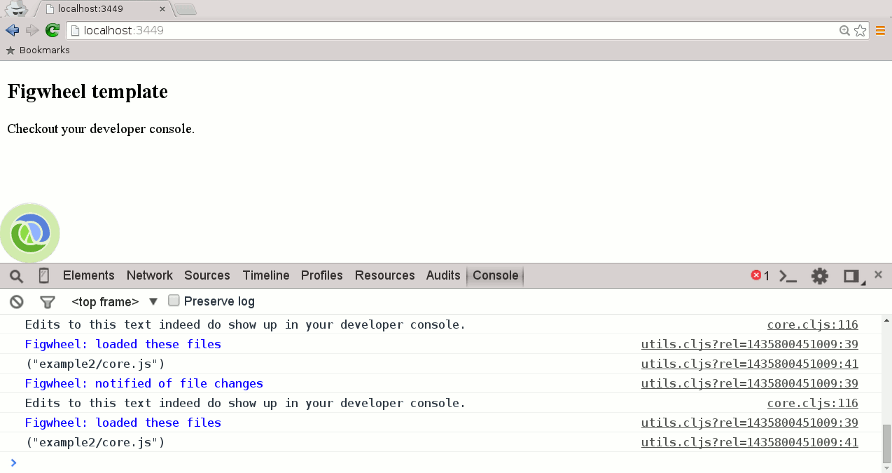
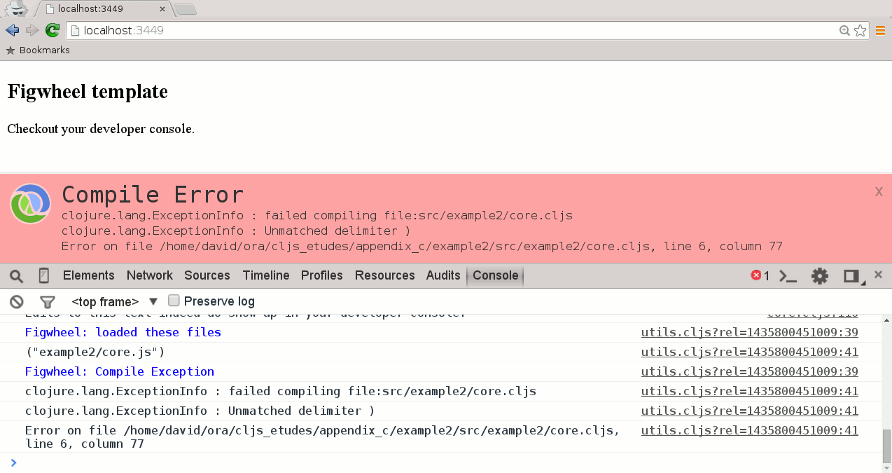
This is not to say that mies and figwheel are the only templates you can use; a search for clojurescript template at https://clojars.org/ will produce a whole list of templates with varying purposes. Choose whichever works best for you.
Just as JavaScript works in the browser and on the server, via a library like Node.js, so does ClojureScript. In this book, I’m using Node.js for the server side.
You can get Node.js from the download page. This will also give you npm, Node’s package manager.
I created a project named node-project by following the instructions at the ClojureScript Quick Start page. (I am sick and tired of “Hello, world!” so I did something slightly different.)
Here is the file structure of the directory, with files organized by category rather than alphabetical order. Notice that the project name node-project has a hyphen in it, but when used in a directory name, you replace the hyphen with an underscore, node_project:
node_project
├── cljs.jar
├── src
│   └── node_project
│       └── core.cljs
└── node.clj
The cljs.jar file contains ClojureScript, downloaded from the link at the Quick Start page.
This is the ClojureScript file for the project; it simply prints to the console:
(nsnode-project.core(:require[cljs.nodejs:asnodejs]))(nodejs/enable-util-print!)(defn-main[&args](println"It works!"))(set!*main-cli-fn*-main)
This file builds the unoptimized project:
(require'cljs.build.api)(cljs.build.api/build"src"{:main'node-project.core:output-to"main.js":target:nodejs})
This file will build the project and start a REPL:
(require'cljs.repl)(require'cljs.build.api)(require'cljs.repl.node)(cljs.build.api/build"src"{:main'hello-world.core:output-to"out/main.js":verbosetrue})(cljs.repl/repl(cljs.repl.node/repl-env):watch"src":output-dir"out")
To use a Node.js module, you need to define a binding for the library via the js/require function. You can then use that binding’s methods and properties in your ClojureScript code. The following is a REPL session that shows the use of the built-in os module:
cljs.user=> (in-ns 'node-project.core)
node-project.core=> (def os (js/require "os"))
;; much output omitted
node-project.core=> (.hostname os)
"localhost.localdomain"
node-project.core=> (.platform os)
"linux"
example.core=> (.-EOL os) ;; this is a property
"\n"
Companion Exercises for Introducing ClojureScript
Copyright © 2016 J. David Eisenberg. All rights reserved.
Printed in the United States of America.
Published by O’Reilly Media, Inc., 1005 Gravenstein Highway North, Sebastopol, CA 95472.
O’Reilly books may be purchased for educational, business, or sales promotional use. Online editions are also available for most titles (http://safaribooksonline.com). For more information, contact our corporate/institutional sales department: 800-998-9938 or corporate@oreilly.com.
See http://oreilly.com/catalog/errata.csp?isbn=9781491934890 for release details.
While the publisher and the author have used good faith efforts to ensure that the information and instructions contained in this work are accurate, the publisher and the author disclaim all responsibility for errors or omissions, including without limitation responsibility for damages resulting from the use of or reliance on this work. Use of the information and instructions contained in this work is at your own risk. If any code samples or other technology this work contains or describes is subject to open source licenses or the intellectual property rights of others, it is your responsibility to ensure that your use thereof complies with such licenses and/or rights.
978-1-491-93489-0
An étude, according to Wikipedia, is “an instrumental musical composition, usually short and of considerable difficulty, usually designed to provide practice material for perfecting a particular musical skill.”
In this book, you will find descriptions of programs that you can compose (write) in ClojureScript. The programs will usually be short, and each one has been designed to provide practice material for a particular ClojureScript programming area. Unlike musical études, these programs have not been designed to be of considerable difficulty, though they may ask you to stretch a bit beyond the immediate material and examples that you find in most ClojureScript books or online references.
These études are not intended to introduce you to individual ClojureScript concepts. That ground is covered quite nicely by ClojureScript Koans, 4Clojure, and ClojureScript Unraveled. Instead, these études take the form of small projects that do something that is (somewhat) useful. They are much along the lines of the programming katas given in chapter 10 of Living Clojure by Carin Meier (O’Reilly). If Koans, 4Clojure, and ClojureScript Unraveled ask you to write programs at the level of chemical elements, in this book, you are constructing simple molecules.
This book is open source, so if you’d like to contribute, make a correction, or otherwise participate in the project, check out https://github.com/oreillymedia/etudes_for_clojurescript for details. If we accept your work, we’ll add you to the contributors chapter.
Thanks to O’Reilly Media, Inc.’s Simon St. Laurent and Meghan Blanchette, who encouraged me to write this book. Thanks also to all the people
on the #clojurescript IRC channel who patiently answered my questions, and to Mike Fikes for his technical review. Any errors remaining in this document are mine, not theirs.
This chapter starts with a couple of “warm-up exercises” so that you can get comfortable with your ClojureScript development environment. First, a quick review of how to define functions. Here is the generic model for a function:
(defn function-name [parameters] function-body)
Here is a function that takes an acceleration and an amount of time as its parameters and returns the distance traveled:
(defn distance [accel time] (/ (* accel time time) 2.0)
You can also put a documentation string between the function name and parameter list:
(defn distance
  "Calculate distance traveled by an object moving
  with a given acceleration for a given amount of time."
  [accel time]
  (/ (* accel time time) 2.0)
Create a project named formulas (see “Creating a ClojureScript Project”) and start a browser REPL (read/evaluate/print/loop). If you haven’t yet installed ClojureScript, follow the instructions in Appendix B, and create a project to work with.
In the REPL, type the preceding distance function and test it.
Defining functions in the REPL is fine for a quick test, but it is not something you want to do on an application-level scale. Instead, you want to define the functions in a source file. In the formulas project, open the src/formulas/core.cljs file and create functions for these formulas:
Here is some sample output. (in-ns 'formulas.core) switches you to that namespace so that you can type the function name without having to specify the module that it is in. If you update the source, (require 'formulas.core :reload) will recompile the code:
cljs.user=> (in-ns 'formulas.core)
nil
formulas.core=> (require 'formulas.core :reload)
nil
formulas.core=> (distance 9.8 5)
122.5
formulas.core=> (kinetic-energy 35 4)
280
formulas.core=> (centripetal 30 2)
450
See a suggested solution: “Solution 1-2”.
The def special form lets you bind a symbol to a value. The symbol is globally available to all functions in the namespace where it is defined. Add a function named gravitational-force that calculates the gravitational force between two masses whose centers of mass are at a distance r from each other to your code:
Use a def for the gravitational constant.
Here is the calculation for two masses of 100 kg that are 5 m apart:
formulas.core=> (gravitational-force 100 100 5)
2.67136e-8
ClojureScript’s def creates an ordinary JavaScript variable. Note that it is possible
to rebind a symbol to a value with code like this:
(defx5)(defx6)(defx(+1x))
However, this is somewhat frowned upon. Global, shared, mutable (changeable) variables can be problematic, as described in this answer to a question on StackExchange. You will find that ClojureScript’s functional programming model makes the need for such global variables much less frequent. As a beginning programmer, when you create a variable with def, treat it as if it were an (unalterable) algebraic variable and do not change its value.
See a suggested solution: “Solution 1-3”
To create local bindings of symbols to values within a function, you use let. The let is followed by a vector of symbol and value pairs.1
In this étude, you will write a function named monthly-payment that calculates monthly payments on a loan. Your function will take the amount of the loan, the annual percentage rate, and the number of years of the loan as its three parameters. Calculate the monthly payment according to this formula:
Use let to make local bindings for:
To raise a number to a power, invoke the JavaScript pow function with code in this format:
(.powjs/Mathnumberpower);; Thus, to calculate 3 to the fifth power:(.powjs/Math35)
You can also use this shorthand:
(js/Math.pow35)
You will learn more about interacting with JavaScript in Chapter 2.
Here is some sample output for a loan of $1,000.00 at 5.5% for 15 years. You can also check the results of your function against the results of the PMT function in your favorite spreadsheet:
formulas.core=>(monthly-payment10005.515)8.17083454621138
See a suggested solution: “Solution 1-4”.
Here’s a somewhat more complicated formula―determining the amount of sunlight in a day, given the day of year and the latitude of your location.
Write a function named daylight with two parameters: a latitude in degrees and a Julian day. The function returns the number of minutes of
sunshine for the day, using the formula explained at the Ask Dr. Math website. The latitude is in degrees, but JavaScript’s trigonometric functions use radians, so you will need a function to convert degrees to radians, and I’ll give you that for free:
(defnradians"Convert degrees to radians"[degrees](*(/(.-PIjs/Math)180)degrees))
The expression (.-PI js/Math) gets the PI property of the JavaScript Math object.
The variable D holds the number of hours of daylight, so multiply that by 60 for your final result. If you feel that these formulas are a bit too complicated to type as single expressions (I certainly did!), break them down by using let for the parts.
On Mac OSX or Linux, you can get a Julian date with the date command:
$ date '+%j' # today
127
$ date -d '2015-09-15' '+%j' # arbitrary date
258
Your results should be very close to those generated by the National Oceanic and Atmospheric Administration spreadsheets, which use a far more complicated algorithm than the one given here.
See a suggested solution: “Solution 1-5”.
1 Technically, let is followed by a vector of binding forms and values. Binding forms include destructuring as well as simple symbols.
Since ClojureScript compiles to JavaScript, you need to have a way to interact with native JavaScript and with web pages. In this chapter, you will discover five different ways to do this:
All of these methods are fairly “old school.” As of this writing, all the Cool Kids™ are using libraries such as Facebook’s React to handle the user interface. I still think it is useful to have knowledge of the older methods, as they might sometimes be the right tool to solve a problem. Chapter 5 describes how to work with React.
You’ll be doing the same task with each of these: calculating the number of hours of daylight based on a latitude and Julian date, as in “Étude 1-5: More Practice with def and let”. Here is the relevant HTML:
<!DOCTYPE html><html><head><title>Daylight Minutes</title><metahttp-equiv="Content-Type"content="text/html; charset=utf-8"/></head><body><h1>Daylight Minutes</h1><p>Latitude:<inputtype="text"size="8"id="latitude"/>°<br/>Day of year:<inputtype="text"size="4"id="julian"/><br/><inputtype="button"value="Calculate"id="calculate"/></p><p>Minutes of daylight:<spanid="result"></span></p><scriptsrc="out/project_name.js"type="text/javascript"></script></body></html>
I suggest you create a new project for each of these études and copy the preceding HTML into the project’s index.html file. Remember to make the src attribute of the script element match your project name.
If your project name has a hyphen in it, such as my-project, Clojure and ClojureScript will convert the hyphens to underscores when creating directories, so you will end up with a src/my_project directory.
This is the most direct method to interact with a page, and is the least ClojureScript-like in its approach.
In order to invoke JavaScript methods directly, you use expressions of the general form:
(.methodnameJavaScriptobjectarguments)
Here are some examples you can try in the REPL:
;; call the sqrt function from JavaScript's Math object with an argument 3(.sqrtjs/Math3);; equivalent of window.parseFloat("3.5")(.parseFloatjs/window"3.5");; equivalent of "shouting".toUpperCase()(.toUpperCase"shouting");; equivalent of "ClojureScript".substr(2,3)(.substr"ClojureScript"23);; equivalent of document.getElementById("latitude")(.getElementByIdjs/document"latitude")
You can also use a different form for methods that belong to the special js namespace. (It is not a real ClojureScript namespace, as it references the underlying JavaScript structure rather than ClojureScript code.)
;; call the sqrt function from JavaScript's Math object with an argument 3(js/Math.sqrt3);; equivalent of window.parseFloat("3.5")(js/Window.parseFloat"3.5");; equivalent of document.getElementById("latitude")(js/document.getElementById"latitude")
To access an object’s properties, use .-. Before you try these in the browser REPL, type something into the latitude field in the form:
;; equivalent of Math.PI(.-PIjs/Math);; equivalent of "ClojureScript".length(.-length"ClojureScript");; equivalent of document.getElementById("latitude").value(.-value(.getElementByIdjs/document"latitude"));; setting properties: equivalent of;; document.getElementById("latitude").value = 23.5;(set!(.-value(.getElementByIdjs/document"latitude"))23.5)
This étude doesn’t need you to create any JavaScript objects, but if you are interacting with an existing library, you may need to do so. To create an object, give the class name followed by a period:
;; equivalent of d = new Date(defd(js/Date.));; now you can use it(.getHoursd);; if you need a true JavaScript Array object(defarr(js/Array.102030))(getarr2)
In JavaScript, if you want an HTML element to respond to an event, you add an event listener to that element, tell it what type of event you want to listen for, and give it the name of a function that handles the event. That event-handling function must have one parameter to hold the event object. In ClojureScript, you need to define functions before you use them, so you have to write the event handler first and then invoke addEventListener. Here is an example of what I did in the REPL (my project name was daylight-js):
cljs.user=> (in-ns 'daylight-js.core)
nil
daylight-js.core=> (defn testing [evt] (.alert js/window "You clicked me!!!"))
#'daylight-js/testing
daylight-js.core=> (let [btn (.getElementById js/document "calculate")]
(.addEventListener btn "click" testing))
nil
The first line switches to the correct namespace for the project. The second line defines the event handler, which calls JavaScript’s alert() function to display a message. The third line tells the “Calculate” button to listen for click events and call the testing function when they occur.
Given this information, complete the code for the project such that, when you click the “Calculate” button, the program will read the values from the latitude and Julian day field, calculate the number of daylight hours, and place the result in the <span id="result">. (Hint: use the innerHTML property.) You may also want to write a function that takes a form field name as its argument and returns the floating-point value from that field.
See a suggested solution: “Solution 2-1”.
Using JavaScript directly is all well and good; one advantage is that if you’re a JavaScript programmer, you already know this stuff. The bad news is that you have all the problems of getting JavaScript to work on multiple browsers and platforms. Enter Google Closure, a library of JavaScript utilities that has all of those nasty compatibility parts all figured out for you. In this étude, you’ll use Closure for the interaction.
To use Google Closure, you need to change the first lines of your core.cljs file to require the code that maniuplates the DOM and handles events. In this example, the project has been named daylight-gc:
(nsdaylight-gc.core(:require[clojure.browser.repl:asrepl][goog.dom:asdom][goog.events:asevents]))
In the REPL, type (require 'goog.dom :as dom) to access the code.
When accessing DOM elements, the main difference between Closure and pure JavaScript is that you use dom/getElement instead of .getElementById js/document. Thus, after starting the browser REPL and typing 55 into the latitude input area:
cljs.user=> (require 'daylight-gc.core)
nil
cljs.user=> (in-ns 'daylight-gc.core)
nil
daylight-gc.core=> (require '[goog.dom :as dom])
nil
daylight-gc.core=> (dom/getElement "latitude")
#<[object HTMLInputElement]>
daylight-gc.core=> (.-value (dom/getElement "latitude"))
"55"
daylight-gc.core=> (set! (.-value (dom/getElement "latitude")) -20)
-20
daylight-gc.core=> ;; Closure has its own way to set an element's text
daylight-gc.core=> (dom/setTextContent (dom/getElement "result")
"Here is some text")
nil
Again, the code is quite similar to what you would do with plain JavaScript; you use events/listener instead of .addListener. The following adds a listener to the “Calculate” button:
daylight-gc.core=> (defn testing [evt] (.alert js/window "Clickety-click"))
#'daylight-gc.core/testing
daylight-gc.core=> (events/listen (dom/getElement "calculate") "click" testing)
#<[object Object]>
After you test it, you may want to remove the listener so that it doesn’t interfere with the code you put in your source core.cljs file:
daylight-gc.core=> (events/unlisten (dom/getElement "calculate") "click" testing)
true
Given this information, complete the code for the project. Note: if you created a new project and just copy/pasted the index.html file, make sure you change the <script> element to refer to the right file.
See a suggested solution: “Solution 2-2”.
While Google Closure gives you a lot of great code, it’s still JavaScript, and it “feels” like JavaScript. What you would like is a library that gives you the capabilities, but in a more functional way. One of those libraries is dommy. In this étude, you will use dommy to interact with the web page.
To use dommy, you need to change the first lines of your core.cljs file to require the code that maniuplates the DOM and handles events. In this example, the project has been named daylight-dommy:
(nsdaylight-dommy.core(:require[clojure.browser.repl:asrepl][dommy.core:asdommy:refer-macros[selsel1]]))
The :refer-macros is new and beyond the scope of this book. The oversimplified explanation is that ClojureScript macros are like functions with extra superpowers. I will explain the sel and sel1 later.
You also need to change the project.clj file to specify dommy as one of your project’s dependencies. The additional code is highlighted:
  :dependencies [[org.clojure/clojure "1.7.0-beta2"]
                 [org.clojure/clojurescript "0.0-3211"]
                 [prismatic/dommy "1.1.0"]]
Dommy has two functions for accessing elements: sel1 and sel. sel1 will return a single HTML node; sel will return a JavaScript array of all matching elements. The index.html file has three <input/> elements. Compare the results:
cljs.user=> ;; set up namespaces
cljs.user=> (require 'daylight-dommy.core)
nil
cljs.user=> (in-ns 'daylight-dommy.core)
nil
daylight-dommy.core=> (require '[dommy.core :as dommy :refer-macros [sel sel1]])
nil
daylight-dommy.core=> ;; access the first <input> element
daylight-dommy.core=> (sel1 "input")
#<[object HTMLInputElement]>
daylight-dommy.core=> ;; access all the <input> elements
daylight-dommy.core=> (sel "input")
#js [#<[object HTMLInputElement]>
#<[object HTMLInputElement]> #<[object HTMLInputElement]>]
daylight-dommy.core=> ;; since IDs are unique, you use sel1 for them.
daylight-dommy.core=> (sel1 "#latitude")
#<[object HTMLInputElement]>
To access values of form fields, use dommy’s value and set-value! functions. (I typed 55 into the latitude field before doing these commands.) Similarly, text and set-text! let you read and write text content of elements. html and set-html! let you read and write HTML content of an element. Notice that you can use either a string or a keyword as an argument to sel:
daylight-dommy.core=> ;; retrieve and set form field
daylight-dommy.core=> (dommy/value (sel1 "#latitude"))
"55"
daylight-dommy.core=> (dommy/set-value! (sel1 "#latitude") 10.24)
#<[object HTMLInputElement]>
daylight-dommy.core=> ;; set and retrieve text content
daylight-dommy.core=> (dommy/set-text! (sel1 :#result) "some text")
#<[object HTMLSpanElement]>
daylight-dommy.core=> (dommy/text (sel1 :#result))
"some text"
daylight-dommy.core-> (dommy/set-html! (sel1 :#result) "<i>Yes!</i>")
Here is the code to add and remove an event listener. You may use either keywords or strings for event names. If you use a keyword for the event name, such as :click when you listen for events, you must use a keyword when you remove the listener:
daylight-dommy.core=> (defn testing [event] (.alert js/window "Clicked."))
#'daylight-dommy.core/testing
daylight-dommy.core=> (dommy/listen! (sel1 :#calculate) :click testing)
#<[object HTMLInputElement]>
daylight-dommy.core=> ;; the web page should now respond to clicks. Try it.
daylight-dommy.core=> ;; now remove the listener.
daylight-dommy.core=> (dommy/unlisten! (sel1 "#calculate") :click testing)
#<[object HTMLInputElement]>
daylight-dommy.core=>
Given this information, complete the code for the project. Note: if you created a new project and just copy/pasted the index.html file, make sure you change the <script> element to refer to the right file.
See a suggested solution: “Solution 2-3”.
The Domina library is very similar in approach to dommy. In this étude, you will use Domina to interact with the web page.
To use Domina, you need to change the first lines of your core.cljs file to require the code that maniuplates the DOM and handles events. In this example, the project has been named daylight-domina:
(nsdaylight-domina.core(:require[clojure.browser.repl:asrepl][domina][domina.events:asevents]))
You also need to change the project.clj file to specify Domina as one of your project’s dependencies. The additional code is highlighted:
  :dependencies [[org.clojure/clojure "1.7.0"]
                 [org.clojure/clojurescript "1.7.48"]
                 [domina "1.0.3"]]
In Domina, you can access an item by its ID, by a CSS class, or by an XPath expression. This étude only uses the first of these methods with the by-id function:
cljs.user=> ;; set up namespaces
cljs.user=> (require 'daylight-domina.core)
nil
cljs.user=> (in-ns 'daylight-domina.core)
nil
daylight-domina.core=> (require 'domina)
nil
daylight-domina.core=> (require '[domina.events :as events])
nil
daylight-domina.core=> (domina/by-id "latitude")
#<[object HTMLInputElement]>
To access values of form fields, use Domina’s value and set-value! functions. (I typed 55 into the latitude field before doing these commands.) Similarly, text and set-text! let you read and write text content of elements. html and set-html! let you read and write HTML content of an element. Notice that you can use either a string or a keyword as an argument to sel:
daylight-domina.core=> ;; retrieve and set form field
daylight-domina.core=> (domina/value (domina/by-id "latitude"))
"55"
daylight-domina.core=> (domina/set-value! (domina/by-id "latitude") 10.24)
#<[object HTMLInputElement]>
daylight-domina.core=> ;; set and retrieve text content
daylight-domina.core=> (domina/set-text! (domina/by-id :result) "Testing 1 2 3")
#<[object HTMLSpanElement]>
daylight-domina.core=> (def resultspan (domina/by-id :result)) ;; to save typing
#<[object HTMLSpanElement]>
daylight-domina.core=> (domina/text resultspan)
"Testing 1 2 3"
daylight-domina.core-> (domina/set-html! resultspan "<i>Yes!</i>")#
<[object HTMLSpanElement]>
daylight-domina.core=> ;; look at web page to see result
Here is the code to add and remove an event listener. You may use either keywords or strings for event names. You may use either a string or keyword when you remove the listener. The unlisten! function removes all listeners associated with the event type:
daylight-domina.core=> (defn testing [event]
(.alert js/window "You clicked me."))
#'daylight-domina.core/testing
daylight-domina.core=> (events/listen! (domina/by-id "calculate") :click testing)
#<[object HTMLInputElement]>
daylight-domina.core=> ;; the web page should now respond to clicks. Try it.
daylight-domina.core=> ;; now remove the listener.
daylight-domina.core=> (events/unlisten! (domina/by-id "calculate") "click")
#<[object HTMLInputElement]>
daylight-domina.core=>
Given this information, complete the code for the project. Note: if you created a new project and just copy/pasted the index.html file, make sure you change the <script> element to refer to the right file.
See a suggested solution: “Solution 2-4”.
The Enfocus library is very different from dommy and Domina.
To use Enfocus, you need to change the first lines of your core.cljs file to require the code that maniuplates the DOM and handles events. In this example, the project has been named daylight-enfocus:
(nsdaylight-dommy.core(:require[clojure.browser.repl:asrepl][enfocus.core:asef][enfocus.events:asev]))
You also need to change the project.clj file to specify Enfocus as one of your project’s dependencies. The additional code is highlighted:
  :dependencies [[org.clojure/clojure "1.7.0-beta2"]
                 [org.clojure/clojurescript "0.0-3211"]
                 [enfocus "2.1.0"]]
The idea behind Enfocus is that you select a node and then do transformations on it. This is a very powerful concept, but this étude will use only its simplest forms. First, set up namespaces:
cljs.user=> (require 'daylight-enfocus.core)
nil
cljs.user=> (in-ns 'daylight-enfocus.core)
nil
daylight-enfocus.core=> (require '[enfocus.core :as ef])
nil
daylight-enfocus.core=> (require '[enfocus.events :as ev])
nil
Enfocus lets you select an element by its ID either as a CSS selector, an Enlive selector, or an XPath Selector. In this case, let’s just stick with the old familar CSS form. To access values of form fields, use Enfocus’s from function to select the field, then use the get-prop transformation to extract the value. (I typed 55 into the latitude field before doing these commands.) Similarly, at selects an element you want to alter, and the content and html-content transformation lets you set an element’s content:
daylight-enfocus.core=> (ef/from "#latitude" (ef/get-prop :value))
"55"
daylight-enfocus.core=> (ef/at "#latitude" (ef/set-prop :value 10.24))
nil
daylight-enfocus.core=> (ef/at "#result" (ef/content "New text"))
nil
daylight-enfocus.core=> (ef/at "#result" (ef/html-content
"<i>Improved text</i>"))
nil
daylight-enfocus.core=> ;; look at web page to see result
Note: when you use the content transformation, the argument must be a string or a node. You can’t use a number―you must convert it to a string:
daylight-enfocus.core=> (ef/at "#result" (ef/content (.toString 3.14159)))
nil
Here is the code to add and remove an event listener:
daylight-enfocus.core=> (defn testing [evt] (.alert js/window "Click-o-rama"))
#'daylight-enfocus.core/testing
daylight-enfocus.core=> (ef/at "#calculate" (ev/listen :click testing))
nil
daylight-enfocus.core=> ;; the web page should now respond to clicks. Try it.
daylight-enfocus.core=> ;; now remove the listener.
daylight-enfocus.core=> (ef/at "#calculate" (ev/remove-listeners :click))
nil
Given this information, complete the code for the project. Note: if you created a new project and just copy/pasted the index.html file, make sure you change the <script> element to refer to the right file.
See a suggested solution: “Solution 2-5”.
In this chapter, you will work with lists and vectors, along with the map, filter, and reduce functions. All of these take functions as one of their arguments, and are thus higher-order functions.
This is a quick warm-up étude. Given a list of integers that have zeros interspersed throughout, move all the zeros to the end. Name the function move-zeros; it accepts a list as an argument and returns a new list with the zeros at the end. I saw the problem at this page, solved in Java, and wondered if I could do it in ClojureScript. Answer: yes, I could. And so can you. Hint: filter is useful. After I solved it, I realized just how much my thinking about functional programming had changed the way I look at imperative code. You may have the same experience:
move-zeros.core=> (move-zeros [1 0 0 2 0 3 0 4 5 0 6])
(1 2 3 4 5 6 0 0 0 0 0)
See a suggested solution: “Solution 3-1”.
Write a function named ordinal-day that takes a day, month, and year as its three arguments and returns the ordinal (Julian) day of the year. Bonus points if you return zero for invalid dates such as 29-02-2015 or 40-40-2015. Don’t worry about handling dates before the year 1584 correctly.
You will need to know if a year is a leap year or not. I’ll give you that one for free:
(defn leap-year?
  "Return true if given year is a leap year; false otherwise"
  [year]
  (or (and (= 0 (rem year 4)) (not= 0 (rem year 100)))
    (= 0 (rem year 400))))
Some sample output from the REPL:
formulas.core=> (ordinal-day 1 3 2015)
60
formulas.core=> (ordinal-day 1 3 2016)
61
formulas.core=> (ordinal-day 1 13 2015)
0
formulas.core=> (ordinal-day 29 2 2015)
0
formulas.core=> (ordinal-day 29 2 2016)
60
formulas.core=> (ordinal-day 31 9 2015)
0
Then, modify the daylight calculator from Chapter 2 to allow entry of a date in the form yyyy-mm-dd. You will need to split the input data into individual numbers. You can use either the split method for JavaScript strings or the split method from the clojure.string library. If you want to use the latter method, you will need to add
that library to your require:
(nsstats.core(:require[clojure.browser.repl:asrepl][clojure.string:asstr]))
To specify a regular expression for split, prefix a string with #. Here is some sample output from the REPL. Using JavaScript’s split returns a JavaScript array. Notice that you do not need to escape backslashes in patterns (see the last example):
formulas.core=> (require '[clojure.string :as str]) nil formulas.core=> (.split "a:b:c:d" #":") #js ["a" "b" "c" "d"] formulas.core=> (str/split "a:b:c:d" #":") ["a" "b" "c" "d"] formulas.core=> (str/split "abc123def456ghi789jkl" #"\d+") ["abc" "def" "ghi" "jkl"] formulas.core=>
Bonus points: display the daylight as hours and minutes. Here is the relevant HTML to put in your index.html file:
<h1>Amount of Daylight</h1><p>Latitude:<inputtype="text"size="8"id="latitude"/>°<br/>Enter date in format<em>yyyy-mm-dd</em>:<inputtype="text"size="15"id="gregorian"/><br/><inputtype="button"value="Calculate"id="calculate"/></p><p>Amount of daylight:<spanid="result"></span></p>
See a suggested solution: “Solution 3-2”.
Create a project named stats and write these functions, each of which takes a list of numbers as its argument:
meanreduce or apply +) and dividing by the number of items in the list.mediansort).I used drop in my solution rather than nth.
stdev, which works out to this algorithm:
You could write two functions that use reduce: one to get the sum of the list and another to get the sum of squares, but, as a challenge, try to write a single function to get both numbers. Hint: there is no law that says the “accumulator” of the function that you give to reduce has to be a single number. It could just as well be a vector of two items. If you take this approach, you might want to make the reducing function a separate function rather than an anonymous function.
See a suggested solution: “Solution 3-3”.
Now that you have the functions working, connect them to a web page where people can enter a list of numbers and the program will display the resulting statistics when the input field changes. Here’s the HTML:
<!DOCTYPE html><html><head><title>Basic Statistics</title><metahttp-equiv="Content-Type"content="text/html; charset=utf-8"/></head><body><h1>Basic Statistics</h1><p>Enter numbers, separated by blanks or commas:<inputtype="text"size="50"id="numbers"/></p><p>Mean:<spanid="mean"></span><br/>Median:<spanid="median"></span><br/>Standard deviation:<spanid="stdev"></span></p><scriptsrc="out/stats.js"type="text/javascript"></script></body></html>
Once you have the individual items, you have to use js/window.parseFloat to convert them to numbers. You must do this because ClojureScript’s (and JavaScript’s) + operator works differently on strings than on numbers: (+ "12" "30") works out to "1230", not 42. Hint: use map.
Use whichever method of interacting with JavaScript (see Chapter 2) that you prefer. In this étude, you will listen for a change event, and you may want to use the JavaScript event.target property. Given a function like (defn handler [evt] ...), here is how you access the value of a form field via the target property:
| Library | ClojureScript |
|---|---|
| JavaScript Google Closure | (.-value (.-target evt)) |
| dommy | (dommy/value (.-target evt)) |
| Domina | (domina/value (domina.events/target evt)) |
| Enfocus | (ef/at (.-target evt) (ef/get-prop :value)) |
See a suggested solution: “Solution 3-4”.
OK, I’ll admit this is a fairly strange étude, but I couldn’t resist. Dentists check the health of your gums by checking the depth of the “pockets” at six different locations around each of your 32 teeth. The depth is measured in millimeters. If any of the depths is greater than or equal to four millimeters, that tooth needs attention. (Thanks to Dr. Patricia Lee, DDS, for explaining this to me.)
Your task is to write a function named alert that takes a vector of 32 vectors of six numbers as its input. If a tooth isn’t present, it is represented by the empty vector [] instead of the six numbers. The function produces a list of the tooth numbers that require attention. The numbers must be in ascending order.
Here’s a definition of a set of pocket depths for a person who has had her upper wisdom teeth, numbers 1 and 16, removed. Just copy and paste it into your project. Note that list entries may be separated by either a comma or by spaces:
(def pocket-depths [[], [2 2 1 2 2 1], [3 1 2 3 2 3], [3 1 3 2 1 2], [3 2 3 2 2 1], [2 3 1 2 1 1], [3 1 3 2 3 2], [3 3 2 1 3 1], [4 3 3 2 3 3], [3 1 1 3 2 2], [4 3 4 3 2 3], [2 3 1 3 2 2], [1 2 1 1 3 2], [1 2 2 3 2 3], [1 3 2 1 3 3], [], [3 2 3 1 1 2], [2 2 1 1 3 2], [2 1 1 1 1 2], [3 3 2 1 1 3], [3 1 3 2 3 2], [3 3 1 2 3 3], [1 2 2 3 3 3], [2 2 3 2 3 3], [2 2 2 4 3 4], [3 4 3 3 3 4], [1 1 2 3 1 2], [2 2 3 2 1 3], [3 4 2 4 4 3], [3 3 2 1 2 3], [2 2 2 2 3 3], [3 2 3 2 3 2]])
And here’s the output:
cljs.user=> (in-ns 'teeth.core) nil teeth.core=> (alert pocket-depths) [9 11 25 26 29] teeth.core=>
See a suggested solution: “Solution 3-5”.
How do you think I got the numbers for the teeth in the preceding étude? Do you really think I made up and typed all 180 of them? No, of course not. Instead, I wrote a ClojureScript program to create the vector of vectors for me, and that’s what you’ll do in this étude.
ClojureScript is luckily provided with the rand function. It generates a random floating-point number from 0 up to but not including 1 (if given no argument); or, if given a single argument n, returns a random floating value from 0 up to n. More useful for this étude is the rand-int function, which takes one argument n and returns a random integer from 0 up to but not including n.
Create a project named make_teeth and write a function
generate-pockets that takes two arguments. The first argument is a string consisting of the letters T and F. A T indicates that the tooth is present, and an F indicates a missing tooth. The second argument is a floating-point number between 0 and 1.0 (inclusive) that indicates the probability that a tooth will be a good tooth.
The result is a vector of vectors, one subvector per tooth. If a tooth is present, the subvector has six entries; if a tooth is absent, the sublist is empty: []. Here is some sample output from the REPL:
make_teeth.core=> (generate-pockets "TFTT" 0.75) [[1 2 2 3 1 1] [] [2 3 1 1 3 2] [4 2 2 3 2 3]]
These are the helper functions I needed:
(generate-list teeth-present probability result)generate_pockets; the
third argument is the accumulated list. If a tooth isn’t present, add [] to the result; otherwise, add the return value of generate_tooth with the probability of a good tooth as its argument.
(one-tooth present probability)"T" or "F") to signiify the presence or absence of a tooth and the probability of a good tooth. If there’s no tooth, it returns []. Otherwise, it sets a “base depth” for all the pockets by generating a random number between 0 and 1. If that number is less than the probability
of a good tooth, base depth is 2; otherwise, it’s 3. It then generates a vector of six numbers, each time randomly adding an integer from -1 to 1 to the base depth.
I imagine that, with a great deal of effort, I could have found a way to use map and reduce to give me the results I wanted, but I was too lazy. Instead, I used recur in generate-list and loop/recur in one-tooth.
See a suggested solution: “Solution 3-6”.
This étude puts together a lot of the things you have been doing in this chapter into one rather large-ish project. The project name is daylight_summary, and it gives a table of average minutes of daylight per month for a given latitude or city (selected from a drop-down menu). Here is the HTML:
<!DOCTYPE html><html><head><title>Amount of Daylight</title><metahttp-equiv="Content-Type"content="text/html; charset=utf-8"/><styletype="text/css">th,td{border:1pxsolidgray;padding:0.5em;}</style></head><body><h1>Amount of Daylight</h1><p><inputtype="radio"name="locationType"id="menu"checked="checked"><selectid="cityMenu"><optionvalue="39.9075">Beijing</option><optionvalue="52.52437">Berlin</option><optionvalue="-15.77972">Brasília</option><optionvalue="30.06263">Cairo</option><optionvalue="-35.28346">Canberra</option><optionvalue="-17.82772">Harare</option><optionvalue="-12.04318">Lima</option><optionvalue="51.50853">London</option><optionvalue="55.75222">Moscow</option><optionvalue="-1.28333">Nairobi</option><optionvalue="28.63576">New Delhi</option><optionvalue="12.36566">Ouagadougou</option><optionvalue="59.91273">Oslo</option><optionvalue="48.85341">Paris</option><optionvalue="35.6895">Tokyo</option><optionvalue="38.89511">Washington, D. C.</option></select><inputtype="radio"id="userSpecified"name="locationType">Other latitude:<inputtype="text"size="8"id="latitude"/><inputtype="button"value="Calculate"id="calculate"/></p><h2>Monthly Average Daylight</h2><table><thead><tr><th>Month</th><th>Average</th></tr></thead><tbody><tr><td>January</td><tdid="m1"></td></tr><tr><td>February</td><tdid="m2"></td></tr><tr><td>March</td><tdid="m3"></td></tr><tr><td>April</td><tdid="m4"></td></tr><tr><td>May</td><tdid="m5"></td></tr><tr><td>June</td><tdid="m6"></td></tr><tr><td>July</td><tdid="m7"></td></tr><tr><td>August</td><tdid="m8"></td></tr><tr><td>September</td><tdid="m9"></td></tr><tr><td>October</td><tdid="m10"></td></tr><tr><td>November</td><tdid="m11"></td></tr><tr><td>December</td><tdid="m12"></td></tr></tbody></table><scriptsrc="out/daylight_summary.js"type="text/javascript"></script></body></html>
In this program, don’t worry about leap years; do the calculation based on a 365-day year.
To determine which of the radio buttons is selected, you use code like this in Enfocus, where ef is the abbreviation for the enfocus.core namespace:
(ef/from"input[name='locationType']"(ef/get-prop:checked)))
The selector is a CSS style selector, and the expression returns a list of the status of the two radio buttons, with true if selected and false if not.
If you are using Domina, use code like this, again using a CSS selector:
(defradio(domina/nodes(domina.css/sel"input[name='locationType']")))(domina/value(firstradio))
The result of the second expression is the string "on" if the radio button is selected, nil if not.
See a suggested solution: “Solution 3-7”.
In this chapter, you will work with maps (not to be confused with the
map function, though you can use map on a map). Also,
the études are designed to run on the server side with Node.js®, so you may want to see how to set that
up in Appendix D.
If you spend some time going through open datasets such as those from data.gov, you will find some fairly, shall we say, esoteric data. Among them is MyPyramid Food Raw Data from the Food and Nutrition Service of the United States Department of Agriculture.
One of the files is Foods_Needing_Condiments_Table.xml, which gives a list of foods and condiments that go with them. Here is what part of the file looks like, indented and edited to eliminate unnecessary elements, and placed in a file named test.xml:
<Foods_Needing_Condiments_Table>
<Foods_Needing_Condiments_Row>
<Survey_Food_Code>51208000</Survey_Food_Code>
<display_name>100% Whole Wheat Bagel</display_name>
<cond_1_name>Butter</cond_1_name>
<cond_2_name>Tub margarine</cond_2_name>
<cond_3_name>Reduced calorie spread (margarine type)</cond_3_name>
<cond_4_name>Cream cheese (regular)</cond_4_name>
<cond_5_name>Low fat cream cheese</cond_5_name>
</Foods_Needing_Condiments_Row>
<Foods_Needing_Condiments_Row>
<Survey_Food_Code>58100100</Survey_Food_Code>
<display_name>"Beef burrito (no beans):"</display_name>
<cond_1_name>Sour cream</cond_1_name>
<cond_2_name>Guacamole</cond_2_name>
<cond_3_name>Salsa</cond_3_name>
</Foods_Needing_Condiments_Row>
<Foods_Needing_Condiments_Row>
<Survey_Food_Code>58104740</Survey_Food_Code>
<display_name>Chicken & cheese quesadilla:</display_name>
<cond_1_name>Sour cream</cond_1_name>
<cond_2_name>Guacamole</cond_2_name>
<cond_3_name>Salsa</cond_3_name>
</Foods_Needing_Condiments_Row>
</Foods_Needing_Condiments_Table>
Your task, in this étude, is to take this XML file and build a ClojureScript map whose keys are the condiments and whose values are vectors of foods that go with those condiments. Thus, for the sample file, if you run the program from the command line, the output would be this map (formatted and quotemarked for ease of reading):
[etudes@localhost nodetest]$ node condiments.js test.xml
{"Butter" ["100% Whole Wheat Bagel"],
"Tub margarine" ["100% Whole Wheat Bagel"],
"Reduced calorie spread (margarine type)" ["100% Whole Wheat Bagel"],
"Cream cheese (regular)" ["100% Whole Wheat Bagel"],
"Low fat cream cheese" ["100% Whole Wheat Bagel"],
"Sour cream" ["Beef burrito (no beans):" "Chicken & cheese quesadilla:"],
"Guacamole" ["Beef burrito (no beans):" "Chicken & cheese quesadilla:"],
"Salsa" ["Beef burrito (no beans):" "Chicken & cheese quesadilla:"]}
How do you parse XML using Node.js? Install the node-xml-lite module:
[etudes@localhost ~]$ npm install node-xml-lite npm http GET https://registry.npmjs.org/node-xml-lite npm http 304 https://registry.npmjs.org/node-xml-lite npm http GET https://registry.npmjs.org/iconv-lite npm http 304 https://registry.npmjs.org/iconv-lite node-xml-lite@0.0.3 node_modules/node-xml-lite └── iconv-lite@0.4.8
Bring the XML parsing module into your core.cljs file:
(def xml (js/require "node-xml-lite"))
The following code will parse an XML file and return a JavaScript object:
(.parseFileSync xml "test.xml")
And here is the JavaScript object that it produces:
{:name "Foods_Needing_Condiments_Table", :childs [
{:name "Foods_Needing_Condiments_Row", :childs [
{:name "Survey_Food_Code", :childs ["51208000"]}
{:name "display_name", :childs ["100% Whole Wheat Bagel"]}
{:name "cond_1_name", :childs ["Butter"]}
{:name "cond_2_name", :childs ["Tub margarine"]}
{:name "cond_3_name", :childs ["Reduced calorie spread (margarine type)"]}
{:name "cond_4_name", :childs ["Cream cheese (regular)"]}
{:name "cond_5_name", :childs ["Low fat cream cheese"]}
]}
{:name "Foods_Needing_Condiments_Row", :childs [
{:name "Survey_Food_Code", :childs ["58100100"]}
{:name "display_name", :childs ["Beef burrito (no beans):"]}
{:name "cond_1_name", :childs ["Sour cream"]}
{:name "cond_2_name", :childs ["Guacamole"]}
{:name "cond_3_name", :childs ["Salsa"]}
]}
{:name "Foods_Needing_Condiments_Row", :childs [
{:name "Survey_Food_Code", :childs ["58104740"]}
{:name "display_name", :childs ["Chicken & cheese quesadilla:"]}
{:name "cond_1_name", :childs ["Sour cream"]}
{:name "cond_2_name", :childs ["Guacamole"]}
{:name "cond_3_name", :childs ["Salsa"]}
]}
]}
While you can hardcode the XML file name into your program, it makes the program less flexible. It would be much nicer if (as in the description of the étude) you could specify the file name to process on the command line.
To get command-line arguments, use the arg property of the global js/process variable. Element 0 is "node", element 1 is the name of the JavaScript file, and element 2 is where your command line arguments begin. Thus, you can get the file name with:
(nth (.-argv js/process) 2)
In my solution, I created two separate functions: the process-children function iterates through all the childs, calling the process-child function for each of them. However, a child element could itself have children, so process-child had to be able to call process-children. The term for this sort of situtation is that you have mutually recursive functions. Here’s the problem: ClojureScript requires you to define a function before you can use it, so you would think that you can’t have mutually recursive functions. Luckily, the inventor of Clojure foresaw this sort of situation and created the declare form, which lets you declare a symbol that you will define later. Thus, I was able to write code like this:
(declare process-child) (defn process-children [...] (process-child ...)) (defn process-child [...] (process-children ...))
Just because I used mutually recursive functions to solve the problem doesn’t mean you have to. If you can find a way to do it with a single recursive function, go for it. I was following the philosophy of “the first way you think of doing it that works is the right way.”
There’s a lot of explanation in this étude, and you are probably thinking this is going to be a huge program. It sure seemed that way to me while I was writing it, but it turned out that was mostly because I was doing lots of tests in the REPL and looking things up in documentation. When I looked at the resulting program, it was only 45 lines. Here it is: “Solution 4-1”.
Now that you have the map from the previous étude, what can you do with it? Well, how many times have you been staring at that jar of mustard and asking yourself “What food would go well with this?” This étude will cure that indecision once and for all. You will write a server using Express, which, as the website says, is a “minimalist web framework for Node.js.” This article about using ClojureScript and Express was very helpful when I was first learning about the subject; I strongly suggest you read it.
Let’s set up a simple server that you can use as a basis for this étude. The server presents a form with an input field for the user’s name. When the user clicks the submit button, the data is submitted back to the server and it echoes back the form and a message: “Pleased to meet you, username.”
You will need to do the following:
[express "4.11.1"] to the :node-dependencies in your
project.clj file.[cljs.nodejs :as nodejs] to the (:require...) clause of the namespace declaration at the beginning of core.cljs.(def express (nodejs/require "express")) in your core.cljs fileMake your main function look like this:
(defn -main []
(let [app (express)]
(.get app "/" generate-page!)
(.listen app 3000
(fn []
(println "Server started on port 3000")))))
This starts a server on port 3000, and when it receives a get request, calls the generate-page! function. (You can also set up the server to accept post requests and route them to other URLs than the server root, but that is beyond the scope of this book.)
To generate the HTML dynamically, you will use the html function of the hiccups library. The function takes as its argument a vector that has a keyword as an element name, an optional map of attributes and values, and the element content. Here are some examples:
| HTML | Hiccup |
|---|---|
| <h1>Heading</h1> | (html [:h1 “Heading"]) |
| <p id="intro">test</p> | (html [:p {:id “intro"} test]) |
| <p>Click to <a href="page2.html">go to page two</a>.</p> | (html [:p “Click to " [:a {:href “page2.html"} “go to page two"] “."]) |
You add [hiccups "0.3.0"] to your project.clj dependencies and modify your core.cljs file to require hiccups:
(ns servertest.core
(:require-macros [hiccups.core :as hiccups])
(:require [cljs.nodejs :as nodejs]
[hiccups.runtime :as hiccupsrt]))
You are now ready to write the generate-page! function, which has two parameters: the HTTP request that the server received, and the HTTP response that you will send back to the client. The property (.-query request) is a JavaScript object with the form names as its properties. Consider a form entry like this:
<input type="text" name="userName"/>
You would access the value via (.-userName (.-query request)).
The generate-page! function creates the HTML page as a string to send back to the client; you send it back by calling (.send response html-string). The HTML page will contain a form whose action URL is the server root (/). The form will have an input area for the user name and a submit button. This will be followed by a paragraph that has the text “Pleased to meet you, username.” (or an empty paragraph if there’s no username). You can either figure out this code on your own or see a suggested solution. I’m giving you the code here because the purpose of this étude is to process the condiment map in the web page context rather than setting up the web page in the first place. (Of course, I strongly encourage you to figure it out on your own; you will learn a lot—I certainly did!)
Your program will use the previous étude’s code to build the map of condiments and compatible foods from the XML file. Then use the same framework that was developed in “Generating HTML from ClojureScript”, with the generated page containing:
<select> menu that gives the condiment names (the keys of the map). You may want to add an entry with the text “Choose a condiment” at the beginning of the menu to indicate “no choice yet.” When you create the menu, remember to select the selected="selected" attribute for the current menu choice.
Your code should alphabetize the condiment names and compatible foods. Some of the foods begin with capital letters, others with lowercase. You will want to do a case-insensitive form. (Hint: use the form of sort that takes a comparison function.)
See a suggested solution: “Solution 4-2B”. To make the program easier to read, I put the code for creating the map into a separate file with its own namespace.
This étude uses an excerpt of the Montgomery County, Maryland (USA) traffic violation database, which you may find at this URL. I have taken only the violations for July 2014, removed several of the columns of the data, and put the result into a tab-separated value file named traffic_july_2014_edited.csv, which you may find in the GitHub repository. (Yes, I know CSV should be comma-separated, but using the Tab key makes life much easier.)
Here are the column headings:
As you can see, you have a treasure trove of data here. For example, one reason I chose July is that I was interested in seeing if the number of traffic violations was greater around the July 4 holiday (in the United States) than during the rest of the month.
If you look at the data, you will notice the “Make” (vehicle manufacturer) column would need some cleaning up to be truly useful. For example, there are entries such as TOYOTA, TOYT, TOYO, and TOUOTA. Various other creative spellings and abbreviations abound in that column. Also, the Scion is listed as both a make and a model. Go figure.
In this étude, you are going to write a Node.js project named frequency. It will contain a function that reads the CSV file and creates a data structure (I suggest a vector of maps) for each row. For example:
[{:date "07/31/2014", :time "22:08:00" ... :gender "F", :driver-state "MD"},
{:date "07/31/2014", :time "21:27:00" ... :gender "F", :driver-state "MD"},
...]
Hints:
For the map, define a vector of heading keywords, such as:
(defheadings[:date:time...:gender:driver-state])
If there are columns you don’t want or need in the map, enter nil in the vector.
zipmap to make it easy to construct a map for each row. You will have to get rid of the nil entry; dissoc is your friend here.
You will then write a function named frequency-table with two parameters:
You can take advantage of ClojureScript’s higher-order functions here. The specifier is a function that takes one entry (a “row”) in the data structure and returns a value. So, if you wanted a frequency table to figure out how many violations there are in each hour of the day, you would write code like this:
(defnhour[csv-row](.substr(csv-row:time)02))(defnfrequency-table[all-datacol-spec];; your code here);; now you do a call like this:(frequency-tabletraffic-datahour)
Note that, because keyword access to maps works like a function, you could get the frequency of genders by doing this call:
(frequency-tabletraffic-data:gender)
The return value from frequency-table will be a vector that consists of:
The return value from the call for gender looks like this: [["F" "M" "U"] [6732 12776 7] 19515].
Hint: build a map whose keys are labels and whose values are their frequency, then use seq.
Some frequency tables that might be interesting include the color of car (which colors are most likely to have a violation?) and the year of car manufacture (are older cars more likely to have a violation?). To be sure, there are other factors at work here. Car colors are not equally common, and there are fewer cars on the road that were manufactured in 1987 than were made last year. This étude is meant to teach you to use maps, not to make rigorous, research-ready hypotheses.
Reading a file one line at a time from Node.js is a nontrivial matter. Luckily for you and me, Jonathan Boston (Twitter/GitHub: bostonou), author of the ClojureScript Made Easy blog, posted a wonderful solution just days before I wrote this étude. He has kindly given me permission to use the code, which you can get at this GitHub gist. Follow the instructions in the gist, and separate the Clojure and ClojureScript code. Your src directory will look like this:
src
├── cljs_made_easy
│ ├── line_seq.clj
│ └── line_seq.cljs
└── traffic
└── core.cljs
Inside the core.cljs file, you will have these requirements:
(nstraffic.core(:require[cljs.nodejs:asnodejs][clojure.string:asstr][cljs-made-easy.line-seq:ascme]))(deffilesystem(js/require"fs"));;require nodejs lib
You can then read a file like this, using with-open and line-seq very much as they are used in Clojure. In the following code, the call to .openSync has three arguments: the filesystem defined earlier, the filename, and the file mode, with "r" for reading:
(defnexample[filename](cme/with-open[file-descriptor(.openSyncfilesystemfilename"r")](println(cme/line-seqfile-descriptor))))
Note: you may want to use a smaller version of the file for testing. The code repository contains a file named small_sample.csv with 14 entries.
See a suggested solution: “Solution 4-3”.
Add to the previous étude by writing a function named cross-tab; it creates frequency cross-tabluations. It has these parameters:
Again, the row and column specifiers are functions. So, if you wanted a cross-tabulation with hour of day as the rows and gender as the columns, you might write code like this:
(defnhour[csv-row](.substr(csv-row:time)02))(defncross-tab[all-datarow-speccol-spec];; your code here);; now you do a call like this:(crosstabtraffic-datahour:gender)
The return value from cross-tab will be a vector that consists of:
The previous search on the full data set returns this result, reformatted to avoid excessively long lines:
(cross-tab traffic-data hour :gender) [["00" "01" "02" "03" "04" "05" "06" "07" "08" "09" "10" "11" "12" "13" "14" "15" "16" "17" "18" "19" "20" "21" "22" "23"] ["F" "M" "U"] [[335 719 0] [165 590 0] [141 380 0] [96 249 0] [73 201 0] [63 119 0] [129 214 2] [380 625 0] [564 743 1] [481 704 0] [439 713 1] [331 527 0] [243 456 0] [280 525 0] [344 515 0] [276 407 0] [307 514 1] [317 553 0] [237 434 1] [181 461 0] [204 553 1] [289 657 0] [424 961 0] [433 956 0]] [1054 755 521 345 274 182 345 1005 1308 1185 1153 858 699 805 859 683 822 870 672 642 758 946 1385 1389] [6732 12776 7] 19515]
Here are some of the cross-tabulations that might be interesting:
Bonus points: write the code such that if you give cross-tab a nil for the column specifier, it will still work, returning only the totals for the row specifier. Then, re-implement frequency-table by calling cross-tab with nil for the column specifier. Hint: you will have to take the vector of vectors for the “cross-tabulation” totals and make it a simple vector. Either map or flatten will be useful here.
See a suggested solution: “Solution 4-4”.
Well, as you can see, the output from the previous étude is ugly to the point of being nearly unreadable. This rather open-ended étude aims to fix that. Your mission, should you decide to accept it, is to set up the code in an Express server to deliver the results in a nice, readable HTML table. Here are some of the things I found out while coming up with a solution, a screenshot of which appears in Figure 4-1:
I wanted to use as much of the code from “Étude 4-2: Condiment Server” as possible, so I decided on drop-down menus to choose the fields. However, a map was not a good choice for generating the menu. In the condiment server, it made sense to alphabetize the keys of the food map. In this étude, the field names are listed by conceptual groups; it doesn’t make sense to alphabetize them, and the keys of a map are inherently unordered. Thus, I ended up making a vector of vectors.
I used map-indexed to create the option menu such that each option has a numeric value. However, when the server reads the value from the request, it gets a string, and 5 is not equal to "5". The fix was easy, but I lost a few minutes figuring out why my selected item wasn’t coming up when I came back from a request.
The source file felt like it was getting too big, so I put the cross-tabulation code into a separate file named crosstab.cljs in the src/traffic directory.
I wanted to include a CSS file, so I put the specification in the header of the hiccups code. However, to make it work, I had to tell Express how to serve static files, using "." for the root directory in:
(.useapp(.staticexpress"path/to/root/directory"))
Having the REPL is really great for testing.
I finished the program late at night. Again, “the first way you think of doing it that works is the right way,” but I am unhappy with the solution. I would really like to unify the cases of one-dimensional and two-dimensional tables, and there seems to be a dreadful amount of unnecessary duplication. To paraphrase Don Marquis, my solution “isn’t moral, but it might be expedient.”
See a suggested solution (which I put in a project named traffic): “Solution 4-5”.
Facebook®’s React JavaScript library is designed to make user interfaces easier to build and manage. React builds a virtual DOM to keep track of and render only the elements that change during user interaction. (As noted in Chapter 2, this is what all the Cool Kids™ are using.)
In this chapter, you will write études that use different ClojureScript libraries that interface with React. This blog post gives you a comparison of the libraries. The two we will use are Quiescent and Reagent.
These études will implement the same web page: a page that displays an image and lets you adjust its width, height, and (via CSS) its border width and style (Figure 5-1). In both libraries, you will build components, which are functions that, as the Quiescent documentation puts it, tell “how a particular piece of data should be rendered to the DOM.” Since they are functions, they can use all of ClojureScript’s computational power.
The HTML for the page will include a <div id="interface">, which is where the components will go.
Both versions of this étude will declare an atom (with a slight variation for Reagant) to hold the state of the application in a map. Let’s do a quick review of atoms by defining an atom with a single value:
(def quantity (atom 32)) cljs.user=> #<Atom:32>
To access the data in an atom, you must dereference it with the @ operator:
cljs.user=>@quantity 32
To update an atom’s data, use the swap! function (for individual map values) and reset! (for the entire value of the atom). The swap! function takes as its
arguments:
Thus, in the REPL:
cljs.user=> (swap! quantity inc) 33 cljs.user=> (swap! quantity * 2) 66 cljs.user=> (reset! quantity 47) 47 cljs.user=> quantity #<Atom: 47> cljs.user=> @quantity 47
However, in most ClojureScript programs, you do not create an atom for each part of the state you need to save. Instead, you will most often use a map:
cljs.user=> (def inventory (atom {:quantity 32 :price 3.75}))
#<Atom: {:quantity 32, :price 3.75}>
cljs.user=> (swap! inventory assoc :price 4.22)
{:quantity 32, :price 4.22}
cljs.user=> (swap! inventory update :quantity inc)
{:quantity 33, :price 4.22}
cljs.user=> @inventory
{:quantity 33, :price 4.22}
Back to the program for this étude. The page has to keep track of:
That gives us this atom:
(defoncestatus(atom{:w0:h0:proportionaltrue:border-width3:border-style"solid":orig-w0:orig-h0:src"clock.jpg"}))
To use Quiescent, add [quiescent "0.2.0-alpha1"] to your project’s dependencies, and add requirements to your namespace:
(:require[quiescent.core:asq][quiescent.dom:asd])
As an example, let’s define a simple component that displays an input area and some text that goes with the w field in the atom that was defined previously:
(q/defcomponentExample:name"Example"[status](d/div{}"Your input here: "(d/input{:type"text":value(:wstatus):size"5"})(d/br)"Your input, squared: "(d/span{}(*(:wstatus)(:wstatus)))))
The general format for creating an HTML element inside a component is to give its element name, a map of its attributes (or the empty map {} if there are no attributes, as on the div), and the element content, which may contain other elements. The :name before the parameter list gives the component a name for React to use. The key/value pairs before the parameter list make up the component configuration; this is described in detail in the Quiescent Documentation. The value of the input field and span are provided by the current value of the :w key in the status atom.
The only thing remaining to do is to render the component. In Quiescent, the q/render function renders a component once. If you want continuous rendering, you can use JavaScript’s requestAnimationFrame to repeat the process. Remember, when using React, only the components that have changed get rerendered, so you don’t need to worry that using requestAnimationFrame will eat your CPU alive:
(defnrender"Render the current state atom, and schedule a render on the next frame"[](q/render(Example@status)(aget(.getElementsByTagNamejs/document"body")0))(.requestAnimationFramejs/windowrender))(render)
Quiescent’s render function takes two arguments: a call to the component with its argument—in this case, the dereferenced atom—and the DOM node where you want the component rooted. For this example, that’s the first (and, we hope, only) <body> element.
If you compile this code and then load the index.html file, you will see a zero in the input and output area—but you will also find that you cannot type into the field. That is because Quiescent and React always keep the DOM value and the atom value synchronized, and since the value in the atom never changes, neither can the field. To fix that, add this code to the input element (it is in bold):
(d/input{:type"text":value(:wstatus):onChangeupdate-value:size"5"})
Next, write the update-value function, which takes the value from the event target and puts it into the atom that keeps the page’s state:
(defnupdate-value[evt](swap!statusassoc:w(.-value(.-targetevt))))
Voilà—your page now updates properly.
You will have to initialize the values for the image’s original width and height. To do this, you add an :onLoad clause to the properties of the image component. Its value is a function that handles the event by setting the width, height, original width, and original height. Use the naturalWidth and naturalHeight properties of the image. Those properties do not work with Internet Explorer 8 but will work in Intenet Explorer 9+.
Handling the checkbox also requires some extra care. The value of the checked attribute isn’t the checkbox’s value, so you will have to use :on-mount to initialize the checkbox, and you will have to directly change the checkbox status with code like this:
(set!(.-checked(.getElementByIdjs/document"prop"))
Here is an example of :on-mount to initialize the example’s input field to the current minute of the hour. :on-mount is followed by the definition of a function that has the current node as its argument:
(q/defcomponentExample:name"Example":on-mount(fn[node](swap!statusassoc:w(.getMinutes(js/Date.))))[status];; etc.
If you want to use a list to initialize the drop-down menu, you will need to define a component for menu options and then use apply and map cleverly. This took me a long time to get right, so I’m giving you the code for free with an abbreviated example:
(q/defcomponentOption[item](d/option{:valueitem}item));; then, in the component that builds the form:(applyd/select{:id"menu":onChangechange-border}(mapOption["none""solid""dotted""etc."]))
See a suggested solution: “Solution 5-1”.
To use Reagent, add [reagent "0.5.0"] to your project’s dependencies and add this requirement to your namespace:
(:require[reagent.core:asreagent:refer[atom])
Note the :refer [atom] clause; Reagent has its own definition of atom that plays nicely with React; it is defined so that you can use it exactly the way you would use a normal ClojureScript atom.
As an example, let’s define a simple component that displays an input area and some text that goes with the w field in the atom that was defined previously:
(defnexample[][:div"Your input here:"[:input{:type"text":value(:w@status):size"5"}][:br]"Your input, squared: "[:span(*(:w@status)(:w@status))]])
The general format for creating an HTML element inside a component is to create a vector whose first element is a keyword giving the HTML element name, a map of its attributes (if any), and the element content, which may contain other elements. The value of the input field and span are provided by the current value of the :w key in the status atom. Unlike Quiescent, you must dereference the atom.
The only thing remaining to do is to render the component. You don’t have to request animation frames; Reagent handles that for you:
(defnrun[](reagent/render[example](aget(.getElementsByTagNamejs/document"body")0)))(run)
Reagent’s render function takes two arguments: a call to the component and the DOM node where you want the component rooted, in this case, the first (and, we hope, only) <body> element.
If you compile this code and then load the index.html file, you will see a zero in the input and output area—but you will also find that you cannot type into the field. That is because Reagent and React always keep the DOM value and the atom value synchronized, and since the value in the atom never changes, neither can the field. To fix that, add this code to the input element (it is in bold):
(d/input{:type"text":value(:wstatus):on-changeupdate-value:size"5"})
Next, write the update-value function, which takes the value from the event target and puts it into the atom that keeps the page’s state:
(defnupdate-value[evt](swap!statusassoc:w(.-value(.-targetevt))))
Voilà—your page now updates properly.
You will have to initialize the values for the image’s original width and height. To do this, you add an :on-load clause to the properties of the image component. Its value is a function that handles the event by setting the width, height, original width, and original height. Use the naturalWidth and naturalHeight properties of the image. Those properties do not work with Internet Explorer 8, but will work in Intenet Explorer 9+.
Handling the checkbox also requires some extra care. The value of the checked attribute isn’t the checkbox’s value, so you will have to directly change the checkbox status with code like this:
(set!(.-checked(.getElementByIdjs/document"prop"))
Initializing the checkbox takes a bit more work in Reagent. You must define a symbol that adds meta-information to the example component. This information includes a function that does the initialization. Here is an example that initializes the example’s input field to the current minute of the hour. You then render the new component:
(definit-example(with-metaexample{:component-will-mount(fn[this](swap!statusassoc:w(.getMinutes(js/Date.))))}))
If you want to use a list to initialize the drop-down menu, you will need to define a component for menu options and then use for. This took me a long time to get right, so I’m giving you the code for free with an abbreviated example. React is not happy if each option does not have a unique key, so this code adds it:
(defnoption[item][:option{:valueitem:keyitem}item]);; then, in the component that builds the form:[:select{:id"menu":on-changechange-border}(for[item["none""solid""dotted""etc."]](optionitem))]])
See a suggested solution: “Solution 5-2”.
Once again, it’s time to put together what you have learned into a somewhat open-ended project. Presume you are an administrator at a college and need to know how well the classroom buildings are utilized. The github repostiory for this book has a file named roster.csv in the datafiles/chapter06/building_usage directory. The roster file contains data for a list of class sections at a community college. This is real data, except the room numbers have been changed to “anonymize” the data. The file consists of a series of lines like this:
24414;201;ACCTG;022;Payroll Accounting;TTH;06:30 PM;08:20 PM;N190 22719;201;ART;012;Two Dimensional Design;MW;01:45 PM;02:35 PM;P204 22719;201;ART;012;Two Dimensional Design;MW;02:45 PM;04:35 PM;P204
The columns are the registration ID number, the section number, department, course number, course title, days of the week when the course meets, beginning and ending time, and room number. In the field for the days of the week, Thursday is represented as TH, Saturday as S, and Sunday as SU (yes, there are some Sunday classes).1
The ultimate goal of this chapter is to produce a program that will let you visualize the percentage use of each building at a particular time and day of week. (If you like, you can expand this étude to visualize usage on a room-by-room basis, but building usage is more generally useful. This is because not all rooms are interchangeable. For example, a chemistry lab may appear underutilized, but you can’t put a history class in that room when it’s not in use.)
You have a lot of options in this étude. Phrasing them in the form of questions:
Unless you decide on a single level map or vector, you will want to look at the get-in and assoc-in functions for accessing and modifying data in a nested associative structure.
In order to calculate the percentage of utilization, you will also need to know the number of distinct rooms in each building. Note that the utilization could be more than 100%. For example, there may be classes that are concurrent in different disciplines; an “introduction to computer technology” might be listed under both BIS (business information systems) and CIT (computer and information technology). Or, an open writing lab may be shared by several English classes at the same time.
This is your implementation, so you get to make all these decisions. See what I came up with: “Solution 6-1”.
Now that you have the data in a format that you like, choose a visualization. The one I decided
on originally was to use a map of the campus, which is in a file named campus_map.svg in the datafiles folder in the github repository. The file has each building in a <g> element with an appropriate id; for example, the SVG for building B starts like this:
<g><titleid="group_B">0%</title><recttransform="matrix(0,1,-1,0,0,0)"y="-123.85256"x="906.50964"height="74.705124"width="102.70512"id="bldg_B"style="fill:green;fill-opacity:0;stroke:#000000;stroke-opacity:1"/>
The program lets you choose a day and time of day; when either of those fields changes, the program calculates the percentage of usage of each building and adjusts the fill-opacity and <title> contents. (I used green for the fill color, because the more the building is in use, the better it is.) Figure 6-1 shows what the resulting page looks like. The “play” button will start advancing time 15 minutes every 1.5 seconds and updating the map automatically.
See a suggested solution: “Solution 6-2”.
I learned a lot of interesting things while writing the preceding étude, but, to be honest, it didn’t look anywhere near as exciting as I thought it would. A more traditional visualization—a bar chart—gives a lot more information in a very readable form, as you can see in Figure 6-2.
While it would be an interesting exercise to write a bar chart program, it is easier to use an existing library, so I downloaded Chart.js (version 1.0, not the alpha version 2.0 as of this writing) and installed the minimized JavaScript in the public directory. You may use any charting package you wish for your solution. If you feel tremendously ambitious, you may write your own.
See a suggested solution: “Solution 6-3”.
1 You may have noticed that the last two lines in the example have the same registration ID and section number. This is not an error. The first of the entries is the lecture part of the course and the second is the lab part. These are distinguished by an “instructional method” column that has not been included in the sample data.
In this chapter, you will write études that use defprotocol and defrecord to implement addition, subtraction, multiplication, and division of rational and complex numbers.
As an example, we will build a record that keeps track of a duration in terms of minutes and seconds, and implement a protocol that can add two durations and can convert a duration to a string. It is in a project named proto:
(defrecordDuration[minsec])
Once you have this record defined, you can use it as follows:
proto.core=> ;; Create a new duration of 2 minutes and 29 seconds
proto.core=> (def d (Duration. 2 29))
#proto.core.Duration{:min 2, :sec 29}
proto.core=> (:min d) ;; extract values
2
proto.core=> (:sec d)
29
Since a duration is a special kind of number, we will implement a protocol for handling special numbers. It has two methods: plus (to add two special numbers) and canonical (to convert the special number to “canonical form.” For example, the canonical form of 2 minutes and 73 seconds is 3 minutes and 13 seconds:
(defprotocolSpecialNumber(plus[thisother])(canonical[this]))
The plus method takes two parameters: this record and an other duration. When you define protocols, the first parameter of every method is the object you are interested in manipulating.
Now you can implement these methods by adding to defrecord. Here is the code for canonical:
(defrecordDuration[minsec]SpecialNumber(plus[thisother]"Just add minutes and seconds part,and let canonical do the rest."(let[m(+(:minthis)(:minother))s(+(:secthis)(:secother))](canonical(Duration.ms))))(canonical[this](let[s(mod(:secthis)60)m(+(:minthis)(quot(:secthis)60))](Duration.ms))))
And it works:
proto.core=> (canonical (Duration. 2 29))
#proto.core.Duration{:min 2, :sec 29}
proto.core=> (canonical (Duration. 2 135))
#proto.core.Duration{:min 4, :sec 15}
proto.core=> (plus (Duration. 2 29) (Duration. 3 40))
#proto.core.Duration{:min 6, :sec 9}
That’s all very nice, but what if you want to display the duration in a form that looks nice, like 2:09? You can do this by implementing the toString method of the Object protocol. Add this code to the defrecord:
Object(toString[this](let[s(:secthis)](str(:minthis)":"(if(<s10)"0""")s)))
And voilà! str will now convert your durations properly:
proto.core=> (str (Duration. 4 45)) "4:45"
Clojure has rational numbers; if you enter (/ 6 8) in the REPL, you get back 3/4. ClojureScript doesn’t do that, so you will implement rational numbers by adding the minus, mul, and div methods to the SpecialNumbers protocol. You will then define a record named Rational for holding a rational number using its numerator and denominator. Implement all the methods of the protocol for rational numbers (including canonical and toString).
The canonical form of a rational number is the fraction reduced to lowest terms, with the denominator always positive; thus:
proto.core=> (canonical (Rational. 6 8))
#proto.core.Rational{:num 3, :denom 4}
proto.core=> (canonical (Rational. 6 -9))
#proto.core.Rational{:num -2, :denom 3}
To reduce a fraction, you divide its numerator and denominator by the greatest common divisor (GCD) of the two numbers. The GCD is defined only for positive numbers. Here is Dijkstra’s algorithm for the GCD of numbers m and n:
The cool thing about this algorithm for finding the greatest common divisor is that it doesn’t do any division at all! Notice that it is recursively defined, so this is a wonderful place for you to learn to use recur. (Hint: cond is also quite useful here.)
When converting to canonical form, if you have a zero in the numerator, just keep the rational number exactly as it is.
See a suggested solution: “Solution 7-1”.
Extend this project further by adding a record and protocol for complex numbers. A complex number has the form a + bi, where a is the real part and b is the imaginary part. The letter “i” stands for the square root of negative 1.
Here are formulas for doing arithmetic on complex numbers:
The canonical form of a complex number is just itself. Here is what conversion of complex numbers to strings should look like:
proto.core=> (str (Complex. 3 7)) "3+7i" proto.core=> (str (Complex. 3 -7)) "3-7i" proto.core=> (str (Complex. 3 0)) "3" proto.core=> (str (Complex. 0 3)) "3i" proto.core=> (str (Complex. 0 -3)) "-3i" proto.core=> (str (Complex. 0 7)) "7i" proto.core=> (str (Complex. 0 -7)) "-7i"
See a suggested solution: “Solution 7-2”.
Through the book so far, I have been very lax in writing unit tests for my code. At least for this chapter, that changes.
Many projects put their tests in a separate test folder, so you should create one now, and, inside of it, make a file named test_cases.cljs. Then give it these contents (they presume that your project is named proto):
(ns^:figwheel-alwaystest.test-cases(:require-macros[cljs.test:refer[deftestisare]])(:require[cljs.test:ast][proto.core:asp]))
Notice that the namespace is test-cases; the filename is translated to test_cases.
The ^:figwheel-always is metadata that tells Figwheel to reload the code on every change to the file.
The :require-macros is something new; macros are like functions, except that they generate ClojureScript code. The three macros that you will use are deftest, is, and are. First, let’s define a test that will check that the canonical form of 3 minutes and 84 seconds is 4 minutes and 24 seconds:
(deftestduration1(is(=(p/canonical(p/Duration.384))(p/Duration.424))))
The deftest macro creates the test, and the is macro makes a testable assertion; the body of is should yield a Boolean value. You can run tests from the REPL:
cljs.user=> (in-ns 'proto.core) nil proto.core=> (require '[cljs.test :as t]) nil proto.core=> (t/run-tests 'test.test-cases) Testing test.test-cases Ran 1 tests containing 1 assertions. 0 failures, 0 errors. nil
If you want to test several additions, you could write several different deftests; but if they all follow the same model, you can use are, which is followed by a vector of parameter names, an expression to evaluate (which can contain let), and then a series of sets of arguments to be evaluated. In the following example, the parameter names vector is on the first line, the second and third line are the expression to evaluate, and the remaining lines are sets of arguments to assert. (Thus, the first set will plug in 1 for m1, 10 for s1, and "1:10" for expected and then test the expression with those values.)
(deftestduration-str(are[m1s1expected](=(str(p/Duration.m1s1)expected))110"1:10"19"1:09"160"2:00"3145"5:25"00"0:00")
You cannot use destructuring in the arguments to are, but you can use destructuring in a let within the expression you are testing. Also, when you save the test file, you may have to do the (require '[cljs.test :as t]) in the REPL again in order to try your tests again.
In this étude, you will write a series of tests for the rational and complex numbers. As you will note, some of the tests I used for durations were designed to try “edge cases” in the hopes of making the algorithms fail. Here are some of the things you might consider testing:
| Expression | Expected result |
|---|---|
| gcd(3, 5) | 1 |
| gcd(12, 14) | 2 |
| gcd(35, 55) | 5 |
| 1/2 + 1/3 | 5/6 |
| 2/8 + 3/12 | 1/2 |
| 0/4 + 0/5 | 0/20 |
| 1/0 + 1/0 | 0/0 |
| 6/8 - 6/12 | 1/4 |
| 1/4 - 3/4 | -1/2 |
| 1/3 * 1/4 | 1/12 |
| 3/4 * 4/3 | 1/1 |
| 1/3 ÷ 1/4 | 4/3 |
| 3/4 ÷ 4/3 | 9/16 |
| (str (Complex. 3 7)) | “3+7i” |
| (str (Complex. 3 -7)) | “3-7i” |
| (str (Complex. -3 7)) | “-3+7i” |
| (str (Complex. -3 -7)) | “-3-7i” |
| (str (Complex. 0 7)) | “7i” |
| (str (Complex. 3 0)) | “3” |
| (1 + 2i) + (3 + 4i) | 4 + 6i |
| (1 - 2i) + (-3 + 4i) | -2 + 2i |
| (1 + 2i) - (3 + 4i) | -2 - 2i |
| (1 + 2i) * (3 + 4i) | -5 + 10i |
| 2i * (3 - 4i) | 8 + 6i |
| (3 + 4i) ÷ (1 + 2i) | 2.2 - 0.4i |
| (1 - 2i) ÷ (3 - 4i) | 0.44 -0.08i |
See a suggested solution: “Solution 7-3”.
In this chapter, you will write an étude that uses core.async to do asynchronous processing. Even though the JavaScript environment is single-threaded, core.async allows you to work with anything that needs to be handled asynchronously; this is a very nice feature indeed.
Here are two examples of using core.async. In the first example, Annie and Brian are going to send each other the numbers 5 down to zero, stopping at zero, in a project named async1. You will need to add some :require and :require-macro specifications to your namespace:
(ns^:figwheel-alwaysasync1.core(:require-macros[cljs.core.async.macros:refer[gogo-loop]])(:require[cljs.core.async:refer[<!>!timeoutalts!chanclose!]]))
Then, define a channel for both Annie and Brian:
(defannie(chan))(defbrian(chan))
Annie gets two processes: one for sending messages to Brian and another for receiving messages from him:
(defnannie-send[](go(loop[n5](println"Annie:"n"-> Brian")(>!briann)(when(pos?n)(recur(decn))))))(defnannie-receive[](go-loop[](let[reply(<!brian)](println"Annie:"reply"<- Brian")(if(pos?reply)(recur)(close!annie)))))
In the annie-send function, you see the go function, which asynchronously executes its body and immediately returns to the calling function. The >! function sends data to a channel. The loop continues until n equals zero, at which point the function returns nil.
Because go and loop occur together so often, ClojureScript has the go-loop construct, which you see in the annie-receive function. That function loops (but does not need the loop variable) until it has received the zero, at which point it performs a close! on the channel.
A similar pair of functions, brian-send and brian-receive, do Brian’s sending and receiving tasks (they are not shown here). You may have noticed there’s a lot of duplication here; we’ll get rid of it in the next example.
All that remains to be done is to write a function that invokes these processes:
(defnasync-test[](do(println"Starting...")(annie-send)(annie-receive)(brian-send)(brian-receive)))
Here is the console log output from invoking async-test. You can see that this is indeed asynchronous; the sends and receives are in no particular order:
Starting... Annie: 5 -> Brian Annie: 5 <- Brian Brian: 5 -> Annie Brian: 5 <- Annie Annie: 4 -> Brian Annie: 3 -> Brian Brian: 4 -> Annie Brian: 3 -> Annie Annie: 4 <- Brian Annie: 3 <- Brian Brian: 4 <- Annie Brian: 3 <- Annie Annie: 2 -> Brian Annie: 1 -> Brian Brian: 2 -> Annie Brian: 1 -> Annie Annie: 2 <- Brian Annie: 1 <- Brian Brian: 2 <- Annie Brian: 1 <- Annie Annie: 0 -> Brian Brian: 0 -> Annie Annie: 0 <- Brian Brian: 0 <- Annie
You can see the entire program here: “Sample core.async Program 1”.
The next example using core.async, in a project named async2, has processes that communicate with one another in a semi-synchronized manner. In this case, Annie will start off by sending Brian the number 8. He will send her a 7, she sends back 6, and so on, down to zero.
In this case, both people do the same thing: send the next lower number to their partner, then await the partner’s reply. Here is the function to activate the process for the two partners. The from-str and to-str parameters are used for the debug output:
(defndecrement![[from-strfrom-chan][to-strto-chan]&[start-value]](go-loop[n(orstart-value(dec(<!from-chan)))](printlnfrom-str":"n"->"to-str)(>!to-chann)(when-let[reply(<!from-chan)](printlnfrom-str":"reply"<-"to-str)(if(pos?reply)(recur(decreply))(do(close!from-chan)(close!to-chan)(println"Finished"))))))
There are several clever tricks going on in this function. The & [start-value] allows an optional starting value. There’s an asymmetry in the processes; Annie starts the sending, and Brian starts by receiving her data. Thus, Annie will start with 8 as her start-value; Brian will omit that argument. The completion of this bit of kabuki is in (or start-value (dec (<! from-chan))); if start-value is nil (which evaluates to false), you take one less than the received value as your starting value.
Similarly, the when-let clause is executed only when the reply from from-chan is true (i.e., not nil):
(defnasync-test[](let[annie(chan)brian(chan)](decrement!["Annie"annie]["Brian"brian]8)(decrement!["Brian"brian]["Annie"annie])))
Here is the output from invoking async-test:
Annie : 8 -> Brian Brian : 7 -> Annie Annie : 7 <- Brian Annie : 6 -> Brian Brian : 6 <- Annie Brian : 5 -> Annie Annie : 5 <- Brian Annie : 4 -> Brian Brian : 4 <- Annie Brian : 3 -> Annie Annie : 3 <- Brian Annie : 2 -> Brian Brian : 2 <- Annie Brian : 1 -> Annie Annie : 1 <- Brian Annie : 0 -> Brian Brian : 0 <- Annie Finished
You can see the entire program here: “Sample core.async Program 2”.
In this étude, you’re going to write a program that lets the computer play the card game “War” against itself.
(Apologies to Sun Tzu.) These are the rules of the game as condensed from Wikipedia, adapted to two players, and simplified further.
Two players each take 26 cards from a shuffled deck. The players each put their top card face up on the table. Whoever has the higher value card wins that battle, takes both cards, and puts them at the bottom of her stack. What happens if the cards have the same value? Then the players go to “war.” Each person puts the next two cards from their stack face down in the pile and a third card face up. High card wins, and the winner takes all the cards for the bottom of their stack. If the cards match again, the war continues with another set of three cards from each person. If a person has fewer than three cards when a war happens, they put in all their cards.
Repeat this entire procedure until one person has all the cards. That player wins the game. In this game, aces are considered to have the highest value, and king > queen > jack.
A game can go on for a very long time, so I have added a new rule: if the game goes more than a predetermined maximum number of rounds (50 in my program), stop playing. The person who has fewer cards wins. If the number of cards is equal, it’s a tie.
Absolutely nothing. Well, almost nothing. War is possibly the most incredibly inane card game ever invented. It is a great way for children to spend time, and it’s perfect as an étude because:
When you purchase an item, if you pay cash on the spot, you often end up paying less than if you use credit. If you are cooking a meal, getting all of the ingredients collected before you start (pay now) is often less stressful than having to stop and go to the grocery store for items you found out you didn’t have (pay later). In most cases, “pay now” ends up being less expensive than “pay later,” and that certainly applies to most programming tasks.
So, before you rush off to start writing code, let me give you a word of advice: don’t. Spend some time with paper and pencil, away from the computer, and design this program first. This is a nontrivial program, and the “extra” time you spend planning it (pay now) will save you a lot of time in debugging and rewriting (pay later). As someone once told me, “Hours of programming will save you minutes of planning.”
Trust me, programs written at the keyboard look like it, and that is not meant as a compliment.
Note: this does not mean that you should never use the REPL or write anything at the keyboard. If you are wondering about how a specific part of ClojureScript works and need to write a small test program to find out, go ahead and do that right away.
Hint: do your design on paper. Don’t try to keep the whole thing in your head. Draw diagrams. Sometimes a picture or a storyboard of how the messages should flow will clarify your thinking. (If your parents ever asked you, “Do I have to draw you a diagram?” you may now confidently answer “Yes. Please do that. It really helps.”)
When I first started planning this, I was going to have just two processes communicating with each other, as it is in a real game. But let’s think about that. There is a slight asymmetry between the players. One person usually brings the cards and suggests playing the game. He shuffles the deck and deals out the cards at the beginning. Once that’s done, things even out. The game play itself proceeds almost automatically. Neither player is in control of the play, yet both of them are. It seems as if there is an implicit, almost telepathic communication between the players. Of course, there are no profound metaphysical issues here. Both players are simultaneously following the same set of rules. And that’s the point that bothered me: who makes the “decisions” in the program? I decided to sidestep the issue by introducing a third agent, the dealer, who is responsible for giving the cards to each player at the start of the game. The dealer then can tell each player to turn over cards, make a decision as to who won, and then tell a particular player to take cards. This simplifies the message flow considerably.
In my code, the dealer has to keep track of:
The dealer initializes the players and then is in one of the following states. I’m going to anthropomorphize and use “me” to represent the dealer:
Wait to receive the cards from the players.
If either player has sent me an empty list for their cards, then that player is out of cards, so the other player must be the winner. Send both players a message to quit looping for messages.
If I really have cards from both players, compare them. If one player has the high card, give that player the pile plus the cards currently in play, and go into “post-battle” state. Otherwise, the cards match. Add the cards currently in play to the pile, and go back to “pre-battle” state.
Note that this is my implementation; you may find an entirely different and better way to write the program.
Remember that the order in which a process receives messages may not be the same order in which they were sent. For example, if players Annie and Brian have a battle, and Annie wins, you may be tempted to send these messages:
This works nicely unless Annie had just thrown her last card down for that battle and message two arrives before message one. Annie will report that she is out of cards, thus losing the game, even though she’s really still in the game with the two cards that she hasn’t picked up yet.
I decided to represent the deck as a vector of the numbers 0 through 51 (inclusive); 0 through 12 are the ace through king of clubs, 13 through 25 are diamonds, then hearts, then spades. (That is, the suits are in English alphabetical order.) You will find ClojureScript’s shuffle function to be quite useful. I wrote a small module in a file named utils.cljs for functions such as converting a card number to its suit and name and finding a card’s value.
If you want to make a web-based version of the game, you will find a set of SVG images of playing cards in the datafiles/chapter08/images directory, with names 0.svg through 51.svg. These filenames correspond to the numbering described in the preceding paragraph. The file blue_grid_back.svg contains the image of the back of a playing card.
Note: you may want to generate a small deck with, say, only four cards in two suits. If you try to play with a full deck, the game could go on for a very long time.
Here is output from a game:
Starting Player 1 with [2 0 16 13 14 18] Starting Player 2 with [1 4 3 15 17 5] ** Starting round 1 Player 1 has [2 0 16 13 14 18] sending dealer (2) Player 2 has [1 4 3 15 17 5] sending dealer (1) 3 of clubs vs. 2 of clubs Player 2 receives [2 1] add to [4 3 15 17 5] ** Starting round 2 Player 1 has [0 16 13 14 18] sending dealer (0) Player 2 has [4 3 15 17 5 2 1] sending dealer (4) Ace of clubs vs. 5 of clubs Player 2 receives [0 4] add to [3 15 17 5 2 1] ** Starting round 3 Player 1 has [16 13 14 18] sending dealer (16) Player 2 has [3 15 17 5 2 1 0 4] sending dealer (3) 4 of diamonds vs. 4 of clubs ** Starting round 4 Player 2 has [15 17 5 2 1 0 4] sending dealer (15 17 5) Player 1 has [13 14 18] sending dealer (13 14 18) 6 of diamonds vs. 6 of clubs ** Starting round 5 Player 1 has [] sending dealer () Player 2 has [2 1 0 4] sending dealer (2 1 0) nil vs. Ace of clubs Winner: Player 1
See a suggested solution: “Solution 8-1”.
Here are suggested solutions for the études. Of course, your solutions may well be entirely different, and better.
(nsformulas.core(:require[clojure.browser.repl:asrepl]))(defonceconn(repl/connect"http://localhost:9000/repl"))(enable-console-print!)(defndistance"Calculate distance traveled by an object movingwith a given acceleration for a given amount of time"[acceltime](*acceltimetime))(defnkinetic-energy"Calculate kinetic energy given mass and velocity"[mv](/(*mvv)2.0))(defncentripetal"Calculate centripetal acceleration given velocity and radius"[vr](/(*vv)r))(defnaverage"Calculate average of two numbers"[ab](/(+ab)2.0))(defnvariance"Calculate variance of two numbers"[ab](-(*2(+(*aa)(*bb)))(*(+ab)(+ab))))
(defG6.6784e-11)(defngravitational-force"Calculate gravitational force of two objects ofmass m1 and m2, with centers of gravity at a distance r"[m1m2r](/(*Gm1m2)(*rr)))
(defnmonthly-payment"Calculate monthly payment on a loan of amount p,with annual percentage rate apr, and a given number of years"[papryears](let[r(/(/apr100)12.0)n(*years12)factor(.powjs/Math(+1r)n)](*p(/(*rfactor)(-factor1)))))
(defnradians"Convert degrees to radians"[degrees](*(/(.-PIjs/Math)180)degrees))(defndaylight"Find minutes of daylight given latitude in degrees and day of year.Formula from http://mathforum.org/library/drmath/view/56478.html"[lat-degreesday](let[lat(radianslat-degrees)part1(*0.9671396(.tanjs/Math(*0.00860(-day186))))part2(.cosjs/Math(+0.2163108(*2(.atanjs/Mathpart1))))p(.asinjs/Math(*0.39795part2))numerator(+(.sinjs/Math0.01454)(*(.sinjs/Mathlat)(.sinjs/Mathp)))denominator(*(.cosjs/Mathlat)(.cosjs/Mathp))](*60(-24(*7.63944(.acosjs/Math(/numeratordenominator)))))))
(nsdaylight-js.core(:require[clojure.browser.repl:asrepl]))(enable-console-print!)(defonceconn(repl/connect"http://localhost:9000/repl"))(defnradians"Convert degrees to radians"[degrees](*(/(.-PIjs/Math)180)degrees))(defndaylight"Find minutes of daylight given day of year and latitude in degrees.Formula from http://mathforum.org/library/drmath/view/56478.html"[daylat-degrees](let[lat(radianslat-degrees)part1(*0.9671396(.tanjs/Math(*0.00860(-day186))))part2(.cosjs/Math(+0.2163108(*2(.atanjs/Mathpart1))))p(.asinjs/Math(*0.39795part2))numerator(+(.sinjs/Math0.01454)(*(.sinjs/Mathlat)(.sinjs/Mathp)))denominator(*(.cosjs/Mathlat)(.cosjs/Mathp))](*60(-24(*7.63944(.acosjs/Math(/numeratordenominator)))))))(defnget-float-value"Get the floating point value of a field"[field](.parseFloatjs/window(.-value(.getElementByIdjs/documentfield))))(defncalculate[evt](let[lat-d(get-float-value"latitude")julian(get-float-value"julian")minutes(daylightlat-djulian)](set!(.-innerHTML(.getElementByIdjs/document"result"))minutes)))(.addEventListener(.getElementByIdjs/document"calculate")"click"calculate)
Much of the code is duplicated from the previous étude. Only new code is shown here, with ellipses to represent omitted code:
(nsdaylight-gc.core(:require[clojure.browser.repl:asrepl][goog.dom:asdom][goog.events:asevents]))...(defnradians...)(defndaylight...)(defnget-float-value"Get the floating point value of a field"[field](.parseFloatjs/window(.-value(dom/getElementfield))))(defncalculate[evt](let[lat-d(get-float-value"latitude")julian(get-float-value"julian")minutes(daylightlat-djulian)](dom/setTextContent(dom/getElement"result")minutes)))(events/listen(dom/getElement"calculate")"click"calculate)
Much of the code is duplicated from the previous étude. Only new code is shown here, with ellipses to represent omitted code:
(nsdaylight-dommy.core(:require[clojure.browser.repl:asrepl][dommy.core:asdommy:refer-macros[selsel1]]))...(defnradians...)(defndaylight...)(defnget-float-value"Get the floating point value of a field"[field](.parseFloatjs/window(dommy/value(sel1field))))(defncalculate[evt](let[lat-d(get-float-value"#latitude")julian(get-float-value"#julian")minutes(daylightlat-djulian)](dommy/set-text!(sel1"#result")minutes)))(dommy/listen!(sel1"#calculate"):clickcalculate)
Much of the code is duplicated from the previous étude. Only new code is shown here, with ellipses to represent omitted code:
(nsdaylight-domina.core(:require[clojure.browser.repl:asrepl][domina][domina.events:asevents]))...(defnradians...)(defndaylight...)(defnget-float-value"Get the floating point value of a field"[field](.parseFloatjs/window(domina/value(domina/by-idfield))))(defncalculate[evt](let[lat-d(get-float-value"latitude")julian(get-float-value"julian")minutes(daylightlat-djulian)](domina/set-text!(domina/by-id"result")minutes)))(events/listen!(domina/by-id"calculate"):clickcalculate)
Much of the code is duplicated from the previous étude. Only new code is shown here, with ellipses to represent omitted code:
(nsdaylight-enfocus.core(:require[clojure.browser.repl:asrepl][enfocus.core:asef][enfocus.events:asev]))...(defndaylight...)(defnget-float-value"Get the floating point value of a field"[field](.parseFloatjs/window(ef/fromfield(ef/get-prop:value))))(defncalculate[evt](let[lat-d(get-float-value"#latitude")julian(get-float-value"#julian")minutes(daylightlat-djulian)](ef/at"#result"(ef/content(.toStringminutes)))))(ef/at"#calculate"(ev/listen:clickcalculate))
(defnmove-zeros"Move zeros to end of a list or vector of numbers"[numbers](let[nonzero(filter(fn[x](not=x0))numbers)](concatnonzero(repeat(-(countnumbers)(countnonzero))0))))
(nsdaylight-by-date.core(:require[clojure.browser.repl:asrepl][clojure.string:asstr][domina][domina.events:asevents]))(enable-console-print!)(defonceconn(repl/connect"http://localhost:9000/repl"))(defnradians"Convert degrees to radians"[degrees](*(/(.-PIjs/Math)180)degrees))(defndaylight"Find minutes of daylight given latitude in degrees and day of year.Formula from http://mathforum.org/library/drmath/view/56478.html"[lat-degreesday](let[lat(radianslat-degrees)part1(*0.9671396(.tanjs/Math(*0.00860(-day186))))part2(.cosjs/Math(+0.2163108(*2(.atanjs/Mathpart1))))p(.asinjs/Math(*0.39795part2))numerator(+(.sinjs/Math0.01454)(*(.sinjs/Mathlat)(.sinjs/Mathp)))denominator(*(.cosjs/Mathlat)(.cosjs/Mathp))](*60(-24(*7.63944(.acosjs/Math(/numeratordenominator)))))))(defnget-float-value"Get the floating point value of a field"[field](.parseFloatjs/window(domina/value(domina/by-idfield))))(defnleap-year?"Return true if given year is a leap year; false otherwise"[year](or(and(=0(remyear4))(not=0(remyear100)))(=0(remyear400))))(defnordinal-day"Compute ordinal day given Gregorian day, month, and year"[daymonthyear](let[leap(leap-year?year)feb-days(ifleap2928)days-per-month[031feb-days31303130313130313031]month-ok(and(>month0)(<month13))day-ok(andmonth-ok(>day0)(<=day(+(nthdays-per-monthmonth))))subtotal(reduce +(takemonthdays-per-month))](ifday-ok(+subtotalday)0)))(defnto-julian"Convert Gregorian date to Julian"[](let[greg(domina/value(domina/by-id"gregorian"))parts(str/splitgreg#"[-/]")[ymd](map(fn[x](.parseIntjs/windowx10))parts)](ordinal-daydmy)))(defncalculate[evt](let[lat-d(get-float-value"latitude")julian(to-julian)minutes(daylightlat-djulian)](domina/set-text!(domina/by-id"result")(str(quotminutes60)"h "(.toFixed(remminutes60)2)"m"))))(events/listen!(domina/by-id"calculate"):clickcalculate)
(defnmean"Compute mean of a sequence of numbers"[x](let[n(countx)](/(apply +x)n)))(defnmedian"Compute median of a sequence of numbers"[x](let[n(countx)remainder(drop(-(int(/n2))1)(sortx))](if(odd?n)(secondremainder)(/(+(firstremainder)(secondremainder))2))))(defngetsums"Reducing function for computing sum and sum of squares.The accumulator is a two-vector with the current sum and sum of squares.Could be made clearer with destructuring, but that's not inthis chapter."[accitem](vector(+(firstacc)item)(+(lastacc)(*itemitem))))(defnstdev"Compute standard deviation of a sequence of numbers"[x](let[[sumsumsq](reducegetsums[00]x)n(countx)](.sqrtjs/Math(/(-sumsq(/(*sumsum)n))(-n1)))))
This solution uses the Domina library to interact with the web page. The ns special form needs to be updated to require the correct libraries:
(nsstats.core(:require[clojure.browser.repl:asrepl][clojure.string:asstr][domina:asdom][domina.events:asev]))
This is the additional code for interacting with the web page:
(defncalculate"Event handler"[evt](let[numbers(mapjs/window.parseFloat(str/split(domina/value(ev/targetevt))#"[, ]+"))](domina/set-text!(domina/by-id"mean")(meannumbers))(domina/set-text!(domina/by-id"median")(mediannumbers))(domina/set-text!(domina/by-id"stdev")(stdevnumbers))));; connect event handler(ev/listen!(domina/by-id"numbers"):changecalculate)
(nsteeth.core(:require[clojure.browser.repl:asrepl]))(defonceconn(repl/connect"http://localhost:9000/repl"))(enable-console-print!)(defpocket-depths[[0],[221221],[312323],[313212],[323221],[231211],[313232],[332131],[433233],[311322],[434323],[231322],[121132],[122323],[132133],[0],[323112],[221132],[211112],[332113],[313232],[331233],[122333],[223233],[222434],[343334],[112312],[223213],[342443],[332123],[222233],[323232]])(defnbad-tooth"Accumulator: vector of bad tooth numbersand current index"[[bad-listindex]tooth](if(some(fn[x](>=x4))tooth)(vector(conjbad-listindex)(incindex))(vectorbad-list(incindex))))(defnalert"Display tooth numbers where any of thepocket depths is 4 or greater."[depths](first(reducebad-tooth[[]1]depths)))
(nsmake_teeth.core(:require[clojure.browser.repl:asrepl]))(defonceconn(repl/connect"http://localhost:9000/repl"))(defnone-tooth"Generate one tooth"[presentprobability](if(=present"F")[](let[base-depth(if(<(rand)probability)23)](loop[n6result[]](if(=n0)result(recur(decn)(conjresult(+base-depth(-1(rand-int3))))))))))(defngenerate-list"Take list of teeth, probability, and current vector of vectors.Add pockets for each tooth."[teeth-presentprobabilityresult](if(empty?teeth-present)result(recur(restteeth-present)probability(conjresult(one-tooth(firstteeth-present)probability)))))(defngenerate-pockets"Take list of teeth present and probability of a good tooth,and create a list of pocket depths."[teeth-presentprobability](generate-listteeth-presentprobability[]))
This suggested solution uses the Enfocus library to interact with the web page:
(nsdaylight-summary.core(:require[clojure.browser.repl:asrepl][enfocus.core:asef][enfocus.events:asev]))(defonceconn(repl/connect"http://localhost:9000/repl"))(enable-console-print!)(defnradians"Convert degrees to radians"[degrees](*(/(.-PIjs/Math)180)degrees))(defndaylight"Find minutes of daylight given day of year and latitude in degrees.Formula from http://mathforum.org/library/drmath/view/56478.html"[lat-degreesday](let[lat(radianslat-degrees)part1(*0.9671396(.tanjs/Math(*0.00860(-day186))))part2(.cosjs/Math(+0.2163108(*2(.atanjs/Mathpart1))))p(.asinjs/Math(*0.39795part2))numerator(+(.sinjs/Math0.01454)(*(.sinjs/Mathlat)(.sinjs/Mathp)))denominator(*(.cosjs/Mathlat)(.cosjs/Mathp))](*60(-24(*7.63944(.acosjs/Math(/numeratordenominator)))))))(defnmake-ranges"Return vector of begin-end ordinal dates for a list of days per month"[mlist](reduce(fn[accx](conjacc(+x(lastacc))))[1](restmlist)))(defmonth-ranges"Days per month for non-leap years"(make-ranges'(0312831303130313130313031)))(defnto-hours-minutes"Convert minutes to hours and minutes"[m](str(quotm60)"h "(.toFixed(modm60)0)"m"))(defnget-value"Get the value from a field"[field](ef/fromfield(ef/get-prop:value)))(defnmean"Compute mean of a sequence of numbers"[x](/(apply +x)(countx)))(defnmean-daylight"Get mean daylight for a range of days"[startfinishlatitude](let[f(fn[x](daylightlatitudex))](mean(mapf(rangestartfinish)))))(defngenerate-averages"Generate monthly averages for a given latitude"[latitude](loop[rangesmonth-rangesresult[]](if(<(countranges)2)result(recur(restranges)(conjresult(mean-daylight(firstranges)(secondranges)latitude))))))(defncalculate[evt](let[fromMenu(first(ef/from"input[name='locationType']"(ef/get-prop:checked)))lat-d(iffromMenu(.parseFloatjs/window(get-value"#cityMenu"))(.parseFloatjs/window(get-value"#latitude")))averages(generate-averageslat-d)](doall(map-indexed(fn[nitem](ef/at(str"#m"(incn))(ef/content(to-hours-minutesitem))))averages))))(ef/at"#calculate"(ev/listen:clickcalculate))
(nscondiments.core(:require[cljs.nodejs:asnodejs]))(nodejs/enable-util-print!)(defxml(js/require"node-xml-lite"));; forward reference(declareprocess-child)(defnprocess-children"Process an array of child nodes, given a current food nameand an accumulated result"[[foodresult]children](let[[final-foodfinal-map](reduceprocess-child[foodresult]children)][final-foodfinal-map]))(defnadd-condiment"Add food to the vector of foods that go with this condiment"[resultfoodcondiment](let[food-list(getresultcondiment)new-list(iffood-list(conjfood-listfood)[food])](assocresultcondimentnew-list)))(defnprocess-child"Given a current food and result map, and an item,return the new food name and result map"[[foodresult]item];; The first child of an element is text - either a food name;; or a condiment name, depending on the element name.(let[firstchild(first(.-childsitem))](cond(=(.-nameitem)"display_name")(vectorfirstchildresult)(.test#"cond_._name"(.-nameitem))(vectorfood(add-condimentresultfoodfirstchild))(and(.-childsitem)(.-namefirstchild))(process-children[foodresult](.-childsitem)):else[foodresult])))(defn-main[](let[docmap(.parseFileSyncxml(nth(.-argvjs/process)2))](println(last(process-children[""{}](.-childsdocmap))))))(set!*main-cli-fn*-main)
This is a sample web server that simply echoes back the user’s input. Use this as a guide for the remainder of the étude:
(nsservertest.core(:require-macros[hiccups.core:ashiccups])(:require[cljs.nodejs:asnodejs][hiccups.runtime:ashiccupsrt]))(nodejs/enable-util-print!)(defexpress(nodejs/require"express"))(defngenerate-pageuser-name(ifquery(.-userNamequery)"")](.sendresponse(hiccups/html[:html[:head[:title"Server Example"][:meta{:http-equiv"Content-type":content"text/html":charset"utf-8"}]][:body[:p"Enter your name:"][:form{:action"/":method"get"}[:input{:name"userName":valueuser-name}][:input{:type"submit":value"Send Data"}]][:p(if(anduser-name(not=user-name""))(str"Pleased to meet you, "user-name".")"")]]]))))(defn-main[](let[app(express)](.getapp"/"generate-page!)(.listenapp3000(fn[](println"Server started on port 3000")))))(set!*main-cli-fn*-main)
This is a solution for the condiment matcher web page. It has separated the code for creating the condiment map from the XML page into a separate file to keep the code cleaner:
(nsfoodserver.mapmaker)(defxml(js/require"node-xml-lite"));; forward reference(declareprocess-child)(defnprocess-children"Process an array of child nodes, given a current food nameand an accumulated result"[[foodresult]children](let[[final-foodfinal-map](reduceprocess-child[foodresult]children)][final-foodfinal-map]))(defnadd-condiment"Add food to the vector of foods that go with this condiment"[resultfoodcondiment](let[food-list(getresultcondiment)new-list(iffood-list(conjfood-listfood)[food])](assocresultcondimentnew-list)))(defnprocess-child"Given a current food and result map, and an item,return the new food name and result map"[[foodresult]item];; The first child of an element is text - either a food name;; or a condiment name, depending on the element name.(let[firstchild(first(.-childsitem))](cond(=(.-nameitem)"display_name")(vectorfirstchildresult)(.test#"cond_._name"(.-nameitem))(vectorfood(add-condimentresultfoodfirstchild))(and(.-childsitem)(.-namefirstchild))(process-children[foodresult](.-childsitem)):else[foodresult])))(defnfoodmap[filename](let[docmap(.parseFileSyncxmlfilename)](last(process-children[""{}](.-childsdocmap)))))
Here is the main file:
(nsfoodserver.core(:require-macros[hiccups.core:ashiccups])(:require[cljs.nodejs:asnodejs][hiccups.runtime:ashiccupsrt][foodserver.mapmaker:asmapmaker][clojure.string:asstr]))(nodejs/enable-util-print!)(defexpress(nodejs/require"express"))(deffoodmap(mapmaker/foodmap"food.xml"))(defncase-insensitive[ab](compare(str/upper-casea)(str/upper-caseb)))(defncondiment-menu"Create HTML menu with the given selectionas the 'selected' item"[selection](map(fn[item][:option(if(=itemselection){:valueitem:selected"selected"}{:valueitem})item])(sortcase-insensitive(keysfoodmap))))(defncompatible-foods"Create unordered list of foods compatible with selected condiment"[selection](ifselection(map(fn[item][:liitem])(sortcase-insensitive(foodmapselection)))nil))(defngenerate-pagechosen-condiment(ifquery(.-condimentquery)"")](.sendresponse(hiccups/html[:html[:head[:title"Condiment Matcher"][:meta{:http-equiv"Content-type":content"text/html; charset=utf-8"}]][:body[:h1"Condiment Matcher"][:form{:action"http://localhost:3000":method"get"}[:select{:name"condiment"}[:option{:value""}"Choose a condiment"](condiment-menuchosen-condiment)][:input{:type"submit":value"Find Compatible Foods"}]][:ul(compatible-foodschosen-condiment)][:p"Source data: ";; URL split across two lines for book width[:a{:href(str"http://catalog.data.gov/dataset/""mypyramid-food-raw-data-f9ed6"))}"MyPyramid Food Raw Data"]" from the Food and Nutrition Service of the "" United States Department of Agriculture."]]]))))(defn-main[](let[app(express)](.getapp"/"generate-page!)(.listenapp3000(fn[](println"Server started on port 3000")))))(set!*main-cli-fn*-main)
Here is the code for reading a file line by line:
;; This is a macro, and must be in Clojure.;; Its name and location is the same as;; the cljs file, except with a .clj extension.(nscljs-made-easy.line-seq(:refer-clojure:exclude[with-open]))(defmacrowith-open[bindings&body](assert(=2(countbindings))"Incorrect with-open bindings")`(let~bindings(try(do~@body)(finally(.closeSynccljs-made-easy.line-seq/fs~(bindings0))))))
(nscljs-made-easy.line-seq(:requireclojure.string)(:require-macros[cljs-made-easy.line-seq:refer[with-open]]))(deffs(js/require"fs"))(defn-read-chunk[fd](let[length128b(js/Buffer.length)bytes-read(.readSyncfsfdb0lengthnil)](if(>bytes-read0)(.toStringb"utf8"0bytes-read))))(defnline-seq([fd](line-seqfdnil))([fdline](if-let[chunk(read-chunkfd)](if(re-find#"\n"(strlinechunk))(let[lines(clojure.string/split(strlinechunk)#"\n")](if(=1(countlines))(lazy-catlines(line-seqfd))(lazy-cat(butlastlines)(line-seqfd(lastlines)))))(recurfd(strlinechunk)))(ifline(listline)()))))
This is the code to create the frequency table:
(nsfrequency.core(:require[cljs.nodejs:asnodejs][clojure.string:asstr][cljs-made-easy.line-seq:ascme]))(nodejs/enable-util-print!)(deffilesystem(js/require"fs"));;require nodejs lib;; These keywords are the "column headers" from the spreadsheet.;; An entry of nil means that I am ignoring that column.(defheaders[:date:timenil:accident:injury:property-damage:fatalnil:vehicle:year:make:model:color:typenil:race:gender:driver-statenil])(defnzipmap-omit-nil"Does the same as zipmap, except when there's a nil in thefirst vector, it doesn't put anything into the map.I wrote it this way just to prove to myself that I could do it.It's easier to just say (dissoc (zipmap a-vec b-vec) nil)"[a-vecb-vec](loop[result{}aa-vecbb-vec](if(or(empty?a)(empty?b))result(recur(if-not(nil?(firsta))(assocresult(firsta)(firstb))result)(resta)(restb)))))(defnadd-row"Convenience function that adds a row from the CSV fileto the data map."[line](zipmap-omit-nilheaders(str/splitline#"\t")))(defncreate-data-structure"Create a vector of maps from a tab-separated value fileand a list of header keywords."[filenameheaders](cme/with-open[file-descriptor(.openSyncfilesystemfilename"r")](reduce(fn[resultline](conjresult(add-rowline)))[](rest(cme/line-seqfile-descriptor)))))(deftraffic(create-data-structure"traffic_july_2014_edited.csv"headers))(defnfrequency-table"Accumulate frequencies for specifier (a heading keywordor a function that returns a value) in data-map,optionally returning a total."[data-mapspecifier](let[result-map(reduce(fn[accitem](let[v(ifspecifier(specifieritem)nil)](assocaccv(+1(getaccv))))){}data-map)result-seq(sort(seqresult-map))freq(map lastresult-seq)][(vec(map firstresult-seq))(vecfreq)(reduce +freq)]))(defn-main[](println"Hello world!"))(set!*main-cli-fn*-main)
The code for reading the CSV file is unchanged from the previous étude, so I won’t repeat it here:
(nscrosstab.core(:require[cljs.nodejs:asnodejs][clojure.string:asstr][cljs-made-easy.line-seq:ascme]))(nodejs/enable-util-print!)(deffilesystem(js/require"fs"));;require nodejs lib;; These keywords are the "column headers" from the spreadsheet.;; An entry of nil means that I am ignoring that column.(defheaders[:date:timenil:accident:injury:property-damage:fatalnil:vehicle:year:make:model:color:typenil:race:gender:driver-statenil])(defnzipmap-omit-nil"Does the same as zipmap, except when there's a nil in thefirst vector, it doesn't put anything into the map.I wrote it this way just to prove to myself that I could do it.It's easier to just say (dissoc (zipmap a-vec b-vec) nil)"[a-vecb-vec](loop[result{}aa-vecbb-vec](if(or(empty?a)(empty?b))result(recur(if-not(nil?(firsta))(assocresult(firsta)(firstb))result)(resta)(restb)))))(defnadd-row"Convenience function that adds a row from the CSV fileto the data map."[line](zipmap-omit-nilheaders(str/splitline#"\t")))(defncreate-data-structure"Create a vector of maps from a tab-separated value fileand a list of header keywords."[filenameheaders](cme/with-open[file-descriptor(.openSyncfilesystemfilename"r")](reduce(fn[resultline](conjresult(add-rowline)))[](rest(cme/line-seqfile-descriptor)))))(deftraffic(create-data-structure"traffic_july_2014_edited.csv"headers))(defnmarginal"Get marginal totals for a frequency map. (Utility function)"[freq](vec(map last(sort(seqfreq)))))(defncross-tab"Accumulate frequencies for given row and column in data-map,returning row and column totals, plus grand total."[data-maprow-speccol-spec]; In the following call to reduce, the accumulator is a; vector of three maps.; The first maps row values => frequency; The second maps column values => frequency; The third is a map of maps, mapping; row values => column values => frequency(let[[row-freqcol-freqcross-freq](reduce(fn[accitem](let[r(ifrow-spec(row-specitem)nil)c(ifcol-spec(col-specitem)nil)][(assoc(firstacc)r(+1(get(firstacc)r)))(assoc(secondacc)c(+1(get(secondacc)c)))(assoc-in(lastacc)[rc](+1(get-in(lastacc)[rc])))]))[{}{}{}]data-map); I need row totals as part of the return, and I also; add them to get grand total - don't want to re-calculaterow-totals(marginalrow-freq)][(vec(sort(keysrow-freq)))(vec(sort(keyscol-freq)))(vec(for[r(sort(keysrow-freq))](vec(for[c(sort(keyscol-freq))](if-let[n(get-incross-freq(listrc))]n0)))))row-totals(marginalcol-freq)(reduce +row-totals)]))(defnfrequency-table"Accumulate frequencies for specifier in data-map,optionally returning a total. Use a call to cross-tabto re-use code."[data-mapspecifier](let[[row-labels_row-totals_grand-total](cross-tabdata-mapspecifiernil)][row-labels(vec(map firstrow-totals))grand-total]))(defn-main[](println"Hello world!"))(set!*main-cli-fn*-main)
The cross-tabulation functions from “Solution 4-4” are moved to a file named crosstab.cljs and the initial (ns...) changed accordingly:
(nstraffic.core(:require-macros[hiccups.core:ashiccups])(:require[cljs.nodejs:asnodejs][clojure.string:asstr][cljs-made-easy.line-seq:ascme][hiccups.runtime:ashiccupsrt][traffic.crosstab:asct]))(nodejs/enable-util-print!)(defexpress(nodejs/require"express"))(deffilesystem(js/require"fs"));;require nodejs lib;; These keywords are the "column headers" from the spreadsheet.;; An entry of nil means that I am ignoring that column.(defheaders[:date:timenil:accident:injury:property-damage:fatalnil:vehicle:year:make:model:color:typenil:race:gender:driver-statenil])(defnzipmap-omit-nil"Does the same as zipmap, except when there's a nil in thefirst vector, it doesn't put anything into the map.I wrote it this way just to prove to myself that I could do it.It's easier to just say (dissoc (zipmap a-vec b-vec) nil)"[a-vecb-vec](loop[result{}aa-vecbb-vec](if(or(empty?a)(empty?b))result(recur(if-not(nil?(firsta))(assocresult(firsta)(firstb))result)(resta)(restb)))))(defnadd-row"Convenience function that adds a row from the CSV fileto the data map."[line](zipmap-omit-nilheaders(str/splitline#"\t")))(defncreate-data-structure"Create a vector of maps from a tab-separated value fileand a list of header keywords."[filenameheaders](cme/with-open[file-descriptor(.openSyncfilesystemfilename"r")](reduce(fn[resultline](conjresult(add-rowline)))[](rest(cme/line-seqfile-descriptor)))))(deftraffic(create-data-structure"traffic_july_2014_edited.csv"headers))(defnday[entry](.substr(:dateentry)32))(defnhour[entry](.substr(:timeentry)02))(deffield-list[["Choose a field"nil]["Day"day]["Hour"hour]["Accident":accident]["Injury":injury]["Property Damage":property-damage]["Fatal":fatal]["Vehicle Year":year]["Vehicle Color":color]["Driver's Race":race]["Driver's Gender":gender]["Driver's State":driver-state]])(defntraffic-menu"Create a <select> menu with the given choice selected"[option-listselection](map-indexed(fn[nitem](let[menu-text(firstitem)][:option(if(=nselection){:valuen:selected"selected"}{:valuen})menu-text]))option-list))(defnfield-name[n](first(getfield-listn)))(defnfield-code[n](last(getfield-listn)))(defnadd-table-row[row-labelcountsrow-totalresult](conjresult(reduce(fn[accitem](conjacc[:tditem]))[:tr[:throw-label]](conjcountsrow-total))))(defnhtml-table[[row-labelscol-labelscountsrow-totalscol-totalsgrand-total]][:div[:table(if(not(nil?(firstcol-labels)))[:thead(reduce(fn[accitem](conjacc[:thitem]))[:tr[:th"\u00a0"]](conjcol-labels"Total"))][:thead[:tr[:th"\u00a0"][:th"Total"]]])(if(not(nil?(firstcol-labels)))(vec(loop[rlrow-labelsfreqcountsrtrow-totalsresult[:tbody]](if-not(empty?rl)(recur(restrl)(restfreq)(restrt)(add-table-row(firstrl)(firstfreq)(firstrt)result))(add-table-row"Total"col-totalsgrand-totalresult))))(vec(loop[rlrow-labelsrtrow-totalsresult[:tbody]](if-not(empty?rl)(recur(restrl)(restrt)(conjresult[:tr[:th(firstrl)][:td(firstrt)]]))(conjresult[:tr[:th"Total"][:tdgrand-total]])))))]])(defnshow-table[row-speccol-spec](cond(and(not=0row-spec)(not=0col-spec))[:div[:h2(str(field-namerow-spec)" vs. "(field-namecol-spec))](html-table(ct/cross-tabtraffic(field-coderow-spec)(field-codecol-spec)))](not=0row-spec)[:div[:h2(field-namerow-spec)](html-table(ct/cross-tabtraffic(field-coderow-spec)nil))]:elsenil))(defngenerate-pagecol-spec(ifquery(js/parseInt(.-columnquery))nil)row-spec(ifquery(js/parseInt(.-rowquery))nil)](.sendresponse(hiccups/html[:html[:head[:title"Traffic Violations"][:meta{:http-equiv"Content-type":content"text/html; charset=utf-8"}][:link{:rel"stylesheet":type"text/css":href"style.css"}]][:body[:h1"Traffic Violations"][:form{:action"http://localhost:3000":method"get"}"Row: "[:select{:name"row"}(traffic-menufield-listrow-spec)]"Column: "[:select{:name"column"}(traffic-menufield-listcol-spec)][:input{:type"submit":value"Calculate"}]](show-tablerow-speccol-spec)[:hr][:p"Source data: "[:a{:href"http://catalog.data.gov/dataset/traffic-violations-56dda"}"Montgomery County Traffic Violation Database"]]]]))))(defn-main[](let[app(express)](.useapp(.staticexpress"."))(.getapp"/"generate-page!)(.listenapp3000(fn[](println"Server started on port 3000")))))(set!*main-cli-fn*-main)
(nsreact_q.core(:require[clojure.browser.repl:asrepl][quiescent.core:asq][quiescent.dom:asd][quiescent.dom.uncontrolled:asdu]))(defonceconn(repl/connect"http://localhost:9000/repl"))(defoncestatus(atom{:w0:h0:proportionaltrue:border-width"3":border-style"none":orig-w0:orig-h0:src"clock.jpg"}))(enable-console-print!)(defonceborder-style-list'("none""solid""dotted""dashed""double""groove""ridge""inset""outset"))(defnresize"Resize the image; if proportional, determine which fieldhas changed and change the other accordingly."[evt](let[{:keys[whproportionalorig-worig-h]}@statustarget(.-targetevt)id(.-idtarget)val(.-valuetarget)](ifproportional(cond(=id"w")(swap!statusassoc:wval:h(int(*(/ valorig-w)orig-h)))(=id"h")(swap!statusassoc:hval:w(int(*(/ valorig-h)orig-w))):else(swap!statusassoc:horig-h:worig-w))(swap!statusassoc(keywordid)(.-valuetarget)))))(defnrecheck"Handle the checkbox. Since the checked property isn't thevalue of the checkbox, I had to set the property by hand"[evt](let[new-checked(not(:proportional@status))](swap!statusassoc:proportionalnew-checked)(set!(.-checked(.-targetevt))new-checked)))(defnchange-border[evt](let[{:keys[border-widthborder-style]}@statustarget(.-targetevt)id(.-idtarget)val(.-valuetarget)](cond(=id"menu")(swap!statusassoc:border-styleval)(=id"bw")(swap!statusassoc:border-widthval))))(defnset-dimensions"Set dimensions of the image once it loads"[evt](let[node(.getElementByIdjs/document"image")id(.-idnode)](swap!statusassoc:orig-w(.-naturalWidthnode):orig-h(.-naturalHeightnode):w(.-naturalWidthnode):h(.-naturalHeightnode))))(q/defcomponentImage"A component that displays an image":name"ImageWidget"[status](d/img{:id"image":src(:srcstatus):width(:wstatus):height(:hstatus):style{:float"right":borderWidth(:border-widthstatus):borderColor"red":borderStyle(:border-stylestatus)}:onLoadset-dimensions}))(q/defcomponentOption[item](d/option{:valueitem}item))(q/defcomponentForm"Input form":name"FormWidget":on-mount(fn[nodeval](set!(.-checked(.getElementByIdjs/document"prop"))(:proportionalval)))[status](d/form{:id"params"}"Width: "(d/input{:type"text":size"5":value(:wstatus):id"w":onChangeresize})"Height: "(d/input{:type"text":size"5":value(:hstatus):id"h":onChangeresize})(d/br)(du/input{:type"checkbox":id"prop":onChangerecheck:value"proportional"})"Preserve Proportions"(d/br)"Border: "(d/input{:type"text":size"5":value(:border-widthstatus):id"bw":onChangechange-border})"px "(applyd/select{:id"menu":onChangechange-border}(mapOptionborder-style-list))))(q/defcomponentInterface"User Interface":name"Interface"[status](d/div{}(Imagestatus)(Formstatus)))(defnrender"Render the current state atom, and schedule a render on the nextframe"[](q/render(Interface@status)(.getElementByIdjs/document"interface"))(.requestAnimationFramejs/windowrender))(render)
(nsreact_r.core(:require[clojure.browser.repl:asrepl][reagent.core:asreagent:refer[atom]]))(defonceconn(repl/connect"http://localhost:9000/repl"))(defoncestatus(atom{:w0:h0:proportionaltrue:border-width"3":border-style"none":orig-w0:orig-h0:src"clock.jpg"}))(enable-console-print!)(defonceborder-style-list'("none""solid""dotted""dashed""double""groove""ridge""inset""outset"))(defnresize"Resize the image; if proportional, determine which fieldhas changed and change the other accordingly."[evt](let[{:keys[whproportionalorig-worig-h]}@statustarget(.-targetevt)id(.-idtarget)val(.-valuetarget)](ifproportional(cond(=id"w")(swap!statusassoc:wval:h(int(*(/ valorig-w)orig-h)))(=id"h")(swap!statusassoc:hval:w(int(*(/ valorig-h)orig-w))):else(swap!statusassoc:horig-h:worig-w))(swap!statusassoc(keywordid)(.-valuetarget)))))(defnrecheck"Handle the checkbox. Since the checked property isn't thevalue of the checkbox, I had to set the property by hand"[evt](let[new-checked(not(:proportional@status))](swap!statusassoc:proportionalnew-checked)(set!(.-checked(.-targetevt))new-checked)))(defnchange-border[evt](let[{:keys[border-widthborder-style]}@statustarget(.-targetevt)id(.-idtarget)val(.-valuetarget)](cond(=id"menu")(swap!statusassoc:border-styleval)(=id"bw")(swap!statusassoc:border-widthval))))(defnset-dimensions"Set dimensions of the image once it loads"[evt](let[node(.getElementByIdjs/document"image")id(.-idnode)](swap!statusassoc:orig-w(.-naturalWidthnode):orig-h(.-naturalHeightnode):w(.-naturalWidthnode):h(.-naturalHeightnode))))(defnimage"A component that displays an image"[][:img{:id"image":src(:src@status):width(:w@status):height(:h@status):style{:float"right":borderWidth(:border-width@status):borderColor"red":borderStyle(:border-style@status)}:on-loadset-dimensions}])(defnoption[item][:option{:valueitem:keyitem}item])(defncbox[](do[:input{:type"checkbox":id"prop":on-changerecheck:value"proportional"}]))(defnform"Input form"[][:form{:id"params"}"Width: "[:input{:type"text":size"5":value(:w@status):id"w":on-changeresize}]"Height: "[:input{:type"text":size"5":value(:h@status):id"h":on-changeresize}][:br](cbox)"Preserve Proportions"[:br]"Border: "[:input{:type"text":size"5":value(:border-width@status):id"bw":on-changechange-border}]"px "[:select{:id"menu":on-changechange-border}(for[itemborder-style-list](optionitem))]])(defninterface-without-init[][:div(image)(form)])(definterface(with-metainterface-without-init{:component-did-mount(fn[this](set!(.-checked(.getElementByIdjs/document"prop"))(:proportional@status)))}))(defnrender"Render the current state atom"[](reagent/render[interface](.getElementByIdjs/document"interface")))(render)
In this étude, I named the project building_usage and had a module named roster.cljs to create the data structures. I also had a module named utils.cljs to handle conversion of time of day to number of minutes past midnight, which makes it easy to calculate durations. There is also a utility routine to convert that format to 24-hour time.
The roster.cljs file includes the raw CSV as a gigantic string (well, if you consider 72K bytes to be gigantic), including columns I am not using. The build-data-structure function creates:
For this very small subset of the data:
(def roster-string "W;01:00 PM;03:25 PM;C283 TH;06:30 PM;09:35 PM;D207 W;02:45 PM;05:35 PM;C244 TH;06:00 PM;09:05 PM;D208")
The resulting map:
{"Wednesday"
{"C" {64 1, 65 1, 66 1, 67 1, 68 1, 69 1, 70 1, 52 1, 53 1, 54 1, 55 1, 56 1,
57 1, 58 1, 59 2, 60 2, 61 2, 62 1, 63 1}},
"Thursday"
{"D" {72 1, 73 1, 74 2, 75 2, 76 2, 77 2, 78 2, 79 2, 80 2, 81 2, 82 2, 83 2,
84 2, 85 1, 86 1}}}
(nsbuilding_usage.roster(:require[clojure.string:asstr][building_usage.utils:asutils]));; many lines omitted(defroster-string"MW;01:00 PM;03:25 PM;C283TH;06:30 PM;09:35 PM;D207W;02:45 PM;05:35 PM;C244TH;06:00 PM;09:05 PM;D208")(defday-map{"M""Monday","T""Tuesday","W""Wednesday","R""Thursday""F""Friday","S""Saturday","N""Sunday"})(defnadd-entries"Increment the usage count for the building on the given days and times.If there is not an entry yet, created 96 zeros (24 hoursat 15-minute intervals)"[accdaybuildingintervals](let[current(get-inacc[(day-mapday)building])before(if(nil?current)(into[](repeat960))current)after(reduce(fn[accitem](assocaccitem(inc(getaccitem))))beforeintervals)](assoc-inacc[(day-mapday)building]after)))(defnbuilding-map-entry"Split incoming line into parts, then add entries into the count vectorfor each day and time interval for the appropriate building."[accline](let[[daysstart-timeend-timeroom](str/splitline#";")day-list(rest(str/split(str/replace(str/replacedays#"TH""R")#"SU""N")#""))start-interval(quot(utils/to-minutesstart-time)15)end-interval(quot(+14(utils/to-minutesend-time))15)building(str/replaceroom#"([A-Z]+).*$""$1")](loop[dday-listresultacc](if(empty?d)result(recur(restd)(add-entriesresult(firstd)building(rangestart-intervalend-interval)))))))(defnbuilding-usage-map[](let[lines(str/split-linesroster-string)](reducebuilding-map-entry{}lines)))(defnroom-list"Create a map building -> set of rooms in building"[accline](let[[___room](str/splitline#";")building(str/replaceroom#"([A-Z]+).*$""$1")current(accbuilding)](assocaccbuilding(if(nil?current)#{room}(conjcurrentroom)))))(defntotal-rooms[]"Create map with building as key and number of rooms in building as value."(let[lines(str/split-linesroster-string)room-list(reduceroom-list{}lines)](into{}(map(fn[[kv]][k(count(room-listk))])room-list))))
(nsbuilding_usage.utils)(defnto-minutes[time-string](let[[_hrminuteam-pm](re-matches#"(?i)(\d\d?):(\d\d)\s*([AP])\.?M\.?"time-string)hour(+(mod(js/parseInthr)12)(if(=(.toUpperCaseam-pm)"A")012))](+(*hour60)(js/parseIntminute))))(defnpad[n](if(<n10)(str"0"n)(.toStringn)))(defnto-am-pm[total-minutes](let[h(quottotal-minutes60)m(modtotal-minutes60)hour(if(=(modh12)0)12(modh12))suffix(if(<h12)"AM""PM")](strhour":"(padm)" "suffix)))(defnto-24-hr[total-minutes](str(pad(quottotal-minutes60))(pad(modtotal-minutes60))))
In this solution, I am using setInterval to advance the animation rather than requestAnimationFrame. This is because I don’t need smooth animation; I really want one “frame” every 1.5 seconds.
(ns^:figwheel-alwaysbuilding_usage.core(:require[building_usage.roster:asroster][building_usage.utils:asutils][goog.dom:asdom][goog.events:asevents]))(enable-console-print!)(defdays["Monday""Tuesday""Wednesday""Thursday""Friday""Saturday""Sunday"])(defbuildings["A""B""C""D""FLD""GYM""M""N""P"])(defsvg(.-contentDocument(dom/getElement"campus_map")));; define your app data so that it doesn't get overwritten on reload(defonceapp-state(atom{:day"Monday":interval24:usage(roster/building-usage-map):room-count(roster/room-count):runningfalse:interval-idnil}))(defnupdate-map[](let[{:keys[dayintervalusageroom-count]}@app-state](doseq[bbuildings](let[n(get-inusage[daybinterval])percent(/n(room-countb))](set!(.-fillOpacity(.-style(.getElementByIdsvg(str"bldg_"b))))percent)(set!(.-textContent(.getElementByIdsvg(str"group_"b)))(str(int(*100(min1.0percent)))"%"))))))(defnupdate-atom[evt](do(swap!app-stateassoc:day(.-value(dom/getElement"day")):interval(quot(utils/to-minutes(.-value(dom/getElement"time")))15))(update-map)))(defndisplay-day-time[dayinterval](set!(.-innerHTML(dom/getElement"show"))(strday" "(utils/to-am-pm(*15interval)))))(declareadvance-time)(defnplay-button[evt](if(@app-state:running)(do(.clearIntervaljs/window(@app-state:interval-id))(swap!app-stateassoc:runningfalse:interval-idnil)(set!(.-value(dom/getElement"time"))(utils/to-am-pm(*15(@app-state:interval))))(set!(.-className(dom/getElement"edit"))"visible")(set!(.-className(dom/getElement"show"))"hidden")(set!(.-src(dom/getElement"play"))"images/play.svg"))(do(swap!app-stateassoc:runningtrue:interval-id(.setIntervaljs/windowadvance-time1500))(display-day-time(@app-state:day)(@app-state:interval))(set!(.-className(dom/getElement"edit"))"hidden")(set!(.-className(dom/getElement"show"))"visible")(set!(.-src(dom/getElement"play"))"images/pause.svg"))))(defnadvance-time[dom-time-stamp](let[{:keys[daylastUpdateinterval]}@app-statenext-interval(incinterval)](if(>=next-interval96)(play-buttonnil)(do(update-map)(swap!app-stateassoc:intervalnext-interval)(display-day-timedaynext-interval)))))(do(events/listen(dom/getElement"time")"change"update-atom)(events/listen(dom/getElement"day")"change"update-atom)(events/listen(dom/getElement"play")"click"play-button))(defnon-js-reload[];; optionally touch your app-state to force rerendering depending on;; your application;; (swap! app-state update-in [:__figwheel_counter] inc))
<!DOCTYPE html><html><head><linkhref="css/style.css"rel="stylesheet"type="text/css"><metahttp-equiv="Content-Type"content="text/html; charset=utf-8"/></head><body><divid="app"><h2>Building Usage</h2><pclass="bigLabel"><spanid="edit"class="visible"><selectid="day"class="bigLabel"><optionvalue="Monday">Monday</option><optionvalue="Tuesday">Tuesday</option><optionvalue="Wednesday">Wednesday</option><optionvalue="Thursday">Thursday</option><optionvalue="Friday">Friday</option><optionvalue="Saturday">Saturday</option><optionvalue="Sunday">Sunday</option></select><inputclass="bigLabel"id="time"value="6:00 AM"size="8"/></span><spanid="show"class="hidden"></span><imgsrc="images/play.svg"width="45"height="45"alt="play"id="play"/></p><div><objectid="campus_map"data="images/campus_map.svg"type="image/svg+xml"style="border: 1px solid gray"><p>Alas, your browser can not load this SVG file.</p></object></div><scriptsrc="js/compiled/building_usage.js"type="text/javascript"></script></body></html>
(ns^:figwheel-alwaysbuilding_usage2.core(:require[building_usage2.roster:asroster][building_usage2.utils:asutils][goog.dom:asdom][goog.events:asevents]))(enable-console-print!)(defdays["Monday""Tuesday""Wednesday""Thursday""Friday""Saturday""Sunday"])(defbuildings["A""B""C""D""FLD""GYM""M""N""P"])(defbuilding-totals(roster/room-count))(defusage(roster/building-usage-map))(defnmake-labels[items]"Intersperse blank labels between the labels for the hours so thatthe number of labels equals the number of data points."(let[result(reduce(fn[accitem](apply conjacc[item""""""]))[]items)]result))(defncreate-chart[data](let[ctx(.getContext(dom/getElement"chart")"2d")chart(js/Chart.ctx);; Note: everything needs to be converted to JavaScript;; objects and arrays to make Chart.js happy.graph-info#js{:labels(clj->js(make-labels(range024))):datasets#js[#js{:label"Usage":fillColor"rgb(0, 128, 0)":strokeColor"rgb(0, 128, 0)":highlightStroke"rgb(255, 0,0)":data(clj->jsdata)}]};; Override default animation, and set scale;; of y-axis to go from 0-100 in all cases.options#js{:animationfalse:scaleBeginAtZerotrue:scaleShowGridLinestrue:scaleGridLineColor"rgba(0,0,0,.05)":scaleGridLineWidth1:scaleShowVerticalLinestrue:scaleOverridetrue:scaleSteps10:scaleStepWidth10:scaleStartValue0}](.Barchartgraph-infooptions)))(defnto-percent[countsbuilding]"Convert counts of rooms occupied to a percentage;max out at 100%"(let[total(getbuilding-totalsbuilding)](map(fn[item](min100(*100(/itemtotal))))counts)))(defnupdate-graph[evt](let[day(.-value(dom/getElement"day"))building(.-value(dom/getElement"building"))data(if(and(not=""day)(not=""building))(to-percent(get-inusage[daybuilding])building)nil)](if(not(nil?data))(create-chartdata)nil)))(do(events/listen(dom/getElement"day")"change"update-graph)(events/listen(dom/getElement"building")"change"update-graph))(defnon-js-reload[];; optionally touch your app-state to force rerendering depending on;; your application;; (swap! app-state update-in [:__figwheel_counter] inc))
<!DOCTYPE html><html><head><linkhref="css/style.css"rel="stylesheet"type="text/css"/><scripttype="text/javascript"src="Chart.min.js"></script><metahttp-equiv="Content-Type"content="text/html; charset=utf-8"/></head><body><divid="app"><h2>Building Usage</h2><pclass="bigLabel"><selectid="day"class="bigLabel"><optionvalue="">Choose a day</option><optionvalue="Monday">Monday</option><optionvalue="Tuesday">Tuesday</option><optionvalue="Wednesday">Wednesday</option><optionvalue="Thursday">Thursday</option><optionvalue="Friday">Friday</option><optionvalue="Saturday">Saturday</option><optionvalue="Sunday">Sunday</option></select>Building<selectid="building"class="bigLabel"><optionvalue="">--</option><optionvalue="A">A</option><optionvalue="B">B</option><optionvalue="C">C</option><optionvalue="D">D</option><optionvalue="FLD">FLD</option><optionvalue="GYM">Gym</option><optionvalue="M">M</option><optionvalue="N">N</option><optionvalue="P">P</option></select></p><canvasid="chart"width="600"height="300"></canvas><scriptsrc="js/compiled/building_usage2.js"type="text/javascript"></script></div></body></html>
(ns^:figwheel-alwaysproto.core(:require))(enable-console-print!)(defprotocolSpecialNumber(plus[thisb])(minus[thisb])(mul[thisb])(div[thisb])(canonical[this]))(defngcd[mmnn](let[m(js/Math.absmm)n(js/Math.absnn)](cond(=mn)m(>mn)(recur(-mn)n):else(recurm(-nm)))))(defrecordRational[numdenom]Object(toString[r](str(:numr)"/"(:denomr)))SpecialNumber(canonical[r](let[d(if(>=(:denomr)0)(:denomr)(-(:denomr)))n(if(>=(:denomr)0)(:numr)(-(:numr)))g(if(or(zero?n)(zero?d))1(gcdnd))](if-not(=g0)(Rational.(/ng)(/dg))r)))(plus[thisr2](let[{n1:numd1:denom}this{n2:numd2:denom}r2n(+(*n1d2)(*n2d1))d(*d1d2)](if(=d1d2)(canonical(Rational.(+n1n2)d1))(canonical(Rational.nd)))))(minus[r1r2](plusr1(Rational.(-(:numr2))(:denomr2))))(mul[r1r2](canonical(Rational.(*(:numr1)(:numr2))(*(:denomr1)(:denomr2)))))(div[r1r2](canonical(Rational.(*(:numr1)(:denomr2))(*(:denomr1)(:numr2))))))
(ns^:figwheel-alwaysproto.core)(enable-console-print!)(defprotocolSpecialNumber(plus[thisb])(minus[thisb])(mul[thisb])(div[thisb])(canonical[this]));; code for duration and rational not duplicated(defrecordComplex[reim]Object(toString[c](let[{:keys[reim]}c](str(if(zero?re)""re)(if-not(zero?im); note: the order of the conditions here; is absoutely crucial in order to get the; leading minus sign(str(cond(<im0)"-"(zero?re)"":else"+")(js/Math.absim)"i")))))SpecialNumber(canonical[c]c)(plus[thisother](Complex.(+(:rethis)(:reother))(+(:imthis)(:imother))))(minus[thisother](Complex.(-(:rethis)(:reother))(-(:imthis)(:imother))))(mul[thisother]; better living through destructuring(let[{a:reb:im}this{c:red:im}other](Complex.(-(*ac)(*bd))(+(*bc)(*ad)))))(div[thisother](let[{a:reb:im}this{c:red:im}otherdenom(+(*cc)(*dd))]denom(+(*cc)(*dd))](Complex.(/(+(*ac)(*bd))denom)(/(-(*bc)(*ad))denom)))))
(ns^:figwheel-alwaystest.test-cases(:require-macros[cljs.test:refer[deftestisare]])(:require[cljs.test:ast][proto.core:asp]))(deftestduration1(is(=(p/canonical(p/Duration.384))(p/Duration.424))))(deftestduration-str(are[m1s1expected](=(str(p/Duration.m1s1)expected))110"1 10"19"1 09"160"2 00"3145"5 25"00"0 00"))(deftestgcd-test(are[xy](=xy)(p/gcd35)1(p/gcd1214)2(p/gcd3555)5))(deftestrational-plus(are[xyz](let[[ab]x[cd]y[rnrd]z](=(p/plus(p/Rational.ab)(p/Rational.cd))(p/Rational.rnrd)))[12][13][56][28][312][12][04][05][020][10][10][20]))(deftestrational-minus(are[xyz](let[[ab]x[cd]y[rnrd]z](=(p/minus(p/Rational.ab)(p/Rational.cd))(p/Rational.rnrd)))[68][612][14][14][34][-12][14][14][04]))(deftestrational-multiply(are[xyz](let[[ab]x[cd]y[rnrd]z](=(p/mul(p/Rational.ab)(p/Rational.cd))(p/Rational.rnrd)))[13][14][112][34][43][11]))(deftestrational-divide(are[xyz](let[[ab]x[cd]y[rnrd]z](=(p/div(p/Rational.ab)(p/Rational.cd))(p/Rational.rnrd)))[13][14][43][34][43][916]))(deftestcomplex-str(are[riresult](=(str(p/Complex.ri))result)37"3+7i"3-7"3-7i"-37"-3+7i"-3-7"-3-7i"07"7i"30"3"))(deftestcomplex-math(are[r1i1fr2i2r3i3](=(f(p/Complex.r1i1)(p/Complex.r2i2))(p/Complex.r3i3))12p/plus34461-2p/plus-34-2212p/minus34-2-212p/mul34-51002p/mul3-48634p/div122.2-0.41-2p/div3-40.44-0.08))
(ns^:figwheel-alwaysasync1.core(:require-macros[cljs.core.async.macros:refer[gogo-loop]])(:require[cljs.core.async:refer[<!>!timeoutalts!chanclose!]]))(enable-console-print!)(defnon-js-reload[])(defannie(chan))(defbrian(chan))(defnannie-send[](go(loop[n5](println"Annie:"n"-> Brian")(>!briann)(if(pos?n)(recur(decn))nil))))(defnannie-send[](go(loop[n5](println"Annie:"n"-> Brian")(>!briann)(when(pos?n)(recur(decn))))))(defnannie-receive[](go-loop[](let[reply(<!brian)](println"Annie:"reply"<- Brian")(if(pos?reply)(recur)(close!annie)))))(defnbrian-send[](go-loop[n5](println"Brian:"n"-> Annie")(>!annien)(when(pos?n)(recur(decn)))))(defnbrian-receive[](go-loop[](let[reply(<!annie)](println"Brian:"reply"<- Annie")(if(pos?reply)(recur)(close!brian)))))(defnasync-test[](do(println"Starting...")(annie-send)(annie-receive)(brian-send)(brian-receive)))
(ns^:figwheel-alwaysasync2.core(:require-macros[cljs.core.async.macros:refer[gogo-loop]])(:require[cljs.core.async:asa:refer[<!>!timeoutalts!chanclose!]]))(enable-console-print!)(defnon-js-reload[])(defndecrement![[from-strfrom-chan][to-strto-chan]&[start-value]](go-loop[n(orstart-value(dec(<!from-chan)))](printlnfrom-str":"n"->"to-str)(>!to-chann)(when-let[reply(<!from-chan)](printlnfrom-str":"reply"<-"to-str)(if(pos?reply)(recur(decreply))(do(close!from-chan)(close!to-chan)(println"Finished"))))))(defnasync-test[](let[annie(chan)brian(chan)](decrement!["Annie"annie]["Brian"brian]8)(decrement!["Brian"brian]["Annie"annie])))
This solution is split into two files: core.cljs and utils.cljs.
(ns^:figwheel-alwayscardgame.core(:require-macros[cljs.core.async.macros:refer[gogo-loop]])(:require[cljs.core.async:refer[<!>!timeoutalts!chanclose!put!]][cardgame.utils:asutils]))(enable-console-print!)(defmax-rounds50);; max # of rounds per game;; create a channel for each player and the dealer(defplayer1(chan))(defplayer2(chan))(defdealer(chan))(defnon-js-reload[]);; I have added a player-name for debug output;;; it's not needed for the program to work.(defnplayer-process"Arguments are channel, channel name, and initialset of cards. Players either give the dealer cardsor receive cards from her. They send their playernumber back to the dealer so that she can distinguishthe inputs. The :show command is for debugging;the :card-count is for stopping a game after agiven number of rounds, and the :quit command finishes the loop."[playerplayer-nameinit-cards](do(println"Starting"player-name"with"init-cards)(go(loop[my-cardsinit-cards](let[[messageargs](<!player)](condp=message:give(do(printlnplayer-name"has"my-cards"sending dealer"(takeargsmy-cards))(>!dealer[player-name(takeargsmy-cards)])(recur(vec(dropargsmy-cards)))):receive(do(printlnplayer-name"receives"args"add to"my-cards)(>!dealer"Received cards")(recur(apply conjmy-cardsargs))):show(do(printlnmy-cards)(recurmy-cards)):card-count(do(>!dealer[player-name(countmy-cards)])(recurmy-cards)):quitnil))))))(defndetermine-game-winner"If either of the players is out of cards, the other player wins."[card1card2](cond(empty?card1)"Player 1"(empty?card2)"Player 2":elsenil))(defnmake-new-pile"Convenience function to join the current pileplus the players' cards into a new pile."[pilecard1card2](apply conj(apply conjpilecard1)card2))(defnput-all!"Convenience function to send same message toall players. The (doall) is necessary to forceevaluation."[info](doall(map(fn[p](put!pinfo))[player1player2])))(defnarrange"Since we can't guarantee which order the cards come in,we arrange the dealer's messages so that player 1's card(s)always precede player 2's card(s)."[[paca][pbcb]](if(=pa"Player 1")[cacb][cbca]))(defndo-battle"Returns a vector giving the winner (if any) and thenew pile of cards, given the current pile, the players' cards,and the number of rounds played.If someone's card is empty, the other person is the winner.If the number of rounds is at the maximum, the person withthe smaller number of cards wins.If one player has a higher card, the other player hasto take all the cards (returning an empty pile); if theymatch, the result is the pile plus the cards"[pilecard1card2n-rounds](let[c1(utils/value(lastcard1))c2(utils/value(lastcard2))game-winner(determine-game-winnercard1card2)new-pile(make-new-pilepilecard1card2)](println(utils/text(lastcard1))"vs."(utils/text(lastcard2)))(when-notgame-winner(cond(>c1c2)(put!player2[:receivenew-pile])(<c1c2)(put!player1[:receivenew-pile])))[game-winner(if(=c1c2)new-pile(vector))]))(defnplay-game"The game starts by dividing the shuffled deck andgives each player half.Pre-battle state: ask each player to give a card(or 3 cards if the pile isn't empty)Battle state: wait for each player to send cards and evalute.Post-battle: wait for person who lost hand (if not a tie)to receive cardsLong-game: too many rounds. Winner is person with most cards"[](let[deck(utils/short-deck)half(/(countdeck)2)](player-processplayer1"Player 1"(vec(takehalfdeck)))(player-processplayer2"Player 2"(vec(drophalfdeck)))(go(loop[pile[]state:pre-battlen-rounds1](condp=state:pre-battle(do(println"** Starting round"n-rounds)(put-all![:give(if(empty?pile)13)])(recurpile:battlen-rounds)):battle(let[d1(<!dealer);; block untild2(<!dealer);; both players send cards[card1card2](arranged1d2)[game-winnernew-pile](do-battlepilecard1card2n-rounds)](<!(timeout300))(if-notgame-winner(recurnew-pile:post-battlen-rounds)(do(put-all![:quitnil])(println"Winner:"game-winner)))):post-battle(do;; wait until player picks up cards(when(empty?pile)(<!dealer))(if(<n-roundsmax-rounds)(recurpile:pre-battle(incn-rounds))(do(put-all![:card-countnil])(recurpile:long-game0)))):long-game(let[[pana](<!dealer)[pbnb](<!dealer)](put-all![:quitnil])(printlnpa"has"na"cards.")(printlnpb"has"nb"cards.")(println"Winner:"(cond(<nanb)pa(>nanb)pb:else"tied"))))))))
(ns^:figwheel-alwayscardgame.utils(:require))(defsuits["clubs""diamonds""hearts""spades"])(defnames["Ace""2""3""4""5""6""7""8""9""10""Jack""Queen""King"]);; If there was no card at all (nil);; return nil, otherwise aces are high.(defnvalue[card](let[v(when-not(nil?card)(modcard13))](if(=v0)13v)))(defntext[card](let[suit(quotcard13)base(modcard13)](if(nil?card)"nil"(str(getnamesbase)" of "(getsuitssuit)))))(defnfull-deck[](shuffle(range052)));; Give a short deck of Ace to 4 in clubs and diamonds only;; for testing purposes.(defnshort-deck[](shuffle(list012345131415161718)))
ClojureScript is a dialect of Clojure that compiles to JavaScript. Clojure is a Lisp dialect that runs on the Java Virtual Machine. So, in order to use JavaScript, you need Java and Clojure.
You can test to see if Java is already installed on your computer by opening a command window (on Windows) or a terminal window (on Mac OS X or Linux) and typing java -version at the command line. If you get some output describing a version of Java, such as the following, you have Java installed:
java version "1.8.0_40"
Java(TM) SE Runtime Environment (build 1.8.0_40-b26)
Java HotSpot(TM) 64-Bit Server VM (build 25.40-b25, mixed mode)
If you get an error message, then you need to install Java. You may either use OpenJDK or Oracle’s Java Development Kit. Follow the download and installation instructons you find there.
If you want to get started quickly with ClojureScript, I recommend that you follow the instructions at the aptly named ClojureScript Quick Start page. From that page, you can download a JAR file that has “the ClojureScript compiler and the bundled REPLs without an overly complicated command line interface.”
Again, using the instructions at the Quick Start page, I created a project named sample-project. (I am sick and tired of “Hello, world!” so I did something slightly different.)
Here is the file structure of the directory, with files organized by category rather than alphabetical order. Notice that the project name sample-project has a hyphen in it, but when used in a directory name, you replace the hyphen with an underscore: sample_project:
sample_project ├── cljs.jar ├── src │ └── sample_project │ └── core.cljs ├── index.html ├── build.clj ├── release.clj ├── repl.clj └── watch.clj
The cljs.jar file contains ClojureScript, downloaded from the link at the Quick Start page.
This is the ClojureScript file for the project; it simply prints to the console:
;; remove the :require and defonce when building the release version(nssample-project.core(:require[clojure.browser.repl:asrepl]))(defonceconn(repl/connect"http://localhost:9000/repl"))(enable-console-print!)(println"It works!")
This file has a bit more than the Quick Start file: the addition of the <meta> element avoids a warning in the web console, and the <title> element lets you distinguish projects from one another if you have multiple browser tabs open:
<!DOCTYPE html><html><head><title>sample-project</title><metahttp-equiv="Content-Type"content="text/html; charset=utf-8"/></head><body><scripttype="text/javascript"src="out/main.js"></script></body></html>
Builds an unoptimized version of the project. Run with the command:
(require'cljs.build.api)(cljs.build.api/build"src"{:main'sample-project.core:output-to"out/main.js"})
Builds an optimized version of the project:
((require'cljs.build.api)(cljs.build.api/build"src"{:output-to"out/main.js":optimizations:advanced})(System/exit0)
Builds an unoptimized version of the project and launches a browser REPL.
On Linux and MacOSX, make sure you have rlwrap installed:
(require'cljs.repl)(require'cljs.build.api)(require'cljs.repl.browser)(cljs.build.api/build"src"{:main'sample-project.core:output-to"out/main.js":verbosetrue})(cljs.repl/repl(cljs.repl.browser/repl-env):watch"src":output-dir"out")
This program watches the src directory and recompiles when any file in that directory changes:
(require'cljs.build.api)(cljs.build.api/watch"src"{:main'sample-project.core:output-to"out/main.js"})
You can use any text editor you like to create your ClojureScript programs. The Emacs editor seems to be quite popular, with Vim another popular choice. Yes, both have plug-ins for support of Clojure (CIDER for Emacs; Fireplace for Vim). No, I will not get involved in the theological battle between these two editors. If you are in search of an IDE (integrated development environment), you have a number of choices there as well:
Another way to get Clojure is to use Leiningen, a tool (as the website puts it) “for automating Clojure projects without setting your hair on fire.” Follow the download instructions at the Leiningen website, and then, as it says, type lein. Leiningen will download the self-install package, and you will then be ready to create ClojureScript (and Clojure) projects.
Leiningen lets you create projects based on templates. You create a new project with a command of the form lein new template-name project-name. There are plenty of templates out there, but the two I’m going to use in this book are the minimal mies template and the more advanced figwheel template.
Use the git utility to download the latest version and install it:
[etudes@localhost ~]$ git clone https://github.com/swannodette/mies.git Cloning into 'mies'... remote: Counting objects: 524, done. remote: Total 524 (delta 0), reused 0 (delta 0), pack-reused 524 Receiving objects: 100% (524/524), 48.61 KiB | 0 bytes/s, done. Resolving deltas: 100% (217/217), done. Checking connectivity... done. [etudes@localhost ~]$ cd mies [etudes@localhost mies]$ lein install Created /home/etudes/mies/target/lein-template-0.6.0.jar Wrote /home/etudes/mies/pom.xml Installed jar and pom into local repo.
Here is the file structure that came from the command lein new mies example:
example
├── index.html
├── index_release.html
├── project.clj
├── README.md
├── scripts
│ ├── brepl
│ ├── build
│ ├── compile_cljsc
│ ├── release
│ ├── repl
│ └── watch
└── src
└── example
└── core.cljs
The project.clj file contains information about your project’s requirements and dependencies. The scripts directory contains scripts that:
The core.cljs file will contain your code. For a new project, it looks like this:
(nsexample.core(:require[clojure.browser.repl:asrepl]));; (defonce conn;; (repl/connect "http://localhost:9000/repl"))(enable-console-print!)(println"Hello world!")
The lines beginning with the two semicolons are ClojureScript comments. The commented-out lines enable the browser REPL. You will almost certainly want to uncomment those lines by removing the semicolons. Then you can, from the main example folder, invoke scripts/compile_cljsc―which you need to do only once―then build the project with scripts/build, and start the browser REPL with scripts/brepl. All these scripts use Leiningen, which will automatically retrieve any dependencies that your project needs. You will eventually see something like this:
[etudes@localhost example]$ scripts/brepl Compiling client js ... Waiting for browser to connect ... Watch compilation log available at: out/watch.log To quit, type: :cljs/quit cljs.user=>
As set up in the mies template, the brepl script keeps track of your src directory, and the project is recompiled whenever a file changes. The results are placed in the file out/watch.log. You can open a separate terminal window and use the command tail out/watch.log to continuously monitor that file. If you do not want to automatically rebuild, go to the scripts/brepl.clj file and change this line:
{:watch"src"
to this, making sure that you put the semicolons after the opening brace:
{;; :watch "src"
If you do this, then you must manually recompile files, and compile errors will appear in the REPL window.
The figwheel template is designed to make interactive development easy. Here is the file structure that you get from the command lein new figwheel example2:
example2
├── .gitignore
├── project.clj
├── README.md
├── resources
│ └── public
│ ├── css
│ │ └── style.css
│ └── index.html
└── src
└── example2
└── core.cljs
The project.clj file contains the information about your project’s requirements and dependencies. Your code goes in the core.cljs file. To compile and run the code,
open a terminal window and type lein figwheel, then go to http://localhost:3449 in your browser. You will have a REPL prompt in the terminal
window, and figwheel will monitor your source directory for changes.
Figure C-1 shows the result of a good compile after making a change to the core.cljs file; Figure C-2 shows the result of a compile error. Notice that figwheel points out the line in the ClojureScript file where the error occurred.
This is not to say that mies and figwheel are the only templates you can use; a search for clojurescript template at https://clojars.org/ will produce a whole list of templates with varying purposes. Choose whichever works best for you.
Just as JavaScript works in the browser and on the server, via a library like Node.js, so does ClojureScript. In this book, I’m using Node.js for the server side.
You can get Node.js from the download page. This will also give you npm, Node’s package manager.
I created a project named node-project by following the instructions at the ClojureScript Quick Start page. (I am sick and tired of “Hello, world!” so I did something slightly different.)
Here is the file structure of the directory, with files organized by category rather than alphabetical order. Notice that the project name node-project has a hyphen in it, but when used in a directory name, you replace the hyphen with an underscore, node_project:
node_project ├── cljs.jar ├── src │ └── node_project │ └── core.cljs └── node.clj
The cljs.jar file contains ClojureScript, downloaded from the link at the Quick Start page.
This is the ClojureScript file for the project; it simply prints to the console:
(nsnode-project.core(:require[cljs.nodejs:asnodejs]))(nodejs/enable-util-print!)(defn-main[&args](println"It works!"))(set!*main-cli-fn*-main)
This file builds the unoptimized project:
(require'cljs.build.api)(cljs.build.api/build"src"{:main'node-project.core:output-to"main.js":target:nodejs})
This file will build the project and start a REPL:
(require'cljs.repl)(require'cljs.build.api)(require'cljs.repl.node)(cljs.build.api/build"src"{:main'hello-world.core:output-to"out/main.js":verbosetrue})(cljs.repl/repl(cljs.repl.node/repl-env):watch"src":output-dir"out")
To use a Node.js module, you need to define a binding for the library via the js/require function. You can then use that binding’s methods and properties in your ClojureScript code. The following is a REPL session that shows the use of the built-in os module:
cljs.user=> (in-ns 'node-project.core) node-project.core=> (def os (js/require "os")) ;; much output omitted node-project.core=> (.hostname os) "localhost.localdomain" node-project.core=> (.platform os) "linux" example.core=> (.-EOL os) ;; this is a property "\n"

