Copyright © 2015 Mystic Coders, LLC. All rights reserved.
Printed in the United States of America.
Published by O’Reilly Media, Inc., 1005 Gravenstein Highway North, Sebastopol, CA 95472.
O’Reilly books may be purchased for educational, business, or sales promotional use. Online editions are also available for most titles (http://safaribooksonline.com). For more information, contact our corporate/institutional sales department: 800-998-9938 or corporate@oreilly.com.
See http://oreilly.com/catalog/errata.csp?isbn=9781449369279 for release details.
The O’Reilly logo is a registered trademark of O’Reilly Media, Inc. WebSocket, the cover image of a sea anemone, and related trade dress are trademarks of O’Reilly Media, Inc.
While the publisher and the author have used good faith efforts to ensure that the information and instructions contained in this work are accurate, the publisher and the author disclaim all responsibility for errors or omissions, including without limitation responsibility for damages resulting from the use of or reliance on this work. Use of the information and instructions contained in this work is at your own risk. If any code samples or other technology this work contains or describes is subject to open source licenses or the intellectual property rights of others, it is your responsibility to ensure that your use thereof complies with such licenses and/or rights.
978-1-449-36927-9
[LSI]
For Joaquín
The Web has grown up.
In the old days, we used to code design-rich websites using an endless mess of nested tables. Today we can use a standards-based approach with Cascading Style Sheets (CSS) to achieve designs not possible in the Web’s infancy. Just as CSS ushered in a new era of ability and readability to the design aspects of a site, WebSocket can do that for bidirectional communication with the backend.
WebSocket provides a standards-based approach to coding for full-duplex bidirectional communication that replaces the age-old hacks like Comet and long polling. Today we have the ability to create desktop-like applications in a browser without resorting to methods that exhaust server-side resources.
In this book, you’ll learn the simple ways to deliver on bidirectional communication between server and client, and do so without making the IT guy cry.
This book is for programmers who want to create web applications that can communicate bidirectionally between server and client and who are looking to avoid using hacks that are prevalent on the Web today. The promise of WebSocket is a better way, based on standards and supported by all modern browsers, with sensible fallback options for those who need to support it. For those who haven’t considered WebSocket, put down the Comet tutorial you have been reading.
This book is appropriate for novices and experienced users. I assume that you have a programming background and are familiar with JavaScript. Experience with Node.js is helpful, but not required. This book will also benefit those who are charged with maintaining servers that run WebSocket code, and are responsible for ensuring the security of the infrastructure. You need to know the potential pitfalls of integrating WebSocket and what that means for you. The earlier chapters may be of less use to you, but the last three chapters will give you enough knowledge to know what is coming across your network.
I’ve been in the trenches, and have had to implement acceptable hacks to achieve bidirectional communication for clients who needed the functionality. It is my hope that I can show you a better way, one that is based on standards and proves simple to implement. For several clients over the years, I have successfully deployed this book’s approach to communicating with the backend by using WebSocket rather than long polling and have achieved the goals I was after.
I often read a book by skimming and pulling out the relevant pieces to use as a reference while coding. If you’re actually reading this preface, the following list will give you a rough idea of each chapters’ goals:
Chapters 1 and 2 provide a quick-start guide with instructions on dependencies needed throughout the book, and introduces you to the JavaScript API.
Chapter 3 presents a full example with client and server code using chat.
In Chapter 4 you write your own implementation of a standard protocol and layer it on top of WebSocket.
Chapter 5 is essential for those who need to support older browsers.
Finally, Chapters 6 through 8 dive into aspects of security, debugging, and an overview of the protocol.
The following typographical conventions are used in this book:
Indicates new terms, URLs, email addresses, filenames, and file extensions.
Constant widthUsed for program listings, as well as within paragraphs to refer to program elements such as variable or function names, databases, data types, environment variables, statements, and keywords.
Constant width boldShows commands or other text that should be typed literally by the user.
Constant width italicShows text that should be replaced with user-supplied values or by values determined by context.
This element signifies a general note.
Supplemental material (code examples, exercises, etc.) is available for download at https://github.com/kinabalu/websocketsbook.
This book is here to help you get your job done. In general, if example code is offered with this book, you may use it in your programs and documentation. You do not need to contact us for permission unless you’re reproducing a significant portion of the code. For example, writing a program that uses several chunks of code from this book does not require permission. Selling or distributing a CD-ROM of examples from O’Reilly books does require permission. Answering a question by citing this book and quoting example code does not require permission. Incorporating a significant amount of example code from this book into your product’s documentation does require permission.
We appreciate, but do not require, attribution. An attribution usually includes the title, author, publisher, and ISBN. For example: “WebSocket by Andrew Lombardi (O’Reilly). Copyright 2015 Mystic Coders, LLC, 978-1-4493-6927-9.”
If you feel your use of code examples falls outside fair use or the permission given above, feel free to contact us at permissions@oreilly.com.
Safari Books Online is an on-demand digital library that delivers expert content in both book and video form from the world’s leading authors in technology and business.
Technology professionals, software developers, web designers, and business and creative professionals use Safari Books Online as their primary resource for research, problem solving, learning, and certification training.
Safari Books Online offers a range of plans and pricing for enterprise, government, education, and individuals.
Members have access to thousands of books, training videos, and prepublication manuscripts in one fully searchable database from publishers like O’Reilly Media, Prentice Hall Professional, Addison-Wesley Professional, Microsoft Press, Sams, Que, Peachpit Press, Focal Press, Cisco Press, John Wiley & Sons, Syngress, Morgan Kaufmann, IBM Redbooks, Packt, Adobe Press, FT Press, Apress, Manning, New Riders, McGraw-Hill, Jones & Bartlett, Course Technology, and hundreds more. For more information about Safari Books Online, please visit us online.
Please address comments and questions concerning this book to the publisher:
We have a web page for this book, where we list errata, examples, and any additional information. You can access this page at http://bit.ly/orm-websocket.
To comment or ask technical questions about this book, send email to bookquestions@oreilly.com.
For more information about our books, courses, conferences, and news, see our website at http://www.oreilly.com.
Find us on Facebook: http://facebook.com/oreilly
Follow us on Twitter: http://twitter.com/oreillymedia
Watch us on YouTube: http://www.youtube.com/oreillymedia
A lot of people made this book possible, including my wonderful and patient editor Brian MacDonald. To everyone at O’Reilly who helped make this book happen, a deep and profound thanks.
I would also like to thank my technical reviewers for their invaluable input and advice: Joe Ottinger and Arun Gupta. And thanks to those of you who sent in errata on the preview of the book so we could get them solved before going to production.
Thanks to Mom and Dad, for putting a computer in front of me and opening up an ever-expanding universe of creativity and wonder.
The WebSocket API and protocol is defined in RFC 6455. WebSocket gives you a bidirectional, full-duplex communications channel that operates over HTTP through a single socket.
Existing hacks that run over HTTP (like long polling) send requests at intervals, regardless of whether messages are available, without any knowledge of the state of the server or client. The WebSocket API, however, is different—the server and client have an open connection from which they can send messages back and forth. For the security minded, WebSocket also operates over Transport Layer Security (TLS) or Secure Sockets Layer (SSL) and is the preferred method, as you will see in Chapter 6.
This book will help you understand the WebSocket API, the protocol, and how to use it in your web applications today.
In this book, JavaScript is used for all code examples. Node.js is used for all server code, and for occasional client code or tests when a browser is extraneous to getting a sense of functionality. To understand the examples, you’ll need some level of proficiency with JavaScript. If you’d like to study up on JavaScript, I recommend Douglas Crockford’s JavaScript: The Good Parts (O’Reilly).
Node.js has been so prevalant in the past several years that the barriers to entry for the examples in this book are remarkably low. If you’ve done any development for the Web, chances are good that you’ve developed in JavaScript or at least understand it. The use of Node.js and JavaScript throughout, then, is meant only to simplify the teaching process, and should not be construed as a requirement for a WebSocket project.
Libraries and servers are available that support WebSocket in nearly every possible configuration. Chapter 5 covers several options for deploying a WebSocket-capable server, including fallback methods for clients that don’t offer support for this technology yet.
To ensure that you can run all of the examples in the book, I strongly recommend that you install Node.js and npm in your development environment. While you can learn all about WebSocket without touching any code, I don’t recommend it. The following sections indicate a few simple ways to get Node in your environment.
I cover only downloading and installing the precompiled binary available on Windows. If you are masochistic and would like to compile it yourself, you can follow the instructions.
For the rest of you, download the standalone Windows executable. Then grab the latest .zip archive of npm. Unpack the npm .zip, and place the downloaded node.exe in a directory you add to your PATH. You’ll be able to run scripts and install modules using Node.js and npm, respectively.
Two of the easiest methods of installing Node.js and npm are via a precompiled downloadable package, or via a package manager. My preference is to use a package manager like Homebrew to get Node.js onto your machine. This allows for quick and easy updating without having to redownload a package from the Web. Assuming you have Homebrew installed, run this command:
brew install node
And if you’d rather use the available precompiled binaries, you can find the download at the Node.js site. When you’d like to install an updated version of Node.js, download and install the latest package and it will overwrite the existing binaries.
Because there are more flavors of Linux than stars in the sky, I’ll outline only how to compile it yourself, and how to get it via apt on Ubuntu. If you’re running another distro and would like to use the package manager available on your particular flavor, visit the Node.js wiki for instructions on installing.
Using apt to install Node.js requires a few simple steps:
sudo apt-get update
sudo apt-get install python-software-properties python g++ make
sudo add-apt-repository ppa:chris-lea/node.js
sudo apt-get update
sudo apt-get install nodejs
This installs the current stable Node.js onto your Ubuntu distro, ready to free JavaScript from the browser and let you write some server-side code.
If you’d like to compile it yourself, assuming Git is already installed and available on your machine, type the following:
git clone git://github.com/joyent/node.gitcdnode git checkout v0.10.7 ./configure&&make&&make install
Check http://nodejs.org/ for the latest version of Node.js to check out onto your system.
When tackling a new topic in development, I prefer to start with an example fairly quickly. So we’ll use the battle-tested example across languages—“Hello, World!”—to initiate a connection to a WebSocket-capable Node.js server, and receive the greeting upon connection.
You’ll start by writing code that starts a WebSocket-capable server on port 8181. First, you will use the CommonJS idiom and require the ws module and assign that class to the WebSocketServer object.
Then you’ll call the constructor with your initialization object, which consists of the port definition, or which contains the port definition.
The WebSocket protocol is essentially a message-passing facility. To begin, you will listen for an event called connection. Upon receiving a connection event, the provided WebSocket object will be used to send back the “Hello, World!” greeting.
To make life a bit simpler, and because I don’t fancy reinventing the wheel, the wonderful WebSocket library called ws will be used. The ws library can take a lot of the headache out of writing a WebSocket server (or client) by offering a simple, clean API for your Node.js application.
Install it using npm:
npm install ws
Another popular option is to use the WebSocket-Node library.
All of this book’s examples will assume that the source code exists in a folder denoted by the abbreviated chapter name, so create a directory called ch1. Now create a new file called server.js in your editor of choice and add this code for your application:
varWebSocketServer=require('ws').Server,wss=newWebSocketServer({port:8181});wss.on('connection',function(ws){console.log('client connected');ws.on('message',function(message){console.log(message);});});
Short and to the point. Next, run the server so it’s listening for the client you’re about to code:
node server.js
Create a file for the client called client.html and place it in the same directory as the server file. With this simple example, the client can be hosted anywhere, even run from the file:// protocol. In later chapters, you’ll use HTTP libraries and require a more web-centric focus for file and directory management.
In this first pass, however, you’ll use a basic HTML page to call the WebSocket server. The structure of the HTML page is a simple form, with a text field and a button to initiate the send. The two methods of sending your message will be submitting a form (via Return/Enter) or clicking the Send! button. Then you’ll add an action on the form submit and the onclick event of the button to call the sendMessage JavaScript function. One thing to note is that the code returns false in the form’s onsubmit so the page doesn’t refresh.
The WebSocket initialization is rather simple; you initiate a connection to a WebSocket server on port 8181 on localhost. Next, because the WebSocket API is event-based (more about this later), you define a function for the onopen event to output a status message for a successful connection to the server. The sendMessage function merely has to call the send function on the variable ws and grab the value inside the message text field.
And voila! You have your first WebSocket example.
<!DOCTYPE html><htmllang="en"><head><title>WebSocket Echo Demo</title><metacharset="utf-8"><metaname="viewport"content="width=device-width, initial-scale=1"><linkrel="stylesheet"href="http://bit.ly/cdn-bootstrap-css"><linkrel="stylesheet"href="http://bit.ly/cdn-bootstrap-theme"><scriptsrc="http://bit.ly/cdn-bootstrap-jq"></script><script>varws=newWebSocket("ws://localhost:8181");ws.onopen=function(e){console.log('Connection to server opened');}functionsendMessage(){ws.send($('#message').val());}</script></head><bodylang="en"><divclass="vertical-center"><divclass="container"><p> </p><formrole="form"id="chat_form"onsubmit="sendMessage(); return false;"><divclass="form-group"><inputclass="form-control"type="text"name="message"id="message"placeholder="Type text to echo in here"value=""autofocus/></div><buttontype="button"id="send"class="btn btn-primary"onclick="sendMessage();">Send!</button></form></div></div><scriptsrc="http://bit.ly/cdn-bootstrap-minjs"></script></body></html>
Throughout the book you will use the two wonderful libraries prevalent on the Web for display and interaction:
In later examples, we’ll dispense with including the script and CSS style tags in favor of brevity. You can use the preceding HTML as a template for future examples, and just remove the content of the custom <script> tag and the contents between the <body> tags while keeping the Bootstrap JavaScript include intact.
With that, open the HTML page in your favorite browser (I suggest Google Chrome or Mozilla Firefox). Send a message and watch it show up in your server’s console output.
If you’re using Chrome, it has an excellent facility for viewing WebSocket connections from the frontmost page. Let’s do this now. From the hotdog menu, choose Tools → Developer Tools (on Windows: F12, Ctrl-Shift-I; on a Mac ⌥-⌘-I).
Figure 1-1 shows the Google Chrome Developer Tools filtered for WebSocket calls. Echo is the first app to be written in the networking space.
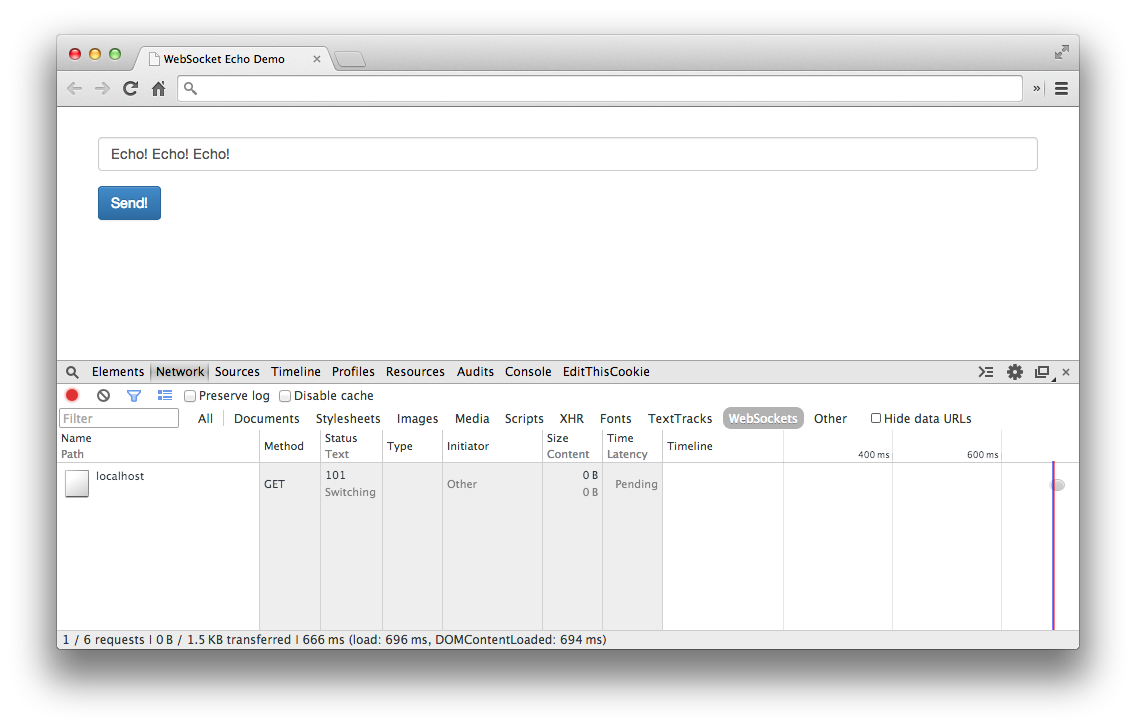
Select the Network tab and refresh the example HTML. In the table you should see an entry for the HTML, and an entry for the WebSocket connection with status of “101 Switching Protocols.” If you select it, you’ll see the Request Headers and Response Headers for this connection:
GET ws://localhost:8181/ HTTP/1.1
Pragma: no-cache
Origin: null
Host: localhost:8181
Sec-WebSocket-Key: qalODNsUoRp+2K9FJty55Q==
User-Agent: Mozilla/5.0 (Macintosh; Intel Mac OS X 10_8_3)...
Upgrade: websocket
Sec-WebSocket-Extensions: x-webkit-deflate-frame
Cache-Control: no-cache
Connection: Upgrade
Sec-WebSocket-Version: 13
HTTP/1.1 101 Switching Protocols
Connection: Upgrade
Sec-WebSocket-Accept: nambQ7W9imtAIYpzsw4hNNuGD58=
Upgrade: websocket
If you’re used to seeing HTTP headers, this should look no different. We do have a few extra headers here, including Connection: Upgrade, Sec-Websocket-Key, Upgrade: websocket, which I’ll explain further in Chapter 8. For now, relish in your first WebSocket example, and get ready to learn why WebSocket should be on your radar for your next project.
The ability today to create desktop-like applications in the browser is achieved primarily by using Comet and Ajax. To use either solution, developers have relied on hacks in servers and clients alike to keep connections open longer and fake a long-running connection.
While these hacks technically work, they create resource allocation issues on servers. With existing methods, the perceived latency to the end user may be low, but the efficiency on the backend leaves a lot to be desired. Long polling makes unnecessary requests and keeps a constant stream of opening and closing connections for your servers to deal with. There is no facility for layering other protocols on top of Comet or Ajax, and even if you could, the simplicity is just not there.
WebSocket gives you the ability to use an upgraded HTTP request (Chapter 8 covers the particulars), and send data in a message-based way, similar to UDP and with all the reliability of TCP. This means a single connection, and the ability to send data back and forth between client and server with negligible penalty in resource utilization. You can also layer another protocol on top of WebSocket, and provide it in a secure way over TLS. Later chapters dive deeper into these and other features such as heartbeating, origin domain, and more.
One of the common pitfalls of choosing between WebSocket and long polling was the sad state of browser support. Today, the state of browser support for WebSocket is much brighter for the end user.
Table 1-1 shows the current state of browser support for WebSocket. For the most up-to-date information on WebSocket support, you can reference the Can I Use website.
| Browser | No support | Partial support | Full support |
|---|---|---|---|
IE |
Versions 8.0, 9.0 |
Version 10.0 and up |
|
Firefox |
Version 27.0 and up |
||
Chrome |
Version 31.0 and up |
||
Safari |
Version 7 and up |
||
Opera |
Version 20.0 and up |
||
iOS Safari |
Versions 3.2, 4.0–4.1 |
Versions 4.2–4.3, 5.0–5.1 |
Version 6.0 and up |
Opera Mini |
Versions 5.0–7.0 |
||
Android Browser |
Versions 2.1–4.3 |
Version 4.4 |
|
BlackBerry Browser |
Versions 7.0, 10.0 |
||
IE Mobile |
Version 10.0 |
As you’ll discover in Chapter 5, you can mitigate the lack of support in older browsers for native WebSocket by using framework libraries such as SockJS or Socket.IO.
This chapter introduced WebSocket and how to build a simple echo server using Node.js. You saw how to build a simple client for testing your WebSocket server, along with one simple way to test your WebSocket server using Chrome Developer Tools. The next chapters explore the WebSocket API, and the protocol, and you’ll learn how to layer other protocols on top of WebSocket to give you even more power.
This chapter exposes the details behind using the WebSocket application programming interface (API). WebSocket is an event-driven, full-duplex asynchronous communications channel for your web applications. It has the ability to give you real-time updates that in the past you would use long polling or other hacks to achieve. The primary benefit is reducing resource needs on both the client and (more important) the server.
While WebSocket uses HTTP as the initial transport mechanism, the communication doesn’t end after a response is received by the client. Using the WebSocket API, you can be freed from the constraints of the typical HTTP request/response cycle. This also means that as long as the connection stays open, the client and server can freely send messages asynchronously without polling for anything new.
Throughout this chapter you’ll build a simple stock-ticker client using WebSocket as data transport and learn about its simple API in the process. You’re going to create a new project folder, ch2, to store all of your code for this chapter. Your client code will be in a file named client.html, and your server code in a file named server.js.
The constructor for WebSocket requires a URL in order to initiate a connection to the server. By default, if no port is specified after the host, it will connect via port 80 (the HTTP port) or port 443 (the HTTPS port).
If you’re running a traditional web server on port 80 already, you’ll have to use a server that understands and can proxy the WebSocket connection, or can pass the connection through to your custom-written application. Chapter 5 presents one popular option using nginx for passing through an upgraded connection to your Node.js-based server.
For now, because you’ll be running the WebSocket server locally, without a web server proxying the connection, you can simply initialize the browser’s native WebSocket object with the following code:
varws=newWebSocket("ws://localhost:8181");
You now have a WebSocket object called ws that you can use to listen for events. The section “WebSocket Events” details various events available to listen for. Table 2-1 lists the constructor parameters available with WebSocket.
| Parameter name | Description |
|---|---|
|
|
|
Parameter specifying subprotocols that may be used as an array or single string |
The second optional parameter in the WebSocket constructor is protocols, passed in headers as Sec-WebSocket-Protocol. This can be either a single protocol string or an array of protocol strings. These indicate subprotocols, so a single server can implement multiple WebSocket subprotocols. If nothing is passed, an empty string is assumed. If subprotocols are supplied and the server does not accept any of them, the connection will not be established. In Chapter 4 you’ll build a subprotocol for STOMP and learn how to use that over WebSocket.
If there is an attempt to initiate a WebSocket connection while using HTTPS at the origin website, but using the non-TLS protocol method of ws://, a SECURITY_ERR will be thrown. In addition, you’ll receive the same error if attempting to connect to a WebSocket server over a port to which the user agent blocks access (typically 80 and 443 are always allowed).
Following is a list of protocol types available to use with WebSocket:
In the spec for WebSocket RFC 6455, section 11.5 defines the Subprotocol Name Registry for IANA-maintained registrations.
In addition, you can use open protocols that are unregistered, such as Extensible Messaging and Presence Protocol (XMPP) or Simple Text Oriented Message Protocol (STOMP), and various others.
You are free to design any protocol you like, as long as your server and client both support it. It is recommended that you use names that contain the ASCII version of the domain name of the subprotocol’s originator; for example, chat.acme.com.
The example you’ll build relies on static data to make life easier. Your server will have a list of stock symbols with predefined values and randomize the price changes across a spectrum of small positive/negative values.
To show a cleaner-looking UI and ease the CSS modification process, you’ll use Twitter’s Bootstrap and jQuery. Copy and paste the contents of the following code snippet into your client.html file:
<!DOCTYPE html><htmllang="en"><head><title>Stock Chart over WebSocket</title><metacharset="utf-8"><metahttp-equiv="X-UA-Compatible"content="IE=edge"><metaname="viewport"content="width=device-width, initial-scale=1"><linkrel="stylesheet"href="http://bit.ly/cdn-bootstrap-css"><linkrel="stylesheet"href="http://bit.ly/cdn-bootstrap-theme"><scriptsrc="http://bit.ly/cdn-bootstrap-jq"></script><scriptlanguage="text/javascript">// code from chapter goes here</script></head><bodylang="en"><divclass="vertical-center"><divclass="container"><h1>Stock Chart over WebSocket</h1><tableclass="table"id="stockTable"><thead><tr><th>Symbol</th><th>Price</th></tr></thead><tbodyid="stockRows"><tr><td><h3>AAPL</h3></td><tdid="AAPL"><h3><spanclass="label label-default">95.00</span></h3></td></tr><tr><td><h3>MSFT</h3></td><tdid="MSFT"><h3><spanclass="label label-default">50.00</span></h3></td></tr><tr><td><h3>AMZN</h3></td><tdid="AMZN"><h3><spanclass="label label-default">300.00</span></h3></td></tr><tr><td><h3>GOOG</h3></td><tdid="GOOG"><h3><spanclass="label label-default">550.00</span></h3></td></tr><tr><td><h3>YHOO</h3></td><tdid="YHOO"><h3><spanclass="label label-default">35.00</span></h3></td></tr></tbody></table></div></div><scriptsrc="http://bit.ly/maxcdn-bootstrap-js"></script></body></html>
The API for WebSocket is based around events. This section covers the four events that your stock-ticker code can listen for. I’ll give descriptions of each, describe how to handle situations you’ll see in the field, and build the example using what you learn. For the example, you need to define a few bits of sample data to pass to the server:
varstock_request={"stocks":["AAPL","MSFT","AMZN","GOOG","YHOO"]};varstocks={"AAPL":0,"MSFT":0,"AMZN":0,"GOOG":0,"YHOO":0};
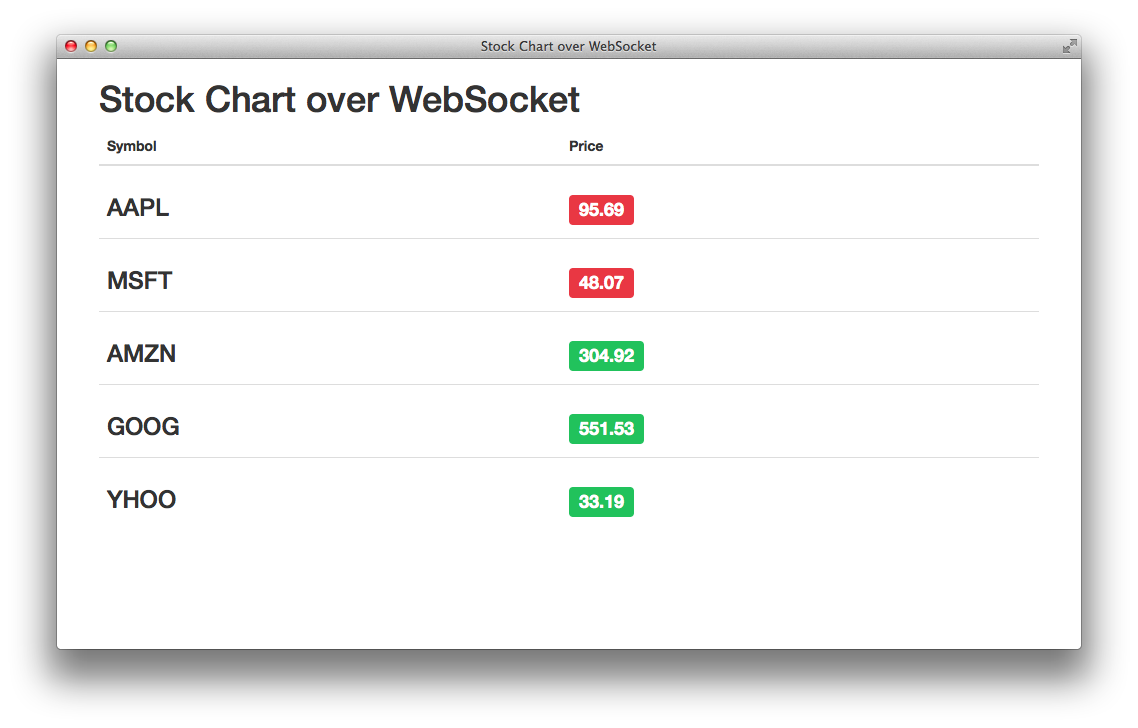
Figure 2-1 shows what your stock application looks like after you hook up the server and client.
The first structure, stock_request, is passed after the successful connection between client and server and asks that the server keep telling you about the updated pricing on these specific stocks. The second structure, stocks, is a simple associative array that will hold the changing values passed back from the server and then used to modify the text in the table and colors.
WebSocket fires four events, which are available from the JavaScript API and defined by the W3C:
open
message
error
close
With JavaScript, you listen for these events to fire either with the handler on<event name>, or the addEventListener() method. Your code will provide a callback that will execute every time that event gets fired.
When the WebSocket server responds to the connection request, and the handshake is complete, the open event fires and the connection is established. Once this happens, the server has completed the handshake and is ready to send and receive messages from your client application:
// WebSocket connection establishedws.onopen=function(e){console.log("Connection established");ws.send(JSON.stringify(stock_request));};
From within this handler you can send messages to the server and output the status to the screen, and the connection is ready and available for bidirectional communication. The initial message being sent to the server over WebSocket is the stock_request structure as a JSON string. Your server now knows what stocks you want to get updates on and will send them back to the client in one-second intervals.
After you’ve established a connection to the WebSocket server, it will be available to send messages to (you’ll look at that in “WebSocket Methods”), and receive messages. The WebSocket API will prepare complete messages to be processed in the onmessage handler.
Chapter 8 covers the WebSocket protocol in more detail, including information about frames and the data flow back and forth between the server and client. For now, the only thing to remember is that when the server has data, the WebSocket API will call the onmessage handler:
// UI update functionvarchangeStockEntry=function(symbol,originalValue,newValue){varvalElem=$('#'+symbol+' span');valElem.html(newValue.toFixed(2));if(newValue<originalValue){valElem.addClass('label-danger');valElem.removeClass('label-success');}elseif(newValue>originalValue){valElem.addClass('label-success');valElem.removeClass('label-danger');}}// WebSocket message handlerws.onmessage=function(e){varstocksData=JSON.parse(e.data);for(varsymbolinstocksData){if(stocksData.hasOwnProperty(symbol)){changeStockEntry(symbol,stocks[symbol],stocksData[symbol]);stocks[symbol]=stocksData[symbol];}}};
You can see from this short snippet that the handler is receiving a message from the server via an onmessage callback. When querying for data, the data attribute will contain updated stock values. The preceding code snippet does the following:
Parses the JSON response within e.data
Iterates over the associative array
Ensures that the key exists in the array
Calls your UI update fragment
Assigns the new stock values to your local array
You’re passing around regular strings here, but WebSocket has full support for sending text and binary data.
When a failure happens for any reason at all, the handler you’ve attached to the error event gets fired. When an error occurs, it can be assumed that the WebSocket connection will close and a close event will fire. Because the close event happens shortly after an error in some instances, the code and reason attributes can give you some indication as to what happened. Here’s a sample of how to handle the error case, and possibly reconnect to the WebSocket server as well:
ws.onerror=function(e){console.log("WebSocket failure, error",e);handleErrors(e);};
The close event fires when the WebSocket connection closes, and the callback onerror will be executed. You can manually trigger calling the onclose event by executing the close() method on a WebSocket object, which will terminate the connection with the server. Once the connection is closed, communication between client and server will not continue. The following example zeros out the stocks array upon a close event being fired to show cleaning up resources:
ws.onclose=function(e){console.log(e.reason+" "+e.code);for(varsymbolinstocks){if(stocks.hasOwnProperty(symbol)){stocks[symbol]=0;}}}ws.close(1000,'WebSocket connection closed')
As mentioned briefly in “Event: Error”, two attributes, code and reason, are conveyed by the server and could indicate an error condition to be handled and/or a reason for the close event (other than normal expectation). Either side may terminate the connection via the close() method on the WebSocket object, as shown in the preceding code. Your code can also use the boolean attribute wasClean to find out if the termination was clean, or to see the result of an error state.
The readyState value will move from closing (2) to closed (3). Now let’s move on to the methods available to your WebSocket object.
The creators of WebSocket kept its methods pretty simple—there are only two: send() and close().
When your connection has been established, you’re ready to start sending (and receiving) messages to/from the WebSocket server. The client application can specify what type of data is being passed in and will accept several, including string and binary values. As shown earlier, the client code is sending a JSON string of listed stocks:
ws.send(JSON.stringify(stock_request));
Of course, performing this send just anywhere won’t be appropriate. As we’ve discussed, WebSocket is event-driven, so you need to ensure that the connection is open and ready to receive messages. You can achieve this in two main ways.
You can perform your send from within the onopen event:
varws=newWebSocket("ws://localhost:8181");ws.onopen=function(e){ws.send(JSON.stringify(stock_request));}
Or you can check the readyState attribute to ensure that the WebSocket object is ready to receive messages:
functionprocessEvent(e){if(ws.readyState===WebSocket.OPEN){// Socket open, send!ws.send(e);}else{// Show an error, queue it for sending later, etc}}
You close the WebSocket connection or terminate an attempt at connection is done via the close() method. After this method is called, no more data can be sent or received from this connection. And calling it multiple times has no effect.
Here’s an example of calling the close() method without arguments:
// Close WebSocket connectionws.close();
Optionally, you can pass a numeric code and a human-readable reason through the close() method. This gives some indication to the server as to why the connection was closed on the client end. The following code shows how to pass those values. Note that if you don’t pass a code, the status 1000 is assumed, which means CLOSE_NORMAL:
// Close the WebSocket connection with reason.ws.close(1000,"Goodbye, World!");
Table 2-2 lists the status codes you can use in the WebSocket close() method.
| Status code | Name | Description |
|---|---|---|
0–999 |
Reserved and not used. |
|
1000 |
|
Normal closure; the connection successfully completed. |
1001 |
|
The endpoint is going away, either because of a server failure or because the browser is navigating away from the page that opened the connection. |
1002 |
|
The endpoint is terminating the connection due to a protocol error. |
1003 |
|
The connection is being terminated because the endpoint received data of a type it cannot accept. |
1004 |
|
The endpoint is terminating the connection because a data frame was received that is too large. |
1005 |
|
Reserved. Indicates that no status code was provided even though one was expected. |
1006 |
|
Reserved. Used to indicate that a connection was closed abnormally. |
1007–1999 |
Reserved for future use by the WebSocket standard. |
|
2000–2999 |
Reserved for use by WebSocket extensions. |
|
3000–3999 |
Available for use by libraries and frameworks. May not be used by applications. |
|
4000–4999 |
Available for use by applications. |
When the event for open is fired, the WebSocket object can have several possible attributes that can be read in your client applications. This section presents the attributes and the best practices for using them in your client code.
The state of the WebSocket connection can be checked via the read-only WebSocket object attribute readyState. The value of readyState will change, and it is a good idea to check it before committing to send any data to the server.
Table 2-3 shows the values you will see reflected in the readyState attribute.
| Attribute name | Attribute value | Description |
|---|---|---|
|
|
The connection is not yet open. |
|
|
The connection is open and ready to communicate. |
|
|
The connection is in the process of closing. |
|
|
The connection is closed or couldn’t be opened. |
Each of these values can be checked at different points for debugging, and for understanding the lifecycle of your connection to the server.
Also included with the attributes is the amount of data buffered for sending to the server. While this is mostly used when sending binary data, because the data size tends to be much larger the browser will take care of properly queueing the data for send. Because you’re dealing only with the client code at this point (the next chapter deals with the protocol), much of the behind-the-scenes is hidden from your view. Use of the bufferedAmount attribute can be useful for ensuring that all data is sent before closing a connection, or performing your own throttling on the client side.
Reflecting back to the constructor for WebSocket, the optional protocol argument allows you to send one or many subprotocols that the client is asking for. The server decides which protocol it chooses, and this is reflected in this attribute for the WebSocket connection. The handshake when completed should contain a selection from one that was sent by the client, or empty if none were chosen or offered.
Now that you have a working client that will connect to a WebSocket server to retrieve stock quotes, it’s time to show what the server looks like:
varWebSocketServer=require('ws').Server,wss=newWebSocketServer({port:8181});varstocks={"AAPL":95.0,"MSFT":50.0,"AMZN":300.0,"GOOG":550.0,"YHOO":35.0}functionrandomInterval(min,max){returnMath.floor(Math.random()*(max-min+1)+min);}varstockUpdater;varrandomStockUpdater=function(){for(varsymbolinstocks){if(stocks.hasOwnProperty(symbol)){varrandomizedChange=randomInterval(-150,150);varfloatChange=randomizedChange/100;stocks[symbol]+=floatChange;}}varrandomMSTime=randomInterval(500,2500);stockUpdater=setTimeout(function(){randomStockUpdater();},randomMSTime)}randomStockUpdater();wss.on('connection',function(ws){varclientStockUpdater;varsendStockUpdates=function(ws){if(ws.readyState==1){varstocksObj={};for(vari=0;i<clientStocks.length;i++){symbol=clientStocks[i];stocksObj[symbol]=stocks[symbol];}ws.send(JSON.stringify(stocksObj));}}clientStockUpdater=setInterval(function(){sendStockUpdates(ws);},1000);varclientStocks=[];ws.on('message',function(message){varstock_request=JSON.parse(message);clientStocks=stock_request['stocks'];sendStockUpdates(ws);});ws.on('close',function(){if(typeofclientStockUpdater!=='undefined'){clearInterval(clientStockUpdater);}});});
After execution, the server code runs a function for a variable amount of time (between 0.5s and 2.5s) and updates the stock prices. It does this to appear as random as possible in a book example without requiring code to go out and retrieve real stock prices (see Chapter 4 for that). Your frontend is expecting to receive a static list of five stocks retrieved from the server. Simple. After receiving the connection event from the client, the server sets up a function to run every second and sends back the list of five stocks with randomized prices once a second. The server can accept requests for different stocks as long as those stock symbols and a starting price are added to the stocks JavaScript object defined in the server.
If you’ve coded anything for the Web over the years, it should come as no surprise that browsers do not always have support for the latest technology. Because some older browsers don’t support the WebSocket API, it is important to check for compatibility before using it. Chapter 5 presents alternatives if the client browsers used by your community of users don’t support the WebSocket API. For now, here is a quick way to check whether the API is supported on the client:
if(window.WebSocket){console.log("WebSocket: supported");// ... code here for doing WebSocket stuff}else{console.log("WebSocket: unsupported");// ... fallback mode, or error back to user}
This chapter went over essential details of the WebSocket API and how to use each of them within your client application. It discussed the API’s events, messages, attributes, and methods, and showed some sample code along the way.
In Chapter 3, you’ll write a bidirectional chat application, learning how to pass messages back and forth with multiple connected clients.
Your first full-fledged example is to build a bidirectional chat using WebSocket. The end result will be a server that accepts WebSocket connections and messages for your “chat room” and fans the messages out to connected clients. The WebSocket protocol itself is simple, so to write your chat application, you will manage the collection of message data in an array and hold the socket and unique UUID for the client in locally scoped variables.
Long polling is a process that keeps a connection to the server alive without having data immediately sent back to the client. Long polling (or a long-held HTTP request) sends a server request that is kept open until it has data, and the client will receive it and reopen a connection soon after receiving data from the server. This, in effect, allows for a persistent connection with the server to send data back and forth.
In practice, two common techniques are available for achieving this. In the first technique, XMLHttpRequest is initiated and then held open, waiting for a response from the server. Once this is received, another request is made to the server and held open, awaiting more data. The other technique involves writing out custom script tags possibly pointing to a different domain (cross-domain requests are not allowed with the first method). Requests are then handled in a similar manner and reopened in the typical long-polling fashion.
Long polling is the most common way of implementing this type of application on the Web today. What you will see in this chapter is a much simpler and more efficient method of implementation. In subsequent chapters you will tackle the compatibility issue of older browsers that may not yet support WebSocket.
Chapter 1 showed a basic server that accepted a WebSocket connection and sent any received message from a connected client to the console. Let’s take another look at that code, and add features required for implementing your bidirectional chat:
varWebSocketServer=require('ws').Server,wss=newWebSocketServer({port:8181});wss.on('connection',function(socket){console.log('client connected');socket.on('message',function(message){console.log(message);});});
The WebSocketServer provided by the popular ws Node module gets initialized and starts listening on port 8181. You can follow this by listening for a client connection event and the subsequent message events that follow. The connection event accepts a callback function where you pass a socket object to be used for listening to messages after a successful connection has occurred. This works well to show off a simple connection for our purposes, and now you’re going to build on top of that by tracking the clients that connect, and sending those messages out to all other connected clients.
The WebSocket protocol does not provide any of this functionality by default; the responsibility for creation and tracking is yours. In later chapters, you will dive into libraries such as Socket.IO that extend the functionality of WebSocket and provide a richer API and backward compatibility with older browsers.
Figure 3-1 shows what the chat application looks like currently.
Building on the code from Chapter 1, import a Node module for generating a UUID. First things first, you’ll use npm to install node-uuid:
% npm install node-uuid
varuuid=require('node-uuid');
A UUID is used to identify each client that has connected to the server and add them to a collection. A UUID allows you to target messages from specific users, operate on those users, and provide data targeted for those users as needed.
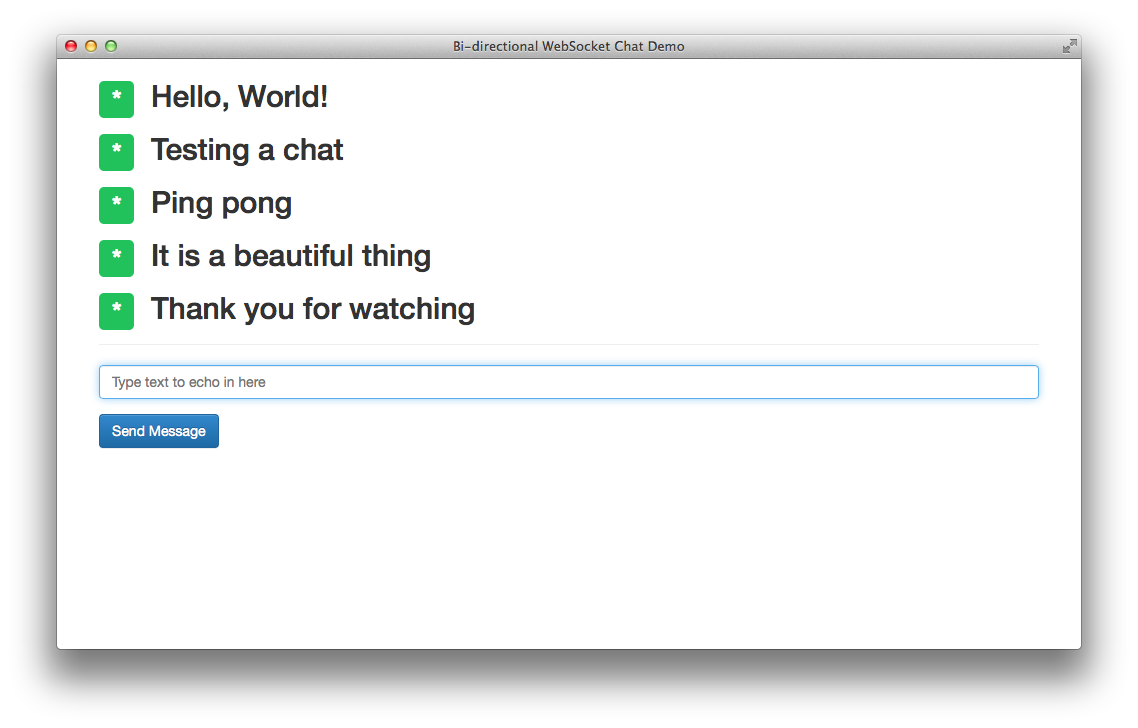
Next, you’ll enhance the connection to the server with identification and logging:
varclients=[];wss.on('connection',function(ws){varclient_uuid=uuid.v4();clients.push({"id":client_uuid,"ws":ws});console.log('client [%s] connected',client_uuid);
Assigning the result of the uuid.v4 function to the client_uuid variable allows you to reference it later when identifying message sends and any close event. A simple metadata object in the form of JSON contains the client UUID along with the WebSocket object.
When the server receives a message from the client, it iterates over all known connected clients using the clients collection, and send back a JSON object containing the message and id of the message sender. You may notice that this also sends back the message to the client that initiated, and this simplicity is by design. On the frontend client you don’t update the list of messages unless it is returned by the server:
ws.on('message',function(message){for(vari=0;i<clients.length;i++){varclientSocket=clients[i].ws;console.log('client [%s]: %s',clients[i].id,message);clientSocket.send(JSON.stringify({"id":client_uuid,"message":message}));}});
The WebSocket server now receives message events from any of the connected clients. After receiving the message, it iterates through the connected clients and sends a JSON string that includes the unique identifier for the client who sent the message, and the message itself. Every connected client will receive this JSON string and can show this to the end user.
A server must handle error states gracefully and still continue to work. You haven’t yet defined what to do in the case of a WebSocket close event, but there is something missing that needs to be addressed in the message event code. The collection of connected clients needs to account for the possibility that the client has gone away, and ensure that before you send a message, there is still an open WebSocket connection.
The new code is as follows:
ws.on('message',function(message){for(vari=0;i<clients.length;i++){varclientSocket=clients[i].ws;if(clientSocket.readyState===WebSocket.OPEN){console.log('client [%s]: %s',clients[i].id,message);clientSocket.send(JSON.stringify({"id":client_uuid,"message":message}));}}});
You now have a server that will accept connections from WebSocket clients, and will rebroadcast received messages to all connected clients. The final thing to handle is the close event:
ws.on('close',function(){for(vari=0;i<clients.length;i++){if(clients[i].id==client_uuid){console.log('client [%s] disconnected',client_uuid);clients.splice(i,1);}}});
The server listens for a close event, and upon receiving it for this client, iterates through the collection and removes the client. Couple this with the check of the readyState flag for your WebSocket object and you’ve got a server that will work with your new client.
Later in this chapter you will broadcast the state of disconnected and connected clients along with your chat messages.
The simple echo client from Chapter 1 can be used as a jumping off point for your chat web app. All the connection handling will work as specified, and you’ll need to listen for the onmessage event that was being ignored previously:
ws.onmessage=function(e){vardata=JSON.parse(e.data);varmessages=document.getElementById('messages');varmessage=document.createElement("li");message.innerHTML=data.message;messages.appendChild(message);}
The client receives a message from the server in the form of a JSON object. Using JavaScript’s built-in parsing function returns an object that can be used to extract the message field. Let’s add a simple unordered list above the form so messages can be appended using the DOM methods shown in the function. Add the following above the form element:
<ulid="messages"></ul>
Messages will be appended to the list using the DOM method appendChild, and shown in every connected client. So far you have only scratched the surface of functionality that shows off the seamless messaging provided by the WebSocket protocol. In the next section you will implement a method of identifying clients by a nickname.
The WebSocket specification has been left relatively simplistic in terms of implementation and lacks some of the features seen in alternatives. In your code so far, you have already gone a long way toward identifying each client individually. Now you can add nickname identities to the client and server code:
varnickname=client_uuid.substr(0,8);clients.push({"id":client_uuid,"ws":ws,"nickname":nickname});
The server gets modified to add the field nickname to a locally stored JSON object for this client. To uniquely identify a connected client who hasn’t identified a nickname choice, you can use the first eight characters of the UUID and assign that to the nickname variable. All of this will be sent back over an open WebSocket connection between the server and all of its connected clients.
You will use a convention used with Internet Relay Chat clients (IRC) and accept /nick new_nick as the command for changing the client nickname from the random string:
if(message.indexOf('/nick')==0){varnickname_array=message.split(' ')if(nickname_array.length>=2){varold_nickname=nickname;nickname=nickname_array[1];for(vari=0;i<clients.length;i++){varclientSocket=clients[i].ws;varnickname_message="Client "+old_nickname+" changed to "+nickname;clientSocket.send(JSON.stringify({"id":client_uuid,"nickname":nickname,"message":nickname_message}));}}}
This code checks for the existence of the /nick command followed by a string of characters representing a nickname. Update your nickname variable, and you can build a notification string to send to all connected clients over the existing open connection.
The clients don’t yet know about this new field, because the JSON you originally sent included only id and message. Add the field with the following code:
clientSocket.send(JSON.stringify({"id":client_uuid,"nickname":nickname,"message":message}));
The appendLog function within the client frontend needs to be modified to support the addition of the nickname variable:
functionappendLog(nickname,message){varmessages=document.getElementById('messages');varmessageElem=document.createElement("li");varmessage_text="["+nickname+"] - "+message;messageElem.innerHTML=message_text;messages.appendChild(messageElem);}
Figure 3-2 shows your chat application with the addition of identity.
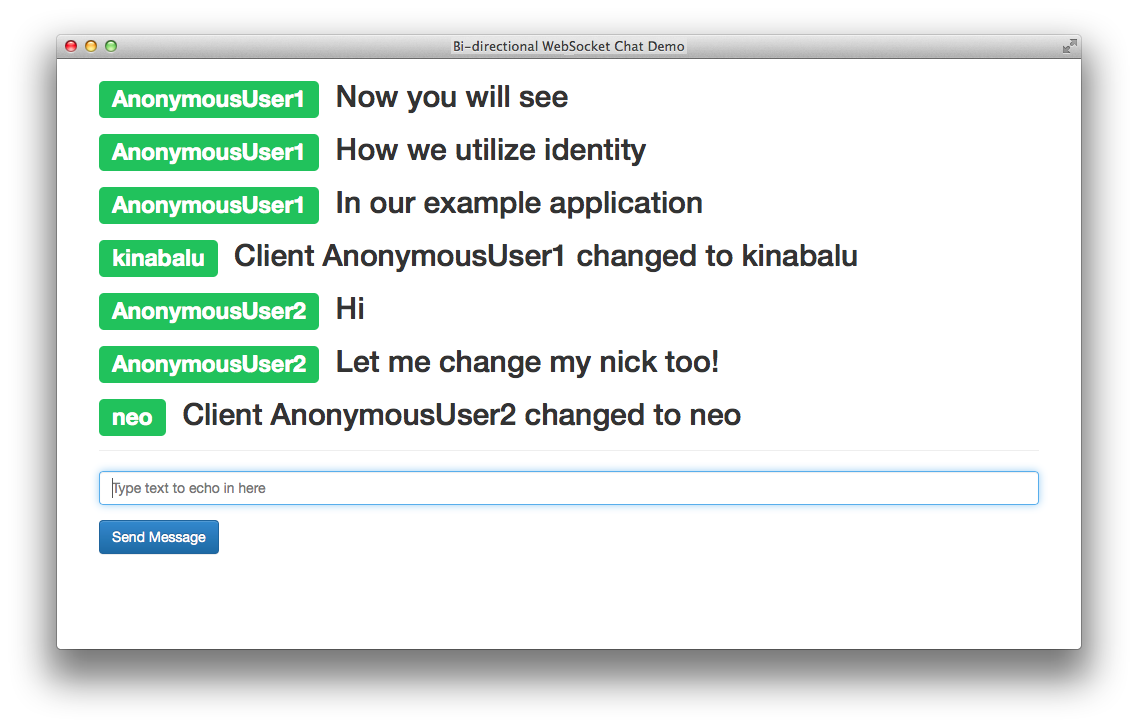
Your new function signature includes nickname along with message, and you can preface every message now with the client nickname. At the client’s request, you can see a nickname preceding messages rather than a random string of characters before each message.
If you were in the middle of a conversation and another person magically appeared in front of you and started talking, that would be odd. To alleviate this, you can add notification of connection or disconnection and send that back to all connected clients.
Your code has several instances where you’ve gone through the trouble of iterating over all connected clients, checking the readyState of the socket, and sending a similar JSON-encoded string with varying values. For good measure, you’ll extract this into a generic function, and call it from several places in your code instead:
functionwsSend(type,client_uuid,nickname,message){for(vari=0;i<clients.length;i++){varclientSocket=clients[i].ws;if(clientSocket.readyState===WebSocket.OPEN){clientSocket.send(JSON.stringify({"type":type,"id":client_uuid,"nickname":nickname,"message":message}));}}}
With this generic function, you can send notifications to all connected clients, handle the connection state, and encode the string as the client expects, like so:
wss.on('connection',function(ws){...wsSend("message",client_uuid,nickname,message);...});
Sending messages to all clients post connection is now simple. Connection messages, disconnection messages, and any notification you need are now handled with your new function.
Here is the complete code for the server:
varWebSocket=require('ws');varWebSocketServer=WebSocket.Server,wss=newWebSocketServer({port:8181});varuuid=require('node-uuid');varclients=[];functionwsSend(type,client_uuid,nickname,message){for(vari=0;i<clients.length;i++){varclientSocket=clients[i].ws;if(clientSocket.readyState===WebSocket.OPEN){clientSocket.send(JSON.stringify({"type":type,"id":client_uuid,"nickname":nickname,"message":message}));}}}varclientIndex=1;wss.on('connection',function(ws){varclient_uuid=uuid.v4();varnickname="AnonymousUser"+clientIndex;clientIndex+=1;clients.push({"id":client_uuid,"ws":ws,"nickname":nickname});console.log('client [%s] connected',client_uuid);varconnect_message=nickname+" has connected";wsSend("notification",client_uuid,nickname,connect_message);ws.on('message',function(message){if(message.indexOf('/nick')===0){varnickname_array=message.split(' ');if(nickname_array.length>=2){varold_nickname=nickname;nickname=nickname_array[1];varnickname_message="Client "+old_nickname+" changed to "+nickname;wsSend("nick_update",client_uuid,nickname,nickname_message);}}else{wsSend("message",client_uuid,nickname,message);}});varcloseSocket=function(customMessage){for(vari=0;i<clients.length;i++){if(clients[i].id==client_uuid){vardisconnect_message;if(customMessage){disconnect_message=customMessage;}else{disconnect_message=nickname+" has disconnected";}wsSend("notification",client_uuid,nickname,disconnect_message);clients.splice(i,1);}}}ws.on('close',function(){closeSocket();});process.on('SIGINT',function(){console.log("Closing things");closeSocket('Server has disconnected');process.exit();});});
Here is the complete code for the client:
<!DOCTYPE html><htmllang="en"><head><title>Bi-directional WebSocket Chat Demo</title><metacharset="utf-8"><metaname="viewport"content="width=device-width, initial-scale=1"><linkrel="stylesheet"href="http://bit.ly/cdn-bootstrap-css"><linkrel="stylesheet"href="http://bit.ly/cdn-bootstrap-theme"><scriptsrc="http://bit.ly/cdn-bootstrap-jq"></script><script>varws=newWebSocket("ws://localhost:8181");varnickname="";ws.onopen=function(e){console.log('Connection to server opened');}functionappendLog(type,nickname,message){varmessages=document.getElementById('messages');varmessageElem=document.createElement("li");varpreface_label;if(type==='notification'){preface_label="<span class=\"label label-info\">*</span>";}elseif(type=='nick_update'){preface_label="<span class=\"label label-warning\">*</span>";}else{preface_label="<span class=\"label label-success\">"+nickname+"</span>";}varmessage_text="<h2>"+preface_label+" "+message+"</h2>";messageElem.innerHTML=message_text;messages.appendChild(messageElem);}ws.onmessage=function(e){vardata=JSON.parse(e.data);nickname=data.nickname;appendLog(data.type,data.nickname,data.message);console.log("ID: [%s] = %s",data.id,data.message);}ws.onclose=function(e){appendLog("Connection closed");console.log("Connection closed");}functionsendMessage(){varmessageField=document.getElementById('message');if(ws.readyState===WebSocket.OPEN){ws.send(messageField.value);}messageField.value='';messageField.focus();}functiondisconnect(){ws.close();}</script></head><bodylang="en"><divclass="vertical-center"><divclass="container"><ulid="messages"class="list-unstyled"></ul><hr/><formrole="form"id="chat_form"onsubmit="sendMessage(); return false;"><divclass="form-group"><inputclass="form-control"type="text"id="message"name="message"placeholder="Type text to echo in here"value=""autofocus/></div><buttontype="button"id="send"class="btn btn-primary"onclick="sendMessage();">Send Message</button></form></div></div><scriptsrc="http://bit.ly/cdn-bootstrap-minjs"></script></body></html>
Figure 3-3 shows the chat application with the addition of notifications.
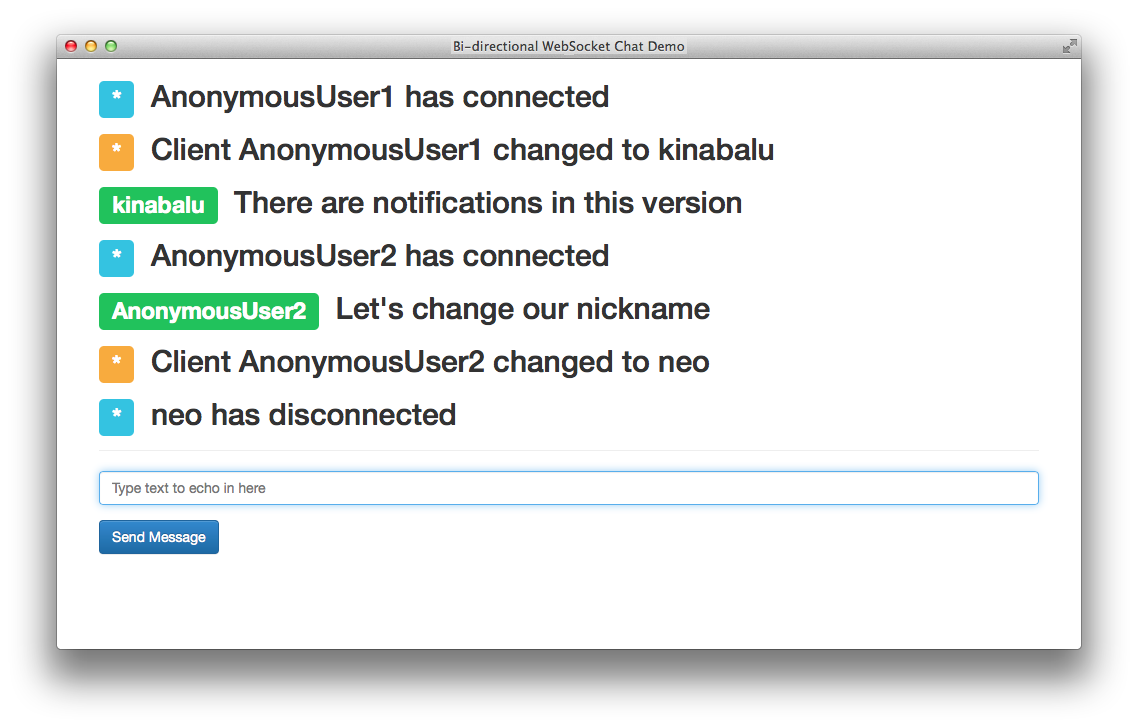
In this chapter you built out a complete chat client and server using the WebSocket protocol. You steadily built a simplistic chat application into something more robust with only the WebSocket API as your technology of choice. Effective and optimized experiences between internal applications, live chat, and layering other protocols over HTTP are all possibilities that are native to WebSocket.
All of this is possible with other technology, and as you’ve probably learned before, there’s more than one way to solve a problem. Comet and Ajax are both battle tested to deliver similar experiences to the end user as provided by WebSocket. Using them, however, is rife with inefficiency, latency, unnecessary requests, and unneeded connections to the server. Only WebSocket removes that overhead and gives you a socket that is full-duplex, bidirectional, and ready to rock ‘n’ roll.
In the next chapter you’ll take a look at a popular protocol for layering on top of WebSocket, to provide transport without the overhead of HTTP.
In previous chapters you built simple applications using the WebSocket API both on the server side and on the client. You built a multiclient chat application with WebSocket as the communication layer. Chapter 2 briefly discussed using subprotocols with WebSocket. Now you’ll take everything learned thus far and layer another protocol on top of WebSocket.
STOMP, an acronym for Simple Text Oriented Messaging Protocol, is a simple HTTP-like protocol for interacting with any STOMP message broker. Any STOMP client can interact with the message broker and be interoperable among languages and platforms.
In this chapter you’ll create a client and server that communicate using the STOMP protocol over WebSocket rather than TCP. You will learn how to connect to RabbitMQ by using the Web-Stomp plug-in, which uses WebSocket as its underlying wire protocol.
As in previous chapters, you’ll create a new project folder for Chapter 4 examples with the abbreviated name ch4. The examples in this chapter again use a stock ticker, and use messaging to subscribe for stock updates. In addition, there are two examples in this chapter, so create a subdirectory named proxy. You’ll create several files to build a real working table of stock prices powered by STOMP over WebSocket. Here are the files that you will use:
The frontend code base; as before, copy the template used in Chapter 1.
The WebSocket proxy that talks to RabbitMQ using AMQP while listening for STOMP over WebSocket.
A convenience library you’ll build for sending and receiving STOMP requests.
A daemon that pulls stocks from Yahoo Finance by using YQL and pulls and pushes messages to RabbitMQ.
STOMP is a simple text protocol that is similar to the HTTP convention of an uppercase command such as CONNECT, followed by a list of header key/value pairs, and then optional content, which in the case of STOMP is null-terminated. It is also possible and highly recommended to pass content-length as a parameter to any commands, and the server will use that value instead as the length of passed content.
As you saw in Chapter 2, the native browser API for connecting to a WebSocket server takes two parameters: URL and protocol. Of those two parameters, only the URL is required, but now you will be making use of the second. If you research registered protocols in the WebSocket Subprotocol Name Registry, you’ll find an entry for STOMP 1.0, which uses the identifier v10.stomp. As we’ll discuss in Chapter 8, you are not required to use a registered subprotocol with WebSocket. The subprotocol does need to be supported by the client and the server. In your client, then, open a connection the following way:
varws;varconnect=function(){if(!ws||ws.readyState!==1){ws=newWebSocket("ws://localhost:8181","v10.stomp");ws.addEventListener('message',onMessageHandler);ws.addEventListener('open',onOpenHandler);ws.addEventListener('close',onCloseHandler);}}connect();
As with the previous examples, you open a connection to a WebSocket server on port 8181. But in addition, you pass a second parameter in the constructor, which can either be a string or an array of strings identifying requested subprotocols from the server. Notice also that a connect function adds the event listeners for open, message, and close by using the addEventListener method. This is the essential method of connecting. If you need to reconnect upon a lost connection, the event handlers will not automatically reattach if you’re using the ws.on<eventname> method.
After opening the WebSocket connection, an open event is fired, and you can officially send and receive messages from the server. If you reference the STOMP 1.0 protocol doc, the following will be shown as the method of initial connection to a STOMP-capable server:
CONNECT
login: <username>
passcode: <passcode>

^@
For our example, you’ll use websockets as the username and rabbitmq as the password for all authentication with the STOMP server and RabbitMQ. So within your code, pass the following with the WebSocket send function:
varframe="CONNECT\n"+"login: websockets\n";+"passcode: rabbitmq\n";+"nickname: anonymous\n";+"\n\n\0";ws.send(frame);
You can see in the STOMP 1.0 protocol doc that every frame sent ends with the null terminator ^@, or if the content-length header is passed, it will be used instead. Because of the simplicity of WebSocket, you’re carefully mapping STOMP frames on top of WebSocket frames in these examples. If the server accepts the connection and authentication information, it passes back the following to the client, which includes a session-id to be used in later calls to the server:
CONNECTED
session: <session-id>

^@
The chapter introduction mentioned stomp_helper.js, and before you get to the server code, let’s review the library that will assist in sending and receiving STOMP-compatible frames (Example 4-1).
(function(exports){exports.process_frame=function(data){varlines=data.split("\n");varframe={};frame['headers']={};if(lines.length>1){frame['command']=lines[0];varx=1;while(lines[x].length>0){varheader_split=lines[x].split(':');varkey=header_split[0].trim();varval=header_split[1].trim();frame['headers'][key]=val;x+=1;}frame['content']=lines.splice(x+1,lines.length-x).join("\n");frame['content']=frame['content'].substring(0,frame['content'].length-1);}returnframe;};exports.send_frame=function(ws,frame){vardata=frame['command']+"\n";varheader_content="";for(varkeyinframe['headers']){if(frame['headers'].hasOwnProperty(key)){header_content+=key+": "+frame['headers'][key]+"\n";}}data+=header_content;data+="\n\n";data+=frame['content'];data+="\n\0";ws.send(data);};exports.send_error=function(ws,message,detail){headers={};if(message)headers['message']=message;elseheaders['message']="No error message given";exports.send_frame(ws,{"command":"ERROR","headers":headers,"content":detail});};})(typeofexports==='undefined'?this['Stomp']={}:exports);
The ceremonial items preceding and following the functions in this library allow this to be used within the browser, and on the server side with Node.js in a require statement.
The first function to describe is process_frame, which takes a STOMP frame as a parameter called data and creates a JavaScript object containing everything parsed out for use within your application. As described in Table 4-1, it splits out the command, all the headers, and any content within the frame and returns an object fully parsed.
| Key | Description |
|---|---|
|
STOMP command passed by the frame |
|
A JavaScript object with key/values for the passed-in headers |
|
Any content sent in the frame that was null-terminated or adheres to the |
Next up and equally important is the send_frame function, which accepts a WebSocket object and a STOMP frame in the form of a JavaScript object exactly as you send back from the process_frame function. The send_frame function takes each of the values passed in, creates a valid STOMP frame, and sends it off over the passed-in WebSocket parameter.
The remaining function is send_error, which takes the parameters shown in Table 4-2.
| Name | Description |
|---|---|
|
The active WebSocket connection |
|
Error message explaining what went wrong |
|
Optional detail message passed in the body |
You’ll be able to use the aforementioned set of functions to send and receive STOMP frames without any string parsing within your client or server code.
On the server side, upon receiving a connection event, your initial task to get connected is to parse what is received in the message frame (using the stomp_helper.js library), and send back a CONNECTED command or an ERROR if it failed:
wss.on('connection',function(ws){varsessionid=uuid.v4();ws.on('message',function(message){varframe=Stomp.process_frame(message);varheaders=frame['headers'];switch(frame['command']){case"CONNECT":Stomp.send_frame(ws,{command:"CONNECTED",headers:{session:sessionid,},content:""});break;default:Stomp.send_error(ws,"No valid command frame");break;}});...});
As you’ve seen in previous examples, the connection event is received, and work begins. There exists an extra layer thanks to STOMP, which is handled somewhat by your library. After assigning a sessionid to a UUID, and upon receiving a message event from the client, you run it through the process_frame function to get a JavaScript object representing the received frame. To process whatever command was sent, the program uses a case statement, and upon receiving the CONNECT command, you send back a STOMP frame letting the client know the connection was received and is accepted along with the sessionid for this session.
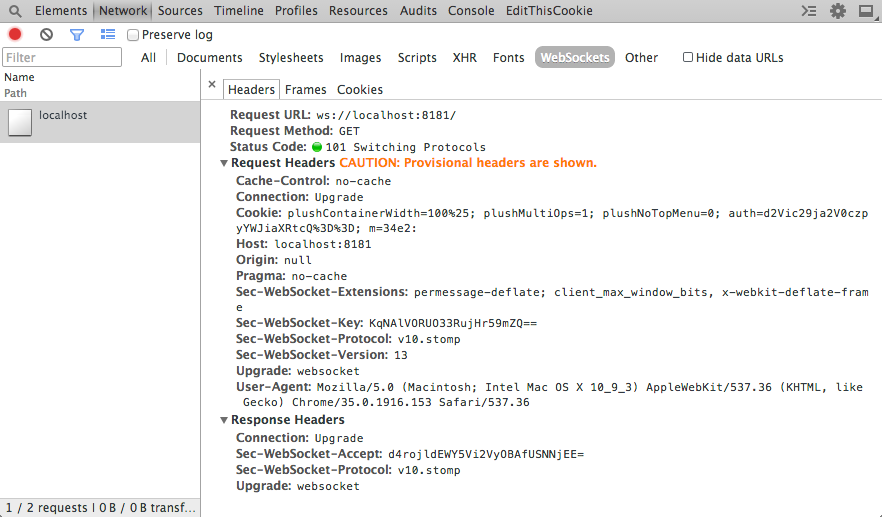
Take a quick look at Figure 4-1, which shows a completed connection event.
Looking at the screen grab, you’ll see a new header for the HTTP request and response: Sec-WebSocket-Protocol. In Chapter 8 you can read a more in-depth discussion about the various headers and dive deep into the protocol nitty-gritty. Here in the stocks example, the request sent along includes the subprotocol v10.stomp. If the server accepts this subprotocol, it will, in turn, respond with that subprotocol name, and the client can continue sending and receiving frames to the server. If the server does not speak v10.stomp, you will receive an error.
The default implementation of the ws library will accept any subprotocol that is sent along. Let’s write some extra code to ensure that only the v10.stomp protocol gets accepted here. To do this, you’ll write a special handler when initializing the WebSocketServer object:
varWebSocketServer=require('ws').Server,wss=newWebSocketServer({port:8181,handleProtocols:function(protocol,cb){varv10_stomp=protocol[protocol.indexOf("v10.stomp")];if(v10_stomp){cb(true,v10_stomp);return;}cb(false);}});
In Chapter 2 the overview of the WebSocket API showed that you could pass in more than one subprotocol. In your handler code, you’ll have to unpack an array of subprotocols that includes the one the client is after. Because you’re using Node.js, you can use conventions like Array.indexOf without worrying about things like Internet Explorer not supporting it. With the preceding code, you’ve successfully performed a handshake accepting a new subprotocol.
As noted earlier, your first example implementing STOMP will be the stocks app. You’ll send requests over STOMP from the client to the server, and the server will send and receive messages with RabbitMQ while the stocks daemon spits out intermittent updates to prices. To get started, get a RabbitMQ server in place to queue your messages for the server.
You’ll need to get a RabbitMQ node running for your WebSocket server to proxy the requests to. To do that, you’ll need to have Vagrant set up on your development machine. Vagrant is a handy tool for creating portable and lightweight development virtual machines. Installing it is as easy as grabbing the proper install binary for your operating system on the download page for Vagrant.
Vagrant is a lightweight tool to create and configure reproducible and portable development environments. It uses VirtualBox or VMWare under the hood for the virtualized instances, and allows for several providers including Puppet, Chef, Ansible, and even simple shell scripts.
After you have Vagrant installed successfully, create a new file in your project folder called Vagrantfile and include the following:
Vagrant.configure("2")do|config|config.vm.hostname="websockets-mq"config.vm.box="precise64"config.vm.box_url="http://bit.ly/ubuntu-vagrant-precise-box-amd64"config.vm.network:forwarded_port,guest:5672,host:5672config.vm.network:forwarded_port,guest:15672,host:15672config.vm.provision"shell",path:"setup_rabbitmq.sh"config.vm.provider:virtualboxdo|v|v.name="websockets-mq"endend
The configuration file will be used to create a new Vagrant instance using the image at config.vm.box_url. It forwards ports 5672 and 15672 to the local machine, and specifies a shell-based provisioning to be run upon vagrant up, which is included in the following code:
#!/bin/bashcat >> /etc/apt/sources.list<<EOTdeb http://www.rabbitmq.com/debian/ testing mainEOTwget http://www.rabbitmq.com/rabbitmq-signing-key-public.asc apt-key add rabbitmq-signing-key-public.asc apt-get update apt-get install -q -y screen htop vim curl wget apt-get install -q -y rabbitmq-server# RabbitMQ Pluginsservice rabbitmq-server stop rabbitmq-pluginsenablerabbitmq_management service rabbitmq-server start# Create our websockets user and remove guestrabbitmqctl delete_user guest rabbitmqctl add_user websockets rabbitmq rabbitmqctl set_user_tags websockets administrator rabbitmqctl set_permissions -p / websockets".*"".*"".*"rabbitmq-plugins list
The shell provisioning script does the following:
Adds a new source for the latest RabbitMQ install
Installs a few dependencies along with the RabbitMQ server
Enables the rabbitmq_management plug-in
Removes the guest user and creates your new default user rabbitmq:websockets
Gives that user administrator privileges
Now from the command line, initialize and provision the new Vagrant instance with the following:
vagrant up
This command reads the Vagrantfile and runs the provisioning script to install the RabbitMQ server on an Ubuntu 12.04 amd64 instance for use in the examples. The following code shows a printout similar to what you should see after you complete the command. Immediately after this output, Vagrant will run the provisioning shell script that sets up RabbitMQ:
Bringing machine'default'up with'virtualbox'provider...==> default: Importing base box'precise64'...==> default: Matching MAC addressforNAT networking...==> default: Setting the name of the VM: websockets-mq==> default: Clearing any previouslysetforwarded ports...==> default: Clearing any previouslysetnetwork interfaces...==> default: Preparing network interfaces based on configuration... default: Adapter 1:nat==> default: Forwarding ports... default:5672=>5672(adapter 1)default:15672=>15672(adapter 1)default:22=>2222(adapter 1)==> default: Booting VM...==> default: Waitingformachine to boot. This may take a few minutes... default: SSH address: 127.0.0.1:2222 default: SSH username: vagrant default: SSH auth method: private key
The included Vagrantfile, which provides the configuration for Vagrant, opens the following ports:
The default port for amqp
The web management interface
After you have the proper dependencies installed, it’s time to circle back and get the server talking to RabbitMQ. The connection to RabbitMQ can happen independently of the WebSocket work. Upon execution of the server, you’ll open a connection to RabbitMQ and perform two actions with the connection:
Listen to the stocks.result queue for updates on pricing
Publish stock requests at a set interval to the stocks.work queue
To do that with your server, you’ll need to talk AMQP with RabbitMQ. There are many libraries out there for Node.js to talk AMQP, and the simplest one I’ve found is node-amqp. Use the command npm to install the library in your project folder:
npm install amqp
Your initial actions will be upon a valid CONNECT request initiated from the client to the server. You’ll create a connection to the running RabbitMQ instance, using the authentication information passed in from the client.
Here’s how you’ll connect to the RabbitMQ instance you installed:
amqp=require('amqp');varconnection=amqp.createConnection({host:'localhost',login:'websockets',password:'rabbitmq'});
The library being used (amqp) fires events that can be listened for using callbacks. In the following snippet, it listens for the ready event and runs the callback function provided. Upon ensuring the connection is ready, you start listening to the stocks.result queue and subscribe to receive updates to messages that get passed back through it. These messages will contain updated pricing for stocks that have been requested. You’ll notice that within the blocks, the stomp_helper.js library is being used to send MESSAGE frames back to the clients that have asked for updates on particular stocks:
connection.on('ready',function(){connection.queue('stocks.result',{autoDelete:false,durable:true},function(q){q.subscribe(function(message){vardata;try{data=JSON.parse(message.data.toString('utf8'));}catch(err){console.log(err);}for(vari=0;i<data.length;i++){for(varclientinstocks){if(stocks.hasOwnProperty(client)){varws=stocks[client].ws;for(varsymbolinstocks[client]){if(stocks[client].hasOwnProperty(symbol)&&symbol===data[i]['symbol']){stocks[client][symbol]=data[i]['price'];varprice=parseFloat(stocks[client][symbol]);Stomp.send_frame(ws,{"command":"MESSAGE","headers":{"destination":"/queue/stocks."+symbol},content:JSON.stringify({price:price})});}}}}}});});});
The payload being received from the stocks.result message queue looks like the following:
[{"symbol":"AAPL","price":149.34},{"symbol":"GOOG","price":593.2600000000037}]
After parsing the payload, the block of code iterates over the result, and over a master list of stocks being stored across all connected clients. In the process of iterating over a JavaScript object, you must check to ensure that the value being passed during the iteration is part of the object by using myObject.hasOwnProperty(myIteratorValue). It maps the updated price with the price being stored and sends a message back to the connected client using STOMP over that specific destination.
When the client makes a request for a new stock, it gets added to the master list of stocks. A separate block of code runs at an interval to send the master list to a stocks.work queue, which gets picked up by the daemon.js to find the updated price and send it back over the stocks.result queue. One of the prime reasons you do this is that it is easier to scale and the system can process more requests if needed by adding more daemons, without any adverse effect. The following code shows the updater method. It creates a string array of stock symbols, and publishes that to the stocks.work queue:
varupdater=setInterval(function(){varst=[];for(varclientinstocks){for(varsymbolinstocks[client]){if(symbol!=='ws'){st.push(symbol);}}}if(st.length>0){connection.publish('stocks.work',JSON.stringify({"stocks":st}),{deliveryMode:2});}},10000);
The following code is for the daemon, which takes in an array of stock symbols, and spits out a JSON object with the up-to-date values using Yahoo YQL. Create a new file called daemon.js and insert the following snippet:
#!/usr/bin/env nodevarrequest=require('request'),amqp=require('amqp');module.exports=Stocks;functionStocks(){varself=this;}Stocks.prototype.lookupByArray=function(stocks,cb){varcsv_stocks='"'+stocks.join('","')+'"';varenv_url='&env=http%3A%2F%2Fdatatables.org%2Falltables.env&format=json';varurl='https://query.yahooapis.com/v1/public/yql';vardata=encodeURIComponent('select * from yahoo.finance.quotes where symbol in ('+csv_stocks+')');vardata_url=url+'?q='+data+env_url;request.get({url:data_url,json:true},function(error,response,body){varstocksResult=[];if(!error&&response.statusCode==200){vartotalReturned=body.query.count;for(vari=0;i<totalReturned;++i){varstock=body.query.results.quote[i];varstockReturn={'symbol':stock.symbol,'price':stock.Ask};stocksResult.push(stockReturn);}cb(stocksResult);}else{console.log(error);}});};varmain=function(){varconnection=amqp.createConnection({host:'localhost',login:'websockets',password:'rabbitmq'});varstocks=newStocks();connection.on('ready',function(){connection.queue('stocks.work',{autoDelete:false,durable:true},function(q){q.subscribe(function(message){varjson_data=message.data.toString('utf8');vardata;console.log(json_data);try{data=JSON.parse(json_data);}catch(err){console.log(err);}stocks.lookupByArray(data.stocks,function(stocks_ret){vardata_str=JSON.stringify(stocks_ret);connection.publish('stocks.result',data_str,{deliveryMode:2});});});});});};if(require.main===module){main();}
This daemon can be executed using node daemon.js, and will connect to RabbitMQ and process the work it pulls from the RabbitMQ message queue. Several conventions should be noticeable from the WebSocket STOMP server, including the method of connection, and processing the ready event. The daemon will listen to the stocks.work queue, however, to get a list of stocks to look up, and in the end push the result back into the stocks.result queue. If you take a look at the Stocks.prototype.lookupByArray function, it’s issuing a Yahoo YQL call for the stocks requested and returning the JSON payload, as seen earlier.
Previous to diving into the server interaction with RabbitMQ, you saw how to achieve connection with STOMP over WebSocket by using your library. Let’s continue on and flesh out the rest of the commands necessary to interact with the frontend:
wss.on('connection',function(ws){varsessionid=uuid.v4();stocks[sessionid]={};connected_sessions.push(ws);stocks[sessionid]['ws']=ws;ws.on('message',function(message){varframe=Stomp.process_frame(message);varheaders=frame['headers'];switch(frame['command']){case"CONNECT":Stomp.send_frame(ws,{command:"CONNECTED",headers:{session:sessionid},content:""});break;case"SUBSCRIBE":varsubscribeSymbol=symbolFromDestination(frame['headers']['destination']);stocks[sessionid][subscribeSymbol]=0;break;case"UNSUBSCRIBE":varunsubscribeSymbol=symbolFromDestination(frame['headers']['destination']);deletestocks[sessionid][unsubscribeSymbol];break;case"DISCONNECT":console.log("Disconnecting");closeSocket();break;default:Stomp.send_error(ws,"No valid command frame");break;}});varsymbolFromDestination=function(destination){returndestination.substring(destination.indexOf('.')+1,destination.length);};varcloseSocket=function(){ws.close();if(stocks[sessionid]&&stocks[sessionid]['ws']){stocks[sessionid]['ws']=null;}deletestocks[sessionid];};ws.on('close',function(){closeSocket();});process.on('SIGINT',function(){console.log("Closing via break");closeSocket();process.exit();});
As with previous examples, upon a successful connection a UUID is generated that will act as your sessionid for passing back and forth in the STOMP frame. The frame will get parsed and placed in the JavaScript object. From there you perform different actions based on the frame command passed. You’ve already seen the code for CONNECT, and so we’ll focus on SUBSCRIBE, UNSUBSCRIBE, and DISCONNECT.
Both subscribing and unsubscribing modify your stocks object. With subscribing, you’re adding a new symbol to the existing list of stocks for that sessionid. Unsubscribing is met by just removing that symbol from the list so it won’t be passed back to the client. Receiving a DISCONNECT command from the client is met with closing the WebSocket and cleaning up any references to that and the client in the stocks object. Because this is an app to be run from the console, there is a chance of receiving a Ctrl-C, which would break the connection. To handle this, hook into the SIGINT event that gets fired, so you can close the socket gracefully and on your own terms.
The client is a simple interface with stocks that vary in price based on data returned from the server. The form at the top takes a stock symbol as input, and attempts to SUBSCRIBE over STOMP to get updates from the server. While the subscribe request is being sent, a table row gets added for the new symbol as well as a placeholder of “Retrieving…” while waiting for data to return.
Figure 4-2 shows a working example of the stock-ticker application.
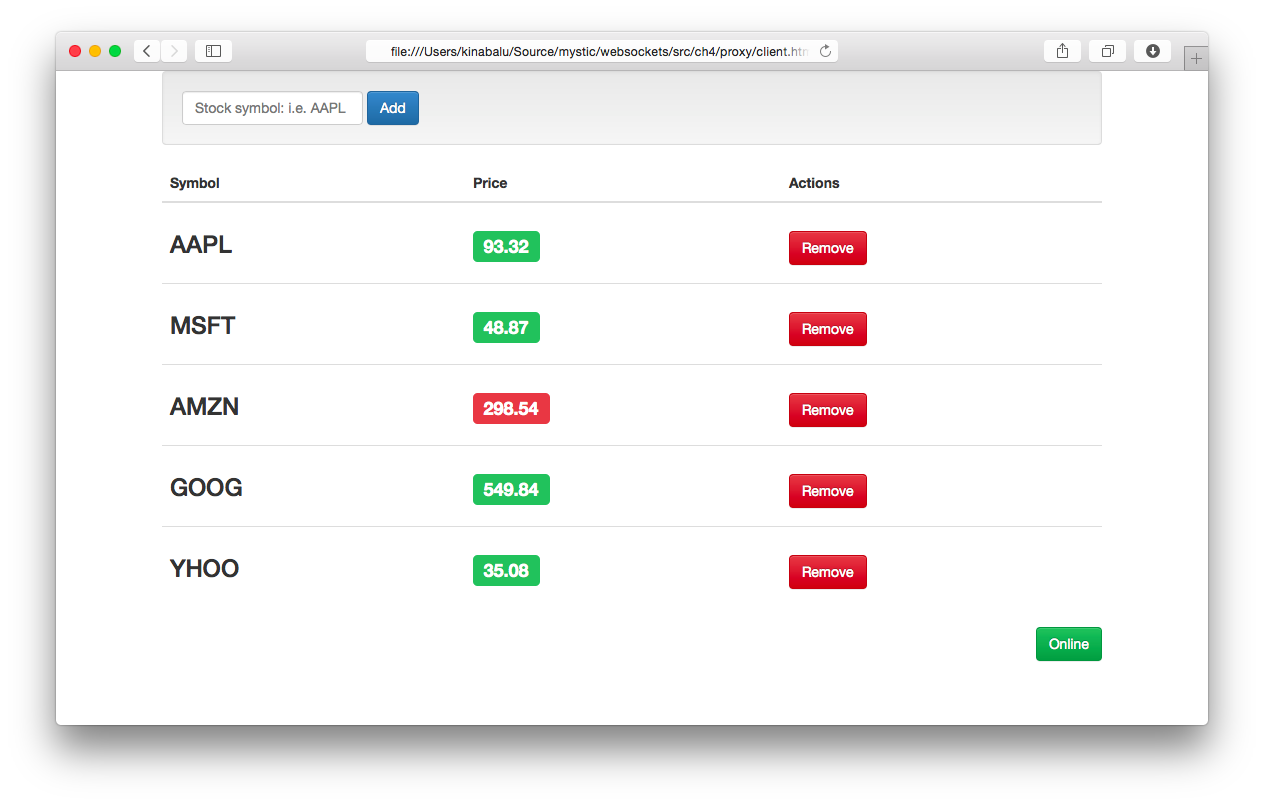
The markup for the example is shown in the following code. It outlines a simple form that calls the subscribe method (which is described next), and the table containing the stock symbols, the up-to-date pricing from the service, and a Remove button. In addition, a status indicator of connection to the WebSocket server has been added:
<divclass="vertical-center"><divclass="container"><divclass="well"><formrole="form"class="form-inline"id="add_form"onsubmit="subscribe($('#symbol').val()); return false;"><divclass="form-group"><inputclass="form-control"type="text"id="symbol"name="symbol"placeholder="Stock symbol: i.e. AAPL"value=""autofocus/></div><buttontype="submit"class="btn btn-primary">Add</button></form></div><tableclass="table"id="stockTable"><thead><tr><th>Symbol</th><th>Price</th><th>Actions</th></tr></thead><tbodyid="stockRows"><trid="norows"><tdcolspan="3">No stocks found, add one above</td></tr></tbody></table><divclass="text-right"><p><aid="connection"class="btn btn-danger"href="#"onclick="connect();">Offline</a></p></div></div></div>
Several functions make up your client app, and they will be described separately in the order they are executed. The first function is subscribe, which adds a new symbol to the interface and communicates that to the server:
varsubscribe=function(symbol){if(stocks.hasOwnProperty(symbol)){alert('You already added the '+symbol+' symbol');return;}stocks[symbol]=0.0;Stomp.send_frame(ws,{"command":"SUBSCRIBE","headers":{"destination":"/queue/stocks."+symbol,},content:""});vartbody=document.getElementById('stockRows');varnewRow=tbody.insertRow(tbody.rows.length);newRow.id=symbol+'_row';newRow.innerHTML='<td><h3>'+symbol+'</h3></td>'+'<td id="'+symbol+'">'+'<h3>'+'<span class="label label-default">Retrieving..</span>'+'</h3>'+'</td>'+'<td>'+'<a href="#" onclick="unsubscribe(\''+symbol+'\');" class="btn btn-danger">Remove</a></td>';if(!$('#norows').hasClass('hidden')){$('#norows').addClass('hidden');}$('#symbol').val('');$('#symbol').focus();}
The first thing to do whenever receiving user input is to perform validation, which is done to check whether you already have that symbol in your list and return an error if found. If all is fine, you initialize the symbol to your list of stocks and send a new SUBSCRIBE frame to the server. The rest of the code is for the user interface, and adds a table row with default values while waiting for a legitimate value from the server.
If a client can subscribe to a stock update, it should be able to unsubscribe as well. This next snippet does exactly that, and is referenced in the previous code for remove:
Object.size=function(obj){varsize=0,key;for(keyinobj){if(obj.hasOwnProperty(key))size++;}returnsize;};varunsubscribe=function(symbol){Stomp.send_frame(ws,{"command":"UNSUBSCRIBE","headers":{"destination":"/queue/stocks."+symbol,},content:""});$('#'+symbol+'_row').remove();deletestocks[symbol];if(Object.size(stocks)===0){$('#norows').removeClass('hidden');}}
To unsubscribe, you perform the following tasks:
Send the UNSUBSCRIBE command in a STOMP frame with the symbol as part of the destination.
Remove the table row in the user interface.
Remove the entry in the stocks object.
Check whether there are any more symbols in the stocks object, and if not, unhide the #norows HTML block.
The functions in the previous two code snippets represent all the actions a user can take with your interface: subscribe and unsubscribe. Now let’s circle back to the connect() function, shown previously, without details about its handlers. The first is the more elaborate form using the stomp_helper.js library for handling open events:
varonOpenHandler=function(e){Stomp.send_frame(ws,{"command":"CONNECT","headers":{login:"websockets",passcode:"rabbitmq"},content:""});}
In short, upon getting a connection to your WebSocket server, you send your CONNECT command with authentication information over the STOMP frame. In order to close the connection, you follow a similar path, and provide notification for the user interface:
varonline=false;varstatusChange=function(newStatus){$('#connection').html((newStatus?'Online':'Offline'));$('#connection').addClass((newStatus?'btn-success':'btn-danger'));$('#connection').removeClass((newStatus?'btn-danger':'btn-success'));online=newStatus;}varswitchOnlineStatus=function(){if(online)logoff();elseconnect();}varlogoff=function(){statusChange(false);Stomp.send_frame(ws,{"command":"DISCONNECT"});returnfalse;}
The HTML code contains a status button that when clicked will run the switchOnlineStatus function. This will either disconnect you from the server, or reconnect you as seen earlier. The logoff function sends your DISCONNECT command using a STOMP frame to tell the server to perform its own disconnection routines.
All of the work done on the server end to retrieve stocks through RabbitMQ is put into action in the following code. As you’ll see, your onMessageHandler takes data from the server and updates the frontend with the new values:
varupdateStockPrice=function(symbol,originalValue,newValue){varvalElem=$('#'+symbol+' span');valElem.html(newValue.toFixed(2));varlostValue=(newValue<originalValue);valElem.addClass((lostValue?'label-danger':'label-success'))valElem.removeClass((lostValue?'label-success':'label-danger'))}varonMessageHandler=function(e){frame=Stomp.process_frame(e.data);switch(frame['command']){case"CONNECTED":statusChange(true);break;case"MESSAGE":vardestination=frame['headers']['destination'];varcontent;try{content=JSON.parse(frame['content']);}catch(ex){console.log("exception:",ex);}varsub_stock=destination.substring(destination.indexOf('.')+1,destination.length);updateStockPrice(sub_stock,stocks[sub_stock],content.price);stocks[sub_stock]=content.price;break;}}
When a new message event is passed, the code will process that data as a STOMP frame. The process will be to check for either the CONNECTED or MESSAGE commands from the frame. Commands that will be processed include the following:
CONNECTEDCall the statusChange(true) to change the button status to be “Online”
MESSAGERetrieve the destination header, parse the content, and update the stock price in the interface
The client has active portions with the subscribe/unsubscribe/disconnect portion, and the passive portions that cater to receiving data from the server. The MESSAGE events being fired will be tied to a STOMP destination, and the stocks will be updated accordingly based on the data retrieved.
You’ve successfully implemented the most basic functions available in the STOMP 1.0 protocol. The mapping between STOMP and WebSocket can be simple, and there are a few more commands that we have left unimplemented in your node-based proxy: BEGIN, COMMIT, ACK, and on the server side RECEIPT.
Mapping STOMP over WebSocket achieves two things: it shows you how to layer a different protocol over WebSocket by using the subprotocol portion of the spec, and enables talking to an AMQP server without specifically needing a server component written. In the next section, you’ll learn how to connect to RabbitMQ with SockJS by using the Web-Stomp plugin with RabbitMQ. You’ll learn more about using SockJS in Chapter 5, which covers compatibility with older browsers. Several options are available for messaging, including these popular ones:
Throughout this chapter you’ve been writing a server implementation of STOMP to effectively proxy commands to RabbitMQ by using AMQP. This hopefully has shown how easy it can be to layer another protocol on top of WebSocket. Now to round out the end of the chapter, you’ll learn how to set up RabbitMQ with Web-Stomp, a plug-in that allows RabbitMQ to accept STOMP. The plug-in exposes a SockJS-compatible bridge over HTTP, which is an alternative transport library (this is discussed in more detail in Chapter 5). It enhances compatibility for older browsers that don’t have native support for WebSocket.
For a more complete implementation of your work in this chapter, download the STOMP Over WebSocket library. It provides a JavaScript client library for accessing servers using STOMP 1.0 and 1.1 over WebSocket, and a Node.js library for doing the same over WebSocket along with an option for TCP sockets via STOMP.
Let’s edit that provisioning shell script used earlier in the chapter to set up RabbitMQ. In the script, after stopping the RabbitMQ server during installation, you’ll add the following line:
rabbitmq-plugins enable rabbitmq_web_stomp
In addition, your virtual machine needs editing, so forward port 15674, which is opened by the previously installed plug-in to listen for SockJS requests. You’ll modify the existing Vagrantfile and add the following line with all the other network config options:
config.vm.network :forwarded_port, guest: 15674, host: 15674
After doing so, if the original VirtualBox instance is still running, you can run vagrant halt or vagrant destroy, and then rerun vagrant up to re-create the instance. If you’ve destroyed, then you’re done, and it will open the new port and turn on the new plug-in. If you’ve halted, you can perform the following tasks:
vagrant ssh
sudo su -
rabbitmq-plugins enable rabbitmq_web_stomp
This enables a new plug-in called Web-Stomp and exposes port 15674. Rabbit has standardized on using SockJS for all WebSocket communication, and we will discuss that library further in Chapter 5. To continue, you’ll want to download the JavaScript STOMP library available at stomp.js. Then you can continue changing up your client code to use the Web-Stomp endpoint.
Let’s build a simple echo client that subscribes to a queue named /topic/echo and then sends and receives messages. At the top of your HTML file, include the following JavaScript statements:
<scriptsrc="http://cdn.sockjs.org/sockjs-0.3.min.js"></script><scriptsrc="stomp.min.js"></script>
You can choose to download the minimized version as referenced in this code, or the unminimized version if you prefer. In either case, you can download the stomp-websocket library on GitHub.
Your HTML will be nearly identical to the previous echo example, and you’ll modify the JavaScript to suit your needs by using the RabbitMQ Web-Stomp plug-in and the Stomp.js library:
<!DOCTYPE html><html><head><title>Echo Server</title></head><bodylang="en"><h1>Web Stomp Echo Server</h1><ulid="messages"></ul><formonsubmit="send_message(); return false;"><inputtype="text"name="message"style="width: 200px;"id="message"placeholder="Type text to echo in here"value=""autofocus/><inputtype="button"value="Send!"onclick="send_message();"/></form></body></html>
Your first task is to initialize the RabbitMQ SockJS endpoint, and then pass that to the STOMP JavaScript library. The Stomp.js library allows you to use native WebSocket, or anything that offers the same API such as SockJS. Because SockJS doesn’t offer heartbeat support, you’ll keep it turned off. The Stomp.js library offers several opportunities for callback and for performing whatever task you’d like on the data that comes back. Here, you’re just outputting the data to the console:
varws=newSockJS('http://localhost:15674/stomp');varclient=Stomp.over(ws);client.heartbeat.outgoing=0;client.heartbeat.incoming=0;client.debug=function(str){console.log(str);}
When you connect to a RabbitMQ queue, you’ll simply offer login details, and a few callbacks along with the host (or virtualhost in RabbitMQ terms). The append_log function will be identical to that shown previously, but implementing the callbacks required for connect, error, and a new send_message function is shown here:
client.connect('websockets','rabbitmq',connect_callback,error_callback.'/');varconnect_callback=function(x){id=client.subscribe("/topic/echo",function(message){append_log(message.body);console.log(JSON.stringify(message.body));});};varerror_callback=function(error){console.log(error.headers.message);};
In connect_callback you issue a subscribe command for the queue /topic/echo so any messages that show up in that bin will be appended to your UI text area. The implementation of error_callback simply outputs any error received to the console for debugging as needed.
You now have a client that will echo messages dumped into the queue to a text area. Next you will hook up the submission process to a new send_message function that looks very close to the WebSocket version:
varsend_message=function(data){client.send("/topic/echo",{},document.getElementById('message').value);};
The major difference here is that rather than just sending through WebSocket, you provide the queue (destination) and extra headers, of which you pass none in this example.
In this chapter you created a subprotocol over WebSocket for STOMP 1.0. As the server got built, the client evolved to support the commands needed along the wire to support the protocol. In the end, while the client you built doesn’t fully support all of STOMP 1.0, it allowed you to witness how easy it is to layer another protocol on top of WebSocket and connect it to a message broker like RabbitMQ.
As you saw in Chapter 2, implementing STOMP over WebSocket is one of the “Registered Protocols” (and also falls under an “Open Protocol”). Nothing is stopping you from using the information in this chapter to create your own protocol for communication, because the WebSocket spec fully supports this.
The next chapter explores the compatibility issues you face when choosing to implement WebSocket, and how to ensure that you can start using the power of WebSocket today.
The technology behind WebSocket is to allow bidirectional communication between client and server. A native WebSocket implementation minimizes server resource usage and provides a consistent method of communicating between client and server. As with the adoption of HTML5 in client browsers, the landscape of support is relegated to modern browsers. That means no support for any user with Internet Explorer less than 10, and mobile browser support less than iOS Safari 6 and Chrome for Android.
Here are just some of the versions with RFC 6455 WebSocket support:
Internet Explorer 10
Firefox 6
Chrome 14
Safari 6.0
Opera 12.1
iOS Safari 6.0
Chrome for Android 27.0
This chapter outlines options for supporting older browsers that predate the WebSocket RFC 6455 spec when you want to take advantage of bidirectional communication in your application. The platforms you’ll look at solve compatibility issues with older client browsers, and add a layer of organization for your messages.
SockJS is a JavaScript library that provides a WebSocket-like object in the browser. The library is compatible with many more browsers due to its conditional use of multiple browser transports. It will use WebSocket if the option is available as a first choice. If a native connection is not available, it can fall back to streaming, and finally polling if that is also unavailable. This provides nearly full browser and restrictive proxy support, as shown in Table 5-1.
| Browser | WebSockets | Streaming | Polling |
|---|---|---|---|
IE 6, 7 |
No |
No |
jsonp-polling |
IE 8, 9 (cookies=no) |
No |
xdr-streaming |
xdr-polling |
IE 8, 9 (cookies=yes) |
No |
iframe-htmlfile |
iframe-xhr-polling |
IE 10 |
rfc6455 |
xhr-streaming |
xhr-polling |
Chrome 6-13 |
hixie-76 |
xhr-streaming |
xhr-polling |
Chrome 14+ |
hybi-10 / rfc6455 |
xhr-streaming |
xhr-polling |
Firefox <10 |
No |
xhr-streaming |
xhr-polling |
Firefox 10+ |
hybi-10 / rfc6455 |
xhr-streaming |
xhr-polling |
Safari 5 |
hixie-76 |
xhr-streaming |
xhr-polling |
Opera 10.70+ |
No |
iframe-eventsource |
iframe-xhr-polling |
Konqueror |
No |
No |
jsonp-polling |
To fully use the SockJS library, you need a server counterpart. The library has several options for the server counterpart, with more being written all the time. Following is a sampling of some of the server libraries available:
SockJS-node
SockJS-erlang
SockJS-tornado
SockJS-twisted
SockJS-ruby
SockJS-netty
SockJS-gevent (SockJS-gevent fork)
SockJS-go
For our needs, we’re going to stick with an all-JavaScript solution.
You’re going to revisit your chat application and make changes to use the SockJS libraries for server and client.
As mentioned, in order to fully use the SockJS client library on the browser, you require a valid server component:
varexpress=require('express');varhttp=require('http');varsockjs=require('sockjs');varuuid=require('uuid');
Your list of new libraries now includes SockJS, http from the standard Node.js library, and Express.
Node.js has a fully developed package manager with npm. They are usually installed together, and a simple call to npm install [package] will pull down the latest revision. The install will create a node_modules directory if it does not exist, and place the modules inside. If you’d like to install the module globally, you can use the -g flag. For more information, check out the docs.
These dependencies will not be available in Node.js by default, so run the following commands to install them:
npm install sockjs
npm install express
Next, you’ll create a SockJS object and listen for the connection event. The events used with SockJS-node are slightly different than similar ones from the WebSocket clients:
connection
data (equivalent to message with WebSocket)
close
error
Express does something interesting with its library by exporting a function as the interface to its module. This is used to create a new Express application and can be written a couple of ways:
varapp=express();
Or the much more terse:
varexpress=require('express')();
This creates an Express application and allows you to assign it to the variable right away. Behind the scenes, there’s some JavaScript magic happening by assigning the function to module.exports:
exports=module.exports=createApplication;...functioncreateApplication(){...}
Now you can create your new SockJS server by initializing express, creating an httpServer with the express application, and finally, creating a SockJS server that listens for the connection event:
varapp=express();varhttpServer=http.createServer(app);varsockServer=sockjs.createServer();sockServer.on('connection',function(conn){...conn.on('message',function(message){if(message.indexOf('/nick')===0){varnickname_array=message.split(' ');if(nickname_array.length>=2){varold_nickname=nickname;nickname=nickname_array[1];varnickname_message="Client "+old_nickname+" changed to "+nickname;wsSend("nick_update",client_uuid,nickname,nickname_message);}}else{wsSend("message",client_uuid,nickname,message);}});...}
The only change to the event handling from your previous code is listening for an event called data instead of message. In addition, you make a slight adjustment to your wsSend method to account for differences with the SockJS API:
varCONNECTING=0;varOPEN=1;varCLOSING=2;varCLOSED=3;functionwsSend(type,client_uuid,nickname,message){for(vari=0;i<clients.length;i++){varclientSocket=clients[i].connection;if(clientSocket.readyState===OPEN){clientSocket.write(JSON.stringify({"type":type,"id":client_uuid,"nickname":nickname,"message":message}));}}}
The WebSocket object you used previously had constants for the readyState property, but here you’ll define them in your client code (to avoid littering the code with integers). The SockJS connection object has the same readyState property, and you will check it against the OPEN constant, which has a value of 1. The other big change is the method for sending data back to the client, which is .write(message) instead of .send(message).
Now that you’ve converted everything from the WebSocket version to use the SockJS-specific code, you’ll initialize a new app with Express and bind the prefix /chat to your http.Server instance:
varapp=express();varhttpServer=http.createServer(app);sockServer.installHandlers(httpServer,{prefix:'/chat'});httpServer.listen(8181,'0.0.0.0');
The HTTP server will listen on port 8181 and respond to requests listening on any IP from the machine, as 0.0.0.0 denotes.
In the example from Chapter 3 you opened your HTML file without an HTTP server present. With SockJS and the other alternatives in this chapter, you’ll opt for serving the client and server from the same HTTP server. Here you set up your client.html and style.css to be sent back upon a request to http://localhost:8181/client.html:
express.get('/client.html',function(req,res){res.sendfile(__dirname+'/client.html');});express.get('/style.css',function(req,res){res.sendfile(__dirname+'/style.css');});
You have now successfully converted the plain WebSocket server to one that uses the SockJS library.
Let’s walk through how to convert the client to use the SockJS library. The first thing you’ll need at the beginning of any other JavaScript will be to include the SockJS library:
<scriptsrc="http://cdn.sockjs.org/sockjs-0.3.min.js"></script>
This library provides the SockJS object, which mimics the WebSocket library included in most modern browsers. The initialization also changes because you are not using the ws or wss protocol, but instead using http as the initial transport:
varsockjs=newSockJS("http://127.0.0.1:8181/chat");
For your WebSocket client code, you used the variable name ws. Here it seems more appropriate to rename it to sockjs. Find all instances of using ws in the code from Chapter 3, and replace them with sockjs. That is the extent of the changes required for the client. SockJS delivers nicely on an easy migration from native WebSocket to the SockJS library.
SockJS offers support for one or more streaming protocols for every major browser, which all work cross-domain and support cookies. Polling transports will be used in the event of older browsers and hosts with restrictive proxies as a viable fallback.
Next, you’ll take on changing your chat application to use the Socket.IO platform instead.
Using WebSocket directly is an easy decision when you can control the clients that are using your system. With most organizations having to cater to a heterogeneous client environment, another alternative is Socket.IO. The development behind Socket.IO looks to make real-time apps possible regardless of browser.
The library is able to perform this feat by gracefully falling back to different technologies that perform similar things. The transports used in the event that WebSocket is not available in the client include the following:
Adobe Flash Socket
Ajax long polling
Ajax multipart streaming
Forever iframe
JSONP polling
Using the native WebSocket implementation would be akin to using TCP directly to communicate. It’s certainly possible to do so, and perhaps in most cases the right choice, but there’s no shame in using a framework to do some of the heavy lifting for you. By default, Socket.IO will use a native WebSocket connection if browser interrogation deems it possible.
One of the alternative transports provided by Socket.IO is Adobe Flash Socket. This allows a WebSocket-like connection to be used over Adobe Flash in lieu of native support. This has the benefit of a socket connection, with very few drawbacks. However, one of the drawbacks is requiring another port to be open for the policy server. By default, Socket.IO will check port 10843 and attempt to use that if available.
Connecting to a Socket.IO server is first achieved by grabbing the client libraries. If the client you’re using is JavaScript, the simplest method of getting this done is simply referencing the Socket.IO server and including the socket.io.js file:
<scriptsrc="http://localhost:8181/socket.io/socket.io.js"></script>
The easiest path of serving the client library is from the Socket.IO server itself. If your web server and Socket.IO are both being served by the same host and port, you can omit the host and port from the call and reference it like any other file served from the web server. To serve the Socket.IO client library on the same host and port, you’ll have to either configure your web server to forward requests to the Socket.IO server, or clone the socket.io-client repository and place the files whersever you’d like.
If you’d like to aggressively cache the Socket.IO client library, a further configuration you can do is include the version number in the request like so:
<scriptsrc="/socket.io/socket.io.v1.0.js"></script>
As we discussed in Chapter 2, WebSocket uses four events, or “control frames.” With Socket.IO, everything is a lot more open-ended in the events department. The following events are fired from the framework itself:
The initial connection from a client that supplies a socket argument, which can be used for future communication with the client.
The event that emits when the client invokes socket.send.
The event that is fired whenever the client-server connection is closed.
Any event except for the reserved ones listed. The data argument is the data sent, and callback is used to send a reply.
First things first. After you include the JavaScript client library, you need to open a connection to the server:
varsocket=io.connect('http://localhost:8181');
Now that you have a Socket.IO connection, you can start listening for specific events that will be emitted from the server. Your client application can listen for any named event coming from the endpoint, and can also emit its own events to be listened to and reacted to from the server-side.
Let’s again revisit the chat example. Copy your code from SockJS mostly verbatim, and do initialization similar to the previous library:
varsocketio=require('socket.io');...varapp=express();varhttpServer=http.createServer(app);vario=socketio.listen(server);
Because Socket.IO uses open-ended naming for events, there is no need to shoehorn different incoming events within the same message construct. Therefore, with your Socket.IO code you split up messages and the nickname requests into separate events:
conn.on('message',function(data){wsSend("message",client_uuid,nickname,message);});...conn.on('nickname',function(nick){varold_nickname=nickname;nickname=nick.nickname;varnickname_message="Client "+old_nickname+" changed to "+nickname;wsSend('nickname',client_uuid,nickname,nickname_message);})
You’ve pushed the code for parsing a nickname request to the client, and can also listen for a separate event sent from the server for nickname-specific messages and logically process them differently if you choose.
When the client wants to communicate with the server, it performs the same API function, and emits a named event that the server can listen for. Due to the nature of serving the Socket.IO HTML on the same HTTP server, you are able to reference Socket.IO from the same domain without specifying:
<scriptsrc="/socket.io/socket.io.js"></script>
With SockJS, it closely maps the native WebSocket spec. With Socket.IO, the only similarity is listening for events and sending events back to the server. A number of events are fired from the Socket.IO framework, which should help keep you connected and knowledgeable about the connection and status:
Emitted when the connection with the server is successful
Emitted when the connection is being attempted with the server
Emitted when the connection has been disconnected with the server
Emitted when Socket.IO has failed to establish a connection with any and all transport mechanisms to fallback
Emitted when an error occurs that isn’t handled by other event types
Emitted when a message is received via a socket.send and callback is an optional acknowledgment function
Emitted when Socket.IO fails to reestablish a working connection after the connection drops
Emitted when Socket.IO successfully reconnects to the server.
Emitted when Socket.IO is attempting to reconnect with the server
Any event except for the reserved ones listed. Data argument is the data sent, and callback is used to send a reply
Also, as we discussed earlier, the socket.io-client is available if you’d like to serve the library without using the regular mechanism.
In your new client code base, the size grows a bit to handle pushing the nickname command parsing to the frontend, and emitting your new event nickname:
functionsendMessage(){varmessageField=document.getElementById('message');varmessage=messageField.value;if(message.indexOf('/nick')===0){varnickname_array=message.split(' ');if(nickname_array.length>=2){socket.emit('nickname',{nickname:nickname_array[1]});}}else{socket.send(messageField.value);}messageField.value='';messageField.focus();}
As you can see, you’ve moved the code originally in the server over to the client end, and are using the socket.emit(channel, data) call from Socket.IO to send your nickname change on to the server.
Everything else on the client is pretty much the same. You use Socket.IO’s method on(channel, data) to listen for specific events (reserved or otherwise), and process them as usual.
Now that you’ve written your first Socket.IO project, you can look through the documentation and review the extra features it provides on top of WebSocket and what we’ve discussed.
Let’s move on to one more project, which is of a commercial nature and in the same camp as Socket.IO in terms of the added features and value it provides on top of the native WebSocket implementation.
The final option you will look at is a layer that sits on top of WebSocket and offers the fallbacks you’ve seen in other solutions. The team behind Pusher has built out an impressive list of features to use with your application should you choose to use their service. In the same way as the other two solutions, Pusher has implemented a layer on top of WebSocket via its API along with a method of testing for acceptable fallback methods should the others fail.
The API is able to perform the fallbacks very similarly to Socket.IO by testing for WebSocket support, and in the event that fails, using the popular web-socket.js client, which substitutes a Flash object for in-browser WebSocket support. If Flash is not installed, or firewalls or proxies prevent a successful connection, the final fallback uses HTTP-based transports.
Similar to events that are on top of Socket.IO’s transport, the Pusher API has a few more tricks up its sleeve. It features channels as a public and private type, which allows you to filter and control communication to the server. A special type of channel is also available for presence, where the client can register member data to show online status.
The major difference here is that you’re including a third party in your communication between server and client. Your server will receive communication from client code most likely using a simple Ajax call from HTML, and based on that will in turn use the Pusher.com REST API to trigger events. The client will be connected to Pusher.com hopefully over WebSocket if it’s available within the browser, or one of the fallback methods, and receive events triggered against the app. Only with several constraints met can a client trigger events and pass them over the network without going through its own server API first.
Let’s go over some of the particular aspects of the Pusher.com API, because they are quite extensive.
Using native WebSocket is a perfect way to achieve bidirectional communication with the understanding that the clients must support the WebSocket protocol, that you can overcome any proxy issues, and that you’ll build out any infrastructure code necessary to make life easier on the backend. You’ll get a data stream from the text or binary message frame, and it’s up to you to parse, make sense of it, and pass it on to whatever handler you’ve set up in your code.
The Pusher API provides a fair bit of this for you. Channels are a common programming construct and used with this API for filtering data and controlling access. A channel comes into existence simply by having a client subscribe to it, and binding events to it.
Pusher has libraries for a lot of the major frameworks and languages that are popular today. We focus, as always, on JavaScript. Here you’ll see how to subscribe to a channel called channelName. Once you have your channel variable, you can use that to send and receive events.
With most of the channel operations, you can bind to an event that will notify you of the subscription success or failure—pusher:subscription_succeeded:
varchannel=pusher.subscribe(channelName);
In this way, you’ve created a public named channel that any client connecting to the server can subscribe to or unsubscribe from. And unsubscribing is also as simple as they could make it. Just provide the channelName, and the API will unsubscribe you from listening on that channel:
pusher.unsubscribe(channelName);
The API also provides for private channel subscription. Permission must be authorized via an HTTP requested authentication URL. All private channels are prefixed with private as a naming convention, as shown in the following code sample. The authentication can happen via Ajax or JSONP:
varprivateChannelName="private-mySensitiveChannelName";varprivateChannel=pusher.subscribe(privateChannelName);
One of the most needed features when using bidirectional communication is state management for member presence. Pusher provides for this with specialized calls for user presence along with events to listen for to ensure completeness.
The following events are ones you can listen for to ensure that expectations were met:
pusher:subscription_succeededCommon in all channel calls. Binding to this event lets you ensure that a subscription has succeeded.
pusher:subscription_errorBind to this event to be notified when a subscription has failed.
pusher:member_addedThis event gets triggered when a user joins a channel. This event fires only once per unique user, even if a user has joined multiple presence channels.
pusher:member_removedThis event gets triggered when a user leaves a channel. Because a user can join multiple channels, this event fires only when the last channel is closed.
Events in Pusher are the way that messages get passed back and forth from the server and the client. A channel, whether public or private, can hold events that pass this data down to the client. If you’re looking to filter messages in different buckets, events are not the way, but channels are. Events in Pusher are aptly named in the past tense because they are notifications of things that happened on the system.
If you have a channel called chat, you would want to be aware when new messages were occurring so you could paint that in the GUI:
varpusher=newPusher('APP_KEY');varchannel=pusher.subscribe('chat-websocket');channel.bind('new-message',function(data){// add any new messages to our collection});
Binding via a channel is not required. Just as easily as you bound to a channel firing events, you can do so using the root pusher variable:
varpusher=newPusher('APP_KEY');pusher.bind(eventName,function(data){// process eventName's data});
Obviously, the API for Pusher and usage patterns you can have are quite vast. The Pusher API is well designed and able to process an insane number of messages per day and number of simultaneous connections. In the next section you’ll perform the same exercise you did previously with Socket.IO and build out a small chat application using the Pusher API.
You’ve written a simple chat application using Socket.IO and SocksJS, and now it’s time to take the knowledge you’ve gained from Pusher.com’s API and way of doing things and rewrite the chat. The major difference is that sending your chat messages from the client will be done via an API you’ve cooked up on your server. All triggered events to Pusher.com happen via your server, and bound events on channels are passed from Pusher.com to the client using WebSocket or the fallback.
Let’s first outline your server, including a shell of the API calls and the dependencies you’ll need. First things first, you need to install your node dependencies using npm:
$npm install node-uuid$npm install pusher$npm install express$npm install body-parser
You’ve installed and used node-uuid in several other server examples. This section is obviously about the Pusher.com API, so you’re going to install its Node.js library. In order to listen for and parse the body of messages as JSON, you’re using express and body-parser.
Here’s a shell of what your server looks like:
varexpress=require('express');varhttp=require('http');varPusher=require('pusher');varuuid=require('node-uuid');varbodyParser=require('body-parser');varapp=express();app.use(bodyParser.json());varhttpServer=http.createServer(app);varpusher=newPusher({appId:'YOUR-APP-ID',key:'YOUR-APP-KEY',secret:'YOUR-APP-SECRET'});varclients={};varclientIndex=1;functionsendMessage(type,client_uuid,nickname,message){}app.post("/nickname",function(req,res){});app.post("/login",function(req,res){});app.post("/chat",function(req,res){});app.listen(8181);app.get('/client.html',function(req,res){res.sendfile(__dirname+'/client.html');});
As you can see, you’ve required and included your dependencies, spun up express with the body-parser, and gotten it to listen on port 8181 and serve your client template. Your API consists of the calls listed in Table 5-2.
| HTTP method | Endpoint | Description |
|---|---|---|
|
|
Update the client nickname and notify all connected clients |
|
|
Initial connection that assigns an anonymous nickname and a unique client ID |
|
|
Messages for the chat are passed along with the nickname and client ID |
The sendMessage call isn’t part of the API, but a convenience function used by several of the examples. It triggers an event of type on the channel chat, which you’ve bound when starting the server. The JSON you’re passing back for all messages includes the client id, nickname if applicable, and message:
functionsendMessage(type,client_uuid,nickname,message){pusher.trigger('chat',type,{"id":client_uuid,"nickname":nickname,"message":message});}
The first API call expected to be made by a client is to login. The client will receive a unique identifier in the form of a uuid and a unique indexed nickname:
app.post("/login",function(req,res){varclient_uuid=uuid.v4();varnickname="AnonymousUser"+clientIndex;clientIndex+=1;clients[client_uuid]={'id':client_uuid,'nickname':nickname};res.status(200).send(JSON.stringify(clients[client_uuid]));});
Your clients are likely to want their own nicknames represented in the chat application. A call to /nickname will make the requested change and trigger an event nickname to allow clients to show the change on the frontend:
app.post("/nickname",function(req,res){varold_nick=clients[req.body.id].nickname;varnickname=req.body.nickname;clients[req.body.id].nickname=nickname;sendMessage('nickname',req.body.id,nickname,old_nick+" changed nickname to "+nickname);res.status(200).send('');});
The simplest of them all is the chat message. You accept the client id, grab the nickname from your existing array, and use the message passed in the JSON and trigger a message event up to the chat Pusher.com channel:
app.post("/chat",function(req,res){sendMessage('message',req.body.id,clients[req.body.id].nickname,req.body.message);res.status(200).send('');});
Your server is now awaiting a client to connect. You’ll be using the same HTML template as in previous chapters, and using the chat HTML from Chapter 3 to make life simpler. Let’s outline what’s necessary to get your client synced up with Pusher.com.
First, you need to include the Pusher.com library in your HTML code:
<scriptsrc="http://js.pusher.com/2.1/pusher.min.js"></script>
Within your JavaScript code, you initialize your Pusher object with the app key given in the Pusher dashboard, and immediately subscribe to the chat channel:
varpusher=newPusher('YOUR-APP-KEY');varchannel=pusher.subscribe('chat');varid;pusher.connection.bind('connected',function(){$.ajax({url:'http://localhost:8181/login',type:'POST',dataType:'json',contentType:"application/json",complete:function(xhr,status){if(xhr.status===200){console.log("login successful.");}},success:function(result){appendLog('*',result.nickname+" connected");id=result.id;}})});pusher.connection.bind('disconnected',function(){appendLog('*','Connection closed');});functiondisconnect(){pusher.disconnect();}channel.bind('message',function(data){appendLog(data.nickname,data.message);});channel.bind('nickname',function(data){appendLog('*',data.message);});
The Pusher connection object will emit several events, and you’re concerned only with connected and disconnected. After subscribing to the chat channel, you bind to two specific events on that channel: message and nickname. For each of these, you’ll show notification messages on the client frontend. When you bind to and receive the connected event, you send your login request to the server API and receive back your client id to be passed in subsequent messages. Figure 5-1 is an example of the chat application using Pusher.com.
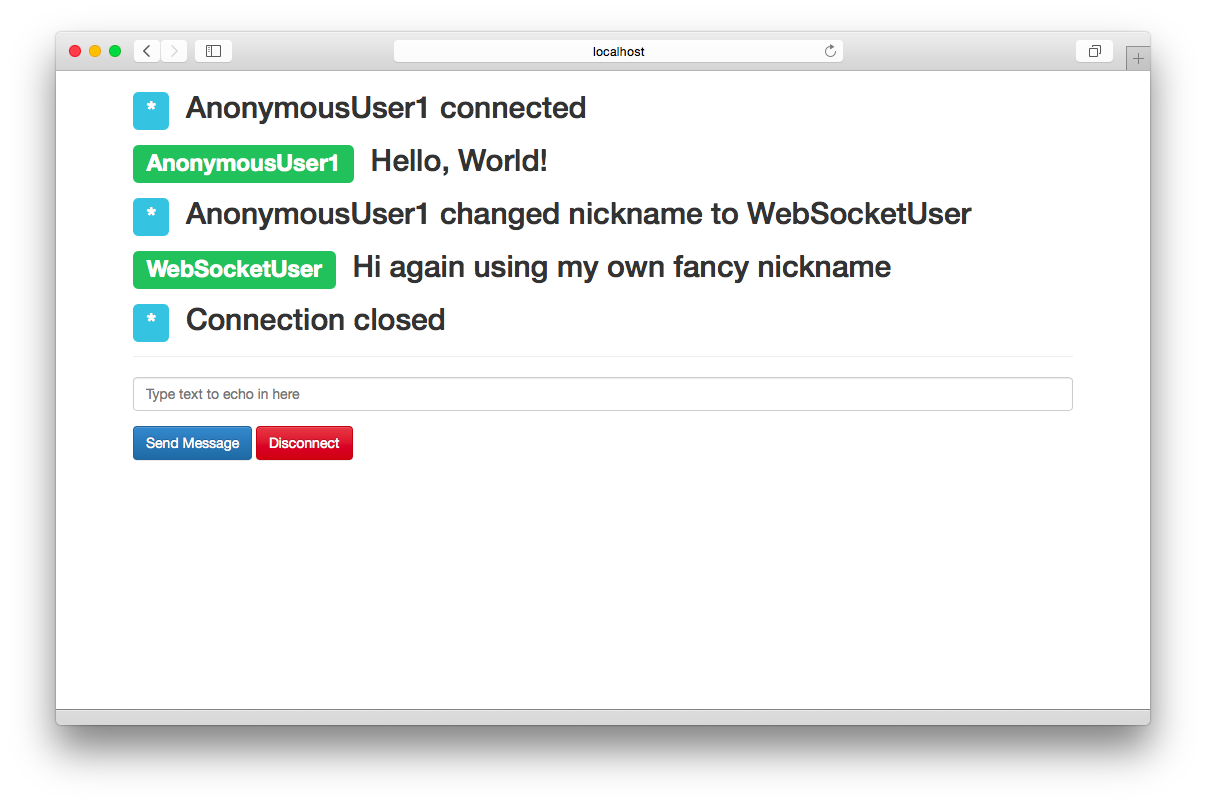
You’ve seen a concrete example of using the basics of the API available to you. The intention is to show what is possible with alternatives to WebSocket, and Pusher is definitely worthy of consideration as an alternative to pure WebSocket.
Unlike WebSocket, Socket.IO, and SocksJS, this framework is a commercial service. Evaluation of the solution and the benefits it provides have to be made by your team. In general, the different pricing tiers are based on connections, messages, and whether or not the connection is protected via SSL encryption. For further evaluation, review Pusher’s pricing page.
One of the things you’ll likely also be asked to do is proxy the WebSocket connection behind a web server. The two most common web servers are nginx and Apache. The setup for these is rather simple, with nginx having the functionality built into the server itself, and Apache using a module called proxy_wstunnel. Rather than go into a ton of detail on how to configure both of these servers to proxy the connections, here are two blog articles that discuss them:
This chapter presented three popular ways to harness the power of bidirectional communication while dealing with a higher-level API. These solutions give you the power of WebSocket in the event that your client is using a modern client browser, and fall back to Flash socket or other less-optimized solutions for older clients. In addition, the two latter frameworks add features that are not natively supported by WebSocket, limiting the amount of code you’ll have to write to support your applications’ communication. The next chapter looks at the methods of securing your WebSocket communication.
This chapter details the WebSocket security apparatus and the various ways you can use it to secure the data being passed over the underlying protocol. You’ll learn why it is always a good idea to communicate over TLS (Transport Layer Security) to avoid ineffective proxies and man-in-the-middle attacks, and ensure frame delivery. Discussion focuses on setup of the WebSocket connection over TLS with wss:// (WebSocket Secure), origin-based security, frame masking, and specific limits imposed by browsers to ensure messages don’t get hijacked.
As with any discussion about security, the content of this chapter presents today’s best-known data about properly securing your WebSocket communication. Security is fickle, though, and the cat-and-mouse game played with those who seek to exploit and those who work to block is constant and unending. Data validation and multiple checks are even more important while using WebSocket. You’ll begin by setting up WebSocket over TLS.
All of the demos so far have used the unencrypted version of WebSocket communication with the ws:// connection string. In practice, this should happen only in the simplest hierarchies, and all communication via WebSocket should happen over TLS.
A valid TLS-based connection over WebSocket can’t be done without a valid certificate. What I’ll go over fairly quickly here is a way to generate a self-signed certificate using OpenSSL. The first thing you’ll need to do is ensure that if you don’t already have OpenSSL installed, you follow the set of instructions presented next that is specific to your platform.
This section covers only downloading and installing the precompiled binary available on Windows. As we discussed in Chapter 1, for the masochistic among us, you can download the source and compile it yourself.
For the rest of us, download the standalone Windows executable. You should be able to run OpenSSL after this via the examples following the instructions on OS X and Linux installs.
The easiest method of installing OpenSSL on OS X is via a package manager like Homebrew. This allows for quick and easy updating without having to redownload a package from the Web. Assuming you have Homebrew installed:
brew install openssl
There are so many flavors of Linux that it would be impossible to illustrate how to install on all of them. I will reiterate how to install it via apt on Ubuntu. If you’re running another distro, you can read through the Compilation and Installation instructions from OpenSSL.
Using apt for installation requires a few simple steps:
sudo apt-get update
sudo apt-get install openssl
Now that you have OpenSSL installed, you can use it for the purposes of generating a certificate to be used for testing, or to submit to a certificate authority.
A certificate authority (CA) issues digital certificates in a public key infrastructure (PKI). The CA is a trusted entity that certifies the ownership of a public key as the named subject of the certificate. The certificate can be used to validate that ownership, and encrypt all information going over the wire.
Here’s what you’re going to do in the following block of code:
Generate a 2048-bit key with a passphrase
Rewrite that key removing the passphrase
Create a certificate signing request (CSR) from that key
Generate a self-signed certificate from the key and CSR
The first thing to do is generate a 2048-bit key. Do this by using the openssl command to generate the RSA key pair:
% openssl genrsa -des3 -passout pass:x -out server.pass.key 2048 Generating RSA private key,2048bit long modulus ............................................................................... +++........+++ e is65537(0x10001)
Next, you generate a private key sans passphrase for eventual creation of a CSR, which can be used for a self-signed certificate, or to receive a certificate authorized by a certificate authority. After generating the key, you can remove the key with the passphrase as well:
% openssl rsa -passin pass:x -in server.pass.key -out server.key
writing RSA key
% rm server.pass.key
Now that you have your private key, you can use that to create a CSR that will be used to generate the self-signed certificate for sending secure WebSocket communication:
% openssl req -new -key server.key -out server.csr
      -subj '/C=US/ST=California/L=Los Angeles/O=Mystic Coders, LLC/
             OU=Information Technology/CN=ws.mysticcoders.com/
             emailAddress=fakeemail AT gmail DOT com/
             subjectAltName=DNS.1=endpoint.com' > server.csr
If you’re looking to get set up with a proper server certificate, the CSR file is all you need. You will receive a certificate file from the Certificate Authority, which you can then use. While you wait, though, let’s get the self-signed certificate for testing and replace it later.
Use the following code to generate your certificate for use in the server code:
% openssl x509 -req -days365-in server.csr -signkey server.key -out server.crt Signature oksubject=/C=US/ST=California/L=Los Angeles/... Getting Private key
In the directory you’ve chosen to run everything in, you should now have three files:
server.key
server.csr
server.crt
If you decide to send things to a Certificate Authority for a validated certificate, you’ll send the server.csr file along with the setup procedure to receive a key. Because you’re just going to use a self-signed certificate here for testing purposes, you’ll continue with your generated certificate server.crt. Decide where you’ll keep the private key and certificate files (in this instance you’ll place them in /etc/ssl/certs).
In the following code you’ll see an example of using the https module to allow the bidirectional WebSocket communication to happen over TLS and listen on port 8080:
varfs=require('fs');// you'll probably load configuration from configvarcfg={ssl:true,port:8080,ssl_key:'/etc/ssl/certs/server.key',ssl_cert:'/etc/ssl/certs/server.crt'};varhttpsServ=require('https');varWebSocket=require('ws');varWebSocketServer=WebSocket.Server;varapp=null;// dummy request processingvarprocessRequest=function(req,res){res.writeHead(200);res.end("Hi!\n");};app=httpsServ.createServer({key:fs.readFileSync(cfg.ssl_key),cert:fs.readFileSync(cfg.ssl_cert)},processRequest).listen(cfg.port);varwss=newWebSocketServer({server:app});wss.on('connection',function(wsConnect){wsConnect.on('message',function(message){console.log(message);});});
Changing client code to use a WebSocket connection over TLS is trivial:
varws=newWebSocket("wss://localhost:8080");
When making this connection, the web page being used to load it must also connect over TLS. In fact, if you attempt to load an insecure WebSocket connection from a website using the https protocol, it will throw a security error in most modern browsers for attempting to load insecure content. Mixed content is a common attack vector and is rightfully discouraged from being allowed. In most modern browsers, the use of mixed content is not only actively discouraged, it is forbidden. Chrome, Firefox, and Internet Explorer all throw security errors and will refuse to communicate over anything other than WebSocket Secure in the event the page being loaded is also served over TLS. Safari, unfortunately, does not do the proper thing. Figure 6-1 is an example from Chrome showing the errors in console upon attempting to connect to an insecure WebSocket server.

Qualys Labs has a nice chart identifying the browsers that handle mixed content properly, and those that do not.
Now that your connection is encrypted, we’ll dive into other methods of securing the communications channel in the next section.
There has always been a race between those who seek to exploit vulnerabilities in a transport mechanism and those who seek to protect it. The WebSocket protocol is no exception. When XMLHttpRequest (XHR) first appeared with Internet Explorer, it was limited to the same-origin policy (SOP) for all requests to the server. There are innumerable ways that this can be exploited, but it worked well enough. As the use of XHR evolved, though, allowing access to other domains became necessary. Cross Origin Resource Sharing (CORS) was the result of this effort; if used properly, CORS can minimize cross-site scripting attacks while still allowing flexibility.
CORS, or Cross-Origin Resource Sharing, is a method of access control employed by the browser, usually for Ajax requests from a domain outside the originating domain. For further information about CORS, see the Mozilla docs.
WebSocket doesn’t place any same-origin policy restriction on accessing WebSocket servers. It also doesn’t employ CORS. What you’re left with in regards to Origin validation is server-side verification. All of the previous examples used the simple and fast ws library with Node.js. You’ll continue to do so and see in the initialization how simple it is to employ an origin check to ensure connection from the browser is only the expected Origin:
varWebSocketServer=require('ws').Server,wss=newWebSocketServer({port:8181,origin:'http://mydomain.com',verifyClient:function(info,callback){if(info.origin==='http://mydomain.com'){callback(true);return;}callback(false);}}),
If you write a verifyClient function for the library you’re using, you can send a callback with either true or false indicating a successful validation of any information, including the Origin header. Upon success, you will see a valid upgraded HTTP exchange for the Origin http://mydomain.com.
The HTTP exchange that happens as a result is as follows:
GET ws://mydomain.com/ HTTP/1.1
Origin: http://mydomain.com
Host: http://mydomain.com
Sec-WebSocket-Key: zy6Dy9mSAIM7GJZNf9rI1A==
Upgrade: websocket
Connection: Upgrade
Sec-WebSocket-Version: 13
HTTP/1.1 101 Switching Protocols
Connection: Upgrade
Sec-WebSocket-Accept: EDJa7WCAQQzMCYNJM42Syuo9SqQ=
Upgrade: websocket
If the Origin header doesn’t match up, the ws library will send back a 401 Unauthorized header. The connection will never complete the handshake, and no data can be sent back and forth. If this happens, you’ll receive a response similar to the following:
HTTP/1.1401UnauthorizedContent-type:text/html
It should also be noted that verifying the Origin header does not constitute a secure and authorized connection by a valid client. You could just as easily pass the proper Origin header from a script run outside the browser. The Origin header can be spoofed with close to no effort at all outside the browser. Therefore, additional strategies must be employed to ensure your connection is authorized.
The major benefit of requiring the Origin header is to combat WebSocket-like Cross-Site Request Forgery (CSRF) attacks, also called Cross-Site WebSocket Hijacking (CSWSH), from being possible as the Origin header is passed by the user agent, and cannot be modified by JavaScript code. Implicit trust, therefore, goes to the client browser in this instance, and the restrictions it places on web-based code.
One other area of concern with WebSocket and the Web at large is termed clickjacking. The process involves framing the client-requested website and executing code in the hidden frame without the user’s awareness.
To combat this, web developers have devised methods called framebusting to ensure that the website their users are visiting is not being framed in any way.
A simple and naive way to bust out of a frame is as follows:
if(top.location!=location){top.location=self.location;}
This tends to fail, however, due to inconsistencies in how browsers have handled these properties with JavaScript in the past. Other problems that creep up are availability of JavaScript on the system, or possibly in the iframe, which can be restricted in certain browsers.
The most thorough JavaScript-based framebusting technique available, which comes from a study by the Stanford Web Security Research on framebusting, is outlined in the following snippet:
<style>body{display:none;}</style><script>if(self===top){documents.getElementsByTagName("body")[0].style.display='block';}else{top.location=self.location;}</script>
Of all the JavaScript-based solutions, this allows you to stop the user from viewing your page if it is being framed. The page will also remain blank if JavaScript is turned off or any other way of exploiting the framebusting code is attempted. Because WebSocket is JavaScript based, busting any frames will remove any ability for an attacker to hijack the browser and execute code without the users’ knowledge. Next you’ll look at a header-based approach that can be used in conjunction with the preceding script, and a proof of concept called Waldo, which takes advantage of this attack vector. Using the techniques mentioned here will render the Waldo code moot.
The safest method of getting around clickjacking was introduced by Microsoft with Internet Explorer 8 and involves an HTTP header option called X-Frame-Options. The solution caught on and has become popular among all major browsers including Safari, Firefox, Chrome, and Opera, and has been officially standardized as RFC 7034. It remains the most effective way of busting out of frames. Table 6-1 shows the acceptable values that can be passed by the server to ensure that only acceptable policies are being used for framing the website.
| Header value | Description of behavior |
|---|---|
|
Prevents framing code at all |
|
Prevents framing by external sites |
|
Allows framing only by the specified site |
Why does all this matter in regards to WebSocket communication? A proof of concept called Waldo shows how simple it can be for a compromised bit of JavaScript to control and report data back to a WebSocket server. These are a few of the things Waldo is able to achieve:
Send back cookies or DOM
Install and retrieve results of keylogger
Execute custom JavaScript
Use in a denial-of-service attack
Modern browsers all support WebSocket, and the only real defense against this attack vector is anti-framing countermeasures such as X-Frame-Options and, to a lesser extent, the other JavaScript-based frame-buster code reviewed previously.
If you’d like to test Waldo, you can find installation instructions on the website. Please be aware that versions of supporting libraries that Waldo uses have advanced.
Here are the supported versions for compiling Waldo:
websocketpp WebSocket library (version 0.2.x)
Boost with version 1.47.0 (can use package manager)
After installing websocketpp and downloading waldo.zip, modify the common.mk file with correct paths for boost and websocketpp and build. Create a simple HTML page that includes the compromised JavaScript in a hidden frame and load the regular website in another frame. Ensure you have the Waldo C++ app running, and control at will. Waldo is completely relevant, as it was released based on RFC 6455 and still works fine on the latest browsers.
For more in-depth tools that allow you to use the browser as an attack vector, including using WebSocket to perform these tests, check out BeEF, which comes with a RESTful and GUI interface, and XSSChef, which installs as a compromised Google Chrome extension.
WebSocket by its very nature opens connections and keeps them open. An attack vector that has been commonly used with HTTP-based web servers is to open hundreds of connections and keep them open indefinitely by slowly trickling valid data back to the web server to keep a timeout from occurring and exhausting the available threads used on the server. The term given to the attack is Slowloris, and while more asynchronous servers such as nginx can mitigate the effect, it is not always completely effective. Some best practices to look at to lessen this attack include the following:
Add IP-based limitation to ensure that connections coming from a single source are not overwhelming the number of available connections.
Ensure that any actions being requested by a user are spawned asynchronously on the server end to lessen the impact of connected clients.
The WebSocket protocol (RFC 6455), discussed in a lot more detail in Chapter 8, defines a 32-bit masking key that is set using the MASK bit in the WebSocket frame. The mask is a random key chosen by the client, and it is a best practice that all clients set the MASK bit along with passing the obligatory masking key. Each frame must include a random masking key from the client side to be considered valid. The masking key is then used to XOR the payload data before sending to the server, and the payload data length will be unchanged.
You may be saying to yourself, “That’s great, but why should I care about this when we’re talking about security?” Two words: cache poisoning. The reality of an app in the wild is that you cannot control misbehaving proxy servers, and the relative newness of WebSocket unfortunately means that it can be an attack vector for the malicious.
A paper in 2011 titled “Talking to Yourself for Fun and Profit” outlined multiple methods for fooling a proxy into serving up the attacker’s JavaScript file. Masking in effect introduces a bit of variability that is injected into every client message, which cannot be exploited by an attacker’s malicious JavaScript code. Data masking ensures that cache poisoning is less likely to happen due to variability in the data packets.
The downside of masking is that it also prevents security tools from identifying patterns in the traffic. Unfortunately, because WebSocket is still a rather new protocol, a good number of proxies, firewalls, and network and endpoint DLP (data loss prevention) software are unable to properly inspect the packets being sent across the wire. In addition, because many tools don’t know how to properly inspect WebSocket frames, dData can be hidden in reserved flags, buffer overflows or underflows are possible, and malicious JavaScript code can be hidden in the mask frame as well.
Trust no one.
There are many ways to validate clients attempting to connect to your WebSocket server. Due to restrictions on the browser for connection over WebSocket, there is no ability to pass any custom HTTP headers during the handshake. Therefore, the two most common methods of implementing auth are using the Basic header and using form-based auth with a set cookie. This example employs the latter method and uses a simple username/password form, setting and reading the cookie in your WebSocket server.
Because the solution uses shared keys via a cookie, you’ll need to get some dependencies in place. The libraries you’ll use are all listed here with the npm commands:
% npm install ws
% npm install express
% npm install body-parser
% npm install cookie
You likely have the ws library installed in your environment from previous examples. You will be using express and plug-ins for parsing form and cookie data: body-parser and cookie. The remaining dependency is fs, which you’ll use to read your TLS certificate files.
Back to your server code—the first thing to do is set up your imports with require:
varfs=require('fs');varhttps=require('https');varcookie=require('cookie');varbodyParser=require('body-parser');varexpress=require('express');varWebSocket=require('ws');
Now that you have all the necessary dependencies in place, set up the self-signed certificate and initialize express and the HTTPS server backing it. You can use the same self-signed cert that you set up earlier in this chapter:
varWebSocketServer=WebSocket.Server;varcredentials={key:fs.readFileSync('server.key','utf8'),cert:fs.readFileSync('server.crt','utf8')};varapp=express();app.use(bodyParser.json());// for parsing application/jsonapp.use(bodyParser.urlencoded({extended:true}));varhttpsServer=https.createServer(credentials,app);httpsServer.listen(8443);
In order for your form-based auth to work, you will be serving up a login page and a secured page, which will require that a cookie named credentials is found and has the proper key within. For brevity, you will use the username/password combination of test/test and use a predefined key that never changes. In your own code, however, this data should be saved to a data source of your choosing that can also be retrieved by the WebSocket server. Stub methods will be used to show where you would insert the retrieval and storage code in whatever data source you decide to use in your own application.
Following is the HTML for the login example, which you’ll serve from your express server. Save this in your project directory and name it login.html:
<html><head><title>Login</title></head><body><h1>Login</h1><formmethod="POST"action="/login"name="login">Username:<inputtype="text"name="username"/>Password:<inputtype="password"name="password"/><inputtype="submit"value="Login"/></form></body></html>
You will listen for GET and POST requests at the URL /login, and a GET request for /secured, which does a check on the cookie to ensure existence and redirects if not found:
app.get('/login',function(req,res){fs.readFile('./login.html',function(err,html){if(err){throwerr;}res.writeHeader(200,{"Content-Type":"text/html"});res.write(html);res.end();});});app.post("/login",function(req,res){if(req.body!=='undefined'){key=validateLogin(req.body['username'],req.body['password']);if(key){res.cookie('credentials',key);res.redirect('/secured');return;}}res.sendStatus(401);});varvalidateLogin=function(username,password){if(username=='test'&&password=='test'){return'591a86e4-5d9d-4bc6-8b3e-6447cd671190';}else{returnnull;}}app.get('/secured',function(req,res){cookies=cookie.parse(req.headers['cookie']);if(!cookies.hasOwnProperty('credentials')&&cookies['credentials']!=='591a86e4-5d9d-4bc6-8b3e-6447cd671190'){res.redirect('/login');}else{fs.readFile('./secured.html',function(err,html){if(err){throwerr;}res.writeHeader(200,{"Content-Type":"text/html"});res.write(html);res.end();});}});
As you can see, you’ve stubbed out a validateLogin method, which in this simple implementation just checks to ensure that the username and password are both test. After a successful validation, it passes back the key. In a production implementation, I would opt for storing this key in a data store, which can then be retrieved and validated with the WebSocket server end. We’re cheating a bit to not add any unnecessary dependencies to this example. The HTML served up by the /secured endpoint as follows:
<html><head><title>WebSocket Auth Example</title><scriptsrc="https://ajax.googleapis.com/ajax/libs/jquery/1.11.1/jquery.min.js"></script><scripttype="text/javascript">$(function(){varws=newWebSocket("wss://localhost:8443");ws.onopen=function(e){console.log('Connection to server opened');}});</script></head><body>Hello, WebSocket.</body></html>
Now you have all the web endpoints being served to the user, and a WebSocket client that is connecting securely over TLS to port 8443.
You’ve handled the web end of the spectrum, and you have a WebSocket client all loaded up and ready to send messages to your WebSocket endpoint. In the same source file, you’ll include code to spin up a secure WebSocket server and use verifyClient to check for your credentials cookie. The first thing you do is ensure you are talking over a secure channel and if not, return false to the callback failing the connection. Then, check the cookie header and call the checkAuth function, which in production code would look up the key in a data source and validate that the client indeed can access this service. If all goes well, return true to the callback and allow the connection to proceed:
varcheckAuth=function(key){returnkey==='591a86e4-5d9d-4bc6-8b3e-6447cd671190';}varwss=newWebSocketServer({server:httpsServer,verifyClient:function(info,callback){if(info.secure!==true){callback(false);return;}varparsed_cookie=cookie.parse(info.req.headers['cookie']);if('credentials'inparsed_cookie){if(checkAuth(parsed_cookie['credentials'])){callback(true);return;}}callback(false);}});wss.on('connection',function(wsConnect){wsConnect.on('message',function(message){console.log(message);});});
As you can see, this is an end-to-end solution for validating that a WebSocket connection is authorized to continue. You can add other checks as needed, depending on the application being built. Just remember that the client browser cannot set any headers, so cookies and the Basic header are all you are afforded. This should give you the structure to enable you to build this out into your own applications in a secure manner, away from prying eyes.
This chapter looked at various attack vectors and ways of securing your WebSocket application. The primary takeaway should be to assume that the client is not a browser, and so do not trust it.
Three things to remember:
Always use TLS.
Server code should always verify the Origin header.
Verify the request by using a random token similar to a CSRF token for Ajax requests.
It is even more important to use the items discussed in this chapter so the possibility of someone hijacking the WebSocket connection for other nefarious purposes is heavily minimized. In the next chapter we’ll review several ways of debugging WebSocket and actively measuring the performance benefits over a regular Ajax-based request.
Previous chapters have gone into depth on building out solutions for using WebSocket in your applications. While in the process of integrating any technology into a new or existing project, perhaps the most vital tool is learning how to debug when things don’t go as originally planned.
In this chapter you’ll explore several areas of the WebSocket lifecycle and review tools that can aid in your journey across the WebSocket landscape. Let’s take one of the previous examples for a spin, and take a look at what’s being passed around and how you can use the tools to see what’s going on under the hood.
A typical WebSocket lifecycle consists of three main areas: the opening handshake, sending and receiving frames, and the closing handshake. Each can present its own challenges. Outlining all of them here would be impossible, but I’ll show some methods of investigating should challenges arise while debugging.
The expected data the server receives from a valid client must include several HTTP headers like Host, Connection, Upgrade, Sec-WebSocket-Key, Sec-WebSocket-Version, and others that are optional to WebSocket. Proxies and security tools on some corporate networks might modify headers before they are transmitted to the server and could likely cause the handshake to fail. For testing purposes you can use OWASP ZAP. ZAP was designed to assist penetration testers with finding vulnerabilities in web applications, and you can use it to intercept the handshake by using its break functionality and remove some of the important headers before the server sees them.
Throughout this chapter you’ll use the identity code example from Chapter 3. The full example for server and client are reproduced in the following sections.
Here is the complete code for the server portion of the identity chat application:
varWebSocket=require('ws');varWebSocketServer=WebSocket.Server,wss=newWebSocketServer({port:8181});varuuid=require('node-uuid');varclients=[];functionwsSend(type,client_uuid,nickname,message){for(vari=0;i<clients.length;i++){varclientSocket=clients[i].ws;if(clientSocket.readyState===WebSocket.OPEN){clientSocket.send(JSON.stringify({"type":type,"id":client_uuid,"nickname":nickname,"message":message}));}}}varclientIndex=1;wss.on('error',function(e){console.log("error time");});wss.on('connection',function(ws){varclient_uuid=uuid.v4();varnickname="AnonymousUser"+clientIndex;clientIndex+=1;clients.push({"id":client_uuid,"ws":ws,"nickname":nickname});console.log('client [%s] connected',client_uuid);varconnect_message=nickname+" has connected";wsSend("notification",client_uuid,nickname,connect_message);ws.on('message',function(message){if(message.indexOf('/nick')===0){varnickname_array=message.split(' ');if(nickname_array.length>=2){varold_nickname=nickname;nickname=nickname_array[1];varnickname_message="Client "+old_nickname+" changed to "+nickname;wsSend("nick_update",client_uuid,nickname,nickname_message);}}else{wsSend("message",client_uuid,nickname,message);}});ws.on('error',function(e){console.log("error happens");});varcloseSocket=function(customMessage){for(vari=0;i<clients.length;i++){if(clients[i].id==client_uuid){vardisconnect_message;if(customMessage){disconnect_message=customMessage;}else{disconnect_message=nickname+" has disconnected";}wsSend("notification",client_uuid,nickname,disconnect_message);clients.splice(i,1);}}}ws.on('close',function(){console.log("closing socket");closeSocket();});process.on('SIGINT',function(){console.log("Closing things");closeSocket('Server has disconnected');process.exit();});});
Here is the complete code for the client portion of the identity chat application:
<!DOCTYPE html><htmllang="en"><head><title>Bi-directional WebSocket Chat Demo</title><metacharset="utf-8"><metahttp-equiv="X-UA-Compatible"content="IE=edge"><metaname="viewport"content="width=device-width, initial-scale=1"><linkrel="stylesheet"href="http://bit.ly/cdn-bootstrap-css"><linkrel="stylesheet"href="http://bit.ly/cdn-bootstrap-theme"><scriptsrc="http://bit.ly/cdn-bootstrap-jq"></script><script>varws=newWebSocket("ws://localhost:8181");varnickname="";ws.onopen=function(e){console.log('Connection to server opened');}functionappendLog(type,nickname,message){varmessages=document.getElementById('messages');varmessageElem=document.createElement("li");varpreface_label;if(type==='notification'){preface_label="<span class=\"label label-info\">*</span>";}elseif(type==='nick_update'){preface_label="<span class=\"label label-warning\">*</span>";}else{preface_label="<span class=\"label label-success\">"+nickname+"</span>";}varmessage_text="<h2>"+preface_label+" "+message+"</h2>";messageElem.innerHTML=message_text;messages.appendChild(messageElem);}ws.onmessage=function(e){vardata=JSON.parse(e.data);nickname=data.nickname;appendLog(data.type,data.nickname,data.message);console.log("ID: [%s] = %s",data.id,data.message);}ws.onclose=function(e){appendLog("Connection closed");console.log("Connection closed");}ws.onerror=function(e){appendLog("Error");console.log("Connection error");}functionsendMessage(){varmessageField=document.getElementById('message');if(ws.readyState===WebSocket.OPEN){ws.send(messageField.value);}messageField.value='';messageField.focus();}functiondisconnect(){ws.close();}</script></head><bodylang="en"><divclass="vertical-center"><divclass="container"><ulid="messages"class="list-unstyled"></ul><hr/><formrole="form"id="chat_form"onsubmit="sendMessage(); return false;"><divclass="form-group"><inputclass="form-control"type="text"id="message"name="message"placeholder="Type text to echo in here"value=""autofocus/></div><buttontype="button"id="send"class="btn btn-primary"onclick="sendMessage();">Send Message</button></form></div></div><scriptsrc="http://bit.ly/cdn-bootstrap-minjs"></script></body></html>
The best way to follow along with the “bad proxies” test is to download ZAP and run it for your specific platform. ZAP can act as a proxy while you browse around your application, so you’ll need to modify the Network settings for your browser. With so many possible iterations, it’s best to just link off to ZAP’s documentation, which talks about a host of browsers and how to configure the proxy. The proxy by default runs on localhost port 8080 and can be changed by getting to the Options at Tools → Options → Local proxy.
In the ZAP client, select “Toggle break on all requests” so you can approve each request before it gets sent out. It is here that you’ll modify your handshake and remove some vital and required headers. When visiting the local client by opening the client.html file, it will attempt to make several HTTP connections. Some of these will be for external dependencies on bootstrap for the UI, and there will be one going to http://localhost:8181 asking for an upgrading connection for WebSocket. There will be Next buttons in the header of the UI allowing you to step through each request. When you get to the WebSocket request, stop and let’s make some changes.
Here is a request similar to what you should see in ZAP:
GET http://localhost:8181/ HTTP/1.1 Host: localhost:8181 Connection: Upgrade Pragma: no-cache Cache-Control: no-cache Upgrade: websocket Origin: null Sec-WebSocket-Version: 13 User-Agent: Mozilla/5.0(Macintosh;... Accept-Encoding: sdch Accept-Language: en-US,en;q=0.8,de;q=0.6 Sec-WebSocket-Key:BRUZ6wGtxKWln5gToX4MSg==Sec-WebSocket-Extensions: permessage-deflate;client_max_window_bits
In the text area, remove all of the WebSocket-specific headers as a bad proxy or IDS might do:
GET http://localhost:8181/ HTTP/1.1 Host: localhost:8181 Connection: Upgrade Pragma: no-cache Cache-Control: no-cache Origin: null User-Agent: Mozilla/5.0(Macintosh;Intel Mac OS X 10_10_3)AppleWebKit/537.36... Accept-Encoding: sdch Accept-Language: en-US,en;q=0.8,de;q=0.6
After allowing the request to continue without the proper headers, you will see in the response from ZAP an HTTP 426 error code. This HTTP code indicates that an upgrade is required and was not provided. This can be a common occurrence when interacting with bad proxies, which we’ll discuss resolving in the section “WebSocket Secure to the Rescue”.
Figure 7-1 shows the WebSocket handshake from within the OWASP application.
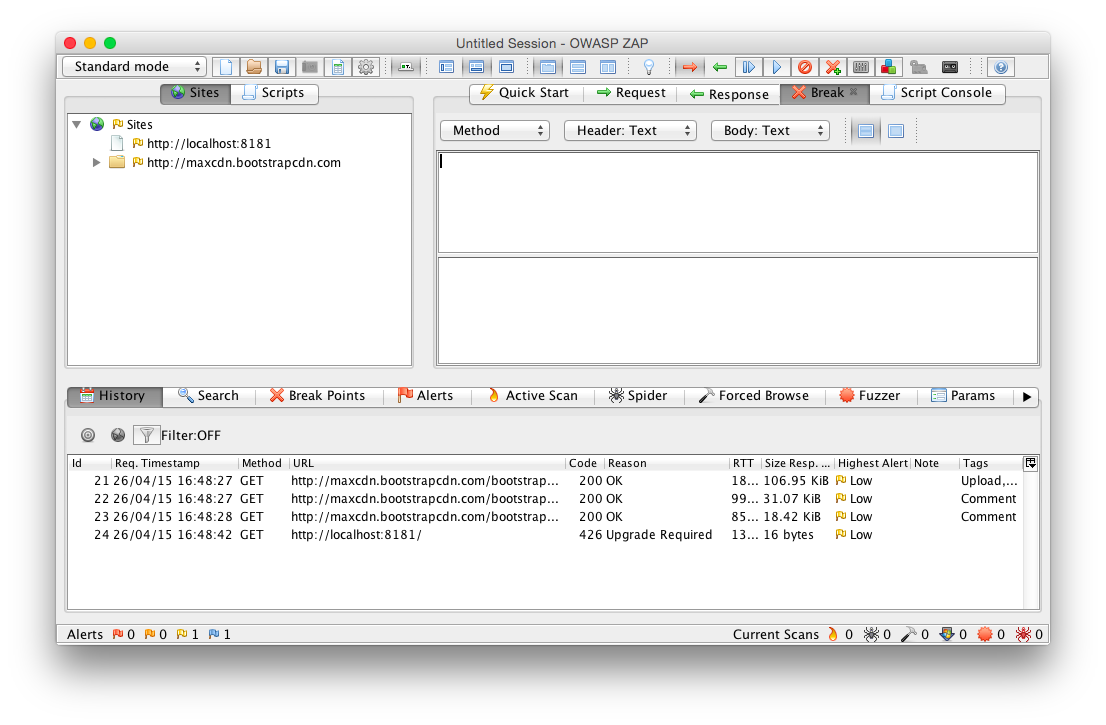
Let’s look at the Chrome Developer Tools; they should tell us a similar story. You may have to refresh the request and step through again with ZAP after navigating to the Network tab in Chrome’s Developer Tools section. You may need to click the Filter button and then specify WebSockets. After resubmitting, you should also see the HTTP 426 response code being passed back to the browser.
Figure 7-2 shows the result of missing some headers in the Chrome Developer Tools.

What would happen if you didn’t remove all headers, just something that may be important, like the Sec-WebSocket-Version? When the request comes in, remove the header you will see for Sec-WebSocket-Version:
GET http://localhost:8181/ HTTP/1.1 Host: localhost:8181 Connection: Upgrade Pragma: no-cache Cache-Control: no-cache Upgrade: websocket Origin: null User-Agent: Mozilla/5.0(Macintosh;Intel Mac OS X 10_10_3)AppleWebKit/537.36... Accept-Encoding: sdch Accept-Language: en-US,en;q=0.8,de;q=0.6 Sec-WebSocket-Key:BRUZ6wGtxKWln5gToX4MSg==Sec-WebSocket-Extensions: permessage-deflate;client_max_window_bits
After submitting this request back to the server, what will likely come back is an HTTP 400 Bad Request. You’re missing some vital information (Sec-WebSocket-Version), and it’s not going to let you continue. How can you ensure that there is a better chance that your messages are going to get received and sent properly?
Thanks to a few neat tools, you’re able to see what’s going on with your connection and why things are looking a bit wonky. How do you get around things like proxies or IDS tools mucking with your precious headers? WebSocket Secure is the answer. As we discussed in Chapter 6, the best way to ensure that your communication will reach its intended destination is to always use wss://. If you need help configuring it, refer to Chapter 6 for instructions. In general, using the secure WebSocket channel can alleviate the issues outlined in the previous section.
Most libraries and all browsers with WebSocket RFC 6455 support will implement the simple handshake process without fail. As we will discuss in Chapter 8, the Sec-WebSocket-Key is a random nonce that is base64 encoded and sent in the initial handshake from the client. In order to validate that your server is sending back the correct value to the client, you could take the example code in Chapter 8 and write a simple script that accepts a Sec-WebSocket-Key and spits out a proper response:
varcrypto=require('crypto');varSPEC_GUID="258EAFA5-E914-47DA-95CA-C5AB0DC85B11";varwebSocketAccept=function(secWebsocketKey){varsha1=crypto.createHash("sha1");sha1.update(secWebsocketKey+SPEC_GUID,"ascii");returnsha1.digest("base64");}if(process.argv.length<=2){console.log("You must provide a Sec-WebSocket-Key as the only parameter");process.exit(1);}varwebSocketKey=process.argv[2];webSocketAccept=webSocketAccept(webSocketKey);console.log("Sec-WebSocket-Accept:",webSocketAccept);
If you are seeing other values when using Wireshark or Chrome Developer Tools (values that would obviously be rejected by the client), run this script against the key first, and then see about fixing whatever may be in error with your server. It could indicate something along the path of communication is inserting itself in the communication and the protocol is doing the right thing by rejecting it.
You will, on more than one occasion, be tasked with figuring out why a client is receiving unexpected data coming back from your server. The first reaction to this may be to add some debug logging to your app and ask the client to make another attempt. If your code is in production, however, this would be ill-advised because it could affect other users and might affect performance or availability. Another option is to use a network sniffer to watch the communication from the server to the affected client. Let’s use our existing chat example to see what is coming across the wire.
The best way to see each frame coming across the wire is to use our trusty tool Wireshark. That’s right, kids, Wireshark isn’t just for sniffing network connections in a café! The versatile network tool runs well on every platform and allows you to filter and inspect the handshake along with each individual frame sent over the wire. As of version 1.9 it runs without needing the X11 dependency as well, which is definitely a bonus.
Getting started with Wireshark is fairly straightforward. After successfully downloading and installing the tool for your specific platform, you’ll be greeted with the main screen, which lists all network interfaces that Wireshark is ready to listen on.
Figure 7-3 shows the initial screen for the Wireshark tool.
Double-click the interface that you will be browsing for these tests, and Wireshark will dutifully start showing you captured packets on the next screen (see Figure 7-4). It shows each captured packet in a table with sortable columns and a filter bar at the top for ease in viewing exactly what you’re after in the huge stream of data flowing back and forth.
You can choose to follow a TCP, UDP, or SSL stream to see the bidirectional communication being sent along the wire. You’ll take a look at the handshake in Figure 7-5 and you’ll see a request to the server from the client with the payload after the HTTP header.
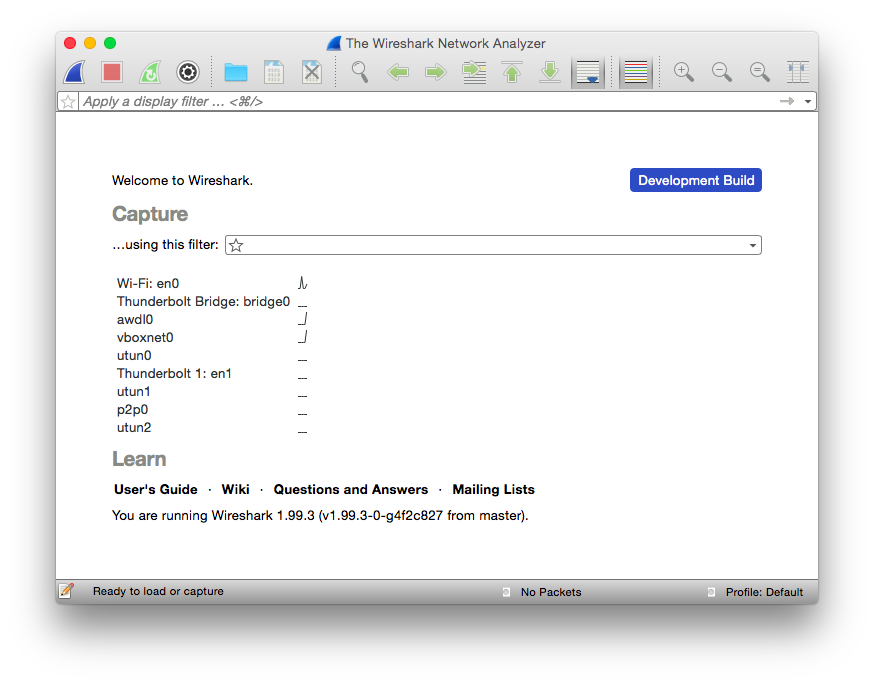
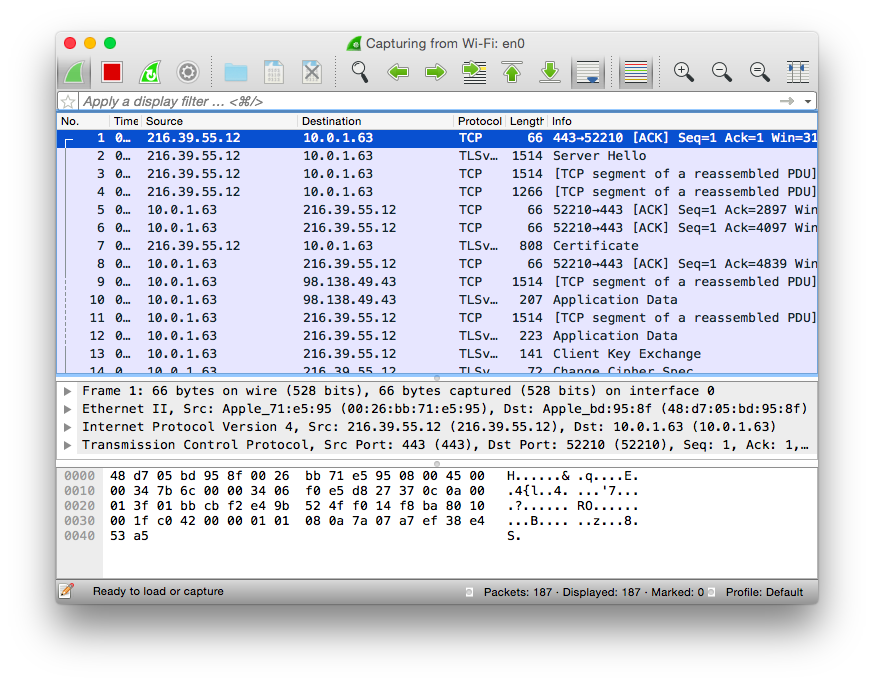

We briefly discussed frame masking in Chapter 6, and if you’re looking at the payload thinking it doesn’t look like the JSON that you were expecting, you are correct. To be considered valid, all clients must mask the payload with the 32-bit masking key passed within the frame before sending any message to a server. You may be saying to yourself, “This sucks; how am I supposed to effectively debug what is going on with this client with these antiquated views into my data?” Have no fear, the latest versions of Wireshark support automatic unmasking of WebSocket requests to the server.
Figure 7-6 shows the masking key captured with Wireshark.
Here’s how to view it in Wireshark:
Find a frame to select that has [MASK] in the Info column.
Ensure that Packet Details is turned on and viewable.
Expand the bottommost section labeled “WebSocket.”
Expand the last section labeled “Unmask Payload” and behold your payload without masking.
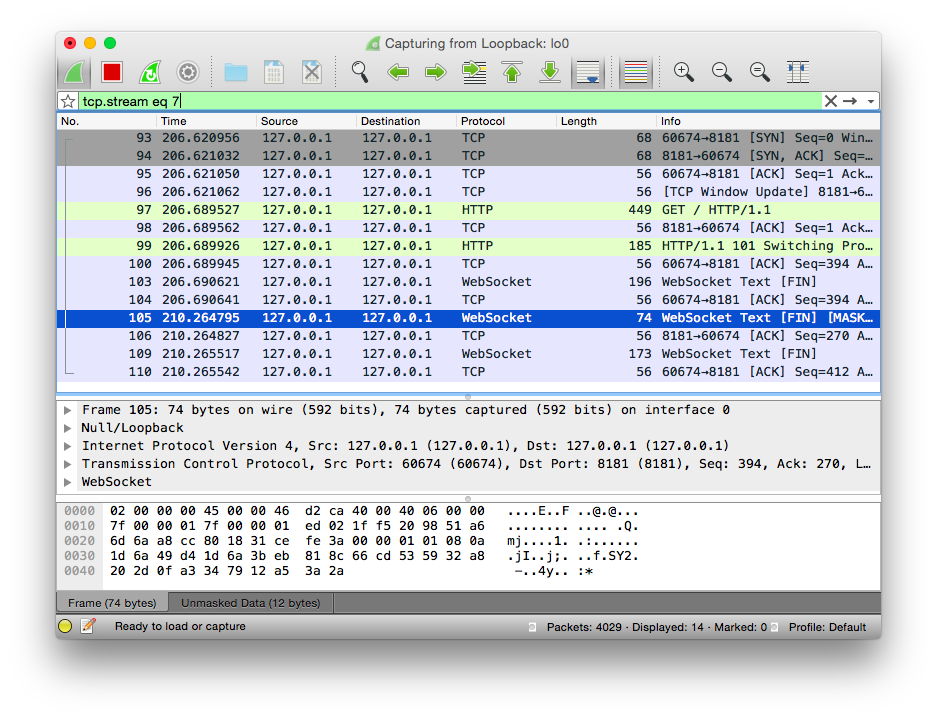
Figure 7-7 shows an example of the Wireshark UI and a sample unmasked payload along with the masked just above it should you need it. This is incredibly powerful for debugging the interactions with multiple clients and your server code.
Now you can see what the unmasked payload looks like for a specific message passed from client to server without resorting to debugging to stderr/stdout or otherwise hampering performance or availability in your application. When looking at options, Chrome Developer Tools is also a worthy companion for our efforts, though it does require that you are the client and can replicate the errors from your environment. One of the reasons I have found Wireshark to be so powerful in this regard is the ability to watch the stream without modifying or interrupting other clients in the process.
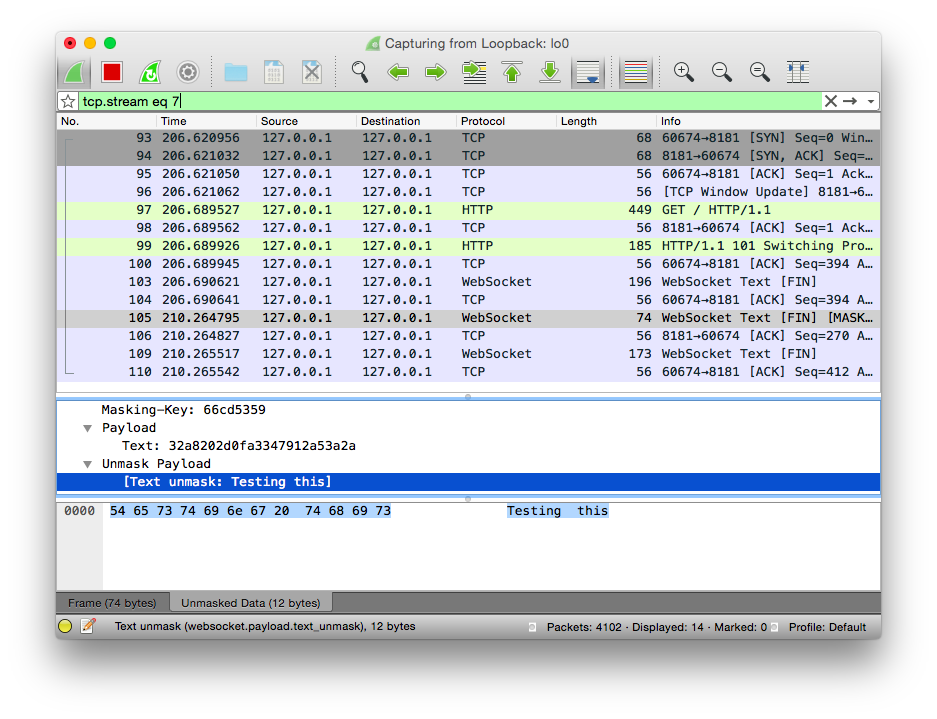
Although viewing specific unmasked payloads is interesting, other times it is most appropriate to see the entire thread of conversation for a specific client. For this, Wireshark is indispensable as well. While still capturing your WebSocket communication, you can right-click or Command-click any of the WebSocket or the initial HTTP handshake in the communication, and choose Follow → Follow TCP Stream. At the moment of capture, it will show you the entire conversation for that specific client.
Figure 7-8 shows the contextual menu necessary for following the TCP stream.
As you look through the conversation being shown in the Follow TCP Stream window, browsing back to the main capture screen you should notice that the capture appears filtered. Whenever you follow a stream, it will pick that stream and filter out anything else so you can focus in. The next section covers how to debug and watch for close frames by using Wireshark.

The final thing you will ever see in a WebSocket conversation is the closing frame. Say that you add a button to your UI, allowing the client to send a close frame to the server like so:
<buttontype="button"onclick="disconnect();">Disconnect</button>
You could then use some of the things you learned about watching frames in Wireshark. Befitting our task would be to see the masked frame being sent by the client and looking at the very small message with the empty payload for a close request. If you view the frame and open the WebSocket section from within Wireshark, you should see something similar to the following:
WebSocket1.......=Fin:True.000....=Reserved:0x00....1000=Opcode:ConnectionClose(8)1.......=Mask:True.0000000=Payloadlength:0Masking-Key:4021df19
The registered status codes for a close for RFC-specific reasons are defined in Chapter 8. The preceding header indicates that a normal close occurred, and no message was passed. If you would like to pass your own status code in the close and/or a message, you can do so using the JavaScript API as we discussed in Chapter 2 with the following:
ws.close(1000,'Ended normally');
The payload would be identical to how messages are received normally including being masked, and sent along with the headers in the frame. The opcode would adorn the code passed in the JavaScript call, the mask would be set, and the masking key would be used to mask the message being sent to the client. That is the final communication you’ll receive with a WebSocket conversation, and you’ve learned how to watch it all, and modify things as needed to test different scenarios.
This chapter covered the opening handshake, the frames, and the closing handshake and presented tools that enable you to watch the interaction between client and server. Following is a recap of some of the problems you can identify using these tools.
If you receive a code other than an HTTP 200 during the opening handshake:
A bad proxy or IDS is likely involved and removing headers. The code could indicate that you didn’t use WebSocket Secure, which is preferred over using the regular non-TLS connection.
The code could also indicate that something went wrong with the Sec-WebSocket-Key or the Sec-WebSocket-Accept that was sent in response. You can watch for the request and response by using either OWASP, Chrome Developer Tools, or Wireshark and run the values against the script you wrote in “Validating the Handshake”.
If a client is complaining of errors but you have no visibility due to masking:
Use Wireshark and follow the instructions that detail how to see the server responses and requests made by the client so you can fully understand where things are going wrong.
And finally, if a close is occurring:
Use any of the listed tools to look at what is being sent by the client, or responded to from the server, see the code and/or message, and handle accordingly.
We were able to identify some potential pitfalls along the way, and how they could be identified using tools so they won’t end up in a days-long search during the debugging process. The tools should serve as worthy companions during the development process and during debugging when the app makes its way into production and you need a better view into what is going on.
You may notice that the debugging-via-browser method focused exclusively on Chrome Developer Tools. Safari offers no discernible way to debug WebSocket frames. Firefox will show you the opening handshake and all headers associated with the connection, but no inspection of the frame is available. According to Mozilla bug 885508, it is still open and looks like no implementation is available in the otherwise wonderful developer tools. You have plenty of tools at your disposal, though; Chrome along with Wireshark and OWASP ZAP can give you the introspection you need to find out what’s going on when things go south.
The final chapter presents a deeper look at the WebSocket protocol itself.
No discussion about protocols, especially ones that are initiated via an HTTP call, would be complete without talking a bit about the history of HTTP. The inception of WebSocket came about because of the massive popularity of Ajax and real-time updates. With HTTP, a protocol where a client requests a resource, and the server responds with the resource or possibly an error code if something went wrong. This unidirectional nature has been worked around by using technologies like Comet and long polling, but comes at a cost of computing resources on the server side. WebSocket seeks to be one of the techniques that solves this problem and allows web developers to implement bidirectional communication over the same HTTP request.
The birth of the World Wide Web brought rise to the first versions of the Hypertext Transfer Protocol (HTTP). The first version of HTTP was conjured up by Tim Berners-Lee in conjunction with the Hypertext Markup Language (HTML). HTTP 0.9 was incredibly simple. A client requests content via the GET method:
GET /index.html
The simplicity of HTTP 0.9 meant that you could request only two things: plain text or HTML. This initial version of HTTP didn’t have headers, so there was no ability to serve any media. In essence, as a client you requested a resource from the server using TCP, and after the server was done sending it, the connection was closed.
The simplicity in 0.9 was not going to last long. With the next version of HTTP, the complexity involved in an HTTP request/response pair grew. The later versions of HTTP added the ability to send HTTP headers with every request. With that growing number of headers to support, things such as POST (form) requests, media types, caching, and authentication were added in HTTP 1.0. In the latest version, multihomed servers with the Host header, content negotiation, persistent connections, and chunked responses were added and are used in production servers today. The point of all this is that as HTTP has grown in complexity, the size of headers has grown.
According to a Google whitepaper talking about SPDY, the average HTTP header is now 800 bytes and often as large as 2 KB. Compression and other techniques are readily available to simplify this situation. The following shows a typical HTTP header from the popular search engine Google:
%curl-Ihttp://www.google.comHTTP/1.1200OKDate:Wed,20May201522:50:00GMTExpires:-1Cache-Control:private,max-age=0Content-Type:text/html;charset=ISO-8859-1Set-Cookie:PREF=ID=68769f4bb498a69f:FF=0:T...Set-Cookie:NID=67=D26hM_BKWVnngC-7_1-XGmBR...P3P:CP="This is not a P3P policy! See http..."Server:gwsX-XSS-Protection:1;mode=blockX-Frame-Options:SAMEORIGINAlternate-Protocol:80:quic,p=0Transfer-Encoding:chunkedAccept-Ranges:noneVary:Accept-Encoding
I took the liberty of removing the contents of the cookie header, and left how many characters it took up in the header. All told, the header was 850 characters long, or just under 1KB. When you’re looking to send data back and forth between server and client and vice versa, having to send a 1KB header on top of that is unnecessary and wasteful. As you’ll see, after the initial handshake, a WebSocket frame header is miniscule in comparison and akin to opening up a TCP connection over HTTP.
The following sections contain code samples showing how to build out portions of the server protocol. Taken together and you can build your own implementation of an RFC-compliant WebSocket server.
One of the many benefits of the WebSocket protocol is that it begins its connection to the server as a simple HTTP request. Browsers and clients that support WebSocket send the server a request with specific headers that ask for a Connection: Upgrade to use WebSocket. The Connection: Upgrade header was introduced in HTTP/1.1 to allow the client to notify the server of alternate means of communication. It is primarily used at this point as a means of upgrading HTTP to use WebSocket and can be used to upgrade to HTTP/2.
According to the WebSocket spec, the only indication that a connection to the WebSocket server has been accepted is the header field Sec-WebSocket-Accept. The value is a hash of a predefined GUID and the client HTTP header Sec-WebSocket-Key.
The Sec-WebSocket-Accept header field indicates whether the server is willing to accept the connection. If present, this header field must include a hash of the client’s nonce sent in Sec-WebSocket-Key along with a predefined GUID. Any other value must not be interpreted as an acceptance of the connection by the server.
The first thing the spec asks for on the client side for generating the Sec-WebSocket-Key is a nonce, or one-time random value. If you are using a browser that supports WebSocket, generating the Sec-WebSocket-Key will be done for you automatically by using the JavaScript API. One of the security restrictions is that an XMLHttpRequest will not be allowed to modify that header. As we discussed in Chapter 6, this ensures that even if the website is compromised, you can trust that the browser will not allow any headers to be modified.
The following code will assume running under Node.js and possibly using WebSocket to communicate with another service acting as the WebSocket server. You’ll use a GUID generated using the node-uuid module, which should prove to be random enough for your needs.
The only thing you’re required to do at this point is base64 your nonce and include it in the HTTP headers for your WebSocket connection request. You will use the node-uuid module required earlier to create your random string:
varuuid=require('node-uuid');varwebSocketKey=function(){varwsUUID=uuid.v1();returnnewBuffer(wsUUID).toString('base64');}
On the server side, the first thing you’ll do is include the crypto module so you can send back your SHA1 hash of the combined value:
varcrypto=require('crypto');
RFC 6455 defines a predefined GUID, which you’ll define as a constant in your code:
varSPEC_GUID="258EAFA5-E914-47DA-95CA-C5AB0DC85B11";
Your next task is to define a function in your JavaScript code that accepts the Sec-WebSocket-Key as a parameter, and creates a crypto SHA1 hash object:
varwebSocketAccept=function(secWebsocketKey){varsha1=crypto.createHash("sha1");
Finally, you’ll append the Sec-WebSocket-Key together with the predefined GUID, passing that into your SHA1 hash object. The update function will update the hash content with your combined data. You pass in ascii to identify the input encoding for the SHA1 update:
sha1.update(secWebsocketKey+SPEC_GUID,"ascii");returnsha1.digest("base64");
Generating the Sec-WebSocket-Accept header is usually be the job of a server library. It is a good idea to understand the inner workings and have a way of testing if something should go awry.
The WebSocket connection must be an HTTP/1.1 GET request, and include the following headers:
Host
Upgrade: websocket
Connection: Upgrade
Sec-WebSocket-Key
Sec-WebSocket-Version
If any of these are not included in the HTTP headers, the server should respond with an HTTP error code 400 Bad Request. Here’s an example of a simple HTTP request to upgrade for WebSocket. The arrangement of the headers is not as important as their existence:
GETws://localhost:8181/ HTTP/1.1Origin:http://localhost:8181Host:localhost:8181Sec-WebSocket-Key:zy6Dy9mSAIM7GJZNf9rI1A==Upgrade:websocketConnection:UpgradeSec-WebSocket-Version:13
Table 8-1 shows the possible headers in the opening handshake.
| Header | Required | Value |
|---|---|---|
|
Yes |
Header field containing the server’s authority. |
|
Yes |
websocket |
|
Yes |
Upgrade |
|
Yes |
Header field with a base64-encoded value that, when decoded, is 16 bytes in length. |
|
Yes |
13 |
|
No |
Optionally, an |
|
Yes (server) |
Server sends back an acknowledgment that is described after the table and must be present for the connection to be valid. |
|
No |
Optionally, a |
|
No |
Optionally, a |
Upon receiving a valid upgrade request with all required fields, the server will decide on the accepted protocol, and any extensions, and send back an HTTP response with status code 101 along with the Sec-WebSocket-Accept handshake acknowledgment. The following code shows a simple response from the server accepting the WebSocket request and opening the channel to communicate using WebSocket:
HTTP/1.1101SwitchingProtocolsConnection:UpgradeSec-WebSocket-Accept:EDJa7WCAQQzMCYNJM42Syuo9SqQ=Upgrade:websocket
Next we’ll go over the WebSocket frame header in detail, at the bit level because the protocol is binary and not text.
A WebSocket message is composed of one or more frames. The frame is a binary syntax that contains the following pieces of information, each of which I will describe in greater detail. As you may remember from Chapter 2, the specifics of the frame, fragmentation, and masking are all shielded and kept in the low-level implementation detail of the server and client side. It is definitely good to understand, though, because debugging WebSocket with this information makes things a lot more powerful than without it.
Is this the final frame, or is there a continuation?
Is this a command frame or data frame?
How long is the payload?
If payload is larger than 125, we’ll use the next 2 to 8 bytes.
Is this frame masked?
4 bytes for the masking key.
The data to send whether binary or UTF-8 string, could be a combination of extension data + payload data.
A WebSocket message may make up multiple frames depending on how the server and client decide to send data back and forth. And because the communication between client and server is bidirectional, at any time either side decides, data can be sent back and forth as long as no close frame was previously sent by either side. The following is a text representation of a WebSocket frame:
012301234567890123456789012345678901+-+-+-+-+-------+-+-------------+-------------------------------+|F|R|R|R|opcode|M|Payloadlen|Extendedpayloadlength||I|S|S|S|(4)|A|(7)|(16/64)||N|V|V|V||S||(ifpayloadlen==126/127)|||1|2|3||K|||+-+-+-+-+-------+-+-------------+---------------+|Extendedpayloadlengthcontinued,ifpayloadlen==127|+---------------+-------------------------------+||Masking-key,ifMASKsetto1|+-------------------------------+-------------------------------+|Masking-key(continued)|PayloadData|+-----------------------------------------------+:PayloadDatacontinued...:+-------------------------------+|PayloadDatacontinued...|+---------------------------------------------------------------+
Let’s talk about each of the header elements in greater detail.
Every frame has an opcode that identifies what the frame represents. These opcodes are defined in RFC 6455. The initial values are as defined by the IANA in the WebSocket registry and are currently in use; additions to this are possible with WebSocket Extensions. The opcode is placed within the second 4-bits of the first byte of the frame header. Table 8-2 lists the opcode definitions.
| Opcode value | Description |
|---|---|
|
Continuation frame; this frame continues the payload from the previous. |
|
Text frame; this frame includes UTF-8 text data. |
|
Binary frame; this frame includes binary data. |
|
Connection Close frame; this frame terminates the connection. |
|
Ping frame; this frame is a ping. |
|
Pong frame; this frame is a pong. |
|
Reserved for future control frames. |
By default, all WebSocket frames are to be masked from the client end, and the server is supposed to close the connection if it receives a frame indicating otherwise. As you discovered in “Frame Masking”, the masking introduces variation into the frame to prevent cache poisoning. The second byte of the frame is taken up by the length in the last 7 bits, and the first bit indicates whether the frame is masked. The mask to apply will be the 4 bytes following the extended length of the WebSocket frame header. All messages received by a WebSocket server must be unmasked before further processing:
varunmask=function(mask,buffer){varpayload=newBuffer(buffer.length);for(vari=0;i<buffer.length;i++){payload[i]=mask[i%4]^buffer[i];}returnpayload;}
Following unmasking, the server can decode UTF-8 for text-based messages (opcode 0x01) and deliver unchanged for binary messages (opcode 0x02).
The payload length is defined by the last 7 bits of the second byte of the frame header. The first byte is the opcode defined earlier. Depending on how long the payload ends up being, it may or may not use the extended length bytes that follow the first 2 header bytes:
For messages under 126 bytes (0–125), the length is packed in the last 7 bits of the second byte of the frame header.
For messages between 126 and 216, two additional bytes are used in the extended length following the initial length. A value of 126 will be placed within the first 7 bits of the length section to indicate usage of the following 2 bytes for length.
For messages larger than 216, it will end up using the entire 8 bytes following the length. A value of 127 will be placed within the first 7 bits of the length section to indicate usage of the following 8 bytes for length.
In two cases, splitting a message into multiple frames could make sense.
One case is that without the ability to fragment messages, the endpoint would have to buffer the entire message before sending so it could send back an accurate count. With the ability to fragment, the endpoint can choose a reasonably sized buffer, and when that is full, send another frame as a continuation until everything is complete.
The second case is multiplexing, in which it isn’t desirable to fill the pipe with data that is being shared, and instead split up into several chunks before sending. Multiplexing isn’t directly supported in the WebSocket protocol but the extension x-google-mux can offer support. To learn more about extensions and how they relate to the WebSocket protocol, check out “WebSocket Extensions”.
If a frame is unfragmented, the Fin bit is set and it contains an opcode other than 0x00. If fragmented, the same opcode must be used when sending each frame until the message has been completed. In addition, the Fin bit would be 0x00 until the final frame, which would be empty other than the Fin bit set and an opcode of 0x00 used.
If sending a fragmented message, there must be the ability to interleave control frames when either side is accepting communication (if a large message was sent and a control frame wasn’t able to be sent until the end, it would be fairly inefficient). The last necessary thing to remember is that the fragmented message must be all of the same type—no mixing and matching of binary and UTF-8 string data within a single message.
The closing handshake for a WebSocket connection requires a frame to be sent with the opcode of 0x08. If the client sends the close frame, it must be masked as is done in all other cases from the client, and not masked coming back from the server.
In addition to the opcode, the close frame may contain a body that indicates a reason for closing, in the form of a code and a message. The status code is passed in the body of the message and is a 2-byte unsigned integer. The remainder reason string would follow, and as with WebSocket messages, would be a UTF-8 encoded string.
Table 8-3 shows the status codes available for a WebSocket close event. Each of the registered status codes in the RFC are identified and described in the next section.
| Status code | Meaning | Description |
|---|---|---|
|
Normal closure |
Send this code when your application has successfully completed. |
|
Going away |
Send this code when either the server or client application is shutting down or closing without expectation of continuing. |
|
Protocol error |
Send this code when connection is closing with a protocol error. |
|
Unsupported data |
Send this code when your application has received a message of an unexpected type that it cannot handle. |
|
Reserved |
Do not use; this is reserved as per RFC 6455. |
|
No status rcvd |
Do not use; the API will use this to indicate when no valid code was received. |
|
Abnormal closure |
Do not use; the API will use this to indicate the connection has closed abnormally. |
|
Invalid frame payload data |
Send this code if the data in the message received was not consistent with the type of the message (e.g., non-UTF-8). |
|
Policy violation |
Send this code when the message received has violated a policy. This is a generic status code that can be returned when there are no more suitable status codes. |
|
Message too big |
Send this code when the message received was too large to process. |
|
Mandatory ext. |
Send this code if you are expecting an extension from the server but it wasn’t returned in the WebSocket handshake. |
|
Internal error |
Send this code when the connection is terminated due to an unexpected condition. |
|
Service restart |
Send this code indicating that the service is restarted, and a client that reconnects should do so with a randomized delay of 5–30s. |
|
Try again later |
Send this code when the server is overloaded and the client should either connect to a different IP (given multiple targets), or reconnect to the same IP when user has performed an action. |
|
Unassigned |
Do not use; this is unassigned but might be changed in future revisions. |
|
TLS handshake |
Do not use; this is sent when the TLS handshake has failed. |
Unlike TCP where connections can be closed at any time without notice, the WebSocket close is a handshake on both sides. The RFC also identifies the ranges and what they mean categorically for your application. In general, you’ll be using the defined range for the current version (1000 through 1013), and given any custom codes necessary in your application, the unregistered range 4000–4999 is available.
If an endpoint receives a Close frame without sending one, it has to send a Close frame as its response (echoing the status code received). In addition, no more data can pass over a WebSocket connection that has been sent a Close frame previously. There are certainly cases where an endpoint delays sending a Close frame until all of its current message is sent (in the case of fragmented messages), but the likelihood the other end would process that message is not guaranteed.
When an endpoint (client or server) has sent and received a Close frame, the WebSocket connection is closed and the TCP connection must be closed. A server will always close the connection after receiving and sending immediately, while the client should wait for a server to close, or set up a timeout to close the underlying TCP connection in a reasonable amount of time following a Close frame.
The IANA has a registry of the WebSocket status codes to use during the closing handshake.
Table 8-4 shows the complete range of status codes for a WebSocket close event.
| Status range | Description |
|---|---|
|
This range is not used for status codes. |
|
Status codes in this range are either defined by RFC 6455 or will be in future revisions. |
|
This range is reserved for libraries, frameworks, and applications. |
|
This range is reserved for private use, and is not registered with the IANA. Feel free to use these values in your code between client and server with prior agreement. |
The RFC for WebSocket defines subprotocols and protocol negotiation between client and server. In Chapter 2, you saw how to pass in one or more protocols via the JavaScript WebSocket API. Now that we’re in the chapter dedicated to the innards of WebSocket, you can look at how that negotiation actually happens, or doesn’t. At the lowest level, the negotiation of which protocol to use for a WebSocket connection happens via the HTTP header Sec-WebSocket-Protocol. This header is passed in with the initial upgrade request sent by the client:
Sec-WebSocket-Protocol: com.acme.chat, com.acme.anotherchat
In this instance, the client is telling the server that the two protocols it would like to speak are chat or anotherchat. At this point, it is up to the server to decide which protocol it will choose. If the server agrees with none of the protocols, it will return null or won’t return that header. If the server agrees with a subprotocol, it will respond with a header such as this:
Sec-WebSocket-Protocol: com.acme.anotherchat
As you may remember from Chapter 2, your JavaScript WebSocket object will have the property protocol populated with the value chosen by the server, or none if nothing was chosen. In this instance, the API will have the value com.acme.anotherchat because the handshake response from the server indicates this as an acceptable protocol to communicate with. A subprotocol doesn’t change the underlying WebSocket protocol, but merely layers on top of it, providing a higher-level communication channel on top of the existing protocol. The ability to change the definition of a WebSocket frame is available to you, however, in the form of “WebSocket Extensions”.
Remember from Chapter 2 that three types of subprotocols can be used with the subprotocol handshake. The first are the registered protocols, identified in WebSocket RFC 6455, section 11.5. It defines a registry with the IANA. The second are open protocols such as XMPP or STOMP, although you can see registered protocols for these as well. And the third, which you’ll likely use in your application, are the custom protocols, which usually take the form of the domain name with an identifier for the subprotocol name.
The WebSocket RFC defines Sec-WebSocket-Extensions as an optional HTTP header to be sent by the connecting client asking if the server can support any of the listed extensions. The client will pass one or more extensions with possible parameters via the HTTP header, and the server will respond with one or more accepted extensions. The server can choose only from the client-passed in list.
Extensions have control to add new opcodes and data fields to the framing format. In essence, you can completely change the entire format of a WebSocket frame with a WebSocket extension. One of the earlier specs, draft-ietf-hybi-thewebsocketprotocol-10, even mentioned a deflate-stream extension, which would compress the entire WebSocket stream. The effectiveness of this is probably the reason it no longer shows up in later specs, because WebSocket has client-to-server frame masking, whereby the mask changes per frame, and with that, deflate would be wholly ineffective.
Here are two examples of extensions that are available in clients today:
deflate-frame, a better method of deflate (available with Chrome, which uses x-webkit-deflate-frame as its name) where frames are compressed at source and extracted at destination
x-google-mux, an early-stage extension supporting multiplexing
The one caveat, and it’s been an issue with adoption of any new technology attached to browsers as clients, is that support must be baked into the browsers used by your clients. The server will parse the extensions passed in by the client, and pass back the list it will support. The order of extensions passed back must coincide with what was passed in by the client. It must pass back only extensions that the client has indicated that it also supports.
I have chosen in this book to focus exclusively on using Node.js on the server side. Implementations of the WebSocket protocol on the server side are widespread and covered in nearly every language imaginable. Covering any of these other server-side options is certainly outside the scope of this book. The following is a nonexhaustive list of some of the RFC-compliant implementations of WebSocket in the wild today for some of the most popular languages:
Java API for WebSocket (JSR-356), which is included in any Java EE 7–compatible server such as Glassfish or Jetty.
Python has several options, two of which are available at pywebsocket and at ws4py.
PHP has a compatible implementation with Ratchet
Ruby has an EventMachine-based implementation, em-websocket.
These are just a few of the more popular implementations in each language. As with any technical decision on the backend, evaluate the options for your chosen platform and use these and the information within this book as a guidepost along the way.
This chapter has gone into a lot of detail about the WebSocket protocol—hopefully enough for you to either use it as is, or extend it in the form of subprotocols layered on top of the underlying WebSocket protocol. The WebSocket protocol has taken a long road to get to where it is today, and while changes may occur in the future, it appears to be a solid way to communicate in a more efficient and powerful manner. It is time to do away with the historically necessary hacks of the past, and embrace the power provided by the WebSocket protocol and its API.
The animal on the cover of WebSocket is a sea anemone (order Actiniaria).
More than 1,000 species of sea anemones are found throughout the world’s oceans. They are particularly abundant in coastal tropical waters. These organisms tend to remain rooted in one place, anchoring to hard surfaces such as coral reefs or rocks on the sea floor.
Closely related to coral and jellyfish, sea anemones are invertebrates with cylindrical bodies surrounded by tentacles. They vary in size, ranging from half an inch to six feet in diameter, and may possess anywhere from a dozen to several hundred tentacles. They also appear in an array of vivid colors, resembling flowers such as their namesake, the terrestrial anemone.
Despite their elegant beauty, these animals are quite predatory. Their tentacles are dotted with stinging cells that are used to immobilize and consume small fish and crustaceans. Accordingly, sea anemones have very few predators of their own, and many species live for more than 50 years.
Sea anemones are frequently cited for their symbiotic relationships with clownfish, which have a protective coating that renders them immune to the anemone’s lethal sting. The clownfish is safe from its enemies among the anemone’s tentacles, while the anemone enjoys food scraps from the clownfish’s meals.
Many of the animals on O’Reilly covers are endangered; all of them are important to the world. To learn more about how you can help, go to animals.oreilly.com.
The cover image is from loose plates (original source unknown). The cover fonts are URW Typewriter and Guardian Sans. The text font is Adobe Minion Pro; the heading font is Adobe Myriad Condensed; and the code font is Dalton Maag’s Ubuntu Mono.
Copyright © 2015 Mystic Coders, LLC. All rights reserved.
Printed in the United States of America.
Published by O’Reilly Media, Inc., 1005 Gravenstein Highway North, Sebastopol, CA 95472.
O’Reilly books may be purchased for educational, business, or sales promotional use. Online editions are also available for most titles (http://safaribooksonline.com). For more information, contact our corporate/institutional sales department: 800-998-9938 or corporate@oreilly.com.
See http://oreilly.com/catalog/errata.csp?isbn=9781449369279 for release details.
The O’Reilly logo is a registered trademark of O’Reilly Media, Inc. WebSocket, the cover image of a sea anemone, and related trade dress are trademarks of O’Reilly Media, Inc.
While the publisher and the author have used good faith efforts to ensure that the information and instructions contained in this work are accurate, the publisher and the author disclaim all responsibility for errors or omissions, including without limitation responsibility for damages resulting from the use of or reliance on this work. Use of the information and instructions contained in this work is at your own risk. If any code samples or other technology this work contains or describes is subject to open source licenses or the intellectual property rights of others, it is your responsibility to ensure that your use thereof complies with such licenses and/or rights.
978-1-449-36927-9
[LSI]
For Joaquín
The Web has grown up.
In the old days, we used to code design-rich websites using an endless mess of nested tables. Today we can use a standards-based approach with Cascading Style Sheets (CSS) to achieve designs not possible in the Web’s infancy. Just as CSS ushered in a new era of ability and readability to the design aspects of a site, WebSocket can do that for bidirectional communication with the backend.
WebSocket provides a standards-based approach to coding for full-duplex bidirectional communication that replaces the age-old hacks like Comet and long polling. Today we have the ability to create desktop-like applications in a browser without resorting to methods that exhaust server-side resources.
In this book, you’ll learn the simple ways to deliver on bidirectional communication between server and client, and do so without making the IT guy cry.
This book is for programmers who want to create web applications that can communicate bidirectionally between server and client and who are looking to avoid using hacks that are prevalent on the Web today. The promise of WebSocket is a better way, based on standards and supported by all modern browsers, with sensible fallback options for those who need to support it. For those who haven’t considered WebSocket, put down the Comet tutorial you have been reading.
This book is appropriate for novices and experienced users. I assume that you have a programming background and are familiar with JavaScript. Experience with Node.js is helpful, but not required. This book will also benefit those who are charged with maintaining servers that run WebSocket code, and are responsible for ensuring the security of the infrastructure. You need to know the potential pitfalls of integrating WebSocket and what that means for you. The earlier chapters may be of less use to you, but the last three chapters will give you enough knowledge to know what is coming across your network.
I’ve been in the trenches, and have had to implement acceptable hacks to achieve bidirectional communication for clients who needed the functionality. It is my hope that I can show you a better way, one that is based on standards and proves simple to implement. For several clients over the years, I have successfully deployed this book’s approach to communicating with the backend by using WebSocket rather than long polling and have achieved the goals I was after.
I often read a book by skimming and pulling out the relevant pieces to use as a reference while coding. If you’re actually reading this preface, the following list will give you a rough idea of each chapters’ goals:
Chapters 1 and 2 provide a quick-start guide with instructions on dependencies needed throughout the book, and introduces you to the JavaScript API.
Chapter 3 presents a full example with client and server code using chat.
In Chapter 4 you write your own implementation of a standard protocol and layer it on top of WebSocket.
Chapter 5 is essential for those who need to support older browsers.
Finally, Chapters 6 through 8 dive into aspects of security, debugging, and an overview of the protocol.
The following typographical conventions are used in this book:
Indicates new terms, URLs, email addresses, filenames, and file extensions.
Constant widthUsed for program listings, as well as within paragraphs to refer to program elements such as variable or function names, databases, data types, environment variables, statements, and keywords.
Constant width boldShows commands or other text that should be typed literally by the user.
Constant width italicShows text that should be replaced with user-supplied values or by values determined by context.
This element signifies a general note.
Supplemental material (code examples, exercises, etc.) is available for download at https://github.com/kinabalu/websocketsbook.
This book is here to help you get your job done. In general, if example code is offered with this book, you may use it in your programs and documentation. You do not need to contact us for permission unless you’re reproducing a significant portion of the code. For example, writing a program that uses several chunks of code from this book does not require permission. Selling or distributing a CD-ROM of examples from O’Reilly books does require permission. Answering a question by citing this book and quoting example code does not require permission. Incorporating a significant amount of example code from this book into your product’s documentation does require permission.
We appreciate, but do not require, attribution. An attribution usually includes the title, author, publisher, and ISBN. For example: “WebSocket by Andrew Lombardi (O’Reilly). Copyright 2015 Mystic Coders, LLC, 978-1-4493-6927-9.”
If you feel your use of code examples falls outside fair use or the permission given above, feel free to contact us at permissions@oreilly.com.
Safari Books Online is an on-demand digital library that delivers expert content in both book and video form from the world’s leading authors in technology and business.
Technology professionals, software developers, web designers, and business and creative professionals use Safari Books Online as their primary resource for research, problem solving, learning, and certification training.
Safari Books Online offers a range of plans and pricing for enterprise, government, education, and individuals.
Members have access to thousands of books, training videos, and prepublication manuscripts in one fully searchable database from publishers like O’Reilly Media, Prentice Hall Professional, Addison-Wesley Professional, Microsoft Press, Sams, Que, Peachpit Press, Focal Press, Cisco Press, John Wiley & Sons, Syngress, Morgan Kaufmann, IBM Redbooks, Packt, Adobe Press, FT Press, Apress, Manning, New Riders, McGraw-Hill, Jones & Bartlett, Course Technology, and hundreds more. For more information about Safari Books Online, please visit us online.
Please address comments and questions concerning this book to the publisher:
We have a web page for this book, where we list errata, examples, and any additional information. You can access this page at http://bit.ly/orm-websocket.
To comment or ask technical questions about this book, send email to bookquestions@oreilly.com.
For more information about our books, courses, conferences, and news, see our website at http://www.oreilly.com.
Find us on Facebook: http://facebook.com/oreilly
Follow us on Twitter: http://twitter.com/oreillymedia
Watch us on YouTube: http://www.youtube.com/oreillymedia
A lot of people made this book possible, including my wonderful and patient editor Brian MacDonald. To everyone at O’Reilly who helped make this book happen, a deep and profound thanks.
I would also like to thank my technical reviewers for their invaluable input and advice: Joe Ottinger and Arun Gupta. And thanks to those of you who sent in errata on the preview of the book so we could get them solved before going to production.
Thanks to Mom and Dad, for putting a computer in front of me and opening up an ever-expanding universe of creativity and wonder.
The WebSocket API and protocol is defined in RFC 6455. WebSocket gives you a bidirectional, full-duplex communications channel that operates over HTTP through a single socket.
Existing hacks that run over HTTP (like long polling) send requests at intervals, regardless of whether messages are available, without any knowledge of the state of the server or client. The WebSocket API, however, is different—the server and client have an open connection from which they can send messages back and forth. For the security minded, WebSocket also operates over Transport Layer Security (TLS) or Secure Sockets Layer (SSL) and is the preferred method, as you will see in Chapter 6.
This book will help you understand the WebSocket API, the protocol, and how to use it in your web applications today.
In this book, JavaScript is used for all code examples. Node.js is used for all server code, and for occasional client code or tests when a browser is extraneous to getting a sense of functionality. To understand the examples, you’ll need some level of proficiency with JavaScript. If you’d like to study up on JavaScript, I recommend Douglas Crockford’s JavaScript: The Good Parts (O’Reilly).
Node.js has been so prevalant in the past several years that the barriers to entry for the examples in this book are remarkably low. If you’ve done any development for the Web, chances are good that you’ve developed in JavaScript or at least understand it. The use of Node.js and JavaScript throughout, then, is meant only to simplify the teaching process, and should not be construed as a requirement for a WebSocket project.
Libraries and servers are available that support WebSocket in nearly every possible configuration. Chapter 5 covers several options for deploying a WebSocket-capable server, including fallback methods for clients that don’t offer support for this technology yet.
To ensure that you can run all of the examples in the book, I strongly recommend that you install Node.js and npm in your development environment. While you can learn all about WebSocket without touching any code, I don’t recommend it. The following sections indicate a few simple ways to get Node in your environment.
I cover only downloading and installing the precompiled binary available on Windows. If you are masochistic and would like to compile it yourself, you can follow the instructions.
For the rest of you, download the standalone Windows executable. Then grab the latest .zip archive of npm. Unpack the npm .zip, and place the downloaded node.exe in a directory you add to your PATH. You’ll be able to run scripts and install modules using Node.js and npm, respectively.
Two of the easiest methods of installing Node.js and npm are via a precompiled downloadable package, or via a package manager. My preference is to use a package manager like Homebrew to get Node.js onto your machine. This allows for quick and easy updating without having to redownload a package from the Web. Assuming you have Homebrew installed, run this command:
brew install node
And if you’d rather use the available precompiled binaries, you can find the download at the Node.js site. When you’d like to install an updated version of Node.js, download and install the latest package and it will overwrite the existing binaries.
Because there are more flavors of Linux than stars in the sky, I’ll outline only how to compile it yourself, and how to get it via apt on Ubuntu. If you’re running another distro and would like to use the package manager available on your particular flavor, visit the Node.js wiki for instructions on installing.
Using apt to install Node.js requires a few simple steps:
sudo apt-get update sudo apt-get install python-software-properties python g++ make sudo add-apt-repository ppa:chris-lea/node.js sudo apt-get update sudo apt-get install nodejs
This installs the current stable Node.js onto your Ubuntu distro, ready to free JavaScript from the browser and let you write some server-side code.
If you’d like to compile it yourself, assuming Git is already installed and available on your machine, type the following:
git clone git://github.com/joyent/node.gitcdnode git checkout v0.10.7 ./configure&&make&&make install
Check http://nodejs.org/ for the latest version of Node.js to check out onto your system.
When tackling a new topic in development, I prefer to start with an example fairly quickly. So we’ll use the battle-tested example across languages—“Hello, World!”—to initiate a connection to a WebSocket-capable Node.js server, and receive the greeting upon connection.
You’ll start by writing code that starts a WebSocket-capable server on port 8181. First, you will use the CommonJS idiom and require the ws module and assign that class to the WebSocketServer object.
Then you’ll call the constructor with your initialization object, which consists of the port definition, or which contains the port definition.
The WebSocket protocol is essentially a message-passing facility. To begin, you will listen for an event called connection. Upon receiving a connection event, the provided WebSocket object will be used to send back the “Hello, World!” greeting.
To make life a bit simpler, and because I don’t fancy reinventing the wheel, the wonderful WebSocket library called ws will be used. The ws library can take a lot of the headache out of writing a WebSocket server (or client) by offering a simple, clean API for your Node.js application.
Install it using npm:
npm install ws
Another popular option is to use the WebSocket-Node library.
All of this book’s examples will assume that the source code exists in a folder denoted by the abbreviated chapter name, so create a directory called ch1. Now create a new file called server.js in your editor of choice and add this code for your application:
varWebSocketServer=require('ws').Server,wss=newWebSocketServer({port:8181});wss.on('connection',function(ws){console.log('client connected');ws.on('message',function(message){console.log(message);});});
Short and to the point. Next, run the server so it’s listening for the client you’re about to code:
node server.js
Create a file for the client called client.html and place it in the same directory as the server file. With this simple example, the client can be hosted anywhere, even run from the file:// protocol. In later chapters, you’ll use HTTP libraries and require a more web-centric focus for file and directory management.
In this first pass, however, you’ll use a basic HTML page to call the WebSocket server. The structure of the HTML page is a simple form, with a text field and a button to initiate the send. The two methods of sending your message will be submitting a form (via Return/Enter) or clicking the Send! button. Then you’ll add an action on the form submit and the onclick event of the button to call the sendMessage JavaScript function. One thing to note is that the code returns false in the form’s onsubmit so the page doesn’t refresh.
The WebSocket initialization is rather simple; you initiate a connection to a WebSocket server on port 8181 on localhost. Next, because the WebSocket API is event-based (more about this later), you define a function for the onopen event to output a status message for a successful connection to the server. The sendMessage function merely has to call the send function on the variable ws and grab the value inside the message text field.
And voila! You have your first WebSocket example.
<!DOCTYPE html><htmllang="en"><head><title>WebSocket Echo Demo</title><metacharset="utf-8"><metaname="viewport"content="width=device-width, initial-scale=1"><linkrel="stylesheet"href="http://bit.ly/cdn-bootstrap-css"><linkrel="stylesheet"href="http://bit.ly/cdn-bootstrap-theme"><scriptsrc="http://bit.ly/cdn-bootstrap-jq"></script><script>varws=newWebSocket("ws://localhost:8181");ws.onopen=function(e){console.log('Connection to server opened');}functionsendMessage(){ws.send($('#message').val());}</script></head><bodylang="en"><divclass="vertical-center"><divclass="container"><p> </p><formrole="form"id="chat_form"onsubmit="sendMessage(); return false;"><divclass="form-group"><inputclass="form-control"type="text"name="message"id="message"placeholder="Type text to echo in here"value=""autofocus/></div><buttontype="button"id="send"class="btn btn-primary"onclick="sendMessage();">Send!</button></form></div></div><scriptsrc="http://bit.ly/cdn-bootstrap-minjs"></script></body></html>
Throughout the book you will use the two wonderful libraries prevalent on the Web for display and interaction:
In later examples, we’ll dispense with including the script and CSS style tags in favor of brevity. You can use the preceding HTML as a template for future examples, and just remove the content of the custom <script> tag and the contents between the <body> tags while keeping the Bootstrap JavaScript include intact.
With that, open the HTML page in your favorite browser (I suggest Google Chrome or Mozilla Firefox). Send a message and watch it show up in your server’s console output.
If you’re using Chrome, it has an excellent facility for viewing WebSocket connections from the frontmost page. Let’s do this now. From the hotdog menu, choose Tools → Developer Tools (on Windows: F12, Ctrl-Shift-I; on a Mac ⌥-⌘-I).
Figure 1-1 shows the Google Chrome Developer Tools filtered for WebSocket calls. Echo is the first app to be written in the networking space.
Select the Network tab and refresh the example HTML. In the table you should see an entry for the HTML, and an entry for the WebSocket connection with status of “101 Switching Protocols.” If you select it, you’ll see the Request Headers and Response Headers for this connection:
GET ws://localhost:8181/ HTTP/1.1 Pragma: no-cache Origin: null Host: localhost:8181 Sec-WebSocket-Key: qalODNsUoRp+2K9FJty55Q== User-Agent: Mozilla/5.0 (Macintosh; Intel Mac OS X 10_8_3)... Upgrade: websocket Sec-WebSocket-Extensions: x-webkit-deflate-frame Cache-Control: no-cache Connection: Upgrade Sec-WebSocket-Version: 13
HTTP/1.1 101 Switching Protocols Connection: Upgrade Sec-WebSocket-Accept: nambQ7W9imtAIYpzsw4hNNuGD58= Upgrade: websocket
If you’re used to seeing HTTP headers, this should look no different. We do have a few extra headers here, including Connection: Upgrade, Sec-Websocket-Key, Upgrade: websocket, which I’ll explain further in Chapter 8. For now, relish in your first WebSocket example, and get ready to learn why WebSocket should be on your radar for your next project.
The ability today to create desktop-like applications in the browser is achieved primarily by using Comet and Ajax. To use either solution, developers have relied on hacks in servers and clients alike to keep connections open longer and fake a long-running connection.
While these hacks technically work, they create resource allocation issues on servers. With existing methods, the perceived latency to the end user may be low, but the efficiency on the backend leaves a lot to be desired. Long polling makes unnecessary requests and keeps a constant stream of opening and closing connections for your servers to deal with. There is no facility for layering other protocols on top of Comet or Ajax, and even if you could, the simplicity is just not there.
WebSocket gives you the ability to use an upgraded HTTP request (Chapter 8 covers the particulars), and send data in a message-based way, similar to UDP and with all the reliability of TCP. This means a single connection, and the ability to send data back and forth between client and server with negligible penalty in resource utilization. You can also layer another protocol on top of WebSocket, and provide it in a secure way over TLS. Later chapters dive deeper into these and other features such as heartbeating, origin domain, and more.
One of the common pitfalls of choosing between WebSocket and long polling was the sad state of browser support. Today, the state of browser support for WebSocket is much brighter for the end user.
Table 1-1 shows the current state of browser support for WebSocket. For the most up-to-date information on WebSocket support, you can reference the Can I Use website.
| Browser | No support | Partial support | Full support |
|---|---|---|---|
IE |
Versions 8.0, 9.0 |
Version 10.0 and up |
|
Firefox |
Version 27.0 and up |
||
Chrome |
Version 31.0 and up |
||
Safari |
Version 7 and up |
||
Opera |
Version 20.0 and up |
||
iOS Safari |
Versions 3.2, 4.0–4.1 |
Versions 4.2–4.3, 5.0–5.1 |
Version 6.0 and up |
Opera Mini |
Versions 5.0–7.0 |
||
Android Browser |
Versions 2.1–4.3 |
Version 4.4 |
|
BlackBerry Browser |
Versions 7.0, 10.0 |
||
IE Mobile |
Version 10.0 |
As you’ll discover in Chapter 5, you can mitigate the lack of support in older browsers for native WebSocket by using framework libraries such as SockJS or Socket.IO.
This chapter introduced WebSocket and how to build a simple echo server using Node.js. You saw how to build a simple client for testing your WebSocket server, along with one simple way to test your WebSocket server using Chrome Developer Tools. The next chapters explore the WebSocket API, and the protocol, and you’ll learn how to layer other protocols on top of WebSocket to give you even more power.
This chapter exposes the details behind using the WebSocket application programming interface (API). WebSocket is an event-driven, full-duplex asynchronous communications channel for your web applications. It has the ability to give you real-time updates that in the past you would use long polling or other hacks to achieve. The primary benefit is reducing resource needs on both the client and (more important) the server.
While WebSocket uses HTTP as the initial transport mechanism, the communication doesn’t end after a response is received by the client. Using the WebSocket API, you can be freed from the constraints of the typical HTTP request/response cycle. This also means that as long as the connection stays open, the client and server can freely send messages asynchronously without polling for anything new.
Throughout this chapter you’ll build a simple stock-ticker client using WebSocket as data transport and learn about its simple API in the process. You’re going to create a new project folder, ch2, to store all of your code for this chapter. Your client code will be in a file named client.html, and your server code in a file named server.js.
The constructor for WebSocket requires a URL in order to initiate a connection to the server. By default, if no port is specified after the host, it will connect via port 80 (the HTTP port) or port 443 (the HTTPS port).
If you’re running a traditional web server on port 80 already, you’ll have to use a server that understands and can proxy the WebSocket connection, or can pass the connection through to your custom-written application. Chapter 5 presents one popular option using nginx for passing through an upgraded connection to your Node.js-based server.
For now, because you’ll be running the WebSocket server locally, without a web server proxying the connection, you can simply initialize the browser’s native WebSocket object with the following code:
varws=newWebSocket("ws://localhost:8181");
You now have a WebSocket object called ws that you can use to listen for events. The section “WebSocket Events” details various events available to listen for. Table 2-1 lists the constructor parameters available with WebSocket.
| Parameter name | Description |
|---|---|
|
|
|
Parameter specifying subprotocols that may be used as an array or single string |
The second optional parameter in the WebSocket constructor is protocols, passed in headers as Sec-WebSocket-Protocol. This can be either a single protocol string or an array of protocol strings. These indicate subprotocols, so a single server can implement multiple WebSocket subprotocols. If nothing is passed, an empty string is assumed. If subprotocols are supplied and the server does not accept any of them, the connection will not be established. In Chapter 4 you’ll build a subprotocol for STOMP and learn how to use that over WebSocket.
If there is an attempt to initiate a WebSocket connection while using HTTPS at the origin website, but using the non-TLS protocol method of ws://, a SECURITY_ERR will be thrown. In addition, you’ll receive the same error if attempting to connect to a WebSocket server over a port to which the user agent blocks access (typically 80 and 443 are always allowed).
Following is a list of protocol types available to use with WebSocket:
In the spec for WebSocket RFC 6455, section 11.5 defines the Subprotocol Name Registry for IANA-maintained registrations.
In addition, you can use open protocols that are unregistered, such as Extensible Messaging and Presence Protocol (XMPP) or Simple Text Oriented Message Protocol (STOMP), and various others.
You are free to design any protocol you like, as long as your server and client both support it. It is recommended that you use names that contain the ASCII version of the domain name of the subprotocol’s originator; for example, chat.acme.com.
The example you’ll build relies on static data to make life easier. Your server will have a list of stock symbols with predefined values and randomize the price changes across a spectrum of small positive/negative values.
To show a cleaner-looking UI and ease the CSS modification process, you’ll use Twitter’s Bootstrap and jQuery. Copy and paste the contents of the following code snippet into your client.html file:
<!DOCTYPE html><htmllang="en"><head><title>Stock Chart over WebSocket</title><metacharset="utf-8"><metahttp-equiv="X-UA-Compatible"content="IE=edge"><metaname="viewport"content="width=device-width, initial-scale=1"><linkrel="stylesheet"href="http://bit.ly/cdn-bootstrap-css"><linkrel="stylesheet"href="http://bit.ly/cdn-bootstrap-theme"><scriptsrc="http://bit.ly/cdn-bootstrap-jq"></script><scriptlanguage="text/javascript">// code from chapter goes here</script></head><bodylang="en"><divclass="vertical-center"><divclass="container"><h1>Stock Chart over WebSocket</h1><tableclass="table"id="stockTable"><thead><tr><th>Symbol</th><th>Price</th></tr></thead><tbodyid="stockRows"><tr><td><h3>AAPL</h3></td><tdid="AAPL"><h3><spanclass="label label-default">95.00</span></h3></td></tr><tr><td><h3>MSFT</h3></td><tdid="MSFT"><h3><spanclass="label label-default">50.00</span></h3></td></tr><tr><td><h3>AMZN</h3></td><tdid="AMZN"><h3><spanclass="label label-default">300.00</span></h3></td></tr><tr><td><h3>GOOG</h3></td><tdid="GOOG"><h3><spanclass="label label-default">550.00</span></h3></td></tr><tr><td><h3>YHOO</h3></td><tdid="YHOO"><h3><spanclass="label label-default">35.00</span></h3></td></tr></tbody></table></div></div><scriptsrc="http://bit.ly/maxcdn-bootstrap-js"></script></body></html>
The API for WebSocket is based around events. This section covers the four events that your stock-ticker code can listen for. I’ll give descriptions of each, describe how to handle situations you’ll see in the field, and build the example using what you learn. For the example, you need to define a few bits of sample data to pass to the server:
varstock_request={"stocks":["AAPL","MSFT","AMZN","GOOG","YHOO"]};varstocks={"AAPL":0,"MSFT":0,"AMZN":0,"GOOG":0,"YHOO":0};
Figure 2-1 shows what your stock application looks like after you hook up the server and client.
The first structure, stock_request, is passed after the successful connection between client and server and asks that the server keep telling you about the updated pricing on these specific stocks. The second structure, stocks, is a simple associative array that will hold the changing values passed back from the server and then used to modify the text in the table and colors.
WebSocket fires four events, which are available from the JavaScript API and defined by the W3C:
open
message
error
close
With JavaScript, you listen for these events to fire either with the handler on<event name>, or the addEventListener() method. Your code will provide a callback that will execute every time that event gets fired.
When the WebSocket server responds to the connection request, and the handshake is complete, the open event fires and the connection is established. Once this happens, the server has completed the handshake and is ready to send and receive messages from your client application:
// WebSocket connection establishedws.onopen=function(e){console.log("Connection established");ws.send(JSON.stringify(stock_request));};
From within this handler you can send messages to the server and output the status to the screen, and the connection is ready and available for bidirectional communication. The initial message being sent to the server over WebSocket is the stock_request structure as a JSON string. Your server now knows what stocks you want to get updates on and will send them back to the client in one-second intervals.
After you’ve established a connection to the WebSocket server, it will be available to send messages to (you’ll look at that in “WebSocket Methods”), and receive messages. The WebSocket API will prepare complete messages to be processed in the onmessage handler.
Chapter 8 covers the WebSocket protocol in more detail, including information about frames and the data flow back and forth between the server and client. For now, the only thing to remember is that when the server has data, the WebSocket API will call the onmessage handler:
// UI update functionvarchangeStockEntry=function(symbol,originalValue,newValue){varvalElem=$('#'+symbol+' span');valElem.html(newValue.toFixed(2));if(newValue<originalValue){valElem.addClass('label-danger');valElem.removeClass('label-success');}elseif(newValue>originalValue){valElem.addClass('label-success');valElem.removeClass('label-danger');}}// WebSocket message handlerws.onmessage=function(e){varstocksData=JSON.parse(e.data);for(varsymbolinstocksData){if(stocksData.hasOwnProperty(symbol)){changeStockEntry(symbol,stocks[symbol],stocksData[symbol]);stocks[symbol]=stocksData[symbol];}}};
You can see from this short snippet that the handler is receiving a message from the server via an onmessage callback. When querying for data, the data attribute will contain updated stock values. The preceding code snippet does the following:
Parses the JSON response within e.data
Iterates over the associative array
Ensures that the key exists in the array
Calls your UI update fragment
Assigns the new stock values to your local array
You’re passing around regular strings here, but WebSocket has full support for sending text and binary data.
When a failure happens for any reason at all, the handler you’ve attached to the error event gets fired. When an error occurs, it can be assumed that the WebSocket connection will close and a close event will fire. Because the close event happens shortly after an error in some instances, the code and reason attributes can give you some indication as to what happened. Here’s a sample of how to handle the error case, and possibly reconnect to the WebSocket server as well:
ws.onerror=function(e){console.log("WebSocket failure, error",e);handleErrors(e);};
The close event fires when the WebSocket connection closes, and the callback onerror will be executed. You can manually trigger calling the onclose event by executing the close() method on a WebSocket object, which will terminate the connection with the server. Once the connection is closed, communication between client and server will not continue. The following example zeros out the stocks array upon a close event being fired to show cleaning up resources:
ws.onclose=function(e){console.log(e.reason+" "+e.code);for(varsymbolinstocks){if(stocks.hasOwnProperty(symbol)){stocks[symbol]=0;}}}ws.close(1000,'WebSocket connection closed')
As mentioned briefly in “Event: Error”, two attributes, code and reason, are conveyed by the server and could indicate an error condition to be handled and/or a reason for the close event (other than normal expectation). Either side may terminate the connection via the close() method on the WebSocket object, as shown in the preceding code. Your code can also use the boolean attribute wasClean to find out if the termination was clean, or to see the result of an error state.
The readyState value will move from closing (2) to closed (3). Now let’s move on to the methods available to your WebSocket object.
The creators of WebSocket kept its methods pretty simple—there are only two: send() and close().
When your connection has been established, you’re ready to start sending (and receiving) messages to/from the WebSocket server. The client application can specify what type of data is being passed in and will accept several, including string and binary values. As shown earlier, the client code is sending a JSON string of listed stocks:
ws.send(JSON.stringify(stock_request));
Of course, performing this send just anywhere won’t be appropriate. As we’ve discussed, WebSocket is event-driven, so you need to ensure that the connection is open and ready to receive messages. You can achieve this in two main ways.
You can perform your send from within the onopen event:
varws=newWebSocket("ws://localhost:8181");ws.onopen=function(e){ws.send(JSON.stringify(stock_request));}
Or you can check the readyState attribute to ensure that the WebSocket object is ready to receive messages:
functionprocessEvent(e){if(ws.readyState===WebSocket.OPEN){// Socket open, send!ws.send(e);}else{// Show an error, queue it for sending later, etc}}
You close the WebSocket connection or terminate an attempt at connection is done via the close() method. After this method is called, no more data can be sent or received from this connection. And calling it multiple times has no effect.
Here’s an example of calling the close() method without arguments:
// Close WebSocket connectionws.close();
Optionally, you can pass a numeric code and a human-readable reason through the close() method. This gives some indication to the server as to why the connection was closed on the client end. The following code shows how to pass those values. Note that if you don’t pass a code, the status 1000 is assumed, which means CLOSE_NORMAL:
// Close the WebSocket connection with reason.ws.close(1000,"Goodbye, World!");
Table 2-2 lists the status codes you can use in the WebSocket close() method.
| Status code | Name | Description |
|---|---|---|
0–999 |
Reserved and not used. |
|
1000 |
|
Normal closure; the connection successfully completed. |
1001 |
|
The endpoint is going away, either because of a server failure or because the browser is navigating away from the page that opened the connection. |
1002 |
|
The endpoint is terminating the connection due to a protocol error. |
1003 |
|
The connection is being terminated because the endpoint received data of a type it cannot accept. |
1004 |
|
The endpoint is terminating the connection because a data frame was received that is too large. |
1005 |
|
Reserved. Indicates that no status code was provided even though one was expected. |
1006 |
|
Reserved. Used to indicate that a connection was closed abnormally. |
1007–1999 |
Reserved for future use by the WebSocket standard. |
|
2000–2999 |
Reserved for use by WebSocket extensions. |
|
3000–3999 |
Available for use by libraries and frameworks. May not be used by applications. |
|
4000–4999 |
Available for use by applications. |
When the event for open is fired, the WebSocket object can have several possible attributes that can be read in your client applications. This section presents the attributes and the best practices for using them in your client code.
The state of the WebSocket connection can be checked via the read-only WebSocket object attribute readyState. The value of readyState will change, and it is a good idea to check it before committing to send any data to the server.
Table 2-3 shows the values you will see reflected in the readyState attribute.
| Attribute name | Attribute value | Description |
|---|---|---|
|
|
The connection is not yet open. |
|
|
The connection is open and ready to communicate. |
|
|
The connection is in the process of closing. |
|
|
The connection is closed or couldn’t be opened. |
Each of these values can be checked at different points for debugging, and for understanding the lifecycle of your connection to the server.
Also included with the attributes is the amount of data buffered for sending to the server. While this is mostly used when sending binary data, because the data size tends to be much larger the browser will take care of properly queueing the data for send. Because you’re dealing only with the client code at this point (the next chapter deals with the protocol), much of the behind-the-scenes is hidden from your view. Use of the bufferedAmount attribute can be useful for ensuring that all data is sent before closing a connection, or performing your own throttling on the client side.
Reflecting back to the constructor for WebSocket, the optional protocol argument allows you to send one or many subprotocols that the client is asking for. The server decides which protocol it chooses, and this is reflected in this attribute for the WebSocket connection. The handshake when completed should contain a selection from one that was sent by the client, or empty if none were chosen or offered.
Now that you have a working client that will connect to a WebSocket server to retrieve stock quotes, it’s time to show what the server looks like:
varWebSocketServer=require('ws').Server,wss=newWebSocketServer({port:8181});varstocks={"AAPL":95.0,"MSFT":50.0,"AMZN":300.0,"GOOG":550.0,"YHOO":35.0}functionrandomInterval(min,max){returnMath.floor(Math.random()*(max-min+1)+min);}varstockUpdater;varrandomStockUpdater=function(){for(varsymbolinstocks){if(stocks.hasOwnProperty(symbol)){varrandomizedChange=randomInterval(-150,150);varfloatChange=randomizedChange/100;stocks[symbol]+=floatChange;}}varrandomMSTime=randomInterval(500,2500);stockUpdater=setTimeout(function(){randomStockUpdater();},randomMSTime)}randomStockUpdater();wss.on('connection',function(ws){varclientStockUpdater;varsendStockUpdates=function(ws){if(ws.readyState==1){varstocksObj={};for(vari=0;i<clientStocks.length;i++){symbol=clientStocks[i];stocksObj[symbol]=stocks[symbol];}ws.send(JSON.stringify(stocksObj));}}clientStockUpdater=setInterval(function(){sendStockUpdates(ws);},1000);varclientStocks=[];ws.on('message',function(message){varstock_request=JSON.parse(message);clientStocks=stock_request['stocks'];sendStockUpdates(ws);});ws.on('close',function(){if(typeofclientStockUpdater!=='undefined'){clearInterval(clientStockUpdater);}});});
After execution, the server code runs a function for a variable amount of time (between 0.5s and 2.5s) and updates the stock prices. It does this to appear as random as possible in a book example without requiring code to go out and retrieve real stock prices (see Chapter 4 for that). Your frontend is expecting to receive a static list of five stocks retrieved from the server. Simple. After receiving the connection event from the client, the server sets up a function to run every second and sends back the list of five stocks with randomized prices once a second. The server can accept requests for different stocks as long as those stock symbols and a starting price are added to the stocks JavaScript object defined in the server.
If you’ve coded anything for the Web over the years, it should come as no surprise that browsers do not always have support for the latest technology. Because some older browsers don’t support the WebSocket API, it is important to check for compatibility before using it. Chapter 5 presents alternatives if the client browsers used by your community of users don’t support the WebSocket API. For now, here is a quick way to check whether the API is supported on the client:
if(window.WebSocket){console.log("WebSocket: supported");// ... code here for doing WebSocket stuff}else{console.log("WebSocket: unsupported");// ... fallback mode, or error back to user}
This chapter went over essential details of the WebSocket API and how to use each of them within your client application. It discussed the API’s events, messages, attributes, and methods, and showed some sample code along the way.
In Chapter 3, you’ll write a bidirectional chat application, learning how to pass messages back and forth with multiple connected clients.
Your first full-fledged example is to build a bidirectional chat using WebSocket. The end result will be a server that accepts WebSocket connections and messages for your “chat room” and fans the messages out to connected clients. The WebSocket protocol itself is simple, so to write your chat application, you will manage the collection of message data in an array and hold the socket and unique UUID for the client in locally scoped variables.
Long polling is a process that keeps a connection to the server alive without having data immediately sent back to the client. Long polling (or a long-held HTTP request) sends a server request that is kept open until it has data, and the client will receive it and reopen a connection soon after receiving data from the server. This, in effect, allows for a persistent connection with the server to send data back and forth.
In practice, two common techniques are available for achieving this. In the first technique, XMLHttpRequest is initiated and then held open, waiting for a response from the server. Once this is received, another request is made to the server and held open, awaiting more data. The other technique involves writing out custom script tags possibly pointing to a different domain (cross-domain requests are not allowed with the first method). Requests are then handled in a similar manner and reopened in the typical long-polling fashion.
Long polling is the most common way of implementing this type of application on the Web today. What you will see in this chapter is a much simpler and more efficient method of implementation. In subsequent chapters you will tackle the compatibility issue of older browsers that may not yet support WebSocket.
Chapter 1 showed a basic server that accepted a WebSocket connection and sent any received message from a connected client to the console. Let’s take another look at that code, and add features required for implementing your bidirectional chat:
varWebSocketServer=require('ws').Server,wss=newWebSocketServer({port:8181});wss.on('connection',function(socket){console.log('client connected');socket.on('message',function(message){console.log(message);});});
The WebSocketServer provided by the popular ws Node module gets initialized and starts listening on port 8181. You can follow this by listening for a client connection event and the subsequent message events that follow. The connection event accepts a callback function where you pass a socket object to be used for listening to messages after a successful connection has occurred. This works well to show off a simple connection for our purposes, and now you’re going to build on top of that by tracking the clients that connect, and sending those messages out to all other connected clients.
The WebSocket protocol does not provide any of this functionality by default; the responsibility for creation and tracking is yours. In later chapters, you will dive into libraries such as Socket.IO that extend the functionality of WebSocket and provide a richer API and backward compatibility with older browsers.
Figure 3-1 shows what the chat application looks like currently.
Building on the code from Chapter 1, import a Node module for generating a UUID. First things first, you’ll use npm to install node-uuid:
% npm install node-uuid
varuuid=require('node-uuid');
A UUID is used to identify each client that has connected to the server and add them to a collection. A UUID allows you to target messages from specific users, operate on those users, and provide data targeted for those users as needed.
Next, you’ll enhance the connection to the server with identification and logging:
varclients=[];wss.on('connection',function(ws){varclient_uuid=uuid.v4();clients.push({"id":client_uuid,"ws":ws});console.log('client [%s] connected',client_uuid);
Assigning the result of the uuid.v4 function to the client_uuid variable allows you to reference it later when identifying message sends and any close event. A simple metadata object in the form of JSON contains the client UUID along with the WebSocket object.
When the server receives a message from the client, it iterates over all known connected clients using the clients collection, and send back a JSON object containing the message and id of the message sender. You may notice that this also sends back the message to the client that initiated, and this simplicity is by design. On the frontend client you don’t update the list of messages unless it is returned by the server:
ws.on('message',function(message){for(vari=0;i<clients.length;i++){varclientSocket=clients[i].ws;console.log('client [%s]: %s',clients[i].id,message);clientSocket.send(JSON.stringify({"id":client_uuid,"message":message}));}});
The WebSocket server now receives message events from any of the connected clients. After receiving the message, it iterates through the connected clients and sends a JSON string that includes the unique identifier for the client who sent the message, and the message itself. Every connected client will receive this JSON string and can show this to the end user.
A server must handle error states gracefully and still continue to work. You haven’t yet defined what to do in the case of a WebSocket close event, but there is something missing that needs to be addressed in the message event code. The collection of connected clients needs to account for the possibility that the client has gone away, and ensure that before you send a message, there is still an open WebSocket connection.
The new code is as follows:
ws.on('message',function(message){for(vari=0;i<clients.length;i++){varclientSocket=clients[i].ws;if(clientSocket.readyState===WebSocket.OPEN){console.log('client [%s]: %s',clients[i].id,message);clientSocket.send(JSON.stringify({"id":client_uuid,"message":message}));}}});
You now have a server that will accept connections from WebSocket clients, and will rebroadcast received messages to all connected clients. The final thing to handle is the close event:
ws.on('close',function(){for(vari=0;i<clients.length;i++){if(clients[i].id==client_uuid){console.log('client [%s] disconnected',client_uuid);clients.splice(i,1);}}});
The server listens for a close event, and upon receiving it for this client, iterates through the collection and removes the client. Couple this with the check of the readyState flag for your WebSocket object and you’ve got a server that will work with your new client.
Later in this chapter you will broadcast the state of disconnected and connected clients along with your chat messages.
The simple echo client from Chapter 1 can be used as a jumping off point for your chat web app. All the connection handling will work as specified, and you’ll need to listen for the onmessage event that was being ignored previously:
ws.onmessage=function(e){vardata=JSON.parse(e.data);varmessages=document.getElementById('messages');varmessage=document.createElement("li");message.innerHTML=data.message;messages.appendChild(message);}
The client receives a message from the server in the form of a JSON object. Using JavaScript’s built-in parsing function returns an object that can be used to extract the message field. Let’s add a simple unordered list above the form so messages can be appended using the DOM methods shown in the function. Add the following above the form element:
<ulid="messages"></ul>
Messages will be appended to the list using the DOM method appendChild, and shown in every connected client. So far you have only scratched the surface of functionality that shows off the seamless messaging provided by the WebSocket protocol. In the next section you will implement a method of identifying clients by a nickname.
The WebSocket specification has been left relatively simplistic in terms of implementation and lacks some of the features seen in alternatives. In your code so far, you have already gone a long way toward identifying each client individually. Now you can add nickname identities to the client and server code:
varnickname=client_uuid.substr(0,8);clients.push({"id":client_uuid,"ws":ws,"nickname":nickname});
The server gets modified to add the field nickname to a locally stored JSON object for this client. To uniquely identify a connected client who hasn’t identified a nickname choice, you can use the first eight characters of the UUID and assign that to the nickname variable. All of this will be sent back over an open WebSocket connection between the server and all of its connected clients.
You will use a convention used with Internet Relay Chat clients (IRC) and accept /nick new_nick as the command for changing the client nickname from the random string:
if(message.indexOf('/nick')==0){varnickname_array=message.split(' ')if(nickname_array.length>=2){varold_nickname=nickname;nickname=nickname_array[1];for(vari=0;i<clients.length;i++){varclientSocket=clients[i].ws;varnickname_message="Client "+old_nickname+" changed to "+nickname;clientSocket.send(JSON.stringify({"id":client_uuid,"nickname":nickname,"message":nickname_message}));}}}
This code checks for the existence of the /nick command followed by a string of characters representing a nickname. Update your nickname variable, and you can build a notification string to send to all connected clients over the existing open connection.
The clients don’t yet know about this new field, because the JSON you originally sent included only id and message. Add the field with the following code:
clientSocket.send(JSON.stringify({"id":client_uuid,"nickname":nickname,"message":message}));
The appendLog function within the client frontend needs to be modified to support the addition of the nickname variable:
functionappendLog(nickname,message){varmessages=document.getElementById('messages');varmessageElem=document.createElement("li");varmessage_text="["+nickname+"] - "+message;messageElem.innerHTML=message_text;messages.appendChild(messageElem);}
Figure 3-2 shows your chat application with the addition of identity.
Your new function signature includes nickname along with message, and you can preface every message now with the client nickname. At the client’s request, you can see a nickname preceding messages rather than a random string of characters before each message.
If you were in the middle of a conversation and another person magically appeared in front of you and started talking, that would be odd. To alleviate this, you can add notification of connection or disconnection and send that back to all connected clients.
Your code has several instances where you’ve gone through the trouble of iterating over all connected clients, checking the readyState of the socket, and sending a similar JSON-encoded string with varying values. For good measure, you’ll extract this into a generic function, and call it from several places in your code instead:
functionwsSend(type,client_uuid,nickname,message){for(vari=0;i<clients.length;i++){varclientSocket=clients[i].ws;if(clientSocket.readyState===WebSocket.OPEN){clientSocket.send(JSON.stringify({"type":type,"id":client_uuid,"nickname":nickname,"message":message}));}}}
With this generic function, you can send notifications to all connected clients, handle the connection state, and encode the string as the client expects, like so:
wss.on('connection',function(ws){...wsSend("message",client_uuid,nickname,message);...});
Sending messages to all clients post connection is now simple. Connection messages, disconnection messages, and any notification you need are now handled with your new function.
Here is the complete code for the server:
varWebSocket=require('ws');varWebSocketServer=WebSocket.Server,wss=newWebSocketServer({port:8181});varuuid=require('node-uuid');varclients=[];functionwsSend(type,client_uuid,nickname,message){for(vari=0;i<clients.length;i++){varclientSocket=clients[i].ws;if(clientSocket.readyState===WebSocket.OPEN){clientSocket.send(JSON.stringify({"type":type,"id":client_uuid,"nickname":nickname,"message":message}));}}}varclientIndex=1;wss.on('connection',function(ws){varclient_uuid=uuid.v4();varnickname="AnonymousUser"+clientIndex;clientIndex+=1;clients.push({"id":client_uuid,"ws":ws,"nickname":nickname});console.log('client [%s] connected',client_uuid);varconnect_message=nickname+" has connected";wsSend("notification",client_uuid,nickname,connect_message);ws.on('message',function(message){if(message.indexOf('/nick')===0){varnickname_array=message.split(' ');if(nickname_array.length>=2){varold_nickname=nickname;nickname=nickname_array[1];varnickname_message="Client "+old_nickname+" changed to "+nickname;wsSend("nick_update",client_uuid,nickname,nickname_message);}}else{wsSend("message",client_uuid,nickname,message);}});varcloseSocket=function(customMessage){for(vari=0;i<clients.length;i++){if(clients[i].id==client_uuid){vardisconnect_message;if(customMessage){disconnect_message=customMessage;}else{disconnect_message=nickname+" has disconnected";}wsSend("notification",client_uuid,nickname,disconnect_message);clients.splice(i,1);}}}ws.on('close',function(){closeSocket();});process.on('SIGINT',function(){console.log("Closing things");closeSocket('Server has disconnected');process.exit();});});
Here is the complete code for the client:
<!DOCTYPE html><htmllang="en"><head><title>Bi-directional WebSocket Chat Demo</title><metacharset="utf-8"><metaname="viewport"content="width=device-width, initial-scale=1"><linkrel="stylesheet"href="http://bit.ly/cdn-bootstrap-css"><linkrel="stylesheet"href="http://bit.ly/cdn-bootstrap-theme"><scriptsrc="http://bit.ly/cdn-bootstrap-jq"></script><script>varws=newWebSocket("ws://localhost:8181");varnickname="";ws.onopen=function(e){console.log('Connection to server opened');}functionappendLog(type,nickname,message){varmessages=document.getElementById('messages');varmessageElem=document.createElement("li");varpreface_label;if(type==='notification'){preface_label="<span class=\"label label-info\">*</span>";}elseif(type=='nick_update'){preface_label="<span class=\"label label-warning\">*</span>";}else{preface_label="<span class=\"label label-success\">"+nickname+"</span>";}varmessage_text="<h2>"+preface_label+" "+message+"</h2>";messageElem.innerHTML=message_text;messages.appendChild(messageElem);}ws.onmessage=function(e){vardata=JSON.parse(e.data);nickname=data.nickname;appendLog(data.type,data.nickname,data.message);console.log("ID: [%s] = %s",data.id,data.message);}ws.onclose=function(e){appendLog("Connection closed");console.log("Connection closed");}functionsendMessage(){varmessageField=document.getElementById('message');if(ws.readyState===WebSocket.OPEN){ws.send(messageField.value);}messageField.value='';messageField.focus();}functiondisconnect(){ws.close();}</script></head><bodylang="en"><divclass="vertical-center"><divclass="container"><ulid="messages"class="list-unstyled"></ul><hr/><formrole="form"id="chat_form"onsubmit="sendMessage(); return false;"><divclass="form-group"><inputclass="form-control"type="text"id="message"name="message"placeholder="Type text to echo in here"value=""autofocus/></div><buttontype="button"id="send"class="btn btn-primary"onclick="sendMessage();">Send Message</button></form></div></div><scriptsrc="http://bit.ly/cdn-bootstrap-minjs"></script></body></html>
Figure 3-3 shows the chat application with the addition of notifications.
In this chapter you built out a complete chat client and server using the WebSocket protocol. You steadily built a simplistic chat application into something more robust with only the WebSocket API as your technology of choice. Effective and optimized experiences between internal applications, live chat, and layering other protocols over HTTP are all possibilities that are native to WebSocket.
All of this is possible with other technology, and as you’ve probably learned before, there’s more than one way to solve a problem. Comet and Ajax are both battle tested to deliver similar experiences to the end user as provided by WebSocket. Using them, however, is rife with inefficiency, latency, unnecessary requests, and unneeded connections to the server. Only WebSocket removes that overhead and gives you a socket that is full-duplex, bidirectional, and ready to rock ‘n’ roll.
In the next chapter you’ll take a look at a popular protocol for layering on top of WebSocket, to provide transport without the overhead of HTTP.
In previous chapters you built simple applications using the WebSocket API both on the server side and on the client. You built a multiclient chat application with WebSocket as the communication layer. Chapter 2 briefly discussed using subprotocols with WebSocket. Now you’ll take everything learned thus far and layer another protocol on top of WebSocket.
STOMP, an acronym for Simple Text Oriented Messaging Protocol, is a simple HTTP-like protocol for interacting with any STOMP message broker. Any STOMP client can interact with the message broker and be interoperable among languages and platforms.
In this chapter you’ll create a client and server that communicate using the STOMP protocol over WebSocket rather than TCP. You will learn how to connect to RabbitMQ by using the Web-Stomp plug-in, which uses WebSocket as its underlying wire protocol.
As in previous chapters, you’ll create a new project folder for Chapter 4 examples with the abbreviated name ch4. The examples in this chapter again use a stock ticker, and use messaging to subscribe for stock updates. In addition, there are two examples in this chapter, so create a subdirectory named proxy. You’ll create several files to build a real working table of stock prices powered by STOMP over WebSocket. Here are the files that you will use:
The frontend code base; as before, copy the template used in Chapter 1.
The WebSocket proxy that talks to RabbitMQ using AMQP while listening for STOMP over WebSocket.
A convenience library you’ll build for sending and receiving STOMP requests.
A daemon that pulls stocks from Yahoo Finance by using YQL and pulls and pushes messages to RabbitMQ.
STOMP is a simple text protocol that is similar to the HTTP convention of an uppercase command such as CONNECT, followed by a list of header key/value pairs, and then optional content, which in the case of STOMP is null-terminated. It is also possible and highly recommended to pass content-length as a parameter to any commands, and the server will use that value instead as the length of passed content.
As you saw in Chapter 2, the native browser API for connecting to a WebSocket server takes two parameters: URL and protocol. Of those two parameters, only the URL is required, but now you will be making use of the second. If you research registered protocols in the WebSocket Subprotocol Name Registry, you’ll find an entry for STOMP 1.0, which uses the identifier v10.stomp. As we’ll discuss in Chapter 8, you are not required to use a registered subprotocol with WebSocket. The subprotocol does need to be supported by the client and the server. In your client, then, open a connection the following way:
varws;varconnect=function(){if(!ws||ws.readyState!==1){ws=newWebSocket("ws://localhost:8181","v10.stomp");ws.addEventListener('message',onMessageHandler);ws.addEventListener('open',onOpenHandler);ws.addEventListener('close',onCloseHandler);}}connect();
As with the previous examples, you open a connection to a WebSocket server on port 8181. But in addition, you pass a second parameter in the constructor, which can either be a string or an array of strings identifying requested subprotocols from the server. Notice also that a connect function adds the event listeners for open, message, and close by using the addEventListener method. This is the essential method of connecting. If you need to reconnect upon a lost connection, the event handlers will not automatically reattach if you’re using the ws.on<eventname> method.
After opening the WebSocket connection, an open event is fired, and you can officially send and receive messages from the server. If you reference the STOMP 1.0 protocol doc, the following will be shown as the method of initial connection to a STOMP-capable server:
CONNECT login: <username> passcode: <passcode> ^@
For our example, you’ll use websockets as the username and rabbitmq as the password for all authentication with the STOMP server and RabbitMQ. So within your code, pass the following with the WebSocket send function:
varframe="CONNECT\n"+"login: websockets\n";+"passcode: rabbitmq\n";+"nickname: anonymous\n";+"\n\n\0";ws.send(frame);
You can see in the STOMP 1.0 protocol doc that every frame sent ends with the null terminator ^@, or if the content-length header is passed, it will be used instead. Because of the simplicity of WebSocket, you’re carefully mapping STOMP frames on top of WebSocket frames in these examples. If the server accepts the connection and authentication information, it passes back the following to the client, which includes a session-id to be used in later calls to the server:
CONNECTED session: <session-id> ^@
The chapter introduction mentioned stomp_helper.js, and before you get to the server code, let’s review the library that will assist in sending and receiving STOMP-compatible frames (Example 4-1).
(function(exports){exports.process_frame=function(data){varlines=data.split("\n");varframe={};frame['headers']={};if(lines.length>1){frame['command']=lines[0];varx=1;while(lines[x].length>0){varheader_split=lines[x].split(':');varkey=header_split[0].trim();varval=header_split[1].trim();frame['headers'][key]=val;x+=1;}frame['content']=lines.splice(x+1,lines.length-x).join("\n");frame['content']=frame['content'].substring(0,frame['content'].length-1);}returnframe;};exports.send_frame=function(ws,frame){vardata=frame['command']+"\n";varheader_content="";for(varkeyinframe['headers']){if(frame['headers'].hasOwnProperty(key)){header_content+=key+": "+frame['headers'][key]+"\n";}}data+=header_content;data+="\n\n";data+=frame['content'];data+="\n\0";ws.send(data);};exports.send_error=function(ws,message,detail){headers={};if(message)headers['message']=message;elseheaders['message']="No error message given";exports.send_frame(ws,{"command":"ERROR","headers":headers,"content":detail});};})(typeofexports==='undefined'?this['Stomp']={}:exports);
The ceremonial items preceding and following the functions in this library allow this to be used within the browser, and on the server side with Node.js in a require statement.
The first function to describe is process_frame, which takes a STOMP frame as a parameter called data and creates a JavaScript object containing everything parsed out for use within your application. As described in Table 4-1, it splits out the command, all the headers, and any content within the frame and returns an object fully parsed.
| Key | Description |
|---|---|
|
STOMP command passed by the frame |
|
A JavaScript object with key/values for the passed-in headers |
|
Any content sent in the frame that was null-terminated or adheres to the |
Next up and equally important is the send_frame function, which accepts a WebSocket object and a STOMP frame in the form of a JavaScript object exactly as you send back from the process_frame function. The send_frame function takes each of the values passed in, creates a valid STOMP frame, and sends it off over the passed-in WebSocket parameter.
The remaining function is send_error, which takes the parameters shown in Table 4-2.
| Name | Description |
|---|---|
|
The active WebSocket connection |
|
Error message explaining what went wrong |
|
Optional detail message passed in the body |
You’ll be able to use the aforementioned set of functions to send and receive STOMP frames without any string parsing within your client or server code.
On the server side, upon receiving a connection event, your initial task to get connected is to parse what is received in the message frame (using the stomp_helper.js library), and send back a CONNECTED command or an ERROR if it failed:
wss.on('connection',function(ws){varsessionid=uuid.v4();ws.on('message',function(message){varframe=Stomp.process_frame(message);varheaders=frame['headers'];switch(frame['command']){case"CONNECT":Stomp.send_frame(ws,{command:"CONNECTED",headers:{session:sessionid,},content:""});break;default:Stomp.send_error(ws,"No valid command frame");break;}});...});
As you’ve seen in previous examples, the connection event is received, and work begins. There exists an extra layer thanks to STOMP, which is handled somewhat by your library. After assigning a sessionid to a UUID, and upon receiving a message event from the client, you run it through the process_frame function to get a JavaScript object representing the received frame. To process whatever command was sent, the program uses a case statement, and upon receiving the CONNECT command, you send back a STOMP frame letting the client know the connection was received and is accepted along with the sessionid for this session.
Take a quick look at Figure 4-1, which shows a completed connection event.
Looking at the screen grab, you’ll see a new header for the HTTP request and response: Sec-WebSocket-Protocol. In Chapter 8 you can read a more in-depth discussion about the various headers and dive deep into the protocol nitty-gritty. Here in the stocks example, the request sent along includes the subprotocol v10.stomp. If the server accepts this subprotocol, it will, in turn, respond with that subprotocol name, and the client can continue sending and receiving frames to the server. If the server does not speak v10.stomp, you will receive an error.
The default implementation of the ws library will accept any subprotocol that is sent along. Let’s write some extra code to ensure that only the v10.stomp protocol gets accepted here. To do this, you’ll write a special handler when initializing the WebSocketServer object:
varWebSocketServer=require('ws').Server,wss=newWebSocketServer({port:8181,handleProtocols:function(protocol,cb){varv10_stomp=protocol[protocol.indexOf("v10.stomp")];if(v10_stomp){cb(true,v10_stomp);return;}cb(false);}});
In Chapter 2 the overview of the WebSocket API showed that you could pass in more than one subprotocol. In your handler code, you’ll have to unpack an array of subprotocols that includes the one the client is after. Because you’re using Node.js, you can use conventions like Array.indexOf without worrying about things like Internet Explorer not supporting it. With the preceding code, you’ve successfully performed a handshake accepting a new subprotocol.
As noted earlier, your first example implementing STOMP will be the stocks app. You’ll send requests over STOMP from the client to the server, and the server will send and receive messages with RabbitMQ while the stocks daemon spits out intermittent updates to prices. To get started, get a RabbitMQ server in place to queue your messages for the server.
You’ll need to get a RabbitMQ node running for your WebSocket server to proxy the requests to. To do that, you’ll need to have Vagrant set up on your development machine. Vagrant is a handy tool for creating portable and lightweight development virtual machines. Installing it is as easy as grabbing the proper install binary for your operating system on the download page for Vagrant.
Vagrant is a lightweight tool to create and configure reproducible and portable development environments. It uses VirtualBox or VMWare under the hood for the virtualized instances, and allows for several providers including Puppet, Chef, Ansible, and even simple shell scripts.
After you have Vagrant installed successfully, create a new file in your project folder called Vagrantfile and include the following:
Vagrant.configure("2")do|config|config.vm.hostname="websockets-mq"config.vm.box="precise64"config.vm.box_url="http://bit.ly/ubuntu-vagrant-precise-box-amd64"config.vm.network:forwarded_port,guest:5672,host:5672config.vm.network:forwarded_port,guest:15672,host:15672config.vm.provision"shell",path:"setup_rabbitmq.sh"config.vm.provider:virtualboxdo|v|v.name="websockets-mq"endend
The configuration file will be used to create a new Vagrant instance using the image at config.vm.box_url. It forwards ports 5672 and 15672 to the local machine, and specifies a shell-based provisioning to be run upon vagrant up, which is included in the following code:
#!/bin/bashcat >> /etc/apt/sources.list<<EOTdeb http://www.rabbitmq.com/debian/ testing mainEOTwget http://www.rabbitmq.com/rabbitmq-signing-key-public.asc apt-key add rabbitmq-signing-key-public.asc apt-get update apt-get install -q -y screen htop vim curl wget apt-get install -q -y rabbitmq-server# RabbitMQ Pluginsservice rabbitmq-server stop rabbitmq-pluginsenablerabbitmq_management service rabbitmq-server start# Create our websockets user and remove guestrabbitmqctl delete_user guest rabbitmqctl add_user websockets rabbitmq rabbitmqctl set_user_tags websockets administrator rabbitmqctl set_permissions -p / websockets".*"".*"".*"rabbitmq-plugins list
The shell provisioning script does the following:
Adds a new source for the latest RabbitMQ install
Installs a few dependencies along with the RabbitMQ server
Enables the rabbitmq_management plug-in
Removes the guest user and creates your new default user rabbitmq:websockets
Gives that user administrator privileges
Now from the command line, initialize and provision the new Vagrant instance with the following:
vagrant up
This command reads the Vagrantfile and runs the provisioning script to install the RabbitMQ server on an Ubuntu 12.04 amd64 instance for use in the examples. The following code shows a printout similar to what you should see after you complete the command. Immediately after this output, Vagrant will run the provisioning shell script that sets up RabbitMQ:
Bringing machine'default'up with'virtualbox'provider...==> default: Importing base box'precise64'...==> default: Matching MAC addressforNAT networking...==> default: Setting the name of the VM: websockets-mq==> default: Clearing any previouslysetforwarded ports...==> default: Clearing any previouslysetnetwork interfaces...==> default: Preparing network interfaces based on configuration... default: Adapter 1:nat==> default: Forwarding ports... default:5672=>5672(adapter 1)default:15672=>15672(adapter 1)default:22=>2222(adapter 1)==> default: Booting VM...==> default: Waitingformachine to boot. This may take a few minutes... default: SSH address: 127.0.0.1:2222 default: SSH username: vagrant default: SSH auth method: private key
The included Vagrantfile, which provides the configuration for Vagrant, opens the following ports:
The default port for amqp
The web management interface
After you have the proper dependencies installed, it’s time to circle back and get the server talking to RabbitMQ. The connection to RabbitMQ can happen independently of the WebSocket work. Upon execution of the server, you’ll open a connection to RabbitMQ and perform two actions with the connection:
Listen to the stocks.result queue for updates on pricing
Publish stock requests at a set interval to the stocks.work queue
To do that with your server, you’ll need to talk AMQP with RabbitMQ. There are many libraries out there for Node.js to talk AMQP, and the simplest one I’ve found is node-amqp. Use the command npm to install the library in your project folder:
npm install amqp
Your initial actions will be upon a valid CONNECT request initiated from the client to the server. You’ll create a connection to the running RabbitMQ instance, using the authentication information passed in from the client.
Here’s how you’ll connect to the RabbitMQ instance you installed:
amqp=require('amqp');varconnection=amqp.createConnection({host:'localhost',login:'websockets',password:'rabbitmq'});
The library being used (amqp) fires events that can be listened for using callbacks. In the following snippet, it listens for the ready event and runs the callback function provided. Upon ensuring the connection is ready, you start listening to the stocks.result queue and subscribe to receive updates to messages that get passed back through it. These messages will contain updated pricing for stocks that have been requested. You’ll notice that within the blocks, the stomp_helper.js library is being used to send MESSAGE frames back to the clients that have asked for updates on particular stocks:
connection.on('ready',function(){connection.queue('stocks.result',{autoDelete:false,durable:true},function(q){q.subscribe(function(message){vardata;try{data=JSON.parse(message.data.toString('utf8'));}catch(err){console.log(err);}for(vari=0;i<data.length;i++){for(varclientinstocks){if(stocks.hasOwnProperty(client)){varws=stocks[client].ws;for(varsymbolinstocks[client]){if(stocks[client].hasOwnProperty(symbol)&&symbol===data[i]['symbol']){stocks[client][symbol]=data[i]['price'];varprice=parseFloat(stocks[client][symbol]);Stomp.send_frame(ws,{"command":"MESSAGE","headers":{"destination":"/queue/stocks."+symbol},content:JSON.stringify({price:price})});}}}}}});});});
The payload being received from the stocks.result message queue looks like the following:
[{"symbol":"AAPL","price":149.34},{"symbol":"GOOG","price":593.2600000000037}]
After parsing the payload, the block of code iterates over the result, and over a master list of stocks being stored across all connected clients. In the process of iterating over a JavaScript object, you must check to ensure that the value being passed during the iteration is part of the object by using myObject.hasOwnProperty(myIteratorValue). It maps the updated price with the price being stored and sends a message back to the connected client using STOMP over that specific destination.
When the client makes a request for a new stock, it gets added to the master list of stocks. A separate block of code runs at an interval to send the master list to a stocks.work queue, which gets picked up by the daemon.js to find the updated price and send it back over the stocks.result queue. One of the prime reasons you do this is that it is easier to scale and the system can process more requests if needed by adding more daemons, without any adverse effect. The following code shows the updater method. It creates a string array of stock symbols, and publishes that to the stocks.work queue:
varupdater=setInterval(function(){varst=[];for(varclientinstocks){for(varsymbolinstocks[client]){if(symbol!=='ws'){st.push(symbol);}}}if(st.length>0){connection.publish('stocks.work',JSON.stringify({"stocks":st}),{deliveryMode:2});}},10000);
The following code is for the daemon, which takes in an array of stock symbols, and spits out a JSON object with the up-to-date values using Yahoo YQL. Create a new file called daemon.js and insert the following snippet:
#!/usr/bin/env nodevarrequest=require('request'),amqp=require('amqp');module.exports=Stocks;functionStocks(){varself=this;}Stocks.prototype.lookupByArray=function(stocks,cb){varcsv_stocks='"'+stocks.join('","')+'"';varenv_url='&env=http%3A%2F%2Fdatatables.org%2Falltables.env&format=json';varurl='https://query.yahooapis.com/v1/public/yql';vardata=encodeURIComponent('select * from yahoo.finance.quotes where symbol in ('+csv_stocks+')');vardata_url=url+'?q='+data+env_url;request.get({url:data_url,json:true},function(error,response,body){varstocksResult=[];if(!error&&response.statusCode==200){vartotalReturned=body.query.count;for(vari=0;i<totalReturned;++i){varstock=body.query.results.quote[i];varstockReturn={'symbol':stock.symbol,'price':stock.Ask};stocksResult.push(stockReturn);}cb(stocksResult);}else{console.log(error);}});};varmain=function(){varconnection=amqp.createConnection({host:'localhost',login:'websockets',password:'rabbitmq'});varstocks=newStocks();connection.on('ready',function(){connection.queue('stocks.work',{autoDelete:false,durable:true},function(q){q.subscribe(function(message){varjson_data=message.data.toString('utf8');vardata;console.log(json_data);try{data=JSON.parse(json_data);}catch(err){console.log(err);}stocks.lookupByArray(data.stocks,function(stocks_ret){vardata_str=JSON.stringify(stocks_ret);connection.publish('stocks.result',data_str,{deliveryMode:2});});});});});};if(require.main===module){main();}
This daemon can be executed using node daemon.js, and will connect to RabbitMQ and process the work it pulls from the RabbitMQ message queue. Several conventions should be noticeable from the WebSocket STOMP server, including the method of connection, and processing the ready event. The daemon will listen to the stocks.work queue, however, to get a list of stocks to look up, and in the end push the result back into the stocks.result queue. If you take a look at the Stocks.prototype.lookupByArray function, it’s issuing a Yahoo YQL call for the stocks requested and returning the JSON payload, as seen earlier.
Previous to diving into the server interaction with RabbitMQ, you saw how to achieve connection with STOMP over WebSocket by using your library. Let’s continue on and flesh out the rest of the commands necessary to interact with the frontend:
wss.on('connection',function(ws){varsessionid=uuid.v4();stocks[sessionid]={};connected_sessions.push(ws);stocks[sessionid]['ws']=ws;ws.on('message',function(message){varframe=Stomp.process_frame(message);varheaders=frame['headers'];switch(frame['command']){case"CONNECT":Stomp.send_frame(ws,{command:"CONNECTED",headers:{session:sessionid},content:""});break;case"SUBSCRIBE":varsubscribeSymbol=symbolFromDestination(frame['headers']['destination']);stocks[sessionid][subscribeSymbol]=0;break;case"UNSUBSCRIBE":varunsubscribeSymbol=symbolFromDestination(frame['headers']['destination']);deletestocks[sessionid][unsubscribeSymbol];break;case"DISCONNECT":console.log("Disconnecting");closeSocket();break;default:Stomp.send_error(ws,"No valid command frame");break;}});varsymbolFromDestination=function(destination){returndestination.substring(destination.indexOf('.')+1,destination.length);};varcloseSocket=function(){ws.close();if(stocks[sessionid]&&stocks[sessionid]['ws']){stocks[sessionid]['ws']=null;}deletestocks[sessionid];};ws.on('close',function(){closeSocket();});process.on('SIGINT',function(){console.log("Closing via break");closeSocket();process.exit();});
As with previous examples, upon a successful connection a UUID is generated that will act as your sessionid for passing back and forth in the STOMP frame. The frame will get parsed and placed in the JavaScript object. From there you perform different actions based on the frame command passed. You’ve already seen the code for CONNECT, and so we’ll focus on SUBSCRIBE, UNSUBSCRIBE, and DISCONNECT.
Both subscribing and unsubscribing modify your stocks object. With subscribing, you’re adding a new symbol to the existing list of stocks for that sessionid. Unsubscribing is met by just removing that symbol from the list so it won’t be passed back to the client. Receiving a DISCONNECT command from the client is met with closing the WebSocket and cleaning up any references to that and the client in the stocks object. Because this is an app to be run from the console, there is a chance of receiving a Ctrl-C, which would break the connection. To handle this, hook into the SIGINT event that gets fired, so you can close the socket gracefully and on your own terms.
The client is a simple interface with stocks that vary in price based on data returned from the server. The form at the top takes a stock symbol as input, and attempts to SUBSCRIBE over STOMP to get updates from the server. While the subscribe request is being sent, a table row gets added for the new symbol as well as a placeholder of “Retrieving…” while waiting for data to return.
Figure 4-2 shows a working example of the stock-ticker application.
The markup for the example is shown in the following code. It outlines a simple form that calls the subscribe method (which is described next), and the table containing the stock symbols, the up-to-date pricing from the service, and a Remove button. In addition, a status indicator of connection to the WebSocket server has been added:
<divclass="vertical-center"><divclass="container"><divclass="well"><formrole="form"class="form-inline"id="add_form"onsubmit="subscribe($('#symbol').val()); return false;"><divclass="form-group"><inputclass="form-control"type="text"id="symbol"name="symbol"placeholder="Stock symbol: i.e. AAPL"value=""autofocus/></div><buttontype="submit"class="btn btn-primary">Add</button></form></div><tableclass="table"id="stockTable"><thead><tr><th>Symbol</th><th>Price</th><th>Actions</th></tr></thead><tbodyid="stockRows"><trid="norows"><tdcolspan="3">No stocks found, add one above</td></tr></tbody></table><divclass="text-right"><p><aid="connection"class="btn btn-danger"href="#"onclick="connect();">Offline</a></p></div></div></div>
Several functions make up your client app, and they will be described separately in the order they are executed. The first function is subscribe, which adds a new symbol to the interface and communicates that to the server:
varsubscribe=function(symbol){if(stocks.hasOwnProperty(symbol)){alert('You already added the '+symbol+' symbol');return;}stocks[symbol]=0.0;Stomp.send_frame(ws,{"command":"SUBSCRIBE","headers":{"destination":"/queue/stocks."+symbol,},content:""});vartbody=document.getElementById('stockRows');varnewRow=tbody.insertRow(tbody.rows.length);newRow.id=symbol+'_row';newRow.innerHTML='<td><h3>'+symbol+'</h3></td>'+'<td id="'+symbol+'">'+'<h3>'+'<span class="label label-default">Retrieving..</span>'+'</h3>'+'</td>'+'<td>'+'<a href="#" onclick="unsubscribe(\''+symbol+'\');" class="btn btn-danger">Remove</a></td>';if(!$('#norows').hasClass('hidden')){$('#norows').addClass('hidden');}$('#symbol').val('');$('#symbol').focus();}
The first thing to do whenever receiving user input is to perform validation, which is done to check whether you already have that symbol in your list and return an error if found. If all is fine, you initialize the symbol to your list of stocks and send a new SUBSCRIBE frame to the server. The rest of the code is for the user interface, and adds a table row with default values while waiting for a legitimate value from the server.
If a client can subscribe to a stock update, it should be able to unsubscribe as well. This next snippet does exactly that, and is referenced in the previous code for remove:
Object.size=function(obj){varsize=0,key;for(keyinobj){if(obj.hasOwnProperty(key))size++;}returnsize;};varunsubscribe=function(symbol){Stomp.send_frame(ws,{"command":"UNSUBSCRIBE","headers":{"destination":"/queue/stocks."+symbol,},content:""});$('#'+symbol+'_row').remove();deletestocks[symbol];if(Object.size(stocks)===0){$('#norows').removeClass('hidden');}}
To unsubscribe, you perform the following tasks:
Send the UNSUBSCRIBE command in a STOMP frame with the symbol as part of the destination.
Remove the table row in the user interface.
Remove the entry in the stocks object.
Check whether there are any more symbols in the stocks object, and if not, unhide the #norows HTML block.
The functions in the previous two code snippets represent all the actions a user can take with your interface: subscribe and unsubscribe. Now let’s circle back to the connect() function, shown previously, without details about its handlers. The first is the more elaborate form using the stomp_helper.js library for handling open events:
varonOpenHandler=function(e){Stomp.send_frame(ws,{"command":"CONNECT","headers":{login:"websockets",passcode:"rabbitmq"},content:""});}
In short, upon getting a connection to your WebSocket server, you send your CONNECT command with authentication information over the STOMP frame. In order to close the connection, you follow a similar path, and provide notification for the user interface:
varonline=false;varstatusChange=function(newStatus){$('#connection').html((newStatus?'Online':'Offline'));$('#connection').addClass((newStatus?'btn-success':'btn-danger'));$('#connection').removeClass((newStatus?'btn-danger':'btn-success'));online=newStatus;}varswitchOnlineStatus=function(){if(online)logoff();elseconnect();}varlogoff=function(){statusChange(false);Stomp.send_frame(ws,{"command":"DISCONNECT"});returnfalse;}
The HTML code contains a status button that when clicked will run the switchOnlineStatus function. This will either disconnect you from the server, or reconnect you as seen earlier. The logoff function sends your DISCONNECT command using a STOMP frame to tell the server to perform its own disconnection routines.
All of the work done on the server end to retrieve stocks through RabbitMQ is put into action in the following code. As you’ll see, your onMessageHandler takes data from the server and updates the frontend with the new values:
varupdateStockPrice=function(symbol,originalValue,newValue){varvalElem=$('#'+symbol+' span');valElem.html(newValue.toFixed(2));varlostValue=(newValue<originalValue);valElem.addClass((lostValue?'label-danger':'label-success'))valElem.removeClass((lostValue?'label-success':'label-danger'))}varonMessageHandler=function(e){frame=Stomp.process_frame(e.data);switch(frame['command']){case"CONNECTED":statusChange(true);break;case"MESSAGE":vardestination=frame['headers']['destination'];varcontent;try{content=JSON.parse(frame['content']);}catch(ex){console.log("exception:",ex);}varsub_stock=destination.substring(destination.indexOf('.')+1,destination.length);updateStockPrice(sub_stock,stocks[sub_stock],content.price);stocks[sub_stock]=content.price;break;}}
When a new message event is passed, the code will process that data as a STOMP frame. The process will be to check for either the CONNECTED or MESSAGE commands from the frame. Commands that will be processed include the following:
CONNECTEDCall the statusChange(true) to change the button status to be “Online”
MESSAGERetrieve the destination header, parse the content, and update the stock price in the interface
The client has active portions with the subscribe/unsubscribe/disconnect portion, and the passive portions that cater to receiving data from the server. The MESSAGE events being fired will be tied to a STOMP destination, and the stocks will be updated accordingly based on the data retrieved.
You’ve successfully implemented the most basic functions available in the STOMP 1.0 protocol. The mapping between STOMP and WebSocket can be simple, and there are a few more commands that we have left unimplemented in your node-based proxy: BEGIN, COMMIT, ACK, and on the server side RECEIPT.
Mapping STOMP over WebSocket achieves two things: it shows you how to layer a different protocol over WebSocket by using the subprotocol portion of the spec, and enables talking to an AMQP server without specifically needing a server component written. In the next section, you’ll learn how to connect to RabbitMQ with SockJS by using the Web-Stomp plugin with RabbitMQ. You’ll learn more about using SockJS in Chapter 5, which covers compatibility with older browsers. Several options are available for messaging, including these popular ones:
Throughout this chapter you’ve been writing a server implementation of STOMP to effectively proxy commands to RabbitMQ by using AMQP. This hopefully has shown how easy it can be to layer another protocol on top of WebSocket. Now to round out the end of the chapter, you’ll learn how to set up RabbitMQ with Web-Stomp, a plug-in that allows RabbitMQ to accept STOMP. The plug-in exposes a SockJS-compatible bridge over HTTP, which is an alternative transport library (this is discussed in more detail in Chapter 5). It enhances compatibility for older browsers that don’t have native support for WebSocket.
For a more complete implementation of your work in this chapter, download the STOMP Over WebSocket library. It provides a JavaScript client library for accessing servers using STOMP 1.0 and 1.1 over WebSocket, and a Node.js library for doing the same over WebSocket along with an option for TCP sockets via STOMP.
Let’s edit that provisioning shell script used earlier in the chapter to set up RabbitMQ. In the script, after stopping the RabbitMQ server during installation, you’ll add the following line:
rabbitmq-plugins enable rabbitmq_web_stomp
In addition, your virtual machine needs editing, so forward port 15674, which is opened by the previously installed plug-in to listen for SockJS requests. You’ll modify the existing Vagrantfile and add the following line with all the other network config options:
config.vm.network :forwarded_port, guest: 15674, host: 15674
After doing so, if the original VirtualBox instance is still running, you can run vagrant halt or vagrant destroy, and then rerun vagrant up to re-create the instance. If you’ve destroyed, then you’re done, and it will open the new port and turn on the new plug-in. If you’ve halted, you can perform the following tasks:
vagrant ssh
sudo su -
rabbitmq-plugins enable rabbitmq_web_stomp
This enables a new plug-in called Web-Stomp and exposes port 15674. Rabbit has standardized on using SockJS for all WebSocket communication, and we will discuss that library further in Chapter 5. To continue, you’ll want to download the JavaScript STOMP library available at stomp.js. Then you can continue changing up your client code to use the Web-Stomp endpoint.
Let’s build a simple echo client that subscribes to a queue named /topic/echo and then sends and receives messages. At the top of your HTML file, include the following JavaScript statements:
<scriptsrc="http://cdn.sockjs.org/sockjs-0.3.min.js"></script><scriptsrc="stomp.min.js"></script>
You can choose to download the minimized version as referenced in this code, or the unminimized version if you prefer. In either case, you can download the stomp-websocket library on GitHub.
Your HTML will be nearly identical to the previous echo example, and you’ll modify the JavaScript to suit your needs by using the RabbitMQ Web-Stomp plug-in and the Stomp.js library:
<!DOCTYPE html><html><head><title>Echo Server</title></head><bodylang="en"><h1>Web Stomp Echo Server</h1><ulid="messages"></ul><formonsubmit="send_message(); return false;"><inputtype="text"name="message"style="width: 200px;"id="message"placeholder="Type text to echo in here"value=""autofocus/><inputtype="button"value="Send!"onclick="send_message();"/></form></body></html>
Your first task is to initialize the RabbitMQ SockJS endpoint, and then pass that to the STOMP JavaScript library. The Stomp.js library allows you to use native WebSocket, or anything that offers the same API such as SockJS. Because SockJS doesn’t offer heartbeat support, you’ll keep it turned off. The Stomp.js library offers several opportunities for callback and for performing whatever task you’d like on the data that comes back. Here, you’re just outputting the data to the console:
varws=newSockJS('http://localhost:15674/stomp');varclient=Stomp.over(ws);client.heartbeat.outgoing=0;client.heartbeat.incoming=0;client.debug=function(str){console.log(str);}
When you connect to a RabbitMQ queue, you’ll simply offer login details, and a few callbacks along with the host (or virtualhost in RabbitMQ terms). The append_log function will be identical to that shown previously, but implementing the callbacks required for connect, error, and a new send_message function is shown here:
client.connect('websockets','rabbitmq',connect_callback,error_callback.'/');varconnect_callback=function(x){id=client.subscribe("/topic/echo",function(message){append_log(message.body);console.log(JSON.stringify(message.body));});};varerror_callback=function(error){console.log(error.headers.message);};
In connect_callback you issue a subscribe command for the queue /topic/echo so any messages that show up in that bin will be appended to your UI text area. The implementation of error_callback simply outputs any error received to the console for debugging as needed.
You now have a client that will echo messages dumped into the queue to a text area. Next you will hook up the submission process to a new send_message function that looks very close to the WebSocket version:
varsend_message=function(data){client.send("/topic/echo",{},document.getElementById('message').value);};
The major difference here is that rather than just sending through WebSocket, you provide the queue (destination) and extra headers, of which you pass none in this example.
In this chapter you created a subprotocol over WebSocket for STOMP 1.0. As the server got built, the client evolved to support the commands needed along the wire to support the protocol. In the end, while the client you built doesn’t fully support all of STOMP 1.0, it allowed you to witness how easy it is to layer another protocol on top of WebSocket and connect it to a message broker like RabbitMQ.
As you saw in Chapter 2, implementing STOMP over WebSocket is one of the “Registered Protocols” (and also falls under an “Open Protocol”). Nothing is stopping you from using the information in this chapter to create your own protocol for communication, because the WebSocket spec fully supports this.
The next chapter explores the compatibility issues you face when choosing to implement WebSocket, and how to ensure that you can start using the power of WebSocket today.
The technology behind WebSocket is to allow bidirectional communication between client and server. A native WebSocket implementation minimizes server resource usage and provides a consistent method of communicating between client and server. As with the adoption of HTML5 in client browsers, the landscape of support is relegated to modern browsers. That means no support for any user with Internet Explorer less than 10, and mobile browser support less than iOS Safari 6 and Chrome for Android.
Here are just some of the versions with RFC 6455 WebSocket support:
Internet Explorer 10
Firefox 6
Chrome 14
Safari 6.0
Opera 12.1
iOS Safari 6.0
Chrome for Android 27.0
This chapter outlines options for supporting older browsers that predate the WebSocket RFC 6455 spec when you want to take advantage of bidirectional communication in your application. The platforms you’ll look at solve compatibility issues with older client browsers, and add a layer of organization for your messages.
SockJS is a JavaScript library that provides a WebSocket-like object in the browser. The library is compatible with many more browsers due to its conditional use of multiple browser transports. It will use WebSocket if the option is available as a first choice. If a native connection is not available, it can fall back to streaming, and finally polling if that is also unavailable. This provides nearly full browser and restrictive proxy support, as shown in Table 5-1.
| Browser | WebSockets | Streaming | Polling |
|---|---|---|---|
IE 6, 7 |
No |
No |
jsonp-polling |
IE 8, 9 (cookies=no) |
No |
xdr-streaming |
xdr-polling |
IE 8, 9 (cookies=yes) |
No |
iframe-htmlfile |
iframe-xhr-polling |
IE 10 |
rfc6455 |
xhr-streaming |
xhr-polling |
Chrome 6-13 |
hixie-76 |
xhr-streaming |
xhr-polling |
Chrome 14+ |
hybi-10 / rfc6455 |
xhr-streaming |
xhr-polling |
Firefox <10 |
No |
xhr-streaming |
xhr-polling |
Firefox 10+ |
hybi-10 / rfc6455 |
xhr-streaming |
xhr-polling |
Safari 5 |
hixie-76 |
xhr-streaming |
xhr-polling |
Opera 10.70+ |
No |
iframe-eventsource |
iframe-xhr-polling |
Konqueror |
No |
No |
jsonp-polling |
To fully use the SockJS library, you need a server counterpart. The library has several options for the server counterpart, with more being written all the time. Following is a sampling of some of the server libraries available:
SockJS-node
SockJS-erlang
SockJS-tornado
SockJS-twisted
SockJS-ruby
SockJS-netty
SockJS-gevent (SockJS-gevent fork)
SockJS-go
For our needs, we’re going to stick with an all-JavaScript solution.
You’re going to revisit your chat application and make changes to use the SockJS libraries for server and client.
As mentioned, in order to fully use the SockJS client library on the browser, you require a valid server component:
varexpress=require('express');varhttp=require('http');varsockjs=require('sockjs');varuuid=require('uuid');
Your list of new libraries now includes SockJS, http from the standard Node.js library, and Express.
Node.js has a fully developed package manager with npm. They are usually installed together, and a simple call to npm install [package] will pull down the latest revision. The install will create a node_modules directory if it does not exist, and place the modules inside. If you’d like to install the module globally, you can use the -g flag. For more information, check out the docs.
These dependencies will not be available in Node.js by default, so run the following commands to install them:
npm install sockjs npm install express
Next, you’ll create a SockJS object and listen for the connection event. The events used with SockJS-node are slightly different than similar ones from the WebSocket clients:
connection
data (equivalent to message with WebSocket)
close
error
Express does something interesting with its library by exporting a function as the interface to its module. This is used to create a new Express application and can be written a couple of ways:
varapp=express();
Or the much more terse:
varexpress=require('express')();
This creates an Express application and allows you to assign it to the variable right away. Behind the scenes, there’s some JavaScript magic happening by assigning the function to module.exports:
exports=module.exports=createApplication;...functioncreateApplication(){...}
Now you can create your new SockJS server by initializing express, creating an httpServer with the express application, and finally, creating a SockJS server that listens for the connection event:
varapp=express();varhttpServer=http.createServer(app);varsockServer=sockjs.createServer();sockServer.on('connection',function(conn){...conn.on('message',function(message){if(message.indexOf('/nick')===0){varnickname_array=message.split(' ');if(nickname_array.length>=2){varold_nickname=nickname;nickname=nickname_array[1];varnickname_message="Client "+old_nickname+" changed to "+nickname;wsSend("nick_update",client_uuid,nickname,nickname_message);}}else{wsSend("message",client_uuid,nickname,message);}});...}
The only change to the event handling from your previous code is listening for an event called data instead of message. In addition, you make a slight adjustment to your wsSend method to account for differences with the SockJS API:
varCONNECTING=0;varOPEN=1;varCLOSING=2;varCLOSED=3;functionwsSend(type,client_uuid,nickname,message){for(vari=0;i<clients.length;i++){varclientSocket=clients[i].connection;if(clientSocket.readyState===OPEN){clientSocket.write(JSON.stringify({"type":type,"id":client_uuid,"nickname":nickname,"message":message}));}}}
The WebSocket object you used previously had constants for the readyState property, but here you’ll define them in your client code (to avoid littering the code with integers). The SockJS connection object has the same readyState property, and you will check it against the OPEN constant, which has a value of 1. The other big change is the method for sending data back to the client, which is .write(message) instead of .send(message).
Now that you’ve converted everything from the WebSocket version to use the SockJS-specific code, you’ll initialize a new app with Express and bind the prefix /chat to your http.Server instance:
varapp=express();varhttpServer=http.createServer(app);sockServer.installHandlers(httpServer,{prefix:'/chat'});httpServer.listen(8181,'0.0.0.0');
The HTTP server will listen on port 8181 and respond to requests listening on any IP from the machine, as 0.0.0.0 denotes.
In the example from Chapter 3 you opened your HTML file without an HTTP server present. With SockJS and the other alternatives in this chapter, you’ll opt for serving the client and server from the same HTTP server. Here you set up your client.html and style.css to be sent back upon a request to http://localhost:8181/client.html:
express.get('/client.html',function(req,res){res.sendfile(__dirname+'/client.html');});express.get('/style.css',function(req,res){res.sendfile(__dirname+'/style.css');});
You have now successfully converted the plain WebSocket server to one that uses the SockJS library.
Let’s walk through how to convert the client to use the SockJS library. The first thing you’ll need at the beginning of any other JavaScript will be to include the SockJS library:
<scriptsrc="http://cdn.sockjs.org/sockjs-0.3.min.js"></script>
This library provides the SockJS object, which mimics the WebSocket library included in most modern browsers. The initialization also changes because you are not using the ws or wss protocol, but instead using http as the initial transport:
varsockjs=newSockJS("http://127.0.0.1:8181/chat");
For your WebSocket client code, you used the variable name ws. Here it seems more appropriate to rename it to sockjs. Find all instances of using ws in the code from Chapter 3, and replace them with sockjs. That is the extent of the changes required for the client. SockJS delivers nicely on an easy migration from native WebSocket to the SockJS library.
SockJS offers support for one or more streaming protocols for every major browser, which all work cross-domain and support cookies. Polling transports will be used in the event of older browsers and hosts with restrictive proxies as a viable fallback.
Next, you’ll take on changing your chat application to use the Socket.IO platform instead.
Using WebSocket directly is an easy decision when you can control the clients that are using your system. With most organizations having to cater to a heterogeneous client environment, another alternative is Socket.IO. The development behind Socket.IO looks to make real-time apps possible regardless of browser.
The library is able to perform this feat by gracefully falling back to different technologies that perform similar things. The transports used in the event that WebSocket is not available in the client include the following:
Adobe Flash Socket
Ajax long polling
Ajax multipart streaming
Forever iframe
JSONP polling
Using the native WebSocket implementation would be akin to using TCP directly to communicate. It’s certainly possible to do so, and perhaps in most cases the right choice, but there’s no shame in using a framework to do some of the heavy lifting for you. By default, Socket.IO will use a native WebSocket connection if browser interrogation deems it possible.
One of the alternative transports provided by Socket.IO is Adobe Flash Socket. This allows a WebSocket-like connection to be used over Adobe Flash in lieu of native support. This has the benefit of a socket connection, with very few drawbacks. However, one of the drawbacks is requiring another port to be open for the policy server. By default, Socket.IO will check port 10843 and attempt to use that if available.
Connecting to a Socket.IO server is first achieved by grabbing the client libraries. If the client you’re using is JavaScript, the simplest method of getting this done is simply referencing the Socket.IO server and including the socket.io.js file:
<scriptsrc="http://localhost:8181/socket.io/socket.io.js"></script>
The easiest path of serving the client library is from the Socket.IO server itself. If your web server and Socket.IO are both being served by the same host and port, you can omit the host and port from the call and reference it like any other file served from the web server. To serve the Socket.IO client library on the same host and port, you’ll have to either configure your web server to forward requests to the Socket.IO server, or clone the socket.io-client repository and place the files whersever you’d like.
If you’d like to aggressively cache the Socket.IO client library, a further configuration you can do is include the version number in the request like so:
<scriptsrc="/socket.io/socket.io.v1.0.js"></script>
As we discussed in Chapter 2, WebSocket uses four events, or “control frames.” With Socket.IO, everything is a lot more open-ended in the events department. The following events are fired from the framework itself:
The initial connection from a client that supplies a socket argument, which can be used for future communication with the client.
The event that emits when the client invokes socket.send.
The event that is fired whenever the client-server connection is closed.
Any event except for the reserved ones listed. The data argument is the data sent, and callback is used to send a reply.
First things first. After you include the JavaScript client library, you need to open a connection to the server:
varsocket=io.connect('http://localhost:8181');
Now that you have a Socket.IO connection, you can start listening for specific events that will be emitted from the server. Your client application can listen for any named event coming from the endpoint, and can also emit its own events to be listened to and reacted to from the server-side.
Let’s again revisit the chat example. Copy your code from SockJS mostly verbatim, and do initialization similar to the previous library:
varsocketio=require('socket.io');...varapp=express();varhttpServer=http.createServer(app);vario=socketio.listen(server);
Because Socket.IO uses open-ended naming for events, there is no need to shoehorn different incoming events within the same message construct. Therefore, with your Socket.IO code you split up messages and the nickname requests into separate events:
conn.on('message',function(data){wsSend("message",client_uuid,nickname,message);});...conn.on('nickname',function(nick){varold_nickname=nickname;nickname=nick.nickname;varnickname_message="Client "+old_nickname+" changed to "+nickname;wsSend('nickname',client_uuid,nickname,nickname_message);})
You’ve pushed the code for parsing a nickname request to the client, and can also listen for a separate event sent from the server for nickname-specific messages and logically process them differently if you choose.
When the client wants to communicate with the server, it performs the same API function, and emits a named event that the server can listen for. Due to the nature of serving the Socket.IO HTML on the same HTTP server, you are able to reference Socket.IO from the same domain without specifying:
<scriptsrc="/socket.io/socket.io.js"></script>
With SockJS, it closely maps the native WebSocket spec. With Socket.IO, the only similarity is listening for events and sending events back to the server. A number of events are fired from the Socket.IO framework, which should help keep you connected and knowledgeable about the connection and status:
Emitted when the connection with the server is successful
Emitted when the connection is being attempted with the server
Emitted when the connection has been disconnected with the server
Emitted when Socket.IO has failed to establish a connection with any and all transport mechanisms to fallback
Emitted when an error occurs that isn’t handled by other event types
Emitted when a message is received via a socket.send and callback is an optional acknowledgment function
Emitted when Socket.IO fails to reestablish a working connection after the connection drops
Emitted when Socket.IO successfully reconnects to the server.
Emitted when Socket.IO is attempting to reconnect with the server
Any event except for the reserved ones listed. Data argument is the data sent, and callback is used to send a reply
Also, as we discussed earlier, the socket.io-client is available if you’d like to serve the library without using the regular mechanism.
In your new client code base, the size grows a bit to handle pushing the nickname command parsing to the frontend, and emitting your new event nickname:
functionsendMessage(){varmessageField=document.getElementById('message');varmessage=messageField.value;if(message.indexOf('/nick')===0){varnickname_array=message.split(' ');if(nickname_array.length>=2){socket.emit('nickname',{nickname:nickname_array[1]});}}else{socket.send(messageField.value);}messageField.value='';messageField.focus();}
As you can see, you’ve moved the code originally in the server over to the client end, and are using the socket.emit(channel, data) call from Socket.IO to send your nickname change on to the server.
Everything else on the client is pretty much the same. You use Socket.IO’s method on(channel, data) to listen for specific events (reserved or otherwise), and process them as usual.
Now that you’ve written your first Socket.IO project, you can look through the documentation and review the extra features it provides on top of WebSocket and what we’ve discussed.
Let’s move on to one more project, which is of a commercial nature and in the same camp as Socket.IO in terms of the added features and value it provides on top of the native WebSocket implementation.
The final option you will look at is a layer that sits on top of WebSocket and offers the fallbacks you’ve seen in other solutions. The team behind Pusher has built out an impressive list of features to use with your application should you choose to use their service. In the same way as the other two solutions, Pusher has implemented a layer on top of WebSocket via its API along with a method of testing for acceptable fallback methods should the others fail.
The API is able to perform the fallbacks very similarly to Socket.IO by testing for WebSocket support, and in the event that fails, using the popular web-socket.js client, which substitutes a Flash object for in-browser WebSocket support. If Flash is not installed, or firewalls or proxies prevent a successful connection, the final fallback uses HTTP-based transports.
Similar to events that are on top of Socket.IO’s transport, the Pusher API has a few more tricks up its sleeve. It features channels as a public and private type, which allows you to filter and control communication to the server. A special type of channel is also available for presence, where the client can register member data to show online status.
The major difference here is that you’re including a third party in your communication between server and client. Your server will receive communication from client code most likely using a simple Ajax call from HTML, and based on that will in turn use the Pusher.com REST API to trigger events. The client will be connected to Pusher.com hopefully over WebSocket if it’s available within the browser, or one of the fallback methods, and receive events triggered against the app. Only with several constraints met can a client trigger events and pass them over the network without going through its own server API first.
Let’s go over some of the particular aspects of the Pusher.com API, because they are quite extensive.
Using native WebSocket is a perfect way to achieve bidirectional communication with the understanding that the clients must support the WebSocket protocol, that you can overcome any proxy issues, and that you’ll build out any infrastructure code necessary to make life easier on the backend. You’ll get a data stream from the text or binary message frame, and it’s up to you to parse, make sense of it, and pass it on to whatever handler you’ve set up in your code.
The Pusher API provides a fair bit of this for you. Channels are a common programming construct and used with this API for filtering data and controlling access. A channel comes into existence simply by having a client subscribe to it, and binding events to it.
Pusher has libraries for a lot of the major frameworks and languages that are popular today. We focus, as always, on JavaScript. Here you’ll see how to subscribe to a channel called channelName. Once you have your channel variable, you can use that to send and receive events.
With most of the channel operations, you can bind to an event that will notify you of the subscription success or failure—pusher:subscription_succeeded:
varchannel=pusher.subscribe(channelName);
In this way, you’ve created a public named channel that any client connecting to the server can subscribe to or unsubscribe from. And unsubscribing is also as simple as they could make it. Just provide the channelName, and the API will unsubscribe you from listening on that channel:
pusher.unsubscribe(channelName);
The API also provides for private channel subscription. Permission must be authorized via an HTTP requested authentication URL. All private channels are prefixed with private as a naming convention, as shown in the following code sample. The authentication can happen via Ajax or JSONP:
varprivateChannelName="private-mySensitiveChannelName";varprivateChannel=pusher.subscribe(privateChannelName);
One of the most needed features when using bidirectional communication is state management for member presence. Pusher provides for this with specialized calls for user presence along with events to listen for to ensure completeness.
The following events are ones you can listen for to ensure that expectations were met:
pusher:subscription_succeededCommon in all channel calls. Binding to this event lets you ensure that a subscription has succeeded.
pusher:subscription_errorBind to this event to be notified when a subscription has failed.
pusher:member_addedThis event gets triggered when a user joins a channel. This event fires only once per unique user, even if a user has joined multiple presence channels.
pusher:member_removedThis event gets triggered when a user leaves a channel. Because a user can join multiple channels, this event fires only when the last channel is closed.
Events in Pusher are the way that messages get passed back and forth from the server and the client. A channel, whether public or private, can hold events that pass this data down to the client. If you’re looking to filter messages in different buckets, events are not the way, but channels are. Events in Pusher are aptly named in the past tense because they are notifications of things that happened on the system.
If you have a channel called chat, you would want to be aware when new messages were occurring so you could paint that in the GUI:
varpusher=newPusher('APP_KEY');varchannel=pusher.subscribe('chat-websocket');channel.bind('new-message',function(data){// add any new messages to our collection});
Binding via a channel is not required. Just as easily as you bound to a channel firing events, you can do so using the root pusher variable:
varpusher=newPusher('APP_KEY');pusher.bind(eventName,function(data){// process eventName's data});
Obviously, the API for Pusher and usage patterns you can have are quite vast. The Pusher API is well designed and able to process an insane number of messages per day and number of simultaneous connections. In the next section you’ll perform the same exercise you did previously with Socket.IO and build out a small chat application using the Pusher API.
You’ve written a simple chat application using Socket.IO and SocksJS, and now it’s time to take the knowledge you’ve gained from Pusher.com’s API and way of doing things and rewrite the chat. The major difference is that sending your chat messages from the client will be done via an API you’ve cooked up on your server. All triggered events to Pusher.com happen via your server, and bound events on channels are passed from Pusher.com to the client using WebSocket or the fallback.
Let’s first outline your server, including a shell of the API calls and the dependencies you’ll need. First things first, you need to install your node dependencies using npm:
$npm install node-uuid$npm install pusher$npm install express$npm install body-parser
You’ve installed and used node-uuid in several other server examples. This section is obviously about the Pusher.com API, so you’re going to install its Node.js library. In order to listen for and parse the body of messages as JSON, you’re using express and body-parser.
Here’s a shell of what your server looks like:
varexpress=require('express');varhttp=require('http');varPusher=require('pusher');varuuid=require('node-uuid');varbodyParser=require('body-parser');varapp=express();app.use(bodyParser.json());varhttpServer=http.createServer(app);varpusher=newPusher({appId:'YOUR-APP-ID',key:'YOUR-APP-KEY',secret:'YOUR-APP-SECRET'});varclients={};varclientIndex=1;functionsendMessage(type,client_uuid,nickname,message){}app.post("/nickname",function(req,res){});app.post("/login",function(req,res){});app.post("/chat",function(req,res){});app.listen(8181);app.get('/client.html',function(req,res){res.sendfile(__dirname+'/client.html');});
As you can see, you’ve required and included your dependencies, spun up express with the body-parser, and gotten it to listen on port 8181 and serve your client template. Your API consists of the calls listed in Table 5-2.
| HTTP method | Endpoint | Description |
|---|---|---|
|
|
Update the client nickname and notify all connected clients |
|
|
Initial connection that assigns an anonymous nickname and a unique client ID |
|
|
Messages for the chat are passed along with the nickname and client ID |
The sendMessage call isn’t part of the API, but a convenience function used by several of the examples. It triggers an event of type on the channel chat, which you’ve bound when starting the server. The JSON you’re passing back for all messages includes the client id, nickname if applicable, and message:
functionsendMessage(type,client_uuid,nickname,message){pusher.trigger('chat',type,{"id":client_uuid,"nickname":nickname,"message":message});}
The first API call expected to be made by a client is to login. The client will receive a unique identifier in the form of a uuid and a unique indexed nickname:
app.post("/login",function(req,res){varclient_uuid=uuid.v4();varnickname="AnonymousUser"+clientIndex;clientIndex+=1;clients[client_uuid]={'id':client_uuid,'nickname':nickname};res.status(200).send(JSON.stringify(clients[client_uuid]));});
Your clients are likely to want their own nicknames represented in the chat application. A call to /nickname will make the requested change and trigger an event nickname to allow clients to show the change on the frontend:
app.post("/nickname",function(req,res){varold_nick=clients[req.body.id].nickname;varnickname=req.body.nickname;clients[req.body.id].nickname=nickname;sendMessage('nickname',req.body.id,nickname,old_nick+" changed nickname to "+nickname);res.status(200).send('');});
The simplest of them all is the chat message. You accept the client id, grab the nickname from your existing array, and use the message passed in the JSON and trigger a message event up to the chat Pusher.com channel:
app.post("/chat",function(req,res){sendMessage('message',req.body.id,clients[req.body.id].nickname,req.body.message);res.status(200).send('');});
Your server is now awaiting a client to connect. You’ll be using the same HTML template as in previous chapters, and using the chat HTML from Chapter 3 to make life simpler. Let’s outline what’s necessary to get your client synced up with Pusher.com.
First, you need to include the Pusher.com library in your HTML code:
<scriptsrc="http://js.pusher.com/2.1/pusher.min.js"></script>
Within your JavaScript code, you initialize your Pusher object with the app key given in the Pusher dashboard, and immediately subscribe to the chat channel:
varpusher=newPusher('YOUR-APP-KEY');varchannel=pusher.subscribe('chat');varid;pusher.connection.bind('connected',function(){$.ajax({url:'http://localhost:8181/login',type:'POST',dataType:'json',contentType:"application/json",complete:function(xhr,status){if(xhr.status===200){console.log("login successful.");}},success:function(result){appendLog('*',result.nickname+" connected");id=result.id;}})});pusher.connection.bind('disconnected',function(){appendLog('*','Connection closed');});functiondisconnect(){pusher.disconnect();}channel.bind('message',function(data){appendLog(data.nickname,data.message);});channel.bind('nickname',function(data){appendLog('*',data.message);});
The Pusher connection object will emit several events, and you’re concerned only with connected and disconnected. After subscribing to the chat channel, you bind to two specific events on that channel: message and nickname. For each of these, you’ll show notification messages on the client frontend. When you bind to and receive the connected event, you send your login request to the server API and receive back your client id to be passed in subsequent messages. Figure 5-1 is an example of the chat application using Pusher.com.
You’ve seen a concrete example of using the basics of the API available to you. The intention is to show what is possible with alternatives to WebSocket, and Pusher is definitely worthy of consideration as an alternative to pure WebSocket.
Unlike WebSocket, Socket.IO, and SocksJS, this framework is a commercial service. Evaluation of the solution and the benefits it provides have to be made by your team. In general, the different pricing tiers are based on connections, messages, and whether or not the connection is protected via SSL encryption. For further evaluation, review Pusher’s pricing page.
One of the things you’ll likely also be asked to do is proxy the WebSocket connection behind a web server. The two most common web servers are nginx and Apache. The setup for these is rather simple, with nginx having the functionality built into the server itself, and Apache using a module called proxy_wstunnel. Rather than go into a ton of detail on how to configure both of these servers to proxy the connections, here are two blog articles that discuss them:
This chapter presented three popular ways to harness the power of bidirectional communication while dealing with a higher-level API. These solutions give you the power of WebSocket in the event that your client is using a modern client browser, and fall back to Flash socket or other less-optimized solutions for older clients. In addition, the two latter frameworks add features that are not natively supported by WebSocket, limiting the amount of code you’ll have to write to support your applications’ communication. The next chapter looks at the methods of securing your WebSocket communication.
This chapter details the WebSocket security apparatus and the various ways you can use it to secure the data being passed over the underlying protocol. You’ll learn why it is always a good idea to communicate over TLS (Transport Layer Security) to avoid ineffective proxies and man-in-the-middle attacks, and ensure frame delivery. Discussion focuses on setup of the WebSocket connection over TLS with wss:// (WebSocket Secure), origin-based security, frame masking, and specific limits imposed by browsers to ensure messages don’t get hijacked.
As with any discussion about security, the content of this chapter presents today’s best-known data about properly securing your WebSocket communication. Security is fickle, though, and the cat-and-mouse game played with those who seek to exploit and those who work to block is constant and unending. Data validation and multiple checks are even more important while using WebSocket. You’ll begin by setting up WebSocket over TLS.
All of the demos so far have used the unencrypted version of WebSocket communication with the ws:// connection string. In practice, this should happen only in the simplest hierarchies, and all communication via WebSocket should happen over TLS.
A valid TLS-based connection over WebSocket can’t be done without a valid certificate. What I’ll go over fairly quickly here is a way to generate a self-signed certificate using OpenSSL. The first thing you’ll need to do is ensure that if you don’t already have OpenSSL installed, you follow the set of instructions presented next that is specific to your platform.
This section covers only downloading and installing the precompiled binary available on Windows. As we discussed in Chapter 1, for the masochistic among us, you can download the source and compile it yourself.
For the rest of us, download the standalone Windows executable. You should be able to run OpenSSL after this via the examples following the instructions on OS X and Linux installs.
The easiest method of installing OpenSSL on OS X is via a package manager like Homebrew. This allows for quick and easy updating without having to redownload a package from the Web. Assuming you have Homebrew installed:
brew install openssl
There are so many flavors of Linux that it would be impossible to illustrate how to install on all of them. I will reiterate how to install it via apt on Ubuntu. If you’re running another distro, you can read through the Compilation and Installation instructions from OpenSSL.
Using apt for installation requires a few simple steps:
sudo apt-get update sudo apt-get install openssl
Now that you have OpenSSL installed, you can use it for the purposes of generating a certificate to be used for testing, or to submit to a certificate authority.
A certificate authority (CA) issues digital certificates in a public key infrastructure (PKI). The CA is a trusted entity that certifies the ownership of a public key as the named subject of the certificate. The certificate can be used to validate that ownership, and encrypt all information going over the wire.
Here’s what you’re going to do in the following block of code:
Generate a 2048-bit key with a passphrase
Rewrite that key removing the passphrase
Create a certificate signing request (CSR) from that key
Generate a self-signed certificate from the key and CSR
The first thing to do is generate a 2048-bit key. Do this by using the openssl command to generate the RSA key pair:
% openssl genrsa -des3 -passout pass:x -out server.pass.key 2048 Generating RSA private key,2048bit long modulus ............................................................................... +++........+++ e is65537(0x10001)
Next, you generate a private key sans passphrase for eventual creation of a CSR, which can be used for a self-signed certificate, or to receive a certificate authorized by a certificate authority. After generating the key, you can remove the key with the passphrase as well:
% openssl rsa -passin pass:x -in server.pass.key -out server.key writing RSA key % rm server.pass.key
Now that you have your private key, you can use that to create a CSR that will be used to generate the self-signed certificate for sending secure WebSocket communication:
% openssl req -new -key server.key -out server.csr
-subj '/C=US/ST=California/L=Los Angeles/O=Mystic Coders, LLC/
OU=Information Technology/CN=ws.mysticcoders.com/
emailAddress=fakeemail AT gmail DOT com/
subjectAltName=DNS.1=endpoint.com' > server.csr
If you’re looking to get set up with a proper server certificate, the CSR file is all you need. You will receive a certificate file from the Certificate Authority, which you can then use. While you wait, though, let’s get the self-signed certificate for testing and replace it later.
Use the following code to generate your certificate for use in the server code:
% openssl x509 -req -days365-in server.csr -signkey server.key -out server.crt Signature oksubject=/C=US/ST=California/L=Los Angeles/... Getting Private key
In the directory you’ve chosen to run everything in, you should now have three files:
server.key
server.csr
server.crt
If you decide to send things to a Certificate Authority for a validated certificate, you’ll send the server.csr file along with the setup procedure to receive a key. Because you’re just going to use a self-signed certificate here for testing purposes, you’ll continue with your generated certificate server.crt. Decide where you’ll keep the private key and certificate files (in this instance you’ll place them in /etc/ssl/certs).
In the following code you’ll see an example of using the https module to allow the bidirectional WebSocket communication to happen over TLS and listen on port 8080:
varfs=require('fs');// you'll probably load configuration from configvarcfg={ssl:true,port:8080,ssl_key:'/etc/ssl/certs/server.key',ssl_cert:'/etc/ssl/certs/server.crt'};varhttpsServ=require('https');varWebSocket=require('ws');varWebSocketServer=WebSocket.Server;varapp=null;// dummy request processingvarprocessRequest=function(req,res){res.writeHead(200);res.end("Hi!\n");};app=httpsServ.createServer({key:fs.readFileSync(cfg.ssl_key),cert:fs.readFileSync(cfg.ssl_cert)},processRequest).listen(cfg.port);varwss=newWebSocketServer({server:app});wss.on('connection',function(wsConnect){wsConnect.on('message',function(message){console.log(message);});});
Changing client code to use a WebSocket connection over TLS is trivial:
varws=newWebSocket("wss://localhost:8080");
When making this connection, the web page being used to load it must also connect over TLS. In fact, if you attempt to load an insecure WebSocket connection from a website using the https protocol, it will throw a security error in most modern browsers for attempting to load insecure content. Mixed content is a common attack vector and is rightfully discouraged from being allowed. In most modern browsers, the use of mixed content is not only actively discouraged, it is forbidden. Chrome, Firefox, and Internet Explorer all throw security errors and will refuse to communicate over anything other than WebSocket Secure in the event the page being loaded is also served over TLS. Safari, unfortunately, does not do the proper thing. Figure 6-1 is an example from Chrome showing the errors in console upon attempting to connect to an insecure WebSocket server.
Qualys Labs has a nice chart identifying the browsers that handle mixed content properly, and those that do not.
Now that your connection is encrypted, we’ll dive into other methods of securing the communications channel in the next section.
There has always been a race between those who seek to exploit vulnerabilities in a transport mechanism and those who seek to protect it. The WebSocket protocol is no exception. When XMLHttpRequest (XHR) first appeared with Internet Explorer, it was limited to the same-origin policy (SOP) for all requests to the server. There are innumerable ways that this can be exploited, but it worked well enough. As the use of XHR evolved, though, allowing access to other domains became necessary. Cross Origin Resource Sharing (CORS) was the result of this effort; if used properly, CORS can minimize cross-site scripting attacks while still allowing flexibility.
CORS, or Cross-Origin Resource Sharing, is a method of access control employed by the browser, usually for Ajax requests from a domain outside the originating domain. For further information about CORS, see the Mozilla docs.
WebSocket doesn’t place any same-origin policy restriction on accessing WebSocket servers. It also doesn’t employ CORS. What you’re left with in regards to Origin validation is server-side verification. All of the previous examples used the simple and fast ws library with Node.js. You’ll continue to do so and see in the initialization how simple it is to employ an origin check to ensure connection from the browser is only the expected Origin:
varWebSocketServer=require('ws').Server,wss=newWebSocketServer({port:8181,origin:'http://mydomain.com',verifyClient:function(info,callback){if(info.origin==='http://mydomain.com'){callback(true);return;}callback(false);}}),
If you write a verifyClient function for the library you’re using, you can send a callback with either true or false indicating a successful validation of any information, including the Origin header. Upon success, you will see a valid upgraded HTTP exchange for the Origin http://mydomain.com.
The HTTP exchange that happens as a result is as follows:
GET ws://mydomain.com/ HTTP/1.1 Origin: http://mydomain.com Host: http://mydomain.com Sec-WebSocket-Key: zy6Dy9mSAIM7GJZNf9rI1A== Upgrade: websocket Connection: Upgrade Sec-WebSocket-Version: 13
HTTP/1.1 101 Switching Protocols
Connection: Upgrade
Sec-WebSocket-Accept: EDJa7WCAQQzMCYNJM42Syuo9SqQ=
Upgrade: websocket
If the Origin header doesn’t match up, the ws library will send back a 401 Unauthorized header. The connection will never complete the handshake, and no data can be sent back and forth. If this happens, you’ll receive a response similar to the following:
HTTP/1.1401UnauthorizedContent-type:text/html
It should also be noted that verifying the Origin header does not constitute a secure and authorized connection by a valid client. You could just as easily pass the proper Origin header from a script run outside the browser. The Origin header can be spoofed with close to no effort at all outside the browser. Therefore, additional strategies must be employed to ensure your connection is authorized.
The major benefit of requiring the Origin header is to combat WebSocket-like Cross-Site Request Forgery (CSRF) attacks, also called Cross-Site WebSocket Hijacking (CSWSH), from being possible as the Origin header is passed by the user agent, and cannot be modified by JavaScript code. Implicit trust, therefore, goes to the client browser in this instance, and the restrictions it places on web-based code.
One other area of concern with WebSocket and the Web at large is termed clickjacking. The process involves framing the client-requested website and executing code in the hidden frame without the user’s awareness.
To combat this, web developers have devised methods called framebusting to ensure that the website their users are visiting is not being framed in any way.
A simple and naive way to bust out of a frame is as follows:
if(top.location!=location){top.location=self.location;}
This tends to fail, however, due to inconsistencies in how browsers have handled these properties with JavaScript in the past. Other problems that creep up are availability of JavaScript on the system, or possibly in the iframe, which can be restricted in certain browsers.
The most thorough JavaScript-based framebusting technique available, which comes from a study by the Stanford Web Security Research on framebusting, is outlined in the following snippet:
<style>body{display:none;}</style><script>if(self===top){documents.getElementsByTagName("body")[0].style.display='block';}else{top.location=self.location;}</script>
Of all the JavaScript-based solutions, this allows you to stop the user from viewing your page if it is being framed. The page will also remain blank if JavaScript is turned off or any other way of exploiting the framebusting code is attempted. Because WebSocket is JavaScript based, busting any frames will remove any ability for an attacker to hijack the browser and execute code without the users’ knowledge. Next you’ll look at a header-based approach that can be used in conjunction with the preceding script, and a proof of concept called Waldo, which takes advantage of this attack vector. Using the techniques mentioned here will render the Waldo code moot.
The safest method of getting around clickjacking was introduced by Microsoft with Internet Explorer 8 and involves an HTTP header option called X-Frame-Options. The solution caught on and has become popular among all major browsers including Safari, Firefox, Chrome, and Opera, and has been officially standardized as RFC 7034. It remains the most effective way of busting out of frames. Table 6-1 shows the acceptable values that can be passed by the server to ensure that only acceptable policies are being used for framing the website.
| Header value | Description of behavior |
|---|---|
|
Prevents framing code at all |
|
Prevents framing by external sites |
|
Allows framing only by the specified site |
Why does all this matter in regards to WebSocket communication? A proof of concept called Waldo shows how simple it can be for a compromised bit of JavaScript to control and report data back to a WebSocket server. These are a few of the things Waldo is able to achieve:
Send back cookies or DOM
Install and retrieve results of keylogger
Execute custom JavaScript
Use in a denial-of-service attack
Modern browsers all support WebSocket, and the only real defense against this attack vector is anti-framing countermeasures such as X-Frame-Options and, to a lesser extent, the other JavaScript-based frame-buster code reviewed previously.
If you’d like to test Waldo, you can find installation instructions on the website. Please be aware that versions of supporting libraries that Waldo uses have advanced.
Here are the supported versions for compiling Waldo:
websocketpp WebSocket library (version 0.2.x)
Boost with version 1.47.0 (can use package manager)
After installing websocketpp and downloading waldo.zip, modify the common.mk file with correct paths for boost and websocketpp and build. Create a simple HTML page that includes the compromised JavaScript in a hidden frame and load the regular website in another frame. Ensure you have the Waldo C++ app running, and control at will. Waldo is completely relevant, as it was released based on RFC 6455 and still works fine on the latest browsers.
For more in-depth tools that allow you to use the browser as an attack vector, including using WebSocket to perform these tests, check out BeEF, which comes with a RESTful and GUI interface, and XSSChef, which installs as a compromised Google Chrome extension.
WebSocket by its very nature opens connections and keeps them open. An attack vector that has been commonly used with HTTP-based web servers is to open hundreds of connections and keep them open indefinitely by slowly trickling valid data back to the web server to keep a timeout from occurring and exhausting the available threads used on the server. The term given to the attack is Slowloris, and while more asynchronous servers such as nginx can mitigate the effect, it is not always completely effective. Some best practices to look at to lessen this attack include the following:
Add IP-based limitation to ensure that connections coming from a single source are not overwhelming the number of available connections.
Ensure that any actions being requested by a user are spawned asynchronously on the server end to lessen the impact of connected clients.
The WebSocket protocol (RFC 6455), discussed in a lot more detail in Chapter 8, defines a 32-bit masking key that is set using the MASK bit in the WebSocket frame. The mask is a random key chosen by the client, and it is a best practice that all clients set the MASK bit along with passing the obligatory masking key. Each frame must include a random masking key from the client side to be considered valid. The masking key is then used to XOR the payload data before sending to the server, and the payload data length will be unchanged.
You may be saying to yourself, “That’s great, but why should I care about this when we’re talking about security?” Two words: cache poisoning. The reality of an app in the wild is that you cannot control misbehaving proxy servers, and the relative newness of WebSocket unfortunately means that it can be an attack vector for the malicious.
A paper in 2011 titled “Talking to Yourself for Fun and Profit” outlined multiple methods for fooling a proxy into serving up the attacker’s JavaScript file. Masking in effect introduces a bit of variability that is injected into every client message, which cannot be exploited by an attacker’s malicious JavaScript code. Data masking ensures that cache poisoning is less likely to happen due to variability in the data packets.
The downside of masking is that it also prevents security tools from identifying patterns in the traffic. Unfortunately, because WebSocket is still a rather new protocol, a good number of proxies, firewalls, and network and endpoint DLP (data loss prevention) software are unable to properly inspect the packets being sent across the wire. In addition, because many tools don’t know how to properly inspect WebSocket frames, dData can be hidden in reserved flags, buffer overflows or underflows are possible, and malicious JavaScript code can be hidden in the mask frame as well.
Trust no one.
There are many ways to validate clients attempting to connect to your WebSocket server. Due to restrictions on the browser for connection over WebSocket, there is no ability to pass any custom HTTP headers during the handshake. Therefore, the two most common methods of implementing auth are using the Basic header and using form-based auth with a set cookie. This example employs the latter method and uses a simple username/password form, setting and reading the cookie in your WebSocket server.
Because the solution uses shared keys via a cookie, you’ll need to get some dependencies in place. The libraries you’ll use are all listed here with the npm commands:
% npm install ws % npm install express % npm install body-parser % npm install cookie
You likely have the ws library installed in your environment from previous examples. You will be using express and plug-ins for parsing form and cookie data: body-parser and cookie. The remaining dependency is fs, which you’ll use to read your TLS certificate files.
Back to your server code—the first thing to do is set up your imports with require:
varfs=require('fs');varhttps=require('https');varcookie=require('cookie');varbodyParser=require('body-parser');varexpress=require('express');varWebSocket=require('ws');
Now that you have all the necessary dependencies in place, set up the self-signed certificate and initialize express and the HTTPS server backing it. You can use the same self-signed cert that you set up earlier in this chapter:
varWebSocketServer=WebSocket.Server;varcredentials={key:fs.readFileSync('server.key','utf8'),cert:fs.readFileSync('server.crt','utf8')};varapp=express();app.use(bodyParser.json());// for parsing application/jsonapp.use(bodyParser.urlencoded({extended:true}));varhttpsServer=https.createServer(credentials,app);httpsServer.listen(8443);
In order for your form-based auth to work, you will be serving up a login page and a secured page, which will require that a cookie named credentials is found and has the proper key within. For brevity, you will use the username/password combination of test/test and use a predefined key that never changes. In your own code, however, this data should be saved to a data source of your choosing that can also be retrieved by the WebSocket server. Stub methods will be used to show where you would insert the retrieval and storage code in whatever data source you decide to use in your own application.
Following is the HTML for the login example, which you’ll serve from your express server. Save this in your project directory and name it login.html:
<html><head><title>Login</title></head><body><h1>Login</h1><formmethod="POST"action="/login"name="login">Username:<inputtype="text"name="username"/>Password:<inputtype="password"name="password"/><inputtype="submit"value="Login"/></form></body></html>
You will listen for GET and POST requests at the URL /login, and a GET request for /secured, which does a check on the cookie to ensure existence and redirects if not found:
app.get('/login',function(req,res){fs.readFile('./login.html',function(err,html){if(err){throwerr;}res.writeHeader(200,{"Content-Type":"text/html"});res.write(html);res.end();});});app.post("/login",function(req,res){if(req.body!=='undefined'){key=validateLogin(req.body['username'],req.body['password']);if(key){res.cookie('credentials',key);res.redirect('/secured');return;}}res.sendStatus(401);});varvalidateLogin=function(username,password){if(username=='test'&&password=='test'){return'591a86e4-5d9d-4bc6-8b3e-6447cd671190';}else{returnnull;}}app.get('/secured',function(req,res){cookies=cookie.parse(req.headers['cookie']);if(!cookies.hasOwnProperty('credentials')&&cookies['credentials']!=='591a86e4-5d9d-4bc6-8b3e-6447cd671190'){res.redirect('/login');}else{fs.readFile('./secured.html',function(err,html){if(err){throwerr;}res.writeHeader(200,{"Content-Type":"text/html"});res.write(html);res.end();});}});
As you can see, you’ve stubbed out a validateLogin method, which in this simple implementation just checks to ensure that the username and password are both test. After a successful validation, it passes back the key. In a production implementation, I would opt for storing this key in a data store, which can then be retrieved and validated with the WebSocket server end. We’re cheating a bit to not add any unnecessary dependencies to this example. The HTML served up by the /secured endpoint as follows:
<html><head><title>WebSocket Auth Example</title><scriptsrc="https://ajax.googleapis.com/ajax/libs/jquery/1.11.1/jquery.min.js"></script><scripttype="text/javascript">$(function(){varws=newWebSocket("wss://localhost:8443");ws.onopen=function(e){console.log('Connection to server opened');}});</script></head><body>Hello, WebSocket.</body></html>
Now you have all the web endpoints being served to the user, and a WebSocket client that is connecting securely over TLS to port 8443.
You’ve handled the web end of the spectrum, and you have a WebSocket client all loaded up and ready to send messages to your WebSocket endpoint. In the same source file, you’ll include code to spin up a secure WebSocket server and use verifyClient to check for your credentials cookie. The first thing you do is ensure you are talking over a secure channel and if not, return false to the callback failing the connection. Then, check the cookie header and call the checkAuth function, which in production code would look up the key in a data source and validate that the client indeed can access this service. If all goes well, return true to the callback and allow the connection to proceed:
varcheckAuth=function(key){returnkey==='591a86e4-5d9d-4bc6-8b3e-6447cd671190';}varwss=newWebSocketServer({server:httpsServer,verifyClient:function(info,callback){if(info.secure!==true){callback(false);return;}varparsed_cookie=cookie.parse(info.req.headers['cookie']);if('credentials'inparsed_cookie){if(checkAuth(parsed_cookie['credentials'])){callback(true);return;}}callback(false);}});wss.on('connection',function(wsConnect){wsConnect.on('message',function(message){console.log(message);});});
As you can see, this is an end-to-end solution for validating that a WebSocket connection is authorized to continue. You can add other checks as needed, depending on the application being built. Just remember that the client browser cannot set any headers, so cookies and the Basic header are all you are afforded. This should give you the structure to enable you to build this out into your own applications in a secure manner, away from prying eyes.
This chapter looked at various attack vectors and ways of securing your WebSocket application. The primary takeaway should be to assume that the client is not a browser, and so do not trust it.
Three things to remember:
Always use TLS.
Server code should always verify the Origin header.
Verify the request by using a random token similar to a CSRF token for Ajax requests.
It is even more important to use the items discussed in this chapter so the possibility of someone hijacking the WebSocket connection for other nefarious purposes is heavily minimized. In the next chapter we’ll review several ways of debugging WebSocket and actively measuring the performance benefits over a regular Ajax-based request.
Previous chapters have gone into depth on building out solutions for using WebSocket in your applications. While in the process of integrating any technology into a new or existing project, perhaps the most vital tool is learning how to debug when things don’t go as originally planned.
In this chapter you’ll explore several areas of the WebSocket lifecycle and review tools that can aid in your journey across the WebSocket landscape. Let’s take one of the previous examples for a spin, and take a look at what’s being passed around and how you can use the tools to see what’s going on under the hood.
A typical WebSocket lifecycle consists of three main areas: the opening handshake, sending and receiving frames, and the closing handshake. Each can present its own challenges. Outlining all of them here would be impossible, but I’ll show some methods of investigating should challenges arise while debugging.
The expected data the server receives from a valid client must include several HTTP headers like Host, Connection, Upgrade, Sec-WebSocket-Key, Sec-WebSocket-Version, and others that are optional to WebSocket. Proxies and security tools on some corporate networks might modify headers before they are transmitted to the server and could likely cause the handshake to fail. For testing purposes you can use OWASP ZAP. ZAP was designed to assist penetration testers with finding vulnerabilities in web applications, and you can use it to intercept the handshake by using its break functionality and remove some of the important headers before the server sees them.
Throughout this chapter you’ll use the identity code example from Chapter 3. The full example for server and client are reproduced in the following sections.
Here is the complete code for the server portion of the identity chat application:
varWebSocket=require('ws');varWebSocketServer=WebSocket.Server,wss=newWebSocketServer({port:8181});varuuid=require('node-uuid');varclients=[];functionwsSend(type,client_uuid,nickname,message){for(vari=0;i<clients.length;i++){varclientSocket=clients[i].ws;if(clientSocket.readyState===WebSocket.OPEN){clientSocket.send(JSON.stringify({"type":type,"id":client_uuid,"nickname":nickname,"message":message}));}}}varclientIndex=1;wss.on('error',function(e){console.log("error time");});wss.on('connection',function(ws){varclient_uuid=uuid.v4();varnickname="AnonymousUser"+clientIndex;clientIndex+=1;clients.push({"id":client_uuid,"ws":ws,"nickname":nickname});console.log('client [%s] connected',client_uuid);varconnect_message=nickname+" has connected";wsSend("notification",client_uuid,nickname,connect_message);ws.on('message',function(message){if(message.indexOf('/nick')===0){varnickname_array=message.split(' ');if(nickname_array.length>=2){varold_nickname=nickname;nickname=nickname_array[1];varnickname_message="Client "+old_nickname+" changed to "+nickname;wsSend("nick_update",client_uuid,nickname,nickname_message);}}else{wsSend("message",client_uuid,nickname,message);}});ws.on('error',function(e){console.log("error happens");});varcloseSocket=function(customMessage){for(vari=0;i<clients.length;i++){if(clients[i].id==client_uuid){vardisconnect_message;if(customMessage){disconnect_message=customMessage;}else{disconnect_message=nickname+" has disconnected";}wsSend("notification",client_uuid,nickname,disconnect_message);clients.splice(i,1);}}}ws.on('close',function(){console.log("closing socket");closeSocket();});process.on('SIGINT',function(){console.log("Closing things");closeSocket('Server has disconnected');process.exit();});});
Here is the complete code for the client portion of the identity chat application:
<!DOCTYPE html><htmllang="en"><head><title>Bi-directional WebSocket Chat Demo</title><metacharset="utf-8"><metahttp-equiv="X-UA-Compatible"content="IE=edge"><metaname="viewport"content="width=device-width, initial-scale=1"><linkrel="stylesheet"href="http://bit.ly/cdn-bootstrap-css"><linkrel="stylesheet"href="http://bit.ly/cdn-bootstrap-theme"><scriptsrc="http://bit.ly/cdn-bootstrap-jq"></script><script>varws=newWebSocket("ws://localhost:8181");varnickname="";ws.onopen=function(e){console.log('Connection to server opened');}functionappendLog(type,nickname,message){varmessages=document.getElementById('messages');varmessageElem=document.createElement("li");varpreface_label;if(type==='notification'){preface_label="<span class=\"label label-info\">*</span>";}elseif(type==='nick_update'){preface_label="<span class=\"label label-warning\">*</span>";}else{preface_label="<span class=\"label label-success\">"+nickname+"</span>";}varmessage_text="<h2>"+preface_label+" "+message+"</h2>";messageElem.innerHTML=message_text;messages.appendChild(messageElem);}ws.onmessage=function(e){vardata=JSON.parse(e.data);nickname=data.nickname;appendLog(data.type,data.nickname,data.message);console.log("ID: [%s] = %s",data.id,data.message);}ws.onclose=function(e){appendLog("Connection closed");console.log("Connection closed");}ws.onerror=function(e){appendLog("Error");console.log("Connection error");}functionsendMessage(){varmessageField=document.getElementById('message');if(ws.readyState===WebSocket.OPEN){ws.send(messageField.value);}messageField.value='';messageField.focus();}functiondisconnect(){ws.close();}</script></head><bodylang="en"><divclass="vertical-center"><divclass="container"><ulid="messages"class="list-unstyled"></ul><hr/><formrole="form"id="chat_form"onsubmit="sendMessage(); return false;"><divclass="form-group"><inputclass="form-control"type="text"id="message"name="message"placeholder="Type text to echo in here"value=""autofocus/></div><buttontype="button"id="send"class="btn btn-primary"onclick="sendMessage();">Send Message</button></form></div></div><scriptsrc="http://bit.ly/cdn-bootstrap-minjs"></script></body></html>
The best way to follow along with the “bad proxies” test is to download ZAP and run it for your specific platform. ZAP can act as a proxy while you browse around your application, so you’ll need to modify the Network settings for your browser. With so many possible iterations, it’s best to just link off to ZAP’s documentation, which talks about a host of browsers and how to configure the proxy. The proxy by default runs on localhost port 8080 and can be changed by getting to the Options at Tools → Options → Local proxy.
In the ZAP client, select “Toggle break on all requests” so you can approve each request before it gets sent out. It is here that you’ll modify your handshake and remove some vital and required headers. When visiting the local client by opening the client.html file, it will attempt to make several HTTP connections. Some of these will be for external dependencies on bootstrap for the UI, and there will be one going to http://localhost:8181 asking for an upgrading connection for WebSocket. There will be Next buttons in the header of the UI allowing you to step through each request. When you get to the WebSocket request, stop and let’s make some changes.
Here is a request similar to what you should see in ZAP:
GET http://localhost:8181/ HTTP/1.1 Host: localhost:8181 Connection: Upgrade Pragma: no-cache Cache-Control: no-cache Upgrade: websocket Origin: null Sec-WebSocket-Version: 13 User-Agent: Mozilla/5.0(Macintosh;... Accept-Encoding: sdch Accept-Language: en-US,en;q=0.8,de;q=0.6 Sec-WebSocket-Key:BRUZ6wGtxKWln5gToX4MSg==Sec-WebSocket-Extensions: permessage-deflate;client_max_window_bits
In the text area, remove all of the WebSocket-specific headers as a bad proxy or IDS might do:
GET http://localhost:8181/ HTTP/1.1 Host: localhost:8181 Connection: Upgrade Pragma: no-cache Cache-Control: no-cache Origin: null User-Agent: Mozilla/5.0(Macintosh;Intel Mac OS X 10_10_3)AppleWebKit/537.36... Accept-Encoding: sdch Accept-Language: en-US,en;q=0.8,de;q=0.6
After allowing the request to continue without the proper headers, you will see in the response from ZAP an HTTP 426 error code. This HTTP code indicates that an upgrade is required and was not provided. This can be a common occurrence when interacting with bad proxies, which we’ll discuss resolving in the section “WebSocket Secure to the Rescue”.
Figure 7-1 shows the WebSocket handshake from within the OWASP application.
Let’s look at the Chrome Developer Tools; they should tell us a similar story. You may have to refresh the request and step through again with ZAP after navigating to the Network tab in Chrome’s Developer Tools section. You may need to click the Filter button and then specify WebSockets. After resubmitting, you should also see the HTTP 426 response code being passed back to the browser.
Figure 7-2 shows the result of missing some headers in the Chrome Developer Tools.
What would happen if you didn’t remove all headers, just something that may be important, like the Sec-WebSocket-Version? When the request comes in, remove the header you will see for Sec-WebSocket-Version:
GET http://localhost:8181/ HTTP/1.1 Host: localhost:8181 Connection: Upgrade Pragma: no-cache Cache-Control: no-cache Upgrade: websocket Origin: null User-Agent: Mozilla/5.0(Macintosh;Intel Mac OS X 10_10_3)AppleWebKit/537.36... Accept-Encoding: sdch Accept-Language: en-US,en;q=0.8,de;q=0.6 Sec-WebSocket-Key:BRUZ6wGtxKWln5gToX4MSg==Sec-WebSocket-Extensions: permessage-deflate;client_max_window_bits
After submitting this request back to the server, what will likely come back is an HTTP 400 Bad Request. You’re missing some vital information (Sec-WebSocket-Version), and it’s not going to let you continue. How can you ensure that there is a better chance that your messages are going to get received and sent properly?
Thanks to a few neat tools, you’re able to see what’s going on with your connection and why things are looking a bit wonky. How do you get around things like proxies or IDS tools mucking with your precious headers? WebSocket Secure is the answer. As we discussed in Chapter 6, the best way to ensure that your communication will reach its intended destination is to always use wss://. If you need help configuring it, refer to Chapter 6 for instructions. In general, using the secure WebSocket channel can alleviate the issues outlined in the previous section.
Most libraries and all browsers with WebSocket RFC 6455 support will implement the simple handshake process without fail. As we will discuss in Chapter 8, the Sec-WebSocket-Key is a random nonce that is base64 encoded and sent in the initial handshake from the client. In order to validate that your server is sending back the correct value to the client, you could take the example code in Chapter 8 and write a simple script that accepts a Sec-WebSocket-Key and spits out a proper response:
varcrypto=require('crypto');varSPEC_GUID="258EAFA5-E914-47DA-95CA-C5AB0DC85B11";varwebSocketAccept=function(secWebsocketKey){varsha1=crypto.createHash("sha1");sha1.update(secWebsocketKey+SPEC_GUID,"ascii");returnsha1.digest("base64");}if(process.argv.length<=2){console.log("You must provide a Sec-WebSocket-Key as the only parameter");process.exit(1);}varwebSocketKey=process.argv[2];webSocketAccept=webSocketAccept(webSocketKey);console.log("Sec-WebSocket-Accept:",webSocketAccept);
If you are seeing other values when using Wireshark or Chrome Developer Tools (values that would obviously be rejected by the client), run this script against the key first, and then see about fixing whatever may be in error with your server. It could indicate something along the path of communication is inserting itself in the communication and the protocol is doing the right thing by rejecting it.
You will, on more than one occasion, be tasked with figuring out why a client is receiving unexpected data coming back from your server. The first reaction to this may be to add some debug logging to your app and ask the client to make another attempt. If your code is in production, however, this would be ill-advised because it could affect other users and might affect performance or availability. Another option is to use a network sniffer to watch the communication from the server to the affected client. Let’s use our existing chat example to see what is coming across the wire.
The best way to see each frame coming across the wire is to use our trusty tool Wireshark. That’s right, kids, Wireshark isn’t just for sniffing network connections in a café! The versatile network tool runs well on every platform and allows you to filter and inspect the handshake along with each individual frame sent over the wire. As of version 1.9 it runs without needing the X11 dependency as well, which is definitely a bonus.
Getting started with Wireshark is fairly straightforward. After successfully downloading and installing the tool for your specific platform, you’ll be greeted with the main screen, which lists all network interfaces that Wireshark is ready to listen on.
Figure 7-3 shows the initial screen for the Wireshark tool.
Double-click the interface that you will be browsing for these tests, and Wireshark will dutifully start showing you captured packets on the next screen (see Figure 7-4). It shows each captured packet in a table with sortable columns and a filter bar at the top for ease in viewing exactly what you’re after in the huge stream of data flowing back and forth.
You can choose to follow a TCP, UDP, or SSL stream to see the bidirectional communication being sent along the wire. You’ll take a look at the handshake in Figure 7-5 and you’ll see a request to the server from the client with the payload after the HTTP header.
We briefly discussed frame masking in Chapter 6, and if you’re looking at the payload thinking it doesn’t look like the JSON that you were expecting, you are correct. To be considered valid, all clients must mask the payload with the 32-bit masking key passed within the frame before sending any message to a server. You may be saying to yourself, “This sucks; how am I supposed to effectively debug what is going on with this client with these antiquated views into my data?” Have no fear, the latest versions of Wireshark support automatic unmasking of WebSocket requests to the server.
Figure 7-6 shows the masking key captured with Wireshark.
Here’s how to view it in Wireshark:
Find a frame to select that has [MASK] in the Info column.
Ensure that Packet Details is turned on and viewable.
Expand the bottommost section labeled “WebSocket.”
Expand the last section labeled “Unmask Payload” and behold your payload without masking.
Figure 7-7 shows an example of the Wireshark UI and a sample unmasked payload along with the masked just above it should you need it. This is incredibly powerful for debugging the interactions with multiple clients and your server code.
Now you can see what the unmasked payload looks like for a specific message passed from client to server without resorting to debugging to stderr/stdout or otherwise hampering performance or availability in your application. When looking at options, Chrome Developer Tools is also a worthy companion for our efforts, though it does require that you are the client and can replicate the errors from your environment. One of the reasons I have found Wireshark to be so powerful in this regard is the ability to watch the stream without modifying or interrupting other clients in the process.
Although viewing specific unmasked payloads is interesting, other times it is most appropriate to see the entire thread of conversation for a specific client. For this, Wireshark is indispensable as well. While still capturing your WebSocket communication, you can right-click or Command-click any of the WebSocket or the initial HTTP handshake in the communication, and choose Follow → Follow TCP Stream. At the moment of capture, it will show you the entire conversation for that specific client.
Figure 7-8 shows the contextual menu necessary for following the TCP stream.
As you look through the conversation being shown in the Follow TCP Stream window, browsing back to the main capture screen you should notice that the capture appears filtered. Whenever you follow a stream, it will pick that stream and filter out anything else so you can focus in. The next section covers how to debug and watch for close frames by using Wireshark.
The final thing you will ever see in a WebSocket conversation is the closing frame. Say that you add a button to your UI, allowing the client to send a close frame to the server like so:
<buttontype="button"onclick="disconnect();">Disconnect</button>
You could then use some of the things you learned about watching frames in Wireshark. Befitting our task would be to see the masked frame being sent by the client and looking at the very small message with the empty payload for a close request. If you view the frame and open the WebSocket section from within Wireshark, you should see something similar to the following:
WebSocket1.......=Fin:True.000....=Reserved:0x00....1000=Opcode:ConnectionClose(8)1.......=Mask:True.0000000=Payloadlength:0Masking-Key:4021df19
The registered status codes for a close for RFC-specific reasons are defined in Chapter 8. The preceding header indicates that a normal close occurred, and no message was passed. If you would like to pass your own status code in the close and/or a message, you can do so using the JavaScript API as we discussed in Chapter 2 with the following:
ws.close(1000,'Ended normally');
The payload would be identical to how messages are received normally including being masked, and sent along with the headers in the frame. The opcode would adorn the code passed in the JavaScript call, the mask would be set, and the masking key would be used to mask the message being sent to the client. That is the final communication you’ll receive with a WebSocket conversation, and you’ve learned how to watch it all, and modify things as needed to test different scenarios.
This chapter covered the opening handshake, the frames, and the closing handshake and presented tools that enable you to watch the interaction between client and server. Following is a recap of some of the problems you can identify using these tools.
If you receive a code other than an HTTP 200 during the opening handshake:
A bad proxy or IDS is likely involved and removing headers. The code could indicate that you didn’t use WebSocket Secure, which is preferred over using the regular non-TLS connection.
The code could also indicate that something went wrong with the Sec-WebSocket-Key or the Sec-WebSocket-Accept that was sent in response. You can watch for the request and response by using either OWASP, Chrome Developer Tools, or Wireshark and run the values against the script you wrote in “Validating the Handshake”.
If a client is complaining of errors but you have no visibility due to masking:
Use Wireshark and follow the instructions that detail how to see the server responses and requests made by the client so you can fully understand where things are going wrong.
And finally, if a close is occurring:
Use any of the listed tools to look at what is being sent by the client, or responded to from the server, see the code and/or message, and handle accordingly.
We were able to identify some potential pitfalls along the way, and how they could be identified using tools so they won’t end up in a days-long search during the debugging process. The tools should serve as worthy companions during the development process and during debugging when the app makes its way into production and you need a better view into what is going on.
You may notice that the debugging-via-browser method focused exclusively on Chrome Developer Tools. Safari offers no discernible way to debug WebSocket frames. Firefox will show you the opening handshake and all headers associated with the connection, but no inspection of the frame is available. According to Mozilla bug 885508, it is still open and looks like no implementation is available in the otherwise wonderful developer tools. You have plenty of tools at your disposal, though; Chrome along with Wireshark and OWASP ZAP can give you the introspection you need to find out what’s going on when things go south.
The final chapter presents a deeper look at the WebSocket protocol itself.
No discussion about protocols, especially ones that are initiated via an HTTP call, would be complete without talking a bit about the history of HTTP. The inception of WebSocket came about because of the massive popularity of Ajax and real-time updates. With HTTP, a protocol where a client requests a resource, and the server responds with the resource or possibly an error code if something went wrong. This unidirectional nature has been worked around by using technologies like Comet and long polling, but comes at a cost of computing resources on the server side. WebSocket seeks to be one of the techniques that solves this problem and allows web developers to implement bidirectional communication over the same HTTP request.
The birth of the World Wide Web brought rise to the first versions of the Hypertext Transfer Protocol (HTTP). The first version of HTTP was conjured up by Tim Berners-Lee in conjunction with the Hypertext Markup Language (HTML). HTTP 0.9 was incredibly simple. A client requests content via the GET method:
GET /index.html
The simplicity of HTTP 0.9 meant that you could request only two things: plain text or HTML. This initial version of HTTP didn’t have headers, so there was no ability to serve any media. In essence, as a client you requested a resource from the server using TCP, and after the server was done sending it, the connection was closed.
The simplicity in 0.9 was not going to last long. With the next version of HTTP, the complexity involved in an HTTP request/response pair grew. The later versions of HTTP added the ability to send HTTP headers with every request. With that growing number of headers to support, things such as POST (form) requests, media types, caching, and authentication were added in HTTP 1.0. In the latest version, multihomed servers with the Host header, content negotiation, persistent connections, and chunked responses were added and are used in production servers today. The point of all this is that as HTTP has grown in complexity, the size of headers has grown.
According to a Google whitepaper talking about SPDY, the average HTTP header is now 800 bytes and often as large as 2 KB. Compression and other techniques are readily available to simplify this situation. The following shows a typical HTTP header from the popular search engine Google:
%curl-Ihttp://www.google.comHTTP/1.1200OKDate:Wed,20May201522:50:00GMTExpires:-1Cache-Control:private,max-age=0Content-Type:text/html;charset=ISO-8859-1Set-Cookie:PREF=ID=68769f4bb498a69f:FF=0:T...Set-Cookie:NID=67=D26hM_BKWVnngC-7_1-XGmBR...P3P:CP="This is not a P3P policy! See http..."Server:gwsX-XSS-Protection:1;mode=blockX-Frame-Options:SAMEORIGINAlternate-Protocol:80:quic,p=0Transfer-Encoding:chunkedAccept-Ranges:noneVary:Accept-Encoding
I took the liberty of removing the contents of the cookie header, and left how many characters it took up in the header. All told, the header was 850 characters long, or just under 1KB. When you’re looking to send data back and forth between server and client and vice versa, having to send a 1KB header on top of that is unnecessary and wasteful. As you’ll see, after the initial handshake, a WebSocket frame header is miniscule in comparison and akin to opening up a TCP connection over HTTP.
The following sections contain code samples showing how to build out portions of the server protocol. Taken together and you can build your own implementation of an RFC-compliant WebSocket server.
One of the many benefits of the WebSocket protocol is that it begins its connection to the server as a simple HTTP request. Browsers and clients that support WebSocket send the server a request with specific headers that ask for a Connection: Upgrade to use WebSocket. The Connection: Upgrade header was introduced in HTTP/1.1 to allow the client to notify the server of alternate means of communication. It is primarily used at this point as a means of upgrading HTTP to use WebSocket and can be used to upgrade to HTTP/2.
According to the WebSocket spec, the only indication that a connection to the WebSocket server has been accepted is the header field Sec-WebSocket-Accept. The value is a hash of a predefined GUID and the client HTTP header Sec-WebSocket-Key.
The Sec-WebSocket-Accept header field indicates whether the server is willing to accept the connection. If present, this header field must include a hash of the client’s nonce sent in Sec-WebSocket-Key along with a predefined GUID. Any other value must not be interpreted as an acceptance of the connection by the server.
The first thing the spec asks for on the client side for generating the Sec-WebSocket-Key is a nonce, or one-time random value. If you are using a browser that supports WebSocket, generating the Sec-WebSocket-Key will be done for you automatically by using the JavaScript API. One of the security restrictions is that an XMLHttpRequest will not be allowed to modify that header. As we discussed in Chapter 6, this ensures that even if the website is compromised, you can trust that the browser will not allow any headers to be modified.
The following code will assume running under Node.js and possibly using WebSocket to communicate with another service acting as the WebSocket server. You’ll use a GUID generated using the node-uuid module, which should prove to be random enough for your needs.
The only thing you’re required to do at this point is base64 your nonce and include it in the HTTP headers for your WebSocket connection request. You will use the node-uuid module required earlier to create your random string:
varuuid=require('node-uuid');varwebSocketKey=function(){varwsUUID=uuid.v1();returnnewBuffer(wsUUID).toString('base64');}
On the server side, the first thing you’ll do is include the crypto module so you can send back your SHA1 hash of the combined value:
varcrypto=require('crypto');
RFC 6455 defines a predefined GUID, which you’ll define as a constant in your code:
varSPEC_GUID="258EAFA5-E914-47DA-95CA-C5AB0DC85B11";
Your next task is to define a function in your JavaScript code that accepts the Sec-WebSocket-Key as a parameter, and creates a crypto SHA1 hash object:
varwebSocketAccept=function(secWebsocketKey){varsha1=crypto.createHash("sha1");
Finally, you’ll append the Sec-WebSocket-Key together with the predefined GUID, passing that into your SHA1 hash object. The update function will update the hash content with your combined data. You pass in ascii to identify the input encoding for the SHA1 update:
sha1.update(secWebsocketKey+SPEC_GUID,"ascii");returnsha1.digest("base64");
Generating the Sec-WebSocket-Accept header is usually be the job of a server library. It is a good idea to understand the inner workings and have a way of testing if something should go awry.
The WebSocket connection must be an HTTP/1.1 GET request, and include the following headers:
Host
Upgrade: websocket
Connection: Upgrade
Sec-WebSocket-Key
Sec-WebSocket-Version
If any of these are not included in the HTTP headers, the server should respond with an HTTP error code 400 Bad Request. Here’s an example of a simple HTTP request to upgrade for WebSocket. The arrangement of the headers is not as important as their existence:
GETws://localhost:8181/ HTTP/1.1Origin:http://localhost:8181Host:localhost:8181Sec-WebSocket-Key:zy6Dy9mSAIM7GJZNf9rI1A==Upgrade:websocketConnection:UpgradeSec-WebSocket-Version:13
Table 8-1 shows the possible headers in the opening handshake.
| Header | Required | Value |
|---|---|---|
|
Yes |
Header field containing the server’s authority. |
|
Yes |
websocket |
|
Yes |
Upgrade |
|
Yes |
Header field with a base64-encoded value that, when decoded, is 16 bytes in length. |
|
Yes |
13 |
|
No |
Optionally, an |
|
Yes (server) |
Server sends back an acknowledgment that is described after the table and must be present for the connection to be valid. |
|
No |
Optionally, a |
|
No |
Optionally, a |
Upon receiving a valid upgrade request with all required fields, the server will decide on the accepted protocol, and any extensions, and send back an HTTP response with status code 101 along with the Sec-WebSocket-Accept handshake acknowledgment. The following code shows a simple response from the server accepting the WebSocket request and opening the channel to communicate using WebSocket:
HTTP/1.1101SwitchingProtocolsConnection:UpgradeSec-WebSocket-Accept:EDJa7WCAQQzMCYNJM42Syuo9SqQ=Upgrade:websocket
Next we’ll go over the WebSocket frame header in detail, at the bit level because the protocol is binary and not text.
A WebSocket message is composed of one or more frames. The frame is a binary syntax that contains the following pieces of information, each of which I will describe in greater detail. As you may remember from Chapter 2, the specifics of the frame, fragmentation, and masking are all shielded and kept in the low-level implementation detail of the server and client side. It is definitely good to understand, though, because debugging WebSocket with this information makes things a lot more powerful than without it.
Is this the final frame, or is there a continuation?
Is this a command frame or data frame?
How long is the payload?
If payload is larger than 125, we’ll use the next 2 to 8 bytes.
Is this frame masked?
4 bytes for the masking key.
The data to send whether binary or UTF-8 string, could be a combination of extension data + payload data.
A WebSocket message may make up multiple frames depending on how the server and client decide to send data back and forth. And because the communication between client and server is bidirectional, at any time either side decides, data can be sent back and forth as long as no close frame was previously sent by either side. The following is a text representation of a WebSocket frame:
012301234567890123456789012345678901+-+-+-+-+-------+-+-------------+-------------------------------+|F|R|R|R|opcode|M|Payloadlen|Extendedpayloadlength||I|S|S|S|(4)|A|(7)|(16/64)||N|V|V|V||S||(ifpayloadlen==126/127)|||1|2|3||K|||+-+-+-+-+-------+-+-------------+---------------+|Extendedpayloadlengthcontinued,ifpayloadlen==127|+---------------+-------------------------------+||Masking-key,ifMASKsetto1|+-------------------------------+-------------------------------+|Masking-key(continued)|PayloadData|+-----------------------------------------------+:PayloadDatacontinued...:+-------------------------------+|PayloadDatacontinued...|+---------------------------------------------------------------+
Let’s talk about each of the header elements in greater detail.
Every frame has an opcode that identifies what the frame represents. These opcodes are defined in RFC 6455. The initial values are as defined by the IANA in the WebSocket registry and are currently in use; additions to this are possible with WebSocket Extensions. The opcode is placed within the second 4-bits of the first byte of the frame header. Table 8-2 lists the opcode definitions.
| Opcode value | Description |
|---|---|
|
Continuation frame; this frame continues the payload from the previous. |
|
Text frame; this frame includes UTF-8 text data. |
|
Binary frame; this frame includes binary data. |
|
Connection Close frame; this frame terminates the connection. |
|
Ping frame; this frame is a ping. |
|
Pong frame; this frame is a pong. |
|
Reserved for future control frames. |
By default, all WebSocket frames are to be masked from the client end, and the server is supposed to close the connection if it receives a frame indicating otherwise. As you discovered in “Frame Masking”, the masking introduces variation into the frame to prevent cache poisoning. The second byte of the frame is taken up by the length in the last 7 bits, and the first bit indicates whether the frame is masked. The mask to apply will be the 4 bytes following the extended length of the WebSocket frame header. All messages received by a WebSocket server must be unmasked before further processing:
varunmask=function(mask,buffer){varpayload=newBuffer(buffer.length);for(vari=0;i<buffer.length;i++){payload[i]=mask[i%4]^buffer[i];}returnpayload;}
Following unmasking, the server can decode UTF-8 for text-based messages (opcode 0x01) and deliver unchanged for binary messages (opcode 0x02).
The payload length is defined by the last 7 bits of the second byte of the frame header. The first byte is the opcode defined earlier. Depending on how long the payload ends up being, it may or may not use the extended length bytes that follow the first 2 header bytes:
For messages under 126 bytes (0–125), the length is packed in the last 7 bits of the second byte of the frame header.
For messages between 126 and 216, two additional bytes are used in the extended length following the initial length. A value of 126 will be placed within the first 7 bits of the length section to indicate usage of the following 2 bytes for length.
For messages larger than 216, it will end up using the entire 8 bytes following the length. A value of 127 will be placed within the first 7 bits of the length section to indicate usage of the following 8 bytes for length.
In two cases, splitting a message into multiple frames could make sense.
One case is that without the ability to fragment messages, the endpoint would have to buffer the entire message before sending so it could send back an accurate count. With the ability to fragment, the endpoint can choose a reasonably sized buffer, and when that is full, send another frame as a continuation until everything is complete.
The second case is multiplexing, in which it isn’t desirable to fill the pipe with data that is being shared, and instead split up into several chunks before sending. Multiplexing isn’t directly supported in the WebSocket protocol but the extension x-google-mux can offer support. To learn more about extensions and how they relate to the WebSocket protocol, check out “WebSocket Extensions”.
If a frame is unfragmented, the Fin bit is set and it contains an opcode other than 0x00. If fragmented, the same opcode must be used when sending each frame until the message has been completed. In addition, the Fin bit would be 0x00 until the final frame, which would be empty other than the Fin bit set and an opcode of 0x00 used.
If sending a fragmented message, there must be the ability to interleave control frames when either side is accepting communication (if a large message was sent and a control frame wasn’t able to be sent until the end, it would be fairly inefficient). The last necessary thing to remember is that the fragmented message must be all of the same type—no mixing and matching of binary and UTF-8 string data within a single message.
The closing handshake for a WebSocket connection requires a frame to be sent with the opcode of 0x08. If the client sends the close frame, it must be masked as is done in all other cases from the client, and not masked coming back from the server.
In addition to the opcode, the close frame may contain a body that indicates a reason for closing, in the form of a code and a message. The status code is passed in the body of the message and is a 2-byte unsigned integer. The remainder reason string would follow, and as with WebSocket messages, would be a UTF-8 encoded string.
Table 8-3 shows the status codes available for a WebSocket close event. Each of the registered status codes in the RFC are identified and described in the next section.
| Status code | Meaning | Description |
|---|---|---|
|
Normal closure |
Send this code when your application has successfully completed. |
|
Going away |
Send this code when either the server or client application is shutting down or closing without expectation of continuing. |
|
Protocol error |
Send this code when connection is closing with a protocol error. |
|
Unsupported data |
Send this code when your application has received a message of an unexpected type that it cannot handle. |
|
Reserved |
Do not use; this is reserved as per RFC 6455. |
|
No status rcvd |
Do not use; the API will use this to indicate when no valid code was received. |
|
Abnormal closure |
Do not use; the API will use this to indicate the connection has closed abnormally. |
|
Invalid frame payload data |
Send this code if the data in the message received was not consistent with the type of the message (e.g., non-UTF-8). |
|
Policy violation |
Send this code when the message received has violated a policy. This is a generic status code that can be returned when there are no more suitable status codes. |
|
Message too big |
Send this code when the message received was too large to process. |
|
Mandatory ext. |
Send this code if you are expecting an extension from the server but it wasn’t returned in the WebSocket handshake. |
|
Internal error |
Send this code when the connection is terminated due to an unexpected condition. |
|
Service restart |
Send this code indicating that the service is restarted, and a client that reconnects should do so with a randomized delay of 5–30s. |
|
Try again later |
Send this code when the server is overloaded and the client should either connect to a different IP (given multiple targets), or reconnect to the same IP when user has performed an action. |
|
Unassigned |
Do not use; this is unassigned but might be changed in future revisions. |
|
TLS handshake |
Do not use; this is sent when the TLS handshake has failed. |
Unlike TCP where connections can be closed at any time without notice, the WebSocket close is a handshake on both sides. The RFC also identifies the ranges and what they mean categorically for your application. In general, you’ll be using the defined range for the current version (1000 through 1013), and given any custom codes necessary in your application, the unregistered range 4000–4999 is available.
If an endpoint receives a Close frame without sending one, it has to send a Close frame as its response (echoing the status code received). In addition, no more data can pass over a WebSocket connection that has been sent a Close frame previously. There are certainly cases where an endpoint delays sending a Close frame until all of its current message is sent (in the case of fragmented messages), but the likelihood the other end would process that message is not guaranteed.
When an endpoint (client or server) has sent and received a Close frame, the WebSocket connection is closed and the TCP connection must be closed. A server will always close the connection after receiving and sending immediately, while the client should wait for a server to close, or set up a timeout to close the underlying TCP connection in a reasonable amount of time following a Close frame.
The IANA has a registry of the WebSocket status codes to use during the closing handshake.
Table 8-4 shows the complete range of status codes for a WebSocket close event.
| Status range | Description |
|---|---|
|
This range is not used for status codes. |
|
Status codes in this range are either defined by RFC 6455 or will be in future revisions. |
|
This range is reserved for libraries, frameworks, and applications. |
|
This range is reserved for private use, and is not registered with the IANA. Feel free to use these values in your code between client and server with prior agreement. |
The RFC for WebSocket defines subprotocols and protocol negotiation between client and server. In Chapter 2, you saw how to pass in one or more protocols via the JavaScript WebSocket API. Now that we’re in the chapter dedicated to the innards of WebSocket, you can look at how that negotiation actually happens, or doesn’t. At the lowest level, the negotiation of which protocol to use for a WebSocket connection happens via the HTTP header Sec-WebSocket-Protocol. This header is passed in with the initial upgrade request sent by the client:
Sec-WebSocket-Protocol: com.acme.chat, com.acme.anotherchat
In this instance, the client is telling the server that the two protocols it would like to speak are chat or anotherchat. At this point, it is up to the server to decide which protocol it will choose. If the server agrees with none of the protocols, it will return null or won’t return that header. If the server agrees with a subprotocol, it will respond with a header such as this:
Sec-WebSocket-Protocol: com.acme.anotherchat
As you may remember from Chapter 2, your JavaScript WebSocket object will have the property protocol populated with the value chosen by the server, or none if nothing was chosen. In this instance, the API will have the value com.acme.anotherchat because the handshake response from the server indicates this as an acceptable protocol to communicate with. A subprotocol doesn’t change the underlying WebSocket protocol, but merely layers on top of it, providing a higher-level communication channel on top of the existing protocol. The ability to change the definition of a WebSocket frame is available to you, however, in the form of “WebSocket Extensions”.
Remember from Chapter 2 that three types of subprotocols can be used with the subprotocol handshake. The first are the registered protocols, identified in WebSocket RFC 6455, section 11.5. It defines a registry with the IANA. The second are open protocols such as XMPP or STOMP, although you can see registered protocols for these as well. And the third, which you’ll likely use in your application, are the custom protocols, which usually take the form of the domain name with an identifier for the subprotocol name.
The WebSocket RFC defines Sec-WebSocket-Extensions as an optional HTTP header to be sent by the connecting client asking if the server can support any of the listed extensions. The client will pass one or more extensions with possible parameters via the HTTP header, and the server will respond with one or more accepted extensions. The server can choose only from the client-passed in list.
Extensions have control to add new opcodes and data fields to the framing format. In essence, you can completely change the entire format of a WebSocket frame with a WebSocket extension. One of the earlier specs, draft-ietf-hybi-thewebsocketprotocol-10, even mentioned a deflate-stream extension, which would compress the entire WebSocket stream. The effectiveness of this is probably the reason it no longer shows up in later specs, because WebSocket has client-to-server frame masking, whereby the mask changes per frame, and with that, deflate would be wholly ineffective.
Here are two examples of extensions that are available in clients today:
deflate-frame, a better method of deflate (available with Chrome, which uses x-webkit-deflate-frame as its name) where frames are compressed at source and extracted at destination
x-google-mux, an early-stage extension supporting multiplexing
The one caveat, and it’s been an issue with adoption of any new technology attached to browsers as clients, is that support must be baked into the browsers used by your clients. The server will parse the extensions passed in by the client, and pass back the list it will support. The order of extensions passed back must coincide with what was passed in by the client. It must pass back only extensions that the client has indicated that it also supports.
I have chosen in this book to focus exclusively on using Node.js on the server side. Implementations of the WebSocket protocol on the server side are widespread and covered in nearly every language imaginable. Covering any of these other server-side options is certainly outside the scope of this book. The following is a nonexhaustive list of some of the RFC-compliant implementations of WebSocket in the wild today for some of the most popular languages:
Java API for WebSocket (JSR-356), which is included in any Java EE 7–compatible server such as Glassfish or Jetty.
Python has several options, two of which are available at pywebsocket and at ws4py.
PHP has a compatible implementation with Ratchet
Ruby has an EventMachine-based implementation, em-websocket.
These are just a few of the more popular implementations in each language. As with any technical decision on the backend, evaluate the options for your chosen platform and use these and the information within this book as a guidepost along the way.
This chapter has gone into a lot of detail about the WebSocket protocol—hopefully enough for you to either use it as is, or extend it in the form of subprotocols layered on top of the underlying WebSocket protocol. The WebSocket protocol has taken a long road to get to where it is today, and while changes may occur in the future, it appears to be a solid way to communicate in a more efficient and powerful manner. It is time to do away with the historically necessary hacks of the past, and embrace the power provided by the WebSocket protocol and its API.
The animal on the cover of WebSocket is a sea anemone (order Actiniaria).
More than 1,000 species of sea anemones are found throughout the world’s oceans. They are particularly abundant in coastal tropical waters. These organisms tend to remain rooted in one place, anchoring to hard surfaces such as coral reefs or rocks on the sea floor.
Closely related to coral and jellyfish, sea anemones are invertebrates with cylindrical bodies surrounded by tentacles. They vary in size, ranging from half an inch to six feet in diameter, and may possess anywhere from a dozen to several hundred tentacles. They also appear in an array of vivid colors, resembling flowers such as their namesake, the terrestrial anemone.
Despite their elegant beauty, these animals are quite predatory. Their tentacles are dotted with stinging cells that are used to immobilize and consume small fish and crustaceans. Accordingly, sea anemones have very few predators of their own, and many species live for more than 50 years.
Sea anemones are frequently cited for their symbiotic relationships with clownfish, which have a protective coating that renders them immune to the anemone’s lethal sting. The clownfish is safe from its enemies among the anemone’s tentacles, while the anemone enjoys food scraps from the clownfish’s meals.
Many of the animals on O’Reilly covers are endangered; all of them are important to the world. To learn more about how you can help, go to animals.oreilly.com.
The cover image is from loose plates (original source unknown). The cover fonts are URW Typewriter and Guardian Sans. The text font is Adobe Minion Pro; the heading font is Adobe Myriad Condensed; and the code font is Dalton Maag’s Ubuntu Mono.