
Beijing • Cambridge • Farnham • Köln • Sebastopol • Tokyo
“A lot of people think JavaScript is simple and in many cases it is. But in its elegant simplicity lies a deeper functionality that if leveraged properly, can produce amazing results. Axel’s ability to distill this into an approachable reference will certainly help both aspiring and experienced developers achieve a better understanding of the language.”
—Rey Bango Advocate for cross-browser development, proponent of the open web, and lover of the JavaScript programming language
“Axel’s writing style is succinct, to the point, yet at the same time extremely detailed. The many code examples make even the most complex topics in the book easy to understand.”
—Mathias Bynens Belgian web standards enthusiast who likes HTML, CSS, JavaScript, Unicode, performance, and security
"Speaking JavaScript is a modern, up to date book perfectly aimed at the existing experienced programmer ready to take a deep dive into JavaScript. Without wasting time on laborious explanations, Dr. Rauschmayer quickly cuts to the core of JavaScript and its various concepts and gets developers up to speed quickly with a language that seems intent on taking over the developer world.”
—Peter Cooper Publisher, entrepreneur, and co-organizer of Fluent Conference
“If you have enjoyed Axel’s blog, then you’ll love this book. His book is filled with tons of bite-sized code snippets to aid in the learning process. If you want to dive deep and understand the ins and outs of JavaScript, then I highly recommend this book.”
—Elijah Manor Christian, family man, and front end web developer for Dave Ramsey; enjoys speaking, blogging, and tweeting
“This book opens the door into the modern JavaScript community with just enough background and plenty of in-depth introduction to make it seem like you’ve been with the community from the start.”
—Mitch Pronschinske DZone Editor
“After following Dr. Axel Rauschmayer’s work for a few years, I was delighted to learn that he was writing a book to share his deep expertise of JavaScript with those getting started with the language. I’ve read many JavaScript books, but none that show the attention to detail and comprehensiveness of Speaking JS, without being boring or overwhelming. I’ll be recommending this book for years to come.”
—Guillermo Rauch Speaker, creator of socket.io, mongoose, early Node.js contributor, author of “Smashing Node.js”, founder of LearnBoost/Cloudup (acq. by Wordpress in 2013), and Open Academy mentor
Due to its prevalence on the Web and other factors, JavaScript has become hard to avoid. That doesn’t mean that it is well liked, though. With this book, I’m hoping to convince you that, while you do have to accept a fair amount of quirks when using it, JavaScript is a decent language that makes you very productive and can be fun to program in.
Even though I have followed its development since its birth, it took me a long time to warm up to JavaScript. However, when I finally did, it turned out that my prior experience had already prepared me well, because I had worked with Scheme, Java (including GWT), Python, Perl, and Self (all of which have influenced JavaScript).
In 2010, I became aware of Node.js, which gave me hope that I’d eventually be able to use JavaScript on both server and client. As a consequence, I switched to JavaScript as my primary programming language. While learning it, I started writing a book chronicling my discoveries. This is the book you are currently reading. On my blog, I published parts of the book and other material on JavaScript. That helped me in several ways: the positive reaction encouraged me to keep going and made writing this book less lonely; comments to blog posts gave me additional information and tips (as acknowledged everywhere in this book); and it made people aware of my work, which eventually led to O’Reilly publishing this book.
Therefore, this book has been over three years in the making. It has profited from this long gestation period, during which I continually refined its contents. I’m glad that the book is finally finished and hope that people will find it useful for learning JavaScript. O’Reilly has agreed to make it available to be read online, for free, which should help make it accessible to a broad audience.
Is this book for you? The following items can help you determine that:
This book has been written for programmers, by a programmer. So, in order to understand it, you should already know object-oriented programming, for example, via a mainstream programming language such as Java, PHP, C++, Python, Ruby, Objective-C, C#, or Perl.
Thus, the book’s target audience is programmers who want to learn JavaScript quickly and properly, and JavaScript programmers who want to deepen their skills and/or look up specific topics.
This book is divided into four parts, but the main two are:
These parts are completely independent! You can treat them as if they were separate books: the former is more like a guide, the latter is more like a reference. The Four Parts of This Book tells you more about the structure of this book.
The most important tip for learning JavaScript is don’t get bogged down by the details. Yes, there are many details when it comes to the language, and this book covers most of them. But there is also a relatively simple and elegant “big picture” that I will point out to you.
This book is organized into four parts:
While reading this book, you may want to have a command line ready. That allows you to try out code interactively. The most popular choices are:
node.
The following notational conventions are used throughout the book.
Question marks (?) are used to mark optional parameters. For example:
parseInt(str,radix?)
French quotation marks (guillemets) denote metacode. You can think of such metacode as blanks, to be filled in by actual code. For example:
try{«try_statements»}
“White” square brackets mark optional syntactic elements. For example:
break⟦«label»⟧
In JavaScript comments, I sometimes use backticks to distinguish JavaScript from English:
foo(x,y);// calling function `foo` with parameters `x` and `y`
I refer to built-in methods via their full path:
«Constructor».prototype.«methodName»()
For example, Array.prototype.join() refers to the array method join(); that is, JavaScript stores the methods of Array instances in the object Array.prototype. The reason for this is explained in Layer 3: Constructors—Factories for Instances.
Whenever I introduce a new concept, I often illustrate it via an interaction in a JavaScript command line. This looks as follows:
> 3 + 4
7
The text after the greater-than character is the input, typed by a human. Everything else is output by the JavaScript engine. Additionally, I use the method console.log() to print data to the console, especially in (non–command-line) source code:
varx=3;x++;console.log(x);// 4
This element signifies a tip or suggestion.
This element signifies a general note.
This element indicates a warning or caution.
While you can obviously use this book as a reference, sometimes looking up information online is quicker. One resource I recommend is the Mozilla Developer Network (MDN). You can search the Web to find documentation on MDN. For example, the following web search finds the documentation for the push() method of arrays:
mdn array push
Safari Books Online is an on-demand digital library that delivers expert content in both book and video form from the world’s leading authors in technology and business.
Technology professionals, software developers, web designers, and business and creative professionals use Safari Books Online as their primary resource for research, problem solving, learning, and certification training.
Safari Books Online offers a range of product mixes and pricing programs for organizations, government agencies, and individuals. Subscribers have access to thousands of books, training videos, and prepublication manuscripts in one fully searchable database from publishers like O’Reilly Media, Prentice Hall Professional, Addison-Wesley Professional, Microsoft Press, Sams, Que, Peachpit Press, Focal Press, Cisco Press, John Wiley & Sons, Syngress, Morgan Kaufmann, IBM Redbooks, Packt, Adobe Press, FT Press, Apress, Manning, New Riders, McGraw-Hill, Jones & Bartlett, Course Technology, and dozens more. For more information about Safari Books Online, please visit us online.
Please address comments and questions concerning this book to the publisher:
| O’Reilly Media, Inc. |
| 1005 Gravenstein Highway North |
| Sebastopol, CA 95472 |
| 800-998-9938 (in the United States or Canada) |
| 707-829-0515 (international or local) |
| 707-829-0104 (fax) |
We have a web page for this book, where we list errata, examples, and any additional information. You can access this page at http://oreil.ly/speaking-js.
To comment or ask technical questions about this book, send email to bookquestions@oreilly.com.
For more information about our books, courses, conferences, and news, see our website at http://www.oreilly.com.
Find us on Facebook: http://facebook.com/oreilly
Follow us on Twitter: http://twitter.com/oreillymedia
Watch us on YouTube: http://www.youtube.com/oreillymedia
I would like to thank the following people, all of whom helped make this book possible.
The following people laid the foundations for my understanding of JavaScript (in chronological order):
More sources are acknowledged in the chapters.
I am much obliged to the following people who reviewed this book. They provided important feedback and corrections. In alphabetical order:
This part is a self-contained quick introduction to JavaScript. You can understand it without reading anything else in this book, and no other part of the book depends on its contents. However, the tips for how to read this book in Tips for Reading This Book do apply.
This chapter is about “Basic JavaScript,” a name I chose for a subset of JavaScript that is as concise as possible while still enabling you to be productive. When you are starting to learn JavaScript, I recommend that you program in it for a while before moving on to the rest of the language. That way, you don’t have to learn everything at once, which can be confusing.
This section gives a little background on JavaScript to help you understand why it is the way it is.
ECMAScript is the official name for JavaScript. A new name became necessary because there is a trademark on Java (held originally by Sun, now by Oracle). At the moment, Mozilla is one of the few companies allowed to officially use the name JavaScript because it received a license long ago. For common usage, the following rules apply:
JavaScript’s creator, Brendan Eich, had no choice but to create the language very quickly (or other, worse technologies would have been adopted by Netscape). He borrowed from several programming languages: Java (syntax, primitive values versus objects), Scheme and AWK (first-class functions), Self (prototypal inheritance), and Perl and Python (strings, arrays, and regular expressions).
JavaScript did not have exception handling until ECMAScript 3, which explains why the language so often automatically converts values and so often fails silently: it initially couldn’t throw exceptions.
On one hand, JavaScript has quirks and is missing quite a bit of functionality (block-scoped variables, modules, support for subclassing, etc.). On the other hand, it has several powerful features that allow you to work around these problems. In other languages, you learn language features. In JavaScript, you often learn patterns instead.
Given its influences, it is no surprise that JavaScript enables a programming style that is a mixture of functional programming (higher-order functions; built-in map, reduce, etc.) and object-oriented programming (objects, inheritance).
This section explains basic syntactic principles of JavaScript.
// Two slashes start single-line commentsvarx;// declaring a variablex=3+y;// assigning a value to the variable `x`foo(x,y);// calling function `foo` with parameters `x` and `y`obj.bar(3);// calling method `bar` of object `obj`// A conditional statementif(x===0){// Is `x` equal to zero?x=123;}// Defining function `baz` with parameters `a` and `b`functionbaz(a,b){returna+b;}
Note the two different uses of the equals sign:
=) is used to assign a value to a variable.
===) is used to compare two values (see Equality Operators).
To understand JavaScript’s syntax, you should know that it has two major syntactic categories: statements and expressions:
Statements “do things.” A program is a sequence of statements. Here is an example of a statement, which declares (creates) a variable foo:
varfoo;
Expressions produce values. They are function arguments, the right side of an assignment, etc. Here’s an example of an expression:
3*7
The distinction between statements and expressions is best illustrated by the fact that JavaScript has two different ways to do if-then-else—either as a statement:
varx;if(y>=0){x=y;}else{x=-y;}
or as an expression:
varx=y>=0?y:-y;
You can use the latter as a function argument (but not the former):
myFunction(y>=0?y:-y)
Finally, wherever JavaScript expects a statement, you can also use an expression; for example:
foo(7,1);
The whole line is a statement (a so-called expression statement), but the function call foo(7, 1) is an expression.
Semicolons are optional in JavaScript. However, I recommend always including them, because otherwise JavaScript can guess wrong about the end of a statement. The details are explained in Automatic Semicolon Insertion.
Semicolons terminate statements, but not blocks. There is one case where you will see a semicolon after a block: a function expression is an expression that ends with a block. If such an expression comes last in a statement, it is followed by a semicolon:
// Pattern: var _ = ___;varx=3*7;varf=function(){};// function expr. inside var decl.
Variables in JavaScript are declared before they are used:
varfoo;// declare variable `foo`
You can declare a variable and assign a value at the same time:
varfoo=6;
You can also assign a value to an existing variable:
foo=4;// change variable `foo`
There are compound assignment operators such as +=. The following two
assignments are equivalent:
x+=1;x=x+1;
Identifiers are names that play various syntactic roles in JavaScript. For example, the name of a variable is an identifier. Identifiers are case sensitive.
Roughly, the first character of an identifier can be any Unicode letter, a dollar sign ($), or an underscore (_). Subsequent characters can additionally be any Unicode digit. Thus, the following are all legal identifiers:
arg0_tmp$elemπ
The following identifiers are reserved words—they are part of the syntax and can’t be used as variable names (including function names and parameter names):
|
|
|
|
|
|
|
|
|
|
|
|
|
|
|
|
|
|
|
|
|
|
|
|
|
|
|
|
|
|
|
|
|
|
|
|
|
|
|
|
|
|
|
|
The following three identifiers are not reserved words, but you should treat them as if they were:
|
|
|
Lastly, you should also stay away from the names of standard global variables (see Chapter 23). You can use them for local variables without breaking anything, but your code still becomes confusing.
JavaScript has many values that we have come to expect from programming languages: booleans, numbers, strings, arrays, and so on. All values in JavaScript have properties. Each property has a key (or name) and a value. You can think of properties like fields of a record. You use the dot (.) operator to read a property:
value.propKey
For example, the string 'abc' has the property length:
> var str = 'abc';
> str.length
3
The preceding can also be written as:
> 'abc'.length
3
The dot operator is also used to assign a value to a property:
> var obj = {};  // empty object
> obj.foo = 123; // create property `foo`, set it to 123
123
> obj.foo
123
And you can use it to invoke methods:
> 'hello'.toUpperCase()
'HELLO'
In the preceding example, we have invoked the method toUpperCase() on the value
'hello'.
JavaScript makes a somewhat arbitrary distinction between values:
null, and undefined.
A major difference between the two is how they are compared; each object has a unique identity and is only (strictly) equal to itself:
> var obj1 = {};  // an empty object
> var obj2 = {};  // another empty object
> obj1 === obj2
false
> obj1 === obj1
true
In contrast, all primitive values encoding the same value are considered the same:
> var prim1 = 123;
> var prim2 = 123;
> prim1 === prim2
true
The next two sections explain primitive values and objects in more detail.
The following are all of the primitive values (or primitives for short):
true, false (see Booleans)
1736, 1.351 (see Numbers)
'abc', "abc" (see Strings)
undefined, null (see undefined and null)
Primitives have the following characteristics:
The “content” is compared:
> 3 === 3
true
> 'abc' === 'abc'
true
Properties can’t be changed, added, or removed:
> var str = 'abc';

> str.length = 1; // try to change property `length`
> str.length      // ⇒ no effect
3

> str.foo = 3; // try to create property `foo`
> str.foo      // ⇒ no effect, unknown property
undefined
(Reading an unknown property always returns undefined.)
All nonprimitive values are objects. The most common kinds of objects are:
Plain objects, which can be created by object literals (see Single Objects):
{firstName:'Jane',lastName:'Doe'}
The preceding object has two properties: the value of property firstName
is 'Jane' and the value of property lastName is 'Doe'.
Arrays, which can be created by array literals (see Arrays):
['apple','banana','cherry']
The preceding array has three elements that can be accessed via numeric
indices. For example, the index of 'apple' is 0.
Regular expressions, which can be created by regular expression literals (see Regular Expressions):
/^a+b+$/Objects have the following characteristics:
Identities are compared; every value has its own identity:
> {} === {}  // two different empty objects
false

> var obj1 = {};
> var obj2 = obj1;
> obj1 === obj2
trueYou can normally freely change, add, and remove properties (see Single Objects):
> var obj = {};
> obj.foo = 123; // add property `foo`
> obj.foo
123Most programming languages have values denoting missing information. JavaScript has two such “nonvalues,” undefined and null:
undefined means “no value.” Uninitialized variables are undefined:
> var foo;
> foo
undefined
Missing parameters are undefined:
> function f(x) { return x }
> f()
undefined
If you read a nonexistent property, you get undefined:
> var obj = {}; // empty object
> obj.foo
undefined
null means “no object.” It is used as a nonvalue whenever an object is expected (parameters, last in a chain of objects, etc.).
undefined and null have no properties, not even standard methods such as toString().
Functions normally allow you to indicate a missing value via either undefined or null. You can do the same via an explicit check:
if(x===undefined||x===null){...}
You can also exploit the fact that both undefined and null are considered false:
if(!x){...}
false, 0, NaN, and '' are also considered false (see Truthy and Falsy).
There are two operators for categorizing values: typeof is mainly used for primitive values, while instanceof is used for objects.
typeof looks like this:
typeofvalue
It returns a string describing the “type” of value. Here are some examples:
> typeof true
'boolean'
> typeof 'abc'
'string'
> typeof {} // empty object literal
'object'
> typeof [] // empty array literal
'object'
The following table lists all results of typeof:
| Operand | Result |
|
|
|
|
Boolean value |
|
Number value |
|
String value |
|
Function |
|
All other normal values |
|
(Engine-created value) | JavaScript engines are allowed to create values for which |
typeof null returning 'object' is a bug that can’t be fixed, because it would break existing code. It does not mean that null is an object.
instanceof looks like this:
valueinstanceofConstr
It returns true if value is an object that has been created by the
constructor Constr (see Constructors: Factories for Objects). Here are some examples:
> var b = new Bar();  // object created by constructor Bar
> b instanceof Bar
true

> {} instanceof Object
true
> [] instanceof Array
true
> [] instanceof Object  // Array is a subconstructor of Object
true

> undefined instanceof Object
false
> null instanceof Object
falseThe primitive boolean type comprises the values true and false. The following operators produce booleans:
&& (And), || (Or)
! (Not)
Comparison operators:
===, !==, ==, !=
>, >=, <, <=
Whenever JavaScript expects a boolean value (e.g., for the condition of an if statement), any value can be used. It will be interpreted as either true or false. The following values are interpreted as false:
undefined, null
false
-0, NaN
''
All other values (including all objects!) are considered true. Values interpreted as false are called falsy, and values interpreted as true are called truthy. Boolean(), called as a function, converts its parameter to a boolean. You can use it to test how a value is interpreted:
> Boolean(undefined)
false
> Boolean(0)
false
> Boolean(3)
true
> Boolean({}) // empty object
true
> Boolean([]) // empty array
true
Binary logical operators in JavaScript are short-circuiting. That is, if the first operand suffices for determining the result, the second operand is not evaluated. For example, in the following expressions, the function foo() is never called:
false&&foo()true||foo()
Furthermore, binary logical operators return either one of their operands—which may or may not be a boolean. A check for truthiness is used to determine which one:
JavaScript has two kinds of equality:
== and !=
=== and !==
Normal equality considers (too) many values to be equal (the details are explained in Normal (Lenient) Equality (==, !=)), which can hide bugs. Therefore, always using strict equality is recommended.
All numbers in JavaScript are floating-point:
> 1 === 1.0
true
Special numbers include the following:
NaN (“not a number”)
An error value:
> Number('xyz')  // 'xyz' can’t be converted to a number
NaN
Infinity
> 3 / 0
Infinity
> Math.pow(2, 1024)  // number too large
Infinity
Infinity is larger than any other number (except NaN). Similarly, -Infinity is smaller than any other number (except NaN). That makes these numbers useful as default values (e.g., when you are looking for a minimum or a maximum).
JavaScript has the following arithmetic operators (see Arithmetic Operators):
number1 + number2
number1 - number2
number1 * number2
number1 / number2
number1 % number2
++variable, variable++
--variable, variable--
-value
+value
The global object Math (see Math) provides more arithmetic operations, via functions.
JavaScript also has operators for bitwise operations (e.g., bitwise And; see Bitwise Operators).
Strings can be created directly via string literals. Those literals are delimited by single or double quotes. The backslash (\) escapes characters and produces a few control characters. Here are some examples:
'abc'"abc"'Did she say "Hello"?'"Did she say \"Hello\"?"'That\'s nice!'"That's nice!"'Line 1\nLine 2'// newline'Backlash: \\'
Single characters are accessed via square brackets:
> var str = 'abc';
> str[1]
'b'
The property length counts the number of characters in the string:
> 'abc'.length
3
Like all primitives, strings are immutable; you need to create a new string if you want to change an existing one.
Strings are concatenated via the plus (+) operator, which converts the other operand to a string if one of the operands is a string:
> var messageCount = 3;
> 'You have ' + messageCount + ' messages'
'You have 3 messages'
To concatenate strings in multiple steps, use the += operator:
> var str = '';
> str += 'Multiple ';
> str += 'pieces ';
> str += 'are concatenated.';
> str
'Multiple pieces are concatenated.'
Strings have many useful methods (see String Prototype Methods). Here are some examples:
> 'abc'.slice(1)  // copy a substring
'bc'
> 'abc'.slice(1, 2)
'b'

> '\t xyz  '.trim()  // trim whitespace
'xyz'

> 'mjölnir'.toUpperCase()
'MJÖLNIR'

> 'abc'.indexOf('b')  // find a string
1
> 'abc'.indexOf('x')
-1Conditionals and loops in JavaScript are introduced in the following sections.
The if statement has a then clause and an optional else clause that are executed depending on a boolean condition:
if(myvar===0){// then}if(myvar===0){// then}else{// else}if(myvar===0){// then}elseif(myvar===1){// else-if}elseif(myvar===2){// else-if}else{// else}
I recommend always using braces (they denote blocks of zero or more statements). But you don’t have to do so if a clause is only a single statement (the same holds for the control flow statements for and while):
if(x<0)return-x;
The following is a switch statement. The value of fruit decides which
case is executed:
switch(fruit){case'banana':// ...break;case'apple':// ...break;default:// all other cases// ...}
The “operand” after case can be any expression; it is compared via === with the parameter of switch.
The for loop has the following format:
for(⟦«init»⟧;⟦«condition»⟧;⟦«post_iteration»⟧)«statement»
init is executed at the beginning of the loop. condition is checked before each loop iteration; if it becomes false, then the loop is terminated. post_iteration is executed after each loop iteration.
This example prints all elements of the array arr on the console:
for(vari=0;i<arr.length;i++){console.log(arr[i]);}
The while loop continues looping over its body while its condition holds:
// Same as for loop above:vari=0;while(i<arr.length){console.log(arr[i]);i++;}
The do-while loop continues looping over its body while its condition holds. As the condition follows the body, the body is always executed at least once:
do{// ...}while(condition);
break leaves the loop.
continue starts a new loop iteration.
One way of defining a function is via a function declaration:
functionadd(param1,param2){returnparam1+param2;}
The preceding code defines a function, add, that has two parameters, param1 and param2, and returns the sum of both parameters. This is how you call that function:
> add(6, 1)
7
> add('a', 'b')
'ab'
Another way of defining add() is by assigning a function expression to a variable add:
varadd=function(param1,param2){returnparam1+param2;};
A function expression produces a value and can thus be used to directly pass functions as arguments to other functions:
someOtherFunction(function(p1,p2){...});
Function declarations are hoisted—moved in their entirety to the beginning of the current scope. That allows you to refer to functions that are declared later:
functionfoo(){bar();// OK, bar is hoistedfunctionbar(){...}}
Note that while var declarations are also hoisted (see Variables Are Hoisted), assignments performed by them are not:
functionfoo(){bar();// Not OK, bar is still undefinedvarbar=function(){// ...};}
You can call any function in JavaScript with an arbitrary amount of arguments; the language will never complain. It will, however, make all parameters available via the special variable arguments. arguments looks like an array, but has none of the array methods:
> function f() { return arguments }
> var args = f('a', 'b', 'c');
> args.length
3
> args[0]  // read element at index 0
'a'Let’s use the following function to explore how too many or too few
parameters are handled in JavaScript (the function toArray() is shown in Converting arguments to an Array):
functionf(x,y){console.log(x,y);returntoArray(arguments);}
Additional parameters will be ignored (except by arguments):
> f('a', 'b', 'c')
a b
[ 'a', 'b', 'c' ]
Missing parameters will get the value undefined:
> f('a')
a undefined
[ 'a' ]
> f()
undefined undefined
[]The following is a common pattern for assigning default values to parameters:
functionpair(x,y){x=x||0;// (1)y=y||0;return[x,y];}
In line (1), the || operator returns x if it is truthy (not null, undefined, etc.). Otherwise, it returns the second operand:
> pair()
[ 0, 0 ]
> pair(3)
[ 3, 0 ]
> pair(3, 5)
[ 3, 5 ]
If you want to enforce an arity (a specific number of parameters), you can check arguments.length:
functionpair(x,y){if(arguments.length!==2){thrownewError('Need exactly 2 arguments');}...}
arguments is not an array, it is only array-like (see Array-Like Objects and Generic Methods). It has a property length, and you can access its elements via indices in square brackets. You cannot, however, remove elements or invoke any of the array methods on it. Thus, you sometimes need to convert arguments to an array, which is what the following function does (it is explained in Array-Like Objects and Generic Methods):
functiontoArray(arrayLikeObject){returnArray.prototype.slice.call(arrayLikeObject);}
The most common way to handle exceptions (see Chapter 14) is as follows:
functiongetPerson(id){if(id<0){thrownewError('ID must not be negative: '+id);}return{id:id};// normally: retrieved from database}functiongetPersons(ids){varresult=[];ids.forEach(function(id){try{varperson=getPerson(id);result.push(person);}catch(exception){console.log(exception);}});returnresult;}
The try clause surrounds critical code, and the catch clause is executed if an exception is thrown inside the try clause. Using the preceding code:
> getPersons([2, -5, 137])
[Error: ID must not be negative: -5]
[ { id: 2 }, { id: 137 } ]
Strict mode (see Strict Mode) enables more warnings and makes JavaScript a cleaner language (nonstrict mode is sometimes called “sloppy mode”). To switch it on, type the following line first in a JavaScript file or a <script> tag:
'use strict';
You can also enable strict mode per function:
functionfunctionInStrictMode(){'use strict';}
In JavaScript, you declare variables via var before using them:
> var x;
> x = 3;
> y = 4;
ReferenceError: y is not defined
You can declare and initialize several variables with a single var
statement:
varx=1,y=2,z=3;
But I recommend using one statement per variable (the reason is explained in Syntax). Thus, I would rewrite the previous statement to:
varx=1;vary=2;varz=3;
Because of hoisting (see Variables Are Hoisted), it is usually best to declare variables at the beginning of a function.
The scope of a variable is always the complete function (as opposed to the current block). For example:
functionfoo(){varx=-512;if(x<0){// (1)vartmp=-x;...}console.log(tmp);// 512}
We can see that the variable tmp is not restricted to the block
starting in line (1); it exists until the end of the function.
Each variable declaration is hoisted: the declaration is moved to the beginning of the function, but assignments that it makes stay put. As an example, consider the variable declaration in line (1) in the following function:
functionfoo(){console.log(tmp);// undefinedif(false){vartmp=3;// (1)}}
Internally, the preceding function is executed like this:
functionfoo(){vartmp;// hoisted declarationconsole.log(tmp);if(false){tmp=3;// assignment stays put}}
Each function stays connected to the variables of the functions that surround it, even after it leaves the scope in which it was created. For example:
functioncreateIncrementor(start){returnfunction(){// (1)start++;returnstart;}}
The function starting in line (1) leaves the context in which it was created, but stays connected to a live version of start:
> var inc = createIncrementor(5);
> inc()
6
> inc()
7
> inc()
8
A closure is a function plus the connection to the variables of its
surrounding scopes. Thus, what createIncrementor() returns is a
closure.
Sometimes you want to introduce a new variable scope—for example, to prevent a variable from becoming global. In JavaScript, you can’t use a block to do so; you must use a function. But there is a pattern for using a function in a block-like manner. It is called IIFE (immediately invoked function expression, pronounced “iffy”):
(function(){// open IIFEvartmp=...;// not a global variable}());// close IIFE
Be sure to type the preceding example exactly as shown (apart from the comments). An IIFE is a function expression that is called immediately after you define it. Inside the function, a new scope exists, preventing tmp from becoming global. Consult Introducing a New Scope via an IIFE for details on IIFEs.
Closures keep their connections to outer variables, which is sometimes not what you want:
varresult=[];for(vari=0;i<5;i++){result.push(function(){returni});// (1)}console.log(result[1]());// 5 (not 1)console.log(result[3]());// 5 (not 3)
The value returned in line (1) is always the current value of i, not the value it had when the function was created. After the loop is finished, i has the value 5, which is why all functions in the array return that value. If you want the function in line (1) to receive a snapshot of the current value of i, you can use an IIFE:
for(vari=0;i<5;i++){(function(){vari2=i;// copy current iresult.push(function(){returni2});}());}
This section covers two basic object-oriented mechanisms of JavaScript: single objects and constructors (which are factories for objects, similar to classes in other languages).
Like all values, objects have properties. You could, in fact, consider an object to be a set of properties, where each property is a (key, value) pair. The key is a string, and the value is any JavaScript value.
In JavaScript, you can directly create plain objects, via object literals:
'use strict';varjane={name:'Jane',describe:function(){return'Person named '+this.name;}};
The preceding object has the properties name and describe. You can read (“get”) and write (“set”) properties:
> jane.name  // get
'Jane'
> jane.name = 'John';  // set
> jane.newProperty = 'abc';  // property created automatically
Function-valued properties such as describe are called methods. They use this to refer to the object that was used to call them:
> jane.describe()  // call method
'Person named John'
> jane.name = 'Jane';
> jane.describe()
'Person named Jane'
The in operator checks whether a property exists:
> 'newProperty' in jane
true
> 'foo' in jane
false
If you read a property that does not exist, you get the value undefined. Hence, the previous two checks could also be performed like this:
> jane.newProperty !== undefined
true
> jane.foo !== undefined
false
The delete operator removes a property:
> delete jane.newProperty
true
> 'newProperty' in jane
false
A property key can be any string. So far, we have seen property keys in object literals and after the dot operator. However, you can use them that way only if they are identifiers (see Identifiers and Variable Names). If you want to use other strings as keys, you have to quote them in an object literal and use square brackets to get and set the property:
> var obj = { 'not an identifier': 123 };
> obj['not an identifier']
123
> obj['not an identifier'] = 456;
Square brackets also allow you to compute the key of a property:
> var obj = { hello: 'world' };
> var x = 'hello';

> obj[x]
'world'
> obj['hel'+'lo']
'world'If you extract a method, it loses its connection with the object. On its own, the function is not a method anymore, and this has the value undefined (in strict mode).
As an example, let’s go back to the earlier object jane:
'use strict';varjane={name:'Jane',describe:function(){return'Person named '+this.name;}};
We want to extract the method describe from jane, put it into a variable func, and call it. However, that doesn’t work:
> var func = jane.describe;
> func()
TypeError: Cannot read property 'name' of undefined
The solution is to use the method bind() that all functions have. It creates a new function whose this always has the given value:
> var func2 = jane.describe.bind(jane);
> func2()
'Person named Jane'
Every function has its own special variable this. This is inconvenient if you nest a function inside a method, because you can’t access the method’s this from the function. The following is an example where we call forEach with a function to iterate over an array:
varjane={name:'Jane',friends:['Tarzan','Cheeta'],logHiToFriends:function(){'use strict';this.friends.forEach(function(friend){// `this` is undefined hereconsole.log(this.name+' says hi to '+friend);});}}
Calling logHiToFriends produces an error:
> jane.logHiToFriends()
TypeError: Cannot read property 'name' of undefined
Let’s look at two ways of fixing this. First, we could store this in a
different variable:
logHiToFriends:function(){'use strict';varthat=this;this.friends.forEach(function(friend){console.log(that.name+' says hi to '+friend);});}
Or, forEach has a second parameter that allows you to provide a
value for this:
logHiToFriends:function(){'use strict';this.friends.forEach(function(friend){console.log(this.name+' says hi to '+friend);},this);}
Function expressions are often used as arguments in function calls in JavaScript. Always be careful when you refer to this from one of those function expressions.
Until now, you may think that JavaScript objects are only maps from strings to values, a notion suggested by JavaScript’s object literals, which look like the map/dictionary literals of other languages. However, JavaScript objects also support a feature that is truly object-oriented: inheritance. This section does not fully explain how JavaScript inheritance works, but it shows you a simple pattern to get you started. Consult Chapter 17 if you want to know more.
In addition to being “real” functions and methods, functions play another role in JavaScript: they become constructors—factories for objects—if invoked via the new operator. Constructors are thus a rough analog to classes in other languages. By convention, the names of constructors start with capital letters. For example:
// Set up instance datafunctionPoint(x,y){this.x=x;this.y=y;}// MethodsPoint.prototype.dist=function(){returnMath.sqrt(this.x*this.x+this.y*this.y);};
We can see that a constructor has two parts. First, the function Point sets up the instance data. Second, the property Point.prototype contains an object with the methods. The former data is specific to each instance, while the latter data is shared among all instances.
To use Point, we invoke it via the new operator:
> var p = new Point(3, 5);
> p.x
3
> p.dist()
5.830951894845301
p is an instance of Point:
> p instanceof Point
true
Arrays are sequences of elements that can be accessed via integer indices starting at zero.
Array literals are handy for creating arrays:
> var arr = [ 'a', 'b', 'c' ];
The preceding array has three elements: the strings 'a', 'b', and 'c'. You can access them via integer indices:
> arr[0]
'a'
> arr[0] = 'x';
> arr
[ 'x', 'b', 'c' ]
The length property indicates how many elements an array has. You can use it to append elements and to remove elements:
> var arr = ['a', 'b'];
> arr.length
2

> arr[arr.length] = 'c';
> arr
[ 'a', 'b', 'c' ]
> arr.length
3

> arr.length = 1;
> arr
[ 'a' ]
The in operator works for arrays, too:
> var arr = [ 'a', 'b', 'c' ];
> 1 in arr // is there an element at index 1?
true
> 5 in arr // is there an element at index 5?
false
Note that arrays are objects and can thus have object properties:
> var arr = [];
> arr.foo = 123;
> arr.foo
123
Arrays have many methods (see Array Prototype Methods). Here are a few examples:
> var arr = [ 'a', 'b', 'c' ];

> arr.slice(1, 2)  // copy elements
[ 'b' ]
> arr.slice(1)
[ 'b', 'c' ]

> arr.push('x')  // append an element
4
> arr
[ 'a', 'b', 'c', 'x' ]

> arr.pop()  // remove last element
'x'
> arr
[ 'a', 'b', 'c' ]

> arr.shift()  // remove first element
'a'
> arr
[ 'b', 'c' ]

> arr.unshift('x')  // prepend an element
3
> arr
[ 'x', 'b', 'c' ]

> arr.indexOf('b')  // find the index of an element
1
> arr.indexOf('y')
-1

> arr.join('-')  // all elements in a single string
'x-b-c'
> arr.join('')
'xbc'
> arr.join()
'x,b,c'There are several array methods for iterating over elements (see Iteration (Nondestructive)). The two most important ones are forEach and map.
forEach iterates over an array and hands the current element and its index to a function:
['a','b','c'].forEach(function(elem,index){// (1)console.log(index+'. '+elem);});
The preceding code produces the following output:
0. a
1. b
2. c
Note that the function in line (1) is free to ignore arguments. It could, for example, only have the parameter elem.
map creates a new array by applying a function to each element of an existing array:
> [1,2,3].map(function (x) { return x*x })
[ 1, 4, 9 ]JavaScript has built-in support for regular expressions (Chapter 19 refers to tutorials and explains in more detail how they work). They are delimited by slashes:
/^abc$//[A-Za-z0-9]+/
> /^a+b+$/.test('aaab')
true
> /^a+b+$/.test('aaa')
false> /a(b+)a/.exec('_abbba_aba_')
[ 'abbba', 'bbb' ]The returned array contains the complete match at index 0, the capture of the first group at index 1, and so on. There is a way (discussed in RegExp.prototype.exec: Capture Groups) to invoke this method repeatedly to get all matches.
> '<a> <bbb>'.replace(/<(.*?)>/g, '[$1]')
'[a] [bbb]'
The first parameter of replace must be a regular expression with a /g flag; otherwise, only the first occurrence is replaced. There is also a way (as discussed in String.prototype.replace: Search and Replace) to use a function to compute the replacement.
Math (see Chapter 21) is an object with arithmetic functions. Here are some examples:
> Math.abs(-2)
2

> Math.pow(3, 2)  // 3 to the power of 2
9

> Math.max(2, -1, 5)
5

> Math.round(1.9)
2

> Math.PI  // pre-defined constant for π
3.141592653589793

> Math.cos(Math.PI)  // compute the cosine for 180°
-1
JavaScript’s standard library is relatively spartan, but there are more things you can use:
Date (Chapter 20)
JSON (Chapter 22)
console.* methods (see The Console API)
This part explains the history and nature of JavaScript. It provides a broad first look at the language and explains the context in which it exists (without going too much into technical details).
This part is not required reading; you will be able to understand the rest of the book without having read it.
There are many programming languages out there. Why should you use JavaScript? This chapter looks at seven aspects that are important when you are choosing a programming language and argues that JavaScript does well overall:
JavaScript is arguably the most open programming language there is: ECMA-262, its specification, is an ISO standard. That specification is closely followed by many implementations from independent parties. Some of those implementations are open source. Furthermore, the evolution of the language is handled by TC39, a committee comprising several companies, including all major browser vendors. Many of those companies are normally competitors, but they work together for the benefit of the language.
Yes and no. I’ve written fair amounts of code in several programming languages from different paradigms. Therefore, I’m well aware that JavaScript isn’t the pinnacle of elegance. However, it is a very flexible language, has a reasonably elegant core, and enables you to use a mixture of object-oriented programming and functional programming.
Language compatibility between JavaScript engines used to be a problem, but isn’t anymore, partly thanks to the test262 suite that checks engines for conformance to the ECMAScript specification. In contrast, browser and DOM differences are still a challenge. That’s why it is normally best to rely on frameworks for hiding those differences.
The most beautiful programming language in the world is useless unless it allows you to write the program that you need.
In the area of graphical user interfaces, JavaScript benefits from being part of HTML5. In this section, I use the term HTML5 for “the browser platform” (HTML, CSS, and browser JavaScript APIs). HTML5 is deployed widely and making constant progress. It is slowly becoming a complete layer for writing full-featured, cross-platform applications; similar to, say, the Java platform, it’s almost like an embedded operating system. One of HTML5’s selling points is that it lets you write cross-platform graphical user interfaces. Those are always a compromise: you give up some quality in exchange for not being limited to a single operating system. In the past, “cross-platform” meant Windows, Mac OS, or Linux. But we now have two additional interactive platforms: web and mobile. With HTML5, you can target all of these platforms via technologies such as PhoneGap, Chrome Apps, and TideSDK.
Additionally, several platforms have web apps as native apps or let you install them natively—for example, Chrome OS, Firefox OS, and Android.
There are more technologies than just HTML5 that complement JavaScript and make the language more useful:
JavaScript is getting better build tools (e.g., Grunt) and test tools (e.g., mocha). Node.js makes it possible to run these kinds of tools via a shell (and not only in the browser). One risk in this area is fragmentation, as we are progressively getting too many of these tools.
The JavaScript IDE space is still nascent, but it’s quickly growing up. The complexity and dynamism of web development make this space a fertile ground for innovation. Two open source examples are Brackets and Light Table.
Additionally, browsers are becoming increasingly capable development environments. Chrome, in particular, has made impressive progress recently. It will be interesting to see how much more IDEs and browsers will be integrated in the future.
JavaScript engines have made tremendous progress, evolving from slow interpreters to fast just-in-time compilers. They are now fast enough for most applications. Furthermore, new ideas are already in development to make JavaScript fast enough for the remaining applications:
mapPar, filterPar, and reducePar (parallelizable versions of the existing array methods map, filter, and reduce). In order for parallelization to work, callbacks must be written in a special style; the main restriction is that you can’t mutate data that hasn’t been created inside the callbacks.
A language that is widely used normally has two benefits. First, such a language is better documented and supported. Second, more programmers know it, which is important whenever you need to hire someone or are looking for customers for a tool based on the language.
JavaScript is widely used and reaps both of the aforementioned benefits:
Several things indicate that JavaScript has a bright future:
Considering the preceding list of what makes a language attractive, JavaScript is doing remarkably well. It certainly is not perfect, but at the moment, it is hard to beat—and things are only getting better.
JavaScript’s nature can be summarized as follows:
bind(), built-in map() and reduce() for arrays, etc.) and object-oriented programming (mutable state, objects, inheritance, etc.).
On one hand, JavaScript has several quirks and missing features (for example, it has no block-scoped variables, no built-in modules, and no support for subclassing). Therefore, where you learn language features in other languages, you learn patterns and workarounds in JavaScript. On the other hand, JavaScript includes unorthodox features (such as prototypal inheritance and object properties). These, too, have to be learned, but are more a feature than a bug.
Note that JavaScript engines have become quite smart and fix some of the quirks, under the hood. For example:
But JavaScript also has many elegant parts. Brendan Eich’s favorites are:[1]
The last two items, object literals and array literals, let you start with objects and introduce abstractions (such as constructors, JavaScript’s analog to classes) later. They also enable JSON (see Chapter 22).
Note that the elegant parts help you work around the quirks. For example, they allow you to implement block scoping, modules, and inheritance APIs—all within the language.
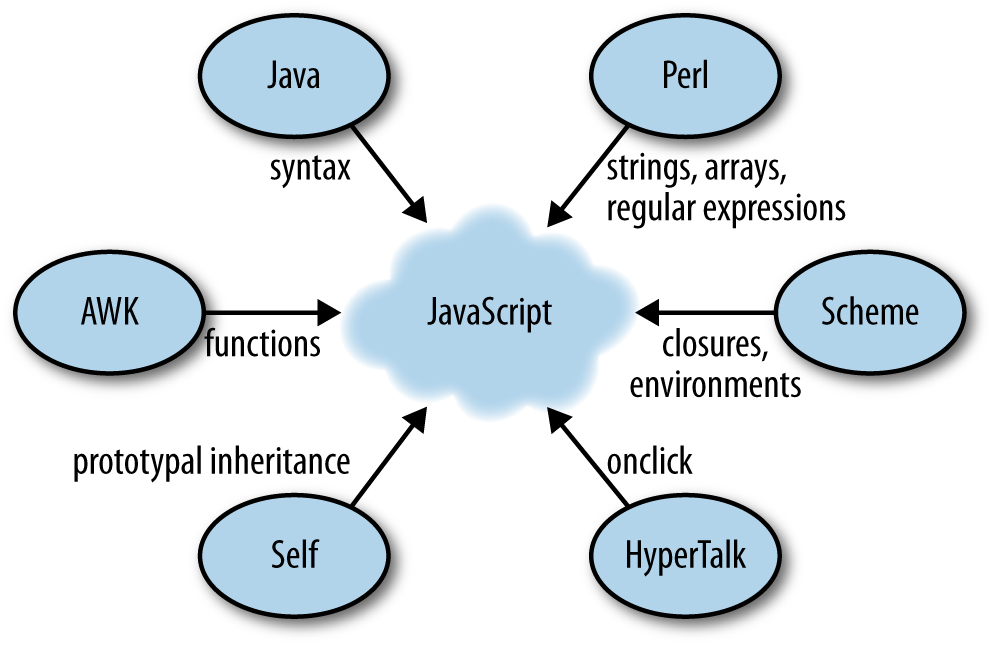
JavaScript was influenced by several programming languages (as shown in Figure 3-1):
Date constructor (which is a port of java.util.Date).
function comes from AWK.
onclick.
Knowing why and how JavaScript was created helps us understand why it is the way it is.
In 1993, NCSA’s Mosaic was the first widely popular web browser. In 1994, a company called Netscape was founded to exploit the potential of the nascent World Wide Web. Netscape created the proprietary web browser Netscape Navigator, which was dominant throughout the 1990s. Many of the original Mosaic authors went on to work on Navigator, but the two intentionally shared no code.
Netscape quickly realized that the Web needed to become more dynamic. Even if you simply wanted to check that users entered correct values in a form, you needed to send the data to the server in order to give feedback. In 1995, Netscape hired Brendan Eich with the promise of letting him implement Scheme (a Lisp dialect) in the browser.[2] Before he could get started, Netscape collaborated with hardware and software company Sun (since bought by Oracle) to include its more static programming language, Java, in Navigator. As a consequence, a hotly debated question at Netscape was why the Web needed two programming languages: Java and a scripting language. The proponents of a scripting language offered the following explanation:[3]
We aimed to provide a “glue language” for the Web designers and part time programmers who were building Web content from components such as images, plugins, and Java applets. We saw Java as the “component language” used by higher-priced programmers, where the glue programmers—the Web page designers—would assemble components and automate their interactions using [a scripting language].
By then, Netscape management had decided that a scripting language had to have a syntax similar to Java’s. That ruled out adopting existing languages such as Perl, Python, TCL, or Scheme. To defend the idea of JavaScript against competing proposals, Netscape needed a prototype. Eich wrote one in 10 days, in May 1995. JavaScript’s first code name was Mocha, coined by Marc Andreesen. Netscape marketing later changed it to LiveScript, for trademark reasons and because the names of several products already had the prefix “Live.” In late November 1995, Navigator 2.0B3 came out and included the prototype, which continued its early existence without major changes. In early December 1995, Java’s momentum had grown, and Sun licensed the trademark Java to Netscape. The language was renamed again, to its final name, JavaScript.[4]
[2] Brendan Eich, “Popularity,” April 3, 2008, http://bit.ly/1lKl6fG.
[3] Naomi Hamilton, “The A–Z of Programming Languages: JavaScript,” Computerworld, July 30, 2008, http://bit.ly/1lKldIe.
[4] Paul Krill, “JavaScript Creator Ponders Past, Future,” InfoWorld, June 23, 2008, http://bit.ly/1lKlpXO; Brendan Eich, “A Brief History of JavaScript,” July 21, 2010, http://bit.ly/1lKkI0M.
After JavaScript came out, Microsoft implemented the same language, under the different name JScript, in Internet Explorer 3.0 (August 1996). Partially to keep Microsoft in check, Netscape decided to standardize JavaScript and asked the standards organization Ecma International to host the standard. Work on a specification called ECMA-262 started in November 1996. Because Sun (now Oracle) had a trademark on the word Java, the official name of the language to be standardized couldn’t be JavaScript. Hence, ECMAScript was chosen, derived from JavaScript and Ecma. However, that name is used only to refer to versions of the language (where one refers to the specification). Everyone still calls the language JavaScript.
ECMA-262 is managed and evolved by Ecma’s Technical Committee 39 (TC39). Its members are companies such as Microsoft, Mozilla, and Google, which appoint employees to participate in committee work; examples include Brendan Eich, Allen Wirfs-Brock (editor of ECMA-262), and David Herman. To advance the design of ECMAScript, TC39 hosts discussions on open channels (such as the mailing list es-discuss) and holds regular meetings. The meetings are attended by TC39 members and invited experts. In early 2013, attendee numbers ranged from 15 to 25.
The following is a list of ECMAScript versions (or editions of ECMA-262) and their key features:
do-while, regular expressions, new string methods (concat, match, replace, slice, split with a regular expression, etc.), exception handling, and more
ECMAScript 4 was developed as the next version of JavaScript, with a prototype written in ML. However, TC39 could not agree on its feature set. To prevent an impasse, the committee met at the end of July 2008 and came to an accord, summarized in four points:
Thus, the ECMAScript 4 developers agreed to make Harmony less radical than ECMAScript 4, and the rest of TC39 agreed to keep moving things forward.
Reaching consensus and creating a standard is not always easy, but thanks to the collaborative efforts of the aforementioned parties, JavaScript is a truly open language, with implementations by multiple vendors that are remarkably compatible. That compatibility is made possible by a very detailed yet concrete specification. For example, the specification often uses pseudocode, and it is complemented by a test suite, test262, that checks an ECMAScript implementation for compliance. It is interesting to note that ECMAScript is not managed by the World Wide Web Consortium (W3C). TC39 and the W3C collaborate wherever there is overlap between JavaScript and HTML5.
It took JavaScript a long time to make an impact. Many JavaScript-related technologies existed for a while until they were discovered by the mainstream. This section describes what happened from JavaScript’s creation until today. Throughout, only the most popular projects are mentioned and many are ignored, even if they were first. For example, the Dojo Toolkit is listed, but there is also the lesser-known qooxdoo, which was created around the same time. And Node.js is listed, even though Jaxer existed before it:
In 2001, Douglas Crockford named and documented JSON (JavaScript Object Notation), whose main idea is to use JavaScript syntax to store data in text format. JSON uses JavaScript literals for objects, arrays, strings, numbers, and booleans to represent structured data. For example:
{"first":"Jane","last":"Porter","married":true,"born":1890,"friends":["Tarzan","Cheeta"]}
Over the years, JSON has become a popular lightweight alternative to XML, especially when structured data is to be represented and not markup. Naturally, JSON is easy to consume via JavaScript (see Chapter 22).
Ajax is a collection of technologies that brings a level of interactivity to web pages that rivals that of desktop applications. One impressive example of what can be achieved via Ajax was introduced in February 2005: Google Maps. This application allowed you to pan and zoom over a map of the world, but only the content that was currently visible was downloaded to the browser. After Google Maps came out, Jesse James Garrett noticed that it shared certain traits with other interactive websites. He called these traits Ajax, a shorthand for Asynchronous JavaScript and XML.[5] The two cornerstones of Ajax are loading content asynchronously in the background (via XMLHttpRequest) and dynamically updating the current page with the results (via dynamic HTML). That was a considerable usability improvement from always performing complete page reloads.
Ajax marked the mainstream breakthrough of JavaScript and dynamic web applications. It is interesting to note how long that took—at that point, the Ajax ingredients had been available for years. Since the inception of Ajax, other data formats have become popular (JSON instead of XML), other protocols are used (e.g., Web Sockets in addition to HTTP), and bidirectional communication is possible. But the basic techniques are still the same. However, the term Ajax is used much less these days and has mostly been replaced by the more comprehensive terms HTML5 and Web Platform (which both mean JavaScript plus browser APIs).
Node.js lets you implement servers that perform well under load. To do so, it uses event-driven, nonblocking I/O and JavaScript (via V8). Node.js creator Ryan Dahl mentions the following reasons for choosing JavaScript:
Dahl was able to build on prior work on event-driven servers and server-side JavaScript (mainly the CommonJS project).
The appeal of Node.js for JavaScript programmers goes beyond being able to program in a familiar language; you get to use the same language on both client and server. That means you can share more code (e.g., for validating data) and use techniques such as isomorphic JavaScript. Isomorphic JavaScript is about assembling web pages on either client or server, with numerous benefits: pages can be rendered on the server for faster initial display, SEO, and running on browsers that either don’t support JavaScript or a version that is too old. But they can also be updated on the client, resulting in a more responsive user interface.
With Chrome OS, the web platform is the native platform. This approach has several advantages:
The introduction of the mobile operating system webOS (which originated at Palm and is now owned by LG Electronics) predates the introduction of Chrome OS, but the “browser as OS” idea is more apparent with the latter (which is why it was chosen as a milestone). webOS is both less and more. Less, because it is very focused on cell phones and tablets. More, because it has Node.js built in, to let you implement services in JavaScript. A more recent entry in the web operating system category is Mozilla’s Firefox OS, which targets cell phones and tablets. Mozilla’s wiki mentions a benefit of web operating systems for the Web:
We also need a hill to take, in order to scope and focus our efforts. Recently we saw the pdf.js project [which renders PDFs via HTML5, without plugins] expose small gaps that needed filling in order for “HTML5” to be a superset of PDF. We want to take a bigger step now, and find the gaps that keep web developers from being able to build apps that are—in every way—the equals of native apps built for the iPhone, Android, and WP7.
This part is a comprehensive reference of the JavaScript language.
JavaScript’s syntax is fairly straightforward. This chapter describes things to watch out for.
This section gives you a quick impression of what JavaScript’s syntax looks like.
The following are five fundamental kinds of values:
Here are a few examples of basic syntax:
// Two slashes start single-linecommentsvarx;// declaring a variablex=3+y;// assigning a value to the variable `x`foo(x,y);// calling function `foo` with parameters `x` and `y`obj.bar(3);// calling method `bar` of object `obj`// A conditional statementif(x===0){// Is `x` equal to zero?x=123;}// Defining function `baz` with parameters `a` and `b`functionbaz(a,b){returna+b;}
Note the two different uses of the equals sign:
=) is used to assign a value to a variable.
===) is used to compare two values (see Equality Operators).
There are two kinds of comments:
Single-line comments via // extend to the rest of the line. Here’s an example:
vara=0;// init
Multiline comments via /* */ can extend over arbitrary ranges of text. They cannot be nested. Here are two examples:
/* temporarily disabledprocessNext(queue);*/function(a/* int */,b/* str */){}
This section looks at an important syntactic distinction in JavaScript: the difference between expressions and statements.
An expression produces a value and can be written wherever a value is expected—for example, as an argument in a function call or at the right side of an assignment. Each of the following lines contains an expression:
myvar3+xmyfunc('a','b')
Roughly, a statement performs an action. Loops and if statements are examples of statements. A program is basically a sequence of statements.[6]
Wherever JavaScript expects a statement, you can also write an expression. Such a statement is called an expression statement. The reverse does not hold: you cannot write a statement where JavaScript expects an expression. For example, an if statement cannot become the argument of a function.
The difference between statements and expressions becomes clearer if we look at members of the two syntactic categories that are similar: the if statement and the conditional operator (an expression).
The following is an example of an if statement:
varsalutation;if(male){salutation='Mr.';}else{salutation='Mrs.';}
There is a similar kind of expression, the conditional operator. The preceding statements are equivalent to the following code:
varsalutation=(male?'Mr.':'Mrs.');
The code between the equals sign and the semicolon is an expression. The parentheses are not necessary, but I find the conditional operator easier to read if I put it in parens.
Two kinds of expressions look like statements—they are ambiguous with regard to their syntactic category:
Object literals (expressions) look like blocks (statements):
{foo:bar(3,5)}
The preceding construct is either an object literal (details: Object Literals) or a block followed by the label foo:, followed by the function call bar(3, 5).
Named function expressions look like function declarations (statements):
functionfoo(){}
The preceding construct is either a named function expression or a function declaration. The former produces a function, the latter creates a variable and assigns a function to it (details on both kinds of function definition: Defining Functions).
In order to prevent ambiguity during parsing, JavaScript does not let you use object literals and function expressions as statements. That is, expression statements must not start with:
function
If an expression starts with either of those tokens, it can only appear in an expression context. You can comply with that requirement by, for example, putting parentheses around the expression. Next, we’ll look at two examples where that is necessary.
eval parses its argument in statement context. You have to put parentheses around an object literal if you want eval to return an object:
> eval('{ foo: 123 }')
123
> eval('({ foo: 123 })')
{ foo: 123 }The following code is an immediately invoked function expression (IIFE), a function whose body is executed right away (you’ll learn what IIFEs are used for in Introducing a New Scope via an IIFE):
> (function () { return 'abc' }())
'abc'If you omit the parentheses, you get a syntax error, because JavaScript sees a function declaration, which can’t be anonymous:
> function () { return 'abc' }()
SyntaxError: function statement requires a nameIf you add a name, you also get a syntax error, because function declarations can’t be immediately invoked:
> function foo() { return 'abc' }()
SyntaxError: Unexpected token )Whatever follows a function declaration must be a legal statement and () isn’t.
For control flow statements, the body is a single statement. Here are two examples:
if(obj!==null)obj.foo();while(x>0)x--;
However, any statement can always be replaced by a block, curly braces containing zero or more statements. Thus, you can also write:
if(obj!==null){obj.foo();}while(x>0){x--;}
I prefer the latter form of control flow statement. Standardizing on it means that there is no difference between single-statement bodies and multistatement bodies. As a consequence, your code looks more consistent, and alternating between one statement and more than one statement is easier.
In this section, we examine how semicolons are used in JavaScript. The basic rules are:
Semicolons are optional in JavaScript. Missing semicolons are added via so-called automatic semicolon insertion (ASI; see Automatic Semicolon Insertion). However, that feature doesn’t always work as expected, which is why you should always include semicolons.
The following statements are not terminated by semicolons if they end with a block:
for, while (but not do-while)
if, switch, try
Here’s an example of while versus do-while:
while(a>0){a--;}// no semicolondo{a--;}while(a>0);
And here’s an example of a function declaration versus a function expression. The latter is followed by a semicolon, because it appears inside a var declaration (which is terminated by a semicolon):
functionfoo(){// ...}// no semicolonvarfoo=function(){// ...};
If you do add a semicolon after a block, you do not get a syntax error, because it is considered an empty statement (see the next section).
That’s most of what you need to know about semicolons. If you always add semicolons, you can probably get by without reading the remaining parts of this section.
A semicolon on its own is an empty statement and does nothing. Empty statements can appear anywhere a statement is expected. They are useful in situations where a statement is demanded, but not needed. In such situations, blocks are usually also allowed. For example, the following two statements are equivalent:
while(processNextItem()>0);while(processNextItem()>0){}
The function processNextItem is assumed to return the number of
remaining items. The following program, consisting of three empty statements, is also syntactically correct:
;;;The goal of automatic semicolon insertion (ASI) is to make semicolons optional at the end of a line. The image invoked by the term automatic semicolon insertion is that the JavaScript parser inserts semicolons for you (internally, things are usually handled differently).
Put another way, ASI helps the parser to determine when a statement ends. Normally, it ends with a semicolon. ASI dictates that a statement also ends if:
The following code contains a line terminator followed by an illegal token:
if(a<0)a=0console.log(a)
The token console is illegal after 0 and triggers ASI:
if(a<0)a=0;console.log(a);
In the following code, the statement inside the braces is not terminated by a semicolon:
functionadd(a,b){returna+b}
ASI creates a syntactically correct version of the preceding code:
functionadd(a,b){returna+b;}
ASI is also triggered if there is a line terminator after the keyword return. For example:
// Don't do thisreturn{name:'John'};
ASI turns the preceding into:
return;{name:'John'};
That’s an empty return, followed by a block with the label name in front of the expression statement 'John'. After the block, there is an empty statement.
Sometimes a statement in a new line starts with a token that is allowed as a continuation of the previous statement. Then ASI is not triggered, even though it seems like it should be. For example:
func()['ul','ol'].foreach(function(t){handleTag(t)})
The square brackets in the second line are interpreted as an index into the result returned by func(). The comma inside the brackets is interpreted as the comma operator (which returns 'ol' in this case; see The Comma Operator). Thus, JavaScript sees the previous code as:
func()['ol'].foreach(function(t){handleTag(t)});
Identifiers are used for naming things and appear in various syntactic roles in JavaScript. For example, the names of variables and unquoted property keys must be valid identifiers. Identifiers are case sensitive.
The first character of an identifier is one of:
$)
_)
Subsequent characters are:
Examples of legal identifiers:
varε=0.0001;varстрока='';var_tmp;var$foo2;
Even though this enables you to use a variety of human languages in JavaScript code, I recommend sticking with English, for both identifiers and comments. That ensures that your code is understandable by the largest possible group of people, which is important, given how much code can spread internationally these days.
The following identifiers are reserved words—they are part of the syntax and can’t be used as variable names (including function names and parameter names):
|
|
|
|
|
|
|
|
|
|
|
|
|
|
|
|
|
|
|
|
|
|
|
|
|
|
|
|
|
|
|
|
|
|
|
|
|
|
|
|
|
|
|
|
The following three identifiers are not reserved words, but you should treat them as if they were:
|
|
|
Lastly, you should also stay away from the names of standard global variables (see Chapter 23). You can use them for local variables without breaking anything, but your code still becomes confusing.
Note that you can use reserved words as unquoted property keys (as of ECMAScript 5):
> var obj = { function: 'abc' };
> obj.function
'abc'You can look up the precise rules for identifiers in Mathias Bynens’s blog post “Valid JavaScript variable names”.
With method invocations, it is important to distinguish between the floating-point dot and the method invocation dot. Thus, you cannot write 1.toString(); you must use one of the following alternatives:
1..toString()1.toString()// space before dot(1).toString()1.0.toString()
ECMAScript 5 has a strict mode that results in cleaner JavaScript, with fewer unsafe features, more warnings, and more logical behavior. The normal (nonstrict) mode is sometimes called “sloppy mode.”
You switch strict mode on by typing the following line first in your JavaScript file or inside your <script> element:
'use strict';
Note that JavaScript engines that don’t support ECMAScript 5 will simply ignore the preceding statement, as writing strings in this manner (as an expression statement; see Statements) normally does nothing.
You can also switch on strict mode per function. To do so, write your function like this:
functionfoo(){'use strict';...}
This is handy when you are working with a legacy code base where switching on strict mode everywhere may break things.
In general, the changes enabled by strict mode are all for the better. Thus, it is highly recommended to use it for new code you write—simply switch it on at the beginning of a file. There are, however, two caveats:
The following sections explain the strict mode features in more detail. You normally don’t need to know them, as you will mostly get more warnings for things that you shouldn’t do anyway.
All variables must be explicitly declared in strict mode. This helps to prevent typos. In sloppy mode, assigning to an undeclared variable creates a global variable:
functionsloppyFunc(){sloppyVar=123;}sloppyFunc();// creates global variable `sloppyVar`console.log(sloppyVar);// 123
In strict mode, assigning to an undeclared variable throws an exception:
functionstrictFunc(){'use strict';strictVar=123;}strictFunc();// ReferenceError: strictVar is not defined
Strict mode limits function-related features.
In strict mode, all functions must be declared at the top level of a scope (global scope or directly inside a function). That means that you can’t put a function declaration inside a block. If you do, you get a descriptive SyntaxError. For example, V8 tells you: “In strict mode code, functions can only be declared at top level or immediately within another function”:
functionstrictFunc(){'use strict';{// SyntaxError:functionnested(){}}}
That is something that isn’t useful anyway, because the function is created in the scope of the surrounding function, not “inside” the block.
If you want to work around this limitation, you can create a function inside a block via a variable declaration and a function expression:
functionstrictFunc(){'use strict';{// OK:varnested=function(){};}}
The rules for function parameters are less permissive: using the same parameter name twice is forbidden, as are local variables that have the same name as a parameter.
The arguments object is simpler in strict mode: the properties arguments.callee and arguments.caller have been eliminated, you can’t assign to the variable arguments, and arguments does not track changes to parameters (if a parameter changes, the corresponding array element does not change with it). Deprecated features of arguments explains the details.
In sloppy mode, the value of this in nonmethod functions is the global object (window in browsers; see The Global Object):
functionsloppyFunc(){console.log(this===window);// true}
In strict mode, it is undefined:
functionstrictFunc(){'use strict';console.log(this===undefined);// true}
This is useful for constructors. For example, the following constructor, Point, is in strict mode:
functionPoint(x,y){'use strict';this.x=x;this.y=y;}
Due to strict mode, you get a warning when you accidentally forget new and call it as a function:
> var pt = Point(3, 1); TypeError: Cannot set property 'x' of undefined
In sloppy mode, you don’t get a warning, and global variables x and y are created. Consult Tips for Implementing Constructors for details.
Illegal manipulations of properties throw exceptions in strict mode. For example, attempting to set the value of a read-only property throws an exception, as does attempting to delete a nonconfigurable property. Here is an example of the former:
varstr='abc';functionsloppyFunc(){str.length=7;// no effect, silent failureconsole.log(str.length);// 3}functionstrictFunc(){'use strict';str.length=7;// TypeError: Cannot assign to// read-only property 'length'}
In sloppy mode, you can delete a global variable foo like this:
deletefoo
In strict mode, you get a syntax error whenever you try to delete unqualified identifiers. You can still delete global variables like this:
deletewindow.foo;// browsersdeleteglobal.foo;// Node.jsdeletethis.foo;// everywhere (in global scope)
In strict mode, the eval() function becomes less quirky: variables declared in the evaluated string are not added to the scope surrounding eval() anymore. For details, consult Evaluating Code Using eval().
Two more JavaScript features are forbidden in strict mode:
with statement is not allowed anymore (see The with Statement). You get a syntax error at compile time (when loading the code).
No more octal numbers: in sloppy mode, an integer with a leading zero is interpreted as octal (base 8). For example:
> 010 === 8 true
In strict mode, you get a syntax error if you use this kind of literal:
> function f() { 'use strict'; return 010 }
SyntaxError: Octal literals are not allowed in strict mode.JavaScript has most of the values that we have come to expect from programming languages: booleans, numbers, strings, arrays, and so on. All normal values in JavaScript have properties.[7] Each property has a key (or name) and a value. You can think of properties like fields of a record. You use the dot (.) operator to access properties:
> var obj = {}; // create an empty object
> obj.foo = 123; // write property
123
> obj.foo // read property
123
> 'abc'.toUpperCase() // call method
'ABC'This chapter gives an overview of JavaScript’s type system.
JavaScript has only six types, according to Chapter 8 of the ECMAScript language specification:
An ECMAScript language type corresponds to values that are directly manipulated by an ECMAScript programmer using the ECMAScript language. The ECMAScript language types are:
- Undefined, Null
- Boolean, String, Number, and
- Object
Therefore, constructors technically don’t introduce new types, even though they are said to have instances.
In the context of language semantics and type systems, static usually means “at compile time” or “without running a program,” while dynamic means “at runtime.”
In a statically typed language, variables, parameters, and members of objects (JavaScript calls them properties) have types that the compiler knows at compile time. The compiler can use that information to perform type checks and to optimize the compiled code.
Even in statically typed languages, a variable also has a dynamic type, the type of the variable’s value at a given point at runtime. The dynamic type can differ from the static type. For example (Java):
Objectfoo="abc";
The static type of foo is Object; its dynamic type is String.
JavaScript is dynamically typed; types of variables are generally not known at compile time.
If you have type information, you can check whether a value used in an operation (calling a function, applying an operator, etc.) has the correct type. Statically type-checked languages perform this kind of check at compile time, while dynamically type-checked languages do so at runtime. A language can be both statically type-checked and dynamically type-checked. If a check fails, you usually get some kind of error or exception.
JavaScript performs a very limited kind of dynamic type checking:
> var foo = null; > foo.prop TypeError: Cannot read property 'prop' of null
Mostly, however, things silently fail or work. For example, if you access a property that does not exist, you get the value undefined:
> var bar = {};
> bar.prop
undefinedIn JavaScript, the main way of dealing with a value whose type doesn’t fit is to coerce it to the correct type. Coercion means implicit type conversion. Most operands coerce:
> '3' * '4' 12
JavaScript’s built-in conversion mechanisms support only the types Boolean, Number, String, and Object. There is no standard way to convert an instance of one constructor to an instance of another constructor.
The terms strongly typed and weakly typed do not have generally meaningful definitions. They are used, but normally incorrectly. It is better to instead use statically typed, statically type-checked, and so on.
JavaScript makes a somewhat arbitrary distinction between values:
A major difference between the two is how they are compared; each object has a unique identity and is only (strictly) equal to itself:
> var obj1 = {}; // an empty object
> var obj2 = {}; // another empty object
> obj1 === obj2
false
> var obj3 = obj1;
> obj3 === obj1
trueIn contrast, all primitive values encoding the same value are considered the same:
> var prim1 = 123; > var prim2 = 123; > prim1 === prim2 true
The following two sections explain primitive values and objects in more detail.
The following are all of the primitive values (primitives for short):
true, false (see Chapter 10)
1736, 1.351 (see Chapter 11)
'abc', "abc" (see Chapter 12)
undefined, null (see undefined and null)
Primitives have the following characteristics:
The “content” is compared:
> 3 === 3 true > 'abc' === 'abc' true
Properties can’t be changed, added, or removed:
> var str = 'abc'; > str.length = 1; // try to change property `length` > str.length // ⇒ no effect 3 > str.foo = 3; // try to create property `foo` > str.foo // ⇒ no effect, unknown property undefined
(Reading an unknown property always returns undefined.)
All nonprimitive values are objects. The most common kinds of objects are:
Plain objects (constructor Object) can be created by object literals (see Chapter 17):
{firstName:'Jane',lastName:'Doe'}
The preceding object has two properties: the value of property firstName
is 'Jane', and the value of property lastName is 'Doe'.
Arrays (constructor Array) can be created by array literals (see Chapter 18):
['apple','banana','cherry']
The preceding array has three elements that can be accessed via numeric
indices. For example, the index of 'apple' is 0.
Regular expressions (constructor RegExp) can be created by regular expression literals (see Chapter 19):
/^a+b+$/Objects have the following characteristics:
Identities are compared; every object has its own identity:
> {} === {} // two different empty objects
false
> var obj1 = {};
> var obj2 = obj1;
> obj1 === obj2
trueYou can normally freely change, add, and remove properties (see Dot Operator (.): Accessing Properties via Fixed Keys):
> var obj = {};
> obj.foo = 123; // add property `foo`
> obj.foo
123JavaScript has two “nonvalues” that indicate missing information, undefined and null:
undefined means “no value” (neither primitive nor object). Uninitialized variables, missing parameters, and missing properties have that nonvalue. And functions implicitly return it if nothing has been explicitly returned.
null means “no object.” It is used as a nonvalue where an object is expected (as a parameter, as a member in a chain of objects, etc.).
undefined and null are the only values for which any kind of property access results in an exception:
> function returnFoo(x) { return x.foo }
> returnFoo(true)
undefined
> returnFoo(0)
undefined
> returnFoo(null)
TypeError: Cannot read property 'foo' of null
> returnFoo(undefined)
TypeError: Cannot read property 'foo' of undefinedundefined is also sometimes used as more of a metavalue that indicates nonexistence. In contrast, null indicates emptiness. For example, a JSON node visitor (see Transforming Data via Node Visitors) returns:
undefined to remove an object property or array element
null to set the property or element to null
Here we review the various scenarios where undefined and null occur.
Uninitialized variables are undefined:
> var foo; > foo undefined
Missing parameters are undefined:
> function f(x) { return x }
> f()
undefinedIf you read a nonexistent property, you get undefined:
> var obj = {}; // empty object
> obj.foo
undefinedAnd functions implicitly return undefined if nothing has been explicitly returned:
> function f() {}
> f()
undefined
> function g() { return; }
> g()
undefined
null is the last element in the prototype chain (a chain of objects; see Layer 2: The Prototype Relationship Between Objects):
> Object.getPrototypeOf(Object.prototype) null
null is returned by RegExp.prototype.exec() if there was no match for the regular expression in the string:
> /x/.exec('aaa')
nullIn the following sections we review how to check for undefined and null individually, or to check if either exists.
Strict equality (===) is the canonical way of checking for undefined:
if(x===undefined)...
You can also check for undefined via the typeof operator (typeof: Categorizing Primitives), but you should normally use the aforementioned approach.
Most functions allow you to indicate a missing value via either undefined or null. One way of checking for both of them is via an explicit comparison:
// Does x have a value?if(x!==undefined&&x!==null){...}// Is x a non-value?if(x===undefined||x===null){...}
Another way is to exploit the fact that both undefined and null are considered false (see Truthy and Falsy Values):
// Does x have a value (is it truthy)?if(x){...}// Is x falsy?if(!x){...}
false, 0, NaN, and '' are also considered false.
A single nonvalue could play the roles of both undefined and null. Why does JavaScript have two such values? The reason is historical.
JavaScript adopted Java’s approach of partitioning values into primitives and objects. It also used Java’s value for “not an object,” null. Following the precedent set by C (but not Java), null becomes 0 if coerced to a number:
> Number(null) 0 > 5 + null 5
Remember that the first version of JavaScript did not have exception handling. Therefore, exceptional cases such as uninitialized variables and missing properties had to be indicated via a value. null would have been a good choice, but Brendan Eich wanted to avoid two things at the time:
As a result, Eich added undefined as an additional nonvalue to the language. It coerces to NaN:
> Number(undefined) NaN > 5 + undefined NaN
undefined is a property of the global object (and thus a global variable; see The Global Object). Under ECMAScript 3, you had to take precautions when reading undefined, because it was easy to accidentally change its value. Under ECMAScript 5, that is not necessary, because undefined is read-only.
To protect against a changed undefined, two techniques were popular (they are still relevant for older JavaScript engines):
Shadow the global undefined (which may have the wrong value):
(function(undefined){if(x===undefined)...// safe now}());// don’t hand in a parameter
In the preceding code, undefined is guaranteed to have the right value, because it is a parameter whose value has not been provided by the function call.
Compare with void 0, which is always (the correct) undefined (see The void Operator):
if(x===void0)// always safe
The three primitive types boolean, number, and string have corresponding constructors: Boolean, Number, String. Their instances (so-called wrapper objects) contain (wrap) primitive values. The constructors can be used in two ways:
As constructors, they create objects that are largely incompatible with the primitive values that they wrap:
> typeof new String('abc')
'object'
> new String('abc') === 'abc'
falseAs functions, they convert values to the corresponding primitive types (see Functions for Converting to Boolean, Number, String, and Object). This is the recommended method of conversion:
> String(123) '123'
It’s considered a best practice to avoid wrapper objects. You normally don’t need them, as there is nothing that objects can do that primitives can’t (with the exception of being mutated). (This is different from Java, from which JavaScript inherited the difference between primitives and objects!)
Primitive values such as 'abc' are fundamentally different from wrapper instances such as new String('abc'):
> typeof 'abc' // a primitive value
'string'
> typeof new String('abc') // an object
'object'
> 'abc' instanceof String // never true for primitives
false
> 'abc' === new String('abc')
falseWrapper instances are objects, and there is no way of comparing objects in JavaScript, not even via lenient equals == (see Equality Operators: === Versus ==):
> var a = new String('abc');
> var b = new String('abc');
> a == b
falseThere is one use case for wrapper objects: you want to add properties to a primitive value. Then you wrap the primitive and add properties to the wrapper object. You need to unwrap the value before you can work with it.
Wrap a primitive by invoking a wrapper constructor:
newBoolean(true)newNumber(123)newString('abc')
Unwrap a primitive by invoking the method valueOf(). All objects have this method (as discussed in Conversion to Primitive):
> new Boolean(true).valueOf()
true
> new Number(123).valueOf()
123
> new String('abc').valueOf()
'abc'Converting wrapper objects to primitives properly extracts numbers and strings, but not booleans:
> Boolean(new Boolean(false)) // does not unwrap
true
> Number(new Number(123)) // unwraps
123
> String(new String('abc')) // unwraps
'abc'The reason for this is explained in Converting to Boolean.
Primitives don’t have their own methods and borrow them from wrappers:
>'abc'.charAt===String.prototype.charAttrue
Sloppy mode and strict mode handle this borrowing differently. In sloppy mode, primitives are converted to wrappers on the fly:
String.prototype.sloppyMethod=function(){console.log(typeofthis);// objectconsole.log(thisinstanceofString);// true};''.sloppyMethod();// call the above method
In strict mode, methods from the wrapper prototype are used transparently:
String.prototype.strictMethod=function(){'use strict';console.log(typeofthis);// stringconsole.log(thisinstanceofString);// false};''.strictMethod();// call the above method
Type coercion means the implicit conversion of a value of one type to a value of another type. Most of JavaScript’s operators, functions, and methods coerce operands and arguments to the types that they need. For example, the operands of the multiplication operator (*) are coerced to numbers:
> '3' * '4' 12
As another example, if one of the operands is a string, the plus operator (+) converts the other one to a string:
> 3 + ' times' '3 times'
Therefore, JavaScript rarely complains about a value having the wrong type. For example, programs normally receive user input (from online forms or GUI widgets) as strings, even if the user has entered a number. If you treat a number-as-string like a number, you will not get a warning, just unexpected results. For example:
varformData={width:'100'};// You think formData.width is a number// and get unexpected resultsvarw=formData.width;varouter=w+20;// You expect outer to be 120, but it’s notconsole.log(outer===120);// falseconsole.log(outer==='10020');// true
In cases such as the preceding one, you should convert to the appropriate type early on:
varw=Number(formData.width);
The following functions are the preferred way of converting a value to a boolean, number, string, or object:
Boolean() (see Converting to Boolean)
Converts a value to a boolean. The following values are converted to false; they are the so-called “falsy” values:
undefined, null
false
0, NaN
''
All other values are considered “truthy” and converted to true (including all objects!).
Number() (see Converting to Number)
undefined becomes NaN.
null becomes 0.
false becomes 0, true becomes 1.
String() (see Converting to String)
Converts a value to a string. It has the obvious results for all primitives. For example:
> String(null) 'null' > String(123.45) '123.45' > String(false) 'false'
Objects are first converted to primitives (discussed shortly), which are then converted to strings.
Object() (see Converting Any Value to an Object)
Converts objects to themselves, undefined and null to empty objects, and primitives to wrapped primitives. For example:
> var obj = { foo: 123 };
> Object(obj) === obj
true
> Object(undefined)
{}
> Object('abc') instanceof String
trueNote that Boolean(), Number(), String(), and Object() are called as functions. You normally don’t use them as constructors. Then they create instances of themselves (see Wrapper Objects for Primitives).
To convert a value to either a number or a string, it is first converted to an arbitrary primitive value, which is then converted to the final type (as discussed in Functions for Converting to Boolean, Number, String, and Object).
The ECMAScript specification has an internal function, ToPrimitive() (which is not accessible from JavaScript), that performs this conversion.
Understanding ToPrimitive() enables you to configure how objects are converted to numbers and strings. It has the following signature:
ToPrimitive(input,PreferredType?)
The optional parameter PreferredType indicates the final type of the conversion: it is either Number or String, depending on whether the result of ToPrimitive() will be converted to a number or a string.
If PreferredType is Number, then you perform the following steps:
input is primitive, return it (there is nothing more to do).
input is an object. Call input.valueOf(). If the result is primitive, return it.
input.toString(). If the result is primitive, return it.
TypeError (indicating the failure to convert input to a primitive).
If PreferredType is String, steps 2 and 3 are swapped. The PreferredType can also be omitted; it is then considered to be String for dates and Number for all other values. This is how the operators + and == call ToPrimitive().
The default implementation of valueOf() returns this, while the default implementation of toString() returns type information:
> var empty = {};
> empty.valueOf() === empty
true
> empty.toString()
'[object Object]'Therefore, Number() skips valueOf() and converts the result of toString() to a number; that is, it converts '[object Object]' to NaN:
> Number({})
NaNThe following object customizes valueOf(), which influences Number(), but doesn’t change anything for String():
> var n = { valueOf: function () { return 123 } };
> Number(n)
123
> String(n)
'[object Object]'The following object customizes toString(). Because the result can be converted to a number, Number() can return a number:
> var s = { toString: function () { return '7'; } };
> String(s)
'7'
> Number(s)
7[7] Technically, primitive values do not have their own properties, they borrow them from wrapper constructors. But that is something that goes on behind the scenes, so you don’t normally see it.
This chapter gives an overview of operators.
All operators coerce (as discussed in Type Coercion) their operands to appropriate types. Most operators only work with primitive values (e.g., arithmetic operators and comparison operators). That means that objects are converted to primitives before anything is done with them. One example where that is unfortunate is the plus operator, which many languages use for array concatenation. That’s not so with JavaScript, however, where this operator converts arrays to strings and appends them:
> [1, 2] + [3] '1,23' > String([1, 2]) '1,2' > String([3]) '3'
There is no way to overload or customize operators in JavaScript, not even equality.
There are several ways to use the plain assignment operator:
x = value
x that has previously been declared
var x = value
obj.propKey = value
obj['propKey'] = value
arr[index] = value
An assignment is an expression that evaluates to the assigned value. That allows you to chain assignments. For example, the following statement assigns 0 to both y and x:
x=y=0;
A compound assignment operator is written as op=, where op is one of several binary operators and = is the assignment operator. The following two expressions are equivalent:
myvarop=valuemyvar=myvaropvalue
In other words, a compound assignment operator op= applies op to both operands and assigns the result to the first operand. Let’s look at an example of using the plus operator (+) via compound assignment:
> var x = 2; > x += 3 5 > x 5
The following are all compound assignment operators:
*=, /=, %=, +=, -=
<<=, >>=, >>>=, &=, ^=, |=
+=
JavaScript has two ways of determining whether two values are equal:
Lenient equality is problematic in two regards. First, how it performs conversion is confusing. Second, due to the operators being so forgiving, type errors can remain hidden longer.
Always use strict equality and avoid lenient equality. You only need to learn about the latter if you want to know why it should be avoided.
Equality is not customizable. Operators can’t be overloaded in JavaScript, and you can’t customize how equality works. There are some operations where you often need to influence comparison—for example, Array.prototype.sort() (see Sorting and Reversing Elements (Destructive)). That method optionally accepts a callback that performs all comparisons between array elements.
Values with different types are never strictly equal. If both values have the same type, then the following assertions hold:
undefined === undefined
null === null
Two numbers:
x===x// unless x is NaN+0===-0NaN!==NaN// read explanation that follows
Two objects (including arrays and functions): x === y if and only if x and y are the same object; that is, if you want to compare different objects, you have to implement your own comparison algorithm:
> var b = {}, c = {};
> b === c
false
> b === b
trueThe special number value NaN (see NaN) is not equal to itself:
> NaN === NaN false
Thus, you need to use other means to check for it, which are described in Pitfall: checking whether a value is NaN.
The algorithm for comparing via normal equality works as follows. If both operands have the same type (one of the six specification types—Undefined, Null, Boolean, Number, String, and Object), then compare them via strict equality.
Otherwise, if the operands are:
undefined and null, then they are considered leniently equal:
> undefined == null true
Otherwise—if none of the aforementioned cases apply—the result of the lenient comparison is false.
x!=y
is equivalent to the negation of an equality comparison:
!(x==y)
Step 3 means that equality and conversion to boolean (see Converting to Boolean) work differently. If converted to boolean, numbers greater than 1 become true (e.g., in if statements). But those numbers are not leniently equal to true. The comments explain how the results were computed:
> 2 == true // 2 === 1 false > 2 == false // 2 === 0 false > 1 == true // 1 === 1 true > 0 == false // 0 === 0 true
Similarly, while the empty string is equal to false, not all nonempty strings are equal to true:
> '' == false // 0 === 0 true > '1' == true // 1 === 1 true > '2' == true // 2 === 1 false > 'abc' == true // NaN === 1 false
Some of the leniency can be useful, depending on what you want:
> 'abc' == new String('abc') // 'abc' == 'abc'
true
> '123' == 123 // 123 === 123
trueOther cases are problematic, due to how JavaScript converts strings to numbers (see Converting to Number):
> '\n\t123\r ' == 123 // usually not OK true > '' == 0 // 0 === 0 true
If you compare an object to a nonobject, it is converted to a primitive, which leads to strange results:
> {} == '[object Object]'
true
> ['123'] == 123
true
> [] == 0
trueHowever, two objects are only equal if they are they same object. That means that you can’t really compare two wrapper objects:
> new Boolean(true) === new Boolean(true)
false
> new Number(123) === new Number(123)
false
> new String('abc') == new String('abc')
falseYou sometimes read about valid use cases for lenient equality (==). This section lists them and points out better alternatives.
The following comparison ensures that x is neither undefined nor null:
if(x!=null)...
While this is a compact way of writing this check, it confuses beginners, and experts can’t be sure whether it is a typo or not. Thus, if you want to check whether x has a value, use the standard check for truthiness (covered in Truthy and Falsy Values):
if(x)...
If you want to be more precise, you should perform an explicit check for both values:
if(x!==undefined&&x!==null)...
If you are not sure whether a value x is a number or a number-as-a-string, you can use checks such as the following:
if(x==123)...
The preceding checks whether x is either 123 or '123'. Again, this is very compact, and again, it is better to be explicit:
if(Number(x)===123)...
Lenient equals lets you compare primitives with wrapped primitives:
> 'abc' == new String('abc')
trueThere are three reasons against this approach. First, lenient equality does not work between wrapped primitives:
> new String('abc') == new String('abc')
falseSecond, you should avoid wrappers anyway. Third, if you do use them, it is better to be explicit:
if(wrapped.valueOf()==='abc')...
JavaScript knows the following ordering operators:
<)
<=)
>)
>=)
These operators work for numbers and for strings:
> 7 >= 5 true > 'apple' < 'orange' true
For strings, they are not very useful, because they are case-sensitive and don’t handle features such as accents well (for details, see Comparing Strings).
You evaluate a comparison:
x<y
by taking the following steps:
obj are converted to primitives via the internal operation ToPrimitive(obj, Number) (refer to Algorithm: ToPrimitive()—Converting a Value to a Primitive), which calls obj.valueOf() and, possibly, obj.toString() to do so.
The other ordering operators are handled similarly.
Roughly, the plus operator examines its operands. If one of them is a string, the other is also converted to a string and both are concatenated:
> 'foo' + 3 'foo3' > 3 + 'foo' '3foo' > 'Colors: ' + [ 'red', 'green', 'blue' ] 'Colors: red,green,blue'
Otherwise, both operands are converted to numbers (see Converting to Number) and added:
> 3 + 1 4 > 3 + true 4
That means that the order in which you evaluate matters:
> 'foo' + (1 + 2)
'foo3'
> ('foo' + 1) + 2
'foo12'You evaluate an addition:
value1+value2
by taking the following steps:
obj are converted to primitives via the internal operation ToPrimitive(obj) (refer to Algorithm: ToPrimitive()—Converting a Value to a Primitive), which calls obj.valueOf() and, possibly, obj.toString() to do so. For dates, obj.toString() is called first.
The following operators only have operands of a single type and also produce results of that type. They are covered elsewhere.
Boolean operators:
Binary logical operators (see Binary Logical Operators: And (&&) and Or (||)):
x&&y,x||y
Logical Not (see Logical Not (!)):
!x
Number operators:
Arithmetic operators (see Arithmetic Operators):
x+y,x-y,x*y,x/y,x%y++x,--x,x++,x---x,+x
Bitwise operators (see Bitwise Operators):
~xx&y,x|y,x^yx<<y,x>>y,x>>>y
Here we will review special operators, namely the conditional, comma, and void
operators.
The conditional operator is an expression:
«condition»?«if_true»:«if_false»
If the condition is true, the result is if_true; otherwise, the result is if_false. For example:
varx=(obj?obj.prop:null);
The parentheses around the operator are not needed, but they make it easier to read.
«left»,«right»
The comma operator evaluates both operands and returns the result of right. Roughly, it does for expressions what the semicolon does for statements.
This example demonstrates that the second operand becomes the result of the operator:
> 123, 'abc' 'abc'
This example demonstrates that both operands are evaluated:
> var x = 0; > var y = (x++, 10); > x 1 > y 10
The comma operator is confusing. It’s better to not be clever and to write two separate statements whenever you can.
The syntax for the void operator is:
void«expr»
which evaluates expr and returns undefined. Here are some examples:
> void 0 undefined > void (0) undefined > void 4+7 // same as (void 4)+7 NaN > void (4+7) undefined > var x; > x = 3 3 > void (x = 5) undefined > x 5
Thus, if you implement void as a function, it looks as follows:
functionmyVoid(expr){returnundefined;}
The void operator is associated closely with its operand, so use parentheses as necessary. For example, void 4+7 binds as (void 4)+7.
Under ECMAScript 5, void is rarely useful. Its main use cases are:
void 0 as a synonym for undefined
undefined is reasonably safe from being changed under ECMAScript 5, which makes this use case less important (for details, see Changing undefined).
In some situations, it is important to return undefined as opposed to the result of an expression. Then void can be used to discard that result. One such situation involves javascript: URLs, which should be avoided for links, but are useful for bookmarklets. When you visit one of those URLs, many browsers replace the current document with the result of evaluating the URL’s “content,” but only if the result isn’t undefined. Hence, if you want to open a new window without changing the currently displayed content, you can do the following:
javascript:voidwindow.open("http://example.com/")
void (see IIFE Variation: Prefix Operators).[9]
According to JavaScript creator Brendan Eich, he added it to the language to help with javascript: links (one of the aforementioned use cases):
I added the
voidoperator to JS before Netscape 2 shipped to make it easy to discard any non-undefined value in a javascript: URL.[10]
If you want to categorize a value, you unfortunately have to distinguish between primitives and objects (refer back to Chapter 8) in JavaScript:
typeof operator distinguishes primitives from objects and determines the types of primitives.
instanceof operator determines whether an object is an instance of a given constructor. Consult Chapter 17 for more information on object-oriented programming in JavaScript.
typeof«value»
returns a string describing what kind of value value is. Here are some examples:
> typeof undefined
'undefined'
> typeof 'abc'
'string'
> typeof {}
'object'
> typeof []
'object'typeof is used to distinguish primitives and objects and to categorize primitives (which cannot be handled by instanceof). Unfortunately, the results of this operator are not completely logical and only loosely correspond to the types of the ECMAScript specification (which are explained in JavaScript’s Types):
| Operand | Result |
|
|
|
|
Boolean value |
|
Number value |
|
String value |
|
Function |
|
All other normal values |
|
(Engine-created value) | JavaScript engines are allowed to create values for whom |
Unfortunately, typeof null is 'object'. This is considered a bug (null is not a member of the internal type Object), but it can’t be fixed, because doing so would break existing code. You thus have to be wary of null. For example, the following function checks whether value is an object:
functionisObject(value){return(value!==null&&(typeofvalue==='object'||typeofvalue==='function'));}
Trying it out:
> isObject(123)
false
> isObject(null)
false
> isObject({})
trueThe first JavaScript engine represented JavaScript values as 32-bit words. The lowest 3 bits of such a word were used as a type tag, to indicate whether the value was an object, an integer, a double, a string, or a boolean (as you can see, even this early engine already stored numbers as integers if possible).
The type tag for objects was 000. In order to represent the value null, the engine used the machine language NULL pointer, a word where all bits are zero. typeof checked the type tag to determine the type of value, which is why it reported null to be an object.[11]
typeofx==='undefined'
has two use cases:
x is undefined.
x exists.
Here are examples of both use cases:
> var foo; > typeof foo === 'undefined' true > typeof undeclaredVariable === 'undefined' true
For the first use case, comparing directly with undefined is usually a better choice. However, it doesn’t work for the second use case:
> var foo; > foo === undefined true > undeclaredVariable === undefined ReferenceError: undeclaredVariable is not defined
«value»instanceof«Constr»
determines whether value has been created by the constructor Constr or a subconstructor. Here are some examples:
> {} instanceof Object
true
> [] instanceof Array // constructor of []
true
> [] instanceof Object // super-constructor of []
trueAs expected, instanceof is false for the nonvalues undefined and null:
> undefined instanceof Object false > null instanceof Object false
But it is also false for all other primitive values:
> 'abc' instanceof Object false > 123 instanceof Object false
For details on instanceof, consult The instanceof Operator.
The following three operators work on objects. They are explained elsewhere:
new (see Layer 3: Constructors—Factories for Instances)
new Point(3, 5)
delete (see Deleting properties)
delete obj.prop
in (see Iteration and Detection of Properties)
'prop' in obj
[8] Strictly speaking, setting an array element is a special case of setting a property.
[9] Thanks to Brandon Benvie (@benvie), who told me about using void for IIFEs.
[10] Source: http://en.wikipedia.org/wiki/Bookmarklet
[11] Thanks to Tom Schuster (@evilpies) for pointing me to the source code of the first JavaScript engine.
The primitive boolean type comprises the values true and false:
> typeof false 'boolean' > typeof true 'boolean'
Values are converted to booleans as follows:
| Value | Converted to boolean |
|
|
|
|
A boolean | Same as input (nothing to convert) |
A number |
|
other numbers → | |
A string |
|
other strings → | |
An object |
|
There are three ways any value can be converted to a boolean:
| (Invoked as a function, not as a constructor) |
| |
| A single “not” converts to negated boolean; use twice for the nonnegated conversion. |
I prefer Boolean(), because it is more descriptive. Here are some examples:
> Boolean(undefined)
false
> Boolean(null)
false
> Boolean(0)
false
> Boolean(1)
true
> Boolean(2)
true
> Boolean('')
false
> Boolean('abc')
true
> Boolean('false')
trueWherever JavaScript expects a boolean, you can provide any kind of value and it is automatically converted to boolean. Thus, there are two sets of values in JavaScript: one set is converted to false, while the other set is converted to true. These sets are called falsy values and truthy values. Given the preceding table, the following are all falsy values:
undefined, null
false
0, NaN
''
All other values—including all objects, even empty objects, empty arrays, and new Boolean(false)—are truthy. Because undefined and null are falsy, you can use the if statement to check whether a variable x has a value:
if(x){// x has a value}
The caveat is that the preceding check interprets all falsy values as “does not have a value,” not just undefined and null. But if you can live with that limitation, you get to use a compact and established pattern.
> Boolean(new Boolean(false))
true
> Boolean([])
true
> Boolean({})
trueThat is different from how objects are converted to a number or string, where you can control the result by implementing the methods valueOf() and toString():
> Number({ valueOf: function () { return 123 } })
123
> String({ toString: function () { return 'abc' } })
'abc'The conversion to boolean is different for historic reasons. For ECMAScript 1, it was decided to not enable objects to configure that conversion (e.g., via a toBoolean() method). The rationale was that the boolean operators || and && preserve the values of their operands. Therefore, if you chain those operators, the same value may be checked multiple times for truthiness or falsiness. Such checks are cheap for primitives, but would be costly for objects if they were able to configure their conversion to boolean. ECMAScript 1 avoided that cost by making objects always truthy.
In this section, we cover the basics of the And (&&), Or (||), and Not (!) logical operators.
They always return either one of the operands, unchanged:
> 'abc' || 123 'abc' > false || 123 123
The second operand is not evaluated if the first operand already determines the result. For example (the result of console.log is undefined):
> true || console.log('Hello')
true
> false || console.log('Hello')
Hello
undefinedThat is uncommon behavior for operators. Normally, all operands are evaluated before an operator is invoked (just like for functions).
If the first operand can be converted to false, return it. Otherwise, return the second operand:
> true && false false > false && 'def' false > '' && 'def' '' > 'abc' && 'def' 'def'
If the first operand can be converted to true, return it. Otherwise, return the second operand:
> true || false true > true || 'def' true > 'abc' || 'def' 'abc' > '' || 'def' 'def'
Sometimes there are situations where a value (a parameter, the result of a function, etc.) can be either a nonvalue (undefined, null) or an actual value. If you want to provide a default value for the former case, you can use the Or operator:
theValue||defaultValue
The preceding expression evaluates to theValue if it is truthy and to defaultValue otherwise. The usual caveat applies: defaultValue will also be returned if theValue has a falsy value other than undefined and null. Let’s look at three examples of using that pattern.
The parameter text of the function saveText() is optional and should be the empty string if it has been omitted:
functionsaveText(text){text=text||'';...}
This is the most common use of || as a default operator. Consult Optional Parameters for more on optional parameters.
The object options may or may not have the property title. If it is missing, the value 'Untitled' should be used when setting the title:
setTitle(options.title||'Untitled');
The function countOccurrences counts how often regex matches inside str:
functioncountOccurrences(regex,str){// Omitted: check that /g is set for `regex`return(str.match(regex)||[]).length;}
The problem is that match() (see String.prototype.match: Capture Groups or Return All Matching Substrings) either returns an array or null. Thanks to ||, a default value is used in the latter case. Therefore, you can safely access the property length in both cases.
The following operators are covered elsewhere:
===, !==, ==, != (see Equality Operators: === Versus ==)
>, >=, <, <= (see Ordering Operators)
The function Boolean can be invoked in two ways:
Boolean(value)
As a normal function, it converts value to a primitive boolean (see Converting to Boolean):
> Boolean(0) false > typeof Boolean(false) // no change 'boolean'
new Boolean(bool)
As a constructor, it creates a new instance of Boolean (see Wrapper Objects for Primitives), an object that wraps bool (after converting it to a boolean). For example:
> typeof new Boolean(false) 'object'
The former invocation is the common one.
JavaScript has a single type for all numbers: it treats all of them as floating-point numbers. However, the dot is not displayed if there are no digits after the decimal point:
> 5.000 5
Internally, most JavaScript engines optimize and do distinguish between floating-point numbers and integers (details: Integers in JavaScript). But that is something that programmers don’t see.
JavaScript numbers are double (64-bit) values, based on the IEEE Standard for Floating-Point Arithmetic (IEEE 754). That standard is used by many programming languages.
A number literal can be an integer, floating point, or (integer) hexadecimal:
> 35 // integer 35 > 3.141 // floating point 3.141 > 0xFF // hexadecimal 255
An exponent, eX, is an abbreviation for “multiply with 10X”:
> 5e2 500 > 5e-2 0.05 > 0.5e2 50
With number literals, the dot for accessing a property must be distinguished from the decimal dot. This leaves you with the following options if you want to invoke toString() on the number literal 123:
123..toString()123.toString()// space before the dot123.0.toString()(123).toString()
Values are converted to numbers as follows:
| Value | Result |
|
|
|
|
A boolean |
|
| |
A number | Same as input (nothing to convert) |
A string | Parse the number in the string (ignoring leading and trailing whitespace); the empty string is converted to 0.
Example: |
An object | Call |
When converting the empty string to a number, NaN would arguably be a better result. The result 0 was chosen to help with empty numeric input fields, in line with what other programming languages did in the mid-1990s.[12]
The two most common ways to convert any value to a number are:
| (Invoked as a function, not as a constructor) |
|
I prefer Number(), because it is more descriptive. Here are some examples:
> Number('')
0
> Number('123')
123
> Number('\t\v\r12.34\n ') // ignores leading and trailing whitespace
12.34
> Number(false)
0
> Number(true)
1The global function parseFloat() provides another way to convert values to numbers. However, Number() is usually a better choice, as we shall see in a moment. This code:
parseFloat(str)
converts str to string, trims leading whitespace, and then parses the longest prefix that is a floating-point number. If no such prefix exists (e.g., in an empty string), NaN is returned.
Comparing parseFloat() and Number():
Applying parseFloat() to a nonstring is less efficient, because it coerces its argument to a string before parsing it. As a consequence, many values that Number() converts to actual numbers are converted to NaN by parseFloat():
> parseFloat(true) // same as parseFloat('true')
NaN
> Number(true)
1
> parseFloat(null) // same as parseFloat('null')
NaN
> Number(null)
0
parseFloat() parses the empty string as NaN:
> parseFloat('')
NaN
> Number('')
0
parseFloat() parses until the last legal character, meaning you get a result where you may not want one:
> parseFloat('123.45#')
123.45
> Number('123.45#')
NaN
parseFloat() ignores leading whitespace and stops before illegal characters (which include whitespace):
> parseFloat('\t\v\r12.34\n ')
12.34Number() ignores both leading and trailing whitespace (but other illegal characters lead to NaN).
JavaScript has several special number values:
NaN and Infinity.
+0 and -0. JavaScript has two zeros, a positive zero and a negative zero, because the sign and the magnitude of a number are stored separately. In most of this book, I pretend that there is only a single zero, and you almost never see in JavaScript that there are two of them.
The error value NaN (an abbreviation for “not a number”) is, ironically, a number value:
> typeof NaN 'number'
It is produced by errors such as the following:
A number could not be parsed:
> Number('xyz')
NaN
> Number(undefined)
NaNAn operation failed:
> Math.acos(2) NaN > Math.log(-1) NaN > Math.sqrt(-1) NaN
One of the operands is NaN (this ensures that, if an error occurs during a longer computation, you can see it in the final result):
> NaN + 3 NaN > 25 / NaN NaN
NaN is the only value that is not equal to itself:
> NaN === NaN false
Strict equality (===) is also used by Array.prototype.indexOf. You therefore can’t search for NaN in an array via that method:
> [ NaN ].indexOf(NaN) -1
If you want to check whether a value is NaN, you have to use the global function isNaN():
> isNaN(NaN) true > isNaN(33) false
However, isNaN does not work properly with nonnumbers, because it first converts those to numbers. That conversion can produce NaN and then the function incorrectly returns true:
> isNaN('xyz')
trueThus, it is best to combine isNaN with a type check:
functionmyIsNaN(value){returntypeofvalue==='number'&&isNaN(value);}
Alternatively, you can check whether the value is unequal to itself (as NaN is the only value with this trait). But that is less self-explanatory:
functionmyIsNaN(value){returnvalue!==value;}
Note that this behavior is dictated by IEEE 754. As noted in Section 7.11, “Details of comparison predicates”:[13]
Every NaN shall compare unordered with everything, including itself.
Infinity is an error value indicating one of two problems: a number can’t be represented because its magnitude is too large, or a division by zero has happened.
Infinity is larger than any other number (except NaN). Similarly, -Infinity is smaller than any other number (except NaN). That makes them useful as default values—for example, when you are looking for a minimum or maximum.
How large a number’s magnitude can become is determined by its internal representation (as discussed in The Internal Representation of Numbers), which is the arithmetic product of:
The exponent must be between (and excluding) −1023 and 1024. If the exponent is too small, the number becomes 0. If the exponent is too large, it becomes Infinity. 21023 can still be represented, but 21024 can’t:
> Math.pow(2, 1023) 8.98846567431158e+307 > Math.pow(2, 1024) Infinity
Dividing by zero produces Infinity as an error value:
> 3 / 0 Infinity > 3 / -0 -Infinity
You get the error result NaN if you try to “neutralize” one Infinity with another one:
> Infinity - Infinity NaN > Infinity / Infinity NaN
If you try to go beyond Infinity, you still get Infinity:
> Infinity + Infinity Infinity > Infinity * Infinity Infinity
Strict and lenient equality work fine for Infinity:
> var x = Infinity; > x === Infinity true
Additionally, the global function isFinite() allows you to check whether a value is an actual number (neither infinite nor NaN):
> isFinite(5) true > isFinite(Infinity) false > isFinite(NaN) false
Because JavaScript’s numbers keep magnitude and sign separate, each nonnegative number has a negative, including 0.
The rationale for this is that whenever you represent a number digitally, it can become so small that it is indistinguishable from 0, because the encoding is not precise enough to represent the difference. Then a signed zero allows you to record “from which direction” you approached zero; that is, what sign the number had before it was considered zero. Wikipedia nicely sums up the pros and cons of signed zeros:
It is claimed that the inclusion of signed zero in IEEE 754 makes it much easier to achieve numerical accuracy in some critical problems, in particular when computing with complex elementary functions. On the other hand, the concept of signed zero runs contrary to the general assumption made in most mathematical fields (and in most mathematics courses) that negative zero is the same thing as zero. Representations that allow negative zero can be a source of errors in programs, as software developers do not realize (or may forget) that, while the two zero representations behave as equal under numeric comparisons, they are different bit patterns and yield different results in some operations.
JavaScript goes to great lengths to hide the fact that there are two zeros. Given that it normally doesn’t matter that they are different, it is recommended that you play along with the illusion of the single zero. Let’s examine how that illusion is maintained.
In JavaScript, you normally write 0, which means +0. But -0 is also displayed as simply 0. This is what you see when you use a browser command line or the Node.js REPL:
> -0 0
That is because the standard toString() method converts both zeros to the same '0':
> (-0).toString() '0' > (+0).toString() '0'
Equality doesn’t distinguish zeros, either. Not even ===:
> +0 === -0 true
Array.prototype.indexOf uses === to search for elements, maintaining the illusion:
> [ -0, +0 ].indexOf(+0) 0 > [ +0, -0 ].indexOf(-0) 0
The ordering operators also consider the zeros to be equal:
> -0 < +0 false > +0 < -0 false
How can you actually observe that the two zeros are different? You can divide by zero (-Infinity and +Infinity can be distinguished by ===):
> 3 / -0 -Infinity > 3 / +0 Infinity
Another way to perform the division by zero is via Math.pow() (see Numerical Functions):
> Math.pow(-0, -1) -Infinity > Math.pow(+0, -1) Infinity
Math.atan2() (see Trigonometric Functions) also reveals that the zeros are different:
> Math.atan2(-0, -1) -3.141592653589793 > Math.atan2(+0, -1) 3.141592653589793
The canonical way of telling the two zeros apart is the division by zero. Therefore, a function for detecting negative zeros would look like this:
functionisNegativeZero(x){returnx===0&&(1/x<0);}
Here is the function in use:
> isNegativeZero(0) false > isNegativeZero(-0) true > isNegativeZero(33) false
JavaScript numbers have 64-bit precision, which is also called double precision (type double in some programming languages). The internal representation is based on the IEEE 754 standard. The 64 bits are distributed between a number’s sign, exponent, and fraction as follows:
| Sign | Exponent ∈ [−1023, 1024] | Fraction |
1 bit | 11 bits | 52 bits |
Bit 63 | Bits 62–52 | Bits 51–0 |
The value of a number is computed by the following formula:
(–1)sign × %1.fraction × 2exponent
The prefixed percentage sign (%) means that the number in the middle is written in binary notation: a 1, followed by a binary point, followed by a binary fraction—namely the binary digits of the fraction (a natural number). Here are some examples of this representation:
+0 | (sign = 0, fraction = 0, exponent = −1023) | |
–0 | (sign = 1, fraction = 0, exponent = −1023) | |
1 | = (−1)0 × %1.0 × 20 | (sign = 0, fraction = 0, exponent = 0) |
2 | = (−1)0 × %1.0 × 21 | |
3 | = (−1)0 × %1.1 × 21 | (sign = 0, fraction = 251, exponent = 0) |
0.5 | = (−1)0 × %1.0 × 2−1 | |
−1 | = (−1)1 × %1.0 × 20 |
The encodings of +0, −0, and 3 can be explained as follows:
The previously mentioned representation of numbers is called normalized. In that case, the exponent e is in the range −1023 < e < 1024 (excluding lower and upper bounds). −1023 and 1024 are special exponents:
NaN and Infinity.
−1023 is used for:
To enable both applications, a different, so-called denormalized, representation is used:
(–1)sign × %0.fraction × 2–1022
To compare, the smallest (as in “closest to zero”) numbers in normalized representation are:
(–1)sign × %1.fraction × 2–1022
Denormalized numbers are smaller, because there is no leading digit 1.
JavaScript’s numbers are usually entered as decimal floating-point numbers, but they are internally represented as binary floating-point numbers. That leads to imprecision. To understand why, let’s forget JavaScript’s internal storage format and take a general look at what fractions can be well represented by decimal floating-point numbers and by binary floating-point numbers. In the decimal system, all fractions are a mantissa m divided by a power of 10:

So, in the denominator, there are only tens. That’s why  cannot be expressed precisely as a decimal floating-point number—there is no way to get a 3 into the denominator. Binary floating-point numbers only have twos in the denominator. Let’s examine which decimal floating-point numbers can be represented well as binary and which can’t. If there are only twos in the denominator, the decimal number can be represented:
 =
=  = 0.1bin
 =
=  = 0.11bin
 =
=  = 0.001bin
Other fractions cannot be represented precisely, because they have numbers other than 2 in the denominator (after prime factorization):
 =
= 
 =
= 
You can’t normally see that JavaScript doesn’t store exactly 0.1 internally. But you can make it visible by multiplying it with a high enough power of 10:
> 0.1 * Math.pow(10, 24) 1.0000000000000001e+23
And if you add two imprecisely represented numbers, the result is sometimes imprecise enough that the imprecision becomes visible:
> 0.1 + 0.2 0.30000000000000004
Another example:
> 0.1 + 1 - 1 0.10000000000000009
Due to rounding errors, as a best practice you should not compare nonintegers directly. Instead, take an upper bound for rounding errors into consideration. Such an upper bound is called a machine epsilon. The standard epsilon value for double precision is 2−53:
varEPSILON=Math.pow(2,-53);functionepsEqu(x,y){returnMath.abs(x-y)<EPSILON;}
epsEqu() ensures correct results where a normal comparison would be inadequate:
> 0.1 + 0.2 === 0.3 false > epsEqu(0.1+0.2, 0.3) true
As mentioned before, JavaScript has only floating-point numbers. Integers appear internally in two ways. First, most JavaScript engines store a small enough number without a decimal fraction as an integer (with, for example, 31 bits) and maintain that representation as long as possible. They have to switch back to a floating-point representation if a number’s magnitude grows too large or if a decimal fraction appears.
Second, the ECMAScript specification has integer operators: namely, all of the bitwise operators. Those operators convert their operands to 32-bit integers and return 32-bit integers. For the specification, integer only means that the numbers don’t have a decimal fraction, and 32-bit means that they are within a certain range. For engines, 32-bit integer means that an actual integer (non-floating-point) representation can usually be introduced or maintained.
Internally, the following ranges of integers are important in JavaScript:
Safe integers (see Safe Integers), the largest practically usable range of integers that JavaScript supports:
Array indices (see Array Indices):
Bitwise operands (see Bitwise Operators):
>>>): 32 bits, unsigned, range [0, 232)
“Char codes,” UTF-16 code units as numbers:
String.fromCharCode() (see String Constructor Method)
String.prototype.charCodeAt() (see Extract Substrings)
JavaScript can only handle integer values up to a magnitude of 53 bits (the 52 bits of the fraction plus 1 indirect bit, via the exponent; see The Internal Representation of Numbers for details).
The following table explains how JavaScript represents 53-bit integers as floating-point numbers:
| Bits | Range | Encoding |
1 bit | 0 | |
1 bit | 1 | %1 × 20 |
2 bits | 2–3 | %1.f51 × 21 |
3 bits | 4–7 = 22–(23−1) | %1.f51f50 × 22 |
4 bits | 23–(24−1) | %1.f51f50f49 × 23 |
⋯ | ⋯ | ⋯ |
53 bits | 252–(253−1) | %1.f51⋯f0 × 252 |
There is no fixed sequence of bits that represents the integer. Instead, the mantissa %1.f is shifted by the exponent, so that the leading digit 1 is in the right place. In a way, the exponent counts the number of digits of the fraction that are in active use (the remaining digits are 0). That means that for 2 bits, we use one digit of the fraction and for 53 bits, we use all digits of the fraction. Additionally, we can represent 253 as %1.0 × 253, but we get problems with higher numbers:
| Bits | Range | Encoding |
54 bits | 253–(254−1) | %1.f51⋯f00 × 253 |
55 bits | 254–(255−1) | %1.f51⋯f000 × 254 |
⋯ |
For 54 bits, the least significant digit is always 0, for 55 bits the two least significant digits are always 0, and so on. That means that for 54 bits, we can only represent every second number, for 55 bits only every fourth number, and so on. For example:
> Math.pow(2, 53) - 1 // OK 9007199254740991 > Math.pow(2, 53) // OK 9007199254740992 > Math.pow(2, 53) + 1 // can't be represented 9007199254740992 > Math.pow(2, 53) + 2 // OK 9007199254740994
If you work with integers of up to 53 bits magnitude, you are fine. Unfortunately, you’ll often encounter 64-bit unsigned integers in programming (Twitter IDs, databases, etc.). These must be stored in strings in JavaScript. If you want to perform arithmetic with such integers, you need special libraries. There are plans to bring larger integers to JavaScript, but that will take a while.
JavaScript can only safely represent integers i in the range −253 < i < 253. This section examines what that means and what the consequences are. It is based on an email by Mark S. Miller to the es-discuss mailing list.
The idea of a safe integer centers on how mathematical integers are represented in JavaScript. In the range (−253, 253) (excluding the lower and upper bounds), JavaScript integers are safe: there is a one-to-one mapping between mathematical integers and their representations in JavaScript.
Beyond this range, JavaScript integers are unsafe: two or more mathematical integers are represented as the same JavaScript integer. For example, starting at 253, JavaScript can represent only every second mathematical integer (the previous section explains why). Therefore, a safe JavaScript integer is one that unambiguously represents a single mathematical integer.
ECMAScript 6 will provide the following constants:
Number.MAX_SAFE_INTEGER=Math.pow(2,53)-1;Number.MIN_SAFE_INTEGER=-Number.MAX_SAFE_INTEGER;
It will also provide a function for determining whether an integer is safe:
Number.isSafeInteger=function(n){return(typeofn==='number'&&Math.round(n)===n&&Number.MIN_SAFE_INTEGER<=n&&n<=Number.MAX_SAFE_INTEGER);}
For a given value n, this function first checks whether n is a number and an integer. If both checks succeed, n is safe if it is greater than or equal to MIN_SAFE_INTEGER and less than or equal to MAX_SAFE_INTEGER.
How can we make sure that results of arithmetic computations are correct? For example, the following result is clearly not correct:
> 9007199254740990 + 3 9007199254740992
We have two safe operands, but an unsafe result:
> Number.isSafeInteger(9007199254740990) true > Number.isSafeInteger(3) true > Number.isSafeInteger(9007199254740992) false
The following result is also incorrect:
> 9007199254740995 - 10 9007199254740986
This time, the result is safe, but one of the operands isn’t:
> Number.isSafeInteger(9007199254740995) false > Number.isSafeInteger(10) true > Number.isSafeInteger(9007199254740986) true
Therefore, the result of applying an integer operator op is guaranteed to be correct only if all operands and the result are safe. More formally:
isSafeInteger(a) && isSafeInteger(b) && isSafeInteger(a op b)
implies that a op b is a correct result.
In JavaScript, all numbers are floating point. Integers are floating-point numbers without a fraction. Converting a number n to an integer means finding the integer that is “closest” to n (where the meaning of “closest” depends on how you convert). You have several options for performing this conversion:
Math functions Math.floor(), Math.ceil(), and Math.round() (see Integers via Math.floor(), Math.ceil(), and Math.round())
ToInteger() (see Integers via the Custom Function ToInteger())
parseInt() (see Integers via parseInt())
Spoiler: #1 is usually the best choice, #2 and #3 have niche applications, and #4 is OK for parsing strings, but not for converting numbers to integers.
The following three functions are usually the best way of converting a number to an integer:
Math.floor() converts its argument to the closest lower integer:
> Math.floor(3.8) 3 > Math.floor(-3.8) -4
Math.ceil() converts its argument to the closest higher integer:
> Math.ceil(3.2) 4 > Math.ceil(-3.2) -3
Math.round() converts its argument to the closest integer:
> Math.round(3.2) 3 > Math.round(3.5) 4 > Math.round(3.8) 4
The result of rounding -3.5 may be surprising:
> Math.round(-3.2) -3 > Math.round(-3.5) -3 > Math.round(-3.8) -4
Therefore, Math.round(x) is the same as:
Math.ceil(x+0.5)
Another good option for converting any value to an integer is the internal ECMAScript operation ToInteger(), which removes the fraction of a floating-point number. If it was accessible in JavaScript, it would work like this:
> ToInteger(3.2) 3 > ToInteger(3.5) 3 > ToInteger(3.8) 3 > ToInteger(-3.2) -3 > ToInteger(-3.5) -3 > ToInteger(-3.8) -3
The ECMAScript specification defines the result of ToInteger(number) as:
sign(number) × floor(abs(number))
For what it does, this formula is relatively complicated because floor seeks the closest larger integer; if you want to remove the fraction of a negative integer, you have to seek the closest smaller integer.
The following code implements the operation in JavaScript. We avoid the sign operation by using ceil if the number is negative:
functionToInteger(x){x=Number(x);returnx<0?Math.ceil(x):Math.floor(x);}
Binary bitwise operators (see Binary Bitwise Operators) convert (at least) one of their operands to a 32-bit integer that is then manipulated to produce a result that is also a 32-bit integer. Therefore, if you choose the other operand appropriately, you get a fast way to convert an arbitrary number to a 32-bit integer (that is either signed or unsigned).
If the mask, the second operand, is 0, you don’t change any bits and the result is the first operand, coerced to a signed 32-bit integer. This is the canonical way to execute this kind of coercion and is used, for example, by asm.js (refer back to Is JavaScript Fast Enough?):
// Convert x to a signed 32-bit integerfunctionToInt32(x){returnx|0;}
ToInt32() removes the fraction and applies modulo 232:
> ToInt32(1.001) 1 > ToInt32(1.999) 1 > ToInt32(1) 1 > ToInt32(-1) -1 > ToInt32(Math.pow(2, 32)+1) 1 > ToInt32(Math.pow(2, 32)-1) -1
The same trick that worked for bitwise Or also works for shift operators: if you shift by zero bits, the result of a shift operation is the first operand, coerced to a 32-bit integer. Here are some examples of implementing operations of the ECMAScript specification via shift operators:
// Convert x to a signed 32-bit integerfunctionToInt32(x){returnx<<0;}// Convert x to a signed 32-bit integerfunctionToInt32(x){returnx>>0;}// Convert x to an unsigned 32-bit integerfunctionToUint32(x){returnx>>>0;}
> ToUint32(-1) 4294967295 > ToUint32(Math.pow(2, 32)-1) 4294967295 > ToUint32(Math.pow(2, 32)) 0
You have to decide for yourself if the slight increase in efficiency is worth your code being harder to understand. Also note that bitwise operators artificially limit themselves to 32 bits, which is often neither necessary nor useful. Using one of the Math functions, possibly in addition to Math.abs(), is a more self-explanatory and arguably better choice.
parseInt(str,radix?)
parses the string str (nonstrings are coerced) as an integer. The function ignores leading whitespace and considers as many consecutive legal digits as it can find.
The range of the radix is 2 ≤ radix ≤ 36.
It determines the base of the number to be parsed. If the radix is greater than 10, letters are used as digits (case-insensitively), in addition to 0–9.
If radix is missing, then it is assumed to be 10, except if str begins with “0x” or “0X,” in which case radix is set to 16 (hexadecimal):
> parseInt('0xA')
10If radix is already 16, then the hexadecimal prefix is optional:
> parseInt('0xA', 16)
10
> parseInt('A', 16)
10So far I have described the behavior of parseInt() according to the ECMAScript specification. Additionally, some engines set the radix to 8 if str starts with a zero:
> parseInt('010')
8
> parseInt('0109') // ignores digits ≥ 8
8Thus, it is best to always explicitly state the radix, to always call parseInt() with two arguments.
Here are a few examples:
> parseInt('')
NaN
> parseInt('zz', 36)
1295
> parseInt(' 81', 10)
81
> parseInt('12**', 10)
12
> parseInt('12.34', 10)
12
> parseInt(12.34, 10)
12Don’t use parseInt() to convert a number to an integer. The last example gives us hope that we might be able to use parseInt() for converting numbers to integers. Alas, here is an example where the conversion is incorrect:
> parseInt(1000000000000000000000.5, 10) 1
The argument is first converted to a string:
> String(1000000000000000000000.5) '1e+21'
parseInt doesn’t consider “e” to be an integer digit and thus stops parsing after the 1. Here’s another example:
> parseInt(0.0000008, 10) 8 > String(0.0000008) '8e-7'
parseInt() shouldn’t be used to convert numbers to integers: coercion to string is an unnecessary detour and even then, the result is not always correct.
parseInt() is useful for parsing strings, but you have to be aware that it stops at the first illegal digit. Parsing strings via Number() (see The Function Number) is less forgiving, but may produce nonintegers.
The following operators are available for numbers:
number1 + number2
Numerical addition, unless either of the operands is a string. Then both operands are converted to strings and concatenated (see The Plus Operator (+)):
> 3.1 + 4.3 7.4 > 4 + ' messages' '4 messages'
number1 - number2
number1 * number2
number1 / number2
number1 % number2
Remainder:
> 9 % 7 2 > -9 % 7 -2
This operation is not modulo. It returns a value whose sign is the same as the first operand (more details in a moment).
-number
+number
++variable, --variable
Returns the current value of the variable after incrementing (or decrementing) it by 1:
> var x = 3; > ++x 4 > x 4
variable++, variable--
Increments (or decrements) the value of the variable by 1 and returns it:
> var x = 3; > x++ 3 > x 4
The position of the operand can help you remember whether it is returned before or after incrementing (or decrementing) it. If the operand comes before the increment operator, it is returned before incrementing it. If the operand comes after the operator, it is incremented and then returned. (The decrement operator works similarly.)
JavaScript has several bitwise operators that work with 32-bit integers. That is, they convert their operands to 32-bit integers and produce a result that is a 32-bit integer. Use cases for these operators include processing binary protocols, special algorithms, etc.
This section explains a few concepts that will help you understand bitwise operators.
Two common ways of computing a binary complement (or inverse) of a binary number are:
You compute the ones’ complement ~x of a number x by inverting each of the 32 digits. Let’s illustrate the ones’ complement via four-digit numbers. The ones’ complement of 1100 is 0011. Adding a number to its ones’ complement results in a number whose digits are all 1:
1 + ~1 = 0001 + 1110 = 1111
The twos’ complement -x of a number x is the ones’ complement plus one. Adding a number to its twos’ complement results in 0 (ignoring overflow beyond the most significant digit). Here’s an example using four-digit numbers:
1 + -1 = 0001 + 1111 = 0000
32-bit integers don’t have an explicit sign, but you can still encode negative numbers. For example, −1 can be encoded as the twos’ complement of 1: adding 1 to the result yields 0 (within 32 bits). The boundary between positive and negative numbers is fluid; 4294967295 (232−1) and −1 are the same integer here. But you have to decide on a sign when you convert such an integer from or to a JavaScript number, which has an explicit sign as opposed to an implicit one. Therefore, signed 32-bit integers are partitioned into two groups:
The highest bit is often called the sign bit. Accordingly, 4294967295, interpreted as a signed 32-bit integer, becomes −1 when converted to a JavaScript number:
> ToInt32(4294967295) -1
ToInt32() is explained in 32-bit Integers via Bitwise Operators.
Only the unsigned right shift operator (>>>) works with unsigned 32-bit integers; all other bitwise operators work with signed 32-bit integers.
In the following examples, we work with binary numbers via the following two operations:
parseInt(str, 2) (see Integers via parseInt()) parses a string str in binary notation (base 2). For example:
> parseInt('110', 2)
6
num.toString(2) (see Number.prototype.toString(radix?)) converts the number num to a string in binary notation. For example:
> 6..toString(2) '110'
~number computes the ones’ complement of number:
> (~parseInt('11111111111111111111111111111111', 2)).toString(2)
'0'JavaScript has three binary bitwise operators:
number1 & number2 (bitwise And):
> (parseInt('11001010', 2) & parseInt('1111', 2)).toString(2)
'1010'
number1 | number2 (bitwise Or):
> (parseInt('11001010', 2) | parseInt('1111', 2)).toString(2)
'11001111'
number1 ^ number2 (bitwise Xor; eXclusive Or):
> (parseInt('11001010', 2) ^ parseInt('1111', 2)).toString(2)
'11000101'There are two ways to intuitively understand binary bitwise operators:
In the following formulas, ni means bit i of number n interpreted as a boolean (0 is false, 1 is true). For example, 20 is false; 21 is true:
resulti = number1i && number2i
resulti = number1i || number2i
Xor: resulti = number1i ^^ number2i
The operator ^^ does not exist. If it did, it would work like this (the result is true if exactly one of the operands is true):
x^^y===(x&&!y)||(!x&&y)
number1 via number2
number1 that are set in number2. This operation is also called masking, with number2 being the mask.
number1 that are set in number2 and keeps all other bits unchanged.
number1 that are set in number2 and keeps all other bits unchanged.
JavaScript has three bitwise shift operators:
number << digitCount (left shift):
> (parseInt('1', 2) << 1).toString(2)
'10'
number >> digitCount (signed right shift):
The 32-bit binary number is interpreted as signed (see the preceding section). When shifting right, the sign is preserved:
> (parseInt('11111111111111111111111111111110', 2) >> 1).toString(2)
'-1'We have right-shifted –2. The result, –1, is equivalent to a 32-bit integer whose digits are all 1 (the twos’ complement of 1). In other words, a signed right shift by one digit divides both negative and positive integers by two.
number >>> digitCount` (unsigned right shift):
> (parseInt('11100', 2) >>> 1).toString(2)
'1110'As you can see, this operator shifts in zeros from the left.
The function Number can be invoked in two ways:
Number(value)
As a normal function, it converts value to a primitive number (see Converting to Number):
> Number('123')
123
> typeof Number(3) // no change
'number'new Number(num)
As a constructor, it creates a new instance of Number (see Wrapper Objects for Primitives), an object that wraps num (after converting it to a number). For example:
> typeof new Number(3) 'object'
The former invocation is the common one.
The object Number has the following properties:
Number.MAX_VALUE
The largest positive number that can be represented. Internally, all digits of its fraction are ones and the exponent is maximal, at 1023. If you try to increment the exponent by multiplying it by two, the result is the error value Infinity (see Infinity):
> Number.MAX_VALUE 1.7976931348623157e+308 > Number.MAX_VALUE * 2 Infinity
Number.MIN_VALUE
The smallest representable positive number (greater than zero, a tiny fraction):
> Number.MIN_VALUE 5e-324
Number.NaN
NaN.
Number.NEGATIVE_INFINITY
> Number.NEGATIVE_INFINITY === -Infinity true
Number.POSITIVE_INFINITY
> Number.POSITIVE_INFINITY === Infinity true
All methods of primitive numbers are stored in Number.prototype (see Primitives Borrow Their Methods from Wrappers).
Number.prototype.toFixed(fractionDigits?) returns an exponent-free representation of the number, rounded to fractionDigits digits. If the parameter is omitted, the value 0 is used:
> 0.0000003.toFixed(10) '0.0000003000' > 0.0000003.toString() '3e-7'
If the number is greater than or equal to 1021, then this method works the same as toString(). You get a number in exponential notation:
> 1234567890123456789012..toFixed() '1.2345678901234568e+21' > 1234567890123456789012..toString() '1.2345678901234568e+21'
Number.prototype.toPrecision(precision?) prunes the mantissa to precision digits before using a conversion algorithm similar to toString(). If no precision is given, toString() is used directly:
> 1234..toPrecision(3) '1.23e+3' > 1234..toPrecision(4) '1234' > 1234..toPrecision(5) '1234.0' > 1.234.toPrecision(3) '1.23'
You need the exponential notation to display 1234 with a precision of three digits.
For Number.prototype.toString(radix?), the parameter radix indicates the base of the system in which the number is to be displayed. The most common radices are 10 (decimal), 2 (binary), and 16 (hexadecimal):
> 15..toString(2) '1111' > 65535..toString(16) 'ffff'
The radix must be at least 2 and at most 36. Any radix greater than 10 leads to alphabetical characters being used as digits, which explains the maximum 36, as the Latin alphabet has 26 characters:
> 1234567890..toString(36) 'kf12oi'
The global function parseInt (see Integers via parseInt()) allows you to convert such notations back to a number:
> parseInt('kf12oi', 36)
1234567890For the radix 10, toString() uses exponential notation (with a single digit before the decimal point) in two cases. First, if there are more than 21 digits before the decimal point of a number:
> 1234567890123456789012 1.2345678901234568e+21 > 123456789012345678901 123456789012345680000
Second, if a number starts with 0. followed by more than five zeros and a non-zero digit:
> 0.0000003 3e-7 > 0.000003 0.000003
In all other cases, a fixed notation is used.
Number.prototype.toExponential(fractionDigits?) forces a number to be expressed in exponential notation. fractionDigits is a number between 0 and 20 that determines how many digits should be shown after the decimal point. If it is omitted, then as many significant digits are included as necessary to uniquely specify the number.
In this example, we force more precision when toString() would also use exponential notation. Results are mixed, because we reach the limits of the precision that can be achieved when converting binary numbers to a decimal notation:
> 1234567890123456789012..toString() '1.2345678901234568e+21' > 1234567890123456789012..toExponential(20) '1.23456789012345677414e+21'
In this example, the magnitude of the number is not large enough for an exponent being displayed by toString(). However, toExponential() does display an exponent:
> 1234..toString() '1234' > 1234..toExponential(5) '1.23400e+3' > 1234..toExponential() '1.234e+3'
In this example, we get exponential notation when the fraction is not small enough:
> 0.003.toString() '0.003' > 0.003.toExponential(4) '3.0000e-3' > 0.003.toExponential() '3e-3'
The following functions operate on numbers:
isFinite(number)
number is an actual number (neither Infinity nor NaN). For details, see Checking for Infinity.
isNaN(number)
true if number is NaN. For details, see Pitfall: checking whether a value is NaN.
parseFloat(str)
str into a floating-point number. For details, see parseFloat().
parseInt(str, radix?)
str as an integer whose base is radix (2–36). For details, see Integers via parseInt().
I referred to the following sources while writing this chapter:
[12] Source: Brendan Eich, http://bit.ly/1lKzQeC.
[13] Béla Varga (@netzzwerg) pointed out that IEEE 754 specifies NaN as not equal to itself.
Strings are immutable sequences of JavaScript characters. Each such character is a 16-bit UTF-16 code unit. That means that a single Unicode character is represented by either one or two JavaScript characters. You mainly need to worry about the two-character case whenever you are counting characters or splitting strings (see Chapter 24).
Both single and double quotes can be used to delimit string literals:
'He said: "Hello"'"He said: \"Hello\""'Everyone\'s a winner'"Everyone's a winner"
Thus, you are free to use either kind of quote. There are several considerations, though:
Your code will look cleaner if you quote consistently. But sometimes, a different quote means that you don’t have to escape, which can justify your being less consistent (e.g., you may normally use single quotes, but temporarily switch to double quotes to write the last one of the preceding examples).
Most characters in string literals simply represent themselves. The backslash is used for escaping and enables several special features:
You can spread a string over multiple lines by escaping the end of the line (the line-terminating character, the line terminator) with a backslash:
varstr='written \over \multiple \lines';console.log(str==='written over multiple lines');// true
An alternative is to use the plus operator to concatenate:
varstr='written '+'over '+'multiple '+'lines';
These sequences start with a backslash:
\b is a backspace, \f is a form feed, \n is a line feed (newline), \r is a carriage return, \t is a horizontal tab, and \v is a vertical tab.
Escaped characters that represent themselves: \' is a single quote, \" is a double quote, and \\ is a backslash. All characters except b f n r t v x u and decimal digits represent themselves, too. Here are two examples:
> '\"' '"' > '\q' 'q'
\0.
\xHH (HH are two hexadecimal digits) specifies a character via an ASCII code. For example:
> '\x4D' 'M'
\uHHHH (HHHH are four hexadecimal digits) specifies a UTF-16 code unit (see Chapter 24). Here are two examples:
> '\u004D' 'M' > '\u03C0' 'π'
There are two operations that return the nth character of a string.[14] Note that JavaScript does not have a special data type for characters; these operations return strings:
> 'abc'.charAt(1) 'b' > 'abc'[1] 'b'
Some older browsers don’t support the array-like access to characters via square brackets.
Values are converted to a string as follows:
| Value | Result |
|
|
|
|
A boolean |
|
| |
A number | The number as a string
(e.g., |
A string | Same as input (nothing to convert) |
An object | Call |
The three most common ways to convert any value to a string are:
| (Invoked as a function, not as a constructor) |
| |
| (Does not work for |
I prefer String(), because it is more descriptive. Here are some examples:
> String(false)
'false'
> String(7.35)
'7.35'
> String({ first: 'John', last: 'Doe' })
'[object Object]'
> String([ 'a', 'b', 'c' ])
'a,b,c'Note that for displaying data, JSON.stringify() (JSON.stringify(value, replacer?, space?)) often works better than the canonical conversion to string:
> console.log(JSON.stringify({ first: 'John', last: 'Doe' }))
{"first":"John","last":"Doe"}
> console.log(JSON.stringify([ 'a', 'b', 'c' ]))
["a","b","c"]Naturally, you have to be aware of the limitations of JSON.stringify()—it doesn’t always show everything. For example, it hides properties whose values it can’t handle (functions and more!). On the plus side, its output can be parsed by eval() and it can display deeply nested data as nicely formatted trees.
There are two ways of comparing strings. First, you can use the comparison operators: <, >, ===, <=, >=. They have the following drawbacks:
They’re case-sensitive:
> 'B' > 'A' // ok true > 'B' > 'a' // should be true false
They don’t handle umlauts and accents well:
> 'ä' < 'b' // should be true false > 'é' < 'f' // should be true false
Second, you can use String.prototype.localeCompare(other), which tends to fare better, but isn’t always supported (consult Search and Compare for details).
The following is an interaction in Firefox’s console:
> 'B'.localeCompare('A')
2
> 'B'.localeCompare('a')
2
> 'ä'.localeCompare('b')
-2
> 'é'.localeCompare('f')
-2A result less than zero means that the receiver is “smaller” than the argument. A result greater than zero means that the receiver is “larger” than the argument.
There are two main approaches for concatenating strings.
The operator + does string concatenation as soon as one of its operands is a string. If you want to collect string pieces in a variable, the compound assignment operator += is useful:
> var str = ''; > str += 'Say hello '; > str += 7; > str += ' times fast!'; > str 'Say hello 7 times fast!'
It may seem that the previous approach creates a new string whenever a piece is added to str. Older JavaScript engines do it that way, which means that you can improve the performance of string concatenation by collecting all the pieces in an array first and joining them as a last step:
> var arr = [];
> arr.push('Say hello ');
> arr.push(7);
> arr.push(' times fast');
> arr.join('')
'Say hello 7 times fast'However, newer engines optimize string concatenation via + and use a similar method internally. Therefore, the plus operator is faster on those engines.
The function String can be invoked in two ways:
String(value)
As a normal function, it converts value to a primitive string (see Converting to String):
> String(123)
'123'
> typeof String('abc') // no change
'string'new String(str)
As a constructor, it creates a new instance of String (see Wrapper Objects for Primitives), an object that wraps str (nonstrings are coerced to string). For example:
> typeof new String('abc')
'object'The former invocation is the common one.
String.fromCharCode(codeUnit1, codeUnit2, ...)
produces a string whose characters are the UTF-16 code units specified by the 16-bit unsigned integers codeUnit1, codeUnit2, and so on. For example:
> String.fromCharCode(97, 98, 99) 'abc'
If you want to turn an array of numbers into a string, you can do so via apply() (see func.apply(thisValue, argArray)):
> String.fromCharCode.apply(null, [97, 98, 99]) 'abc'
The inverse of String.fromCharCode() is String.prototype.charCodeAt().
The length property indicates the number of JavaScript characters in the string and is immutable:
> 'abc'.length 3
All methods of primitive strings are stored in String.prototype (refer back to Primitives Borrow Their Methods from Wrappers). Next, I describe how they work for primitive strings, not for instances of String.
The following methods extract substrings from the receiver:
String.prototype.charAt(pos)
Returns a string with the character at position pos. For example:
> 'abc'.charAt(1) 'b'
The following two expressions return the same result, but some older JavaScript engines support only charAt() for accessing characters:
str.charAt(n)str[n]
String.prototype.charCodeAt(pos)
Returns the code (a 16-bit unsigned integer) of the JavaScript character (a UTF-16 code unit; see Chapter 24) at position pos.
This is how you create an array of character codes:
> 'abc'.split('').map(function (x) { return x.charCodeAt(0) })
[ 97, 98, 99 ]The inverse of charCodeAt() is String.fromCharCode().
String.prototype.slice(start, end?)
Returns the substring starting at position start up to and excluding position end. Both of the two parameters can be negative, and then the length of the string is added to them:
> 'abc'.slice(2) 'c' > 'abc'.slice(1, 2) 'b' > 'abc'.slice(-2) 'bc'
String.prototype.substring(start, end?)
slice(), which is similar, but can handle negative positions and is implemented more consistently across browsers.
String.prototype.split(separator?, limit?)
Extracts the substrings of the receiver that are delimited by separator and returns them in an array. The method has two parameters:
separator: Either a string or a regular expression. If missing, the complete string is returned, wrapped in an array.
limit: If given, the returned array contains at most limit elements.
Here are some examples:
> 'a, b,c, d'.split(',') // string
[ 'a', ' b', 'c', ' d' ]
> 'a, b,c, d'.split(/,/) // simple regular expression
[ 'a', ' b', 'c', ' d' ]
> 'a, b,c, d'.split(/, */) // more complex regular expression
[ 'a', 'b', 'c', 'd' ]
> 'a, b,c, d'.split(/, */, 2) // setting a limit
[ 'a', 'b' ]
> 'test'.split() // no separator provided
[ 'test' ]If there is a group, then the matches are also returned as array elements:
> 'a, b , '.split(/(,)/) [ 'a', ',', ' b ', ',', ' ' ] > 'a, b , '.split(/ *(,) */) [ 'a', ',', 'b', ',', '' ]
Use '' (empty string) as a separator to produce an array with the characters of a string:
> 'abc'.split('')
[ 'a', 'b', 'c' ]While the previous section was about extracting substrings, this section is about transforming a given string into a new one. These methods are typically used as follows:
varstr=str.trim();
In other words, the original string is discarded after it has been (nondestructively) transformed:
String.prototype.trim()
Removes all whitespace from the beginning and the end of the string:
> '\r\nabc \t'.trim() 'abc'
String.prototype.concat(str1?, str2?, ...)
Returns the concatenation of the receiver and str1, str2, etc.:
> 'hello'.concat(' ', 'world', '!')
'hello world!'String.prototype.toLowerCase()
Creates a new string with all of the original string’s characters converted to lowercase:
> 'MJÖLNIR'.toLowerCase() 'mjölnir'
String.prototype.toLocaleLowerCase()
toLowerCase(), but respects the rules of the current locale. According to the ECMAScript spec: “There will only be a difference in the few cases (such as Turkish) where the rules for that language conflict with the regular Unicode case mappings.”
String.prototype.toUpperCase()
Creates a new string with all of the original string’s characters converted to uppercase:
> 'mjölnir'.toUpperCase() 'MJÖLNIR'
String.prototype.toLocaleUpperCase()
toUpperCase(), but respects the rules of the current locale.
The following methods are used for searching and comparing strings:
String.prototype.indexOf(searchString, position?)
Searches for searchString starting at position (the default is 0). It returns the position where searchString has been found or –1 if it can’t be found:
> 'aXaX'.indexOf('X')
1
> 'aXaX'.indexOf('X', 2)
3Note that when it comes to finding text inside a string, a regular expression works just as well. For example, the following two expressions are equivalent:
str.indexOf('abc')>=0/abc/.test(str)
String.prototype.lastIndexOf(searchString, position?)
Searches for searchString, starting at position (the default is the end), backward. It returns the position where searchString has been found or –1 if it can’t be found:
> 'aXaX'.lastIndexOf('X')
3
> 'aXaX'.lastIndexOf('X', 2)
1String.prototype.localeCompare(other)
Performs a locale-sensitive comparison of the string with other. It returns a number:
other
other
other
For example:
> 'apple'.localeCompare('banana')
-2
> 'apple'.localeCompare('apple')
0Not all JavaScript engines implement this method properly. Some just base it on the comparison operators. However, the ECMAScript Internationalization API (see The ECMAScript Internationalization API) does provide a Unicode-aware implementation. That is, if that API is available in an engine, localeCompare() will work.
If it is supported, localeCompare() is a better choice for comparing strings than the comparison operators. Consult Comparing Strings for more information.
The following methods work with regular expressions:
String.prototype.search(regexp) (more thoroughly explained in String.prototype.search: At What Index Is There a Match?)
Returns the first index at which regexp matches in the receiver (or –1 if it doesn’t):
> '-yy-xxx-y-'.search(/x+/) 4
String.prototype.match(regexp) (more thoroughly explained in String.prototype.match: Capture Groups or Return All Matching Substrings)
Matches the given regular expression against the receiver. It returns a match object for the first match if the flag /g of regexp is not set:
> '-abb--aaab-'.match(/(a+)b/) [ 'ab', 'a', index: 1, input: '-abb--aaab-' ]
If the flag /g is set, then all complete matches (group 0) are returned in an array:
> '-abb--aaab-'.match(/(a+)b/g) [ 'ab', 'aaab' ]
String.prototype.replace(search, replacement) (more thoroughly explained in String.prototype.replace: Search and Replace)
Searches for search and replaces it with replacement. search can be a string or a regular expression, and replacement can be a string or a function. Unless you use a regular expression as search whose flag /g is set, only the first occurrence will be replaced:
> 'iixxxixx'.replace('i', 'o')
'oixxxixx'
> 'iixxxixx'.replace(/i/, 'o')
'oixxxixx'
> 'iixxxixx'.replace(/i/g, 'o')
'ooxxxoxx'A dollar sign ($) in a replacement string allows you to refer to the complete match or a captured group:
> 'iixxxixx'.replace(/i+/g, '($&)') // complete match '(ii)xxx(i)xx' > 'iixxxixx'.replace(/(i+)/g, '($1)') // group 1 '(ii)xxx(i)xx'
You can also compute a replacement via a function:
> function repl(all) { return '('+all.toUpperCase()+')' }
> 'axbbyyxaa'.repl(/a+|b+/g, replacement)
'(A)x(BB)yyx(AA)'[14] Strictly speaking, a JavaScript string consists of a sequence of UTF-16 code units. That is, JavaScript characters are Unicode code units (see Chapter 24).
This chapter covers JavaScript’s statements: variable declarations, loops, conditionals, and others.
var is used to declare a variable, which creates the variable and enables you to work with it. The equals operator (=) is used to assign a value to it:
varfoo;foo='abc';
var also lets you combine the preceding two statements into a single one:
varfoo='abc';
Finally, you can also combine multiple var statements into one:
varx,y=123,z;
Read more about how variables work in Chapter 16.
Compound statements such as loops and conditionals have one or more “bodies” embedded—for example, the while loop:
while(«condition»)«statement»
For the body «statement», you have a choice. You can either use a single statement:
while(x>=0)x--;
or you can use a block (which counts as a single statement):
while(x>0){x--;}
You need to use a block if you want the body to comprise multiple statements. Unless the complete compound statement can be written in a single line, I recommend using a block.
This section explores JavaScript’s loop statements.
The following mechanisms can be used with all loops:
break ⟦«label»⟧
continue ⟦«label»⟧
A label is an identifier followed by a colon. In front of a loop, a label allows you to break or continue that loop even from a loop nested inside of it. In front of a block, you can break out of that block. In both cases, the name of the label becomes an argument of break or continue. Here’s an example of breaking out of a block:
functionfindEvenNumber(arr){loop:{// labelfor(vari=0;i<arr.length;i++){varelem=arr[i];if((elem%2)===0){console.log('Found: '+elem);breakloop;}}console.log('No even number found.');}console.log('DONE');}
while(«condition»)«statement»
executes statement as long as condition holds. If condition is always true, you get an infinite loop:
while(true){...}
In the following example, we remove all elements of an array and log them to the console:
vararr=['a','b','c'];while(arr.length>0){console.log(arr.shift());}
Here is the output:
a b c
do«statement»while(«condition»);
executes statement at least once and then as long as condition holds. For example:
varline;do{line=prompt('Enter a number:');}while(!/^[0-9]+$/.test(line));
for(⟦«init»⟧;⟦«condition»⟧;⟦«post_iteration»⟧)«statement»
init is executed once before the loop, which continues as long as condition is true. You can use var in init to declare variables, but the scope of those variables is always the complete surrounding function. post_iteration is executed after each iteration of the loop. Taking all of this into consideration, the preceding loop is equivalent to the following while loop:
«init»;while(«condition»){«statement»«post_iteration»;}
The following example is the traditional way of iterating over arrays (other possibilities are described in Best Practices: Iterating over Arrays):
vararr=['a','b','c'];for(vari=0;i<arr.length;i++){console.log(arr[i]);}
A for loop becomes infinite if you omit all parts of the head:
for(;;){...}
for(«variable»in«object»)«statement»
iterates over all property keys of object, including inherited ones. However, properties that are marked as not enumerable are ignored (see Property Attributes and Property Descriptors). The following rules apply to for-in loops:
var to declare variables, but the scope of those variables is always the complete surrounding function.
Don’t use for-in to iterate over arrays. First, it iterates over indices, not over values:
> var arr = [ 'a', 'b', 'c' ];
> for (var key in arr) { console.log(key); }
0
1
2Second, it also iterates over all (nonindex) property keys. The following example illustrates what happens when you add a property foo to an array:
> var arr = [ 'a', 'b', 'c' ];
> arr.foo = true;
> for (var key in arr) { console.log(key); }
0
1
2
fooThus, you are better off with a normal for loop or the array method forEach() (see Best Practices: Iterating over Arrays).
The for-in loop iterates over all (enumerable) properties, including inherited ones. That may not be what you want. Let’s use the following constructor to illustrate the problem:
functionPerson(name){this.name=name;}Person.prototype.describe=function(){return'Name: '+this.name;};
Instances of Person inherit the property describe from Person.prototype, which is seen by for-in:
varperson=newPerson('Jane');for(varkeyinperson){console.log(key);}
Here is the output:
name describe
Normally, the best way to use for-in is to skip inherited properties via hasOwnProperty():
for(varkeyinperson){if(person.hasOwnProperty(key)){console.log(key);}}
And here is the output:
name
There is one last caveat: person may have a property hasOwnProperty, which would prevent the check from working. To be safe, you have to refer to the generic method (see Generic Methods: Borrowing Methods from Prototypes) Object.prototype.hasOwnProperty directly:
for(varkeyinperson){if(Object.prototype.hasOwnProperty.call(person,key)){console.log(key);}}
There are other, more comfortable, means for iterating over property keys, which are described in Best Practices: Iterating over Own Properties.
This section covers JavaScript’s conditional statements.
if(«condition»)«then_branch»⟦else«else_branch»⟧
then_branch and else_branch can be either single statements or blocks of statements (see The Bodies of Loops and Conditionals).
You can chain several if statements:
if(s1>s2){return1;}elseif(s1<s2){return-1;}else{return0;}
Note that in the preceding example, all the else branches are single statements (if statements). Programming languages that only allow blocks for else branches need some kind of else-if branch for chaining.
The else branch of the following example is called dangling, because it is not clear to which of the two if statements it belongs:
if(«cond1»)if(«cond2»)«stmt1»else«stmt2»
Here’s a simple rule: use braces. The preceding snippet is equivalent to the following code (where it is obvious who the else belongs to):
if(«cond1»){if(«cond2»){«stmt1»}else{«stmt2»}}
switch(«expression»){case«label1_1»:case«label1_2»:...«statements1»⟦break;⟧case«label2_1»:case«label2_2»:...«statements2»⟦break;⟧...⟦default:«statements_default»⟦break;⟧⟧}
evaluates expression and then jumps to the case clause whose label matches the result. If no label matches, switch jumps to the default clause if it exists or does nothing otherwise.
The “operand” after case can be any expression; it is compared via === with the parameter of switch.
If you don’t finish a clause with a terminating statement, execution continues into the next clause. The most frequently used terminating statement is break. But return and throw also work, even though they normally leave more than just the switch statement.
The following example illustrates that you don’t need to break if you use throw or return:
functiondivide(dividend,divisor){switch(divisor){case0:throw'Division by zero';default:returndividend/divisor;}}
In this example, there is no default clause. Therefore, nothing happens if fruit matches none of the case labels:
functionuseFruit(fruit){switch(fruit){case'apple':makeCider();break;case'grape':makeWine();break;// neither apple nor grape: do nothing}}
Here, there are multiple case labels in a row:
functioncategorizeColor(color){varresult;switch(color){case'red':case'yellow':case'blue':result='Primary color: '+color;break;case'or':case'green':case'violet':result='Secondary color: '+color;break;case'black':case'white':result='Not a color';break;default:throw'Illegal argument: '+color;}console.log(result);}
This example demonstrates that the value after case can be an arbitrary expression:
functioncompare(x,y){switch(true){casex<y:return-1;casex===y:return0;default:return1;}}
The preceding switch statement looks for a match for its parameter true by going through the case clauses. If one of the case expressions evaluates to true, the corresponding case body is executed.
Therefore, the preceding code is equivalent to the following if statement:
functioncompare(x,y){if(x<y){return-1;}elseif(x===y){return0;}else{return1;}}
You normally should prefer the latter solution; it is more self-explanatory.
This section explains how the with statement works in JavaScript and why its use is discouraged.
The syntax of the with statement is as follows:
with(«object»)«statement»
It turns the properties of object into local variables for statement. For example:
varobj={first:'John'};with(obj){console.log('Hello '+first);// Hello John}
Its intended use is to avoid redundancy when accessing an object several times. The following is an example of code with redundancies:
foo.bar.baz.bla=123;foo.bar.baz.yadda='abc';
with makes this shorter:
with(foo.bar.baz){bla=123;yadda='abc';}
The use of the with statement is generally discouraged (the next section explains why). For example, it is forbidden in strict mode:
> function foo() { 'use strict'; with ({}); }
SyntaxError: strict mode code may not contain 'with' statements// Don't do this:with(foo.bar.baz){console.log('Hello '+first+' '+last);}
Instead, use a temporary variable with a short name:
varb=foo.bar.baz;console.log('Hello '+b.first+' '+b.last);
If you don’t want to expose the temporary variable b to the current
scope, you can use an IIFE (see Introducing a New Scope via an IIFE):
(function(){varb=foo.bar.baz;console.log('Hello '+b.first+' '+b.last);}());
You also have the option of making the object that you want to access a parameter of the IIFE:
(function(b){console.log('Hello '+b.first+' '+b.last);}(foo.bar.baz));
To understand why with is deprecated, look at the following example and notice how the function’s argument completely changes how it works:
functionlogit(msg,opts){with(opts){console.log('msg: '+msg);// (1)}}
If opts has a property msg, then the statement in line (1) doesn’t access the parameter msg anymore. It accesses the property:
> logit('hello', {}) // parameter msg
msg: hello
> logit('hello', { msg: 'world' }) // property opts.msg
msg: worldThere are three problems that the with statement causes:
You cannot determine what an identifier refers to by looking at its syntactic surroundings (its lexical context). According to Brendan Eich, that was the actual reason why with was deprecated, not performance considerations:
withviolates lexical scope, making program analysis (e.g. for security) hard to infeasible.
with statement, you can’t statically determine whether a name refers to a variable or a property. Only variables can be renamed by minifiers.
Here is an example of with making code brittle:
functionfoo(someArray){varvalues=...;// (1)with(someArray){values.someMethod(...);// (2)...}}foo(myData);// (3)
You can prevent the function call in line (3) from working, even if you don’t have access to the array myData.
How? By adding a property values to Array.prototype. For example:
Array.prototype.values=function(){...};
Now the code in line (2) calls someArray.values.someMethod() instead of values.someMethod(). The reason is that, inside the with statement, values now refers to someArray.values and not the local variable from line (1) anymore.
This is not just a thought experiment: the array method values() was added to Firefox and broke the TYPO3 content management system. Brandon Benvie figured out what went wrong.
This chapter describes how JavaScript’s exception handling works. It begins with a general explanation of what exception handling is.
In exception handling, you often group statements that are tightly coupled. If, while you are executing those statements, one of them causes an error, then it makes no sense to continue with the remaining statements. Instead, you try to recover from the error as gracefully as you can. This is loosely reminiscent of transactions (but without the atomicity).
Let’s look at code without exception handling:
functionprocessFiles(){varfileNames=collectFileNames();varentries=extractAllEntries(fileNames);processEntries(entries);}functionextractAllEntries(fileNames){varallEntries=newEntries();fileNames.forEach(function(fileName){varentry=extractOneEntry(fileName);allEntries.add(entry);// (1)});}functionextractOneEntry(fileName){varfile=openFile(fileName);// (2)...}...
What is the best way to react to an error in openFile() at (2)? Clearly, the statement (1) should not be executed anymore. But we wouldn’t want to abort extractAllEntries(), either. Instead, it is enough to skip the current file and continue with the next one. To do that, we add exception handling to the previous code:
functionextractAllEntries(fileNames){varallEntries=newEntries();fileNames.forEach(function(fileName){try{varentry=extractOneEntry(fileName);allEntries.add(entry);}catch(exception){// (2)errorLog.log('Error in '+fileName,exception);}});}functionextractOneEntry(fileName){varfile=openFile(fileName);...}functionopenFile(fileName){if(!exists(fileName)){thrownewError('Could not find file '+fileName);// (1)}...}
There are two aspects to exception handling:
At (1), the following constructs are active:
processFile()
extractAllEntries(...)
fileNames.forEach(...)
function (fileName) { ... }
try { ... } catch (exception) { ... }
extractOneEntry(...)
openFile(...)The throw statement at (1) walks up that tree and leaves all constructs until it encounters an active try statement. It then invokes that statement’s catch block and passes it the exception value.
Exception handling in JavaScript works like in most programming languages: a try statement groups statements and lets you intercept exceptions in those statements.
The syntax of throw is as follows:
throw«value»;
Any JavaScript value can be thrown. For simplicity’s sake, many JavaScript programs just throw strings:
// Don't do thisif(somethingBadHappened){throw'Something bad happened';}
Don’t do this. JavaScript has special constructors for exception objects (see Error Constructors). Use those or subclass them (see Chapter 28). Their advantage is that JavaScript automatically adds a stack trace (on most engines) and that they have room for additional context-specific properties. The simplest solution is to use the built-in constructor Error():
if(somethingBadHappened){thrownewError('Something bad happened');}
The syntax of try-catch-finally looks as follows. try is mandatory, and at least one of catch and finally must be there, too:
try{«try_statements»}⟦catch(«exceptionVar»){«catch_statements»}⟧⟦finally{«finally_statements»}⟧
Here’s how it works:
catch catches any exception that is thrown in try_statements, whether directly or in functions they invoke. Tip: If you want to distinguish between different kinds of exceptions, you can use the constructor property to switch over the exceptions’ constructors (see Use cases for the constructor property).
finally is always executed, no matter what happens in try_statements (or in functions they invoke). Use it for clean-up operations that should always be performed, no matter what happens in try_statements:
varresource=allocateResource();try{...}finally{resource.deallocate();}
If one of the try_statements is a return, then the try block is executed afterward (immediately before leaving the function or method; see the examples that follow).
functionthrowIt(exception){try{throwexception;}catch(e){console.log('Caught: '+e);}}
Here is the interaction:
> throwIt(3);
Caught: 3
> throwIt('hello');
Caught: hello
> throwIt(new Error('An error happened'));
Caught: Error: An error happenedfinally is always executed:
functionthrowsError(){thrownewError('Sorry...');}functioncleansUp(){try{throwsError();}finally{console.log('Performing clean-up');}}
Here is the interaction:
> cleansUp(); Performing clean-up Error: Sorry...
finally is executed after a return statement:
functionidLog(x){try{console.log(x);return'result';}finally{console.log("FINALLY");}}
Here is the interaction:
> idLog('arg')
arg
FINALLY
'result'The return value is queued before executing finally:
varcount=0;functioncountUp(){try{returncount;}finally{count++;// (1)}}
By the time statement (1) is executed, the value of count has already been queued for returning:
> countUp() 0 > count 1
ECMAScript standardizes the following error constructors. The descriptions are quoted from the ECMAScript 5 specification:
Error is a generic constructor for errors. All other error constructors mentioned here are subconstructors.
EvalError “is not currently used within this specification. This object remains for compatibility with previous editions of this specification.”
RangeError “indicates a numeric value has exceeded the allowable range.” For example:
> new Array(-1) RangeError: Invalid array length
ReferenceError “indicates that an invalid reference value has been detected.” Usually, this is an unknown variable. For example:
> unknownVariable ReferenceError: unknownVariable is not defined
SyntaxError “indicates that a parsing error has occurred”—for example, while parsing code via eval():
> eval('3 +')
SyntaxError: Unexpected end of file
TypeError “indicates the actual type of an operand is different than the expected type.” For example:
> undefined.foo TypeError: Cannot read property 'foo' of undefined
URIError “indicates that one of the global URI handling functions was used in a way that is incompatible with its definition.” For example:
> decodeURI('%2')
URIError: URI malformedHere are the properties of errors:
message
name
stack
The usual sources of errors are either external (wrong input, missing file, etc.) or internal (a bug in the program). Especially in the latter case, you will get unexpected exceptions and need to debug. Often you don’t have a debugger running. For “manual” debugging, two pieces of information are helpful:
You can put some of the first item (data) into either the message or the properties of an exception object. The second item (execution) is supported on many JavaScript engines via stack traces, snapshots of the call stack when the exception objects were created. The following example prints a stack trace:
functioncatchit(){try{throwit();}catch(e){console.log(e.stack);// print stack trace}}functionthrowit(){thrownewError('');}
Here’s the interaction:
> catchit()
Error
at throwit (~/examples/throwcatch.js:9:11)
at catchit (~/examples/throwcatch.js:3:9)
at repl:1:5If you want stack traces, you need the services of the built-in error constructors. You can use an existing constructor and attach your own data to it. Or you can create a subconstructor, whose instances can be distinguished from those of other error constructors via instanceof. Alas, doing so (for built-in constructors) is complicated; see Chapter 28 to learn how to do it.
Functions are values that can be called. One way of defining a function is called a function declaration. For example, the following code defines the function id that has a single parameter, x:
functionid(x){returnx;}
The return statement returns a value from id. You can call a function by mentioning its name, followed by arguments in parentheses:
> id('hello')
'hello'If you don’t return anything from a function, undefined is returned (implicitly):
> function f() { }
> f()
undefinedThis section showed just one way of defining and one way of calling a function. Others are described later.
Once you have defined a function as just shown, it can play several roles:
You can call a function directly. Then it works as a normal function. Here’s an example invocation:
id('hello')
By convention, the names of normal functions start with lowercase letters.
You can invoke a function via the new operator. Then it becomes a constructor, a factory for objects. Here’s an example invocation:
newDate()
By convention, the names of constructors start with uppercase letters.
You can store a function in a property of an object, which turns it into a method that you can invoke via that object. Here’s an example invocation:
obj.method()
By convention, the names of methods start with lowercase letters.
Nonmethod functions are explained in this chapter; constructors and methods are explained in Chapter 17.
The terms parameter and argument are often used interchangeably, because the context usually makes it clear what the intended meaning is. The following is a rule of thumb for distinguishing them.
Parameters are used to define a function. They are also called formal parameters and formal arguments. In the following example, param1 and param2 are parameters:
functionfoo(param1,param2){...}
Arguments are used to invoke a function. They are also called actual parameters and actual arguments. In the following example, 3 and 7 are arguments:
foo(3,7);
This section describes three ways to create a function:
Function()
All functions are objects, instances of Function:
functionid(x){returnx;}console.log(idinstanceofFunction);// true
Therefore, functions get their methods from Function.prototype.
A function expression produces a value—a function object. For example:
varadd=function(x,y){returnx+y};console.log(add(2,3));// 5
The preceding code assigned the result of a function expression to the variable add and called it via that variable. The value produced by a function expression can be assigned to a variable (as shown in the last example), passed as an argument to another function, and more. Because normal function expressions don’t have a name, they are also called anonymous function expressions.
You can give a function expression a name. Named function expressions allow a function expression to refer to itself, which is useful for self-recursion:
varfac=functionme(n){if(n>0){returnn*me(n-1);}else{return1;}};console.log(fac(3));// 6
The name of a named function expression is only accessible inside the function expression:
varrepeat=functionme(n,str){returnn>0?str+me(n-1,str):'';};console.log(repeat(3,'Yeah'));// YeahYeahYeahconsole.log(me);// ReferenceError: me is not defined
The following is a function declaration:
functionadd(x,y){returnx+y;}
The preceding looks like a function expression, but it is a statement (see Expressions Versus Statements). It is roughly equivalent to the following code:
varadd=function(x,y){returnx+y;};
In other words, a function declaration declares a new variable, creates a function object, and assigns it to the variable.
The constructor Function() evaluates JavaScript code stored in strings. For example, the following code is equivalent to the previous example:
varadd=newFunction('x','y','return x + y');
However, this way of defining a function is slow and keeps code in strings (inaccessible to tools). Therefore, it is much better to use a function expression or a function declaration if possible. Evaluating Code Using new Function() explains Function() in more detail; it works similarly to eval().
Hoisting means “moving to the beginning of a scope.” Function declarations are hoisted completely, variable declarations only partially.
Function declarations are completely hoisted. That allows you to call a function before it has been declared:
foo();functionfoo(){// this function is hoisted...}
The reason the preceding code works is that JavaScript engines move the declaration of foo to the beginning of the scope. They execute the code as if it looked like this:
functionfoo(){...}foo();
var declarations are hoisted, too, but only the declarations, not assignments made with them. Therefore, using a var declaration and a function expression similarly to the previous example results in an error:
foo();// TypeError: undefined is not a functionvarfoo=functionfoo(){...};
Only the variable declaration is hoisted. The engine executes the preceding code as:
varfoo;foo();// TypeError: undefined is not a functionfoo=functionfoo(){...};
Most JavaScript engines support the nonstandard property name for function objects. Function declarations have it:
> function f1() {}
> f1.name
'f1'The name of anonymous function expressions is the empty string:
> var f2 = function () {};
> f2.name
''Named function expressions, however, do have a name:
> var f3 = function myName() {};
> f3.name
'myName'The name of a function is useful for debugging. Some people always give their function expressions names for that reason.
Should you prefer a function declaration like the following?
functionid(x){returnx;}
Or the equivalent combination of a var declaration plus a function expression?
varid=function(x){returnx;};
They are basically the same, but function declarations have two advantages over function expressions:
call(), apply(), and bind() are methods that all functions have (remember that functions are objects and therefore have methods). They can supply a value for this when invoking a method and thus are mainly interesting in an object-oriented context (see Calling Functions While Setting this: call(), apply(), and bind()). This section explains two use cases for nonmethods.
This method uses the elements of argArray as arguments while calling the function func; that is, the following two expressions are equivalent:
func(arg1,arg2,arg3)func.apply(null,[arg1,arg2,arg3])
thisValue is the value that this has while executing func. It is not needed in a non-object-oriented setting and is thus null here.
apply() is useful whenever a function accepts multiple arguments in an array-like manner, but not an array.
Thanks to apply(), we can use Math.max() (see Other Functions) to determine the maximum element of an array:
> Math.max(17, 33, 2) 33 > Math.max.apply(null, [17, 33, 2]) 33
This performs partial function application—a new function is created that calls func with this set to thisValue and the following arguments: first arg1 until argN, and then the actual arguments of the new function.
thisValue is not needed in the following non-object-oriented setting, which is why it is null.
Here, we use bind() to create a new function plus1() that is like add(), but only requires the parameter y, because x is always 1:
functionadd(x,y){returnx+y;}varplus1=add.bind(null,1);console.log(plus1(5));// 6
In other words, we have created a new function that is equivalent to the following code:
functionplus1(y){returnadd(1,y);}
JavaScript does not enforce a function’s arity: you can call it with any number of actual parameters, independent of what formal parameters have been defined. Hence, the number of actual parameters and formal parameters can differ in two ways:
arguments (discussed momentarily).
undefined.
The special variable arguments exists only inside functions (including methods). It is an array-like object that holds all of the actual parameters of the current function call. The following code uses it:
functionlogArgs(){for(vari=0;i<arguments.length;i++){console.log(i+'. '+arguments[i]);}}
And here is the interaction:
> logArgs('hello', 'world')
0. hello
1. worldarguments has the following characteristics:
It is array-like, but not an array. On one hand, it has a property length, and individual parameters can be read and written by index.
On the other hand, arguments is not an array, it is only similar to one. It has none of the array methods (slice(), forEach(), etc.). Thankfully, you can borrow array methods or convert arguments to an array, as explained in Array-Like Objects and Generic Methods.
It is an object, so all object methods and operators are available. For example, you can use the in operator (Iteration and Detection of Properties) to check whether arguments “has” a given index:
> function f() { return 1 in arguments }
> f('a')
false
> f('a', 'b')
trueYou can use hasOwnProperty() (Iteration and Detection of Properties) in a similar manner:
> function g() { return arguments.hasOwnProperty(1) }
> g('a', 'b')
trueStrict mode drops several of the more unusual features of arguments:
arguments.callee refers to the current function. It is mainly used to do self-recursion in anonymous functions, and is not allowed in strict mode. As a workaround, use a named function expression (see Named function expressions), which can refer to itself via its name.
In nonstrict mode, arguments stays up-to-date if you change a parameter:
functionsloppyFunc(param){param='changed';returnarguments[0];}console.log(sloppyFunc('value'));// changed
But this kind of updating is not done in strict mode:
functionstrictFunc(param){'use strict';param='changed';returnarguments[0];}console.log(strictFunc('value'));// value
arguments (e.g., via arguments++). Assigning to elements and properties is still allowed.
There are three ways to find out whether a parameter is missing. First, you can check if it is undefined:
functionfoo(mandatory,optional){if(mandatory===undefined){thrownewError('Missing parameter: mandatory');}}
Second, you can interpret the parameter as a boolean. Then undefined is considered false. However, there is a caveat: several other values are also considered false (see Truthy and Falsy Values), so the check cannot distinguish between, say, 0 and a missing parameter:
if(!mandatory){thrownewError('Missing parameter: mandatory');}
Third, you can also check the length of arguments to enforce a minimum arity:
if(arguments.length<1){thrownewError('You need to provide at least 1 argument');}
The last approach differs from the other ones:
foo() and foo(undefined). In both cases, an exception is thrown.
foo() and sets optional to undefined for foo(undefined).
If a parameter is optional, it means that you give it a default value if it is missing. Similarly to mandatory parameters, there are four alternatives.
First, check for undefined:
functionbar(arg1,arg2,optional){if(optional===undefined){optional='default value';}}
Second, interpret optional as a boolean:
if(!optional){optional='default value';}
Third, you can use the Or operator || (see Logical Or (||)), which returns the left operand, if it isn’t falsy. Otherwise, it returns the right operand:
// Or operator: use left operand if it isn't falsyoptional=optional||'default value';
Fourth, you can check a function’s arity via arguments.length:
if(arguments.length<3){optional='default value';}
Again, the last approach differs from the other ones:
bar(1, 2) and bar(1, 2, undefined). In both cases, optional is 'default value'.
optional to 'default value' for bar(1, 2) and leaves it undefined (i.e., unchanged) for bar(1, 2, undefined).
Another possibility is to hand in optional parameters as named parameters, as properties of an object literal (see Named Parameters).
In JavaScript, you cannot pass parameters by reference; that is, if you pass a variable to a function, its value is copied and handed to the function (pass by value). Therefore, the function can’t change the variable. If you need to do so, you must wrap the value of the variable in an array.
This example demonstates a function that increments a variable:
functionincRef(numberRef){numberRef[0]++;}varn=[7];incRef(n);console.log(n[0]);// 8
If you hand a function c as a parameter to another function f, then you have to be aware of two signatures:
f expects its parameter to have. f might provide several parameters, and c can decide how many (if any) of them to use.
c. For example, it might support optional parameters.
If the two diverge, then you can get unexpected results: c could have optional parameters that you don’t know about and that would interpret additional arguments provided by f incorrectly.
As an example, consider the array method map() (see Transformation Methods) whose parameter is normally a function with a single parameter:
> [ 1, 2, 3 ].map(function (x) { return x * x })
[ 1, 4, 9 ]One function that you could pass as an argument is parseInt() (see Integers via parseInt()):
> parseInt('1024')
1024You may (incorrectly) think that map() provides only a single argument and that parseInt() accepts only a single argument. Then you would be surprised by the following result:
> [ '1', '2', '3' ].map(parseInt) [ 1, NaN, NaN ]
map() expects a function with the following signature:
function(element,index,array)
But parseInt() has the following signature:
parseInt(string,radix?)
Thus, map() not only fills in string (via element), but also radix (via index). That means that the values of the preceding array are produced as follows:
> parseInt('1', 0)
1
> parseInt('2', 1)
NaN
> parseInt('3', 2)
NaNTo sum up, be careful with functions and methods whose signature you are not sure about. If you use them, it often makes sense to be explicit about what parameters are received and what parameters are passed on. That is achieved via a callback:
> ['1', '2', '3'].map(function (x) { return parseInt(x, 10) })
[ 1, 2, 3 ]When calling a function (or method) in a programming language, you must map the actual parameters (specified by the caller) to the formal parameters (of a function definition). There are two common ways to do so:
Named parameters have two main benefits: they provide descriptions for arguments in function calls and they work well for optional parameters. I’ll first explain the benefits and then show you how to simulate named parameters in JavaScript via object literals.
As soon as a function has more than one parameter, you might get confused about what each parameter is used for. For example, let’s say you have a function, selectEntries(), that returns entries from a database. Given the following function call:
selectEntries(3,20,2);
what do these two numbers mean? Python supports named parameters, and they make it easy to figure out what is going on:
selectEntries(start=3,end=20,step=2)# Python syntax
Optional positional parameters work well only if they are omitted at the end. Anywhere else, you have to insert placeholders such as null so that the remaining parameters have correct positions.
With optional named parameters, that is not an issue. You can easily omit any of them.
Here are some examples:
# Python syntaxselectEntries(step=2)selectEntries(end=20,start=3)selectEntries()
JavaScript does not have native support for named parameters like Python and many other languages. But there is a reasonably elegant simulation: name parameters via an object literal, passed as a single actual parameter. When you use this technique, an invocation of selectEntries() looks like:
selectEntries({start:3,end:20,step:2});
The function receives an object with the properties start, end, and step. You can omit any of them:
selectEntries({step:2});selectEntries({end:20,start:3});selectEntries();
You could implement selectEntries() as follows:
functionselectEntries(options){options=options||{};varstart=options.start||0;varend=options.end||getDbLength();varstep=options.step||1;...}
You can also combine positional parameters with named parameters. It is customary for the latter to come last:
selectEntries(posArg1,posArg2,{namedArg1:7,namedArg2:true});
This chapter first explains how to use variables and then goes into detail on how they work (environments, closures, etc.).
In JavaScript, you declare a variable via a var statement before you use it:
varfoo;foo=3;// OK, has been declaredbar=5;// not OK, an undeclared variable
You can also combine a declaration with an assignment, to immediately initialize a variable:
varfoo=3;
The value of an uninitialized variable is undefined:
> var x; > x undefined
There are two angles from which you can examine the workings of a program:
You examine the program as it exists in source code, without running it. Given the following code, we can make the static assertion that function g is nested inside function f:
functionf(){functiong(){}}
The adjective lexical is used synonymously with static, because both pertain to the lexicon (the words, the source) of the program.
You examine what happens while executing the program (“at runtime”). Given the following code:
functiong(){}functionf(){g();}
when we call f(), it calls g(). During runtime, g being called by f represents a dynamic relationship.
For the rest of this chapter, you should understand the following concepts:
The scope of a variable are the locations where it is accessible. For example:
functionfoo(){varx;}
Here, the direct scope of x is the function foo().
If scopes are nested within the direct scope of a variable, then the variable is accessible in all of those scopes:
functionfoo(arg){functionbar(){console.log('arg: '+arg);}bar();}console.log(foo('hello'));// arg: hello
The direct scope of arg is foo(), but it is also accessible in the nested scope bar(). With regard to nesting, foo() is the outer scope and bar() is the inner scope.
If a scope declares a variable that has the same name as one in a surrounding scope, access to the outer variable is blocked in the inner scope and all scopes nested inside it. Changes to the inner variable do not affect the outer variable, which is accessible again after the inner scope is left:
varx="global";functionf(){varx="local";console.log(x);// local}f();console.log(x);// global
Inside the function f(), the global x is shadowed by a local x.
Most mainstream languages are block-scoped: variables “live inside” the innermost surrounding code block. Here is an example from Java:
publicstaticvoidmain(String[]args){{// block startsintfoo=4;}// block endsSystem.out.println(foo);// Error: cannot find symbol}
In the preceding code, the variable foo is accessible only inside the block that directly surrounds it. If we try to access it after the end of the block, we get a compilation error.
In contrast, JavaScript’s variables are function-scoped: only functions introduce new scopes; blocks are ignored when it comes to scoping. For example:
functionmain(){{// block startsvarfoo=4;}// block endsconsole.log(foo);// 4}
Put another way, foo is accessible within all of main(), not just inside the block.
JavaScript hoists all variable declarations, it moves them to the beginning of their direct scopes. This makes it clear what happens if a variable is accessed before it has been declared:
functionf(){console.log(bar);// undefinedvarbar='abc';console.log(bar);// abc}
We can see that the variable bar already exists in the first line of f(), but it does not have a value yet; that is, the declaration has been hoisted, but not the assignment. JavaScript executes f() as if its code were:
functionf(){varbar;console.log(bar);// undefinedbar='abc';console.log(bar);// abc}
If you declare a variable that has already been declared, nothing happens (the variable’s value is unchanged):
> var x = 123; > var x; > x 123
Each function declaration is also hoisted, but in a slightly different manner. The complete function is hoisted, not just the creation of the variable in which it is stored (see Hoisting).
Some JavaScript style guides recommend that you only put variable declarations at the beginning of a function, in order to avoid being tricked by hoisting. If your function is relatively small (which it should be anyway), then you can afford to relax that rule a bit and declare variables close to where they are used (e.g., inside a for loop). That better encapsulates pieces of code. Obviously, you should be aware that that encapsulation is only conceptual, because function-wide hoisting still happens.
You typically introduce a new scope to restrict the lifetime of a variable. One example where you may want to do so is the “then” part of an if statement: it is executed only if the condition holds; and if it exclusively uses helper variables, we don’t want them to “leak out” into the surrounding scope:
functionf(){if(condition){vartmp=...;...}// tmp still exists here// => not what we want}
If you want to introduce a new scope for the then block, you can define a function and immediately invoke it. This is a workaround, a simulation of block scoping:
functionf(){if(condition){(function(){// open blockvartmp=...;...}());// close block}}
This is a common pattern in JavaScript. Ben Alman suggested it be called immediately invoked function expression (IIFE, pronounced “iffy”). In general, an IIFE looks like this:
(function(){// open IIFE// inside IIFE}());// close IIFE
Here are some things to note about an IIFE:
function, the parser expects it to be a function declaration (see Expressions Versus Statements). But a function declaration cannot be immediately invoked. Thus, we tell the parser that the keyword function is the beginning of a function expression by starting the statement with an open parenthesis. Inside parentheses, there can only be expressions.
If you forget it between two IIFEs, then your code won’t work anymore:
(function(){...}())// no semicolon(function(){...}());
The preceding code is interpreted as a function call—the first IIFE (including the parentheses) is the function to be called, and the second IIFE is the parameter.
An IIFE incurs costs (both cognitively and performance-wise), so it rarely makes sense to use it inside an if statement. The preceding example was chosen for didactic reasons.
You can also enforce the expression context via prefix operators. For example, you can do so via the logical Not operator:
!function(){// open IIFE// inside IIFE}();// close IIFE
or via the void operator (see The void Operator):
voidfunction(){// open IIFE// inside IIFE}();// close IIFE
The advantage of using prefix operators is that forgetting the terminating semicolon does not cause trouble.
Note that enforcing the expression context for an IIFE is not necessary, if you are already in the expression context. Then you need no parentheses or prefix operators. For example:
varFile=function(){// open IIFEvarUNTITLED='Untitled';functionFile(name){this.name=name||UNTITLED;}returnFile;}();// close IIFE
In the preceding example, there are two different variables that have the name File. On one hand, there is the function that is only directly accessible inside the IIFE. On the other hand, there is the variable that is declared in the first line. It is assigned the value that is returned in the IIFE.
You can use parameters to define variables for the inside of the IIFE:
varx=23;(function(twice){console.log(twice);}(x*2));
This is similar to:
varx=23;(function(){vartwice=x*2;console.log(twice);}());
An IIFE enables you to attach private data to a function. Then you don’t have to declare a global variable and can tightly package the function with its state. You avoid polluting the global namespace:
varsetValue=function(){varprevValue;returnfunction(value){// define setValueif(value!==prevValue){console.log('Changed: '+value);prevValue=value;}};}();
Other applications of IIFEs are mentioned elsewhere in this book:
The scope containing all of a program is called global scope or program scope. This is the scope you are in when entering a script (be it a <script> tag in a web page or be it a .js file). Inside the global scope, you can create a nested scope by defining a function. Inside such a function, you can again nest scopes. Each scope has access to its own variables and to the variables in the scopes that surround it. As the global scope surrounds all other scopes, its variables can be accessed everywhere:
// here we are in global scopevarglobalVariable='xyz';functionf(){varlocalVariable=true;functiong(){varanotherLocalVariable=123;// All variables of surround scopes are accessiblelocalVariable=false;globalVariable='abc';}}// here we are again in global scope
Global variables have two disadvantages. First, pieces of software that rely on global variables are subject to side effects; they are less robust, behave less predictably, and are less reusable.
Second, all of the JavaScript on a web page shares the same global variables: your code, built-ins, analytics code, social media buttons, and so on. That means that name clashes can become a problem. That is why it is best to hide as many variables from the global scope as possible. For example, don’t do this:
<!-- Don’t do this --><script>// Global scopevartmp=generateData();processData(tmp);persistData(tmp);</script>
The variable tmp becomes global, because its declaration is executed in global scope. But it is only used locally. Hence, we can use an IIFE (see Introducing a New Scope via an IIFE) to hide it inside a nested scope:
<script>(function(){// open IIFE// Local scopevartmp=generateData();processData(tmp);persistData(tmp);}());// close IIFE</script>
Thankfully, module systems (see Module Systems) mostly eliminate the problem of global variables, because modules don’t interface via the global scope and because each module has its own scope for module-global variables.
The ECMAScript specification uses the internal data structure environment to store variables (see Environments: Managing Variables). The language has the somewhat unusual feature of making the environment for global variables accessible via an object, the so-called global object. The global object can be used to create, read, and change global variables. In global scope, this points to it:
> var foo = 'hello'; > this.foo // read global variable 'hello' > this.bar = 'world'; // create global variable > bar 'world'
Note that the global object has prototypes. If you want to list all of its (own and inherited) properties, you need a function such as getAllPropertyNames() from Listing All Property Keys:
> getAllPropertyNames(window).sort().slice(0, 5) [ 'AnalyserNode', 'Array', 'ArrayBuffer', 'Attr', 'Audio' ]
JavaScript creator Brendan Eich considers the global object one of his “biggest regrets”. It affects performance negatively, makes the implementation of variable scoping more complicated, and leads to less modular code.
Browsers and Node.js have global variables for referring to the global object. Unfortunately, they are different:
window, which is standardized as part of the Document Object Model (DOM), not as part of ECMAScript 5. There is one global object per frame or window.
global, which is a Node.js-specific variable. Each module has its own scope in which this points to an object with that scopes variables. Accordingly, this and global are different inside modules.
On both platforms, this refers to the global object, but only when you are in global scope. That is almost never the case on Node.js. If you want to access the global object in a cross-platform manner, you can use a pattern such as the following:
(function(glob){// glob points to global object}(typeofwindow!=='undefined'?window:global));
From now on, I use window to refer to the global object, but in cross-platform code, you should use the preceding pattern and glob instead.
This section describes use cases for accessing global variables via window. But the general rule is: avoid doing that as much as you can.
The prefix window is a visual clue that code is referring to a global variable and not to a local one:
varfoo=123;(function(){console.log(window.foo);// 123}());
However, this makes your code brittle. It ceases to work as soon as you move foo from global scope to another surrounding scope:
(function(){varfoo=123;console.log(window.foo);// undefined}());
Thus, it is better to refer to foo as a variable, not as a property of window. If you want to make it obvious that foo is a global or global-like variable, you can add a name prefix such as g_:
varg_foo=123;(function(){console.log(g_foo);}());
I prefer not to refer to built-in global variables via window. They are well-known names, so you gain little from an indicator that they are global. And the prefixed window adds clutter:
window.isNaN(...)// noisNaN(...)// yes
When you are working with a style checking tool such as JSLint and JSHint, using window means that you don’t get an error when referring to a global variable that is not declared in the current file. However, both tools provide ways to tell them about such variables and prevent such errors (search for “global variable” in their documentation).
It’s not a frequent use case, but shims and polyfills especially (see Shims Versus Polyfills) need to check whether a global variable someVariable exists. In that case, window helps:
if(window.someVariable){...}
This is a safe way of performing this check. The following statement throws an exception if someVariable has not been declared:
// Don’t do thisif(someVariable){...}
There are two additional ways in which you can check via window; they are roughly equivalent, but a little more explicit:
if(window.someVariable!==undefined){...}if('someVariable'inwindow){...}
The general way of checking whether a variable exists (and has a value) is via typeof (see typeof: Categorizing Primitives):
if(typeofsomeVariable!=='undefined'){...}
window lets you add things to the global scope (even if you are in a nested scope), and it lets you do so conditionally:
if(!window.someApiFunction){window.someApiFunction=...;}
It is normally best to add things to the global scope via var, while you are in the global scope. However, window provides a clean way of making additions conditionally.
Environments are an advanced topic. They are a detail of JavaScript’s internals. Read this section if you want to get a deeper understanding of how variables work.
Variables come into existence when program execution enters their scope. Then they need storage space. The data structure that provides that storage space is called an environment in JavaScript. It maps variable names to values. Its structure is very similar to that of JavaScript objects. Environments sometimes live on after you leave their scope. Therefore, they are stored on a heap, not on a stack.
Variables are passed on in two ways. There are two dimensions to them, if you will:
Every time a function is invoked, it needs new storage for its parameters and variables. After it is finished, that storage can usually be reclaimed. As an example, take the following implementation of the faculty function. It calls itself recursively several times and each time, it needs fresh storage for n:
functionfac(n){if(n<=1){return1;}returnn*fac(n-1);}
No matter how often a function is called, it always needs access to both its own (fresh) local variables and the variables of the surrounding scopes. For example, the following function, doNTimes, has a helper function, doNTimesRec, inside it. When doNTimesRec calls itself several times, a new environment is created each time. However, doNTimesRec also stays connected to the single environment of doNTimes during those calls (similar to all functions sharing a single global environment). doNTimesRec needs that connection to access action in line (1):
functiondoNTimes(n,action){functiondoNTimesRec(x){if(x>=1){action();// (1)doNTimesRec(x-1);}}doNTimesRec(n);}
These two dimensions are handled as follows:
To support this dimension, a function records the scope it was created in via the internal property [[Scope]]. When a function is called, an environment is created for the new scope that is entered.
That environment has a field called outer that points to the outer scope’s environment and is set up via [[Scope]]. Therefore, there is always a chain of environments, starting with the currently active environment, continuing with its outer environment, and so on. Every chain ends with the global environment (the scope of all initially invoked functions). The field outer of the global environment is null.
To resolve an identifier, the complete environment chain is traversed, starting with the active environment.
Let’s look at an example:
functionmyFunction(myParam){varmyVar=123;returnmyFloat;}varmyFloat=1.3;// Step 1myFunction('abc');// Step 2
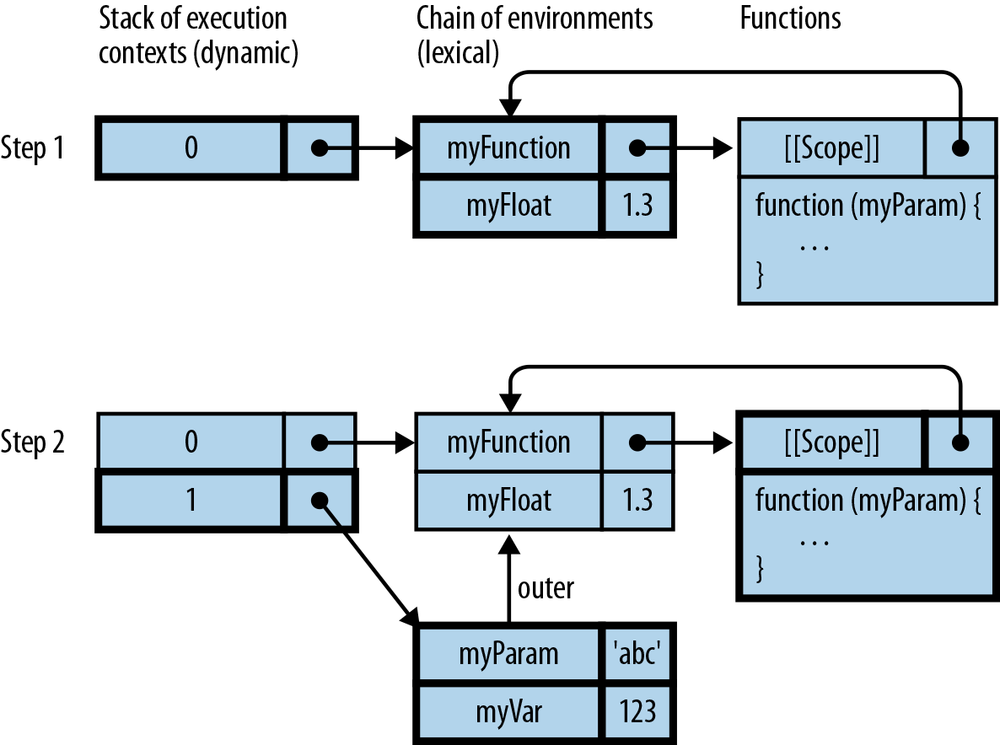
Figure 16-1 illustrates what happens when the preceding code is executed:
myFunction and myFloat have been stored in the global environment (#0). Note that the function object referred to by myFunction points to its scope (the global scope) via the internal property [[Scope]].
myFunction('abc'), a new environment (#1) is created that holds the parameter and the local variable. It refers to its outer environment via outer (which is initialized from myFunction.[[Scope]]). Thanks to the outer environment, myFunction can access myFloat.
If a function leaves the scope in which it was created, it stays connected to the variables of that scope (and of the surrounding scopes). For example:
functioncreateInc(startValue){returnfunction(step){startValue+=step;returnstartValue;};}
The function returned by createInc() does not lose its connection to startValue—the variable provides the function with state that persists across function calls:
> var inc = createInc(5); > inc(1) 6 > inc(2) 8
A closure is a function plus the connection to the scope in which the function was created. The name stems from the fact that a closure “closes over” the free variables of a function. A variable is free if it is not declared within the function—that is, if it comes “from outside.”
This is an advanced section that goes deeper into how closures work. You should be familiar with environments (review Environments: Managing Variables).
A closure is an example of an environment surviving after execution has left its scope. To illustrate how closures work, let’s examine the previous interaction with createInc() and split it up into four steps (during each step, the active execution context and its environment are highlighted; if a function is active, it is highlighted, too):
This step takes place before the interaction, and after the evaluation of the function declaration of createInc. An entry for createInc has been added to the global environment (#0) and points to a function object.
This step occurs during the execution of the function call createInc(5). A fresh environment (#1) for createInc is created and pushed onto the stack. Its outer environment is the global environment (the same as createInc.[[Scope]]). The environment holds the parameter startValue.
This step happens after the assignment to inc. After we returned from createInc, the execution context pointing to its environment was removed from the stack, but the environment still exists on the heap, because inc.[[Scope]] refers to it. inc is a closure (function plus birth environment).
This step takes place during the execution of inc(1). A new environment (#1) has been created and an execution context pointing to it has been pushed onto the stack. Its outer environment is the [[Scope]] of inc. The outer environment gives inc access to startValue.
This step happens after the execution of inc(1). No reference (execution context, outer field, or [[Scope]]) points to inc’s environment, anymore. It is therefore not needed and can be removed from the heap.
Sometimes the behavior of functions you create is influenced by a variable in the current scope.
In JavaScript, that can be problematic, because each function should work with the value that the variable had when the function was created. However, due to functions being closures, the function will always work with the current value of the variable. In for loops, that can prevent things from working properly. An example will make things clearer:
functionf(){varresult=[];for(vari=0;i<3;i++){varfunc=function(){returni;};result.push(func);}returnresult;}console.log(f()[1]());// 3
f returns an array with three functions in it. All of these functions can still access the environment of f and thus i. In fact, they share the same environment. Alas, after the loop is finished, i has the value 3 in that environment. Therefore, all functions return 3.
This is not what we want. To fix things, we need to make a snapshot of the index i before creating a function that uses it. In other words, we want to package each function with the value that i had at the time of the function’s creation. We therefore take the following steps:
Only functions create environments, so we use an IIFE (see Introducing a New Scope via an IIFE) to accomplish step 1:
functionf(){varresult=[];for(vari=0;i<3;i++){(function(){// step 1: IIFEvarpos=i;// step 2: copyvarfunc=function(){returnpos;};result.push(func);}());}returnresult;}console.log(f()[1]());// 1
Note that the example has real-world relevance, because similar scenarios arise when you add event handlers to DOM elements via loops.
There are several layers to object-oriented programming (OOP) in JavaScript:
Each new layer only depends on prior ones, enabling you to learn JavaScript OOP incrementally. Layers 1 and 2 form a simple core that you can refer back to whenever you are getting confused by the more complicated layers 3 and 4.
Roughly, all objects in JavaScript are maps (dictionaries) from strings to values. A (key, value) entry in an object is called a property. The key of a property is always a text string. The value of a property can be any JavaScript value, including a function. Methods are properties whose values are functions.
There are three kinds of properties:
[[Prototype]] holds the prototype of an object and is readable via Object.getPrototypeOf().
JavaScript’s object literals allow you to directly create plain objects (direct instances of Object). The following code uses an object literal to assign an object to the variable jane. The object has the two properties: name and describe. describe is a method:
varjane={name:'Jane',describe:function(){return'Person named '+this.name;// (1)},// (2)};
this in methods to refer to the current object (also called the receiver of a method invocation).
You may get the impression that objects are only maps from strings to values. But they are more than that: they are real general-purpose objects. For example, you can use inheritance between objects (see Layer 2: The Prototype Relationship Between Objects), and you can protect objects from being changed. The ability to directly create objects is one of JavaScript’s standout features: you can start with concrete objects (no classes needed!) and introduce abstractions later. For example, constructors, which are factories for objects (as discussed in Layer 3: Constructors—Factories for Instances), are roughly similar to classes in other languages.
The dot operator provides a compact syntax for accessing properties. The property keys must be identifiers (consult Legal Identifiers). If you want to read or write properties with arbitrary names, you need to use the bracket operator (see Bracket Operator ([]): Accessing Properties via Computed Keys).
The examples in this section work with the following object:
varjane={name:'Jane',describe:function(){return'Person named '+this.name;}};
The dot operator lets you “get” a property (read its value). Here are some examples:
> jane.name // get property `name` 'Jane' > jane.describe // get property `describe` [Function]
Getting a property that doesn’t exist returns undefined:
> jane.unknownProperty undefined
The dot operator is also used to call methods:
> jane.describe() // call method `describe` 'Person named Jane'
You can use the assignment operator (=) to set the value of a property referred to via the dot notation. For example:
> jane.name = 'John'; // set property `name` > jane.describe() 'Person named John'
If a property doesn’t exist yet, setting it automatically creates it. If a property already exists, setting it changes its value.
The delete operator lets you completely remove a property (the whole key-value pair) from an object. For example:
> var obj = { hello: 'world' };
> delete obj.hello
true
> obj.hello
undefinedIf you merely set a property to undefined, the property still exists and the object still contains its key:
> var obj = { foo: 'a', bar: 'b' };
> obj.foo = undefined;
> Object.keys(obj)
[ 'foo', 'bar' ]If you delete the property, its key is gone, too:
> delete obj.foo true > Object.keys(obj) [ 'bar' ]
delete affects only the direct (“own,” noninherited) properties of an object. Its prototypes are not touched (see Deleting an inherited property).
Use the delete operator sparingly. Most modern JavaScript engines optimize the performance of instances created by constructors if their “shape” doesn’t change (roughly: no properties are removed or added). Deleting a property prevents that optimization.
delete returns false if the property is an own property, but cannot be deleted. It returns true in all other cases. Following are some examples.
As a preparation, we create one property that can be deleted and another one that can’t be deleted (Getting and Defining Properties via Descriptors explains Object.defineProperty()):
varobj={};Object.defineProperty(obj,'canBeDeleted',{value:123,configurable:true});Object.defineProperty(obj,'cannotBeDeleted',{value:456,configurable:false});
delete returns false for own properties that can’t be deleted:
> delete obj.cannotBeDeleted false
delete returns true in all other cases:
> delete obj.doesNotExist true > delete obj.canBeDeleted true
delete returns true even if it doesn’t change anything (inherited properties are never removed):
> delete obj.toString true > obj.toString // still there [Function: toString]
While you can’t use reserved words (such as var and function) as variable names, you can use them as property keys:
> var obj = { var: 'a', function: 'b' };
> obj.var
'a'
> obj.function
'b'Numbers can be used as property keys in object literals, but they are interpreted as strings. The dot operator can only access properties whose keys are identifiers. Therefore, you need the bracket operator (shown in the following example) to access properties whose keys are numbers:
> var obj = { 0.7: 'abc' };
> Object.keys(obj)
[ '0.7' ]
> obj['0.7']
'abc'Object literals also allow you to use arbitrary strings (that are neither identifiers nor numbers) as property keys, but you must quote them. Again, you need the bracket operator to access the property values:
> var obj = { 'not an identifier': 123 };
> Object.keys(obj)
[ 'not an identifier' ]
> obj['not an identifier']
123While the dot operator works with fixed property keys, the bracket operator allows you to refer to a property via an expression.
The bracket operator lets you compute the key of a property, via an expression:
> var obj = { someProperty: 'abc' };
> obj['some' + 'Property']
'abc'
> var propKey = 'someProperty';
> obj[propKey]
'abc'That also allows you to access properties whose keys are not identifiers:
> var obj = { 'not an identifier': 123 };
> obj['not an identifier']
123Note that the bracket operator coerces its interior to string. For example:
> var obj = { '6': 'bar' };
> obj[3+3] // key: the string '6'
'bar'Calling methods works as you would expect:
> var obj = { myMethod: function () { return true } };
> obj['myMethod']()
trueIt’s not a frequent use case, but sometimes you need to convert an arbitrary value to an object. Object(), used as a function (not as a constructor), provides that service. It produces the following results:
| Value | Result |
(Called with no parameters) |
|
|
|
|
|
A boolean |
|
A number |
|
A string |
|
An object |
|
Here are some examples:
> Object(null) instanceof Object
true
> Object(false) instanceof Boolean
true
> var obj = {};
> Object(obj) === obj
trueTthe following function checks whether value is an object:
functionisObject(value){returnvalue===Object(value);}
Note that the preceding function creates an object if value isn’t an object.
You can implement the same function without doing that, via typeof (see Pitfall: typeof null).
You can also invoke Object as a constructor, which produces the same results as calling it as a function:
> var obj = {};
> new Object(obj) === obj
true
> new Object(123) instanceof Number
trueWhen you call a function, this is always an (implicit) parameter:
Even though normal functions have no use for this, it still exists as a special variable whose value is always the global object (window in browsers; see The Global Object):
> function returnThisSloppy() { return this }
> returnThisSloppy() === window
true
this is always undefined:
> function returnThisStrict() { 'use strict'; return this }
> returnThisStrict() === undefined
true
this refers to the object on which the method has been invoked:
> var obj = { method: returnThisStrict };
> obj.method() === obj
trueIn the case of methods, the value of this is called the receiver of the method call.
Remember that functions are also objects. Thus, each function has methods of its own. Three of them are introduced in this section and help with calling functions. These three methods are used in the following sections to work around some of the pitfalls of calling functions. The upcoming examples all refer to the following object, jane:
varjane={name:'Jane',sayHelloTo:function(otherName){'use strict';console.log(this.name+' says hello to '+otherName);}};
The first parameter is the value that this will have inside the invoked function; the remaining parameters are handed over as arguments to the invoked function. The following three invocations are equivalent:
jane.sayHelloTo('Tarzan');jane.sayHelloTo.call(jane,'Tarzan');varfunc=jane.sayHelloTo;func.call(jane,'Tarzan');
For the second invocation, you need to repeat jane, because call() doesn’t know how you got the function that it is invoked on.
The first parameter is the value that this will have inside the invoked function; the second parameter is an array that provides the arguments for the invocation. The following three invocations are equivalent:
jane.sayHelloTo('Tarzan');jane.sayHelloTo.apply(jane,['Tarzan']);varfunc=jane.sayHelloTo;func.apply(jane,['Tarzan']);
For the second invocation, you need to repeat jane, because apply() doesn’t know how you got the function that it is invoked on.
apply() for Constructors explains how to use apply() with constructors.
This method performs partial function application—meaning it creates a new function that calls the receiver of bind() in the following manner: the value of this is thisValue and the arguments start with arg1 until argN, followed by the arguments of the new function. In other words, the new function appends its arguments to arg1, ..., argN when it calls the original function.
Let’s look at an example:
functionfunc(){console.log('this: '+this);console.log('arguments: '+Array.prototype.slice.call(arguments));}varbound=func.bind('abc',1,2);
The array method slice is used to convert arguments to an array, which is necessary for logging it (this operation is explained in Array-Like Objects and Generic Methods). bound is a new function. Here’s the interaction:
> bound(3) this: abc arguments: 1,2,3
The following three invocations of sayHelloTo are all equivalent:
jane.sayHelloTo('Tarzan');varfunc1=jane.sayHelloTo.bind(jane);func1('Tarzan');varfunc2=jane.sayHelloTo.bind(jane,'Tarzan');func2();
Let’s pretend that JavaScript has a triple dot operator (...) that turns arrays into actual parameters. Such an operator would allow you to use Math.max() (see Other Functions) with arrays. In that case, the following two expressions would be equivalent:
Math.max(...[13,7,30])Math.max(13,7,30)
For functions, you can achieve the effect of the triple dot operator via apply():
> Math.max.apply(null, [13, 7, 30]) 30
The triple dot operator would also make sense for constructors:
newDate(...[2011,11,24])// Christmas Eve 2011
Alas, here apply() does not work, because it helps only with function or method calls, not with constructor invocations.
We can simulate apply() in two steps.
Pass the arguments to Date via a method call (they are not in an array—yet):
new(Date.bind(null,2011,11,24))
The preceding code uses bind() to create a constructor without parameters and invokes it via new.
Use apply() to hand an array to bind(). Because bind() is a method call, we can use apply():
new(Function.prototype.bind.apply(Date,[null,2011,11,24]))
The preceding array still has one element too many, null. We can use concat() to prepend it:
vararr=[2011,11,24];new(Function.prototype.bind.apply(Date,[null].concat(arr)))
The preceding manual workaround is inspired by a library method published by Mozilla. The following is a slightly edited version of it:
if(!Function.prototype.construct){Function.prototype.construct=function(argArray){if(!Array.isArray(argArray)){thrownewTypeError("Argument must be an array");}varconstr=this;varnullaryFunc=Function.prototype.bind.apply(constr,[null].concat(argArray));returnnewnullaryFunc();};}
Here is the method in use:
> Date.construct([2011, 11, 24]) Sat Dec 24 2011 00:00:00 GMT+0100 (CET)
An alternative to the previous approach is to create an uninitialized instance via Object.create() and then call the constructor (as a function) via apply(). That means that you are effectively reimplementing the new operator (some checks are omitted):
Function.prototype.construct=function(argArray){varconstr=this;varinst=Object.create(constr.prototype);varresult=constr.apply(inst,argArray);// (1)// Check: did the constructor return an object// and prevent `this` from being the result?returnresult?result:inst;};
The preceding code does not work for most built-in constructors, which always produce new instances when called as functions. In other words, the step in line (1) doesn’t set up inst as desired.
If you extract a method from an object, it becomes a true function again. Its connection with the object is severed, and it usually doesn’t work properly anymore. Take, for example, the following object, counter:
varcounter={count:0,inc:function(){this.count++;}}
Extracting inc and calling it (as a function!) fails:
> var func = counter.inc; > func() > counter.count // didn’t work 0
Here’s the explanation: we have called the value of counter.inc as a function. Hence, this is the global object and we have performed window.count++. window.count does not exist and is undefined. Applying the ++ operator to it sets it to NaN:
> count // global variable NaN
If method inc() is in strict mode, you get a warning:
> counter.inc = function () { 'use strict'; this.count++ };
> var func2 = counter.inc;
> func2()
TypeError: Cannot read property 'count' of undefinedThe reason is that when we call the strict mode function func2, this is undefined, resulting in an error.
Thanks to bind(), we can make sure that inc doesn’t lose the connection with counter:
> var func3 = counter.inc.bind(counter); > func3() > counter.count // it worked! 1
In JavaScript, there are many functions and methods that accept callbacks. Examples in browsers are setTimeout() and event handling. If we pass in counter.inc as a callback, it is also invoked as a function, resulting in the same problem just described. To illustrate this phenomenon, let’s use a simple callback-invoking function:
functioncallIt(callback){callback();}
Executing counter.count via callIt triggers a warning (due to strict mode):
> callIt(counter.inc) TypeError: Cannot read property 'count' of undefined
As before, we fix things via bind():
> callIt(counter.inc.bind(counter)) > counter.count // one more than before 2
Each call to bind() creates a new function. That has consequences when you’re registering and unregistering callbacks (e.g., for event handling). You need to store the value you registered somewhere and use it for unregistering, too.
You often nest function definitions in JavaScript, because functions can be parameters (e.g., callbacks) and because they can be created in place, via function expressions. This poses a problem when a method contains a normal function and you want to access the former’s this inside the latter, because the method’s this is shadowed by the normal function’s this (which doesn’t even have any use for its own this).
In the following example, the function at (1) tries to access the method’s this at (2):
varobj={name:'Jane',friends:['Tarzan','Cheeta'],loop:function(){'use strict';this.friends.forEach(function(friend){// (1)console.log(this.name+' knows '+friend);// (2)});}};
Obviously, this fails, because the function at (1) has its own this, which is undefined here:
> obj.loop(); TypeError: Cannot read property 'name' of undefined
There are three ways to work around this problem.
We assign this to a variable that won’t be shadowed inside the nested function:
loop:function(){'use strict';varthat=this;this.friends.forEach(function(friend){console.log(that.name+' knows '+friend);});}
Here’s the interaction:
> obj.loop(); Jane knows Tarzan Jane knows Cheeta
We can use bind() to give the callback a fixed value for this—namely, the method’s this (line (1)):
loop:function(){'use strict';this.friends.forEach(function(friend){console.log(this.name+' knows '+friend);}.bind(this));// (1)}
A workaround that is specific to forEach() (see Examination Methods) is to provide a second parameter after the callback that becomes the this of the callback:
loop:function(){'use strict';this.friends.forEach(function(friend){console.log(this.name+' knows '+friend);},this);}
The prototype relationship between two objects is about inheritance: every object can have another object as its prototype. Then the former object inherits all of its prototype’s properties.
An object specifies its prototype via the internal property [[Prototype]]. Every object has this property, but it can be null. The chain of objects connected by the [[Prototype]] property is called the prototype chain (Figure 17-1).
To see how prototype-based (or prototypal) inheritance works, let’s look at an example (with invented syntax for specifying the [[Prototype]] property):
varproto={describe:function(){return'name: '+this.name;}};varobj={[[Prototype]]:proto,name:'obj'};
The object obj inherits the property describe from proto. It also has a so-called own (noninherited, direct) property, name.
obj inherits the property describe; you can access it as if the object itself had that property:
> obj.describe [Function]
Whenever you access a property via obj, JavaScript starts the search for it in that object and continues with its prototype, the prototype’s prototype, and so on. That’s why we can access proto.describe via obj.describe. The prototype chain behaves as if it were a single object. That illusion is maintained when you call a method: the value of this is always the object where the search for the method began, not where the method was found. That allows the method to access all of the properties of the prototype chain. For example:
> obj.describe() 'name: obj'
Inside describe(), this is obj, which allows the method to access obj.name.
In a prototype chain, a property in an object overrides a property with the same key in a “later” object: the former property is found first. It hides the latter property, which can’t be accessed anymore.
As an example, let’s override the method proto.describe() in obj:
> obj.describe = function () { return 'overridden' };
> obj.describe()
'overridden'That is similar to how overriding of methods works in class-based languages.
Prototypes are great for sharing data between objects: several objects get the same prototype, which holds all shared properties. Let’s look at an example. The objects jane and tarzan both contain the same method, describe(). That is something that we would like to avoid by using sharing:
varjane={name:'Jane',describe:function(){return'Person named '+this.name;}};vartarzan={name:'Tarzan',describe:function(){return'Person named '+this.name;}};
Both objects are persons. Their name property is different, but we could have them share the method describe. We do that by creating a common prototype called PersonProto and putting describe into it (Figure 17-2).
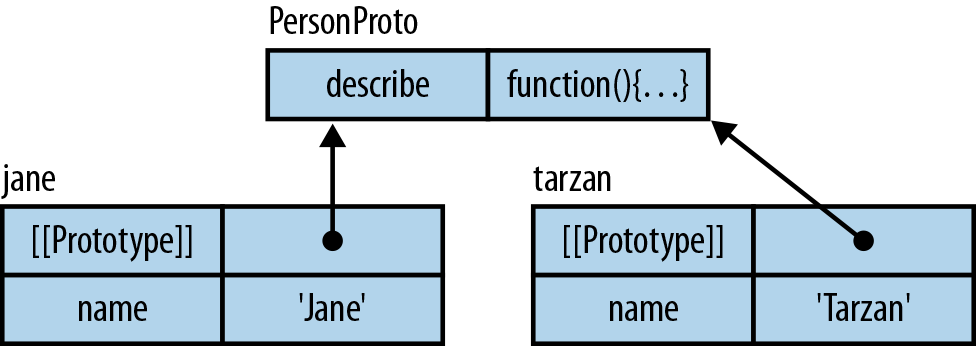
The following code creates objects jane and tarzan that share the prototype PersonProto:
varPersonProto={describe:function(){return'Person named '+this.name;}};varjane={[[Prototype]]:PersonProto,name:'Jane'};vartarzan={[[Prototype]]:PersonProto,name:'Tarzan'};
And here is the interaction:
> jane.describe() Person named Jane > tarzan.describe() Person named Tarzan
This is a common pattern: the data resides in the first object of a prototype chain, while methods reside in later objects. JavaScript’s flavor of prototypal inheritance is designed to support this pattern: setting a property affects only the first object in a prototype chain, whereas getting a property considers the complete chain (see Setting and Deleting Affects Only Own Properties).
So far, we have pretended that you can access the internal property [[Prototype]] from JavaScript. But the language does not let you do that. Instead, there are functions for reading the prototype and for creating a new object with a given prototype.
Object.create(proto,propDescObj?)
creates an object whose prototype is proto. Optionally, properties can be added via descriptors (which are explained in Property Descriptors). In the following example, object jane gets the prototype PersonProto and a mutable property name whose value is 'Jane' (as specified via a property descriptor):
varPersonProto={describe:function(){return'Person named '+this.name;}};varjane=Object.create(PersonProto,{name:{value:'Jane',writable:true}});
Here is the interaction:
> jane.describe() 'Person named Jane'
But you frequently just create an empty object and then manually add properties, because descriptors are verbose:
varjane=Object.create(PersonProto);jane.value='Jane';
Object.getPrototypeOf(obj)
returns the prototype of obj. Continuing the preceding example:
> Object.getPrototypeOf(jane) === PersonProto true
Object.prototype.isPrototypeOf(obj)
checks whether the receiver of the method is a (direct or indirect) prototype of obj. In other words: are the receiver and obj in the same prototype chain, and does obj come before the receiver? For example:
> var A = {};
> var B = Object.create(A);
> var C = Object.create(B);
> A.isPrototypeOf(C)
true
> C.isPrototypeOf(A)
falseThe following function iterates over the property chain of an object obj. It returns the first object that has an own property with the key propKey, or null if there is no such object:
functiongetDefiningObject(obj,propKey){obj=Object(obj);// make sure it’s an objectwhile(obj&&!{}.hasOwnProperty.call(obj,propKey)){obj=Object.getPrototypeOf(obj);// obj is null if we have reached the end}returnobj;}
In the preceding code, we called the method Object.prototype.hasOwnProperty generically (see Generic Methods: Borrowing Methods from Prototypes).
Some JavaScript engines have a special property for getting and setting the prototype of an object: __proto__. It brings direct access to [[Prototype]] to the language:
> var obj = {};
> obj.__proto__ === Object.prototype
true
> obj.__proto__ = Array.prototype
> Object.getPrototypeOf(obj) === Array.prototype
trueThere are several things you need to know about __proto__:
__proto__ is pronounced “dunder proto,” an abbreviation of “double underscore proto.” That pronunciation has been borrowed from the Python programming language (as suggested by Ned Batchelder in 2006). Special variables with double underscores are quite frequent in Python.
__proto__ is not part of the ECMAScript 5 standard. Therefore, you must not use it if you want your code to conform to that standard and run reliably across current JavaScript engines.
__proto__ and it will be part of ECMAScript 6.
The following expression checks whether an engine supports __proto__ as a special property:
Object.getPrototypeOf({__proto__:null})===null
Only getting a property considers the complete prototype chain of an object. Setting and deleting ignores inheritance and affects only own properties.
Setting a property creates an own property, even if there is an inherited property with that key. For example, given the following source code:
varproto={foo:'a'};varobj=Object.create(proto);
obj inherits foo from proto:
> obj.foo
'a'
> obj.hasOwnProperty('foo')
falseSetting foo has the desired result:
> obj.foo = 'b'; > obj.foo 'b'
However, we have created an own property and not changed proto.foo:
> obj.hasOwnProperty('foo')
true
> proto.foo
'a'The rationale is that prototype properties are meant to be shared by several objects. This approach allows us to nondestructively “change” them—only the current object is affected.
You can only delete own properties. Let’s again set up an object, obj, with a prototype, proto:
varproto={foo:'a'};varobj=Object.create(proto);
Deleting the inherited property foo has no effect:
> delete obj.foo true > obj.foo 'a'
For more information on the delete operator, consult Deleting properties.
If you want to change an inherited property, you first have to find the object that owns it (see Finding the object where a property is defined) and then perform the change on that object. For example, let’s delete the property foo from the previous example:
> delete getDefiningObject(obj, 'foo').foo; true > obj.foo undefined
Operations for iterating over and detecting properties are influenced by:
true or false. Enumerability rarely matters and can normally be ignored (see Enumerability: Best Practices).
You can list own property keys, list all enumerable property keys, and check whether a property exists. The following subsections show how.
You can either list all own property keys, or only enumerable ones:
Note that properties are normally enumerable (see Enumerability: Best Practices), so you can use Object.keys(), especially for objects that you have created.
If you want to list all properties (both own and inherited ones) of an object, then you have two options.
Option 1 is to use the loop:
for(«variable»in«object»)«statement»
to iterate over the keys of all enumerable properties of object. See for-in for a more thorough description.
Option 2 is to implement a function yourself that iterates over all properties (not just enumerable ones). For example:
functiongetAllPropertyNames(obj){varresult=[];while(obj){// Add the own property names of `obj` to `result`Array.prototype.push.apply(result,Object.getOwnPropertyNames(obj));obj=Object.getPrototypeOf(obj);}returnresult;}
You can check whether an object has a property, or whether a property exists directly inside an object:
Avoid invoking hasOwnProperty() directly on an object, as it may be overridden (e.g., by an own property whose key is hasOwnProperty):
> var obj = { hasOwnProperty: 1, foo: 2 };
> obj.hasOwnProperty('foo') // unsafe
TypeError: Property 'hasOwnProperty' is not a functionInstead, it is better to call it generically (see Generic Methods: Borrowing Methods from Prototypes):
> Object.prototype.hasOwnProperty.call(obj, 'foo') // safe
true
> {}.hasOwnProperty.call(obj, 'foo') // shorter
trueThe following examples are based on these definitions:
varproto=Object.defineProperties({},{protoEnumTrue:{value:1,enumerable:true},protoEnumFalse:{value:2,enumerable:false}});varobj=Object.create(proto,{objEnumTrue:{value:1,enumerable:true},objEnumFalse:{value:2,enumerable:false}});
Object.defineProperties() is explained in Getting and Defining Properties via Descriptors, but it should be fairly obvious how it works: proto has the own properties protoEnumTrue and protoEnumFalse and obj has the own properties objEnumTrue and objEnumFalse (and inherits all of proto’s properties).
Note that objects (such as proto in the preceding example) normally have at least the prototype Object.prototype (where standard methods such as toString() and hasOwnProperty() are defined):
> Object.getPrototypeOf({}) === Object.prototype
trueAmong property-related operations, enumberability only influences the for-in loop and Object.keys() (it also influences JSON.stringify(), see JSON.stringify(value, replacer?, space?)).
The for-in loop iterates over the keys of all enumerable properties, including inherited ones (note that none of the nonenumerable properties of Object.prototype show up):
> for (var x in obj) console.log(x); objEnumTrue protoEnumTrue
Object.keys() returns the keys of all own (noninherited) enumerable properties:
> Object.keys(obj) [ 'objEnumTrue' ]
If you want the keys of all own properties, you need to use Object.getOwnPropertyNames():
> Object.getOwnPropertyNames(obj) [ 'objEnumTrue', 'objEnumFalse' ]
To iterate over property keys:
Combine for-in with hasOwnProperty(), in the manner described in for-in. This works even on older JavaScript engines. For example:
for(varkeyinobj){if(Object.prototype.hasOwnProperty.call(obj,key)){console.log(key);}}
Combine Object.keys() or Object.getOwnPropertyNames() with forEach() array iteration:
varobj={first:'John',last:'Doe'};// Visit non-inherited enumerable keysObject.keys(obj).forEach(function(key){console.log(key);});
To iterate over property values or over (key, value) pairs:
ECMAScript 5 lets you write methods whose invocations look like you are getting or setting a property. That means that a property is virtual and not storage space. You could, for example, forbid setting a property and always compute the value returned when reading it.
The following example uses an object literal to define a setter and a getter for property foo:
varobj={getfoo(){return'getter';},setfoo(value){console.log('setter: '+value);}};
Here’s the interaction:
> obj.foo = 'bla'; setter: bla > obj.foo 'getter'
An alternate way to specify getters and setters is via property descriptors (see Property Descriptors). The following code defines the same object as the preceding literal:
varobj=Object.create(Object.prototype,{// object with property descriptorsfoo:{// property descriptorget:function(){return'getter';},set:function(value){console.log('setter: '+value);}}});
Property attributes and property descriptors are an advanced topic. You normally don’t need to know how they work.
In this section, we’ll look at the internal structure of properties:
All of a property’s state, both its data and its metadata, is stored in attributes. They are fields that a property has, much like an object has properties. Attribute keys are often written in double brackets. Attributes matter for normal properties and for accessors (getters and setters).
The following attributes are specific to normal properties:
[[Value]] holds the property’s value, its data.
[[Writable]] holds a boolean indicating whether the value of a property can be changed.
The following attributes are specific to accessors:
[[Get]] holds the getter, a function that is called when a property is read. The function computes the result of the read access.
[[Set]] holds the setter, a function that is called when a property is set to a value. The function receives that value as a parameter.
All properties have the following attributes:
[[Enumerable]] holds a boolean. Making a property nonenumerable hides it from some operations (see Iteration and Detection of Properties).
[[Configurable]] holds a boolean. If it is false, you cannot delete a property, change any of its attributes (except [[Value]]), or convert it from a data property to an accessor property or vice versa. In other words, [[Configurable]] controls the writability of a property’s metadata. There is one exception to this rule—JavaScript allows you to change an unconfigurable property from writable to read-only, for historic reasons; the property length of arrays has always been writable and unconfigurable. Without this exception, you wouldn’t be able to freeze (see Freezing) arrays.
If you don’t specify attributes, the following defaults are used:
| Attribute key | Default value |
|
|
|
|
|
|
|
|
|
|
|
|
These defaults are important when you are creating properties via property descriptors (see the following section).
A property descriptor is a data structure for working programmatically with attributes. It is an object that encodes the attributes of a property. Each of a descriptor’s properties corresponds to an attribute. For example, the following is the descriptor of a read-only property whose value is 123:
{value:123,writable:false,enumerable:true,configurable:false}
You can achieve the same goal, immutability, via accessors. Then the descriptor looks as follows:
{get:function(){return123},enumerable:true,configurable:false}
Property descriptors are used for two kinds of operations:
Defining a property means something different depending on whether a property already exists:
If a property does not exist, create a new property whose attributes are as specified by the descriptor. If an attribute has no corresponding property in the descriptor, then use the default value. The defaults are dictated by what the attribute names mean. They are the opposite of the values that are used when creating a property via assignment (then the property is writable, enumerable, and configurable). For example:
> var obj = {};
> Object.defineProperty(obj, 'foo', { configurable: true });
> Object.getOwnPropertyDescriptor(obj, 'foo')
{ value: undefined,
writable: false,
enumerable: false,
configurable: true }I usually don’t rely on the defaults and explicitly state all attributes, to be completely clear.
If a property already exists, update the attributes of the property as specified by the descriptor. If an attribute has no corresponding property in the descriptor, then don’t change it. Here is an example (continued from the previous one):
> Object.defineProperty(obj, 'foo', { writable: true });
> Object.getOwnPropertyDescriptor(obj, 'foo')
{ value: undefined,
writable: true,
enumerable: false,
configurable: true }The following operations allow you to get and set a property’s attributes via property descriptors:
Object.getOwnPropertyDescriptor(obj, propKey)
Returns the descriptor of the own (noninherited) property of obj whose key is propKey. If there is no such property, undefined is returned:
> Object.getOwnPropertyDescriptor(Object.prototype, 'toString')
{ value: [Function: toString],
writable: true,
enumerable: false,
configurable: true }
> Object.getOwnPropertyDescriptor({}, 'toString')
undefinedObject.defineProperty(obj, propKey, propDesc)
Create or change a property of obj whose key is propKey and whose attributes are specified via propDesc. Return the modified object. For example:
varobj=Object.defineProperty({},'foo',{value:123,enumerable:true// writable: false (default value)// configurable: false (default value)});
Object.defineProperties(obj, propDescObj)
The batch version of Object.defineProperty(). Each property of propDescObj holds a property descriptor. The keys of the properties and their values tell Object.defineProperties what properties to create or change on obj. For example:
varobj=Object.defineProperties({},{foo:{value:123,enumerable:true},bar:{value:'abc',enumerable:true}});
Object.create(proto, propDescObj?)
First, create an object whose prototype is proto. Then, if the optional parameter propDescObj has been specified, add properties to it—in the same manner as Object.defineProperties. Finally, return the result. For example, the following code snippet produces the same result as the previous snippet:
varobj=Object.create(Object.prototype,{foo:{value:123,enumerable:true},bar:{value:'abc',enumerable:true}});
To create an identical copy of an object, you need to get two things right:
The following function performs such a copy:
functioncopyObject(orig){// 1. copy has same prototype as origvarcopy=Object.create(Object.getPrototypeOf(orig));// 2. copy has all of orig’s propertiescopyOwnPropertiesFrom(copy,orig);returncopy;}
The properties are copied from orig to copy via this function:
functioncopyOwnPropertiesFrom(target,source){Object.getOwnPropertyNames(source)// (1).forEach(function(propKey){// (2)vardesc=Object.getOwnPropertyDescriptor(source,propKey);// (3)Object.defineProperty(target,propKey,desc);// (4)});returntarget;};
These are the steps involved:
source.
target.
Note that this function is very similar to the function _.extend() in the Underscore.js library.
The following two operations are very similar:
defineProperty() and defineProperties() (see Getting and Defining Properties via Descriptors).
=.
There are, however, a few subtle differences:
Assigning to a property prop means changing an existing property. The process is as follows:
prop is a setter (own or inherited), call that setter.
prop is read-only (own or inherited), throw an exception (in strict mode) or do nothing (in sloppy mode). The next section explains this (slightly unexpected) phenomenon in more detail.
prop is own (and writable), change the value of that property.
prop, or it is inherited and writable. In both cases, define an own property prop that is writable, configurable, and enumerable. In the latter case, we have just overridden an inherited property (nondestructively changed it). In the former case, a missing property has been defined automatically. This kind of autodefining is problematic, because typos in assignments can be hard to detect.
If an object, obj, inherits a property, foo, from a prototype and foo is not writable, then you can’t assign to obj.foo:
varproto=Object.defineProperty({},'foo',{value:'a',writable:false});varobj=Object.create(proto);
obj inherits the read-only property foo from proto. In sloppy mode, setting the property has no effect:
> obj.foo = 'b'; > obj.foo 'a'
In strict mode, you get an exception:
> (function () { 'use strict'; obj.foo = 'b' }());
TypeError: Cannot assign to read-only property 'foo'This fits with the idea that assignment changes inherited properties, but nondestructively. If an inherited property is read-only, you want to forbid all changes, even nondestructive ones.
Note that you can circumvent this protection by defining an own property (see the previous subsection for the difference between definition and assignment):
> Object.defineProperty(obj, 'foo', { value: 'b' });
> obj.foo
'b'The general rule is that properties created by the system are nonenumerable, while properties created by users are enumerable:
> Object.keys([]) [] > Object.getOwnPropertyNames([]) [ 'length' ] > Object.keys(['a']) [ '0' ]
This is especially true for the methods of the built-in instance prototypes:
> Object.keys(Object.prototype) [] > Object.getOwnPropertyNames(Object.prototype) [ hasOwnProperty', 'valueOf', 'constructor', 'toLocaleString', 'isPrototypeOf', 'propertyIsEnumerable', 'toString' ]
The main purpose of enumerability is to tell the for-in loop which properties it should ignore. As we have seen just now when we looked at instances of built-in constructors, everything not created by the user is hidden from for-in.
The only operations affected by enumerability are:
for-in loop
Object.keys() (Listing Own Property Keys)
JSON.stringify() (JSON.stringify(value, replacer?, space?))
Here are some best practices to keep in mind:
for-in loop (Best Practices: Iterating over Arrays).
There are three levels of protecting an object, listed here from weakest to strongest:
Object.preventExtensions(obj)
makes it impossible to add properties to obj. For example:
varobj={foo:'a'};Object.preventExtensions(obj);
Now adding a property fails silently in sloppy mode:
> obj.bar = 'b'; > obj.bar undefined
and throws an error in strict mode:
> (function () { 'use strict'; obj.bar = 'b' }());
TypeError: Can't add property bar, object is not extensibleYou can still delete properties, though:
> delete obj.foo true > obj.foo undefined
You check whether an object is extensible via:
Object.isExtensible(obj)
Sealing via:
Object.seal(obj)
prevents extensions and makes all properties “unconfigurable.” The latter means that the attributes (see Property Attributes and Property Descriptors) of properties can’t be changed anymore. For example, read-only properties stay read-only forever.
The following example demonstrates that sealing makes all properties unconfigurable:
> var obj = { foo: 'a' };
> Object.getOwnPropertyDescriptor(obj, 'foo') // before sealing
{ value: 'a',
writable: true,
enumerable: true,
configurable: true }
> Object.seal(obj)
> Object.getOwnPropertyDescriptor(obj, 'foo') // after sealing
{ value: 'a',
writable: true,
enumerable: true,
configurable: false }You can still change the property foo:
> obj.foo = 'b'; 'b' > obj.foo 'b'
but you can’t change its attributes:
> Object.defineProperty(obj, 'foo', { enumerable: false });
TypeError: Cannot redefine property: fooYou check whether an object is sealed via:
Object.isSealed(obj)
Object.freeze(obj)
It makes all properties nonwritable and seals obj. In other words, obj is not extensible and all properties are read-only, and there is no way to change that. Let’s look at an example:
varpoint={x:17,y:-5};Object.freeze(point);
Once again, you get silent failures in sloppy mode:
> point.x = 2; // no effect, point.x is read-only
> point.x
17
> point.z = 123; // no effect, point is not extensible
> point
{ x: 17, y: -5 }And you get errors in strict mode:
> (function () { 'use strict'; point.x = 2 }());
TypeError: Cannot assign to read-only property 'x'
> (function () { 'use strict'; point.z = 123 }());
TypeError: Can't add property z, object is not extensibleYou check whether an object is frozen via:
Object.isFrozen(obj)
Protecting an object is shallow: it affects the own properties, but not the values of those properties. For example, consider the following object:
varobj={foo:1,bar:['a','b']};Object.freeze(obj);
Even though you have frozen obj, it is not completely immutable—you can change the (mutable) value of property bar:
> obj.foo = 2; // no effect
> obj.bar.push('c'); // changes obj.bar
> obj
{ foo: 1, bar: [ 'a', 'b', 'c' ] }Additionally, obj has the prototype Object.prototype, which is also mutable.
A constructor function (short: constructor) helps with producing objects that are similar in some way. It is a normal function, but it is named, set up, and invoked differently. This section explains how constructors work. They correspond to classes in other languages.
We have already seen an example of two objects that are similar (in Sharing Data Between Objects via a Prototype):
varPersonProto={describe:function(){return'Person named '+this.name;}};varjane={[[Prototype]]:PersonProto,name:'Jane'};vartarzan={[[Prototype]]:PersonProto,name:'Tarzan'};
The objects jane and tarzan are both considered “persons” and share the prototype object PersonProto.
Let’s turn that prototype into a constructor Person that creates objects like jane and tarzan. The objects a constructor creates are called its instances. Such instances have the same structure as jane and tarzan, consisting of two parts:
jane and tarzan in the preceding example).
PersonProto in the preceding example).
A constructor is a function that is invoked via the new operator. By convention, the names of constructors start with uppercase letters, while the names of normal functions and methods start with lowercase letters. The function itself sets up part 1:
functionPerson(name){this.name=name;}
The object in Person.prototype becomes the prototype of all instances of Person. It contributes part 2:
Person.prototype.describe=function(){return'Person named '+this.name;};
Let’s create and use an instance of Person:
> var jane = new Person('Jane');
> jane.describe()
'Person named Jane'We can see that Person is a normal function. It only becomes a constructor when it is invoked via new. The new operator performs the following steps:
Person. prototype.
Person receives that object as the implicit parameter this and adds instance properties.
Figure 17-3 shows what the instance jane looks like. The property constructor of Person.prototype points back to the constructor and is explained in The constructor Property of Instances.
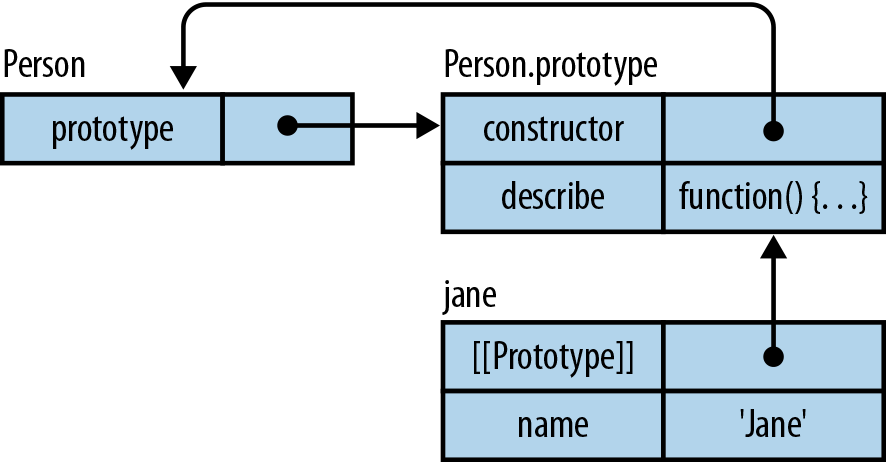
The instanceof operator allows us to check whether an object is an instance of a given constructor:
> jane instanceof Person true > jane instanceof Date false
If you were to manually implement the new operator, it would look roughly as follows:
functionnewOperator(Constr,args){varthisValue=Object.create(Constr.prototype);// (1)varresult=Constr.apply(thisValue,args);if(typeofresult==='object'&&result!==null){returnresult;// (2)}returnthisValue;}
In line (1), you can see that the prototype of an instance created by a constructor Constr is Constr.prototype.
Line (2) reveals another feature of the new operator: you can return an arbitrary object from a constructor and it becomes the result of the new operator. This is useful if you want a constructor to return an instance of a subconstructor (an example is given in Returning arbitrary objects from a constructor).
Unfortunately, the term prototype is used ambiguously in JavaScript:
An object can be the prototype of another object:
> var proto = {};
> var obj = Object.create(proto);
> Object.getPrototypeOf(obj) === proto
trueIn the preceding example, proto is the prototype of obj.
prototype
Each constructor C has a prototype property that refers to an object. That object becomes the prototype of all instances of C:
> function C() {}
> Object.getPrototypeOf(new C()) === C.prototype
trueUsually the context makes it clear which of the two prototypes is meant. Should disambiguation be necessary, then we are stuck with prototype to describe the relationship between objects, because that name has made it into the standard library via getPrototypeOf and isPrototypeOf. We thus need to find a different name for the object referenced by the prototype property. One possibility is constructor prototype, but that is problematic because constructors have prototypes, too:
> function Foo() {}
> Object.getPrototypeOf(Foo) === Function.prototype
trueBy default, each function C contains an instance prototype object C.prototype whose property constructor points back to C:
> function C() {}
> C.prototype.constructor === C
trueBecause the constructor property is inherited from the prototype by each instance, you can use it to get the constructor of an instance:
> var o = new C(); > o.constructor [Function: C]
In the following catch clause, we take different actions, depending on the constructor of the caught exception:
try{...}catch(e){switch(e.constructor){caseSyntaxError:...break;caseCustomError:...break;...}}
This approach detects only direct instances of a given constructor. In contrast, instanceof detects both direct instances and instances of all subconstructors.
For example:
> function Foo() {}
> var f = new Foo();
> f.constructor.name
'Foo'Not all JavaScript engines support the property name for functions.
This is how you create a new object, y, that has the same constructor as an existing object, x:
functionConstr(){}varx=newConstr();vary=newx.constructor();console.log(yinstanceofConstr);// true
This trick is handy for a method that must work for instances of subconstructors and wants to create a new instance that is similar to this. Then you can’t use a fixed constructor:
SuperConstr.prototype.createCopy=function(){returnnewthis.constructor(...);};
Some inheritance libraries assign the superprototype to a property of a subconstructor. For example, the YUI framework provides subclassing via Y.extend:
functionSuper(){}functionSub(){Sub.superclass.constructor.call(this);// (1)}Y.extend(Sub,Super);
The call in line (1) works, because extend sets Sub.superclass to Super.prototype. Thanks to the constructor property, you can call the superconstructor as a method.
The instanceof operator (see The instanceof Operator) does not rely on the property constructor.
Make sure that for each constructor C, the following assertion holds:
C.prototype.constructor===C
By default, every function f already has a property prototype that is set up correctly:
> function f() {}
> f.prototype.constructor === f
trueYou should thus avoid replacing this object and only add properties to it:
// Avoid:C.prototype={method1:function(...){...},...};// Prefer:C.prototype.method1=function(...){...};...
If you do replace it, you should manually assign the correct value to constructor:
C.prototype={constructor:C,method1:function(...){...},...};
Note that nothing crucial in JavaScript depends on the constructor property; but it is good style to set it up, because it enables the techniques mentioned in this section.
The instanceof operator:
valueinstanceofConstr
determines whether value has been created by the constructor Constr or a subconstructor. It does so by checking whether Constr.prototype is in the prototype chain of value. Therefore, the following two expressions are equivalent:
valueinstanceofConstrConstr.prototype.isPrototypeOf(value)
Here are some examples:
> {} instanceof Object
true
> [] instanceof Array // constructor of []
true
> [] instanceof Object // super-constructor of []
true
> new Date() instanceof Date
true
> new Date() instanceof Object
trueAs expected, instanceof is always false for primitive values:
> 'abc' instanceof Object false > 123 instanceof Number false
Finally, instanceof throws an exception if its right side isn’t a function:
> [] instanceof 123 TypeError: Expecting a function in instanceof check
Almost all objects are instances of Object, because Object.prototype is in their prototype chain. But there are also objects where that is not the case. Here are two examples:
> Object.create(null) instanceof Object false > Object.prototype instanceof Object false
The former object is explained in more detail in The dict Pattern: Objects Without Prototypes Are Better Maps. The latter object is where most prototype chains end (and they must end somewhere). Neither object has a prototype:
> Object.getPrototypeOf(Object.create(null)) null > Object.getPrototypeOf(Object.prototype) null
But typeof correctly classifies them as objects:
> typeof Object.create(null) 'object' > typeof Object.prototype 'object'
This pitfall is not a deal-breaker for most use cases for instanceof, but you have to be aware of it.
In web browsers, each frame and window has its own realm with separate global variables. That prevents instanceof from working for objects that cross realms. To see why, look at the following code:
if(myvarinstanceofArray)...// Doesn’t always work
If myvar is an array from a different realm, then its prototype is the Array.prototype from that realm. Therefore, instanceof will not find the Array.prototype of the current realm in the prototype chain of myvar and will return false. ECMAScript 5 has the function Array.isArray(), which always works:
<head><script>functiontest(arr){variframe=frames[0];console.log(arrinstanceofArray);// falseconsole.log(arrinstanceofiframe.Array);// trueconsole.log(Array.isArray(arr));// true}</script></head><body><iframesrcdoc="<script>window.parent.test([])</script>"></iframe></body>
Obviously, this is also an issue with non-built-in constructors.
Apart from using Array.isArray(), there are several things you can do to work around this problem:
postMessage() method, which can copy an object to another realm instead of passing a reference.
Check the name of the constructor of an instance (only works on engines that support the property name for functions):
someValue.constructor.name==='NameOfExpectedConstructor'
Use a prototype property to mark instances as belonging to a type T. There are several ways in which you can do so. The checks for whether value is an instance of T look as follows:
value.isT():
The prototype of T instances must return true from this method; a common superconstructor should return the default value, false.
'T' in value:
You must tag the prototype of T instances with a property whose key is 'T' (or something more unique).
value.TYPE_NAME === 'T':
Every relevant prototype must have a TYPE_NAME property with an appropriate value.
This section gives a few tips for implementing constructors.
If you forget new when you use a constructor, you are calling it as a function instead of as a constructor. In sloppy mode, you don’t get an instance and global variables are created. Unfortunately, all of this happens without a warning:
functionSloppyColor(name){this.name=name;}varc=SloppyColor('green');// no warning!// No instance is created:console.log(c);// undefined// A global variable is created:console.log(name);// green
In strict mode, you get an exception:
functionStrictColor(name){'use strict';this.name=name;}varc=StrictColor('green');// TypeError: Cannot set property 'name' of undefined
In many object-oriented languages, constructors can produce only direct instances. For example, consider Java: let’s say you want to implement a class Expression that has the subclasses Addition and Multiplication. Parsing produces direct instances of the latter two classes. You can’t implement it as a constructor of Expression, because that constructor can produce only direct instances of Expression. As a workaround, static factory methods are used in Java:
classExpression{// Static factory method:publicstaticExpressionparse(Stringstr){if(...){returnnewAddition(...);}elseif(...){returnnewMultiplication(...);}else{thrownewExpressionException(...);}}}...Expressionexpr=Expression.parse(someStr);
In JavaScript, you can simply return whatever object you need from a constructor. Thus, the JavaScript version of the preceding code would look like:
functionExpression(str){if(...){returnnewAddition(..);}elseif(...){returnnewMultiplication(...);}else{thrownewExpressionException(...);}}...varexpr=newExpression(someStr);
That is good news: JavaScript constructors don’t lock you in, so you can always change your mind as to whether a constructor should return a direct instance or something else.
This section explains that in most cases, you should not put data in prototype properties. There are, however, a few exceptions to that rule.
Prototypes contain properties that are shared by several objects. Hence, they work well for methods. Additionally, with a technique that is described next, you can also use them to provide initial values for instance properties. I’ll later explain why that is not recommended.
A constructor usually sets instance properties to initial values. If one such value is a default, then you don’t need to create an instance property. You only need a prototype property with the same key whose value is the default. For example:
/*** Anti-pattern: don’t do this** @param data an array with names*/functionNames(data){if(data){// There is a parameter// => create instance propertythis.data=data;}}Names.prototype.data=[];
The parameter data is optional. If it is missing, the instance does not get a property data, but inherits Names.prototype.data instead.
This approach mostly works: you can create an instance n of Names. Getting n.data reads Names.prototype.data. Setting n.data creates a new own property in n and preserves the shared default value in the prototype. We only have a problem if we change the default value (instead of replacing it with a new value):
> var n1 = new Names();
> var n2 = new Names();
> n1.data.push('jane'); // changes default value
> n1.data
[ 'jane' ]
> n2.data
[ 'jane' ]In the preceding example, push() changed the array in Names.prototype.data. Since
that array is shared by all instances without an own property data,
n2.data’s initial value has changed, too.
Given what we’ve just discussed, it is better to not share default values and to always create new ones:
functionNames(data){this.data=data||[];}
Obviously, the problem of modifying a shared default value does not arise if that value is immutable (as all primitives are; see Primitive Values). But for consistency’s sake, it’s best to stick to a single way of setting up properties. I also prefer to maintain the usual separation of concerns (see Layer 3: Constructors—Factories for Instances): the constructor sets up the instance properties, and the prototype contains the methods.
ECMAScript 6 will make this even more of a best practice, because constructor parameters can have default values and you can define prototype methods via classes, but not prototype properties with data.
Occasionally, creating a property value is an expensive operation (computationally or storage-wise). In that case, you can create an instance property on demand:
functionNames(data){if(data)this.data=data;}Names.prototype={constructor:Names,// (1)getdata(){// Define, don’t assign// => avoid calling the (nonexistent) setterObject.defineProperty(this,'data',{value:[],enumerable:true,configurable:false,writable:false});returnthis.data;}};
We can’t add the property data to the instance via assignment, because JavaScript would complain about a missing setter (which it does when it only finds a getter). Therefore, we add it via Object.defineProperty(). Consult Properties: Definition Versus Assignment to review the differences between defining and assigning.
In line (1), we are ensuring that the property constructor is set up properly (see The constructor Property of Instances).
Obviously, that is quite a bit of work, so you have to be sure it is worth it.
If the same property (same key, same semantics, generally different values), exists in several prototypes, it is called polymorphic. Then the result of reading the property via an instance is dynamically determined via that instance’s prototype. Prototype properties that are not used polymorphically can be replaced by variables (which better reflects their nonpolymorphic nature).
For example, you can store a constant in a prototype property and access it via this:
functionFoo(){}Foo.prototype.FACTOR=42;Foo.prototype.compute=function(x){returnx*this.FACTOR;};
This constant is not polymorphic. Therefore, you can just as well access it via a variable:
// This code should be inside an IIFE or a modulefunctionFoo(){}varFACTOR=42;Foo.prototype.compute=function(x){returnx*FACTOR;};
Here is an example of polymorphic prototype properties with immutable data. Tagging instances of a constructor via prototype properties enables you to tell them apart from instances of a different constructor:
functionConstrA(){}ConstrA.prototype.TYPE_NAME='ConstrA';functionConstrB(){}ConstrB.prototype.TYPE_NAME='ConstrB';
Thanks to the polymorphic “tag” TYPE_NAME, you can distinguish the instances of ConstrA and ConstrB even when they cross realms (then instanceof does not work; see Pitfall: crossing realms (frames or windows)).
JavaScript does not have dedicated means for managing private data for an object. This section will describe three techniques for working around that limitation:
Additionally, I will explain how to keep global data private via IIFEs.
When a constructor is invoked, two things are created: the constructor’s instance and an environment (see Environments: Managing Variables). The instance is to be initialized by the constructor. The environment holds the constructor’s parameters and local variables. Every function (which includes methods) created inside the constructor will retain a reference to the environment—the environment in which it was created. Thanks to that reference, it will always have access to the environment, even after the constructor is finished. This combination of function and environment is called a closure (Closures: Functions Stay Connected to Their Birth Scopes). The constructor’s environment is thus data storage that is independent of the instance and related to it only because the two are created at the same time. To properly connect them, we must have functions that live in both worlds. Using Douglas Crockford’s terminology, an instance can have three kinds of values associated with it (see Figure 17-4):
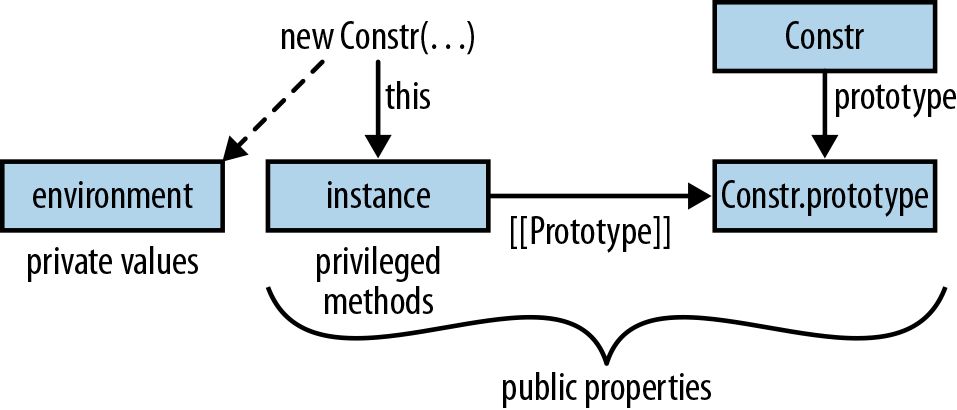
The following sections explain each kind of value in more detail.
Remember that given a constructor Constr, there are two kinds of properties that are public, accessible to everyone. First, prototype properties are stored in Constr.prototype and shared by all instances. Prototype properties are usually methods:
Constr.prototype.publicMethod=...;
Second, instance properties are unique to each instance. They are added in the constructor and usually hold data (not methods):
functionConstr(...){this.publicData=...;...}
The constructor’s environment consists of the parameters and local variables. They are accessible only from inside the constructor and thus private to the instance:
functionConstr(...){...varthat=this;// make accessible to private functionsvarprivateData=...;functionprivateFunction(...){// Access everythingprivateData=...;that.publicData=...;that.publicMethod(...);}...}
Private data is so safe from outside access that prototype methods can’t access it. But then how else would you use it after leaving the constructor? The answer is privileged methods: functions created in the constructor are added as instance methods. That means that, on one hand, they can access private data; on the other hand, they are public and therefore seen by prototype methods. In other words, they serve as mediators between private data and the public (including prototype methods):
functionConstr(...){...this.privilegedMethod=function(...){// Access everythingprivateData=...;privateFunction(...);this.publicData=...;this.publicMethod(...);};}
The following is an implementation of a StringBuilder, using the Crockford privacy pattern:
functionStringBuilder(){varbuffer=[];this.add=function(str){buffer.push(str);};this.toString=function(){returnbuffer.join('');};}// Can’t put methods in the prototype!
Here is the interaction:
> var sb = new StringBuilder();
> sb.add('Hello');
> sb.add(' world!');
> sb.toString()
’Hello world!’Here are some points to consider when you are using the Crockford privacy pattern:
For most non-security-critical applications, privacy is more like a hint to clients of an API: “You don’t need to see this.” That’s the key benefit of encapsulation—hiding complexity. Even though more is going on under the hood, you only need to understand the public part of an API. The idea of a naming convention is to let clients know about privacy by marking the key of a property. A prefixed underscore is often used for this purpose.
Let’s rewrite the previous StringBuilder example so that the buffer is kept in a property _buffer, which is private, but by convention only:
functionStringBuilder(){this._buffer=[];}StringBuilder.prototype={constructor:StringBuilder,add:function(str){this._buffer.push(str);},toString:function(){returnthis._buffer.join('');}};
Here are some pros and cons of privacy via marked property keys:
One problem with a naming convention for private properties is that keys might clash (e.g., a key from a constructor with a key from a subconstructor, or a key from a mixin with a key from a constructor). You can make such clashes less likely by using longer keys, that, for example, include the name of the constructor. Then, in the previous case, the private property _buffer would be called _StringBuilder_buffer. If such a key is too long for your taste, you have the option of reifying it, of storing it in a variable:
varKEY_BUFFER='_StringBuilder_buffer';
We now access the private data via this[KEY_BUFFER]:
varStringBuilder=function(){varKEY_BUFFER='_StringBuilder_buffer';functionStringBuilder(){this[KEY_BUFFER]=[];}StringBuilder.prototype={constructor:StringBuilder,add:function(str){this[KEY_BUFFER].push(str);},toString:function(){returnthis[KEY_BUFFER].join('');}};returnStringBuilder;}();
We have wrapped an IIFE around StringBuilder so that the constant KEY_BUFFER stays local and doesn’t pollute the global namespace.
Reified property keys enable you to use UUIDs (universally unique identifiers) in keys. For example, via Robert Kieffer’s node-uuid:
varKEY_BUFFER='_StringBuilder_buffer_'+uuid.v4();
KEY_BUFFER has a different value each time the code runs. It may, for example, look like this:
_StringBuilder_buffer_110ec58a-a0f2-4ac4-8393-c866d813b8d1
Long keys with UUIDs make key clashes virtually impossible.
This subsection explains how to keep global data private to singleton objects, constructors, and methods, via IIFEs (see Introducing a New Scope via an IIFE). Those IIFEs create new environments (refer back to Environments: Managing Variables), which is where you put the private data.
You don’t need a constructor to associate an object with private data in an environment. The following example shows how to use an IIFE for the same purpose, by wrapping it around a singleton object:
varobj=function(){// open IIFE// publicvarself={publicMethod:function(...){privateData=...;privateFunction(...);},publicData:...};// privatevarprivateData=...;functionprivateFunction(...){privateData=...;self.publicData=...;self.publicMethod(...);}returnself;}();// close IIFE
Some global data is relevant only for a constructor and the prototype methods. By wrapping an IIFE around both, you can hide it from public view. Private Data in Properties with Reified Keys gave an example: the constructor StringBuilder and its prototype methods use the constant KEY_BUFFER, which contains a property key. That constant is stored in the environment of an IIFE:
varStringBuilder=function(){// open IIFEvarKEY_BUFFER='_StringBuilder_buffer_'+uuid.v4();functionStringBuilder(){this[KEY_BUFFER]=[];}StringBuilder.prototype={// Omitted: methods accessing this[KEY_BUFFER]};returnStringBuilder;}();// close IIFE
Note that if you are using a module system (see Chapter 31), you can achieve the same effect with cleaner code by putting the constructor plus methods in a module.
Sometimes you only need global data for a single method. You can keep it private by putting it in the environment of an IIFE that you wrap around the method. For example:
varobj={method:function(){// open IIFE// method-private datavarinvocCount=0;returnfunction(){invocCount++;console.log('Invocation #'+invocCount);return'result';};}()// close IIFE};
Here is the interaction:
> obj.method() Invocation #1 'result' > obj.method() Invocation #2 'result'
In this section, we examine how constructors can be inherited from: given a constructor Super, how can we write a new constructor, Sub, that has all the features of Super plus some features of its own? Unfortunately, JavaScript does not have a built-in mechanism for performing this task. Hence, we’ll have to do some manual work.
Figure 17-5 illustrates the idea: the subconstructor Sub should have all of the properties of Super (both prototype properties and instance properties) in addition to its own. Thus, we have a rough idea of what Sub should look like, but don’t know how to get there. There are several things we need to figure out, which I’ll explain next:
instanceof works: if sub is an instance of Sub, we also want sub instanceof Super to be true.
Super’s methods in Sub.
Super’s methods, we may need to call the original method from Sub.
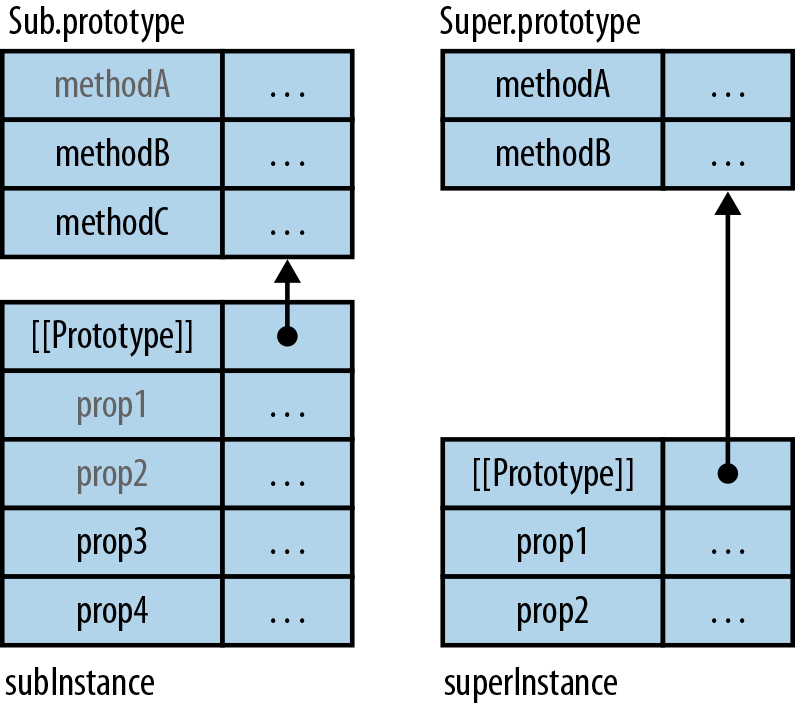
Instance properties are set up in the constructor itself, so inheriting the superconstructor’s instance properties involves calling that constructor:
functionSub(prop1,prop2,prop3,prop4){Super.call(this,prop1,prop2);// (1)this.prop3=prop3;// (2)this.prop4=prop4;// (3)}
When Sub is invoked via new, its implicit parameter this refers to a fresh instance. It first passes that instance on to Super (1), which adds its instance properties. Afterward, Sub sets up its own instance properties (2,3). The trick is not to invoke Super via new, because that would create a fresh superinstance. Instead, we call Super as a function and hand in the current (sub)instance as the value of this.
Shared properties such as methods are kept in the instance prototype. Thus, we need to find a way for Sub.prototype to inherit all of Super.prototype’s properties. The solution is to give Sub.prototype the prototype Super.prototype.
Yes, JavaScript terminology is confusing here. If you feel lost, consult Terminology: The Two Prototypes, which explains how they differ.
This is the code that achieves that:
Sub.prototype=Object.create(Super.prototype);Sub.prototype.constructor=Sub;Sub.prototype.methodB=...;Sub.prototype.methodC=...;
Object.create() produces a fresh object whose prototype is Super.prototype. Afterward, we add Sub’s methods. As explained in The constructor Property of Instances, we also need to set up the property constructor, because we have replaced the original instance prototype where it had the correct value.
Figure 17-6 shows how Sub and Super are related now. Sub’s structure does resemble what I have sketched in Figure 17-5. The diagram does not show the instance properties, which are set up by the function call mentioned in the diagram.
“Ensuring that instanceof works” means that every instance of Sub must also be an instance of Super. Figure 17-7 shows what the prototype chain of subInstance, an instance of Sub, looks like: its first prototype is Sub.prototype, and its second prototype is Super.prototype.
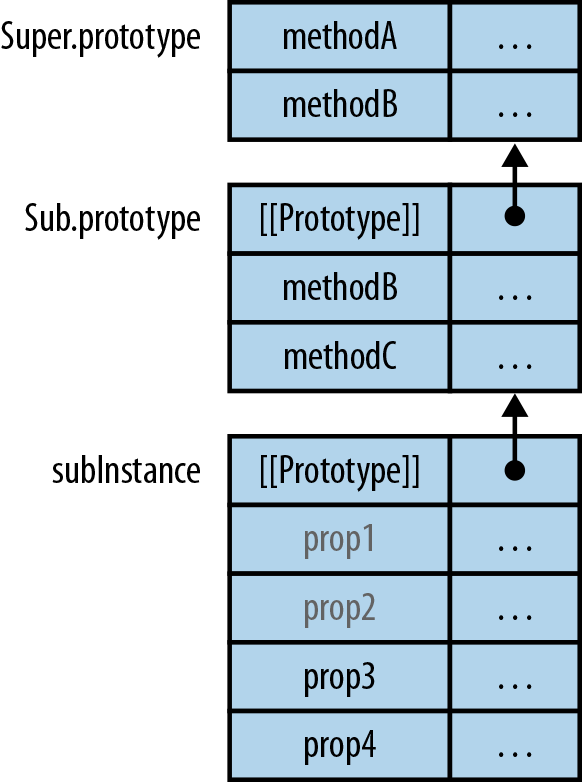
Let’s start with an easier question: is subInstance an instance of Sub? Yes, it is, because the following two assertions are equivalent (the latter can be considered the definition of the former):
subInstanceinstanceofSubSub.prototype.isPrototypeOf(subInstance)
As mentioned before, Sub.prototype is one of the prototypes of subInstance, so both assertions are true. Similarly, subInstance is also an instance of Super, because the following two assertions hold:
subInstanceinstanceofSuperSuper.prototype.isPrototypeOf(subInstance)
We override a method in Super.prototype by adding a method with the same name to Sub.prototype. methodB is an example and in Figure 17-7, we can see why it works: the search for methodB begins in subInstance and finds Sub.prototype.methodB before Super.prototype.methodB.
To understand supercalls, you need to know the term home object. The home object of a method is the object that owns the property whose value is the method. For example, the home object of Sub.prototype.methodB is Sub.prototype. Supercalling a method foo involves three steps:
foo.
this. The rationale is that the supermethod must work with the same instance as the current method; it must be able to access the same instance properties.
Therefore, the code of the submethod looks as follows. It supercalls itself, it calls the method it has overridden:
Sub.prototype.methodB=function(x,y){varsuperResult=Super.prototype.methodB.call(this,x,y);// (1)returnthis.prop3+' '+superResult;}
One way of reading the supercall at (1) is as follows: refer to the supermethod directly and call it with the current this. However, if we split it into three parts, we find the aforementioned steps:
Super.prototype: Start your search in Super.prototype, the prototype of Sub.prototype (the home object of the current method Sub.prototype.methodB).
methodB: Look for a method with the name methodB.
call(this, ...): Call the method found in the previous step, and maintain the current this.
Until now, we have always referred to supermethods and superconstructors by mentioning the superconstructor name. This kind of hardcoding makes your code less flexible. You can avoid it by assigning the superprototype to a property of Sub:
Sub._super=Super.prototype;
Then calling the superconstructor and a supermethod looks as follows:
functionSub(prop1,prop2,prop3,prop4){Sub._super.constructor.call(this,prop1,prop2);this.prop3=prop3;this.prop4=prop4;}Sub.prototype.methodB=function(x,y){varsuperResult=Sub._super.methodB.call(this,x,y);returnthis.prop3+' '+superResult;}
Setting up Sub._super is usually handled by a utility function that also connects the subprototype to the superprototype. For example:
functionsubclasses(SubC,SuperC){varsubProto=Object.create(SuperC.prototype);// Save `constructor` and, possibly, other methodscopyOwnPropertiesFrom(subProto,SubC.prototype);SubC.prototype=subProto;SubC._super=SuperC.prototype;};
This code uses the helper function copyOwnPropertiesFrom(), which is shown and explained in Copying an Object.
Read “subclasses” as a verb: SubC subclasses SuperC.
Such a utility function can take some of the pain out of creating a subconstructor: there are fewer things to do manually, and the name of the superconstructor is never mentioned redundantly. The following example demonstrates how it simplifies code.
As a concrete example, let’s assume that the constructor Person already exists:
functionPerson(name){this.name=name;}Person.prototype.describe=function(){return'Person called '+this.name;};
We now want to create the constructor Employee as a subconstructor of Person. We do so manually, which looks like this:
functionEmployee(name,title){Person.call(this,name);this.title=title;}Employee.prototype=Object.create(Person.prototype);Employee.prototype.constructor=Employee;Employee.prototype.describe=function(){returnPerson.prototype.describe.call(this)+' ('+this.title+')';};
Here is the interaction:
> var jane = new Employee('Jane', 'CTO');
> jane.describe()
Person called Jane (CTO)
> jane instanceof Employee
true
> jane instanceof Person
trueThe utility function subclasses() from the previous section makes the code of Employee slightly simpler and avoids hardcoding the superconstructor Person:
functionEmployee(name,title){Employee._super.constructor.call(this,name);this.title=title;}Employee.prototype.describe=function(){returnEmployee._super.describe.call(this)+' ('+this.title+')';};subclasses(Employee,Person);
Built-in constructors use the same subclassing approach described in this section. For example, Array is a subconstructor of Object. Therefore, the prototype chain of an instance of Array looks like this:
> var p = Object.getPrototypeOf > p([]) === Array.prototype true > p(p([])) === Object.prototype true > p(p(p([]))) === null true
Before ECMAScript 5 and Object.create(), an often-used solution was to create the subprototype by invoking the superconstructor:
Sub.prototype=newSuper();// Don’t do this
This is not recommended under ECMAScript 5. The prototype will have all of Super’s instance properties, which it has no use for. Therefore, it is better to use the aforementioned pattern (involving Object.create()).
Almost all objects have Object.prototype in their prototype chain:
> Object.prototype.isPrototypeOf({})
true
> Object.prototype.isPrototypeOf([])
true
> Object.prototype.isPrototypeOf(/xyz/)
trueThe following subsections describe the methods that Object.prototype provides for its prototypees.
The following two methods are used to convert an object to a primitive value:
Object.prototype.toString()
Returns a string representation of an object:
> ({ first: 'John', last: 'Doe' }.toString())
'[object Object]'
> [ 'a', 'b', 'c' ].toString()
'a,b,c'Object.prototype.valueOf()
This is the preferred way of converting an object to a number. The default implementation returns this:
> var obj = {};
> obj.valueOf() === obj
truevalueOf is overridden by wrapper constructors to return the wrapped primitive:
> new Number(7).valueOf() 7
The conversion to number and string (whether implicit or explicit) builds on the conversion to primitive (for details, see Algorithm: ToPrimitive()—Converting a Value to a Primitive). That is why you can use the aforementioned two methods to configure those conversions. valueOf() is preferred by the conversion to number:
> 3 * { valueOf: function () { return 5 } }
15toString() is preferred by the conversion to string:
> String({ toString: function () { return 'ME' } })
'Result: ME'The conversion to boolean is not configurable; objects are always considered to be true (see Converting to Boolean).
This method returns a locale-specific string representation of an object. The default implementation calls toString(). Most engines don’t go beyond this support for this method. However, the ECMAScript Internationalization API (see The ECMAScript Internationalization API), which is supported by many modern engines, overrides it for several built-in constructors.
The following methods help with prototypal inheritance and properties:
Object.prototype.isPrototypeOf(obj)
Returns true if the receiver is part of the prototype chain of obj:
> var proto = { };
> var obj = Object.create(proto);
> proto.isPrototypeOf(obj)
true
> obj.isPrototypeOf(obj)
falseObject.prototype.hasOwnProperty(key)
Returns true if this owns a property whose key is key. “Own” means that the property exists in the object itself and not in one of its prototypes.
You normally should invoke this method generically (not directly), especially on objects whose properties you don’t know statically. Why and how is explained in Iteration and Detection of Properties:
> var proto = { foo: 'abc' };
> var obj = Object.create(proto);
> obj.bar = 'def';
> Object.prototype.hasOwnProperty.call(obj, 'foo')
false
> Object.prototype.hasOwnProperty.call(obj, 'bar')
trueObject.prototype.propertyIsEnumerable(propKey)
Returns true if the receiver has a property with the key propKey that is enumerable and false otherwise:
> var obj = { foo: 'abc' };
> obj.propertyIsEnumerable('foo')
true
> obj.propertyIsEnumerable('toString')
false
> obj.propertyIsEnumerable('unknown')
falseSometimes instance prototypes have methods that are useful for more objects than those that inherit from them. This section explains how to use the methods of a prototype without inheriting from it.
For example, the instance prototype Wine.prototype has the method incAge():
functionWine(age){this.age=age;}Wine.prototype.incAge=function(years){this.age+=years;}
The interaction is as follows:
> var chablis = new Wine(3); > chablis.incAge(1); > chablis.age 4
The method incAge() works for any object that has the property age. How can we invoke it on an object that is not an instance of Wine? Let’s look at the preceding method call:
chablis.incAge(1)
There are actually two arguments:
chablis is the receiver of the method call, passed to incAge via this.
1 is an argument, passed to incAge via years.
We can’t replace the former with an arbitrary object—the receiver must be an instance of Wine. Otherwise, the method incAge is not found. But the preceding method call is equivalent to (refer back to Calling Functions While Setting this: call(), apply(), and bind()):
Wine.prototype.incAge.call(chablis,1)
With the preceding pattern, we can make an object the receiver (first argument of call) that is not an instance of Wine, because the receiver isn’t used to find the method Wine.prototype.incAge. In the following example, we apply the method incAge() to the object john:
> var john = { age: 51 };
> Wine.prototype.incAge.call(john, 3)
> john.age
54A function that can be used in this manner is called a generic method; it must be prepared for this not being an instance of “its” constructor. Thus, not all methods are generic; the ECMAScript language specification explicitly states which ones are (see A List of All Generic Methods).
Calling a method generically is quite verbose:
Object.prototype.hasOwnProperty.call(obj,'propKey')
You can make this shorter by accessing hasOwnProperty via an instance of Object, as created by an empty object literal {}:
{}.hasOwnProperty.call(obj,'propKey')
Similarly, the following two expressions are equivalent:
Array.prototype.join.call(str,'-')[].join.call(str,'-')
The advantage of this pattern is that it is less verbose. But it is also less self-explanatory. Performance should not be an issue (at least long term), as engines can statically determine that the literals should not create objects.
These are a few examples of generic methods in use:
Use apply()(see Function.prototype.apply(thisValue, argArray)) to push an array (instead of individual elements; see Adding and Removing Elements (Destructive)):
> var arr1 = [ 'a', 'b' ]; > var arr2 = [ 'c', 'd' ]; > [].push.apply(arr1, arr2) 4 > arr1 [ 'a', 'b', 'c', 'd' ]
This example is about turning an array into arguments, not about borrowing a method from another constructor.
Apply the array method join() to a string (which is not an array):
> Array.prototype.join.call('abc', '-')
'a-b-c'
Apply the array method map() to a string:[15]
> [].map.call('abc', function (x) { return x.toUpperCase() })
[ 'A', 'B', 'C' ]Using map() generically is more efficient than using split(''), which creates an intermediate array:
> 'abc'.split('').map(function (x) { return x.toUpperCase() })
[ 'A', 'B', 'C' ]
Apply a string method to nonstrings. toUpperCase() converts the receiver to a string and uppercases the result:
> String.prototype.toUpperCase.call(true) 'TRUE' > String.prototype.toUpperCase.call(['a','b','c']) 'A,B,C'
Using generic array methods on plain objects gives you insight into how they work:
Invoke an array method on a fake array:
> var fakeArray = { 0: 'a', 1: 'b', length: 2 };
> Array.prototype.join.call(fakeArray, '-')
'a-b'See how an array method transforms an object that it treats like an array:
> var obj = {};
> Array.prototype.push.call(obj, 'hello');
1
> obj
{ '0': 'hello', length: 1 }There are some objects in JavaScript that feel like an array, but actually aren’t. That means that while they have indexed access and a length property, they don’t have any of the array methods (forEach(), push, concat(), etc.). This is unfortunate, but as we will see, generic array methods enable a workaround. Examples of array-like objects include:
The special variable arguments (see All Parameters by Index: The Special Variable arguments), which is an important array-like object, because it is such a fundamental part of JavaScript. arguments looks like an array:
> function args() { return arguments }
> var arrayLike = args('a', 'b');
> arrayLike[0]
'a'
> arrayLike.length
2But none of the array methods are available:
> arrayLike.join('-')
TypeError: object has no method 'join'That’s because arrayLike is not an instance of Array (and Array.prototype is not in the prototype chain):
> arrayLike instanceof Array false
Browser DOM node lists, which are returned by document.getElementsBy*() (e.g., getElementsByTagName()), document.forms, and so on:
> var elts = document.getElementsByTagName('h3');
> elts.length
3
> elts instanceof Array
falseStrings, which are array-like, too:
> 'abc'[1] 'b' > 'abc'.length 3
The term array-like can also be seen as a contract between generic array methods and objects. The objects have to fulfill certain requirements; otherwise, the methods won’t work on them. The requirements are:
The elements of an array-like object must be accessible via square brackets and integer indices starting at 0. All methods need read access, and some methods additionally need write access. Note that all objects support this kind of indexing: an index in brackets is converted to a string and used as a key to look up a property value:
> var obj = { '0': 'abc' };
> obj[0]
'abc'length property whose value is the number of its elements. Some methods require length to be mutable (for example, reverse()). Values whose lengths are immutable (for example, strings) cannot be used with those methods.
The following patterns are useful for working with array-like objects:
Turn an array-like object into an array:
vararr=Array.prototype.slice.call(arguments);
The method slice() (see Concatenating, Slicing, Joining (Nondestructive)) without any arguments creates a copy of an array-like receiver:
varcopy=['a','b'].slice();
To iterate over all elements of an array-like object, you can use a simple for loop:
functionlogArgs(){for(vari=0;i<arguments.length;i++){console.log(i+'. '+arguments[i]);}}
But you can also borrow Array.prototype.forEach():
functionlogArgs(){Array.prototype.forEach.call(arguments,function(elem,i){console.log(i+'. '+elem);});}
In both cases, the interaction looks as follows:
> logArgs('hello', 'world');
0. hello
1. worldThe following list includes all methods that are generic, as mentioned in the ECMAScript language specification:
Array.prototype (see Array Prototype Methods):
concat
every
filter
forEach
indexOf
join
lastIndexOf
map
pop
push
reduce
reduceRight
reverse
shift
slice
some
sort
splice
toLocaleString
toString
unshift
Date.prototype (see Date Prototype Methods)
toJSON
Object.prototype (see Methods of All Objects)
Object methods are automatically generic—they have to work for all objects.)
String.prototype (see String Prototype Methods)
charAt
charCodeAt
concat
indexOf
lastIndexOf
localeCompare
match
replace
search
slice
split
substring
toLocaleLowerCase
toLocaleUpperCase
toLowerCase
toUpperCase
trim
Since JavaScript has no built-in data structure for maps, objects are often used as maps from strings to values. Alas, that is more error-prone than it seems. This section explains three pitfalls that are involved in this task.
The operations that read properties can be partitioned into two kinds:
You need to choose carefully between these kinds of operations when you read the entries of an object-as-map. To see why, consider the following example:
varproto={protoProp:'a'};varobj=Object.create(proto);obj.ownProp='b';
obj is an object with one own property whose prototype is proto, which also has one own property. proto has the prototype Object.prototype, like all objects that are created by object literals. Thus, obj inherits properties from both proto and Object. prototype.
We want obj to be interpreted as a map with the single entry:
ownProp: 'b'
That is, we want to ignore inherited properties and only consider own properties. Let’s see which read operations interpret obj in this manner and which don’t. Note that for objects-as-maps, we normally want to use arbitrary property keys, stored in variables. That rules out dot notation.
The in operator checks whether an object has a property with a given key, but it considers inherited properties:
> 'ownProp' in obj // ok true > 'unknown' in obj // ok false > 'toString' in obj // wrong, inherited from Object.prototype true > 'protoProp' in obj // wrong, inherited from proto true
We need the check to ignore inherited properties. hasOwnProperty() does what we want:
> obj.hasOwnProperty('ownProp') // ok
true
> obj.hasOwnProperty('unknown') // ok
false
> obj.hasOwnProperty('toString') // ok
false
> obj.hasOwnProperty('protoProp') // ok
falseWhat operations can we use to find all of the keys of obj, while honoring our interpretation of it as a map? for-in looks like it might work. But, alas, it doesn’t:
> for (propKey in obj) console.log(propKey) ownProp protoProp
It considers inherited enumerable properties. The reason that no properties of Object.prototype show up here is that all of them are nonenumerable.
In contrast, Object.keys() lists only own properties:
> Object.keys(obj) [ 'ownProp' ]
This method returns only enumerable own properties; ownProp has been added via assignment and is thus enumerable by default. If you want to list all own properties, you need to use Object.getOwnPropertyNames().
For reading the value of a property, we can only choose between the dot operator and the bracket operator. We can’t use the former, because we have arbitrary keys, stored in variables. That leaves us with the bracket operator, which considers inherited properties:
> obj['toString'] [Function: toString]
This is not what we want. There is no built-in operation for reading only own properties, but you can easily implement one yourself:
functiongetOwnProperty(obj,propKey){// Using hasOwnProperty() in this manner is problematic// (explained and fixed later)return(obj.hasOwnProperty(propKey)?obj[propKey]:undefined);}
With that function, the inherited property toString is ignored:
> getOwnProperty(obj, 'toString') undefined
The function getOwnProperty() invoked the method hasOwnProperty() on obj. Normally, that is fine:
> getOwnProperty({ foo: 123 }, 'foo')
123However, if you add a property to obj whose key is hasOwnProperty, then that property overrides the method Object.prototype.hasOwnProperty() and getOwnProperty() ceases to work:
> getOwnProperty({ hasOwnProperty: 123 }, 'foo')
TypeError: Property 'hasOwnProperty' is not a functionYou can fix this problem by directly referring to hasOwnProperty(). This avoids going through obj to find it:
functiongetOwnProperty(obj,propKey){return(Object.prototype.hasOwnProperty.call(obj,propKey)?obj[propKey]:undefined);}
We have called hasOwnProperty() generically (see Generic Methods: Borrowing Methods from Prototypes).
In many JavaScript engines, the property __proto__ (see The Special Property __proto__) is special: getting it retrieves the prototype of an object, and setting it changes the prototype of an object. This is why the object can’t store map data in a property whose key is '__proto__'. If you want to allow the map key '__proto__', you must escape it before using it as a property key:
functionget(obj,key){returnobj[escapeKey(key)];}functionset(obj,key,value){obj[escapeKey(key)]=value;}// Similar: checking if key exists, deleting an entryfunctionescapeKey(key){if(key.indexOf('__proto__')===0){// (1)returnkey+'%';}else{returnkey;}}
We also need to escape the escaped version of '__proto__' (etc.) to avoid clashes; that is, if we escape the key '__proto__' as '__proto__%', then we also need to escape the key '__proto__%' so that it doesn’t replace a '__proto__' entry. That’s what happens in line (1).
Mark S. Miller mentions the real-world implications of this pitfall in an email:
Think this exercise is academic and doesn’t arise in real systems? As observed at a support thread, until recently, on all non-IE browsers, if you typed “__proto__” at the beginning of a new Google Doc, your Google Doc would hang. This was tracked down to such a buggy use of an object as a string map.
You create an object without a prototype like this:
vardict=Object.create(null);
Such an object is a better map (dictionary) than a normal object, which is why this pattern is sometimes called the dict pattern (dict for dictionary). Let’s first examine normal objects and then find out why prototype-less objects are better maps.
Usually, each object you create in JavaScript has at least Object.prototype in its prototype chain. The prototype of Object.prototype is null, so that’s where most prototype chains end:
> Object.getPrototypeOf({}) === Object.prototype
true
> Object.getPrototypeOf(Object.prototype)
nullPrototype-less objects have two advantages as maps:
in operator to detect whether a property exists and brackets to read properties.
__proto__ will be disabled. In ECMAScript 6, the special property __proto__ will be disabled if Object.prototype is not in the prototype chain of an object. You can expect JavaScript engines to slowly migrate to this behavior, but it is not yet very common.
The only disadvantage is that you’ll lose the services provided by Object.prototype. For example, a dict object can’t be automatically converted to a string anymore:
> console.log('Result: '+obj)
TypeError: Cannot convert object to primitive valueBut that is not a real disadvantage, because it isn’t safe to directly invoke methods on a dict object anyway.
Use the dict pattern for quick hacks and as a foundation for libraries. In (nonlibrary) production code, a library is preferable, because you can be sure to avoid all pitfalls. The next section lists a few such libraries.
There are many applications for using objects as maps. If all property keys are known statically (at development time), then you just need to make sure that you ignore inheritance and look only at own properties. If arbitrary keys can be used, you should turn to a library to avoid the pitfalls mentioned in this section. Here are two examples:
This section is a quick reference with pointers to more thorough explanations.
Object literals (see Object Literals):
varjane={name:'Jane','not an identifier':123,describe:function(){// methodreturn'Person named '+this.name;},};// Call a method:console.log(jane.describe());// Person named Jane
Dot operator (.) (see Dot Operator (.): Accessing Properties via Fixed Keys):
obj.propKeyobj.propKey=valuedeleteobj.propKey
Bracket operator ([]) (see Bracket Operator ([]): Accessing Properties via Computed Keys):
obj['propKey']obj['propKey']=valuedeleteobj['propKey']
Getting and setting the prototype (see Getting and Setting the Prototype):
Object.create(proto,propDescObj?)Object.getPrototypeOf(obj)
Iteration and detection of properties (see Iteration and Detection of Properties):
Object.keys(obj)Object.getOwnPropertyNames(obj)Object.prototype.hasOwnProperty.call(obj,propKey)propKeyinobj
Getting and defining properties via descriptors (see Getting and Defining Properties via Descriptors):
Object.defineProperty(obj,propKey,propDesc)Object.defineProperties(obj,propDescObj)Object.getOwnPropertyDescriptor(obj,propKey)Object.create(proto,propDescObj?)
Protecting objects (see Protecting Objects):
Object.preventExtensions(obj)Object.isExtensible(obj)Object.seal(obj)Object.isSealed(obj)Object.freeze(obj)Object.isFrozen(obj)
Methods of all objects (see Methods of All Objects):
Object.prototype.toString()Object.prototype.valueOf()Object.prototype.toLocaleString()Object.prototype.isPrototypeOf(obj)Object.prototype.hasOwnProperty(key)Object.prototype.propertyIsEnumerable(propKey)
An array is a map from indices (natural numbers, starting at zero) to arbitrary values. The values (the range of the map) are called the array’s elements. The most convenient way of creating an array is via an array literal. Such a literal enumerates the array elements; an element’s position implicitly specifies its index.
In this chapter, I will first cover basic array mechanisms, such as indexed access and the length property, and then go over array methods.
This section provides a quick overview of arrays. Details are explained later.
As a first example, we create an array arr via an array literal (see Creating Arrays) and access elements (see Array Indices):
> var arr = [ 'a', 'b', 'c' ]; // array literal > arr[0] // get element 0 'a' > arr[0] = 'x'; // set element 0 > arr [ 'x', 'b', 'c' ]
We can use the array property length (see length) to remove and append elements:
> var arr = [ 'a', 'b', 'c' ]; > arr.length 3 > arr.length = 2; // remove an element > arr [ 'a', 'b' ] > arr[arr.length] = 'd'; // append an element > arr [ 'a', 'b', 'd' ]
The array method push() provides another way of appending an element:
> var arr = [ 'a', 'b' ];
> arr.push('d')
3
> arr
[ 'a', 'b', 'd' ]The ECMAScript standard specifies arrays as maps (dictionaries) from indices to values. In other words, arrays may not be contiguous and can have holes in them. For example:
> var arr = []; > arr[0] = 'a'; 'a' > arr[2] = 'b'; 'b' > arr [ 'a', , 'b' ]
The preceding array has a hole: there is no element at index 1. Holes in Arrays explains holes in more detail.
Note that most JavaScript engines optimize arrays without holes internally and store them contiguously.
You create an array via an array literal:
varmyArray=['a','b','c'];
Trailing commas in arrays are ignored:
> [ 'a', 'b' ].length 2 > [ 'a', 'b', ].length 2 > [ 'a', 'b', ,].length // hole + trailing comma 3
There are two ways to use the constructor Array: you can create an empty array with a given length or an array whose elements are the given values. For this constructor, new is optional: invoking it as a normal function (without new) does the same as invoking it as a constructor.
An empty array with a given length has only holes in it! Thus, it rarely makes sense to use this version of the constructor:
> var arr = new Array(2); > arr.length 2 > arr // two holes plus trailing comma (ignored!) [ , ,]
Some engines may preallocate contiguous memory when you call Array() in this manner, which may slightly improve performance. However, be sure that the increased verbosity and redundancy is worth it!
This way of invoking Array is similar to an array literal:
// The same as ['a', 'b', 'c']:vararr1=newArray('a','b','c');
The problem is that you can’t create arrays with a single number in them, because that is interpreted as creating an array whose length is the number:
> new Array(2) // alas, not [ 2 ]
[ , ,]
> new Array(5.7) // alas, not [ 5.7 ]
RangeError: Invalid array length
> new Array('abc') // ok
[ 'abc' ]If you need multiple dimensions for elements, you must nest arrays. When you create such nested arrays, the innermost arrays can grow as needed. But if you want direct access to elements, you need to at least create the outer arrays. In the following example, I create a three-by-three matrix for Tic-tac-toe. The matrix is completely filled with data (as opposed to letting rows grow as needed):
// Create the Tic-tac-toe boardvarrows=[];for(varrowCount=0;rowCount<3;rowCount++){rows[rowCount]=[];for(varcolCount=0;colCount<3;colCount++){rows[rowCount][colCount]='.';}}// Set an X in the upper right cornerrows[0][2]='X';// [row][column]// Print the boardrows.forEach(function(row){console.log(row.join(' '));});
Here is the output:
. . X . . . . . .
I wanted the example to demonstrate the general case. Obviously, if a matrix is so small and has fixed dimensions, you can set it up via an array literal:
varrows=[['.','.','.'],['.','.','.'],['.','.','.']];
When you are working with array indices, you must keep in mind the following limits:
i < 232−1.
Indices that are out of range are treated as normal property keys (strings!). They don’t show up as array elements and they don’t influence the property length. For example:
> var arr = []; > arr[-1] = 'a'; > arr [] > arr['-1'] 'a' > arr[4294967296] = 'b'; > arr [] > arr['4294967296'] 'b'
The in operator detects whether an object has a property with a given key. But it can also be used to determine whether a given element index exists in an array. For example:
> var arr = [ 'a', , 'b' ]; > 0 in arr true > 1 in arr false > 10 in arr false
In addition to deleting properties, the delete operator also deletes array elements. Deleting elements creates holes (the length property is not updated):
> var arr = [ 'a', 'b' ]; > arr.length 2 > delete arr[1] // does not update length true > arr [ 'a', ] > arr.length 2
You can also delete trailing array elements by decreasing an array’s length (see length for details). To remove elements without creating holes (i.e., the indices of subsequent elements are decremented), you use Array.prototype.splice() (see Adding and Removing Elements (Destructive)). In this example, we remove two elements at index 1:
> var arr = ['a', 'b', 'c', 'd']; > arr.splice(1, 2) // returns what has been removed [ 'b', 'c' ] > arr [ 'a', 'd' ]
This is an advanced section. You normally don’t need to know the details explained here.
Array indices are not what they seem. Until now, I have pretended that array indices are numbers. And that is how JavaScript engines implement arrays, internally. However, the ECMAScript specification sees indices differently. Paraphrasing Section 15.4:
P (a string) is an array index if and only if ToString(ToUint32(P)) is equal to P and ToUint32(P) is not equal to 232−1. What this means is explained momentarily.
In other words, in the world of the spec all values in brackets are converted to strings and interpreted as property keys, even numbers. The following interaction demonstrates this:
> var arr = ['a', 'b']; > arr['0'] 'a' > arr[0] 'a'
To be an array index, a property key P (a string!) must be equal to the result of the following computation:
P to a number.
That means that an array index must be a stringified integer i in the 32-bit range 0 ≤ i < 232−1. The upper limit has been explicitly excluded in the spec (as quoted previously). It is reserved for the maximum length. To see how this definition works, let’s use the function ToUint32() from 32-bit Integers via Bitwise Operators.
First, a string that doesn’t contain a number is always converted to 0, which, after stringification, is not equal to the string:
> ToUint32('xyz')
0
> ToUint32('?@#!')
0Second, a stringified integer that is out of range is also converted to a completely different integer, which is not equal to the string, after stringification:
> ToUint32('-1')
4294967295
> Math.pow(2, 32)
4294967296
> ToUint32('4294967296')
0Third, stringified noninteger numbers are converted to integers, which are, again, different:
> ToUint32('1.371')
1Note that the specification also enforces that array indices don’t have exponents:
> ToUint32('1e3')
1000And that they don’t have leading zeros:
> var arr = ['a', 'b']; > arr['0'] // array index 'a' > arr['00'] // normal property undefined
The basic function of the length property is to track the highest index in an array:
> [ 'a', 'b' ].length 2 > [ 'a', , 'b' ].length 3
Thus, length does not count the number of elements, so you’d have to write your own function for doing so. For example:
functioncountElements(arr){varelemCount=0;arr.forEach(function(){elemCount++;});returnelemCount;}
To count elements (nonholes), we have used the fact that forEach skips holes.
Here is the interaction:
> countElements([ 'a', 'b' ]) 2 > countElements([ 'a', , 'b' ]) 2
Manually increasing the length of an array has remarkably little effect on an array; it only creates holes:
> var arr = [ 'a', 'b' ]; > arr.length = 3; > arr // one hole at the end [ 'a', 'b', ,]
The last result has two commas at the end, because a trailing comma is optional and thus always ignored.
What we just did did not add any elements:
> countElements(arr) 2
However, the length property does act as a pointer indicating where to insert new elements. For example:
> arr.push('c')
4
> arr
[ 'a', 'b', , 'c' ]Thus, setting the initial length of an array via the Array constructor creates an array that is completely empty:
> var arr = new Array(2); > arr.length 2 > countElements(arr) 0
If you decrease the length of an array, all elements at the new length and above are deleted:
> var arr = [ 'a', 'b', 'c' ]; > 1 in arr true > arr[1] 'b' > arr.length = 1; > arr [ 'a' ] > 1 in arr false > arr[1] undefined
If you set an array’s length to 0, then it becomes empty. That allows you to clear an array for someone else. For example:
functionclearArray(arr){arr.length=0;}
Here’s the interaction:
> var arr = [ 'a', 'b', 'c' ]; > clearArray(arr) > arr []
Note, however, that this approach can be slow, because each array element is explicitly deleted. Ironically, creating a new empty array is often faster:
arr=[];
You need to be aware of the fact that setting an array’s length to zero affects everybody who shares the array:
>vara1=[1,2,3];>vara2=a1;>a1.length=0;>a1[]>a2[]
In contrast, assigning an empty array doesn’t:
>vara1=[1,2,3];>vara2=a1;>a1=[];>a1[]>a2[1,2,3]
Arrays are maps from indices to values. That means that arrays can have holes, indices smaller than the length that are missing in the array. Reading an element at one of those indices returns undefined.
It is recommended that you avoid holes in arrays. JavaScript handles them inconsistently (i.e., some methods ignore them, other don’t). Thankfully, you normally don’t need to know how holes are handled: they are rarely useful and affect performance negatively.
You can create holes by assigning to array indices:
> var arr = []; > arr[0] = 'a'; > arr[2] = 'c'; > 1 in arr // hole at index 1 false
You can also create holes by omitting values in array literals:
> var arr = ['a',,'c']; > 1 in arr // hole at index 1 false
You need two trailing commas to create a trailing hole, because the last comma is always ignored:
> [ 'a', ].length 1 > [ 'a', ,].length 2
This section examines the differences between a hole and undefined as an element. Given that reading a hole returns undefined, both are very similar.
An array with holes is called sparse. An array without holes is called dense. Dense arrays are contiguous and have an element at each index—starting at zero, and ending at length − 1. Let’s compare the following two arrays, a sparse array and a dense array. The two are very similar:
varsparse=[,,'c'];vardense=[undefined,undefined,'c'];
A hole is almost like having the element undefined at the same index. Both arrays have the same length:
> sparse.length 3 > dense.length 3
But the sparse array does not have an element at index 0:
> 0 in sparse false > 0 in dense true
Iteration via for is the same for both arrays:
> for (var i=0; i<sparse.length; i++) console.log(sparse[i]); undefined undefined c > for (var i=0; i<dense.length; i++) console.log(dense[i]); undefined undefined c
Iteration via forEach skips the holes, but not the undefined elements:
> sparse.forEach(function (x) { console.log(x) });
c
> dense.forEach(function (x) { console.log(x) });
undefined
undefined
cSome operations involving arrays ignore holes, while others consider them. This sections explains the details.
> ['a',, 'b'].forEach(function (x,i) { console.log(i+'.'+x) })
0.a
2.bevery() also skips holes (similarly: some()):
> ['a',, 'b'].every(function (x) { return typeof x === 'string' })
truemap() skips, but preserves holes:
> ['a',, 'b'].map(function (x,i) { return i+'.'+x })
[ '0.a', , '2.b' ]> ['a',, 'b'].filter(function (x) { return true })
[ 'a', 'b' ]join() converts holes, undefineds, and nulls to empty strings:
> ['a',, 'b'].join('-')
'a--b'
> [ 'a', undefined, 'b' ].join('-')
'a--b'sort() preserves holes while sorting:
> ['a',, 'b'].sort() // length of result is 3 [ 'a', 'b', , ]
The for-in loop correctly lists property keys (which are a superset of array indices):
> for (var key in ['a',, 'b']) { console.log(key) }
0
2apply() turns each hole into an argument whose value is undefined. The following interaction demonstrates this: function f() returns its arguments as an array. When we pass apply() an array with three holes in order to invoke f(), the latter receives three undefined arguments:
> function f() { return [].slice.call(arguments) }
> f.apply(null, [ , , ,])
[ undefined, undefined, undefined ]That means that we can use apply() to create an array with undefineds:
> Array.apply(null, Array(3)) [ undefined, undefined, undefined ]
apply() translates holes to undefineds in empty arrays, but it can’t be used to plug holes in arbitrary arrays (which may or may not contain holes). Take, for example, the arbitrary array [2]:
> Array.apply(null, [2]) [ , ,]
The array does not contain any holes, so apply() should return the same array. Instead, it returns an empty array with length 2 (all it contains are two holes). That is because Array() interprets single numbers as array lengths, not as array elements.
As we have seen, filter() removes holes:
> ['a',, 'b'].filter(function (x) { return true })
[ 'a', 'b' ]Use a custom function to convert holes to undefineds in arbitrary arrays:
functionconvertHolesToUndefineds(arr){varresult=[];for(vari=0;i<arr.length;i++){result[i]=arr[i];}returnresult;}
Using the function:
> convertHolesToUndefineds(['a',, 'b']) [ 'a', undefined, 'b' ]
Array.isArray(obj)
true if obj is an array. It correctly handles objects that cross realms (windows or frames)—as opposed to instanceof (see Pitfall: crossing realms (frames or windows)).
In the following sections, array prototype methods are grouped by functionality. For each of the subsections, I mention whether the methods are destructive (they change the arrays that they are invoked on) or nondestructive (they don’t modify their receivers; such methods often return new arrays).
All of the methods in this section are destructive:
Array.prototype.shift()
Removes the element at index 0 and returns it. The indices of subsequent elements are decremented by 1:
> var arr = [ 'a', 'b' ]; > arr.shift() 'a' > arr [ 'b' ]
Array.prototype.unshift(elem1?, elem2?, ...)
Prepends the given elements to the array. It returns the new length:
> var arr = [ 'c', 'd' ];
> arr.unshift('a', 'b')
4
> arr
[ 'a', 'b', 'c', 'd' ]Array.prototype.pop()
Removes the last element of the array and returns it:
> var arr = [ 'a', 'b' ]; > arr.pop() 'b' > arr [ 'a' ]
Array.prototype.push(elem1?, elem2?, ...)
Adds the given elements to the end of the array. It returns the new length:
> var arr = [ 'a', 'b' ];
> arr.push('c', 'd')
4
> arr
[ 'a', 'b', 'c', 'd' ]apply() (see Function.prototype.apply(thisValue, argArray)) enables you to destructively append an array arr2 to another array arr1:
> var arr1 = [ 'a', 'b' ]; > var arr2 = [ 'c', 'd' ]; > Array.prototype.push.apply(arr1, arr2) 4 > arr1 [ 'a', 'b', 'c', 'd' ]
Array.prototype.splice(start, deleteCount?, elem1?, elem2?, ...)
Starting at start, removes deleteCount elements and inserts the elements given. In other words, you are replacing the deleteCount elements at position start with elem1, elem2, and so on. The method returns the elements that have been removed:
> var arr = [ 'a', 'b', 'c', 'd' ]; > arr.splice(1, 2, 'X'); [ 'b', 'c' ] > arr [ 'a', 'X', 'd' ]
Special parameter values:
start can be negative, in which case it is added to the length to determine the start index. Thus, -1 refers the last element, and so on.
deleteCount is optional. If it is omitted (along with all subsequent arguments), then all elements at and after index start are removed.
In this example, we remove all elements after and including the second-to-last index:
> var arr = [ 'a', 'b', 'c', 'd' ]; > arr.splice(-2) [ 'c', 'd' ] > arr [ 'a', 'b' ]
These methods are also destructive:
Array.prototype.reverse()
Reverses the order of the elements in the array and returns a reference to the original (modified) array:
> var arr = [ 'a', 'b', 'c' ]; > arr.reverse() [ 'c', 'b', 'a' ] > arr // reversing happened in place [ 'c', 'b', 'a' ]
Array.prototype.sort(compareFunction?)
Sorts the array and returns it:
> var arr = ['banana', 'apple', 'pear', 'orange']; > arr.sort() [ 'apple', 'banana', 'orange', 'pear' ] > arr // sorting happened in place [ 'apple', 'banana', 'orange', 'pear' ]
Keep in mind that sorting compares values by converting them to strings, which means that numbers are not sorted numerically:
> [-1, -20, 7, 50].sort() [ -1, -20, 50, 7 ]
You can fix this by providing the optional parameter compareFunction, which controls how sorting is done. It has the following signature:
functioncompareFunction(a,b)
This function compares a and b and returns:
-1) if a is less than b
a is equal to b
1) if a is greater than b
For numbers, you can simply return a-b, but that can cause numeric overflow. To prevent that from happening, you need more verbose code:
functioncompareCanonically(a,b){if(a<b){return-1;}elseif(a>b){return1;}else{return0;}}
I don’t like nested conditional operators. But in this case, the code is so much less verbose that I’m tempted to recommend it:
functioncompareCanonically(a,b){returnreturna<b?-1(a>b?1:0);}
Using the function:
> [-1, -20, 7, 50].sort(compareCanonically) [ -20, -1, 7, 50 ]
For strings, you can use String.prototype.localeCompare (see Comparing Strings):
> ['c', 'a', 'b'].sort(function (a,b) { return a.localeCompare(b) })
[ 'a', 'b', 'c' ]The parameter compareFunction is also useful for sorting objects:
vararr=[{name:'Tarzan'},{name:'Cheeta'},{name:'Jane'}];functioncompareNames(a,b){returna.name.localeCompare(b.name);}
With compareNames as the compare function, arr is sorted by name:
> arr.sort(compareNames)
[ { name: 'Cheeta' },
{ name: 'Jane' },
{ name: 'Tarzan' } ]The following methods perform various nondestructive operations on arrays:
Array.prototype.concat(arr1?, arr2?, ...)
Creates a new array that contains all the elements of the receiver, followed by all the elements of the array arr1, and so on. If one of the parameters is not an array, then it is added to the result as an element (for example, the first argument, 'c', here):
> var arr = [ 'a', 'b' ];
> arr.concat('c', ['d', 'e'])
[ 'a', 'b', 'c', 'd', 'e' ]The array that concat() is invoked on is not changed:
> arr [ 'a', 'b' ]
Array.prototype.slice(begin?, end?)
Copies array elements into a new array, starting at begin, until and excluding the element at end:
> [ 'a', 'b', 'c', 'd' ].slice(1, 3) [ 'b', 'c' ]
If end is missing, the array length is used:
> [ 'a', 'b', 'c', 'd' ].slice(1) [ 'b', 'c', 'd' ]
If both indices are missing, the array is copied:
> [ 'a', 'b', 'c', 'd' ].slice() [ 'a', 'b', 'c', 'd' ]
If either of the indices is negative, the array length is added to it. Thus, -1 refers to the last element, and so on:
> [ 'a', 'b', 'c', 'd' ].slice(1, -1) [ 'b', 'c' ] > [ 'a', 'b', 'c', 'd' ].slice(-2) [ 'c', 'd' ]
Array.prototype.join(separator?)
Creates a string by applying toString() to all array elements and putting the string in separator between the results. If separator is omitted, ',' is used:
> [3, 4, 5].join('-')
'3-4-5'
> [3, 4, 5].join()
'3,4,5'
> [3, 4, 5].join('')
'345'join() converts undefined and null to empty strings:
> [undefined, null].join('#')
'#'Holes in arrays are also converted to empty strings:
> ['a',, 'b'].join('-')
'a--b'The following methods search for values in arrays:
Array.prototype.indexOf(searchValue, startIndex?)
Searches the array for searchValue, starting at startIndex. It returns the index of the first occurrence or –1 if nothing is found. If startIndex is negative, the array length is added to it; if it is missing, the whole array is searched:
> [ 3, 1, 17, 1, 4 ].indexOf(1) 1 > [ 3, 1, 17, 1, 4 ].indexOf(1, 2) 3
Strict equality (seevEquality Operators: === Versus ==) is used for the search, which means that indexOf() can’t find NaN:
> [NaN].indexOf(NaN) -1
Array.prototype.lastIndexOf(searchElement, startIndex?)
Searches the array for searchElement, starting at startIndex, backward. It returns the index of the first occurrence or –1 if nothing is found. If startIndex is negative, the array length is added to it; if it is missing, the whole array is searched. Strict equality (see Equality Operators: === Versus ==) is used for the search:
> [ 3, 1, 17, 1, 4 ].lastIndexOf(1) 3 > [ 3, 1, 17, 1, 4 ].lastIndexOf(1, -3) 1
Iteration methods use a function to iterate over an array. I distinguish three kinds of iteration methods, all of which are nondestructive: examination methods mainly observe the content of an array; transformation methods derive a new array from the receiver; and reduction methods compute a result based on the receiver’s elements.
Each method described in this section looks like this:
arr.examinationMethod(callback,thisValue?)
Such a method takes the following parameters:
callback is its first parameter, a function that it calls.
Depending on the examination method, the callback returns a boolean or nothing. It has the following signature:
functioncallback(element,index,array)
element is an array element for callback to process, index is the element’s index, and array is the array that examinationMethod has been invoked on.
thisValue allows you to configure the value of this inside callback.
And now for the examination methods whose signatures I have just described:
Array.prototype.forEach(callback, thisValue?)
Iterates over the elements of an array:
vararr=['apple','pear','orange'];arr.forEach(function(elem){console.log(elem);});
Array.prototype.every(callback, thisValue?)
Returns true if the callback returns true for every element. It stops iteration as soon as the callback returns false.
Note that not returning a value leads to an implicit return of undefined, which every() interprets as false.
every() works like the universal quantifier (“for all”).
This example checks whether every number in the array is even:
> function isEven(x) { return x % 2 === 0 }
> [ 2, 4, 6 ].every(isEven)
true
> [ 2, 3, 4 ].every(isEven)
falseIf the array is empty, the result is true (and callback is not called):
> [].every(function () { throw new Error() })
trueArray.prototype.some(callback, thisValue?)
Returns true if the callback returns true for at least one element. It stops iteration as soon as the callback returns true.
Note that not returning a value leads to an implicit return of undefined, which some interprets as false.
some() works like the existential quantifier (“there exists”).
This example checks whether there is an even number in the array:
> function isEven(x) { return x % 2 === 0 }
> [ 1, 3, 5 ].some(isEven)
false
> [ 1, 2, 3 ].some(isEven)
trueIf the array is empty, the result is false (and callback is not called):
> [].some(function () { throw new Error() })
falseOne potential pitfall of forEach() is that it does not support break or something similar to prematurely abort the loop. If you need to do that, you can use some():
functionbreakAtEmptyString(strArr){strArr.some(function(elem){if(elem.length===0){returntrue;// break}console.log(elem);// implicit: return undefined (interpreted as false)});}
some() returns true if a break happened, and false otherwise. This allows you to react differently depending on whether iterating finished successfully (something that is slightly tricky with for loops).
Transformation methods take an input array and produce an output array, while the callback controls how the output is produced. The callback has the same signature as for examination:
functioncallback(element,index,array)
There are two transformation methods:
Array.prototype.map(callback, thisValue?)
Each output array element is the result of applying callback to an input element. For example:
> [ 1, 2, 3 ].map(function (x) { return 2 * x })
[ 2, 4, 6 ]Array.prototype.filter(callback, thisValue?)
The output array contains only those input elements for which callback returns true. For example:
> [ 1, 0, 3, 0 ].filter(function (x) { return x !== 0 })
[ 1, 3 ]For reducing, the callback has a different signature:
functioncallback(previousValue,currentElement,currentIndex,array)
The parameter previousValue is the value previously returned by the callback. When the callback is first called, there are two possibilities (the descriptions are for Array.prototype.reduce(); differences with reduceRight() are mentioned in parentheses):
initialValue has been provided. Then previousValue is initialValue, and currentElement is the first array element (reduceRight: the last array element).
initialValue has been provided. Then previousValue is the first array element, and currentElement is the second array element (reduceRight: the last array element and second-to-last array element).
There are two reduction methods:
Array.prototype.reduce(callback, initialValue?)
Iterates from left to right and invokes the callback as previously sketched. The result of the method is the last value returned by the callback. This example computes the sum of all array elements:
functionadd(prev,cur){returnprev+cur;}console.log([10,3,-1].reduce(add));// 12
If you invoke reduce on an array with a single element, that element is returned:
> [7].reduce(add) 7
If you invoke reduce on an empty array, you must specify initialValue, otherwise you get an exception:
> [].reduce(add) TypeError: Reduce of empty array with no initial value > [].reduce(add, 123) 123
Array.prototype.reduceRight(callback, initialValue?)
reduce(), but iterates from right to left.
In many functional programming languages, reduce is known as fold or foldl (left fold) and reduceRight is known as foldr (right fold).
Another way to look at the reduce method is that it implements an n-ary operator OP:
OP1≤i≤n xi
via a series of applications of a binary operator op2:
(...(x1 op2 x2) op2 ...) op2 xn
That’s what happened in the previous code example: we implemented an n-ary sum operator for arrays via JavaScript’s binary plus operator.
As an example, let’s examine the two iteration directions via the following function:
functionprintArgs(prev,cur,i){console.log('prev:'+prev+', cur:'+cur+', i:'+i);returnprev+cur;}
As expected, reduce() iterates from left to right:
> ['a', 'b', 'c'].reduce(printArgs) prev:a, cur:b, i:1 prev:ab, cur:c, i:2 'abc' > ['a', 'b', 'c'].reduce(printArgs, 'x') prev:x, cur:a, i:0 prev:xa, cur:b, i:1 prev:xab, cur:c, i:2 'xabc'
And reduceRight() iterates from right to left:
> ['a', 'b', 'c'].reduceRight(printArgs) prev:c, cur:b, i:1 prev:cb, cur:a, i:0 'cba' > ['a', 'b', 'c'].reduceRight(printArgs, 'x') prev:x, cur:c, i:2 prev:xc, cur:b, i:1 prev:xcb, cur:a, i:0 'xcba'
Some objects in JavaScript look like an array, but they aren’t one. That usually means that they have indexed access and a length property, but none of the array methods. Examples include the special variable arguments, DOM node lists, and strings. Array-Like Objects and Generic Methods gives tips for working with array-like objects.
To iterate over an array arr, you have two options:
A simple for loop (see for):
for(vari=0;i<arr.length;i++){console.log(arr[i]);}
One of the array iteration methods (see Iteration (Nondestructive)). For example, forEach():
arr.forEach(function(elem){console.log(elem);});
Do not use the for-in loop (see for-in) to iterate over arrays. It iterates over indices, not over values. And it includes the keys of normal properties while doing so, including inherited ones.
This chapter gives an overview of the JavaScript API for regular expressions. It assumes that you are roughly familiar with how they work. If you are not, there are many good tutorials on the Web. Two examples are:
The terms used here closely reflect the grammar in the ECMAScript specification. I sometimes deviate to make things easier to understand.
The syntax for general atoms is as follows:
All of the following characters have special meaning:
\ ^ $ . * + ? ( ) [ ] { } |You can escape them by prefixing a backslash. For example:
> /^(ab)$/.test('(ab)')
false
> /^\(ab\)$/.test('(ab)')
trueAdditional special characters are:
Inside a character class [...]:
-
Inside a group that starts with a question mark (?...):
: = ! < >
The angle brackets are used only by the XRegExp library (see Chapter 30), to name groups.
. (dot)
Matches any JavaScript character (UTF-16 code unit) except line terminators (newline, carriage return, etc.). To really match any character, use [\s\S]. For example:
> /./.test('\n')
false
> /[\s\S]/.test('\n')
true\f (form feed), \n (line feed, newline), \r (carriage return), \t (horizontal tab), and \v (vertical tab).
\0 matches the NUL character (\u0000).
\cA – \cZ.
\u0000 – \xFFFF (Unicode code units; see Chapter 24).
\x00 – \xFF.
\d matches any digit (same as [0-9]);
\D matches any nondigit (same as [^0-9]).
\w matches any Latin alphanumeric character plus underscore (same as [A-Za-z0-9_]);
\W matches all characters not matched by \w.
\s matches whitespace characters (space, tab, line feed, carriage return, form feed, all Unicode spaces, etc.);
\S matches all nonwhitespace characters.
The syntax for character classes is as follows:
[«charSpecs»] matches any single character that matches at least one of the charSpecs.
[^«charSpecs»] matches any single character that does not match any of the charSpecs.
The following constructs are all character specifications:
Source characters match themselves. Most characters are source characters (even many characters that are special elsewhere). Only three characters are not:
\ ] -
As usual, you escape via a backslash. If you want to match a dash without escaping it, it must be the first character after the opening bracket or the right side of a range, as described shortly.
Class escapes: Any of the character escapes and character class escapes listed previously are allowed. There is one additional escape:
\b): Outside a character class, \b matches word boundaries. Inside a character class, it matches the control character backspace.
-), followed by a source character or a class escape.
To demonstrate using character classes, this example parses a date formatted in the ISO 8601 standard:
functionparseIsoDate(str){varmatch=/^([0-9]{4})-([0-9]{2})-([0-9]{2})$/.exec(str);// Other ways of writing the regular expression:// /^([0-9][0-9][0-9][0-9])-([0-9][0-9])-([0-9][0-9])$/// /^(\d\d\d\d)-(\d\d)-(\d\d)$/if(!match){thrownewError('Not an ISO date: '+str);}console.log('Year: '+match[1]);console.log('Month: '+match[2]);console.log('Day: '+match[3]);}
And here is the interaction:
> parseIsoDate('2001-12-24')
Year: 2001
Month: 12
Day: 24The syntax for groups is as follows:
(«pattern») is a capturing group. Whatever is matched by pattern can be accessed via backreferences or as the result of a match operation.
(?:«pattern») is a noncapturing group. pattern is still matched against the input, but not saved as a capture. Therefore, the group does not have a number you can refer to (e.g., via a backreference).
\1, \2, and so on are known as backreferences; they refer back to a previously matched group. The number after the backslash can be any integer greater than or equal to 1, but the first digit must not be 0.
In this example, a backreference guarantees the same amount of a’s before and after the dash:
> /^(a+)-\1$/.test('a-a')
true
> /^(a+)-\1$/.test('aaa-aaa')
true
> /^(a+)-\1$/.test('aa-a')
falseThis example uses a backreference to match an HTML tag (obviously, you should normally use a proper parser to process HTML):
> var tagName = /<([^>]+)>[^<]*<\/\1>/;
> tagName.exec('<b>bold</b>')[1]
'b'
> tagName.exec('<strong>text</strong>')[1]
'strong'
> tagName.exec('<strong>text</stron>')
nullAny atom (including character classes and groups) can be followed by a quantifier:
? means match never or once.
* means match zero or more times.
+ means match one or more times.
{n} means match exactly n times.
{n,} means match n or more times.
{n,m} means match at least n, at most m, times.
By default, quantifiers are greedy; that is, they match as much as possible. You can get reluctant matching (as little as possible) by suffixing any of the preceding quantifiers (including the ranges in curly braces) with a question mark (?). For example:
> '<a> <strong>'.match(/^<(.*)>/)[1] // greedy 'a> <strong' > '<a> <strong>'.match(/^<(.*?)>/)[1] // reluctant 'a'
Thus, .*? is a useful pattern for matching everything until the next occurrence of the following atom. For example, the following is a more compact version of the regular expression for HTML tags just shown (which used [^<]* instead of .*?):
/<(.+?)>.*?<\/\1>/Assertions, shown in the following list, are checks about the current position in the input:
| Matches only at the beginning of the input. |
| Matches only at the end of the input. |
| Matches only at a word boundary.
Don’t confuse with |
| Matches only if not at a word boundary. |
| Positive lookahead: Matches only if |
| Negative lookahead: Matches only if |
This example matches a word boundary via \b:
> /\bell\b/.test('hello')
false
> /\bell\b/.test('ello')
false
> /\bell\b/.test('ell')
trueThis example matches the inside of a word via \B:
> /\Bell\B/.test('ell')
false
> /\Bell\B/.test('hell')
false
> /\Bell\B/.test('hello')
trueLookbehind is not supported. Manually Implementing Lookbehind explains how to implement it manually.
A disjunction operator (|) separates two alternatives; either of the alternatives must match for the disjunction to match. The alternatives are atoms (optionally including quantifiers).
The operator binds very weakly, so you have to be careful that the alternatives don’t extend too far.
For example, the following regular expression matches all strings that either start with aa or end with bb:
> /^aa|bb$/.test('aaxx')
true
> /^aa|bb$/.test('xxbb')
trueIn other words, the disjunction binds more weakly than even ^ and $ and the two alternatives are ^aa and bb$. If you want to match the two strings 'aa' and 'bb', you need parentheses:
/^(aa|bb)$/
Similarly, if you want to match the strings 'aab' and 'abb':
/^a(a|b)b$/
JavaScript’s regular expressions have only very limited support for Unicode. Especially when it comes to code points in the astral planes, you have to be careful. Chapter 24 explains the details.
You can create a regular expression via either a literal or a constructor and configure how it works via flags.
There are two ways to create a regular expression: you can use a literal or the constructor RegExp:
Literal |
| Compiled at load time |
Constructor (second argument is optional) |
| Compiled at runtime |
A literal and a constructor differ in when they are compiled:
The literal is compiled at load time. The following code will cause an exception when it is evaluated:
functionfoo(){/[/;}
The constructor compiles the regular expression when it is called. The following code will not cause an exception, but calling foo() will:
functionfoo(){newRegExp('[');}
Thus, you should normally use literals, but you need the constructor if you want to dynamically assemble a regular expression.
Flags are a suffix of regular expression literals and a parameter of regular expression constructors; they modify the matching behavior of regular expressions. The following flags exist:
| Short name | Long name | Description |
|
| The given regular expression is matched multiple times. Influences several methods, especially |
|
| Case is ignored when trying to match the given regular expression. |
|
| In multiline mode, the begin operator |
The short name is used for literal prefixes and constructor parameters (see examples in the next section). The long name is used for properties of a regular expression that indicate what flags were set during its creation.
Regular expressions have the following instance properties:
Flags: boolean values indicating what flags are set:
global: Is flag /g set?
ignoreCase: Is flag /i set?
multiline: Is flag /m set?
Data for matching multiple times (flag /g is set):
lastIndex is the index where to continue the search next time.
The following is an example of accessing the instance properties for flags:
> var regex = /abc/i; > regex.ignoreCase true > regex.multiline false
In this example, we create the same regular expression first with a literal, then with a constructor, and use the test() method to determine whether it matches a string:
> /abc/.test('ABC')
false
> new RegExp('abc').test('ABC')
falseIn this example, we create a regular expression that ignores case (flag /i):
> /abc/i.test('ABC')
true
> new RegExp('abc', 'i').test('ABC')
trueThe test() method checks whether a regular expression, regex, matches a string, str:
regex.test(str)
test() operates differently depending on whether the flag /g is set or not.
If the flag /g is not set, then the method checks whether there is a match somewhere in str. For example:
> var str = '_x_x'; > /x/.test(str) true > /a/.test(str) false
If the flag /g is set, then the method returns true as many times as there are matches for regex in str. The property regex.lastIndex contains the index after the last match:
> var regex = /x/g; > regex.lastIndex 0 > regex.test(str) true > regex.lastIndex 2 > regex.test(str) true > regex.lastIndex 4 > regex.test(str) false
The search() method looks for a match with regex within str:
str.search(regex)
If there is a match, the index where it was found is returned. Otherwise, the result is -1. The properties global and lastIndex of regex are ignored as the search is performed (and lastIndex is not changed).
For example:
> 'abba'.search(/b/) 1 > 'abba'.search(/x/) -1
If the argument of search() is not a regular expression, it is converted to one:
> 'aaab'.search('^a+b+$')
0The following method call captures groups while matching regex against str:
varmatchData=regex.exec(str);
If there was no match, matchData is null. Otherwise, matchData is a match result, an array with two additional properties:
input is the complete input string.
index is the index where the match was found.
If the flag /g is not set, only the first match is returned:
> var regex = /a(b+)/;
> regex.exec('_abbb_ab_')
[ 'abbb',
'bbb',
index: 1,
input: '_abbb_ab_' ]
> regex.lastIndex
0If the flag /g is set, all matches are returned if you invoke exec() repeatedly. The return value null signals that there are no more matches. The property lastIndex indicates where matching will continue next time:
> var regex = /a(b+)/g; > var str = '_abbb_ab_'; > regex.exec(str) [ 'abbb', 'bbb', index: 1, input: '_abbb_ab_' ] > regex.lastIndex 6 > regex.exec(str) [ 'ab', 'b', index: 7, input: '_abbb_ab_' ] > regex.lastIndex 10 > regex.exec(str) null
Here we loop over matches:
varregex=/a(b+)/g;varstr='_abbb_ab_';varmatch;while(match=regex.exec(str)){console.log(match[1]);}
and we get the following output:
bbb b
The following method call matches regex against str:
varmatchData=str.match(regex);
If the flag /g of regex is not set, this method works like RegExp.prototype.exec():
> 'abba'.match(/a/) [ 'a', index: 0, input: 'abba' ]
If the flag is set, then the method returns an array with all matching substrings in str (i.e., group 0 of every match) or null if there is no match:
> 'abba'.match(/a/g) [ 'a', 'a' ] > 'abba'.match(/x/g) null
The replace() method searches a string, str, for matches with search and replaces them with replacement:
str.replace(search,replacement)
There are several ways in which the two parameters can be specified:
search
Either a string or a regular expression:
/g flag. This is unexpected and a major pitfall.
global flag, otherwise only one attempt is made to match the regular expression.
replacement
Either a string or a function:
If replacement is a string, its content is used verbatim to replace the match. The only exception is the special character dollar sign ($), which starts so-called replacement directives:
$n inserts group n from the match. n must be at least 1 ($0 has no special meaning).
The matching substring:
$` (backtick) inserts the text before the match.
$& inserts the complete match.
$' (apostrophe) inserts the text after the match.
$$ inserts a single $.
This example refers to the matching substring and its prefix and suffix:
> 'axb cxd'.replace(/x/g, "[$`,$&,$']") 'a[a,x,b cxd]b c[axb c,x,d]d'
This example refers to a group:
> '"foo" and "bar"'.replace(/"(.*?)"/g, '#$1#') '#foo# and #bar#'
If replacement is a function, it computes the string that is to replace the match. This function has the following signature:
function(completeMatch,group_1,...,group_n,offset,inputStr)
completeMatch is the same as $& previously, offset indicates where the match was found, and inputStr is what is being matched against.
Thus, you can use the special variable arguments to access groups (group 1 via arguments[1], and so on). For example:
> function replaceFunc(match) { return 2 * match }
> '3 apples and 5 oranges'.replace(/[0-9]+/g, replaceFunc)
'6 apples and 10 oranges'Regular expressions whose /g flag is set are problematic if a method invoked on them must be invoked multiple times to return all results. That’s the case for two methods:
RegExp.prototype.test()
RegExp.prototype.exec()
Then JavaScript abuses the regular expression as an iterator, as a pointer into the sequence of results. That causes problems:
/g regular expressions can’t be inlined
For example:
// Don’t do that:varcount=0;while(/a/g.test('babaa'))count++;
The preceding loop is infinite, because a new regular expression is created for each loop iteration, which restarts the iteration over the results. Therefore, the code must be rewritten:
varcount=0;varregex=/a/g;while(regex.test('babaa'))count++;
Here is another example:
// Don’t do that:functionextractQuoted(str){varmatch;varresult=[];while((match=/"(.*?)"/g.exec(str))!=null){result.push(match[1]);}returnresult;}
Calling the preceding function will again result in an infinite loop. The correct version is (why lastIndex is set to 0 is explained shortly):
varQUOTE_REGEX=/"(.*?)"/g;functionextractQuoted(str){QUOTE_REGEX.lastIndex=0;varmatch;varresult=[];while((match=QUOTE_REGEX.exec(str))!=null){result.push(match[1]);}returnresult;}
Using the function:
> extractQuoted('"hello", "world"')
[ 'hello', 'world' ]It’s a best practice not to inline anyway (then you can give regular expressions descriptive names). But you have to be aware that you can’t do it, not even in quick hacks.
/g regular expressions as parameters
test() and exec() multiple times must be careful with a regular expression handed to it as a parameter. Its flag /g must active and, to be safe, its lastIndex should be set to zero (an explanation is offered in the next example).
/g regular expressions (e.g., constants)
lastIndex property to zero, before using it as an iterator (an explanation is offered in the next example). As iteration depends on lastIndex, such a regular expression can’t be used in more than one iteration at the same time.
The following example illustrates problem 2. It is a naive implementation of a function that counts how many matches there are for the regular expression regex in the string str:
// Naive implementationfunctioncountOccurrences(regex,str){varcount=0;while(regex.test(str))count++;returncount;}
Here’s an example of using this function:
> countOccurrences(/x/g, '_x_x') 2
The first problem is that this function goes into an infinite loop if the regular expression’s /g flag is not set. For example:
countOccurrences(/x/,'_x_x')// never terminates
The second problem is that the function doesn’t work correctly if regex.lastIndex isn’t 0, because that property indicates where to start the search. For example:
> var regex = /x/g; > regex.lastIndex = 2; > countOccurrences(regex, '_x_x') 1
The following implementation fixes the two problems:
functioncountOccurrences(regex,str){if(!regex.global){thrownewError('Please set flag /g of regex');}varorigLastIndex=regex.lastIndex;// storeregex.lastIndex=0;varcount=0;while(regex.test(str))count++;regex.lastIndex=origLastIndex;// restorereturncount;}
A simpler alternative is to use match():
functioncountOccurrences(regex,str){if(!regex.global){thrownewError('Please set flag /g of regex');}return(str.match(regex)||[]).length;}
There’s one possible pitfall: str.match() returns null if the /g flag is set and there are no matches. We avoid that pitfall in the preceding code by using [] if the result of match() isn’t truthy.
This section gives a few tips and tricks for working with regular expressions in JavaScript.
Sometimes, when you assemble a regular expression manually, you want to use a given string verbatim. That means that none of the special characters (e.g., *, [) should be interpreted as such—all of them need to be escaped. JavaScript has no built-in means for this kind of quoting, but you can program your own function, quoteText, that would work as follows:
> console.log(quoteText('*All* (most?) aspects.'))
\*All\* \(most\?\) aspects\.Such a function is especially handy if you need to do a search and replace with multiple occurrences. Then the value to search for must be a regular expression with the global flag set. With quoteText(), you can use arbitrary strings. The function looks like this:
functionquoteText(text){returntext.replace(/[\\^$.*+?()[\]{}|=!<>:-]/g,'\\$&');}
All special characters are escaped, because you may want to quote several characters inside parentheses or square brackets.
If you don’t use assertions such as ^ and $, most regular expression methods find a pattern anywhere. For example:
> /aa/.test('xaay')
true
> /^aa$/.test('xaay')
falseIt’s a rare use case, but sometimes you need a regular expression that matches everything or nothing. For example, a function may have a parameter with a regular expression that is used for filtering. If that parameter is missing, you give it a default value, a regular expression that matches everything.
The empty regular expression matches everything. We can create an instance of RegExp based on that regular expression like this:
> new RegExp('').test('dfadsfdsa')
true
> new RegExp('').test('')
trueHowever, the empty regular expression literal would be //, which is interpreted as a comment by JavaScript. Therefore, the following is the closest you can get via a literal: /(?:)/ (empty noncapturing group). The group matches everything, while not capturing anything, which the group from influencing the result returned by exec(). Even JavaScript itself uses the preceding representation when displaying an empty regular expression:
> new RegExp('')
/(?:)/The empty regular expression has an inverse—the regular expression that matches nothing:
> var never = /.^/;
> never.test('abc')
false
> never.test('')
falseLookbehind is an assertion. Similar to lookahead, a pattern is used to check something about the current position in the input, but otherwise ignored. In contrast to lookahead, the match for the pattern has to end at the current position (not start at it).
The following function replaces each occurrence of the string 'NAME' with the value of the parameter name, but only if the occurrence is not preceded by a quote. We handle the quote by “manually” checking the character before the current match:
functioninsertName(str,name){returnstr.replace(/NAME/g,function(completeMatch,offset){if(offset===0||(offset>0&&str[offset-1]!=='"')){returnname;}else{returncompleteMatch;}});}
> insertName('NAME "NAME"', 'Jane')
'Jane "NAME"'
> insertName('"NAME" NAME', 'Jane')
'"NAME" Jane'An alternative is to include the characters that may escape in the regular expression. Then you have to temporarily add a prefix to the string you are searching in; otherwise, you’d miss matches at the beginning of that string:
functioninsertName(str,name){vartmpPrefix=' ';str=tmpPrefix+str;str=str.replace(/([^"])NAME/g,function(completeMatch,prefix){returnprefix+name;});returnstr.slice(tmpPrefix.length);// remove tmpPrefix}
Atoms (see Atoms: General):
. (dot) matches everything except line terminators (e.g., newlines). Use [\s\S] to really match everything.
Character class escapes:
\d matches digits ([0-9]); \D matches nondigits ([^0-9]).
\w matches Latin alphanumeric characters plus underscore ([A-Za-z0-9_]); \W matches all other characters.
\s matches all whitespace characters (space, tab, line feed, etc.); \S matches all nonwhitespace characters.
Character class (set of characters): [...] and [^...]
[abc] (all characters except \ ] - match themselves)
[\d\w]
[A-Za-z0-9]
Groups:
(...); backreference: \1
(?:...)
Quantifiers (see Quantifiers):
Greedy:
? * +
{n} {n,} {n,m}
? after any of the greedy quantifiers.
Assertions (see Assertions):
^ $
\b \B
(?=...) (pattern must come next, but is otherwise ignored)
(?!...) (pattern must not come next, but is otherwise ignored)
Disjunction: |
Creating a regular expression (see Creating a Regular Expression):
/xyz/i (compiled at load time)
new RegExp('xzy', 'i') (compiled at runtime)
Flags (see Flags):
Methods:
regex.test(str): Is there a match (see RegExp.prototype.test: Is There a Match?)?
/g is not set: Is there a match somewhere?
/g is set: Return true as many times as there are matches.
str.search(regex): At what index is there a match (see String.prototype.search: At What Index Is There a Match?)?
regex.exec(str): Capture groups (see the section RegExp.prototype.exec: Capture Groups)?
/g is not set: Capture groups of first match only (invoked once)
/g is set: Capture groups of all matches (invoked repeatedly; returns null if there are no more matches)
str.match(regex): Capture groups or return all matching substrings (see String.prototype.match: Capture Groups or Return All Matching Substrings)
/g is not set: Capture groups
/g is set: Return all matching substrings in an array
str.replace(search, replacement): Search and replace (see String.prototype.replace: Search and Replace)
search: String or regular expression (use the latter, set /g!)
replacement: String (with $1, etc.) or function (arguments[1] is group 1, etc.) that returns a string
For tips on using the flag /g, see Problems with the Flag /g.
Mathias Bynens (@mathias) and Juan Ignacio Dopazo (@juandopazo) recommended using match() and test() for counting occurrences, and Šime Vidas (@simevidas) warned me about being careful with match() if there are no matches. The pitfall of the global flag causing infinite loops comes from a talk by Andrea Giammarchi (@webreflection). Claude Pache told me to escape more characters in quoteText().
JavaScript’s Date constructor helps with parsing, managing, and displaying dates. This chapter describes how it works.
The date API uses the term UTC (Coordinated Universal Time). For most purposes, UTC is a synonym for GMT (Greenwich Mean Time) and roughly means the time zone of London, UK.
There are four ways of invoking the constructor of Date:
new Date(year, month, date?, hours?, minutes?, seconds?, milliseconds?)
Constructs a new date from the given data. The time is interpreted relative to the current time zone. Date.UTC() provides similar functionality, but relative to UTC. The parameters have the following ranges:
year: For 0 ≤ year ≤ 99, 1900 is added.
month: 0–11 (0 is January, 1 is February, etc.)
date: 1–31
hours: 0–23
minutes: 0–59
seconds: 0–59
milliseconds: 0–999
Here are some examples:
> new Date(2001, 1, 27, 14, 55)
Date {Tue Feb 27 2001 14:55:00 GMT+0100 (CET)}
> new Date(01, 1, 27, 14, 55)
Date {Wed Feb 27 1901 14:55:00 GMT+0100 (CET)}As an aside, JavaScript has inherited the slightly weird convention of interpreting 0 as January, 1 as February, and so on, from Java.
new Date(dateTimeStr)
This is a date time string that is converted into a number, with which new Date(number) is invoked. Date Time Formats explains the date time formats. For example:
> new Date('2004-08-29')
Date {Sun Aug 29 2004 02:00:00 GMT+0200 (CEST)}Illegal date time strings lead to NaN being passed to new Date(number).
new Date(timeValue)
Creates a date as specified in the number of milliseconds since 1 January 1970 00:00:00 UTC. For example:
> new Date(0)
Date {Thu Jan 01 1970 01:00:00 GMT+0100 (CET)}The inverse of this constructor is the getTime() method, which returns the milliseconds:
> new Date(123).getTime() 123
You can use NaN as an argument, which produces a special instance of Date, an “invalid date”:
> var d = new Date(NaN); > d.toString() 'Invalid Date' > d.toJSON() null > d.getTime() NaN > d.getYear() NaN
new Date()
new Date(Date.now()).
The constructor Date has the following methods:
Date.now()
new Date().getTime().
Date.parse(dateTimeString)
Converts dateTimeString to milliseconds since 1 January 1970, 00:00:00 UTC. Date Time Formats explains the format of dateTimeString. The result can be used to invoke new Date(number). Here are some examples:
> Date.parse('1970-01-01')
0
> Date.parse('1970-01-02')
86400000If it can’t parse a string, this method returns NaN:
> Date.parse('abc')
NaNDate.UTC(year, month, date?, hours?, minutes?, seconds?, milliseconds?)
Converts the given data to milliseconds since 1 January 1970 00:00:00 UTC. It differs from the Date constructor with the same arguments in two ways:
This section covers the methods of Date.prototype.
Time unit getters and setters are available with the following signatures:
Local time:
Date.prototype.get«Unit»() returns Unit, according to local time.
Date.prototype.set«Unit»(number) sets Unit, according to local time.
Universal time:
Date.prototype.getUTC«Unit»() returns Unit, according to universal time.
Date.prototype.setUTC«Unit»(number) sets Unit, according to universal time.
Unit is one of the following words:
FullYear: Usually four digits
Month: Month (0–11)
Date: Day of the month (1–31)
Day (getter only): Day of the week (0–6); 0 is Sunday
Hours: Hour (0–23)
Minutes: Minutes (0–59)
Seconds: Seconds (0–59)
Milliseconds: Milliseconds (0–999)
For example:
> var d = new Date('1968-11-25');
Date {Mon Nov 25 1968 01:00:00 GMT+0100 (CET)}
> d.getDate()
25
> d.getDay()
1The following methods enable you to get and set the time in milliseconds since 1 January 1970 and more:
Date.prototype.getTime() returns the milliseconds since 1 January 1970 00:00:00 UTC (see Time Values: Dates as Milliseconds Since 1970-01-01).
Date.prototype.setTime(timeValue) sets the date as specified in milliseconds since 1 January 1970 00:00:00 UTC (see Time Values: Dates as Milliseconds Since 1970-01-01).
Date.prototype.valueOf() is the same as getTime(). This method is called when a date is converted to a number.
Date.prototype.getTimezoneOffset() returns the difference between local time and UTC time in minutes.
The unit Year has been deprecated in favor of FullYear:
Date.prototype.getYear() is deprecated; use getFullYear() instead.
Date.prototype.setYear(number) is deprecated; use setFullYear() instead.
Note that conversion to a string is highly implementation-dependent. The following date is used to compute the output in the following examples (in Firefox, which had the most complete support when this book was written):
newDate(2001,9,30,17,43,7,856);
Date.prototype.toTimeString():
17:43:07 GMT+0100 (CET)
The time, in the current time zone.
Date.prototype.toLocaleTimeString():
17:43:07
The time in a locale-specific format. This method is provided by the ECMAScript Internationalization API (see The ECMAScript Internationalization API) and does not make much sense without it.
Date.prototype.toDateString():
Tue Oct 30 2001
The date.
Date.prototype.toLocaleDateString():
10/30/2001
The date, in a locale-specific format. This method is provided by the ECMAScript Internationalization API (see The ECMAScript Internationalization API) and does not make much sense without it.
Date.prototype.toString():
Tue Oct 30 2001 17:43:07 GMT+0100 (CET)
Date and time, in the current time zone. For any Date instance that has no milliseconds (i.e., the second is full), the following expression is true:
Date.parse(d.toString())===d.valueOf()
Date.prototype.toLocaleString():
Tue Oct 30 17:43:07 2001
Date and time in a locale-specific format. This method is provided by the ECMAScript Internationalization API (see The ECMAScript Internationalization API) and does not make much sense without it.
Date.prototype.toUTCString():
Tue, 30 Oct 2001 16:43:07 GMT
Date and time, in UTC.
Date.prototype.toGMTString():
Deprecated; use toUTCString() instead.
Date.prototype.toISOString():
2001-10-30T16:43:07.856Z
All internal properties show up in the returned string. The format is in accordance with Date Time Formats; the time zone is always Z.
Date.prototype.toJSON():
This method internally calls toISOString(). It is used by JSON.stringify() (see JSON.stringify(value, replacer?, space?)) to convert date objects to JSON strings.
This section describes formats for expressing points in time as strings. There are many ways of doing so: indicating just the date, including a time of day, omitting the time zone, specifying the time zone, and more. In its support for date time formats, ECMAScript 5 closely follows the standard ISO 8601 Extended Format. JavaScript engines implement the ECMAScript specification relatively completely, but there are still some variations, so you have to be vigilant.
The longest date time format is:
YYYY-MM-DDTHH:mm:ss.sssZ
Each part stands for several decimal digits of date time data. For example, YYYY means that the format starts with a four-digit year. The following subsections explain what each part means. Formats are relevant for the following methods:
Date.parse() can parse the formats.
new Date() can parse the formats.
Date.prototype.toISOString() creates a string in the aforementioned “full” format:
> new Date().toISOString() '2014-09-12T23:05:07.414Z'
The following date formats are available:
YYYY-MM-DD YYYY-MM YYYY
They include the following parts:
YYYY refers to year (Gregorian calendar).
MM refers to month, from 01 to 12.
DD refers to day, from 01 to 31.
For example:
> new Date('2001-02-22')
Date {Thu Feb 22 2001 01:00:00 GMT+0100 (CET)}The following time formats are available. As you can see, time zone information Z is optional:
THH:mm:ss.sss THH:mm:ss.sssZ THH:mm:ss THH:mm:ssZ THH:mm THH:mmZ
They include the following parts:
T is the prefix of the time part of a format (a literal T, not a digit).
HH refers to hour, from 00 to 23. You can use 24 as a value for HH (which refers to hour 00 of the following day), but then all remaining parts must be 0.
mm indicates the minute, from 00 to 59.
ss indicates the second, from 00 to 59.
sss indicates the millisecond, from 000 to 999.
Z refers to time zone, either of the following two:
Z” for UTC
+” or “-” followed by a time “hh:mm”
Some JavaScript engines allow you to specify only a time (others require a date):
> new Date('T13:17')
Date {Thu Jan 01 1970 13:17:00 GMT+0100 (CET)}What the date API calls time is called a time value by the ECMAScript specification. It is a primitive number that encodes a date as milliseconds since 1 January 1970 00:00:00 UTC. Each date object stores its state as a time value, in the internal property [[PrimitiveValue]] (the same property that instances of the wrapper constructors Boolean, Number, and String use to store their wrapped primitive values).
Leap seconds are ignored in time values.
The following methods work with time values:
new Date(timeValue) uses a time value to create a date.
Date.parse(dateTimeString) parses a string with a date time string and returns a time value.
Date.now() returns the current date time as a time value.
Date.UTC(year, month, date?, hours?, minutes?, seconds?, milliseconds?) interprets the parameters relative to UTC and returns a time value.
Date.prototype.getTime() returns the time value stored in the receiver.
Date.prototype.setTime(timeValue) changes the date as specified via a time value.
Date.prototype.valueOf() returns the time value stored in the receiver. This method determines how dates are converted to primitives, as explained in the next subsection.
The range of JavaScript integers (53 bits plus a sign) is large enough that a time span can be represented that starts at approximately 285,616 years before 1970 and ends at approximately 285,616 years after 1970.
Here are a few examples of converting dates to time values:
> new Date('1970-01-01').getTime()
0
> new Date('1970-01-02').getTime()
86400000
> new Date('1960-01-02').getTime()
-315532800000The Date constructor enables you to convert times values to dates:
> new Date(0)
Date {Thu Jan 01 1970 01:00:00 GMT+0100 (CET)}
> new Date(24 * 60 * 60 * 1000) // 1 day in ms
Date {Fri Jan 02 1970 01:00:00 GMT+0100 (CET)}
> new Date(-315532800000)
Date {Sat Jan 02 1960 01:00:00 GMT+0100 (CET)}A date is converted to a number via Date.prototype.valueOf(), which returns a time value. This allows you to compare dates:
> new Date('1980-05-21') > new Date('1980-05-20')
trueYou can also perform arithmetic, but beware that leap seconds are ignored:
> new Date('1980-05-21') - new Date('1980-05-20')
86400000Using the plus operator (+) to add a date to another date or a number results in a string, because the default for the conversion to primitive is to convert dates to strings (consult The Plus Operator (+) for an explanation of how the plus operator works):
> new Date('2024-10-03') + 86400000
'Thu Oct 03 2024 02:00:00 GMT+0200 (CEST)86400000'
> new Date(Number(new Date('2024-10-03')) + 86400000)
Fri Oct 04 2024 02:00:00 GMT+0200 (CEST)The Math object is used as a namespace for several math functions. This chapter provides an overview.
The properties of Math are as follows:
Math.E
Math.LN2
Math.LN10
Math.LOG2E
Math.LOG10E
Math.PI
Math.SQRT1_2

Math.SQRT2

The numerical functions of Math include the following:
Math.abs(x)
x.
Math.ceil(x)
Returns the smallest integer ≥ x:
> Math.ceil(3.999) 4 > Math.ceil(3.001) 4 > Math.ceil(-3.001) -3 > Math.ceil(3.000) 3
For more on converting floating-point numbers to integers, see Converting to Integer.
Math.exp(x)
Math.E). This is the inverse of Math.log().
Math.floor(x)
Returns the largest integer ≤ x:
> Math.floor(3.999) 3 > Math.floor(3.001) 3 > Math.floor(-3.001) -4 > Math.floor(3.000) 3
For more on converting floating-point numbers to integers, see Converting to Integer.
Math.log(x)
x) of x. This is the inverse of Math.exp().
Math.pow(x, y)
Returns xy, x raised to the power of y:
> Math.pow(9, 2) 81 > Math.pow(36, 0.5) 6
Math.round(x)
Returns x rounded to the nearest integer (the greater one if it is between two integers):
> Math.round(3.999) 4 > Math.round(3.001) 3 > Math.round(3.5) 4 > Math.round(-3.5) -3
For more on converting floating-point numbers to integers, see Converting to Integer.
Math.sqrt(x)
Returns  , the square root of
 x:
> Math.sqrt(256) 16
The trigonometric methods accept and return angles as radians. The following functions show you how you could implement conversions, should you need to:
From degrees to radians:
functiontoRadians(degrees){returndegrees/180*Math.PI;}
Here is the interaction:
> toRadians(180) 3.141592653589793 > toRadians(90) 1.5707963267948966
From radians to degrees:
functiontoDegrees(radians){returnradians/Math.PI*180;}
Here is the interaction:
> toDegrees(Math.PI * 2) 360 > toDegrees(Math.PI) 180
The trigonometric methods are as follows:
Following are the remaining Math functions:
min(x1?, x2?, ...)
Returns the smallest number among the parameters:
> Math.min() Infinity > Math.min(27) 27 > Math.min(27, -38) -38 > Math.min(27, -38, -43) -43
Use it on arrays via apply() (see func.apply(thisValue, argArray)):
> Math.min.apply(null, [27, -38, -43]) -43
max(x1?, x2?, ...)
Returns the largest number among the parameters:
> Math.max() -Infinity > Math.max(7) 7 > Math.max(7, 10) 10 > Math.max(7, 10, -333) 10
Use it on arrays via apply() (see func.apply(thisValue, argArray)):
> Math.max.apply(null, [7, 10, -333]) 10
Math.random()
Returns a pseudorandom number r, 0 ≤ r < 1.
The following function uses Math.random() to compute a random integer:
/*** Compute a random integer within the given range.** @param [lower] Optional lower bound. Default: zero.* @returns A random integer i, lower ≤ i < upper*/functiongetRandomInteger(lower,upper){if(arguments.length===1){upper=lower;lower=0;}returnMath.floor(Math.random()*(upper-lower))+lower;}
JSON (JavaScript Object Notation) is a plain-text format for data storage. It has become quite popular as a data interchange format for web services, for configuration files, and more. ECMAScript 5 has an API for converting from a string in JSON format to a JavaScript value (parsing) and vice versa (stringifying).
This section explains what JSON is and how it was created.
JSON stores data as plain text. Its grammar is a subset of the grammar of JavaScript expressions. For example:
{"first":"Jane","last":"Porter","married":true,"born":1890,"friends":["Tarzan","Cheeta"]}
JSON uses the following constructs from JavaScript expressions:
null
It adheres to these rules:
Douglas Crockford discovered JSON in 2001. He gave it a name and put up a specification at http://json.org:
I discovered JSON. I do not claim to have invented JSON, because it already existed in nature. What I did was I found it, I named it, I described how it was useful. I don’t claim to be the first person to have discovered it; I know that there are other people who discovered it at least a year before I did. The earliest occurrence I’ve found was, there was someone at Netscape who was using JavaScript array literals for doing data communication as early as 1996, which was at least five years before I stumbled onto the idea.
Initially, Crockford wanted JSON to have the name JavaScript Markup Language, but the acronym JSML was already taken by the JSpeech Markup Language.
The JSON specification has been translated to many human languages, and there are now libraries for many programming languages that support parsing and generating JSON.
Douglas Crockford created a JSON business card with a logo on the front (see Figure 22-1) and the full grammar on the back (see Figure 22-2). That makes it visually obvious how positively simple JSON is.
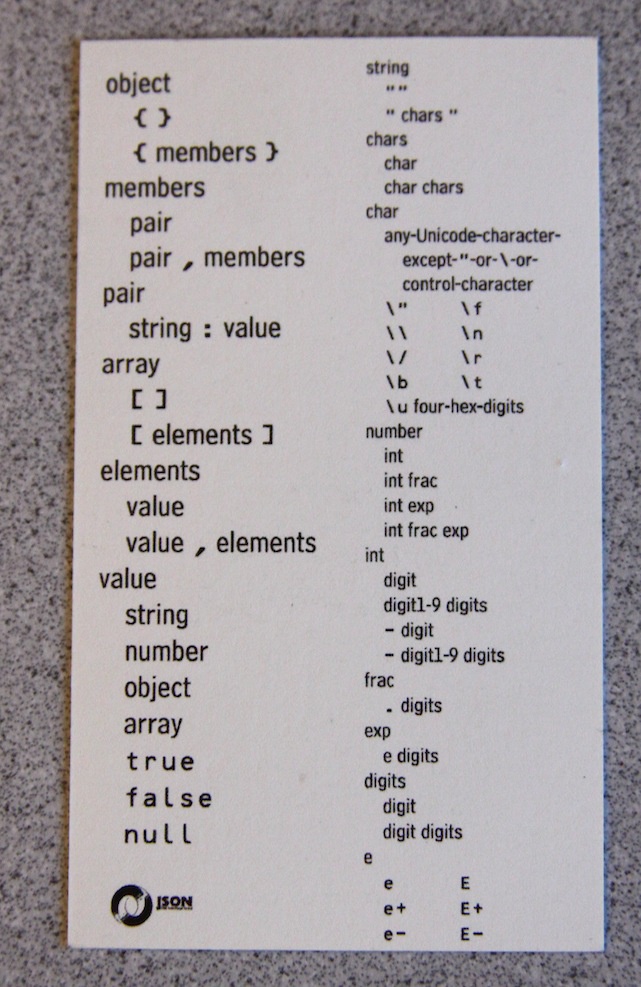
The grammar can be transcribed as follows:
{ }
{ members }
pair
pair , members
: value
[ ]
[ elements ]
value
value , elements
string
number
object
array
true
false
null
""
" chars "
char
char chars
any-Unicode-character-except-"-or-\-or-control-character
\" \\ \/ \b \f \n \r \t
\u four-hex-digits
int
int frac
int exp
int frac exp
digit
digit1-9 digits
- digit
- digit1-9 digits
. digits
digit
digit digits
e e+ e-
E E+ E-
The global variable JSON serves as a namespace for functions that produce and parse strings with JSON data.
JSON.stringify(value, replacer?, space?) translates the JavaScript value value to a string in JSON format. It has two optional arguments.
The optional parameter replacer is used to change the value before stringifying it. It can be:
A node visitor (see Transforming Data via Node Visitors) that transforms the tree of values before it is stringified. For example:
functionreplacer(key,value){if(typeofvalue==='number'){value=2*value;}returnvalue;}
Using the replacer:
> JSON.stringify({ a: 5, b: [ 2, 8 ] }, replacer)
'{"a":10,"b":[4,16]}'A whitelist of property keys that hides all properties (of nonarray objects) whose keys are not in the list. For example:
> JSON.stringify({foo: 1, bar: {foo: 1, bar: 1}}, ['bar'])
'{"bar":{"bar":1}}'The whitelist has no effect on arrays:
> JSON.stringify(['a', 'b'], ['0']) '["a","b"]'
The optional parameter space influences the formatting of the output. Without this parameter, the result of stringify is a single line of text:
> console.log(JSON.stringify({a: 0, b: ['\n']}))
{"a":0,"b":["\n"]}With it, newlines are inserted and each level of nesting via arrays and objects increases indentation. There are two ways to specify how to indent:
Multiply the number by the level of indentation and indent the line by as many spaces. Numbers smaller than 0 are interpreted as 0; numbers larger than 10 are interpreted as 10:
> console.log(JSON.stringify({a: 0, b: ['\n']}, null, 2))
{
"a": 0,
"b": [
"\n"
]
}To indent, repeat the given string once for each level of indentation. Only the first 10 characters of the string are used:
> console.log(JSON.stringify({a: 0, b: ['\n']}, null, '|--'))
{
|--"a": 0,
|--"b": [
|--|--"\n"
|--]
}Therefore, the following invocation of JSON.stringify() prints an object as a nicely formatted tree:
JSON.stringify(data,null,4)
In objects, JSON.stringify() only considers enumerable own properties (see Property Attributes and Property Descriptors). The following example demonstrates the nonenumerable own property obj.foo being ignored:
> var obj = Object.defineProperty({}, 'foo', { enumerable: false, value: 7 });
> Object.getOwnPropertyNames(obj)
[ 'foo' ]
> obj.foo
7
> JSON.stringify(obj)
'{}'How JSON.stringify() handles values that are not supported by JSON (such as functions and undefined) depends on where it encounters them. An unsupported value itself leads to stringify() returning undefined instead of a string:
> JSON.stringify(function () {})
undefinedProperties whose values are unsupported are simply ignored:
> JSON.stringify({ foo: function () {} })
'{}'Unsupported values in arrays are stringified as nulls:
> JSON.stringify([ function () {} ])
'[null]'If JSON.stringify() encounters an object that has a toJSON method, it uses that method to obtain a value to be stringified. For example:
> JSON.stringify({ toJSON: function () { return 'Cool' } })
'"Cool"'Dates already have a toJSON method that produces an ISO 8601 date string:
> JSON.stringify(new Date('2011-07-29'))
'"2011-07-28T22:00:00.000Z"'The full signature of a toJSON method is as follows:
function(key)
The key parameter allows you to stringify differently, depending on context. It is always a string and indicates where your object was found in the parent object:
I’ll demonstrate toJSON() via the following object:
varobj={toJSON:function(key){// Use JSON.stringify for nicer-looking outputconsole.log(JSON.stringify(key));return0;}};
If you use JSON.stringify(), each occurrence of obj is replaced with 0. The toJSON() method is notified that obj was encountered at the property key 'foo' and at the array index 0:
> JSON.stringify({ foo: obj, bar: [ obj ]})
"foo"
"0"
'{"foo":0,"bar":[0]}'The built-in toJSON() methods are as follows:
Boolean.prototype.toJSON()
Number.prototype.toJSON()
String.prototype.toJSON()
Date.prototype.toJSON()
JSON.parse(text, reviver?) parses the JSON data in text and returns a JavaScript value. Here are some examples:
> JSON.parse("'String'") // illegal quotes
SyntaxError: Unexpected token ILLEGAL
> JSON.parse('"String"')
'String'
> JSON.parse('123')
123
> JSON.parse('[1, 2, 3]')
[ 1, 2, 3 ]
> JSON.parse('{ "hello": 123, "world": 456 }')
{ hello: 123, world: 456 }The optional parameter reviver is a node visitor (see Transforming Data via Node Visitors) and can be used to transform the parsed data. In this example, we are translating date strings to date objects:
functiondateReviver(key,value){if(typeofvalue==='string'){varx=Date.parse(value);if(!isNaN(x)){// valid date string?returnnewDate(x);}}returnvalue;}
And here is the interaction:
> var str = '{ "name": "John", "birth": "2011-07-28T22:00:00.000Z" }';
> JSON.parse(str, dateReviver)
{ name: 'John', birth: Thu, 28 Jul 2011 22:00:00 GMT }Both JSON.stringify() and JSON.parse() let you transform JavaScript data by passing in a function:
JSON.stringify() lets you change the JavaScript data before turning it into JSON.
JSON.parse() parses JSON and then lets you post-process the resulting JavaScript data.
The JavaScript data is a tree whose compound nodes are arrays and objects and whose leaves are primitive values (booleans, numbers, strings, null). Let’s use the name node visitor for the transformation function that you pass in. The methods iterate over the tree and call the visitor for each node. It then has the option to replace or delete the node. The node visitor has the signature:
functionnodeVisitor(key,value)
The parameters are:
this
key
key is always a string.
value
The root node root has no parent. When root is visited, a pseudoparent is created for it and the parameters have the following values:
this is { '': root }.
key is ''.
value is root.
The node visitor has three options for returning a value:
value as it is. Then no change is performed.
undefined. Then the node is removed.
The following is an example of a node visitor. It logs what values have been passed to it.
functionnodeVisitor(key,value){console.log([// Use JSON.stringify for nicer-looking outputJSON.stringify(this),// parentJSON.stringify(key),JSON.stringify(value)].join(' # '));returnvalue;// don't change node}
Let’s use this function to examine how the JSON methods iterate over JavaScript data.
The special root node comes first, in a prefix iteration (parent before children).
The first node that is visited is always the pseudoroot.
The last line that is displayed after each call is the string returned by stringify():
> JSON.stringify(['a','b'], nodeVisitor)
{"":["a","b"]} # "" # ["a","b"]
["a","b"] # "0" # "a"
["a","b"] # "1" # "b"
'["a","b"]'
> JSON.stringify({a:1, b:2}, nodeVisitor)
{"":{"a":1,"b":2}} # "" # {"a":1,"b":2}
{"a":1,"b":2} # "a" # 1
{"a":1,"b":2} # "b" # 2
'{"a":1,"b":2}'
> JSON.stringify('abc', nodeVisitor)
{"":"abc"} # "" # "abc"
'"abc"'The leaves come first, in a postfix iteration (children before parent).
The last node that is visited is always the pseudoroot.
The last line that is displayed after each call is the JavaScript value returned by parse():
> JSON.parse('["a","b"]', nodeVisitor)
["a","b"] # "0" # "a"
["a","b"] # "1" # "b"
{"":["a","b"]} # "" # ["a","b"]
[ 'a', 'b' ]
> JSON.parse('{"a":1, "b":2}', nodeVisitor)
{"a":1,"b":2} # "a" # 1
{"a":1,"b":2} # "b" # 2
{"":{"a":1,"b":2}} # "" # {"a":1,"b":2}
{ a: 1, b: 2 }
> JSON.parse('"hello"', nodeVisitor)
{"":"hello"} # "" # "hello"
'hello'This chapter is a reference for the global variables standardized by the ECMAScript specification. Web browsers have more global variables, which are listed on MDN. All global variables are (own or inherited) properties of the global object (window in browsers; see The Global Object).
For details on the following constructors, see the sections indicated in parentheses:
Array (The Array Constructor)
Boolean (Wrapper Objects for Primitives)
Date (The Date Constructor)
Function (Evaluating Code Using new Function())
Number (Wrapper Objects for Primitives)
Object (Converting Any Value to an Object)
RegExp (Creating a Regular Expression)
String (Wrapper Objects for Primitives)
For details on these constructors, see Error Constructors:
Error
EvalError
RangeError
ReferenceError
SyntaxError
TypeError
URIError
Several global functions are not constructors. They are listed in this section.
The following functions handle several ways of URI encoding and decoding:
encodeURI(uri)
Percent-encodes special characters in uri. Special characters are all Unicode characters except for the
following ones:
URI characters: |
|
Not encoded either: |
|
For example:
> encodeURI('http://example.com/Für Elise/')
'http://example.com/F%C3%BCr%20Elise/'encodeURIComponent(uriComponent)
Percent-encodes all characters in uriComponent, except for:
Not encoded: |
|
In contrast to encodeURI, characters that are significant in URLs and filenames are encoded, too. You
can thus use this function to turn any text into a legal filename or URL path segment. For example:
> encodeURIComponent('http://example.com/Für Elise/')
'http%3A%2F%2Fexample.com%2FF%C3%BCr%20Elise%2F'decodeURI(encodedURI)
Decodes a percent-encoded URI that has been produced by encodeURI:
> decodeURI('http://example.com/F%C3%BCr%20Elise/')
'http://example.com/Für Elise/'encodeURI does not encode URI characters and decodeURI does not decode them, even if they have been
correctly encoded:
> decodeURI('%2F')
'%2F'
> decodeURIComponent('%2F')
'/'decodeURIComponent(encodedURIComponent)
Decodes a percent-encoded URI component that has been produced by encodeURIComponent. In contrast to
decodeURI, all percent-encoded characters are decoded:
> decodeURIComponent('http%3A%2F%2Fexample.com%2FF%C3%BCr%20Elise%2F')
'http://example.com/Für Elise/'The following are deprecated:
escape(str)
percent-encodes str. It is deprecated because it does not handle non-ASCII characters properly. Use
encodeURIComponent() instead.
unescape(str)
percent-decodes str. It is deprecated because it does not handle non-ASCII characters properly. Use
decodeURIComponent() instead.
The following methods help with categorizing and parsing numbers:
isFinite(number) (Checking for Infinity)
isNaN(value) (Pitfall: checking whether a value is NaN)
parseFloat(string) (parseFloat())
parseInt(string, radix) (Integers via parseInt())
This section examines how one can dynamically evaluate code in JavaScript.
eval(str)
evaluates the JavaScript code in str. For example:
> var a = 12;
> eval('a + 5')
17Note that eval() parses in statement context (see Expressions Versus Statements):
> eval('{ foo: 123 }') // code block
123
> eval('({ foo: 123 })') // object literal
{ foo: 123 }For eval(), you really should use strict mode (see Strict Mode). In sloppy mode, evaluated code can create local variables in the surrounding scope:
functionsloppyFunc(){eval('var foo = 123');// added to the scope of sloppyFuncconsole.log(foo);// 123}
That can’t happen in strict mode:
functionstrictFunc(){'use strict';eval('var foo = 123');console.log(foo);// ReferenceError: foo is not defined}
However, even in strict mode, evaluated code still has read and write access to variables in surrounding scopes. To prevent such access, you need to call eval() indirectly.
There are two ways to invoke eval():
call(), as a method of window, by storing it under a different name and calling it there, etc.).
As we have already seen, direct eval() executes code in the current scope:
varx='global';functiondirectEval(){'use strict';varx='local';console.log(eval('x'));// local}
Conversely, indirect eval() executes it in global scope:
varx='global';functionindirectEval(){'use strict';varx='local';// Don’t call eval directlyconsole.log(eval.call(null,'x'));// globalconsole.log(window.eval('x'));// globalconsole.log((1,eval)('x'));// global (1)// Change the name of evalvarxeval=eval;console.log(xeval('x'));// global// Turn eval into a methodvarobj={eval:eval};console.log(obj.eval('x'));// global}
Explanation of (1): When you refer to a variable via its name, the initial result is a so-called reference, a data structure with two main fields:
base points to the environment, the data structure in which the variable’s value is stored.
referencedName is the name of the variable.
During an eval() function call, the function call operator (the parentheses) encounters a reference to eval and can determine the name of the function to be called. Therefore, such a function call triggers a direct eval(). You can, however, force an indirect eval() by not giving the call operator a reference. That is achieved by retrieving the value of the reference before applying the operator. The comma operator does that for us in line (1). This operator evaluates the first operand and returns the result of evaluating the second operand. The evaluation always produces values, which means that references are resolved and function names are lost.
Indirectly evaluated code is always sloppy. That is a consequence of the code being evaluated independently of its current surroundings:
functionstrictFunc(){'use strict';varcode='(function () { return this }())';varresult=eval.call(null,code);console.log(result!==undefined);// true, sloppy mode}
The constructor Function() has the signature:
newFunction(param1,...,paramN,funcBody)
It creates a function whose zero or more parameters have the names param1, parem2, and so on, and whose body is funcBody; that is, the created function looks like this:
function(«param1»,...,«paramN»){«funcBody»}
Let’s use new Function() to create a function f that returns the sum of its parameters:
> var f = new Function('x', 'y', 'return x+y');
> f(3, 4)
7Similar to indirect eval(), new Function() creates functions whose scope is global:[16]
varx='global';functionstrictFunc(){'use strict';varx='local';varf=newFunction('return x');console.log(f());// global}
Such functions are also sloppy by default:
functionstrictFunc(){'use strict';varsl=newFunction('return this');console.log(sl()!==undefined);// true, sloppy modevarst=newFunction('"use strict"; return this');console.log(st()===undefined);// true, strict mode}
Normally, it is better to use new Function() than eval() in order to evaluate code: the function parameters provide a clear interface to the evaluated code and you don’t need the slightly awkward syntax of indirect eval() to ensure that the evaluated code can access only global variables (in addition to its own).
You should avoid eval() and new Function(). Dynamically evaluating code is slow and a potential security risk. It also prevents most tools (such as IDEs) that use static analysis from considering the code.
Often, there are better alternatives. For example, Brendan Eich recently tweeted an antipattern used by programmers who want to access a property whose name is stored in a variable propName:
varvalue=eval('obj.'+propName);
The idea makes sense: the dot operator only supports fixed, statically provided property keys. In this case, the property key is only known at runtime, which is why eval() is needed in order to use that operator. Luckily, JavaScript also has the bracket operator, which does accept dynamic property keys. Therefore, the following is a better version of the preceding code:
varvalue=obj[propName];
You also shouldn’t use eval() or new Function() to parse JSON data. That is unsafe. Either rely on ECMAScript 5’s built-in support for JSON (see Chapter 22) or use a library.
This was a relatively high-level overview of dynamically evaluating code in JavaScript. If you want to dig deeper, you can take a look at the article “Global eval. What are the options?” by kangax.
In most JavaScript engines, there is a global object, console, with methods for logging and debugging. That object is not part of the language proper, but has become a de facto standard. Since their main purpose is debugging, the console methods will most frequently be used during development and rarely in deployed code.
This section provides an overview of the console API. It documents the status quo as of Chrome 32, Firebug 1.12, Firefox 25, Internet Explorer 11, Node.js 0.10.22, and Safari 7.0.
The implementations of the console API vary greatly and are constantly changing. If you want authoritative documentation, you have two options. First, you can look at standard-like overviews of the API:
Second, you can look at the documentation of various engines:
There is a bug in Internet Explorer 9. In that browser, the console object exists only if the developer tools were open at least once. That means that you get a ReferenceError if you refer to console and the tools weren’t open before. As a workaround, you can check whether console exists and create a dummy implementation if it doesn’t.
The console API includes the following logging methods:
console.clear()
console.debug(object1, object2?, ...)
console.log(), which does the same as this method.
console.error(object1, object2?, ...)
console.exception(errorObject, object1?, ...]) [Firebug-only]
object1 etc. and show an interactive stack trace.
console.info(object1?, object2?, ...)
console.log(object1?, object2?, ...)
Log the parameters to the console. If the first parameter is a printf-style format string, use it to print the remaining parameters. For example (Node.js REPL):
> console.log('%s', { foo: 'bar' })
[object Object]
> console.log('%j', { foo: 'bar' })
{"foo":"bar"}The only dependable cross-platform formatting directive is %s. Node.js supports %j to format data as JSON; browsers tend to support directives that log something interactive to the console.
console.trace()
console.warn(object1?, object2?, ...)
Support on various platforms is indicated in the following table:
| Chrome | Firebug | Firefox | IE | Node.js | Safari | |
| ✓ | ✓ | ✓ | ✓ | ||
| ✓ | ✓ | ✓ | ✓ | ✓ | |
| ✓ | ✓ | ✓ | ✓ | ✓ | ✓ |
| ✓ | |||||
| ✓ | ✓ | ✓ | ✓ | ✓ | ✓ |
| ✓ | ✓ | ✓ | ✓ | ✓ | ✓ |
| ✓ | ✓ | ✓ | ✓ | ✓ | ✓ |
| ✓ | ✓ | ✓ | ✓ | ✓ | ✓ |
exception has been typeset in italics, because it is supported only on a single platform.
The console API includes the following checking and counting methods:
console.assert(expr, obj?)
expr is false, log obj to the console and throw an exception. If it is true, do nothing.
console.count(label?)
Support on various platforms is indicated in the following table:
| Chrome | Firebug | Firefox | IE | Node.js | Safari | |
| ✓ | ✓ | ✓ | ✓ | ✓ | |
| ✓ | ✓ | ✓ | ✓ |
The console API includes the following methods for formatted logging:
console.dir(object)
console.dirxml(object)
console.group(object1?, object2?, ...)
console.groupEnd(). The block is initially expanded, but can be collapsed.
console.groupCollapsed(object1?, object2?, ...)
console.group(), but the block is initially collapsed.
console.groupEnd()
console.group() or console.group Collapsed().
console.table(data, columns?)
Print an array as a table, one element per row. The optional parameter columns specifies which properties/array indices are shown in the columns. If that parameter is missing, all property keys are used as table columns. Missing properties and array elements show up as undefined in columns:
varpersons=[{firstName:'Jane',lastName:'Bond'},{firstName:'Lars',lastName:'Croft',age:72}];// Equivalent:console.table(persons);console.table(persons,['firstName','lastName','age']);
The resulting table is as follows:
| (index) | firstName | lastName | age |
0 | “Jane” | “Bond” | undefined |
1 | “Lars” | “Croft” | 72 |
Support on various platforms is indicated in the following table:
| Chrome | Firebug | Firefox | IE | Node.js | Safari | |
| ✓ | ✓ | ✓ | ✓ | ✓ | ✓ |
| ✓ | ✓ | ✓ | ✓ | ||
| ✓ | ✓ | ✓ | ✓ | ✓ | |
| ✓ | ✓ | ✓ | ✓ | ✓ | |
| ✓ | ✓ | ✓ | ✓ | ✓ | |
| ✓ | ✓ |
The console API includes the following methods for profiling and timing:
console.markTimeline(label) [Safari-only]
console.timeStamp.
console.profile(title?)
title is used for the profile report.
console.profileEnd()
console.time(label)
label.
console.timeEnd(label)
label and print the time that has elapsed since starting it.
console.timeStamp(label?)
label. May be logged to the console or a timeline.
Support on various platforms is indicated in the following table:
| Chrome | Firebug | Firefox | IE | Node.js | Safari | |
| ✓ | |||||
| ✓ | ✓ | (devtools) | ✓ | ✓ | |
| ✓ | ✓ | (devtools) | ✓ | ✓ | |
| ✓ | ✓ | ✓ | ✓ | ✓ | ✓ |
| ✓ | ✓ | ✓ | ✓ | ✓ | ✓ |
| ✓ | ✓ |
markTimeline has been typeset in italics, because it is supported only on a single platform. The
(devtools) designation means that the developer tools must be open in order for the method to work.[17]
The following global variables serve as namespaces for functions. For details, see the material indicated in parentheses:
JSON
Math
Object
The following global variables contain special values. For more on them, review the material indicated in parentheses:
undefined
A value expressing that something does not exist (undefined and null):
> ({}.foo) === undefined
trueNaN
A value expressing that something is “not a number” (NaN):
> 1 / 'abc' NaN
Infinity
A value denoting numeric infinity ∞ (Infinity):
> 1 / 0 Infinity
This chapter is a brief introduction to Unicode and how it is handled in JavaScript.
Unicode was started in 1987, by Joe Becker (Xerox), Lee Collins (Apple), and Mark Davis (Apple). The idea was to create a universal character set, as there were many incompatible standards for encoding plain text at that time: numerous variations of 8-bit ASCII, Big Five (Traditional Chinese), GB 2312 (Simplified Chinese), and more. Before Unicode, no standard for multilingual plain text existed, but there were rich-text systems (such as Apple’s WorldScript) that allowed you to combine multiple encodings.
The first Unicode draft proposal was published in 1988. Work continued afterward and the working group expanded. The Unicode Consortium was incorporated on January 3, 1991:
The Unicode Consortium is a non-profit corporation devoted to developing, maintaining, and promoting software internationalization standards and data, particularly the Unicode Standard [...]
The first volume of the Unicode 1.0 standard was published in October 1991, and the second in June 1992.
The idea of a character may seem a simple one, but there are many aspects to it. That’s why Unicode is such a complex standard. The following are important basic concepts:
If a code unit is larger than a single byte, byte ordering matters. The BOM is a single pseudocharacter (possibly encoded as multiple code units) at the beginning of a text that indicates whether the code units are big endian (most significant bytes come first) or little endian (least significant bytes come first). The default for texts without a BOM is big endian. The BOM also indicates the encoding that is used; it is different for UTF-8, UTF-16, and so on. Additionally, it serves as a marker for Unicode if web browsers have no other information regarding the encoding of a text. However, the BOM is not used very often, for several reasons:
Each Unicode character is assigned several properties by the specification, some of which are listed here:
Name. An English name, composed of uppercase letters A–Z, digits 0–9, hyphen (-), and <space>. Two examples:
The range of the code points was initially 16 bits. With Unicode version 2.0 (July 1996), it was expanded: it is now divided into 17 planes, numbered from 0 to 16. Each plane comprises 16 bits (in hexadecimal notation: 0x0000–0xFFFF). Thus, in the hexadecimal ranges that follow, digits beyond the four bottom ones contain the number of the plane.
Planes 1–16 are called supplementary planes or astral planes.
UTF-32 (Unicode Transformation Format 32) is a format with 32-bit code units. Any code point can be encoded by a single code unit, making this the only fixed-length encoding; for other encodings, the number of units needed to encode a point varies.
UTF-16 is a format with 16-bit code units that needs one to two units to represent a code point. BMP code points can be represented by single code units. Higher code points are 20 bit (16 times 16 bits), after 0x10000 (the range of the BMP) is subtracted. These bits are encoded as two code units (a so-called surrogate pair):
The following table (adapted from Unicode Standard 6.2.0, Table 3-5) visualizes how the bits are distributed:
| Code point | UTF-16 code unit(s) |
xxxxxxxxxxxxxxxx (16 bits) | xxxxxxxxxxxxxxxx |
pppppxxxxxxyyyyyyyyyy (21 bits = 5+6+10 bits) | 110110qqqqxxxxxx 110111yyyyyyyyyy (qqqq = ppppp − 1) |
To enable this encoding scheme, the BMP has a hole with unused code points whose range is 0xD800–0xDFFF. Therefore, the ranges of leading surrogates, trailing surrogates, and BMP code points are disjoint, making decoding robust in the face of errors. The following function encodes a code point as UTF-16 (later we’ll see an example of using it):
functiontoUTF16(codePoint){varTEN_BITS=parseInt('1111111111',2);functionu(codeUnit){return'\\u'+codeUnit.toString(16).toUpperCase();}if(codePoint<=0xFFFF){returnu(codePoint);}codePoint-=0x10000;// Shift right to get to most significant 10 bitsvarleadingSurrogate=0xD800|(codePoint>>10);// Mask to get least significant 10 bitsvartrailingSurrogate=0xDC00|(codePoint&TEN_BITS);returnu(leadingSurrogate)+u(trailingSurrogate);}
UCS-2, a deprecated format, uses 16-bit code units to represent (only!) the code points of the BMP. When the range of Unicode code points expanded beyond 16 bits, UTF-16 replaced UCS-2.
UTF-8 has 8-bit code units. It builds a bridge between the legacy ASCII encoding and Unicode. ASCII has only 128 characters, whose numbers are the same as the first 128 Unicode code points. UTF-8 is backward compatible, because all ASCII codes are valid code units. In other words, a single code unit in the range 0–127 encodes a single code point in the same range. Such code units are marked by their highest bit being zero. If, on the other hand, the highest bit is one, then more units will follow, to provide the additional bits for the higher code points. That leads to the following encoding scheme:
If the highest bit is not 0, then the number of ones before the zero indicates how many code units there are in a sequence. All code units after the initial one have the bit prefix 10. Therefore, the ranges of initial code units and subsequent code units are disjoint, which helps with recovering from encoding errors.
UTF-8 has become the most popular Unicode format. Initially, its popularity was due to its backward compatibility with ASCII. Later, it gained traction because of its broad and consistent support across operating systems, programming environments, and applications.
There are two ways in which JavaScript handles Unicode source code: internally (during parsing) and externally (while loading a file).
Internally, JavaScript source code is treated as a sequence of UTF-16 code units. According to Section 6 of the EMCAScript specification:
ECMAScript source text is represented as a sequence of characters in the Unicode character encoding, version 3.0 or later. [...] ECMAScript source text is assumed to be a sequence of 16-bit code units for the purposes of this specification. [...] If an actual source text is encoded in a form other than 16-bit code units, it must be processed as if it was first converted to UTF-16.
In identifiers, string literals, and regular expression literals, any code unit can also be expressed via a Unicode escape sequence \uHHHH, where HHHH are four hexadecimal digits. For example:
> var f\u006F\u006F = 'abc'; > foo 'abc' > var λ = 123; > \u03BB 123
That means that you can use Unicode characters in literals and variable names, without leaving the ASCII range in the source code.
In string literals, an additional kind of escape is available: hexadecimal escape sequences with two-digit hexadecimal numbers that represent code units in the range 0x00–0xFF. For example:
> '\xF6' === 'ö' true > '\xF6' === '\u00F6' true
While UTF-16 is used internally, JavaScript source code is usually not stored in that format. When a web browser loads a source file via a <script> tag, it determines the encoding as follows:
Otherwise, if the file is loaded via HTTP(S), then the Content-Type header can specify an encoding, via the charset parameter. For example:
Content-Type: application/javascript; charset=utf-8
The correct media type (formerly known as MIME type) for JavaScript files is application/javascript. However, older browsers (e.g., Internet Explorer 8 and earlier) work most reliably with text/javascript. Unfortunately, the default value for the attribute type of <script> tags is text/javascript. At least you can omit that attribute for JavaScript; there is no benefit in including it.
<script> tag has the attribute charset, then that encoding is used. Even though the attribute type holds a valid media type, that type must not have the parameter charset (like in the aforementioned Content-Type header). That ensures that the values of charset and type don’t clash.
Otherwise, the encoding of the document is used, in which the <script> tag resides. For example, this is the beginning of an HTML5 document, where a <meta> tag declares that the document is encoded as UTF-8:
<!doctype html><html><head><metacharset="UTF-8">...
It is highly recommended that you always specify an encoding. If you don’t, a locale-specific default encoding is used. In other words, people will see the file differently in different countries. Only the lowest 7 bits are relatively stable across locales.
My recommendations can be summarized as follows:
Some minification tools can translate source with Unicode code points beyond 7 bit to source that is “7-bit clean.” They do so by replacing non-ASCII characters with Unicode escapes. For example, the following invocation of UglifyJS translates the file test.js:
uglifyjs -b beautify=false,ascii-only=true test.js
The file test.js looks like this:
varσ='Köln';
The output of UglifyJS looks like this:
var\u03c3="K\xf6ln";
Consider the following negative example. For a while, the library D3.js was published in UTF-8. That caused an error when it was loaded from a page whose encoding was not UTF-8, because the code contained statements such as:
varπ=Math.PI,ε=1e-6;
The identifiers π and ε were not decoded correctly and not recognized as valid variable names. Additionally, some string literals with code points beyond 7 bit weren’t decoded correctly either. As a workaround, you could load the code by adding the appropriate charset attribute to the <script> tag:
<scriptcharset="utf-8"src="d3.js"></script>
A JavaScript string is a sequence of UTF-16 code units. According to the ECMAScript specification, Section 8.4:
When a String contains actual textual data, each element is considered to be a single UTF-16 code unit.
As mentioned before, you can use Unicode escape sequences and hexadecimal escape sequences in string literals. For example, you can produce the character ö by combining an o with a diaeresis (code point 0x0308):
> console.log('o\u0308')
öThis works in JavaScript command lines, such as web browser consoles and the Node.js REPL. You can also insert this kind of string into the DOM of a web page.
There are many nice Unicode symbol tables on the Web. Take a look at Tim Whitlock’s “Emoji Unicode Tables” and be amazed by how many symbols there are in modern Unicode fonts. None of the symbols in the table are images; they are all font glyphs. Let’s assume you want to display a Unicode character via JavaScript that is in an astral plane (obviously, there is a risk when doing so: not all fonts support all such characters). For example, consider a cow, code point 0x1F404:  .
.
You can copy the character and paste it directly into your Unicode-encoded JavaScript source:

JavaScript engines will decode the source (which is most often in UTF-8) and create a string with two UTF-16 code units. Alternatively, you can compute the two code units yourself and use Unicode escape sequences. There are web apps that perform this computation, such as:
The previously defined function toUTF16 performs it, too:
> toUTF16(0x1F404) '\\uD83D\\uDC04'
The UTF-16 surrogate pair (0xD83D, 0xDC04) does indeed encode the cow:

If a string contains a surrogate pair (two code units encoding a single code point), then the length property doesn’t count graphemes anymore. It counts code units:
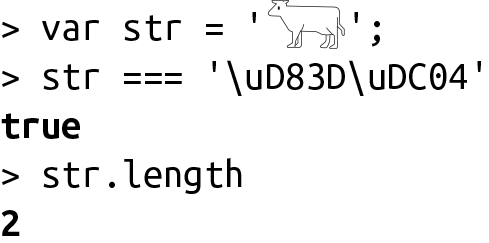
This can be fixed via libraries, such as Mathias Bynens’s Punycode.js, which is bundled with Node.js:
> var puny = require('punycode');
> puny.ucs2.decode(str).length
1If you want to search in strings or compare them, then you need to normalize—for example, via the library unorm (by Bjarke Walling).
Support for Unicode in JavaScript’s regular expressions (see Chapter 19) is very limited. For example, there is no way to match Unicode categories such as “uppercase letter.”
Line terminators influence matching. A line terminator is one of four characters, specified in the following table:
| Code unit | Name | Character escape sequence |
\u000A | Line feed |
|
\u000D | Carriage return |
|
\u2028 | Line separator | |
\u2029 | Paragraph separator |
The following regular expression constructs are based on Unicode:
\s \S (whitespace, nonwhitespace) have Unicode-based definitions:
> /^\s$/.test('\uFEFF')
true. (dot) matches all code units (not code points!) except line terminators. See the next section to learn how to match any code point.
/m: In multiline mode, the assertion ^ matches at the beginning of the input and after line terminators. The assertion $ matches before line terminators and at the end of the input. In nonmultiline mode, they match only at the beginning or the end of the input, respectively.
Other important character classes have definitions that are based on ASCII, not on Unicode:
\d \D (digits, nondigits): A digit is equivalent to [0-9].
\w \W (word characters, nonword characters): A word character is equivalent to [A-Za-z0-9_].
\b \B (at word breaks, inside words): Words are sequences of word characters ([A-Za-z0-9_]). For example, in the string 'über', the character class escape \b sees the character b as starting a word:
> /\bb/.test('über')
trueTo match any code unit, you can use [\s\S]; see Atoms: General.
To match any code point, you need to use:[18]
([\0-\uD7FF\uE000-\uFFFF]|[\uD800-\uDBFF][\uDC00-\uDFFF])
The preceding pattern works like this:
([BMP code point]|[leading surrogate][trailing surrogate])
As all of these ranges are disjoint, the pattern will correctly match code points in well-formed UTF-16 strings.
A few libraries help with handling Unicode in JavaScript:
XRegExp is a regular expression library that has an official add-on for matching Unicode categories, scripts, blocks, and properties via one of the following three constructs:
\p{...} \p{^...} \P{...}For example, \p{Letter} matches letters in various alphabets while \p{^Letter} and \P{Letter} both match all other code points. Chapter 30 contains a brief overview of XRegExp.
For more information on Unicode, see the following:
For information on Unicode support in JavaScript, see:
The following people contributed to this chapter: Mathias Bynens (@mathias), Anne van Kesteren (@annevk), and Calvin Metcalf (@CWMma).
This chapter lists features that are available only in ECMAScript 5. Should you have to work with older JavaScript engines, you should avoid these features or enable some of them via a library (how is described later). Note that normally, this book assumes that you are working with modern engines, which fully support ECMAScript 5.
The ECMAScript 5 specification contains the following description of its scope:
The fifth edition of ECMAScript (published as ECMA-262 5th edition)
- codifies de facto interpretations of the language specification that have become common among browser implementations and
adds support for new features that have emerged since the publication of the third edition. Such features include
- accessor properties,
- reflective creation and inspection of objects,
- program control of property attributes,
- additional array manipulation functions,
- support for the JSON object encoding format, and
- a strict mode that provides enhanced error checking and program security.
The new features included in ECMAScript 5 are as follows:
Putting the following line first in a file or a function switches on the so-called strict mode that makes JavaScript a cleaner language by forbidding some features, performing more checks, and throwing more exceptions:
'use strict';
Getters and setters allow you to implement the getting and setting of a property via methods. For example, the following object obj contains a getter for the property foo:
> var obj = { get foo() { return 'abc' } };
> obj.foo
'abc'ECMAScript 5 includes the following syntactic changes:
You can use reserved words (such as new and function) after the dot operator and as unquoted property keys in object literals:
> var obj = { new: 'abc' };
> obj.new
'abc'ECMAScript 5 brought several additions to JavaScript’s standard library. This section lists them by category.
Getting and setting prototypes (see Getting and Setting the Prototype):
Object.create()
Object.getPrototypeOf()
Managing property attributes via property descriptors (see Property Descriptors):
Object.defineProperty()
Object.defineProperties()
Object.create()
Object.getOwnPropertyDescriptor()
Listing properties (see Iteration and Detection of Properties):
Object.keys()
Object.getOwnPropertyNames()
Protecting objects (see Protecting Objects):
Object.preventExtensions()
Object.isExtensible()
Object.seal()
Object.isSealed()
Object.freeze()
Object.isFrozen()
New Function method (see Function.prototype.bind(thisValue, arg1?, ..., argN?)):
Function.prototype.bind()
Strings (see Chapter 12):
New Array methods (see Array Prototype Methods):
Array.isArray()
Array.prototype.every()
Array.prototype.filter()
Array.prototype.forEach()
Array.prototype.indexOf()
Array.prototype.lastIndexOf()
Array.prototype.map()
Array.prototype.reduce()
Array.prototype.some()
New Date methods (see Date Prototype Methods):
Date.now()
Date.prototype.toISOString()
Support for JSON (see Chapter 22):
JSON.parse() (see JSON.parse(text, reviver?))
JSON.stringify() (see JSON.stringify(value, replacer?, space?))
Some built-in objects have special toJSON() methods:
Boolean.prototype.toJSON()
Number.prototype.toJSON()
String.prototype.toJSON()
Date.prototype.toJSON()
The following resources will be useful if you need to work with legacy browsers:
This part gives tips for using JavaScript (best practices, advanced techniques, and learning resources) and describes a few important tools and libraries.
JavaScript has many great style guides. Thus, there is no need to write yet another one. Instead, this chapter describes meta style rules and surveys existing style guides and established best practices. It also mentions practices I like that are more controversial. The idea is to complement existing style guides rather than to replace them.
These are style guides that I like:
Additionally, there are two style guides that go meta:
This section will cover some general code writing tips.
There are two important rules for writing consistent code. The first rule is that, if you start a new project, you should come up with a style, document it, and follow it everywhere. The larger the team, the more important it is to check for adherence to the style automatically, via tools such as JSHint. When it comes to style, there are many decisions to make. Most of them have generally agreed-upon answers. Others have to be defined per project. For example:
var statements
The second rule is that, if you are joining an existing project, you should follow its rules rigorously (even if you don’t agree with them).
Everyone knows that debugging is twice as hard as writing a program in the first place. So if you are as clever as you can be when you write it, how will you ever debug it? —Brian Kernighan
For most code, the time used for reading it is much greater than the time used for writing it. It is thus important to make the former as easy as possible. Here are some guidelines for doing that:
redBalloon is easier to read than rdBlln.
Most code bases are filled with new ideas and concepts. That means that if you want to work with a code base, you need to learn those ideas and concepts. In contrast to textbooks, the added challenge with code is that people will not read it linearly. They will jump in anywhere and should be able to roughly understand what is going on. Three parts of a code base help:
Much cleverness is directed at these optimizations. However, you normally don’t need them. On one hand, JavaScript engines are becoming increasingly smart and automatically optimize the speed of code that follows established patterns. On the other hand, minification tools (Chapter 32) rewrite your code so that it is as small as possible. In both cases, tools are clever for you, so that you don’t have to be.
Sometimes you have no choice but to optimize the performance of your code. If you do, be sure to measure and optimize the right pieces. In browsers, the problems are often related to DOM and HTML and not the language proper.
A majority of JavaScript programmers agree on the following best practices:
Always use strict equality (===) and strict inequality (!==). I recommend never deviating from this rule. I even prefer the first of the following two conditions, even though they are equivalent:
if(x!==undefined&&x!==null)...// my choiceif(x!=null)...// equivalent
In languages where braces delimit blocks of code, a brace style determines where you put those braces. Two brace styles are most common in C-like languages (such as Java and JavaScript): Allman style and 1TBS.
If a statement contains a block, that block is considered as somewhat separate from the head of the statement: its opening brace is in a line of its own, at the same indentation level as the head. For example:
// Allman brace stylefunctionfoo(x,y,z){if(x){a();}else{b();c();}}
Here, a block is more closely associated with the header of its statement; it starts after it, in the same line. The bodies of control flow statements are always put in braces, even if there is only a single statement. For example:
// One True Brace Stylefunctionfoo(x,y,z){if(x){a();}else{b();c();}}
1TBS is a variant of the (older) K&R (Kernighan and Ritchie) style.[19] In K&R style, functions are written in Allman style and braces are omitted where they are not necessary—for example, around single-statement then cases:
// K&R brace stylefunctionfoo(x,y,z){if(x)a();else{b();c();}}
The de facto standard in the JavaScript world is 1TBS. It has been inherited from Java and most style guides recommend it. One reason for that is objective. If you return an object literal, you must put the opening brace in the same line as the keyword return, like this (otherwise, automatic semicolon insertion inserts a semicolon after return, meaning that nothing is returned; see Pitfall: ASI can unexpectedly break up statements):
return{name:'Jane'};
Obviously, an object literal is not a code block, but things look more consistent and you are less likely to make mistakes if both are formatted the same way.
My personal style and preference is:
As an exception, I omit braces if a statement can be written in a single line. For example:
if(x)returnx;
Several literals produce objects that can also be created by constructors. However, the latter is normally the better choice:
varobj=newObject();// novarobj={};// yesvararr=newArray();// novararr=[];// yesvarregex=newRegExp('abc');// avoid if possiblevarregex=/abc/;// yes
Don’t ever use the constructor Array to create an array with given elements. Initializing an array with elements (avoid!) explains why:
vararr=newArray('a','b','c');// never evervararr=['a','b','c'];// yes
This section collects examples of unrecommended cleverness.
Don’t nest the conditional operator:
// Don’t:returnx===0?'red':x===1?'green':'blue';// Better:if(x===0){return'red';}elseif(x===1){return'green';}else{return'blue';}// Best:switch(x){case0:return'red';case1:return'green';default:return'blue';}
Don’t abbreviate if statements via logical operators:
foo&&bar();// noif(foo)bar();// yesfoo||bar();// noif(!foo)bar();// yes
If possible, use the increment operator (++) and the decrement operator (--) as statements; don’t use them as expressions. In the latter case, they return a value and while there is a mnemonic, you still need to think to figure out what is going on:
// Unsure: what is happening?return++foo;// Easy to understand++foo;returnfoo;
if(x===void0)x=0;// not necessary in ES5if(x===undefined)x=0;// preferable
Starting with ECMAScript 5, the second way of checking is better. Changing undefined explains why.
returnx>>0;// noreturnMath.round(x);// yes
The shift operator can be used to convert a number to an integer. However, it is usually better to use a more explicit alternative such as Math.round(). Converting to Integer gives an overview of all ways of converting to integer.
Sometimes you can be clever in JavaScript—if the cleverness has become an established pattern.
Using the Or (||) operator to provide default values is a common pattern—for example, for parameters:
functionf(x){x=x||0;...}
For details and more examples, consult Pattern: providing a default value.
If you use methods generically, you can abbreviate Object.prototype as {}. The following two expressions are equivalent:
Object.prototype.hasOwnProperty.call(obj,propKey){}.hasOwnProperty.call(obj,propKey)
And Array.prototype can be abbreviated as []:
Array.prototype.slice.call(arguments)[].slice.call(arguments)
I’m ambivalent about this one. It is a hack (you are accessing a prototype property via an instance). But it reduces clutter, and I expect engines to eventually optimize this pattern.
Let’s look at some conventions I like that are a bit more controversial.
We’ll start with syntactic conventions:
I like relatively tight whitespace. The model is written English: there are no spaces after an opening parenthesis and before a closing parenthesis. And there are spaces after commas:
varresult=foo('a','b');vararr=[1,2,3];if(flag){...}
For anonymous functions, I follow Douglas Crockford’s rule of having a space after the keyword function. The rationale is that this is what a named function expression looks like if you remove the name:
functionfoo(arg){...}// named function expressionfunction(arg){...}// anonymous function expression
This helps with reading, because it is easier to make out the scope of the operator:
returnresult?result:theDefault;// noreturn(result?result:theDefault);// yes
Next, I’ll cover conventions for variables:
I don’t declare multiple variables with a single declaration:
// novarfoo=3,bar=2,baz;// yesvarfoo=3;varbar=2;varbaz;
The advantages of this approach are that deleting, inserting, and rearranging lines is simpler and the lines are automatically indented correctly.
var declarations are block-scoped. In other words, you can declare a variable in the context in which it is used (inside a loop, inside a then block or an else block, etc.). This kind of local encapsulation makes a code fragment easier to understand in isolation. It is also easier to remove the code fragment or to move it somewhere else.
As an addendum to the previous rule: don’t declare the same variable twice, in two different blocks. For example:
// Don’t do thisif(v){varx=v;}else{varx=10;}doSomethingWith(x);
The preceding code has the same effect and intention as the following code, which is why it should be written that way:
varx;if(v){x=v;}else{x=10;}doSomethingWith(x);
Now we’ll cover conventions relating to object orientation.
I recommend that you:
new when creating an instance.
The main advantages of doing so are:
For constructors, it is important to use strict mode, because it protects you against forgetting the new operator for instantiation. And you should be aware that you can return any object in a constructor. More tips for using constructors are mentioned in Tips for Implementing Constructors.
I find that such a constructor invocation looks cleaner with parentheses:
varfoo=newFoo;// novarfoo=newFoo();// yes
Use parens so that two operators don’t compete with each other—the result is not always what you might expect:
> false && true || true true > false && (true || true) false > (false && true) || true true
instanceof is especially tricky:
> ! {} instanceof Array
false
> (!{}) instanceof Array
false
> !({} instanceof Array)
trueHowever, I find method calls after a constructor unproblematic:
newFoo().bar().baz();// ok(newFoo()).bar().baz();// not necessary
This section collects various tips:
Coerce a value to a type via Boolean, Number, String(), Object() (used as functions—never use those functions as constructors). The rationale is that this convention is more descriptive:
> +'123' // no
123
> Number('123') // yes
123
> ''+true // no
'true'
> String(true) // yes
'true'this as an implicit parameter
this should refer only to the receiver of the current method invocation; it should not be abused as an implicit parameter. The rationale is that such functions are easier to call and understand. I also like to keep object-oriented and functional mechanisms separate:
// Avoid:functionhandler(){this.logError(...);}// Prefer:functionhandler(context){context.logError(...);}
in and hasOwnProperty (see Iteration and Detection of Properties)
This is more self-explanatory and safer than comparing with undefined or checking for truthiness:
// All properties:if(obj.foo)// noif(obj.foo!==undefined)// noif('foo'inobj)...// yes// Own properties:if(obj.hasOwnProperty('foo'))...// risky for arbitrary objectsif(Object.prototype.hasOwnProperty.call(obj,'foo'))...// safe
Whenever you are considering a style question, ask yourself: what makes my code easier to understand? Resist the temptation to be clever and leave most of the mechanical cleverness to JavaScript engines and minifiers (see Chapter 32).
The following three language constructs help with debugging. They should obviously be complemented by a proper debugger:
The console API provides more debugging help and is documented in more detail in The Console API. Exception handling is explained in Chapter 14.
JavaScript’s built-in constructors are difficult to subclass. This chapter explains why and presents solutions.
We use the phrase subclass a built-in and avoid the term extend, because it is taken in JavaScript:
A
B of a given built-in constructor A. B’s instances are also instances of A.
obj
There are two obstacles to subclassing a built-in: instances with internal properties and a constructor that can’t be called as a function.
Most built-in constructors have instances with so-called internal properties (see Kinds of Properties), whose names are written in double square brackets, like this: [[PrimitiveValue]]. Internal properties are managed by the JavaScript engine and usually not directly accessible in JavaScript. The normal subclassing technique in JavaScript is to call a superconstructor as a function with the this of the subconstructor (see Layer 4: Inheritance Between Constructors):
functionSuper(x,y){this.x=x;// (1)this.y=y;// (1)}functionSub(x,y,z){// Add superproperties to subinstanceSuper.call(this,x,y);// (2)// Add subpropertythis.z=z;}
Most built-ins ignore the subinstance passed in as this (2), an obstacle that is described in the next section. Furthermore, adding internal properties to an existing instance (1) is in general impossible, because they tend to fundamentally change the instance’s nature. Hence, the call at (2) can’t be used to add internal properties. The following constructors have instances with internal properties:
Instances of Boolean, Number, and String wrap primitives. They all have the internal property [[PrimitiveValue]] whose value is returned by valueOf(); String has two additional instance properties:
Boolean: Internal instance property [[PrimitiveValue]].
Number: Internal instance property [[PrimitiveValue]].
String: Internal instance property [[PrimitiveValue]], custom internal instance method [[GetOwnProperty]], normal instance property length. [[GetOwnProperty]] enables indexed access of characters by reading from the wrapped string when an array index is used.
Array
[[DefineOwnProperty]] intercepts properties being set. It ensures that the length property works correctly, by keeping length up-to-date when array elements are added and by removing excess elements when length is made smaller.
Date
[[PrimitiveValue]] stores the time represented by a date instance (as the number of milliseconds since 1 January 1970 00:00:00 UTC).
Function
[[Call]] (the code to execute when an instance is called) and possibly others.
RegExp
The internal instance property [[Match]], plus two noninternal instance properties. From the ECMAScript specification:
The value of the
[[Match]]internal property is an implementation dependent representation of the Pattern of theRegExpobject.
The only built-in constructors that don’t have internal properties are Error and Object.
MyArray is a subclass of of Array. It has a getter size that returns the actual elements in an array, ignoring holes (where length considers holes). The trick used to implement MyArray is that it creates an array instance and copies its methods into it:[20]
functionMyArray(/*arguments*/){vararr=[];// Don’t use Array constructor to set up elements (doesn’t always work)Array.prototype.push.apply(arr,arguments);// (1)copyOwnPropertiesFrom(arr,MyArray.methods);returnarr;}MyArray.methods={getsize(){varsize=0;for(vari=0;i<this.length;i++){if(iinthis)size++;}returnsize;}}
This code uses the helper function copyOwnPropertiesFrom(), which is shown and explained in Copying an Object.
We do not call the Array constructor in line (1), because of a quirk: if it is called with a single parameter that is a number, the number does not become an element, but determines the length of an empty array (see Initializing an array with elements (avoid!)).
Here is the interaction:
> var a = new MyArray('a', 'b')
> a.length = 4;
> a.length
4
> a.size
2Copying methods to an instance leads to redundancies that could be avoided with a prototype (if we had the option to use one). Additionally, MyArray creates objects that are not its instances:
> a instanceof MyArray false > a instanceof Array true
Even though Error and subclasses don’t have instances with internal properties, you still can’t subclass them easily, because the standard pattern for subclassing won’t work (repeated from earlier):
functionSuper(x,y){this.x=x;this.y=y;}functionSub(x,y,z){// Add superproperties to subinstanceSuper.call(this,x,y);// (1)// Add subpropertythis.z=z;}
The problem is that Error always produces a new instance, even if called as a function (1); that is, it ignores the parameter this handed to it via call():
> var e = {};
> Object.getOwnPropertyNames(Error.call(e)) // new instance
[ 'stack', 'arguments', 'type' ]
> Object.getOwnPropertyNames(e) // unchanged
[]In the preceding interaction, Error returns an instance with own properties, but it’s a new instance, not e. The subclassing pattern would only work if Error added the own properties to this (e, in the preceding case).
Inside the subconstructor, create a new superinstance and copy its own properties to the subinstance:
functionMyError(){// Use Error as a functionvarsuperInstance=Error.apply(null,arguments);copyOwnPropertiesFrom(this,superInstance);}MyError.prototype=Object.create(Error.prototype);MyError.prototype.constructor=MyError;
The helper function copyOwnPropertiesFrom() is shown in Copying an Object.
Trying out MyError:
try{thrownewMyError('Something happened');}catch(e){console.log('Properties: '+Object.getOwnPropertyNames(e));}
here is the output on Node.js:
Properties: stack,arguments,message,type
The instanceof relationship is as it should be:
> new MyError() instanceof Error true > new MyError() instanceof MyError true
Delegation is a very clean alternative to subclassing. For example, to create your own array constructor, you keep an array in a property:
functionMyArray(/*arguments*/){this.array=[];Array.prototype.push.apply(this.array,arguments);}Object.defineProperties(MyArray.prototype,{size:{get:function(){varsize=0;for(vari=0;i<this.array.length;i++){if(iinthis.array)size++;}returnsize;}},length:{get:function(){returnthis.array.length;},set:function(value){returnthis.array.length=value;}}});
The obvious limitation is that you can’t access elements of MyArray
via square brackets; you must use methods to do so:
MyArray.prototype.get=function(index){returnthis.array[index];}MyArray.prototype.set=function(index,value){returnthis.array[index]=value;}
Normal methods of Array.prototype can be transferred via the following
bit of metaprogramming:
['toString','push','pop'].forEach(function(key){MyArray.prototype[key]=function(){returnArray.prototype[key].apply(this.array,arguments);}});
We derive MyArray methods from Array methods by invoking them on the array this.array that is stored in instances of MyArray.
Using MyArray:
> var a = new MyArray('a', 'b');
> a.length = 4;
> a.push('c')
5
> a.length
5
> a.size
3
> a.set(0, 'x');
> a.toString()
'x,b,,,c'It is a common development problem: you have written JavaScript code that is to be used by others and need a nice-looking HTML documentation of its API. The de facto standard tool in the JavaScript world for generating API documentation is JSDoc.[21] It is modeled after its Java analog, JavaDoc.
JSDoc takes JavaScript code with /** */ comments (normal block comments that start with an asterisk) and produces HTML documentation for it. For example, given the following code:
/** @namespace */varutil={/*** Repeat <tt>str</tt> several times.* @param {string} str The string to repeat.* @param {number} [times=1] How many times to repeat the string.* @returns {string}*/repeat:function(str,times){if(times===undefined||times<1){times=1;}returnnewArray(times+1).join(str);}};
the generated HTML looks as shown in Figure 29-1 in a web browser.
The Readme on the JSDoc website explains how to install and call this tool.
JSDoc is all about documenting entities (functions, methods, constructors, etc.). That is achieved via comments that precede the entities and start with /**.
Let’s review the comment shown at the beginning:
/*** Repeat <tt>str</tt> several times.* @param {string} str The string to repeat.* @param {number} [times=1] How many times to repeat the string.* @returns {string}*/
This demonstrates some of the JSDoc syntax, which consists of the following pieces:
/** starts such a comment.
@param is an example in the preceding code.
<tt> displays a word in a monospaced font.
You can document the type of an entity via a type name in braces. Variations include:
@param {string} name
@param {string|number} idCode
@param {string[]} names
Inside JSDoc comments, so-called namepaths are used to refer to entities. The syntax of such paths is as follows:
myFunction MyClass MyClass.staticMember MyClass#instanceMember
Classes are usually (implemented by) constructors. Static members are, for example, properties of constructors. JSDoc has a broad definition of instance member. It means everything that can be accessed via an instance. Therefore, instance members include instance properties and prototype properties.
The types of entities are either primitive types or classes. The names of the former always start with lowercase letters; the names of the latter always start with uppercase letters. In other words, the type names of primitives are boolean, number, and string, just like the results returned by the typeof operator. That way, you cannot confuse strings (primitives) with instances of the constructor String (objects).
Following are the basic metadata tags:
@fileOverview description
Marks a JSDoc comment that describes the whole file. For example:
/*** @fileOverview Various tool functions.* @author <a href="mailto:jd@example.com">John Doe</a>* @version 3.1.2*/
@author
@deprecated
@example
Contains a code example illustrating how the given entity should be used:
/*** @example* var str = 'abc';* console.log(repeat(str, 3)); // abcabcabc*/
Basic tags for linking are as follows:
@see
Points to a related resource:
/*** @see MyConstructor#myMethod* @see The <a href="http://example.com">Example Project</a>.*/
{@link ...}
@see, but can be used inside other tags.
@requires resourceDescription
Versioning tags include the following:
@version versionNumber
Indicates the version of the documented entity. For example:
@version 10.3.1
@since versionNumber
Indicates since which version the documented entity has been available. For example:
@since 10.2.0
For functions and methods, you can document parameters, return values, and exceptions they may throw:
@param {paramType} paramName description
Describes the parameter whose name is paramName. Type and description are optional. Here are some examples:
@param str The string to repeat.
@param {string} str
@param {string} str The string to repeat.Advanced features:
Optional parameter:
@param {number} [times] The number of times is optional.Optional parameter with default value:
@param {number} [times=1] The number of times is optional.@returns {returnType} description
@throws {exceptionType} description
There are two ways of providing type information for parameters and return values. First, you can add type annotations to @param and @returns:
/*** @param {String} name* @returns {Object}*/functiongetPerson(name){}
Second, you can inline the type information:
functiongetPerson(/**String*/name)/**Object*/{}
The following tags are used for documenting variables, parameters, and instance properties:
@type {typeName}
What type does the documented variable have? For example:
/** @type {number} */varcarCounter=0;
This tag can also be used to document the return type of functions, but @returns is preferable in this case.
@constant
A flag that indicates that the documented variable has a constant value.
/** @constant */varFORD='Ford';
@property {propType} propKey description
Document an instance property in the constructor comment. For example:
/*** @constructor* @property {string} name The name of the person.*/functionPerson(name){this.name=name;}
Alternatively, instance properties can be documented as follows:
/*** @class*/functionPerson(name){/*** The name of the person.* @type {string}*/this.name=name;}
Which one of those styles to use is a matter of personal preference.
@default defaultValue
What is the default value of a parameter or instance property? For example:
/** @constructor */functionPage(title){/*** @default 'Untitled'*/this.title=title||'Untitled';}
JSDoc distinguishes between classes and constructors. The former concept is more like a type, while a constructor is one way of implementing a class. JavaScript’s built-in means for defining classes are limited, which is why there are many APIs that help with this task. These APIs differ, often radically, so you have to help JSDoc with figuring out what is going on. The following tags let you do that:
@constructor
@class
@class is a synonym for @constructor.
@constructs
@lends namePath
Specifies to which class the following object literal contributes. There are two ways of contributing.
@lends Person#: The object literal contributes instance members to Person.
@lends Person: The object literal contributes static members to Person.
@memberof parentNamePath
@lends MyClass#, applied to an object literal, has the same effect as marking each property of that literal with @memberof MyClass#.
The most common ways of defining a class are: via a constructor function, via an object literal, and via an object literal that has an @constructs method.
To define a class via a constructor function, you must mark the constructor function; otherwise, it will not be documented as a class. Capitalization alone does not mark a function as a constructor:
/*** A class for managing persons.* @constructor*/functionPerson(name){}
To define a class via an object literal, you need two markers. First, you need to tell JSDoc that a given variable holds a class. Second, you need to mark an object literal as defining a class. You do the latter via the @lends tag:
/*** A class for managing persons.* @class*/varPerson=makeClass(/** @lends Person# */{say:function(message){return'This person says: '+message;}});
If an object literal has an @constructs method, you need to tell JSDoc about it, so that it can find the documentation for the instance properties. The documentation of the class moves to that method:
varPerson=makeClass(/** @lends Person# */{/*** A class for managing persons.* @constructs*/initialize:function(name){this.name=name;},say:function(message){returnthis.name+' says: '+message;}});
If you omit the @lends, you must specify which class the methods belong to:
varPerson=makeClass({/*** A class for managing persons.* @constructs Person*/initialize:function(name){this.name=name;},/** @memberof Person# */say:function(message){returnthis.name+' says: '+message;}});
JavaScript has no built-in support for subclassing. When you subclass in your code (be it manually, be it via a library), you have to tell JSDoc what is going on:
@extends namePath
Indicates that the documented class is the subclass of another one. For example:
/*** @constructor* @extends Person*/functionProgrammer(name){Person.call(this,name);...}// Remaining code for subclassing omitted
All of these tags are documented at the JSDoc website:
This chapter covers JavaScript libraries. It first explains what shims and polyfills are, two special kinds of libraries. Then it lists a few core libraries. Lastly, it points to additional library-related resources.
Shims and polyfills are libraries that retrofit newer functionality on older JavaScript engines:
A polyfill is a shim for a browser API. It typically checks if a browser supports an API. If it doesn’t, the polyfill installs its own implementation. That allows you to use the API in either case. The term polyfill comes from a home improvement product; according to Remy Sharp:
Polyfilla is a UK product known as Spackling Paste in the US. With that in mind: think of the browsers as a wall with cracks in it. These [polyfills] help smooth out the cracks and give us a nice smooth wall of browsers to work with.
Examples include:
The following libraries are quite established and close to the language. It is useful to be aware of them:
The ECMAScript Internationalization API is a standard JavaScript API that helps with tasks related to internationalization: collation (sorting and searching strings), number formatting, and date and time formatting. This section gives a brief overview and points you to more reading material.
The first edition of the API provides the following services:
Number formatting. Parameters include:
Date and time formatting. Parameters include:
Most of the functionality is accessed via an object in the global variable Intl, but the API also augments the following methods:
String.prototype.localeCompare
Number.prototype.toLocaleString
Date.prototype.toLocaleString
Date.prototype.toLocaleDateString
Date.prototype.toLocaleTimeString
The number of the standard “ECMAScript Internationalization API” (EIA) is ECMA-402. It is hosted by Ecma International, the association that also hosts EMCA-262, the ECMAScript language specification. Both standards are maintained by TC39. Therefore, EIA is as close to the language as you can get without being part of ECMA-262. The API has been designed to work with both ECMAScript 5 and ECMAScript 6. A set of conformance tests complements the standard and ensures that the various implementations of the API are compatible (ECMA-262 has a similar test suite).
Most modern browsers already support it or are in the process of supporting it. David Storey has created a detailed compatibility table (indicating which browsers support which locales and more).
The specification of the ECMAScript Internationalization API is edited by Norbert Lindenberg. It is available in PDF, HTML, and EPUB format. Additionally, there are several comprehensive introductory articles:
This section describes sites that collect information on JavaScript resources. There are several kinds of such directories.
Following is a list of general directories for JavaScript:
Specialized directories include:
Obviously, you can always directly browse the registries of package managers:
Directories for CDNs (content delivery networks) and CDN content include:
The following people contributed to this section: Kyle Simpson (@getify), Gildas Lormeau (@check_ca), Fredrik Sogaard (@fredrik_sogaard), Gene Loparco (@gloparco), Manuel Strehl (@m_strehl), and Elijah Manor (@elijahmanor).
JavaScript does not have built-in support for modules, but the community has created impressive workarounds. To manage modules, you can use so-called package managers, which handle discovery, installation, dependency management, and more.
The two most important (and unfortunately incompatible) standards for JavaScript modules are:
The dominant incarnation of this standard is Node.js modules (Node.js modules have a few features that go beyond CJS). Its characteristics include:
The most popular implementation of this standard is RequireJS. Its characteristics include:
eval() or a static compilation step
When it comes to package managers, npm (Node Packaged Modules) is the canonical choice for Node.js. For browsers, two options are popular (among others):
For normal web development, you should use a module system such as RequireJS or Browserify. However, sometimes you just want to put together a quick hack. Then the following simple module pattern can help:
varmoduleName=function(){functionprivateFunction(){...}functionpublicFunction(...){privateFunction();otherModule.doSomething();// implicit import}return{// exportspublicFunction:publicFunction};}();
The preceding is a module that is stored in the global variable moduleName. It does the following:
otherModule)
privateFunction
publicFunction
To use the module on a web page, simply load its file and the files of its dependencies via <script> tags:
<scriptsrc="modules/otherModule.js"></script><scriptsrc="modules/moduleName.js"></script><scripttype="text/javascript">moduleName.publicFunction(...);</script>
If no other module is accessed while a module is loaded (which is the case for moduleName), then the order in which modules are loaded does not matter.
Here are my comments and recommendations:
Module systems and package managers are covered in Chapter 31. But there are additional important categories of tools:
Lint tools analyze source code and report potential problems and style violations. Three popular ones are:
Ideally, a unit test framework runs on both of the two large JavaScript platforms—the browser and Node.js. Two important frameworks that do are:
JavaScript source code usually wastes space—variable names are longer than need be, there are comments, extra whitespace, and so on. A minification tool removes the waste and compiles code to smaller code. Some parts of the removal process are relatively complex (e.g., the renaming of variables to short names). Three popular minification tools are:
Now that you know the JavaScript language, how do you proceed? What is the best way to get to know the whole ecosystem? Here are some suggestions:
Apart from Twitter, there are many other interesting news sources to explore. The following are a few examples:
Finally, you can also take a look at the book’s companion website, SpeakingJS.com, where I’ll occasionally publish material related to this book.
A link in an index entry is displayed as the section title in which that entry appears. Because some sections have multiple index markers, it is not unusual for an entry to have several links to the same section. Clicking on any link will take you directly to the place in the text in which the marker appears.
Dr. Axel Rauschmayer specializes in JavaScript and web technologies. He blogs at 2ality.com, teaches web development for ecmanauten.de, edits JavaScript Weekly and organizes Munich’s JavaScript user group (munichjs.de). Axel has been programming since 1985, developing web applications since 1995 and held his first talk on Ajax in 2006. In 1999, he was technical manager at a German internet startup that later expanded internationally. He has done extensive research into programming language design and has followed the state and future of JavaScript since its creation.
The animal on the cover of Speaking JavaScript is a Papuan Hornbill (Rhyticeros plicatus), a large bird inhabiting the forest canopy in Eastern Indonesia and New Guinea. This species is also known as Blyth’s hornbill after Edward Blyth (1810–1873), an English zoologist and Curator of the Museum of the Asiatic Society of Bengal.
The male hornbill is quite unusual in appearance due to its reddish-orange or golden-yellow plumage that surrounds the head and neck. Females differ by having a black head and neck. Both sexes have a largely black body, except for the contrasting short, white tail, and the bare, bluish-white skin around the eyes and throat. Hornbills also have red eyes, although those of the male are far brighter.
The variety of honking and grunting calls of the Papuan hornbill are believed to have led to reports of this bird laughing. In flight, the sound of its wings is loud and distinctive, a rushing noise that has been compared to the sound of steam escaping from a steam locomotive. Unsurprisingly, considering its rather large size and striking appearance, the Papuan hornbill is said to be a conspicuous bird, which can be seen flying high over the forest, frequently emitting its distinctive call.
These impressive birds are hunted on their native islands for food and as a trophy, and their skulls are sometimes worn as ornaments. Like other hornbills, its diet consists mainly of fruits—especially figs—occasionally supplemented with insects and other small animals.
The cover image is from Braukhaus Lexicon. The cover fonts are URW Typewriter and Guardian Sans. The text font is Adobe Minion Pro; the heading font is Adobe Myriad Condensed; and the code font is Dalton Maag’s Ubuntu Mono.
| Revision History | |
| 2014-02-20 | First release |
Copyright © 2014 Axel Rauschmayer
O’Reilly books may be purchased for educational, business, or sales promotional use. Online editions are also available for most titles (http://my.safaribooksonline.com). For more information, contact our corporate/institutional sales department: 800-998-9938 or corporate@oreilly.com.
Nutshell Handbook, the Nutshell Handbook logo, and the O’Reilly logo are registered trademarks of O’Reilly Media, Inc. Speaking JavaScript, the image of a Papuan Hornbill, and related trade dress are trademarks of O’Reilly Media, Inc.
Many of the designations used by manufacturers and sellers to distinguish their products are claimed as trademarks. Where those designations appear in this book, and O’Reilly Media, Inc. was aware of a trademark claim, the designations have been printed in caps or initial caps.
1005 Gravenstein Highway North
Sebastopol, CA 95472
Beijing • Cambridge • Farnham • Köln • Sebastopol • Tokyo
“A lot of people think JavaScript is simple and in many cases it is. But in its elegant simplicity lies a deeper functionality that if leveraged properly, can produce amazing results. Axel’s ability to distill this into an approachable reference will certainly help both aspiring and experienced developers achieve a better understanding of the language.”
—Rey Bango Advocate for cross-browser development, proponent of the open web, and lover of the JavaScript programming language
“Axel’s writing style is succinct, to the point, yet at the same time extremely detailed. The many code examples make even the most complex topics in the book easy to understand.”
—Mathias Bynens Belgian web standards enthusiast who likes HTML, CSS, JavaScript, Unicode, performance, and security
"Speaking JavaScript is a modern, up to date book perfectly aimed at the existing experienced programmer ready to take a deep dive into JavaScript. Without wasting time on laborious explanations, Dr. Rauschmayer quickly cuts to the core of JavaScript and its various concepts and gets developers up to speed quickly with a language that seems intent on taking over the developer world.”
—Peter Cooper Publisher, entrepreneur, and co-organizer of Fluent Conference
“If you have enjoyed Axel’s blog, then you’ll love this book. His book is filled with tons of bite-sized code snippets to aid in the learning process. If you want to dive deep and understand the ins and outs of JavaScript, then I highly recommend this book.”
—Elijah Manor Christian, family man, and front end web developer for Dave Ramsey; enjoys speaking, blogging, and tweeting
“This book opens the door into the modern JavaScript community with just enough background and plenty of in-depth introduction to make it seem like you’ve been with the community from the start.”
—Mitch Pronschinske DZone Editor
“After following Dr. Axel Rauschmayer’s work for a few years, I was delighted to learn that he was writing a book to share his deep expertise of JavaScript with those getting started with the language. I’ve read many JavaScript books, but none that show the attention to detail and comprehensiveness of Speaking JS, without being boring or overwhelming. I’ll be recommending this book for years to come.”
—Guillermo Rauch Speaker, creator of socket.io, mongoose, early Node.js contributor, author of “Smashing Node.js”, founder of LearnBoost/Cloudup (acq. by Wordpress in 2013), and Open Academy mentor
Due to its prevalence on the Web and other factors, JavaScript has become hard to avoid. That doesn’t mean that it is well liked, though. With this book, I’m hoping to convince you that, while you do have to accept a fair amount of quirks when using it, JavaScript is a decent language that makes you very productive and can be fun to program in.
Even though I have followed its development since its birth, it took me a long time to warm up to JavaScript. However, when I finally did, it turned out that my prior experience had already prepared me well, because I had worked with Scheme, Java (including GWT), Python, Perl, and Self (all of which have influenced JavaScript).
In 2010, I became aware of Node.js, which gave me hope that I’d eventually be able to use JavaScript on both server and client. As a consequence, I switched to JavaScript as my primary programming language. While learning it, I started writing a book chronicling my discoveries. This is the book you are currently reading. On my blog, I published parts of the book and other material on JavaScript. That helped me in several ways: the positive reaction encouraged me to keep going and made writing this book less lonely; comments to blog posts gave me additional information and tips (as acknowledged everywhere in this book); and it made people aware of my work, which eventually led to O’Reilly publishing this book.
Therefore, this book has been over three years in the making. It has profited from this long gestation period, during which I continually refined its contents. I’m glad that the book is finally finished and hope that people will find it useful for learning JavaScript. O’Reilly has agreed to make it available to be read online, for free, which should help make it accessible to a broad audience.
Is this book for you? The following items can help you determine that:
This book has been written for programmers, by a programmer. So, in order to understand it, you should already know object-oriented programming, for example, via a mainstream programming language such as Java, PHP, C++, Python, Ruby, Objective-C, C#, or Perl.
Thus, the book’s target audience is programmers who want to learn JavaScript quickly and properly, and JavaScript programmers who want to deepen their skills and/or look up specific topics.
This book is divided into four parts, but the main two are:
These parts are completely independent! You can treat them as if they were separate books: the former is more like a guide, the latter is more like a reference. The Four Parts of This Book tells you more about the structure of this book.
The most important tip for learning JavaScript is don’t get bogged down by the details. Yes, there are many details when it comes to the language, and this book covers most of them. But there is also a relatively simple and elegant “big picture” that I will point out to you.
This book is organized into four parts:
While reading this book, you may want to have a command line ready. That allows you to try out code interactively. The most popular choices are:
node.
The following notational conventions are used throughout the book.
Question marks (?) are used to mark optional parameters. For example:
parseInt(str,radix?)
French quotation marks (guillemets) denote metacode. You can think of such metacode as blanks, to be filled in by actual code. For example:
try{«try_statements»}
“White” square brackets mark optional syntactic elements. For example:
break⟦«label»⟧
In JavaScript comments, I sometimes use backticks to distinguish JavaScript from English:
foo(x,y);// calling function `foo` with parameters `x` and `y`
I refer to built-in methods via their full path:
«Constructor».prototype.«methodName»()
For example, Array.prototype.join() refers to the array method join(); that is, JavaScript stores the methods of Array instances in the object Array.prototype. The reason for this is explained in Layer 3: Constructors—Factories for Instances.
Whenever I introduce a new concept, I often illustrate it via an interaction in a JavaScript command line. This looks as follows:
> 3 + 4 7
The text after the greater-than character is the input, typed by a human. Everything else is output by the JavaScript engine. Additionally, I use the method console.log() to print data to the console, especially in (non–command-line) source code:
varx=3;x++;console.log(x);// 4
This element signifies a tip or suggestion.
This element signifies a general note.
This element indicates a warning or caution.
While you can obviously use this book as a reference, sometimes looking up information online is quicker. One resource I recommend is the Mozilla Developer Network (MDN). You can search the Web to find documentation on MDN. For example, the following web search finds the documentation for the push() method of arrays:
mdn array push
Safari Books Online is an on-demand digital library that delivers expert content in both book and video form from the world’s leading authors in technology and business.
Technology professionals, software developers, web designers, and business and creative professionals use Safari Books Online as their primary resource for research, problem solving, learning, and certification training.
Safari Books Online offers a range of product mixes and pricing programs for organizations, government agencies, and individuals. Subscribers have access to thousands of books, training videos, and prepublication manuscripts in one fully searchable database from publishers like O’Reilly Media, Prentice Hall Professional, Addison-Wesley Professional, Microsoft Press, Sams, Que, Peachpit Press, Focal Press, Cisco Press, John Wiley & Sons, Syngress, Morgan Kaufmann, IBM Redbooks, Packt, Adobe Press, FT Press, Apress, Manning, New Riders, McGraw-Hill, Jones & Bartlett, Course Technology, and dozens more. For more information about Safari Books Online, please visit us online.
Please address comments and questions concerning this book to the publisher:
| O’Reilly Media, Inc. |
| 1005 Gravenstein Highway North |
| Sebastopol, CA 95472 |
| 800-998-9938 (in the United States or Canada) |
| 707-829-0515 (international or local) |
| 707-829-0104 (fax) |
We have a web page for this book, where we list errata, examples, and any additional information. You can access this page at http://oreil.ly/speaking-js.
To comment or ask technical questions about this book, send email to bookquestions@oreilly.com.
For more information about our books, courses, conferences, and news, see our website at http://www.oreilly.com.
Find us on Facebook: http://facebook.com/oreilly
Follow us on Twitter: http://twitter.com/oreillymedia
Watch us on YouTube: http://www.youtube.com/oreillymedia
I would like to thank the following people, all of whom helped make this book possible.
The following people laid the foundations for my understanding of JavaScript (in chronological order):
More sources are acknowledged in the chapters.
I am much obliged to the following people who reviewed this book. They provided important feedback and corrections. In alphabetical order:
This part is a self-contained quick introduction to JavaScript. You can understand it without reading anything else in this book, and no other part of the book depends on its contents. However, the tips for how to read this book in Tips for Reading This Book do apply.
This chapter is about “Basic JavaScript,” a name I chose for a subset of JavaScript that is as concise as possible while still enabling you to be productive. When you are starting to learn JavaScript, I recommend that you program in it for a while before moving on to the rest of the language. That way, you don’t have to learn everything at once, which can be confusing.
This section gives a little background on JavaScript to help you understand why it is the way it is.
ECMAScript is the official name for JavaScript. A new name became necessary because there is a trademark on Java (held originally by Sun, now by Oracle). At the moment, Mozilla is one of the few companies allowed to officially use the name JavaScript because it received a license long ago. For common usage, the following rules apply:
JavaScript’s creator, Brendan Eich, had no choice but to create the language very quickly (or other, worse technologies would have been adopted by Netscape). He borrowed from several programming languages: Java (syntax, primitive values versus objects), Scheme and AWK (first-class functions), Self (prototypal inheritance), and Perl and Python (strings, arrays, and regular expressions).
JavaScript did not have exception handling until ECMAScript 3, which explains why the language so often automatically converts values and so often fails silently: it initially couldn’t throw exceptions.
On one hand, JavaScript has quirks and is missing quite a bit of functionality (block-scoped variables, modules, support for subclassing, etc.). On the other hand, it has several powerful features that allow you to work around these problems. In other languages, you learn language features. In JavaScript, you often learn patterns instead.
Given its influences, it is no surprise that JavaScript enables a programming style that is a mixture of functional programming (higher-order functions; built-in map, reduce, etc.) and object-oriented programming (objects, inheritance).
This section explains basic syntactic principles of JavaScript.
// Two slashes start single-line commentsvarx;// declaring a variablex=3+y;// assigning a value to the variable `x`foo(x,y);// calling function `foo` with parameters `x` and `y`obj.bar(3);// calling method `bar` of object `obj`// A conditional statementif(x===0){// Is `x` equal to zero?x=123;}// Defining function `baz` with parameters `a` and `b`functionbaz(a,b){returna+b;}
Note the two different uses of the equals sign:
=) is used to assign a value to a variable.
===) is used to compare two values (see Equality Operators).
To understand JavaScript’s syntax, you should know that it has two major syntactic categories: statements and expressions:
Statements “do things.” A program is a sequence of statements. Here is an example of a statement, which declares (creates) a variable foo:
varfoo;
Expressions produce values. They are function arguments, the right side of an assignment, etc. Here’s an example of an expression:
3*7
The distinction between statements and expressions is best illustrated by the fact that JavaScript has two different ways to do if-then-else—either as a statement:
varx;if(y>=0){x=y;}else{x=-y;}
or as an expression:
varx=y>=0?y:-y;
You can use the latter as a function argument (but not the former):
myFunction(y>=0?y:-y)
Finally, wherever JavaScript expects a statement, you can also use an expression; for example:
foo(7,1);
The whole line is a statement (a so-called expression statement), but the function call foo(7, 1) is an expression.
Semicolons are optional in JavaScript. However, I recommend always including them, because otherwise JavaScript can guess wrong about the end of a statement. The details are explained in Automatic Semicolon Insertion.
Semicolons terminate statements, but not blocks. There is one case where you will see a semicolon after a block: a function expression is an expression that ends with a block. If such an expression comes last in a statement, it is followed by a semicolon:
// Pattern: var _ = ___;varx=3*7;varf=function(){};// function expr. inside var decl.
Variables in JavaScript are declared before they are used:
varfoo;// declare variable `foo`
You can declare a variable and assign a value at the same time:
varfoo=6;
You can also assign a value to an existing variable:
foo=4;// change variable `foo`
There are compound assignment operators such as +=. The following two
assignments are equivalent:
x+=1;x=x+1;
Identifiers are names that play various syntactic roles in JavaScript. For example, the name of a variable is an identifier. Identifiers are case sensitive.
Roughly, the first character of an identifier can be any Unicode letter, a dollar sign ($), or an underscore (_). Subsequent characters can additionally be any Unicode digit. Thus, the following are all legal identifiers:
arg0_tmp$elemπ
The following identifiers are reserved words—they are part of the syntax and can’t be used as variable names (including function names and parameter names):
|
|
|
|
|
|
|
|
|
|
|
|
|
|
|
|
|
|
|
|
|
|
|
|
|
|
|
|
|
|
|
|
|
|
|
|
|
|
|
|
|
|
|
|
The following three identifiers are not reserved words, but you should treat them as if they were:
|
|
|
Lastly, you should also stay away from the names of standard global variables (see Chapter 23). You can use them for local variables without breaking anything, but your code still becomes confusing.
JavaScript has many values that we have come to expect from programming languages: booleans, numbers, strings, arrays, and so on. All values in JavaScript have properties. Each property has a key (or name) and a value. You can think of properties like fields of a record. You use the dot (.) operator to read a property:
value.propKey
For example, the string 'abc' has the property length:
> var str = 'abc'; > str.length 3
The preceding can also be written as:
> 'abc'.length 3
The dot operator is also used to assign a value to a property:
> var obj = {}; // empty object
> obj.foo = 123; // create property `foo`, set it to 123
123
> obj.foo
123And you can use it to invoke methods:
> 'hello'.toUpperCase() 'HELLO'
In the preceding example, we have invoked the method toUpperCase() on the value
'hello'.
JavaScript makes a somewhat arbitrary distinction between values:
null, and undefined.
A major difference between the two is how they are compared; each object has a unique identity and is only (strictly) equal to itself:
> var obj1 = {}; // an empty object
> var obj2 = {}; // another empty object
> obj1 === obj2
false
> obj1 === obj1
trueIn contrast, all primitive values encoding the same value are considered the same:
> var prim1 = 123; > var prim2 = 123; > prim1 === prim2 true
The next two sections explain primitive values and objects in more detail.
The following are all of the primitive values (or primitives for short):
true, false (see Booleans)
1736, 1.351 (see Numbers)
'abc', "abc" (see Strings)
undefined, null (see undefined and null)
Primitives have the following characteristics:
The “content” is compared:
> 3 === 3 true > 'abc' === 'abc' true
Properties can’t be changed, added, or removed:
> var str = 'abc'; > str.length = 1; // try to change property `length` > str.length // ⇒ no effect 3 > str.foo = 3; // try to create property `foo` > str.foo // ⇒ no effect, unknown property undefined
(Reading an unknown property always returns undefined.)
All nonprimitive values are objects. The most common kinds of objects are:
Plain objects, which can be created by object literals (see Single Objects):
{firstName:'Jane',lastName:'Doe'}
The preceding object has two properties: the value of property firstName
is 'Jane' and the value of property lastName is 'Doe'.
Arrays, which can be created by array literals (see Arrays):
['apple','banana','cherry']
The preceding array has three elements that can be accessed via numeric
indices. For example, the index of 'apple' is 0.
Regular expressions, which can be created by regular expression literals (see Regular Expressions):
/^a+b+$/Objects have the following characteristics:
Identities are compared; every value has its own identity:
> {} === {} // two different empty objects
false
> var obj1 = {};
> var obj2 = obj1;
> obj1 === obj2
trueYou can normally freely change, add, and remove properties (see Single Objects):
> var obj = {};
> obj.foo = 123; // add property `foo`
> obj.foo
123Most programming languages have values denoting missing information. JavaScript has two such “nonvalues,” undefined and null:
undefined means “no value.” Uninitialized variables are undefined:
> var foo; > foo undefined
Missing parameters are undefined:
> function f(x) { return x }
> f()
undefinedIf you read a nonexistent property, you get undefined:
> var obj = {}; // empty object
> obj.foo
undefinednull means “no object.” It is used as a nonvalue whenever an object is expected (parameters, last in a chain of objects, etc.).
undefined and null have no properties, not even standard methods such as toString().
Functions normally allow you to indicate a missing value via either undefined or null. You can do the same via an explicit check:
if(x===undefined||x===null){...}
You can also exploit the fact that both undefined and null are considered false:
if(!x){...}
false, 0, NaN, and '' are also considered false (see Truthy and Falsy).
There are two operators for categorizing values: typeof is mainly used for primitive values, while instanceof is used for objects.
typeof looks like this:
typeofvalue
It returns a string describing the “type” of value. Here are some examples:
> typeof true
'boolean'
> typeof 'abc'
'string'
> typeof {} // empty object literal
'object'
> typeof [] // empty array literal
'object'The following table lists all results of typeof:
| Operand | Result |
|
|
|
|
Boolean value |
|
Number value |
|
String value |
|
Function |
|
All other normal values |
|
(Engine-created value) | JavaScript engines are allowed to create values for which |
typeof null returning 'object' is a bug that can’t be fixed, because it would break existing code. It does not mean that null is an object.
instanceof looks like this:
valueinstanceofConstr
It returns true if value is an object that has been created by the
constructor Constr (see Constructors: Factories for Objects). Here are some examples:
> var b = new Bar(); // object created by constructor Bar
> b instanceof Bar
true
> {} instanceof Object
true
> [] instanceof Array
true
> [] instanceof Object // Array is a subconstructor of Object
true
> undefined instanceof Object
false
> null instanceof Object
falseThe primitive boolean type comprises the values true and false. The following operators produce booleans:
&& (And), || (Or)
! (Not)
Comparison operators:
===, !==, ==, !=
>, >=, <, <=
Whenever JavaScript expects a boolean value (e.g., for the condition of an if statement), any value can be used. It will be interpreted as either true or false. The following values are interpreted as false:
undefined, null
false
-0, NaN
''
All other values (including all objects!) are considered true. Values interpreted as false are called falsy, and values interpreted as true are called truthy. Boolean(), called as a function, converts its parameter to a boolean. You can use it to test how a value is interpreted:
> Boolean(undefined)
false
> Boolean(0)
false
> Boolean(3)
true
> Boolean({}) // empty object
true
> Boolean([]) // empty array
trueBinary logical operators in JavaScript are short-circuiting. That is, if the first operand suffices for determining the result, the second operand is not evaluated. For example, in the following expressions, the function foo() is never called:
false&&foo()true||foo()
Furthermore, binary logical operators return either one of their operands—which may or may not be a boolean. A check for truthiness is used to determine which one:
JavaScript has two kinds of equality:
== and !=
=== and !==
Normal equality considers (too) many values to be equal (the details are explained in Normal (Lenient) Equality (==, !=)), which can hide bugs. Therefore, always using strict equality is recommended.
All numbers in JavaScript are floating-point:
> 1 === 1.0 true
Special numbers include the following:
NaN (“not a number”)
An error value:
> Number('xyz') // 'xyz' can’t be converted to a number
NaNInfinity
> 3 / 0 Infinity > Math.pow(2, 1024) // number too large Infinity
Infinity is larger than any other number (except NaN). Similarly, -Infinity is smaller than any other number (except NaN). That makes these numbers useful as default values (e.g., when you are looking for a minimum or a maximum).
JavaScript has the following arithmetic operators (see Arithmetic Operators):
number1 + number2
number1 - number2
number1 * number2
number1 / number2
number1 % number2
++variable, variable++
--variable, variable--
-value
+value
The global object Math (see Math) provides more arithmetic operations, via functions.
JavaScript also has operators for bitwise operations (e.g., bitwise And; see Bitwise Operators).
Strings can be created directly via string literals. Those literals are delimited by single or double quotes. The backslash (\) escapes characters and produces a few control characters. Here are some examples:
'abc'"abc"'Did she say "Hello"?'"Did she say \"Hello\"?"'That\'s nice!'"That's nice!"'Line 1\nLine 2'// newline'Backlash: \\'
Single characters are accessed via square brackets:
> var str = 'abc'; > str[1] 'b'
The property length counts the number of characters in the string:
> 'abc'.length 3
Like all primitives, strings are immutable; you need to create a new string if you want to change an existing one.
Strings are concatenated via the plus (+) operator, which converts the other operand to a string if one of the operands is a string:
> var messageCount = 3; > 'You have ' + messageCount + ' messages' 'You have 3 messages'
To concatenate strings in multiple steps, use the += operator:
> var str = ''; > str += 'Multiple '; > str += 'pieces '; > str += 'are concatenated.'; > str 'Multiple pieces are concatenated.'
Strings have many useful methods (see String Prototype Methods). Here are some examples:
> 'abc'.slice(1) // copy a substring
'bc'
> 'abc'.slice(1, 2)
'b'
> '\t xyz '.trim() // trim whitespace
'xyz'
> 'mjölnir'.toUpperCase()
'MJÖLNIR'
> 'abc'.indexOf('b') // find a string
1
> 'abc'.indexOf('x')
-1Conditionals and loops in JavaScript are introduced in the following sections.
The if statement has a then clause and an optional else clause that are executed depending on a boolean condition:
if(myvar===0){// then}if(myvar===0){// then}else{// else}if(myvar===0){// then}elseif(myvar===1){// else-if}elseif(myvar===2){// else-if}else{// else}
I recommend always using braces (they denote blocks of zero or more statements). But you don’t have to do so if a clause is only a single statement (the same holds for the control flow statements for and while):
if(x<0)return-x;
The following is a switch statement. The value of fruit decides which
case is executed:
switch(fruit){case'banana':// ...break;case'apple':// ...break;default:// all other cases// ...}
The “operand” after case can be any expression; it is compared via === with the parameter of switch.
The for loop has the following format:
for(⟦«init»⟧;⟦«condition»⟧;⟦«post_iteration»⟧)«statement»
init is executed at the beginning of the loop. condition is checked before each loop iteration; if it becomes false, then the loop is terminated. post_iteration is executed after each loop iteration.
This example prints all elements of the array arr on the console:
for(vari=0;i<arr.length;i++){console.log(arr[i]);}
The while loop continues looping over its body while its condition holds:
// Same as for loop above:vari=0;while(i<arr.length){console.log(arr[i]);i++;}
The do-while loop continues looping over its body while its condition holds. As the condition follows the body, the body is always executed at least once:
do{// ...}while(condition);
break leaves the loop.
continue starts a new loop iteration.
One way of defining a function is via a function declaration:
functionadd(param1,param2){returnparam1+param2;}
The preceding code defines a function, add, that has two parameters, param1 and param2, and returns the sum of both parameters. This is how you call that function:
> add(6, 1)
7
> add('a', 'b')
'ab'Another way of defining add() is by assigning a function expression to a variable add:
varadd=function(param1,param2){returnparam1+param2;};
A function expression produces a value and can thus be used to directly pass functions as arguments to other functions:
someOtherFunction(function(p1,p2){...});
Function declarations are hoisted—moved in their entirety to the beginning of the current scope. That allows you to refer to functions that are declared later:
functionfoo(){bar();// OK, bar is hoistedfunctionbar(){...}}
Note that while var declarations are also hoisted (see Variables Are Hoisted), assignments performed by them are not:
functionfoo(){bar();// Not OK, bar is still undefinedvarbar=function(){// ...};}
You can call any function in JavaScript with an arbitrary amount of arguments; the language will never complain. It will, however, make all parameters available via the special variable arguments. arguments looks like an array, but has none of the array methods:
> function f() { return arguments }
> var args = f('a', 'b', 'c');
> args.length
3
> args[0] // read element at index 0
'a'Let’s use the following function to explore how too many or too few
parameters are handled in JavaScript (the function toArray() is shown in Converting arguments to an Array):
functionf(x,y){console.log(x,y);returntoArray(arguments);}
Additional parameters will be ignored (except by arguments):
> f('a', 'b', 'c')
a b
[ 'a', 'b', 'c' ]Missing parameters will get the value undefined:
> f('a')
a undefined
[ 'a' ]
> f()
undefined undefined
[]The following is a common pattern for assigning default values to parameters:
functionpair(x,y){x=x||0;// (1)y=y||0;return[x,y];}
In line (1), the || operator returns x if it is truthy (not null, undefined, etc.). Otherwise, it returns the second operand:
> pair() [ 0, 0 ] > pair(3) [ 3, 0 ] > pair(3, 5) [ 3, 5 ]
If you want to enforce an arity (a specific number of parameters), you can check arguments.length:
functionpair(x,y){if(arguments.length!==2){thrownewError('Need exactly 2 arguments');}...}
arguments is not an array, it is only array-like (see Array-Like Objects and Generic Methods). It has a property length, and you can access its elements via indices in square brackets. You cannot, however, remove elements or invoke any of the array methods on it. Thus, you sometimes need to convert arguments to an array, which is what the following function does (it is explained in Array-Like Objects and Generic Methods):
functiontoArray(arrayLikeObject){returnArray.prototype.slice.call(arrayLikeObject);}
The most common way to handle exceptions (see Chapter 14) is as follows:
functiongetPerson(id){if(id<0){thrownewError('ID must not be negative: '+id);}return{id:id};// normally: retrieved from database}functiongetPersons(ids){varresult=[];ids.forEach(function(id){try{varperson=getPerson(id);result.push(person);}catch(exception){console.log(exception);}});returnresult;}
The try clause surrounds critical code, and the catch clause is executed if an exception is thrown inside the try clause. Using the preceding code:
> getPersons([2, -5, 137])
[Error: ID must not be negative: -5]
[ { id: 2 }, { id: 137 } ]Strict mode (see Strict Mode) enables more warnings and makes JavaScript a cleaner language (nonstrict mode is sometimes called “sloppy mode”). To switch it on, type the following line first in a JavaScript file or a <script> tag:
'use strict';
You can also enable strict mode per function:
functionfunctionInStrictMode(){'use strict';}
In JavaScript, you declare variables via var before using them:
> var x; > x = 3; > y = 4; ReferenceError: y is not defined
You can declare and initialize several variables with a single var
statement:
varx=1,y=2,z=3;
But I recommend using one statement per variable (the reason is explained in Syntax). Thus, I would rewrite the previous statement to:
varx=1;vary=2;varz=3;
Because of hoisting (see Variables Are Hoisted), it is usually best to declare variables at the beginning of a function.
The scope of a variable is always the complete function (as opposed to the current block). For example:
functionfoo(){varx=-512;if(x<0){// (1)vartmp=-x;...}console.log(tmp);// 512}
We can see that the variable tmp is not restricted to the block
starting in line (1); it exists until the end of the function.
Each variable declaration is hoisted: the declaration is moved to the beginning of the function, but assignments that it makes stay put. As an example, consider the variable declaration in line (1) in the following function:
functionfoo(){console.log(tmp);// undefinedif(false){vartmp=3;// (1)}}
Internally, the preceding function is executed like this:
functionfoo(){vartmp;// hoisted declarationconsole.log(tmp);if(false){tmp=3;// assignment stays put}}
Each function stays connected to the variables of the functions that surround it, even after it leaves the scope in which it was created. For example:
functioncreateIncrementor(start){returnfunction(){// (1)start++;returnstart;}}
The function starting in line (1) leaves the context in which it was created, but stays connected to a live version of start:
> var inc = createIncrementor(5); > inc() 6 > inc() 7 > inc() 8
A closure is a function plus the connection to the variables of its
surrounding scopes. Thus, what createIncrementor() returns is a
closure.
Sometimes you want to introduce a new variable scope—for example, to prevent a variable from becoming global. In JavaScript, you can’t use a block to do so; you must use a function. But there is a pattern for using a function in a block-like manner. It is called IIFE (immediately invoked function expression, pronounced “iffy”):
(function(){// open IIFEvartmp=...;// not a global variable}());// close IIFE
Be sure to type the preceding example exactly as shown (apart from the comments). An IIFE is a function expression that is called immediately after you define it. Inside the function, a new scope exists, preventing tmp from becoming global. Consult Introducing a New Scope via an IIFE for details on IIFEs.
Closures keep their connections to outer variables, which is sometimes not what you want:
varresult=[];for(vari=0;i<5;i++){result.push(function(){returni});// (1)}console.log(result[1]());// 5 (not 1)console.log(result[3]());// 5 (not 3)
The value returned in line (1) is always the current value of i, not the value it had when the function was created. After the loop is finished, i has the value 5, which is why all functions in the array return that value. If you want the function in line (1) to receive a snapshot of the current value of i, you can use an IIFE:
for(vari=0;i<5;i++){(function(){vari2=i;// copy current iresult.push(function(){returni2});}());}
This section covers two basic object-oriented mechanisms of JavaScript: single objects and constructors (which are factories for objects, similar to classes in other languages).
Like all values, objects have properties. You could, in fact, consider an object to be a set of properties, where each property is a (key, value) pair. The key is a string, and the value is any JavaScript value.
In JavaScript, you can directly create plain objects, via object literals:
'use strict';varjane={name:'Jane',describe:function(){return'Person named '+this.name;}};
The preceding object has the properties name and describe. You can read (“get”) and write (“set”) properties:
> jane.name // get 'Jane' > jane.name = 'John'; // set > jane.newProperty = 'abc'; // property created automatically
Function-valued properties such as describe are called methods. They use this to refer to the object that was used to call them:
> jane.describe() // call method 'Person named John' > jane.name = 'Jane'; > jane.describe() 'Person named Jane'
The in operator checks whether a property exists:
> 'newProperty' in jane true > 'foo' in jane false
If you read a property that does not exist, you get the value undefined. Hence, the previous two checks could also be performed like this:
> jane.newProperty !== undefined true > jane.foo !== undefined false
The delete operator removes a property:
> delete jane.newProperty true > 'newProperty' in jane false
A property key can be any string. So far, we have seen property keys in object literals and after the dot operator. However, you can use them that way only if they are identifiers (see Identifiers and Variable Names). If you want to use other strings as keys, you have to quote them in an object literal and use square brackets to get and set the property:
> var obj = { 'not an identifier': 123 };
> obj['not an identifier']
123
> obj['not an identifier'] = 456;Square brackets also allow you to compute the key of a property:
> var obj = { hello: 'world' };
> var x = 'hello';
> obj[x]
'world'
> obj['hel'+'lo']
'world'If you extract a method, it loses its connection with the object. On its own, the function is not a method anymore, and this has the value undefined (in strict mode).
As an example, let’s go back to the earlier object jane:
'use strict';varjane={name:'Jane',describe:function(){return'Person named '+this.name;}};
We want to extract the method describe from jane, put it into a variable func, and call it. However, that doesn’t work:
> var func = jane.describe; > func() TypeError: Cannot read property 'name' of undefined
The solution is to use the method bind() that all functions have. It creates a new function whose this always has the given value:
> var func2 = jane.describe.bind(jane); > func2() 'Person named Jane'
Every function has its own special variable this. This is inconvenient if you nest a function inside a method, because you can’t access the method’s this from the function. The following is an example where we call forEach with a function to iterate over an array:
varjane={name:'Jane',friends:['Tarzan','Cheeta'],logHiToFriends:function(){'use strict';this.friends.forEach(function(friend){// `this` is undefined hereconsole.log(this.name+' says hi to '+friend);});}}
Calling logHiToFriends produces an error:
> jane.logHiToFriends() TypeError: Cannot read property 'name' of undefined
Let’s look at two ways of fixing this. First, we could store this in a
different variable:
logHiToFriends:function(){'use strict';varthat=this;this.friends.forEach(function(friend){console.log(that.name+' says hi to '+friend);});}
Or, forEach has a second parameter that allows you to provide a
value for this:
logHiToFriends:function(){'use strict';this.friends.forEach(function(friend){console.log(this.name+' says hi to '+friend);},this);}
Function expressions are often used as arguments in function calls in JavaScript. Always be careful when you refer to this from one of those function expressions.
Until now, you may think that JavaScript objects are only maps from strings to values, a notion suggested by JavaScript’s object literals, which look like the map/dictionary literals of other languages. However, JavaScript objects also support a feature that is truly object-oriented: inheritance. This section does not fully explain how JavaScript inheritance works, but it shows you a simple pattern to get you started. Consult Chapter 17 if you want to know more.
In addition to being “real” functions and methods, functions play another role in JavaScript: they become constructors—factories for objects—if invoked via the new operator. Constructors are thus a rough analog to classes in other languages. By convention, the names of constructors start with capital letters. For example:
// Set up instance datafunctionPoint(x,y){this.x=x;this.y=y;}// MethodsPoint.prototype.dist=function(){returnMath.sqrt(this.x*this.x+this.y*this.y);};
We can see that a constructor has two parts. First, the function Point sets up the instance data. Second, the property Point.prototype contains an object with the methods. The former data is specific to each instance, while the latter data is shared among all instances.
To use Point, we invoke it via the new operator:
> var p = new Point(3, 5); > p.x 3 > p.dist() 5.830951894845301
p is an instance of Point:
> p instanceof Point true
Arrays are sequences of elements that can be accessed via integer indices starting at zero.
Array literals are handy for creating arrays:
> var arr = [ 'a', 'b', 'c' ];
The preceding array has three elements: the strings 'a', 'b', and 'c'. You can access them via integer indices:
> arr[0] 'a' > arr[0] = 'x'; > arr [ 'x', 'b', 'c' ]
The length property indicates how many elements an array has. You can use it to append elements and to remove elements:
> var arr = ['a', 'b']; > arr.length 2 > arr[arr.length] = 'c'; > arr [ 'a', 'b', 'c' ] > arr.length 3 > arr.length = 1; > arr [ 'a' ]
The in operator works for arrays, too:
> var arr = [ 'a', 'b', 'c' ]; > 1 in arr // is there an element at index 1? true > 5 in arr // is there an element at index 5? false
Note that arrays are objects and can thus have object properties:
> var arr = []; > arr.foo = 123; > arr.foo 123
Arrays have many methods (see Array Prototype Methods). Here are a few examples:
> var arr = [ 'a', 'b', 'c' ];
> arr.slice(1, 2) // copy elements
[ 'b' ]
> arr.slice(1)
[ 'b', 'c' ]
> arr.push('x') // append an element
4
> arr
[ 'a', 'b', 'c', 'x' ]
> arr.pop() // remove last element
'x'
> arr
[ 'a', 'b', 'c' ]
> arr.shift() // remove first element
'a'
> arr
[ 'b', 'c' ]
> arr.unshift('x') // prepend an element
3
> arr
[ 'x', 'b', 'c' ]
> arr.indexOf('b') // find the index of an element
1
> arr.indexOf('y')
-1
> arr.join('-') // all elements in a single string
'x-b-c'
> arr.join('')
'xbc'
> arr.join()
'x,b,c'There are several array methods for iterating over elements (see Iteration (Nondestructive)). The two most important ones are forEach and map.
forEach iterates over an array and hands the current element and its index to a function:
['a','b','c'].forEach(function(elem,index){// (1)console.log(index+'. '+elem);});
The preceding code produces the following output:
0. a 1. b 2. c
Note that the function in line (1) is free to ignore arguments. It could, for example, only have the parameter elem.
map creates a new array by applying a function to each element of an existing array:
> [1,2,3].map(function (x) { return x*x })
[ 1, 4, 9 ]JavaScript has built-in support for regular expressions (Chapter 19 refers to tutorials and explains in more detail how they work). They are delimited by slashes:
/^abc$//[A-Za-z0-9]+/
> /^a+b+$/.test('aaab')
true
> /^a+b+$/.test('aaa')
false> /a(b+)a/.exec('_abbba_aba_')
[ 'abbba', 'bbb' ]The returned array contains the complete match at index 0, the capture of the first group at index 1, and so on. There is a way (discussed in RegExp.prototype.exec: Capture Groups) to invoke this method repeatedly to get all matches.
> '<a> <bbb>'.replace(/<(.*?)>/g, '[$1]') '[a] [bbb]'
The first parameter of replace must be a regular expression with a /g flag; otherwise, only the first occurrence is replaced. There is also a way (as discussed in String.prototype.replace: Search and Replace) to use a function to compute the replacement.
Math (see Chapter 21) is an object with arithmetic functions. Here are some examples:
> Math.abs(-2) 2 > Math.pow(3, 2) // 3 to the power of 2 9 > Math.max(2, -1, 5) 5 > Math.round(1.9) 2 > Math.PI // pre-defined constant for π 3.141592653589793 > Math.cos(Math.PI) // compute the cosine for 180° -1
JavaScript’s standard library is relatively spartan, but there are more things you can use:
Date (Chapter 20)
JSON (Chapter 22)
console.* methods (see The Console API)
This part explains the history and nature of JavaScript. It provides a broad first look at the language and explains the context in which it exists (without going too much into technical details).
This part is not required reading; you will be able to understand the rest of the book without having read it.
There are many programming languages out there. Why should you use JavaScript? This chapter looks at seven aspects that are important when you are choosing a programming language and argues that JavaScript does well overall:
JavaScript is arguably the most open programming language there is: ECMA-262, its specification, is an ISO standard. That specification is closely followed by many implementations from independent parties. Some of those implementations are open source. Furthermore, the evolution of the language is handled by TC39, a committee comprising several companies, including all major browser vendors. Many of those companies are normally competitors, but they work together for the benefit of the language.
Yes and no. I’ve written fair amounts of code in several programming languages from different paradigms. Therefore, I’m well aware that JavaScript isn’t the pinnacle of elegance. However, it is a very flexible language, has a reasonably elegant core, and enables you to use a mixture of object-oriented programming and functional programming.
Language compatibility between JavaScript engines used to be a problem, but isn’t anymore, partly thanks to the test262 suite that checks engines for conformance to the ECMAScript specification. In contrast, browser and DOM differences are still a challenge. That’s why it is normally best to rely on frameworks for hiding those differences.
The most beautiful programming language in the world is useless unless it allows you to write the program that you need.
In the area of graphical user interfaces, JavaScript benefits from being part of HTML5. In this section, I use the term HTML5 for “the browser platform” (HTML, CSS, and browser JavaScript APIs). HTML5 is deployed widely and making constant progress. It is slowly becoming a complete layer for writing full-featured, cross-platform applications; similar to, say, the Java platform, it’s almost like an embedded operating system. One of HTML5’s selling points is that it lets you write cross-platform graphical user interfaces. Those are always a compromise: you give up some quality in exchange for not being limited to a single operating system. In the past, “cross-platform” meant Windows, Mac OS, or Linux. But we now have two additional interactive platforms: web and mobile. With HTML5, you can target all of these platforms via technologies such as PhoneGap, Chrome Apps, and TideSDK.
Additionally, several platforms have web apps as native apps or let you install them natively—for example, Chrome OS, Firefox OS, and Android.
There are more technologies than just HTML5 that complement JavaScript and make the language more useful:
JavaScript is getting better build tools (e.g., Grunt) and test tools (e.g., mocha). Node.js makes it possible to run these kinds of tools via a shell (and not only in the browser). One risk in this area is fragmentation, as we are progressively getting too many of these tools.
The JavaScript IDE space is still nascent, but it’s quickly growing up. The complexity and dynamism of web development make this space a fertile ground for innovation. Two open source examples are Brackets and Light Table.
Additionally, browsers are becoming increasingly capable development environments. Chrome, in particular, has made impressive progress recently. It will be interesting to see how much more IDEs and browsers will be integrated in the future.
JavaScript engines have made tremendous progress, evolving from slow interpreters to fast just-in-time compilers. They are now fast enough for most applications. Furthermore, new ideas are already in development to make JavaScript fast enough for the remaining applications:
mapPar, filterPar, and reducePar (parallelizable versions of the existing array methods map, filter, and reduce). In order for parallelization to work, callbacks must be written in a special style; the main restriction is that you can’t mutate data that hasn’t been created inside the callbacks.
A language that is widely used normally has two benefits. First, such a language is better documented and supported. Second, more programmers know it, which is important whenever you need to hire someone or are looking for customers for a tool based on the language.
JavaScript is widely used and reaps both of the aforementioned benefits:
Several things indicate that JavaScript has a bright future:
Considering the preceding list of what makes a language attractive, JavaScript is doing remarkably well. It certainly is not perfect, but at the moment, it is hard to beat—and things are only getting better.
JavaScript’s nature can be summarized as follows:
bind(), built-in map() and reduce() for arrays, etc.) and object-oriented programming (mutable state, objects, inheritance, etc.).
On one hand, JavaScript has several quirks and missing features (for example, it has no block-scoped variables, no built-in modules, and no support for subclassing). Therefore, where you learn language features in other languages, you learn patterns and workarounds in JavaScript. On the other hand, JavaScript includes unorthodox features (such as prototypal inheritance and object properties). These, too, have to be learned, but are more a feature than a bug.
Note that JavaScript engines have become quite smart and fix some of the quirks, under the hood. For example:
But JavaScript also has many elegant parts. Brendan Eich’s favorites are:[1]
The last two items, object literals and array literals, let you start with objects and introduce abstractions (such as constructors, JavaScript’s analog to classes) later. They also enable JSON (see Chapter 22).
Note that the elegant parts help you work around the quirks. For example, they allow you to implement block scoping, modules, and inheritance APIs—all within the language.
JavaScript was influenced by several programming languages (as shown in Figure 3-1):
Date constructor (which is a port of java.util.Date).
function comes from AWK.
onclick.
Knowing why and how JavaScript was created helps us understand why it is the way it is.
In 1993, NCSA’s Mosaic was the first widely popular web browser. In 1994, a company called Netscape was founded to exploit the potential of the nascent World Wide Web. Netscape created the proprietary web browser Netscape Navigator, which was dominant throughout the 1990s. Many of the original Mosaic authors went on to work on Navigator, but the two intentionally shared no code.
Netscape quickly realized that the Web needed to become more dynamic. Even if you simply wanted to check that users entered correct values in a form, you needed to send the data to the server in order to give feedback. In 1995, Netscape hired Brendan Eich with the promise of letting him implement Scheme (a Lisp dialect) in the browser.[2] Before he could get started, Netscape collaborated with hardware and software company Sun (since bought by Oracle) to include its more static programming language, Java, in Navigator. As a consequence, a hotly debated question at Netscape was why the Web needed two programming languages: Java and a scripting language. The proponents of a scripting language offered the following explanation:[3]
We aimed to provide a “glue language” for the Web designers and part time programmers who were building Web content from components such as images, plugins, and Java applets. We saw Java as the “component language” used by higher-priced programmers, where the glue programmers—the Web page designers—would assemble components and automate their interactions using [a scripting language].
By then, Netscape management had decided that a scripting language had to have a syntax similar to Java’s. That ruled out adopting existing languages such as Perl, Python, TCL, or Scheme. To defend the idea of JavaScript against competing proposals, Netscape needed a prototype. Eich wrote one in 10 days, in May 1995. JavaScript’s first code name was Mocha, coined by Marc Andreesen. Netscape marketing later changed it to LiveScript, for trademark reasons and because the names of several products already had the prefix “Live.” In late November 1995, Navigator 2.0B3 came out and included the prototype, which continued its early existence without major changes. In early December 1995, Java’s momentum had grown, and Sun licensed the trademark Java to Netscape. The language was renamed again, to its final name, JavaScript.[4]
[2] Brendan Eich, “Popularity,” April 3, 2008, http://bit.ly/1lKl6fG.
[3] Naomi Hamilton, “The A–Z of Programming Languages: JavaScript,” Computerworld, July 30, 2008, http://bit.ly/1lKldIe.
[4] Paul Krill, “JavaScript Creator Ponders Past, Future,” InfoWorld, June 23, 2008, http://bit.ly/1lKlpXO; Brendan Eich, “A Brief History of JavaScript,” July 21, 2010, http://bit.ly/1lKkI0M.
After JavaScript came out, Microsoft implemented the same language, under the different name JScript, in Internet Explorer 3.0 (August 1996). Partially to keep Microsoft in check, Netscape decided to standardize JavaScript and asked the standards organization Ecma International to host the standard. Work on a specification called ECMA-262 started in November 1996. Because Sun (now Oracle) had a trademark on the word Java, the official name of the language to be standardized couldn’t be JavaScript. Hence, ECMAScript was chosen, derived from JavaScript and Ecma. However, that name is used only to refer to versions of the language (where one refers to the specification). Everyone still calls the language JavaScript.
ECMA-262 is managed and evolved by Ecma’s Technical Committee 39 (TC39). Its members are companies such as Microsoft, Mozilla, and Google, which appoint employees to participate in committee work; examples include Brendan Eich, Allen Wirfs-Brock (editor of ECMA-262), and David Herman. To advance the design of ECMAScript, TC39 hosts discussions on open channels (such as the mailing list es-discuss) and holds regular meetings. The meetings are attended by TC39 members and invited experts. In early 2013, attendee numbers ranged from 15 to 25.
The following is a list of ECMAScript versions (or editions of ECMA-262) and their key features:
do-while, regular expressions, new string methods (concat, match, replace, slice, split with a regular expression, etc.), exception handling, and more
ECMAScript 4 was developed as the next version of JavaScript, with a prototype written in ML. However, TC39 could not agree on its feature set. To prevent an impasse, the committee met at the end of July 2008 and came to an accord, summarized in four points:
Thus, the ECMAScript 4 developers agreed to make Harmony less radical than ECMAScript 4, and the rest of TC39 agreed to keep moving things forward.
Reaching consensus and creating a standard is not always easy, but thanks to the collaborative efforts of the aforementioned parties, JavaScript is a truly open language, with implementations by multiple vendors that are remarkably compatible. That compatibility is made possible by a very detailed yet concrete specification. For example, the specification often uses pseudocode, and it is complemented by a test suite, test262, that checks an ECMAScript implementation for compliance. It is interesting to note that ECMAScript is not managed by the World Wide Web Consortium (W3C). TC39 and the W3C collaborate wherever there is overlap between JavaScript and HTML5.
It took JavaScript a long time to make an impact. Many JavaScript-related technologies existed for a while until they were discovered by the mainstream. This section describes what happened from JavaScript’s creation until today. Throughout, only the most popular projects are mentioned and many are ignored, even if they were first. For example, the Dojo Toolkit is listed, but there is also the lesser-known qooxdoo, which was created around the same time. And Node.js is listed, even though Jaxer existed before it:
In 2001, Douglas Crockford named and documented JSON (JavaScript Object Notation), whose main idea is to use JavaScript syntax to store data in text format. JSON uses JavaScript literals for objects, arrays, strings, numbers, and booleans to represent structured data. For example:
{"first":"Jane","last":"Porter","married":true,"born":1890,"friends":["Tarzan","Cheeta"]}
Over the years, JSON has become a popular lightweight alternative to XML, especially when structured data is to be represented and not markup. Naturally, JSON is easy to consume via JavaScript (see Chapter 22).
Ajax is a collection of technologies that brings a level of interactivity to web pages that rivals that of desktop applications. One impressive example of what can be achieved via Ajax was introduced in February 2005: Google Maps. This application allowed you to pan and zoom over a map of the world, but only the content that was currently visible was downloaded to the browser. After Google Maps came out, Jesse James Garrett noticed that it shared certain traits with other interactive websites. He called these traits Ajax, a shorthand for Asynchronous JavaScript and XML.[5] The two cornerstones of Ajax are loading content asynchronously in the background (via XMLHttpRequest) and dynamically updating the current page with the results (via dynamic HTML). That was a considerable usability improvement from always performing complete page reloads.
Ajax marked the mainstream breakthrough of JavaScript and dynamic web applications. It is interesting to note how long that took—at that point, the Ajax ingredients had been available for years. Since the inception of Ajax, other data formats have become popular (JSON instead of XML), other protocols are used (e.g., Web Sockets in addition to HTTP), and bidirectional communication is possible. But the basic techniques are still the same. However, the term Ajax is used much less these days and has mostly been replaced by the more comprehensive terms HTML5 and Web Platform (which both mean JavaScript plus browser APIs).
Node.js lets you implement servers that perform well under load. To do so, it uses event-driven, nonblocking I/O and JavaScript (via V8). Node.js creator Ryan Dahl mentions the following reasons for choosing JavaScript:
Dahl was able to build on prior work on event-driven servers and server-side JavaScript (mainly the CommonJS project).
The appeal of Node.js for JavaScript programmers goes beyond being able to program in a familiar language; you get to use the same language on both client and server. That means you can share more code (e.g., for validating data) and use techniques such as isomorphic JavaScript. Isomorphic JavaScript is about assembling web pages on either client or server, with numerous benefits: pages can be rendered on the server for faster initial display, SEO, and running on browsers that either don’t support JavaScript or a version that is too old. But they can also be updated on the client, resulting in a more responsive user interface.
With Chrome OS, the web platform is the native platform. This approach has several advantages:
The introduction of the mobile operating system webOS (which originated at Palm and is now owned by LG Electronics) predates the introduction of Chrome OS, but the “browser as OS” idea is more apparent with the latter (which is why it was chosen as a milestone). webOS is both less and more. Less, because it is very focused on cell phones and tablets. More, because it has Node.js built in, to let you implement services in JavaScript. A more recent entry in the web operating system category is Mozilla’s Firefox OS, which targets cell phones and tablets. Mozilla’s wiki mentions a benefit of web operating systems for the Web:
We also need a hill to take, in order to scope and focus our efforts. Recently we saw the pdf.js project [which renders PDFs via HTML5, without plugins] expose small gaps that needed filling in order for “HTML5” to be a superset of PDF. We want to take a bigger step now, and find the gaps that keep web developers from being able to build apps that are—in every way—the equals of native apps built for the iPhone, Android, and WP7.
This part is a comprehensive reference of the JavaScript language.
JavaScript’s syntax is fairly straightforward. This chapter describes things to watch out for.
This section gives you a quick impression of what JavaScript’s syntax looks like.
The following are five fundamental kinds of values:
Here are a few examples of basic syntax:
// Two slashes start single-linecommentsvarx;// declaring a variablex=3+y;// assigning a value to the variable `x`foo(x,y);// calling function `foo` with parameters `x` and `y`obj.bar(3);// calling method `bar` of object `obj`// A conditional statementif(x===0){// Is `x` equal to zero?x=123;}// Defining function `baz` with parameters `a` and `b`functionbaz(a,b){returna+b;}
Note the two different uses of the equals sign:
=) is used to assign a value to a variable.
===) is used to compare two values (see Equality Operators).
There are two kinds of comments:
Single-line comments via // extend to the rest of the line. Here’s an example:
vara=0;// init
Multiline comments via /* */ can extend over arbitrary ranges of text. They cannot be nested. Here are two examples:
/* temporarily disabledprocessNext(queue);*/function(a/* int */,b/* str */){}
This section looks at an important syntactic distinction in JavaScript: the difference between expressions and statements.
An expression produces a value and can be written wherever a value is expected—for example, as an argument in a function call or at the right side of an assignment. Each of the following lines contains an expression:
myvar3+xmyfunc('a','b')
Roughly, a statement performs an action. Loops and if statements are examples of statements. A program is basically a sequence of statements.[6]
Wherever JavaScript expects a statement, you can also write an expression. Such a statement is called an expression statement. The reverse does not hold: you cannot write a statement where JavaScript expects an expression. For example, an if statement cannot become the argument of a function.
The difference between statements and expressions becomes clearer if we look at members of the two syntactic categories that are similar: the if statement and the conditional operator (an expression).
The following is an example of an if statement:
varsalutation;if(male){salutation='Mr.';}else{salutation='Mrs.';}
There is a similar kind of expression, the conditional operator. The preceding statements are equivalent to the following code:
varsalutation=(male?'Mr.':'Mrs.');
The code between the equals sign and the semicolon is an expression. The parentheses are not necessary, but I find the conditional operator easier to read if I put it in parens.
Two kinds of expressions look like statements—they are ambiguous with regard to their syntactic category:
Object literals (expressions) look like blocks (statements):
{foo:bar(3,5)}
The preceding construct is either an object literal (details: Object Literals) or a block followed by the label foo:, followed by the function call bar(3, 5).
Named function expressions look like function declarations (statements):
functionfoo(){}
The preceding construct is either a named function expression or a function declaration. The former produces a function, the latter creates a variable and assigns a function to it (details on both kinds of function definition: Defining Functions).
In order to prevent ambiguity during parsing, JavaScript does not let you use object literals and function expressions as statements. That is, expression statements must not start with:
function
If an expression starts with either of those tokens, it can only appear in an expression context. You can comply with that requirement by, for example, putting parentheses around the expression. Next, we’ll look at two examples where that is necessary.
eval parses its argument in statement context. You have to put parentheses around an object literal if you want eval to return an object:
> eval('{ foo: 123 }')
123
> eval('({ foo: 123 })')
{ foo: 123 }The following code is an immediately invoked function expression (IIFE), a function whose body is executed right away (you’ll learn what IIFEs are used for in Introducing a New Scope via an IIFE):
> (function () { return 'abc' }())
'abc'
If you omit the parentheses, you get a syntax error, because JavaScript sees a function declaration, which can’t be anonymous:
> function () { return 'abc' }()
SyntaxError: function statement requires a name
If you add a name, you also get a syntax error, because function declarations can’t be immediately invoked:
> function foo() { return 'abc' }()
SyntaxError: Unexpected token )
Whatever follows a function declaration must be a legal statement and () isn’t.
For control flow statements, the body is a single statement. Here are two examples:
if(obj!==null)obj.foo();while(x>0)x--;
However, any statement can always be replaced by a block, curly braces containing zero or more statements. Thus, you can also write:
if(obj!==null){obj.foo();}while(x>0){x--;}
I prefer the latter form of control flow statement. Standardizing on it means that there is no difference between single-statement bodies and multistatement bodies. As a consequence, your code looks more consistent, and alternating between one statement and more than one statement is easier.
In this section, we examine how semicolons are used in JavaScript. The basic rules are:
Semicolons are optional in JavaScript. Missing semicolons are added via so-called automatic semicolon insertion (ASI; see Automatic Semicolon Insertion). However, that feature doesn’t always work as expected, which is why you should always include semicolons.
The following statements are not terminated by semicolons if they end with a block:
for, while (but not do-while)
if, switch, try
Here’s an example of while versus do-while:
while(a>0){a--;}// no semicolondo{a--;}while(a>0);
And here’s an example of a function declaration versus a function expression. The latter is followed by a semicolon, because it appears inside a var declaration (which is terminated by a semicolon):
functionfoo(){// ...}// no semicolonvarfoo=function(){// ...};
If you do add a semicolon after a block, you do not get a syntax error, because it is considered an empty statement (see the next section).
That’s most of what you need to know about semicolons. If you always add semicolons, you can probably get by without reading the remaining parts of this section.
A semicolon on its own is an empty statement and does nothing. Empty statements can appear anywhere a statement is expected. They are useful in situations where a statement is demanded, but not needed. In such situations, blocks are usually also allowed. For example, the following two statements are equivalent:
while(processNextItem()>0);while(processNextItem()>0){}
The function processNextItem is assumed to return the number of
remaining items. The following program, consisting of three empty statements, is also syntactically correct:
;;;The goal of automatic semicolon insertion (ASI) is to make semicolons optional at the end of a line. The image invoked by the term automatic semicolon insertion is that the JavaScript parser inserts semicolons for you (internally, things are usually handled differently).
Put another way, ASI helps the parser to determine when a statement ends. Normally, it ends with a semicolon. ASI dictates that a statement also ends if:
The following code contains a line terminator followed by an illegal token:
if(a<0)a=0console.log(a)
The token console is illegal after 0 and triggers ASI:
if(a<0)a=0;console.log(a);
In the following code, the statement inside the braces is not terminated by a semicolon:
functionadd(a,b){returna+b}
ASI creates a syntactically correct version of the preceding code:
functionadd(a,b){returna+b;}
ASI is also triggered if there is a line terminator after the keyword return. For example:
// Don't do thisreturn{name:'John'};
ASI turns the preceding into:
return;{name:'John'};
That’s an empty return, followed by a block with the label name in front of the expression statement 'John'. After the block, there is an empty statement.
Sometimes a statement in a new line starts with a token that is allowed as a continuation of the previous statement. Then ASI is not triggered, even though it seems like it should be. For example:
func()['ul','ol'].foreach(function(t){handleTag(t)})
The square brackets in the second line are interpreted as an index into the result returned by func(). The comma inside the brackets is interpreted as the comma operator (which returns 'ol' in this case; see The Comma Operator). Thus, JavaScript sees the previous code as:
func()['ol'].foreach(function(t){handleTag(t)});
Identifiers are used for naming things and appear in various syntactic roles in JavaScript. For example, the names of variables and unquoted property keys must be valid identifiers. Identifiers are case sensitive.
The first character of an identifier is one of:
$)
_)
Subsequent characters are:
Examples of legal identifiers:
varε=0.0001;varстрока='';var_tmp;var$foo2;
Even though this enables you to use a variety of human languages in JavaScript code, I recommend sticking with English, for both identifiers and comments. That ensures that your code is understandable by the largest possible group of people, which is important, given how much code can spread internationally these days.
The following identifiers are reserved words—they are part of the syntax and can’t be used as variable names (including function names and parameter names):
|
|
|
|
|
|
|
|
|
|
|
|
|
|
|
|
|
|
|
|
|
|
|
|
|
|
|
|
|
|
|
|
|
|
|
|
|
|
|
|
|
|
|
|
The following three identifiers are not reserved words, but you should treat them as if they were:
|
|
|
Lastly, you should also stay away from the names of standard global variables (see Chapter 23). You can use them for local variables without breaking anything, but your code still becomes confusing.
Note that you can use reserved words as unquoted property keys (as of ECMAScript 5):
> var obj = { function: 'abc' };
> obj.function
'abc'
You can look up the precise rules for identifiers in Mathias Bynens’s blog post “Valid JavaScript variable names”.
With method invocations, it is important to distinguish between the floating-point dot and the method invocation dot. Thus, you cannot write 1.toString(); you must use one of the following alternatives:
1..toString()1.toString()// space before dot(1).toString()1.0.toString()
ECMAScript 5 has a strict mode that results in cleaner JavaScript, with fewer unsafe features, more warnings, and more logical behavior. The normal (nonstrict) mode is sometimes called “sloppy mode.”
You switch strict mode on by typing the following line first in your JavaScript file or inside your <script> element:
'use strict';
Note that JavaScript engines that don’t support ECMAScript 5 will simply ignore the preceding statement, as writing strings in this manner (as an expression statement; see Statements) normally does nothing.
You can also switch on strict mode per function. To do so, write your function like this:
functionfoo(){'use strict';...}
This is handy when you are working with a legacy code base where switching on strict mode everywhere may break things.
In general, the changes enabled by strict mode are all for the better. Thus, it is highly recommended to use it for new code you write—simply switch it on at the beginning of a file. There are, however, two caveats:
The following sections explain the strict mode features in more detail. You normally don’t need to know them, as you will mostly get more warnings for things that you shouldn’t do anyway.
All variables must be explicitly declared in strict mode. This helps to prevent typos. In sloppy mode, assigning to an undeclared variable creates a global variable:
functionsloppyFunc(){sloppyVar=123;}sloppyFunc();// creates global variable `sloppyVar`console.log(sloppyVar);// 123
In strict mode, assigning to an undeclared variable throws an exception:
functionstrictFunc(){'use strict';strictVar=123;}strictFunc();// ReferenceError: strictVar is not defined
Strict mode limits function-related features.
In strict mode, all functions must be declared at the top level of a scope (global scope or directly inside a function). That means that you can’t put a function declaration inside a block. If you do, you get a descriptive SyntaxError. For example, V8 tells you: “In strict mode code, functions can only be declared at top level or immediately within another function”:
functionstrictFunc(){'use strict';{// SyntaxError:functionnested(){}}}
That is something that isn’t useful anyway, because the function is created in the scope of the surrounding function, not “inside” the block.
If you want to work around this limitation, you can create a function inside a block via a variable declaration and a function expression:
functionstrictFunc(){'use strict';{// OK:varnested=function(){};}}
The rules for function parameters are less permissive: using the same parameter name twice is forbidden, as are local variables that have the same name as a parameter.
The arguments object is simpler in strict mode: the properties arguments.callee and arguments.caller have been eliminated, you can’t assign to the variable arguments, and arguments does not track changes to parameters (if a parameter changes, the corresponding array element does not change with it). Deprecated features of arguments explains the details.
In sloppy mode, the value of this in nonmethod functions is the global object (window in browsers; see The Global Object):
functionsloppyFunc(){console.log(this===window);// true}
In strict mode, it is undefined:
functionstrictFunc(){'use strict';console.log(this===undefined);// true}
This is useful for constructors. For example, the following constructor, Point, is in strict mode:
functionPoint(x,y){'use strict';this.x=x;this.y=y;}
Due to strict mode, you get a warning when you accidentally forget new and call it as a function:
> var pt = Point(3, 1);
TypeError: Cannot set property 'x' of undefined
In sloppy mode, you don’t get a warning, and global variables x and y are created. Consult Tips for Implementing Constructors for details.
Illegal manipulations of properties throw exceptions in strict mode. For example, attempting to set the value of a read-only property throws an exception, as does attempting to delete a nonconfigurable property. Here is an example of the former:
varstr='abc';functionsloppyFunc(){str.length=7;// no effect, silent failureconsole.log(str.length);// 3}functionstrictFunc(){'use strict';str.length=7;// TypeError: Cannot assign to// read-only property 'length'}
In sloppy mode, you can delete a global variable foo like this:
deletefoo
In strict mode, you get a syntax error whenever you try to delete unqualified identifiers. You can still delete global variables like this:
deletewindow.foo;// browsersdeleteglobal.foo;// Node.jsdeletethis.foo;// everywhere (in global scope)
In strict mode, the eval() function becomes less quirky: variables declared in the evaluated string are not added to the scope surrounding eval() anymore. For details, consult Evaluating Code Using eval().
Two more JavaScript features are forbidden in strict mode:
with statement is not allowed anymore (see The with Statement). You get a syntax error at compile time (when loading the code).
No more octal numbers: in sloppy mode, an integer with a leading zero is interpreted as octal (base 8). For example:
> 010 === 8
true
In strict mode, you get a syntax error if you use this kind of literal:
> function f() { 'use strict'; return 010 }
SyntaxError: Octal literals are not allowed in strict mode.JavaScript has most of the values that we have come to expect from programming languages: booleans, numbers, strings, arrays, and so on. All normal values in JavaScript have properties.[7] Each property has a key (or name) and a value. You can think of properties like fields of a record. You use the dot (.) operator to access properties:
> var obj = {}; // create an empty object
> obj.foo = 123;  // write property
123
> obj.foo  // read property
123
> 'abc'.toUpperCase()  // call method
'ABC'This chapter gives an overview of JavaScript’s type system.
JavaScript has only six types, according to Chapter 8 of the ECMAScript language specification:
An ECMAScript language type corresponds to values that are directly manipulated by an ECMAScript programmer using the ECMAScript language. The ECMAScript language types are:
- Undefined, Null
- Boolean, String, Number, and
- Object
Therefore, constructors technically don’t introduce new types, even though they are said to have instances.
In the context of language semantics and type systems, static usually means “at compile time” or “without running a program,” while dynamic means “at runtime.”
In a statically typed language, variables, parameters, and members of objects (JavaScript calls them properties) have types that the compiler knows at compile time. The compiler can use that information to perform type checks and to optimize the compiled code.
Even in statically typed languages, a variable also has a dynamic type, the type of the variable’s value at a given point at runtime. The dynamic type can differ from the static type. For example (Java):
Objectfoo="abc";
The static type of foo is Object; its dynamic type is String.
JavaScript is dynamically typed; types of variables are generally not known at compile time.
If you have type information, you can check whether a value used in an operation (calling a function, applying an operator, etc.) has the correct type. Statically type-checked languages perform this kind of check at compile time, while dynamically type-checked languages do so at runtime. A language can be both statically type-checked and dynamically type-checked. If a check fails, you usually get some kind of error or exception.
JavaScript performs a very limited kind of dynamic type checking:
> var foo = null;
> foo.prop
TypeError: Cannot read property 'prop' of null
Mostly, however, things silently fail or work. For example, if you access a property that does not exist, you get the value undefined:
> var bar = {};
> bar.prop
undefinedIn JavaScript, the main way of dealing with a value whose type doesn’t fit is to coerce it to the correct type. Coercion means implicit type conversion. Most operands coerce:
> '3' * '4'
12
JavaScript’s built-in conversion mechanisms support only the types Boolean, Number, String, and Object. There is no standard way to convert an instance of one constructor to an instance of another constructor.
The terms strongly typed and weakly typed do not have generally meaningful definitions. They are used, but normally incorrectly. It is better to instead use statically typed, statically type-checked, and so on.
JavaScript makes a somewhat arbitrary distinction between values:
A major difference between the two is how they are compared; each object has a unique identity and is only (strictly) equal to itself:
> var obj1 = {};  // an empty object
> var obj2 = {};  // another empty object
> obj1 === obj2
false

> var obj3 = obj1;
> obj3 === obj1
true
In contrast, all primitive values encoding the same value are considered the same:
> var prim1 = 123;
> var prim2 = 123;
> prim1 === prim2
true
The following two sections explain primitive values and objects in more detail.
The following are all of the primitive values (primitives for short):
true, false (see Chapter 10)
1736, 1.351 (see Chapter 11)
'abc', "abc" (see Chapter 12)
undefined, null (see undefined and null)
Primitives have the following characteristics:
The “content” is compared:
> 3 === 3
true
> 'abc' === 'abc'
true
Properties can’t be changed, added, or removed:
> var str = 'abc';

> str.length = 1; // try to change property `length`
> str.length      // ⇒ no effect
3

> str.foo = 3; // try to create property `foo`
> str.foo      // ⇒ no effect, unknown property
undefined
(Reading an unknown property always returns undefined.)
All nonprimitive values are objects. The most common kinds of objects are:
Plain objects (constructor Object) can be created by object literals (see Chapter 17):
{firstName:'Jane',lastName:'Doe'}
The preceding object has two properties: the value of property firstName
is 'Jane', and the value of property lastName is 'Doe'.
Arrays (constructor Array) can be created by array literals (see Chapter 18):
['apple','banana','cherry']
The preceding array has three elements that can be accessed via numeric
indices. For example, the index of 'apple' is 0.
Regular expressions (constructor RegExp) can be created by regular expression literals (see Chapter 19):
/^a+b+$/Objects have the following characteristics:
Identities are compared; every object has its own identity:
> {} === {}  // two different empty objects
false

> var obj1 = {};
> var obj2 = obj1;
> obj1 === obj2
trueYou can normally freely change, add, and remove properties (see Dot Operator (.): Accessing Properties via Fixed Keys):
> var obj = {};
> obj.foo = 123; // add property `foo`
> obj.foo
123JavaScript has two “nonvalues” that indicate missing information, undefined and null:
undefined means “no value” (neither primitive nor object). Uninitialized variables, missing parameters, and missing properties have that nonvalue. And functions implicitly return it if nothing has been explicitly returned.
null means “no object.” It is used as a nonvalue where an object is expected (as a parameter, as a member in a chain of objects, etc.).
undefined and null are the only values for which any kind of property access results in an exception:
> function returnFoo(x) { return x.foo }

> returnFoo(true)
undefined
> returnFoo(0)
undefined

> returnFoo(null)
TypeError: Cannot read property 'foo' of null
> returnFoo(undefined)
TypeError: Cannot read property 'foo' of undefined
undefined is also sometimes used as more of a metavalue that indicates nonexistence. In contrast, null indicates emptiness. For example, a JSON node visitor (see Transforming Data via Node Visitors) returns:
undefined to remove an object property or array element
null to set the property or element to null
Here we review the various scenarios where undefined and null occur.
Uninitialized variables are undefined:
> var foo;
> foo
undefined
Missing parameters are undefined:
> function f(x) { return x }
> f()
undefined
If you read a nonexistent property, you get undefined:
> var obj = {}; // empty object
> obj.foo
undefined
And functions implicitly return undefined if nothing has been explicitly returned:
> function f() {}
> f()
undefined

> function g() { return; }
> g()
undefined
null is the last element in the prototype chain (a chain of objects; see Layer 2: The Prototype Relationship Between Objects):
> Object.getPrototypeOf(Object.prototype)
null
null is returned by RegExp.prototype.exec() if there was no match for the regular expression in the string:
> /x/.exec('aaa')
nullIn the following sections we review how to check for undefined and null individually, or to check if either exists.
Strict equality (===) is the canonical way of checking for undefined:
if(x===undefined)...
You can also check for undefined via the typeof operator (typeof: Categorizing Primitives), but you should normally use the aforementioned approach.
Most functions allow you to indicate a missing value via either undefined or null. One way of checking for both of them is via an explicit comparison:
// Does x have a value?if(x!==undefined&&x!==null){...}// Is x a non-value?if(x===undefined||x===null){...}
Another way is to exploit the fact that both undefined and null are considered false (see Truthy and Falsy Values):
// Does x have a value (is it truthy)?if(x){...}// Is x falsy?if(!x){...}
false, 0, NaN, and '' are also considered false.
A single nonvalue could play the roles of both undefined and null. Why does JavaScript have two such values? The reason is historical.
JavaScript adopted Java’s approach of partitioning values into primitives and objects. It also used Java’s value for “not an object,” null. Following the precedent set by C (but not Java), null becomes 0 if coerced to a number:
> Number(null)
0
> 5 + null
5
Remember that the first version of JavaScript did not have exception handling. Therefore, exceptional cases such as uninitialized variables and missing properties had to be indicated via a value. null would have been a good choice, but Brendan Eich wanted to avoid two things at the time:
As a result, Eich added undefined as an additional nonvalue to the language. It coerces to NaN:
> Number(undefined)
NaN
> 5 + undefined
NaN
undefined is a property of the global object (and thus a global variable; see The Global Object). Under ECMAScript 3, you had to take precautions when reading undefined, because it was easy to accidentally change its value. Under ECMAScript 5, that is not necessary, because undefined is read-only.
To protect against a changed undefined, two techniques were popular (they are still relevant for older JavaScript engines):
Shadow the global undefined (which may have the wrong value):
(function(undefined){if(x===undefined)...// safe now}());// don’t hand in a parameter
In the preceding code, undefined is guaranteed to have the right value, because it is a parameter whose value has not been provided by the function call.
Compare with void 0, which is always (the correct) undefined (see The void Operator):
if(x===void0)// always safe
The three primitive types boolean, number, and string have corresponding constructors: Boolean, Number, String. Their instances (so-called wrapper objects) contain (wrap) primitive values. The constructors can be used in two ways:
As constructors, they create objects that are largely incompatible with the primitive values that they wrap:
> typeof new String('abc')
'object'
> new String('abc') === 'abc'
false
As functions, they convert values to the corresponding primitive types (see Functions for Converting to Boolean, Number, String, and Object). This is the recommended method of conversion:
> String(123)
'123'
It’s considered a best practice to avoid wrapper objects. You normally don’t need them, as there is nothing that objects can do that primitives can’t (with the exception of being mutated). (This is different from Java, from which JavaScript inherited the difference between primitives and objects!)
Primitive values such as 'abc' are fundamentally different from wrapper instances such as new String('abc'):
> typeof 'abc'  // a primitive value
'string'
> typeof new String('abc')  // an object
'object'
> 'abc' instanceof String  // never true for primitives
false
> 'abc' === new String('abc')
false
Wrapper instances are objects, and there is no way of comparing objects in JavaScript, not even via lenient equals == (see Equality Operators: === Versus ==):
> var a = new String('abc');
> var b = new String('abc');
> a == b
falseThere is one use case for wrapper objects: you want to add properties to a primitive value. Then you wrap the primitive and add properties to the wrapper object. You need to unwrap the value before you can work with it.
Wrap a primitive by invoking a wrapper constructor:
newBoolean(true)newNumber(123)newString('abc')
Unwrap a primitive by invoking the method valueOf(). All objects have this method (as discussed in Conversion to Primitive):
> new Boolean(true).valueOf()
true
> new Number(123).valueOf()
123
> new String('abc').valueOf()
'abc'
Converting wrapper objects to primitives properly extracts numbers and strings, but not booleans:
> Boolean(new Boolean(false))  // does not unwrap
true
> Number(new Number(123))  // unwraps
123
> String(new String('abc'))  // unwraps
'abc'
The reason for this is explained in Converting to Boolean.
Primitives don’t have their own methods and borrow them from wrappers:
>'abc'.charAt===String.prototype.charAttrue
Sloppy mode and strict mode handle this borrowing differently. In sloppy mode, primitives are converted to wrappers on the fly:
String.prototype.sloppyMethod=function(){console.log(typeofthis);// objectconsole.log(thisinstanceofString);// true};''.sloppyMethod();// call the above method
In strict mode, methods from the wrapper prototype are used transparently:
String.prototype.strictMethod=function(){'use strict';console.log(typeofthis);// stringconsole.log(thisinstanceofString);// false};''.strictMethod();// call the above method
Type coercion means the implicit conversion of a value of one type to a value of another type. Most of JavaScript’s operators, functions, and methods coerce operands and arguments to the types that they need. For example, the operands of the multiplication operator (*) are coerced to numbers:
> '3' * '4'
12
As another example, if one of the operands is a string, the plus operator (+) converts the other one to a string:
> 3 + ' times'
'3 times'
Therefore, JavaScript rarely complains about a value having the wrong type. For example, programs normally receive user input (from online forms or GUI widgets) as strings, even if the user has entered a number. If you treat a number-as-string like a number, you will not get a warning, just unexpected results. For example:
varformData={width:'100'};// You think formData.width is a number// and get unexpected resultsvarw=formData.width;varouter=w+20;// You expect outer to be 120, but it’s notconsole.log(outer===120);// falseconsole.log(outer==='10020');// true
In cases such as the preceding one, you should convert to the appropriate type early on:
varw=Number(formData.width);
The following functions are the preferred way of converting a value to a boolean, number, string, or object:
Boolean() (see Converting to Boolean)
Converts a value to a boolean. The following values are converted to false; they are the so-called “falsy” values:
undefined, null
false
0, NaN
''
All other values are considered “truthy” and converted to true (including all objects!).
Number() (see Converting to Number)
undefined becomes NaN.
null becomes 0.
false becomes 0, true becomes 1.
String() (see Converting to String)
Converts a value to a string. It has the obvious results for all primitives. For example:
> String(null)
'null'
> String(123.45)
'123.45'
> String(false)
'false'
Objects are first converted to primitives (discussed shortly), which are then converted to strings.
Object() (see Converting Any Value to an Object)
Converts objects to themselves, undefined and null to empty objects, and primitives to wrapped primitives. For example:
> var obj = { foo: 123 };
> Object(obj) === obj
true

> Object(undefined)
{}
> Object('abc') instanceof String
true
Note that Boolean(), Number(), String(), and Object() are called as functions. You normally don’t use them as constructors. Then they create instances of themselves (see Wrapper Objects for Primitives).
To convert a value to either a number or a string, it is first converted to an arbitrary primitive value, which is then converted to the final type (as discussed in Functions for Converting to Boolean, Number, String, and Object).
The ECMAScript specification has an internal function, ToPrimitive() (which is not accessible from JavaScript), that performs this conversion.
Understanding ToPrimitive() enables you to configure how objects are converted to numbers and strings. It has the following signature:
ToPrimitive(input,PreferredType?)
The optional parameter PreferredType indicates the final type of the conversion: it is either Number or String, depending on whether the result of ToPrimitive() will be converted to a number or a string.
If PreferredType is Number, then you perform the following steps:
input is primitive, return it (there is nothing more to do).
input is an object. Call input.valueOf(). If the result is primitive, return it.
input.toString(). If the result is primitive, return it.
TypeError (indicating the failure to convert input to a primitive).
If PreferredType is String, steps 2 and 3 are swapped. The PreferredType can also be omitted; it is then considered to be String for dates and Number for all other values. This is how the operators + and == call ToPrimitive().
The default implementation of valueOf() returns this, while the default implementation of toString() returns type information:
> var empty = {};
> empty.valueOf() === empty
true
> empty.toString()
'[object Object]'
Therefore, Number() skips valueOf() and converts the result of toString() to a number; that is, it converts '[object Object]' to NaN:
> Number({})
NaN
The following object customizes valueOf(), which influences Number(), but doesn’t change anything for String():
> var n = { valueOf: function () { return 123 } };
> Number(n)
123
> String(n)
'[object Object]'
The following object customizes toString(). Because the result can be converted to a number, Number() can return a number:
> var s = { toString: function () { return '7'; } };
> String(s)
'7'
> Number(s)
7[7] Technically, primitive values do not have their own properties, they borrow them from wrapper constructors. But that is something that goes on behind the scenes, so you don’t normally see it.
This chapter gives an overview of operators.
All operators coerce (as discussed in Type Coercion) their operands to appropriate types. Most operators only work with primitive values (e.g., arithmetic operators and comparison operators). That means that objects are converted to primitives before anything is done with them. One example where that is unfortunate is the plus operator, which many languages use for array concatenation. That’s not so with JavaScript, however, where this operator converts arrays to strings and appends them:
> [1, 2] + [3]
'1,23'
> String([1, 2])
'1,2'
> String([3])
'3'
There is no way to overload or customize operators in JavaScript, not even equality.
There are several ways to use the plain assignment operator:
x = value
x that has previously been declared
var x = value
obj.propKey = value
obj['propKey'] = value
arr[index] = value
An assignment is an expression that evaluates to the assigned value. That allows you to chain assignments. For example, the following statement assigns 0 to both y and x:
x=y=0;
A compound assignment operator is written as op=, where op is one of several binary operators and = is the assignment operator. The following two expressions are equivalent:
myvarop=valuemyvar=myvaropvalue
In other words, a compound assignment operator op= applies op to both operands and assigns the result to the first operand. Let’s look at an example of using the plus operator (+) via compound assignment:
> var x = 2;
> x += 3
5
> x
5
The following are all compound assignment operators:
*=, /=, %=, +=, -=
<<=, >>=, >>>=, &=, ^=, |=
+=
JavaScript has two ways of determining whether two values are equal:
Lenient equality is problematic in two regards. First, how it performs conversion is confusing. Second, due to the operators being so forgiving, type errors can remain hidden longer.
Always use strict equality and avoid lenient equality. You only need to learn about the latter if you want to know why it should be avoided.
Equality is not customizable. Operators can’t be overloaded in JavaScript, and you can’t customize how equality works. There are some operations where you often need to influence comparison—for example, Array.prototype.sort() (see Sorting and Reversing Elements (Destructive)). That method optionally accepts a callback that performs all comparisons between array elements.
Values with different types are never strictly equal. If both values have the same type, then the following assertions hold:
undefined === undefined
null === null
Two numbers:
x===x// unless x is NaN+0===-0NaN!==NaN// read explanation that follows
Two objects (including arrays and functions): x === y if and only if x and y are the same object; that is, if you want to compare different objects, you have to implement your own comparison algorithm:
> var b = {}, c = {};
> b === c
false
> b === b
trueThe special number value NaN (see NaN) is not equal to itself:
> NaN === NaN
false
Thus, you need to use other means to check for it, which are described in Pitfall: checking whether a value is NaN.
The algorithm for comparing via normal equality works as follows. If both operands have the same type (one of the six specification types—Undefined, Null, Boolean, Number, String, and Object), then compare them via strict equality.
Otherwise, if the operands are:
undefined and null, then they are considered leniently equal:
> undefined == null
true
Otherwise—if none of the aforementioned cases apply—the result of the lenient comparison is false.
x!=y
is equivalent to the negation of an equality comparison:
!(x==y)
Step 3 means that equality and conversion to boolean (see Converting to Boolean) work differently. If converted to boolean, numbers greater than 1 become true (e.g., in if statements). But those numbers are not leniently equal to true. The comments explain how the results were computed:
> 2 == true  // 2 === 1
false
> 2 == false  // 2 === 0
false

> 1 == true  // 1 === 1
true
> 0 == false  // 0 === 0
true
Similarly, while the empty string is equal to false, not all nonempty strings are equal to true:
> '' == false   // 0 === 0
true
> '1' == true  // 1 === 1
true
> '2' == true  // 2 === 1
false
> 'abc' == true  // NaN === 1
false
Some of the leniency can be useful, depending on what you want:
> 'abc' == new String('abc')  // 'abc' == 'abc'
true
> '123' == 123  // 123 === 123
true
Other cases are problematic, due to how JavaScript converts strings to numbers (see Converting to Number):
> '\n\t123\r ' == 123  // usually not OK
true
> '' == 0  // 0 === 0
true
If you compare an object to a nonobject, it is converted to a primitive, which leads to strange results:
> {} == '[object Object]'
true
> ['123'] == 123
true
> [] == 0
true
However, two objects are only equal if they are they same object. That means that you can’t really compare two wrapper objects:
> new Boolean(true) === new Boolean(true)
false
> new Number(123) === new Number(123)
false
> new String('abc') == new String('abc')
falseYou sometimes read about valid use cases for lenient equality (==). This section lists them and points out better alternatives.
The following comparison ensures that x is neither undefined nor null:
if(x!=null)...
While this is a compact way of writing this check, it confuses beginners, and experts can’t be sure whether it is a typo or not. Thus, if you want to check whether x has a value, use the standard check for truthiness (covered in Truthy and Falsy Values):
if(x)...
If you want to be more precise, you should perform an explicit check for both values:
if(x!==undefined&&x!==null)...
If you are not sure whether a value x is a number or a number-as-a-string, you can use checks such as the following:
if(x==123)...
The preceding checks whether x is either 123 or '123'. Again, this is very compact, and again, it is better to be explicit:
if(Number(x)===123)...
Lenient equals lets you compare primitives with wrapped primitives:
> 'abc' == new String('abc')
true
There are three reasons against this approach. First, lenient equality does not work between wrapped primitives:
> new String('abc') == new String('abc')
false
Second, you should avoid wrappers anyway. Third, if you do use them, it is better to be explicit:
if(wrapped.valueOf()==='abc')...
JavaScript knows the following ordering operators:
<)
<=)
>)
>=)
These operators work for numbers and for strings:
> 7 >= 5 true > 'apple' < 'orange' true
For strings, they are not very useful, because they are case-sensitive and don’t handle features such as accents well (for details, see Comparing Strings).
You evaluate a comparison:
x<y
by taking the following steps:
obj are converted to primitives via the internal operation ToPrimitive(obj, Number) (refer to Algorithm: ToPrimitive()—Converting a Value to a Primitive), which calls obj.valueOf() and, possibly, obj.toString() to do so.
The other ordering operators are handled similarly.
Roughly, the plus operator examines its operands. If one of them is a string, the other is also converted to a string and both are concatenated:
> 'foo' + 3 'foo3' > 3 + 'foo' '3foo' > 'Colors: ' + [ 'red', 'green', 'blue' ] 'Colors: red,green,blue'
Otherwise, both operands are converted to numbers (see Converting to Number) and added:
> 3 + 1 4 > 3 + true 4
That means that the order in which you evaluate matters:
> 'foo' + (1 + 2)
'foo3'
> ('foo' + 1) + 2
'foo12'You evaluate an addition:
value1+value2
by taking the following steps:
obj are converted to primitives via the internal operation ToPrimitive(obj) (refer to Algorithm: ToPrimitive()—Converting a Value to a Primitive), which calls obj.valueOf() and, possibly, obj.toString() to do so. For dates, obj.toString() is called first.
The following operators only have operands of a single type and also produce results of that type. They are covered elsewhere.
Boolean operators:
Binary logical operators (see Binary Logical Operators: And (&&) and Or (||)):
x&&y,x||y
Logical Not (see Logical Not (!)):
!x
Number operators:
Arithmetic operators (see Arithmetic Operators):
x+y,x-y,x*y,x/y,x%y++x,--x,x++,x---x,+x
Bitwise operators (see Bitwise Operators):
~xx&y,x|y,x^yx<<y,x>>y,x>>>y
Here we will review special operators, namely the conditional, comma, and void
operators.
The conditional operator is an expression:
«condition»?«if_true»:«if_false»
If the condition is true, the result is if_true; otherwise, the result is if_false. For example:
varx=(obj?obj.prop:null);
The parentheses around the operator are not needed, but they make it easier to read.
«left»,«right»
The comma operator evaluates both operands and returns the result of right. Roughly, it does for expressions what the semicolon does for statements.
This example demonstrates that the second operand becomes the result of the operator:
> 123, 'abc' 'abc'
This example demonstrates that both operands are evaluated:
> var x = 0; > var y = (x++, 10); > x 1 > y 10
The comma operator is confusing. It’s better to not be clever and to write two separate statements whenever you can.
The syntax for the void operator is:
void«expr»
which evaluates expr and returns undefined. Here are some examples:
> void 0 undefined > void (0) undefined > void 4+7 // same as (void 4)+7 NaN > void (4+7) undefined > var x; > x = 3 3 > void (x = 5) undefined > x 5
Thus, if you implement void as a function, it looks as follows:
functionmyVoid(expr){returnundefined;}
The void operator is associated closely with its operand, so use parentheses as necessary. For example, void 4+7 binds as (void 4)+7.
Under ECMAScript 5, void is rarely useful. Its main use cases are:
void 0 as a synonym for undefined
undefined is reasonably safe from being changed under ECMAScript 5, which makes this use case less important (for details, see Changing undefined).
In some situations, it is important to return undefined as opposed to the result of an expression. Then void can be used to discard that result. One such situation involves javascript: URLs, which should be avoided for links, but are useful for bookmarklets. When you visit one of those URLs, many browsers replace the current document with the result of evaluating the URL’s “content,” but only if the result isn’t undefined. Hence, if you want to open a new window without changing the currently displayed content, you can do the following:
javascript:voidwindow.open("http://example.com/")
void (see IIFE Variation: Prefix Operators).[9]
According to JavaScript creator Brendan Eich, he added it to the language to help with javascript: links (one of the aforementioned use cases):
I added the
voidoperator to JS before Netscape 2 shipped to make it easy to discard any non-undefined value in a javascript: URL.[10]
If you want to categorize a value, you unfortunately have to distinguish between primitives and objects (refer back to Chapter 8) in JavaScript:
typeof operator distinguishes primitives from objects and determines the types of primitives.
instanceof operator determines whether an object is an instance of a given constructor. Consult Chapter 17 for more information on object-oriented programming in JavaScript.
typeof«value»
returns a string describing what kind of value value is. Here are some examples:
> typeof undefined
'undefined'
> typeof 'abc'
'string'
> typeof {}
'object'
> typeof []
'object'typeof is used to distinguish primitives and objects and to categorize primitives (which cannot be handled by instanceof). Unfortunately, the results of this operator are not completely logical and only loosely correspond to the types of the ECMAScript specification (which are explained in JavaScript’s Types):
| Operand | Result |
|
|
|
|
Boolean value |
|
Number value |
|
String value |
|
Function |
|
All other normal values |
|
(Engine-created value) | JavaScript engines are allowed to create values for whom |
Unfortunately, typeof null is 'object'. This is considered a bug (null is not a member of the internal type Object), but it can’t be fixed, because doing so would break existing code. You thus have to be wary of null. For example, the following function checks whether value is an object:
functionisObject(value){return(value!==null&&(typeofvalue==='object'||typeofvalue==='function'));}
Trying it out:
> isObject(123)
false
> isObject(null)
false
> isObject({})
trueThe first JavaScript engine represented JavaScript values as 32-bit words. The lowest 3 bits of such a word were used as a type tag, to indicate whether the value was an object, an integer, a double, a string, or a boolean (as you can see, even this early engine already stored numbers as integers if possible).
The type tag for objects was 000. In order to represent the value null, the engine used the machine language NULL pointer, a word where all bits are zero. typeof checked the type tag to determine the type of value, which is why it reported null to be an object.[11]
typeofx==='undefined'
has two use cases:
x is undefined.
x exists.
Here are examples of both use cases:
> var foo; > typeof foo === 'undefined' true > typeof undeclaredVariable === 'undefined' true
For the first use case, comparing directly with undefined is usually a better choice. However, it doesn’t work for the second use case:
> var foo; > foo === undefined true > undeclaredVariable === undefined ReferenceError: undeclaredVariable is not defined
«value»instanceof«Constr»
determines whether value has been created by the constructor Constr or a subconstructor. Here are some examples:
> {} instanceof Object
true
> [] instanceof Array // constructor of []
true
> [] instanceof Object // super-constructor of []
trueAs expected, instanceof is false for the nonvalues undefined and null:
> undefined instanceof Object false > null instanceof Object false
But it is also false for all other primitive values:
> 'abc' instanceof Object false > 123 instanceof Object false
For details on instanceof, consult The instanceof Operator.
The following three operators work on objects. They are explained elsewhere:
new (see Layer 3: Constructors—Factories for Instances)
new Point(3, 5)
delete (see Deleting properties)
delete obj.prop
in (see Iteration and Detection of Properties)
'prop' in obj
[8] Strictly speaking, setting an array element is a special case of setting a property.
[9] Thanks to Brandon Benvie (@benvie), who told me about using void for IIFEs.
[10] Source: http://en.wikipedia.org/wiki/Bookmarklet
[11] Thanks to Tom Schuster (@evilpies) for pointing me to the source code of the first JavaScript engine.
The primitive boolean type comprises the values true and false:
> typeof false 'boolean' > typeof true 'boolean'
Values are converted to booleans as follows:
| Value | Converted to boolean |
|
|
|
|
A boolean | Same as input (nothing to convert) |
A number |
|
other numbers → | |
A string |
|
other strings → | |
An object |
|
There are three ways any value can be converted to a boolean:
| (Invoked as a function, not as a constructor) |
| |
| A single “not” converts to negated boolean; use twice for the nonnegated conversion. |
I prefer Boolean(), because it is more descriptive. Here are some examples:
> Boolean(undefined)
false
> Boolean(null)
false
> Boolean(0)
false
> Boolean(1)
true
> Boolean(2)
true
> Boolean('')
false
> Boolean('abc')
true
> Boolean('false')
trueWherever JavaScript expects a boolean, you can provide any kind of value and it is automatically converted to boolean. Thus, there are two sets of values in JavaScript: one set is converted to false, while the other set is converted to true. These sets are called falsy values and truthy values. Given the preceding table, the following are all falsy values:
undefined, null
false
0, NaN
''
All other values—including all objects, even empty objects, empty arrays, and new Boolean(false)—are truthy. Because undefined and null are falsy, you can use the if statement to check whether a variable x has a value:
if(x){// x has a value}
The caveat is that the preceding check interprets all falsy values as “does not have a value,” not just undefined and null. But if you can live with that limitation, you get to use a compact and established pattern.
> Boolean(new Boolean(false))
true
> Boolean([])
true
> Boolean({})
trueThat is different from how objects are converted to a number or string, where you can control the result by implementing the methods valueOf() and toString():
> Number({ valueOf: function () { return 123 } })
123
> String({ toString: function () { return 'abc' } })
'abc'The conversion to boolean is different for historic reasons. For ECMAScript 1, it was decided to not enable objects to configure that conversion (e.g., via a toBoolean() method). The rationale was that the boolean operators || and && preserve the values of their operands. Therefore, if you chain those operators, the same value may be checked multiple times for truthiness or falsiness. Such checks are cheap for primitives, but would be costly for objects if they were able to configure their conversion to boolean. ECMAScript 1 avoided that cost by making objects always truthy.
In this section, we cover the basics of the And (&&), Or (||), and Not (!) logical operators.
They always return either one of the operands, unchanged:
> 'abc' || 123 'abc' > false || 123 123
The second operand is not evaluated if the first operand already determines the result. For example (the result of console.log is undefined):
> true || console.log('Hello')
true
> false || console.log('Hello')
Hello
undefinedThat is uncommon behavior for operators. Normally, all operands are evaluated before an operator is invoked (just like for functions).
If the first operand can be converted to false, return it. Otherwise, return the second operand:
> true && false false > false && 'def' false > '' && 'def' '' > 'abc' && 'def' 'def'
If the first operand can be converted to true, return it. Otherwise, return the second operand:
> true || false true > true || 'def' true > 'abc' || 'def' 'abc' > '' || 'def' 'def'
Sometimes there are situations where a value (a parameter, the result of a function, etc.) can be either a nonvalue (undefined, null) or an actual value. If you want to provide a default value for the former case, you can use the Or operator:
theValue||defaultValue
The preceding expression evaluates to theValue if it is truthy and to defaultValue otherwise. The usual caveat applies: defaultValue will also be returned if theValue has a falsy value other than undefined and null. Let’s look at three examples of using that pattern.
The parameter text of the function saveText() is optional and should be the empty string if it has been omitted:
functionsaveText(text){text=text||'';...}
This is the most common use of || as a default operator. Consult Optional Parameters for more on optional parameters.
The object options may or may not have the property title. If it is missing, the value 'Untitled' should be used when setting the title:
setTitle(options.title||'Untitled');
The function countOccurrences counts how often regex matches inside str:
functioncountOccurrences(regex,str){// Omitted: check that /g is set for `regex`return(str.match(regex)||[]).length;}
The problem is that match() (see String.prototype.match: Capture Groups or Return All Matching Substrings) either returns an array or null. Thanks to ||, a default value is used in the latter case. Therefore, you can safely access the property length in both cases.
The following operators are covered elsewhere:
===, !==, ==, != (see Equality Operators: === Versus ==)
>, >=, <, <= (see Ordering Operators)
The function Boolean can be invoked in two ways:
Boolean(value)
As a normal function, it converts value to a primitive boolean (see Converting to Boolean):
> Boolean(0) false > typeof Boolean(false) // no change 'boolean'
new Boolean(bool)
As a constructor, it creates a new instance of Boolean (see Wrapper Objects for Primitives), an object that wraps bool (after converting it to a boolean). For example:
> typeof new Boolean(false) 'object'
The former invocation is the common one.
JavaScript has a single type for all numbers: it treats all of them as floating-point numbers. However, the dot is not displayed if there are no digits after the decimal point:
> 5.000 5
Internally, most JavaScript engines optimize and do distinguish between floating-point numbers and integers (details: Integers in JavaScript). But that is something that programmers don’t see.
JavaScript numbers are double (64-bit) values, based on the IEEE Standard for Floating-Point Arithmetic (IEEE 754). That standard is used by many programming languages.
A number literal can be an integer, floating point, or (integer) hexadecimal:
> 35 // integer 35 > 3.141 // floating point 3.141 > 0xFF // hexadecimal 255
An exponent, eX, is an abbreviation for “multiply with 10X”:
> 5e2 500 > 5e-2 0.05 > 0.5e2 50
With number literals, the dot for accessing a property must be distinguished from the decimal dot. This leaves you with the following options if you want to invoke toString() on the number literal 123:
123..toString()123.toString()// space before the dot123.0.toString()(123).toString()
Values are converted to numbers as follows:
| Value | Result |
|
|
|
|
A boolean |
|
| |
A number | Same as input (nothing to convert) |
A string | Parse the number in the string (ignoring leading and trailing whitespace); the empty string is converted to 0.
Example: |
An object | Call |
When converting the empty string to a number, NaN would arguably be a better result. The result 0 was chosen to help with empty numeric input fields, in line with what other programming languages did in the mid-1990s.[12]
The two most common ways to convert any value to a number are:
| (Invoked as a function, not as a constructor) |
|
I prefer Number(), because it is more descriptive. Here are some examples:
> Number('')
0
> Number('123')
123
> Number('\t\v\r12.34\n ') // ignores leading and trailing whitespace
12.34
> Number(false)
0
> Number(true)
1The global function parseFloat() provides another way to convert values to numbers. However, Number() is usually a better choice, as we shall see in a moment. This code:
parseFloat(str)
converts str to string, trims leading whitespace, and then parses the longest prefix that is a floating-point number. If no such prefix exists (e.g., in an empty string), NaN is returned.
Comparing parseFloat() and Number():
Applying parseFloat() to a nonstring is less efficient, because it coerces its argument to a string before parsing it. As a consequence, many values that Number() converts to actual numbers are converted to NaN by parseFloat():
> parseFloat(true) // same as parseFloat('true')
NaN
> Number(true)
1
> parseFloat(null) // same as parseFloat('null')
NaN
> Number(null)
0
parseFloat() parses the empty string as NaN:
> parseFloat('')
NaN
> Number('')
0
parseFloat() parses until the last legal character, meaning you get a result where you may not want one:
> parseFloat('123.45#')
123.45
> Number('123.45#')
NaN
parseFloat() ignores leading whitespace and stops before illegal characters (which include whitespace):
> parseFloat('\t\v\r12.34\n ')
12.34Number() ignores both leading and trailing whitespace (but other illegal characters lead to NaN).
JavaScript has several special number values:
NaN and Infinity.
+0 and -0. JavaScript has two zeros, a positive zero and a negative zero, because the sign and the magnitude of a number are stored separately. In most of this book, I pretend that there is only a single zero, and you almost never see in JavaScript that there are two of them.
The error value NaN (an abbreviation for “not a number”) is, ironically, a number value:
> typeof NaN 'number'
It is produced by errors such as the following:
A number could not be parsed:
> Number('xyz')
NaN
> Number(undefined)
NaNAn operation failed:
> Math.acos(2) NaN > Math.log(-1) NaN > Math.sqrt(-1) NaN
One of the operands is NaN (this ensures that, if an error occurs during a longer computation, you can see it in the final result):
> NaN + 3 NaN > 25 / NaN NaN
NaN is the only value that is not equal to itself:
> NaN === NaN false
Strict equality (===) is also used by Array.prototype.indexOf. You therefore can’t search for NaN in an array via that method:
> [ NaN ].indexOf(NaN) -1
If you want to check whether a value is NaN, you have to use the global function isNaN():
> isNaN(NaN) true > isNaN(33) false
However, isNaN does not work properly with nonnumbers, because it first converts those to numbers. That conversion can produce NaN and then the function incorrectly returns true:
> isNaN('xyz')
trueThus, it is best to combine isNaN with a type check:
functionmyIsNaN(value){returntypeofvalue==='number'&&isNaN(value);}
Alternatively, you can check whether the value is unequal to itself (as NaN is the only value with this trait). But that is less self-explanatory:
functionmyIsNaN(value){returnvalue!==value;}
Note that this behavior is dictated by IEEE 754. As noted in Section 7.11, “Details of comparison predicates”:[13]
Every NaN shall compare unordered with everything, including itself.
Infinity is an error value indicating one of two problems: a number can’t be represented because its magnitude is too large, or a division by zero has happened.
Infinity is larger than any other number (except NaN). Similarly, -Infinity is smaller than any other number (except NaN). That makes them useful as default values—for example, when you are looking for a minimum or maximum.
How large a number’s magnitude can become is determined by its internal representation (as discussed in The Internal Representation of Numbers), which is the arithmetic product of:
The exponent must be between (and excluding) −1023 and 1024. If the exponent is too small, the number becomes 0. If the exponent is too large, it becomes Infinity. 21023 can still be represented, but 21024 can’t:
> Math.pow(2, 1023) 8.98846567431158e+307 > Math.pow(2, 1024) Infinity
Dividing by zero produces Infinity as an error value:
> 3 / 0 Infinity > 3 / -0 -Infinity
You get the error result NaN if you try to “neutralize” one Infinity with another one:
> Infinity - Infinity NaN > Infinity / Infinity NaN
If you try to go beyond Infinity, you still get Infinity:
> Infinity + Infinity Infinity > Infinity * Infinity Infinity
Strict and lenient equality work fine for Infinity:
> var x = Infinity; > x === Infinity true
Additionally, the global function isFinite() allows you to check whether a value is an actual number (neither infinite nor NaN):
> isFinite(5) true > isFinite(Infinity) false > isFinite(NaN) false
Because JavaScript’s numbers keep magnitude and sign separate, each nonnegative number has a negative, including 0.
The rationale for this is that whenever you represent a number digitally, it can become so small that it is indistinguishable from 0, because the encoding is not precise enough to represent the difference. Then a signed zero allows you to record “from which direction” you approached zero; that is, what sign the number had before it was considered zero. Wikipedia nicely sums up the pros and cons of signed zeros:
It is claimed that the inclusion of signed zero in IEEE 754 makes it much easier to achieve numerical accuracy in some critical problems, in particular when computing with complex elementary functions. On the other hand, the concept of signed zero runs contrary to the general assumption made in most mathematical fields (and in most mathematics courses) that negative zero is the same thing as zero. Representations that allow negative zero can be a source of errors in programs, as software developers do not realize (or may forget) that, while the two zero representations behave as equal under numeric comparisons, they are different bit patterns and yield different results in some operations.
JavaScript goes to great lengths to hide the fact that there are two zeros. Given that it normally doesn’t matter that they are different, it is recommended that you play along with the illusion of the single zero. Let’s examine how that illusion is maintained.
In JavaScript, you normally write 0, which means +0. But -0 is also displayed as simply 0. This is what you see when you use a browser command line or the Node.js REPL:
> -0 0
That is because the standard toString() method converts both zeros to the same '0':
> (-0).toString() '0' > (+0).toString() '0'
Equality doesn’t distinguish zeros, either. Not even ===:
> +0 === -0 true
Array.prototype.indexOf uses === to search for elements, maintaining the illusion:
> [ -0, +0 ].indexOf(+0) 0 > [ +0, -0 ].indexOf(-0) 0
The ordering operators also consider the zeros to be equal:
> -0 < +0 false > +0 < -0 false
How can you actually observe that the two zeros are different? You can divide by zero (-Infinity and +Infinity can be distinguished by ===):
> 3 / -0 -Infinity > 3 / +0 Infinity
Another way to perform the division by zero is via Math.pow() (see Numerical Functions):
> Math.pow(-0, -1) -Infinity > Math.pow(+0, -1) Infinity
Math.atan2() (see Trigonometric Functions) also reveals that the zeros are different:
> Math.atan2(-0, -1) -3.141592653589793 > Math.atan2(+0, -1) 3.141592653589793
The canonical way of telling the two zeros apart is the division by zero. Therefore, a function for detecting negative zeros would look like this:
functionisNegativeZero(x){returnx===0&&(1/x<0);}
Here is the function in use:
> isNegativeZero(0) false > isNegativeZero(-0) true > isNegativeZero(33) false
JavaScript numbers have 64-bit precision, which is also called double precision (type double in some programming languages). The internal representation is based on the IEEE 754 standard. The 64 bits are distributed between a number’s sign, exponent, and fraction as follows:
| Sign | Exponent ∈ [−1023, 1024] | Fraction |
1 bit | 11 bits | 52 bits |
Bit 63 | Bits 62–52 | Bits 51–0 |
The value of a number is computed by the following formula:
(–1)sign × %1.fraction × 2exponent
The prefixed percentage sign (%) means that the number in the middle is written in binary notation: a 1, followed by a binary point, followed by a binary fraction—namely the binary digits of the fraction (a natural number). Here are some examples of this representation:
+0 | (sign = 0, fraction = 0, exponent = −1023) | |
–0 | (sign = 1, fraction = 0, exponent = −1023) | |
1 | = (−1)0 × %1.0 × 20 | (sign = 0, fraction = 0, exponent = 0) |
2 | = (−1)0 × %1.0 × 21 | |
3 | = (−1)0 × %1.1 × 21 | (sign = 0, fraction = 251, exponent = 0) |
0.5 | = (−1)0 × %1.0 × 2−1 | |
−1 | = (−1)1 × %1.0 × 20 |
The encodings of +0, −0, and 3 can be explained as follows:
The previously mentioned representation of numbers is called normalized. In that case, the exponent e is in the range −1023 < e < 1024 (excluding lower and upper bounds). −1023 and 1024 are special exponents:
NaN and Infinity.
−1023 is used for:
To enable both applications, a different, so-called denormalized, representation is used:
(–1)sign × %0.fraction × 2–1022
To compare, the smallest (as in “closest to zero”) numbers in normalized representation are:
(–1)sign × %1.fraction × 2–1022
Denormalized numbers are smaller, because there is no leading digit 1.
JavaScript’s numbers are usually entered as decimal floating-point numbers, but they are internally represented as binary floating-point numbers. That leads to imprecision. To understand why, let’s forget JavaScript’s internal storage format and take a general look at what fractions can be well represented by decimal floating-point numbers and by binary floating-point numbers. In the decimal system, all fractions are a mantissa m divided by a power of 10:
So, in the denominator, there are only tens. That’s why cannot be expressed precisely as a decimal floating-point number—there is no way to get a 3 into the denominator. Binary floating-point numbers only have twos in the denominator. Let’s examine which decimal floating-point numbers can be represented well as binary and which can’t. If there are only twos in the denominator, the decimal number can be represented:
= = 0.1bin
= = 0.11bin
= = 0.001bin
Other fractions cannot be represented precisely, because they have numbers other than 2 in the denominator (after prime factorization):
=
=
You can’t normally see that JavaScript doesn’t store exactly 0.1 internally. But you can make it visible by multiplying it with a high enough power of 10:
> 0.1 * Math.pow(10, 24) 1.0000000000000001e+23
And if you add two imprecisely represented numbers, the result is sometimes imprecise enough that the imprecision becomes visible:
> 0.1 + 0.2 0.30000000000000004
Another example:
> 0.1 + 1 - 1 0.10000000000000009
Due to rounding errors, as a best practice you should not compare nonintegers directly. Instead, take an upper bound for rounding errors into consideration. Such an upper bound is called a machine epsilon. The standard epsilon value for double precision is 2−53:
varEPSILON=Math.pow(2,-53);functionepsEqu(x,y){returnMath.abs(x-y)<EPSILON;}
epsEqu() ensures correct results where a normal comparison would be inadequate:
> 0.1 + 0.2 === 0.3 false > epsEqu(0.1+0.2, 0.3) true
As mentioned before, JavaScript has only floating-point numbers. Integers appear internally in two ways. First, most JavaScript engines store a small enough number without a decimal fraction as an integer (with, for example, 31 bits) and maintain that representation as long as possible. They have to switch back to a floating-point representation if a number’s magnitude grows too large or if a decimal fraction appears.
Second, the ECMAScript specification has integer operators: namely, all of the bitwise operators. Those operators convert their operands to 32-bit integers and return 32-bit integers. For the specification, integer only means that the numbers don’t have a decimal fraction, and 32-bit means that they are within a certain range. For engines, 32-bit integer means that an actual integer (non-floating-point) representation can usually be introduced or maintained.
Internally, the following ranges of integers are important in JavaScript:
Safe integers (see Safe Integers), the largest practically usable range of integers that JavaScript supports:
Array indices (see Array Indices):
Bitwise operands (see Bitwise Operators):
>>>): 32 bits, unsigned, range [0, 232)
“Char codes,” UTF-16 code units as numbers:
String.fromCharCode() (see String Constructor Method)
String.prototype.charCodeAt() (see Extract Substrings)
JavaScript can only handle integer values up to a magnitude of 53 bits (the 52 bits of the fraction plus 1 indirect bit, via the exponent; see The Internal Representation of Numbers for details).
The following table explains how JavaScript represents 53-bit integers as floating-point numbers:
| Bits | Range | Encoding |
1 bit | 0 | |
1 bit | 1 | %1 × 20 |
2 bits | 2–3 | %1.f51 × 21 |
3 bits | 4–7 = 22–(23−1) | %1.f51f50 × 22 |
4 bits | 23–(24−1) | %1.f51f50f49 × 23 |
⋯ | ⋯ | ⋯ |
53 bits | 252–(253−1) | %1.f51⋯f0 × 252 |
There is no fixed sequence of bits that represents the integer. Instead, the mantissa %1.f is shifted by the exponent, so that the leading digit 1 is in the right place. In a way, the exponent counts the number of digits of the fraction that are in active use (the remaining digits are 0). That means that for 2 bits, we use one digit of the fraction and for 53 bits, we use all digits of the fraction. Additionally, we can represent 253 as %1.0 × 253, but we get problems with higher numbers:
| Bits | Range | Encoding |
54 bits | 253–(254−1) | %1.f51⋯f00 × 253 |
55 bits | 254–(255−1) | %1.f51⋯f000 × 254 |
⋯ |
For 54 bits, the least significant digit is always 0, for 55 bits the two least significant digits are always 0, and so on. That means that for 54 bits, we can only represent every second number, for 55 bits only every fourth number, and so on. For example:
> Math.pow(2, 53) - 1 // OK 9007199254740991 > Math.pow(2, 53) // OK 9007199254740992 > Math.pow(2, 53) + 1 // can't be represented 9007199254740992 > Math.pow(2, 53) + 2 // OK 9007199254740994
If you work with integers of up to 53 bits magnitude, you are fine. Unfortunately, you’ll often encounter 64-bit unsigned integers in programming (Twitter IDs, databases, etc.). These must be stored in strings in JavaScript. If you want to perform arithmetic with such integers, you need special libraries. There are plans to bring larger integers to JavaScript, but that will take a while.
JavaScript can only safely represent integers i in the range −253 < i < 253. This section examines what that means and what the consequences are. It is based on an email by Mark S. Miller to the es-discuss mailing list.
The idea of a safe integer centers on how mathematical integers are represented in JavaScript. In the range (−253, 253) (excluding the lower and upper bounds), JavaScript integers are safe: there is a one-to-one mapping between mathematical integers and their representations in JavaScript.
Beyond this range, JavaScript integers are unsafe: two or more mathematical integers are represented as the same JavaScript integer. For example, starting at 253, JavaScript can represent only every second mathematical integer (the previous section explains why). Therefore, a safe JavaScript integer is one that unambiguously represents a single mathematical integer.
ECMAScript 6 will provide the following constants:
Number.MAX_SAFE_INTEGER=Math.pow(2,53)-1;Number.MIN_SAFE_INTEGER=-Number.MAX_SAFE_INTEGER;
It will also provide a function for determining whether an integer is safe:
Number.isSafeInteger=function(n){return(typeofn==='number'&&Math.round(n)===n&&Number.MIN_SAFE_INTEGER<=n&&n<=Number.MAX_SAFE_INTEGER);}
For a given value n, this function first checks whether n is a number and an integer. If both checks succeed, n is safe if it is greater than or equal to MIN_SAFE_INTEGER and less than or equal to MAX_SAFE_INTEGER.
How can we make sure that results of arithmetic computations are correct? For example, the following result is clearly not correct:
> 9007199254740990 + 3 9007199254740992
We have two safe operands, but an unsafe result:
> Number.isSafeInteger(9007199254740990) true > Number.isSafeInteger(3) true > Number.isSafeInteger(9007199254740992) false
The following result is also incorrect:
> 9007199254740995 - 10 9007199254740986
This time, the result is safe, but one of the operands isn’t:
> Number.isSafeInteger(9007199254740995) false > Number.isSafeInteger(10) true > Number.isSafeInteger(9007199254740986) true
Therefore, the result of applying an integer operator op is guaranteed to be correct only if all operands and the result are safe. More formally:
isSafeInteger(a) && isSafeInteger(b) && isSafeInteger(a op b)
implies that a op b is a correct result.
In JavaScript, all numbers are floating point. Integers are floating-point numbers without a fraction. Converting a number n to an integer means finding the integer that is “closest” to n (where the meaning of “closest” depends on how you convert). You have several options for performing this conversion:
Math functions Math.floor(), Math.ceil(), and Math.round() (see Integers via Math.floor(), Math.ceil(), and Math.round())
ToInteger() (see Integers via the Custom Function ToInteger())
parseInt() (see Integers via parseInt())
Spoiler: #1 is usually the best choice, #2 and #3 have niche applications, and #4 is OK for parsing strings, but not for converting numbers to integers.
The following three functions are usually the best way of converting a number to an integer:
Math.floor() converts its argument to the closest lower integer:
> Math.floor(3.8) 3 > Math.floor(-3.8) -4
Math.ceil() converts its argument to the closest higher integer:
> Math.ceil(3.2) 4 > Math.ceil(-3.2) -3
Math.round() converts its argument to the closest integer:
> Math.round(3.2) 3 > Math.round(3.5) 4 > Math.round(3.8) 4
The result of rounding -3.5 may be surprising:
> Math.round(-3.2) -3 > Math.round(-3.5) -3 > Math.round(-3.8) -4
Therefore, Math.round(x) is the same as:
Math.ceil(x+0.5)
Another good option for converting any value to an integer is the internal ECMAScript operation ToInteger(), which removes the fraction of a floating-point number. If it was accessible in JavaScript, it would work like this:
> ToInteger(3.2) 3 > ToInteger(3.5) 3 > ToInteger(3.8) 3 > ToInteger(-3.2) -3 > ToInteger(-3.5) -3 > ToInteger(-3.8) -3
The ECMAScript specification defines the result of ToInteger(number) as:
sign(number) × floor(abs(number))
For what it does, this formula is relatively complicated because floor seeks the closest larger integer; if you want to remove the fraction of a negative integer, you have to seek the closest smaller integer.
The following code implements the operation in JavaScript. We avoid the sign operation by using ceil if the number is negative:
functionToInteger(x){x=Number(x);returnx<0?Math.ceil(x):Math.floor(x);}
Binary bitwise operators (see Binary Bitwise Operators) convert (at least) one of their operands to a 32-bit integer that is then manipulated to produce a result that is also a 32-bit integer. Therefore, if you choose the other operand appropriately, you get a fast way to convert an arbitrary number to a 32-bit integer (that is either signed or unsigned).
If the mask, the second operand, is 0, you don’t change any bits and the result is the first operand, coerced to a signed 32-bit integer. This is the canonical way to execute this kind of coercion and is used, for example, by asm.js (refer back to Is JavaScript Fast Enough?):
// Convert x to a signed 32-bit integerfunctionToInt32(x){returnx|0;}
ToInt32() removes the fraction and applies modulo 232:
> ToInt32(1.001) 1 > ToInt32(1.999) 1 > ToInt32(1) 1 > ToInt32(-1) -1 > ToInt32(Math.pow(2, 32)+1) 1 > ToInt32(Math.pow(2, 32)-1) -1
The same trick that worked for bitwise Or also works for shift operators: if you shift by zero bits, the result of a shift operation is the first operand, coerced to a 32-bit integer. Here are some examples of implementing operations of the ECMAScript specification via shift operators:
// Convert x to a signed 32-bit integerfunctionToInt32(x){returnx<<0;}// Convert x to a signed 32-bit integerfunctionToInt32(x){returnx>>0;}// Convert x to an unsigned 32-bit integerfunctionToUint32(x){returnx>>>0;}
> ToUint32(-1) 4294967295 > ToUint32(Math.pow(2, 32)-1) 4294967295 > ToUint32(Math.pow(2, 32)) 0
You have to decide for yourself if the slight increase in efficiency is worth your code being harder to understand. Also note that bitwise operators artificially limit themselves to 32 bits, which is often neither necessary nor useful. Using one of the Math functions, possibly in addition to Math.abs(), is a more self-explanatory and arguably better choice.
parseInt(str,radix?)
parses the string str (nonstrings are coerced) as an integer. The function ignores leading whitespace and considers as many consecutive legal digits as it can find.
The range of the radix is 2 ≤ radix ≤ 36.
It determines the base of the number to be parsed. If the radix is greater than 10, letters are used as digits (case-insensitively), in addition to 0–9.
If radix is missing, then it is assumed to be 10, except if str begins with “0x” or “0X,” in which case radix is set to 16 (hexadecimal):
> parseInt('0xA')
10If radix is already 16, then the hexadecimal prefix is optional:
> parseInt('0xA', 16)
10
> parseInt('A', 16)
10So far I have described the behavior of parseInt() according to the ECMAScript specification. Additionally, some engines set the radix to 8 if str starts with a zero:
> parseInt('010')
8
> parseInt('0109') // ignores digits ≥ 8
8Thus, it is best to always explicitly state the radix, to always call parseInt() with two arguments.
Here are a few examples:
> parseInt('')
NaN
> parseInt('zz', 36)
1295
> parseInt(' 81', 10)
81
> parseInt('12**', 10)
12
> parseInt('12.34', 10)
12
> parseInt(12.34, 10)
12Don’t use parseInt() to convert a number to an integer. The last example gives us hope that we might be able to use parseInt() for converting numbers to integers. Alas, here is an example where the conversion is incorrect:
> parseInt(1000000000000000000000.5, 10) 1
The argument is first converted to a string:
> String(1000000000000000000000.5) '1e+21'
parseInt doesn’t consider “e” to be an integer digit and thus stops parsing after the 1. Here’s another example:
> parseInt(0.0000008, 10) 8 > String(0.0000008) '8e-7'
parseInt() shouldn’t be used to convert numbers to integers: coercion to string is an unnecessary detour and even then, the result is not always correct.
parseInt() is useful for parsing strings, but you have to be aware that it stops at the first illegal digit. Parsing strings via Number() (see The Function Number) is less forgiving, but may produce nonintegers.
The following operators are available for numbers:
number1 + number2
Numerical addition, unless either of the operands is a string. Then both operands are converted to strings and concatenated (see The Plus Operator (+)):
> 3.1 + 4.3 7.4 > 4 + ' messages' '4 messages'
number1 - number2
number1 * number2
number1 / number2
number1 % number2
Remainder:
> 9 % 7 2 > -9 % 7 -2
This operation is not modulo. It returns a value whose sign is the same as the first operand (more details in a moment).
-number
+number
++variable, --variable
Returns the current value of the variable after incrementing (or decrementing) it by 1:
> var x = 3; > ++x 4 > x 4
variable++, variable--
Increments (or decrements) the value of the variable by 1 and returns it:
> var x = 3; > x++ 3 > x 4
The position of the operand can help you remember whether it is returned before or after incrementing (or decrementing) it. If the operand comes before the increment operator, it is returned before incrementing it. If the operand comes after the operator, it is incremented and then returned. (The decrement operator works similarly.)
JavaScript has several bitwise operators that work with 32-bit integers. That is, they convert their operands to 32-bit integers and produce a result that is a 32-bit integer. Use cases for these operators include processing binary protocols, special algorithms, etc.
This section explains a few concepts that will help you understand bitwise operators.
Two common ways of computing a binary complement (or inverse) of a binary number are:
You compute the ones’ complement ~x of a number x by inverting each of the 32 digits. Let’s illustrate the ones’ complement via four-digit numbers. The ones’ complement of 1100 is 0011. Adding a number to its ones’ complement results in a number whose digits are all 1:
1 + ~1 = 0001 + 1110 = 1111
The twos’ complement -x of a number x is the ones’ complement plus one. Adding a number to its twos’ complement results in 0 (ignoring overflow beyond the most significant digit). Here’s an example using four-digit numbers:
1 + -1 = 0001 + 1111 = 0000
32-bit integers don’t have an explicit sign, but you can still encode negative numbers. For example, −1 can be encoded as the twos’ complement of 1: adding 1 to the result yields 0 (within 32 bits). The boundary between positive and negative numbers is fluid; 4294967295 (232−1) and −1 are the same integer here. But you have to decide on a sign when you convert such an integer from or to a JavaScript number, which has an explicit sign as opposed to an implicit one. Therefore, signed 32-bit integers are partitioned into two groups:
The highest bit is often called the sign bit. Accordingly, 4294967295, interpreted as a signed 32-bit integer, becomes −1 when converted to a JavaScript number:
> ToInt32(4294967295) -1
ToInt32() is explained in 32-bit Integers via Bitwise Operators.
Only the unsigned right shift operator (>>>) works with unsigned 32-bit integers; all other bitwise operators work with signed 32-bit integers.
In the following examples, we work with binary numbers via the following two operations:
parseInt(str, 2) (see Integers via parseInt()) parses a string str in binary notation (base 2). For example:
> parseInt('110', 2)
6
num.toString(2) (see Number.prototype.toString(radix?)) converts the number num to a string in binary notation. For example:
> 6..toString(2) '110'
~number computes the ones’ complement of number:
> (~parseInt('11111111111111111111111111111111', 2)).toString(2)
'0'JavaScript has three binary bitwise operators:
number1 & number2 (bitwise And):
> (parseInt('11001010', 2) & parseInt('1111', 2)).toString(2)
'1010'
number1 | number2 (bitwise Or):
> (parseInt('11001010', 2) | parseInt('1111', 2)).toString(2)
'11001111'
number1 ^ number2 (bitwise Xor; eXclusive Or):
> (parseInt('11001010', 2) ^ parseInt('1111', 2)).toString(2)
'11000101'There are two ways to intuitively understand binary bitwise operators:
In the following formulas, ni means bit i of number n interpreted as a boolean (0 is false, 1 is true). For example, 20 is false; 21 is true:
resulti = number1i && number2i
resulti = number1i || number2i
Xor: resulti = number1i ^^ number2i
The operator ^^ does not exist. If it did, it would work like this (the result is true if exactly one of the operands is true):
x^^y===(x&&!y)||(!x&&y)
number1 via number2
number1 that are set in number2. This operation is also called masking, with number2 being the mask.
number1 that are set in number2 and keeps all other bits unchanged.
number1 that are set in number2 and keeps all other bits unchanged.
JavaScript has three bitwise shift operators:
number << digitCount (left shift):
> (parseInt('1', 2) << 1).toString(2)
'10'
number >> digitCount (signed right shift):
The 32-bit binary number is interpreted as signed (see the preceding section). When shifting right, the sign is preserved:
> (parseInt('11111111111111111111111111111110', 2) >> 1).toString(2)
'-1'We have right-shifted –2. The result, –1, is equivalent to a 32-bit integer whose digits are all 1 (the twos’ complement of 1). In other words, a signed right shift by one digit divides both negative and positive integers by two.
number >>> digitCount` (unsigned right shift):
> (parseInt('11100', 2) >>> 1).toString(2)
'1110'As you can see, this operator shifts in zeros from the left.
The function Number can be invoked in two ways:
Number(value)
As a normal function, it converts value to a primitive number (see Converting to Number):
> Number('123')
123
> typeof Number(3) // no change
'number'new Number(num)
As a constructor, it creates a new instance of Number (see Wrapper Objects for Primitives), an object that wraps num (after converting it to a number). For example:
> typeof new Number(3) 'object'
The former invocation is the common one.
The object Number has the following properties:
Number.MAX_VALUE
The largest positive number that can be represented. Internally, all digits of its fraction are ones and the exponent is maximal, at 1023. If you try to increment the exponent by multiplying it by two, the result is the error value Infinity (see Infinity):
> Number.MAX_VALUE 1.7976931348623157e+308 > Number.MAX_VALUE * 2 Infinity
Number.MIN_VALUE
The smallest representable positive number (greater than zero, a tiny fraction):
> Number.MIN_VALUE 5e-324
Number.NaN
NaN.
Number.NEGATIVE_INFINITY
> Number.NEGATIVE_INFINITY === -Infinity true
Number.POSITIVE_INFINITY
> Number.POSITIVE_INFINITY === Infinity true
All methods of primitive numbers are stored in Number.prototype (see Primitives Borrow Their Methods from Wrappers).
Number.prototype.toFixed(fractionDigits?) returns an exponent-free representation of the number, rounded to fractionDigits digits. If the parameter is omitted, the value 0 is used:
> 0.0000003.toFixed(10) '0.0000003000' > 0.0000003.toString() '3e-7'
If the number is greater than or equal to 1021, then this method works the same as toString(). You get a number in exponential notation:
> 1234567890123456789012..toFixed() '1.2345678901234568e+21' > 1234567890123456789012..toString() '1.2345678901234568e+21'
Number.prototype.toPrecision(precision?) prunes the mantissa to precision digits before using a conversion algorithm similar to toString(). If no precision is given, toString() is used directly:
> 1234..toPrecision(3) '1.23e+3' > 1234..toPrecision(4) '1234' > 1234..toPrecision(5) '1234.0' > 1.234.toPrecision(3) '1.23'
You need the exponential notation to display 1234 with a precision of three digits.
For Number.prototype.toString(radix?), the parameter radix indicates the base of the system in which the number is to be displayed. The most common radices are 10 (decimal), 2 (binary), and 16 (hexadecimal):
> 15..toString(2) '1111' > 65535..toString(16) 'ffff'
The radix must be at least 2 and at most 36. Any radix greater than 10 leads to alphabetical characters being used as digits, which explains the maximum 36, as the Latin alphabet has 26 characters:
> 1234567890..toString(36) 'kf12oi'
The global function parseInt (see Integers via parseInt()) allows you to convert such notations back to a number:
> parseInt('kf12oi', 36)
1234567890For the radix 10, toString() uses exponential notation (with a single digit before the decimal point) in two cases. First, if there are more than 21 digits before the decimal point of a number:
> 1234567890123456789012 1.2345678901234568e+21 > 123456789012345678901 123456789012345680000
Second, if a number starts with 0. followed by more than five zeros and a non-zero digit:
> 0.0000003 3e-7 > 0.000003 0.000003
In all other cases, a fixed notation is used.
Number.prototype.toExponential(fractionDigits?) forces a number to be expressed in exponential notation. fractionDigits is a number between 0 and 20 that determines how many digits should be shown after the decimal point. If it is omitted, then as many significant digits are included as necessary to uniquely specify the number.
In this example, we force more precision when toString() would also use exponential notation. Results are mixed, because we reach the limits of the precision that can be achieved when converting binary numbers to a decimal notation:
> 1234567890123456789012..toString() '1.2345678901234568e+21' > 1234567890123456789012..toExponential(20) '1.23456789012345677414e+21'
In this example, the magnitude of the number is not large enough for an exponent being displayed by toString(). However, toExponential() does display an exponent:
> 1234..toString() '1234' > 1234..toExponential(5) '1.23400e+3' > 1234..toExponential() '1.234e+3'
In this example, we get exponential notation when the fraction is not small enough:
> 0.003.toString() '0.003' > 0.003.toExponential(4) '3.0000e-3' > 0.003.toExponential() '3e-3'
The following functions operate on numbers:
isFinite(number)
number is an actual number (neither Infinity nor NaN). For details, see Checking for Infinity.
isNaN(number)
true if number is NaN. For details, see Pitfall: checking whether a value is NaN.
parseFloat(str)
str into a floating-point number. For details, see parseFloat().
parseInt(str, radix?)
str as an integer whose base is radix (2–36). For details, see Integers via parseInt().
I referred to the following sources while writing this chapter:
[12] Source: Brendan Eich, http://bit.ly/1lKzQeC.
[13] Béla Varga (@netzzwerg) pointed out that IEEE 754 specifies NaN as not equal to itself.
Strings are immutable sequences of JavaScript characters. Each such character is a 16-bit UTF-16 code unit. That means that a single Unicode character is represented by either one or two JavaScript characters. You mainly need to worry about the two-character case whenever you are counting characters or splitting strings (see Chapter 24).
Both single and double quotes can be used to delimit string literals:
'He said: "Hello"'"He said: \"Hello\""'Everyone\'s a winner'"Everyone's a winner"
Thus, you are free to use either kind of quote. There are several considerations, though:
Your code will look cleaner if you quote consistently. But sometimes, a different quote means that you don’t have to escape, which can justify your being less consistent (e.g., you may normally use single quotes, but temporarily switch to double quotes to write the last one of the preceding examples).
Most characters in string literals simply represent themselves. The backslash is used for escaping and enables several special features:
You can spread a string over multiple lines by escaping the end of the line (the line-terminating character, the line terminator) with a backslash:
varstr='written \over \multiple \lines';console.log(str==='written over multiple lines');// true
An alternative is to use the plus operator to concatenate:
varstr='written '+'over '+'multiple '+'lines';
These sequences start with a backslash:
\b is a backspace, \f is a form feed, \n is a line feed (newline), \r is a carriage return, \t is a horizontal tab, and \v is a vertical tab.
Escaped characters that represent themselves: \' is a single quote, \" is a double quote, and \\ is a backslash. All characters except b f n r t v x u and decimal digits represent themselves, too. Here are two examples:
> '\"' '"' > '\q' 'q'
\0.
\xHH (HH are two hexadecimal digits) specifies a character via an ASCII code. For example:
> '\x4D' 'M'
\uHHHH (HHHH are four hexadecimal digits) specifies a UTF-16 code unit (see Chapter 24). Here are two examples:
> '\u004D' 'M' > '\u03C0' 'π'
There are two operations that return the nth character of a string.[14] Note that JavaScript does not have a special data type for characters; these operations return strings:
> 'abc'.charAt(1) 'b' > 'abc'[1] 'b'
Some older browsers don’t support the array-like access to characters via square brackets.
Values are converted to a string as follows:
| Value | Result |
|
|
|
|
A boolean |
|
| |
A number | The number as a string
(e.g., |
A string | Same as input (nothing to convert) |
An object | Call |
The three most common ways to convert any value to a string are:
| (Invoked as a function, not as a constructor) |
| |
| (Does not work for |
I prefer String(), because it is more descriptive. Here are some examples:
> String(false)
'false'
> String(7.35)
'7.35'
> String({ first: 'John', last: 'Doe' })
'[object Object]'
> String([ 'a', 'b', 'c' ])
'a,b,c'Note that for displaying data, JSON.stringify() (JSON.stringify(value, replacer?, space?)) often works better than the canonical conversion to string:
> console.log(JSON.stringify({ first: 'John', last: 'Doe' }))
{"first":"John","last":"Doe"}
> console.log(JSON.stringify([ 'a', 'b', 'c' ]))
["a","b","c"]Naturally, you have to be aware of the limitations of JSON.stringify()—it doesn’t always show everything. For example, it hides properties whose values it can’t handle (functions and more!). On the plus side, its output can be parsed by eval() and it can display deeply nested data as nicely formatted trees.
There are two ways of comparing strings. First, you can use the comparison operators: <, >, ===, <=, >=. They have the following drawbacks:
They’re case-sensitive:
> 'B' > 'A' // ok true > 'B' > 'a' // should be true false
They don’t handle umlauts and accents well:
> 'ä' < 'b' // should be true false > 'é' < 'f' // should be true false
Second, you can use String.prototype.localeCompare(other), which tends to fare better, but isn’t always supported (consult Search and Compare for details).
The following is an interaction in Firefox’s console:
> 'B'.localeCompare('A')
2
> 'B'.localeCompare('a')
2
> 'ä'.localeCompare('b')
-2
> 'é'.localeCompare('f')
-2A result less than zero means that the receiver is “smaller” than the argument. A result greater than zero means that the receiver is “larger” than the argument.
There are two main approaches for concatenating strings.
The operator + does string concatenation as soon as one of its operands is a string. If you want to collect string pieces in a variable, the compound assignment operator += is useful:
> var str = ''; > str += 'Say hello '; > str += 7; > str += ' times fast!'; > str 'Say hello 7 times fast!'
It may seem that the previous approach creates a new string whenever a piece is added to str. Older JavaScript engines do it that way, which means that you can improve the performance of string concatenation by collecting all the pieces in an array first and joining them as a last step:
> var arr = [];
> arr.push('Say hello ');
> arr.push(7);
> arr.push(' times fast');
> arr.join('')
'Say hello 7 times fast'However, newer engines optimize string concatenation via + and use a similar method internally. Therefore, the plus operator is faster on those engines.
The function String can be invoked in two ways:
String(value)
As a normal function, it converts value to a primitive string (see Converting to String):
> String(123)
'123'
> typeof String('abc') // no change
'string'new String(str)
As a constructor, it creates a new instance of String (see Wrapper Objects for Primitives), an object that wraps str (nonstrings are coerced to string). For example:
> typeof new String('abc')
'object'The former invocation is the common one.
String.fromCharCode(codeUnit1, codeUnit2, ...)
produces a string whose characters are the UTF-16 code units specified by the 16-bit unsigned integers codeUnit1, codeUnit2, and so on. For example:
> String.fromCharCode(97, 98, 99) 'abc'
If you want to turn an array of numbers into a string, you can do so via apply() (see func.apply(thisValue, argArray)):
> String.fromCharCode.apply(null, [97, 98, 99]) 'abc'
The inverse of String.fromCharCode() is String.prototype.charCodeAt().
The length property indicates the number of JavaScript characters in the string and is immutable:
> 'abc'.length 3
All methods of primitive strings are stored in String.prototype (refer back to Primitives Borrow Their Methods from Wrappers). Next, I describe how they work for primitive strings, not for instances of String.
The following methods extract substrings from the receiver:
String.prototype.charAt(pos)
Returns a string with the character at position pos. For example:
> 'abc'.charAt(1) 'b'
The following two expressions return the same result, but some older JavaScript engines support only charAt() for accessing characters:
str.charAt(n)str[n]
String.prototype.charCodeAt(pos)
Returns the code (a 16-bit unsigned integer) of the JavaScript character (a UTF-16 code unit; see Chapter 24) at position pos.
This is how you create an array of character codes:
> 'abc'.split('').map(function (x) { return x.charCodeAt(0) })
[ 97, 98, 99 ]The inverse of charCodeAt() is String.fromCharCode().
String.prototype.slice(start, end?)
Returns the substring starting at position start up to and excluding position end. Both of the two parameters can be negative, and then the length of the string is added to them:
> 'abc'.slice(2) 'c' > 'abc'.slice(1, 2) 'b' > 'abc'.slice(-2) 'bc'
String.prototype.substring(start, end?)
slice(), which is similar, but can handle negative positions and is implemented more consistently across browsers.
String.prototype.split(separator?, limit?)
Extracts the substrings of the receiver that are delimited by separator and returns them in an array. The method has two parameters:
separator: Either a string or a regular expression. If missing, the complete string is returned, wrapped in an array.
limit: If given, the returned array contains at most limit elements.
Here are some examples:
> 'a, b,c, d'.split(',') // string
[ 'a', ' b', 'c', ' d' ]
> 'a, b,c, d'.split(/,/) // simple regular expression
[ 'a', ' b', 'c', ' d' ]
> 'a, b,c, d'.split(/, */) // more complex regular expression
[ 'a', 'b', 'c', 'd' ]
> 'a, b,c, d'.split(/, */, 2) // setting a limit
[ 'a', 'b' ]
> 'test'.split() // no separator provided
[ 'test' ]If there is a group, then the matches are also returned as array elements:
> 'a, b , '.split(/(,)/) [ 'a', ',', ' b ', ',', ' ' ] > 'a, b , '.split(/ *(,) */) [ 'a', ',', 'b', ',', '' ]
Use '' (empty string) as a separator to produce an array with the characters of a string:
> 'abc'.split('')
[ 'a', 'b', 'c' ]While the previous section was about extracting substrings, this section is about transforming a given string into a new one. These methods are typically used as follows:
varstr=str.trim();
In other words, the original string is discarded after it has been (nondestructively) transformed:
String.prototype.trim()
Removes all whitespace from the beginning and the end of the string:
> '\r\nabc \t'.trim() 'abc'
String.prototype.concat(str1?, str2?, ...)
Returns the concatenation of the receiver and str1, str2, etc.:
> 'hello'.concat(' ', 'world', '!')
'hello world!'String.prototype.toLowerCase()
Creates a new string with all of the original string’s characters converted to lowercase:
> 'MJÖLNIR'.toLowerCase() 'mjölnir'
String.prototype.toLocaleLowerCase()
toLowerCase(), but respects the rules of the current locale. According to the ECMAScript spec: “There will only be a difference in the few cases (such as Turkish) where the rules for that language conflict with the regular Unicode case mappings.”
String.prototype.toUpperCase()
Creates a new string with all of the original string’s characters converted to uppercase:
> 'mjölnir'.toUpperCase() 'MJÖLNIR'
String.prototype.toLocaleUpperCase()
toUpperCase(), but respects the rules of the current locale.
The following methods are used for searching and comparing strings:
String.prototype.indexOf(searchString, position?)
Searches for searchString starting at position (the default is 0). It returns the position where searchString has been found or –1 if it can’t be found:
> 'aXaX'.indexOf('X')
1
> 'aXaX'.indexOf('X', 2)
3Note that when it comes to finding text inside a string, a regular expression works just as well. For example, the following two expressions are equivalent:
str.indexOf('abc')>=0/abc/.test(str)
String.prototype.lastIndexOf(searchString, position?)
Searches for searchString, starting at position (the default is the end), backward. It returns the position where searchString has been found or –1 if it can’t be found:
> 'aXaX'.lastIndexOf('X')
3
> 'aXaX'.lastIndexOf('X', 2)
1String.prototype.localeCompare(other)
Performs a locale-sensitive comparison of the string with other. It returns a number:
other
other
other
For example:
> 'apple'.localeCompare('banana')
-2
> 'apple'.localeCompare('apple')
0Not all JavaScript engines implement this method properly. Some just base it on the comparison operators. However, the ECMAScript Internationalization API (see The ECMAScript Internationalization API) does provide a Unicode-aware implementation. That is, if that API is available in an engine, localeCompare() will work.
If it is supported, localeCompare() is a better choice for comparing strings than the comparison operators. Consult Comparing Strings for more information.
The following methods work with regular expressions:
String.prototype.search(regexp) (more thoroughly explained in String.prototype.search: At What Index Is There a Match?)
Returns the first index at which regexp matches in the receiver (or –1 if it doesn’t):
> '-yy-xxx-y-'.search(/x+/) 4
String.prototype.match(regexp) (more thoroughly explained in String.prototype.match: Capture Groups or Return All Matching Substrings)
Matches the given regular expression against the receiver. It returns a match object for the first match if the flag /g of regexp is not set:
> '-abb--aaab-'.match(/(a+)b/) [ 'ab', 'a', index: 1, input: '-abb--aaab-' ]
If the flag /g is set, then all complete matches (group 0) are returned in an array:
> '-abb--aaab-'.match(/(a+)b/g) [ 'ab', 'aaab' ]
String.prototype.replace(search, replacement) (more thoroughly explained in String.prototype.replace: Search and Replace)
Searches for search and replaces it with replacement. search can be a string or a regular expression, and replacement can be a string or a function. Unless you use a regular expression as search whose flag /g is set, only the first occurrence will be replaced:
> 'iixxxixx'.replace('i', 'o')
'oixxxixx'
> 'iixxxixx'.replace(/i/, 'o')
'oixxxixx'
> 'iixxxixx'.replace(/i/g, 'o')
'ooxxxoxx'A dollar sign ($) in a replacement string allows you to refer to the complete match or a captured group:
> 'iixxxixx'.replace(/i+/g, '($&)') // complete match '(ii)xxx(i)xx' > 'iixxxixx'.replace(/(i+)/g, '($1)') // group 1 '(ii)xxx(i)xx'
You can also compute a replacement via a function:
> function repl(all) { return '('+all.toUpperCase()+')' }
> 'axbbyyxaa'.repl(/a+|b+/g, replacement)
'(A)x(BB)yyx(AA)'[14] Strictly speaking, a JavaScript string consists of a sequence of UTF-16 code units. That is, JavaScript characters are Unicode code units (see Chapter 24).
This chapter covers JavaScript’s statements: variable declarations, loops, conditionals, and others.
var is used to declare a variable, which creates the variable and enables you to work with it. The equals operator (=) is used to assign a value to it:
varfoo;foo='abc';
var also lets you combine the preceding two statements into a single one:
varfoo='abc';
Finally, you can also combine multiple var statements into one:
varx,y=123,z;
Read more about how variables work in Chapter 16.
Compound statements such as loops and conditionals have one or more “bodies” embedded—for example, the while loop:
while(«condition»)«statement»
For the body «statement», you have a choice. You can either use a single statement:
while(x>=0)x--;
or you can use a block (which counts as a single statement):
while(x>0){x--;}
You need to use a block if you want the body to comprise multiple statements. Unless the complete compound statement can be written in a single line, I recommend using a block.
This section explores JavaScript’s loop statements.
The following mechanisms can be used with all loops:
break ⟦«label»⟧
continue ⟦«label»⟧
A label is an identifier followed by a colon. In front of a loop, a label allows you to break or continue that loop even from a loop nested inside of it. In front of a block, you can break out of that block. In both cases, the name of the label becomes an argument of break or continue. Here’s an example of breaking out of a block:
functionfindEvenNumber(arr){loop:{// labelfor(vari=0;i<arr.length;i++){varelem=arr[i];if((elem%2)===0){console.log('Found: '+elem);breakloop;}}console.log('No even number found.');}console.log('DONE');}
while(«condition»)«statement»
executes statement as long as condition holds. If condition is always true, you get an infinite loop:
while(true){...}
In the following example, we remove all elements of an array and log them to the console:
vararr=['a','b','c'];while(arr.length>0){console.log(arr.shift());}
Here is the output:
a b c
do«statement»while(«condition»);
executes statement at least once and then as long as condition holds. For example:
varline;do{line=prompt('Enter a number:');}while(!/^[0-9]+$/.test(line));
for(⟦«init»⟧;⟦«condition»⟧;⟦«post_iteration»⟧)«statement»
init is executed once before the loop, which continues as long as condition is true. You can use var in init to declare variables, but the scope of those variables is always the complete surrounding function. post_iteration is executed after each iteration of the loop. Taking all of this into consideration, the preceding loop is equivalent to the following while loop:
«init»;while(«condition»){«statement»«post_iteration»;}
The following example is the traditional way of iterating over arrays (other possibilities are described in Best Practices: Iterating over Arrays):
vararr=['a','b','c'];for(vari=0;i<arr.length;i++){console.log(arr[i]);}
A for loop becomes infinite if you omit all parts of the head:
for(;;){...}
for(«variable»in«object»)«statement»
iterates over all property keys of object, including inherited ones. However, properties that are marked as not enumerable are ignored (see Property Attributes and Property Descriptors). The following rules apply to for-in loops:
var to declare variables, but the scope of those variables is always the complete surrounding function.
Don’t use for-in to iterate over arrays. First, it iterates over indices, not over values:
> var arr = [ 'a', 'b', 'c' ];
> for (var key in arr) { console.log(key); }
0
1
2Second, it also iterates over all (nonindex) property keys. The following example illustrates what happens when you add a property foo to an array:
> var arr = [ 'a', 'b', 'c' ];
> arr.foo = true;
> for (var key in arr) { console.log(key); }
0
1
2
fooThus, you are better off with a normal for loop or the array method forEach() (see Best Practices: Iterating over Arrays).
The for-in loop iterates over all (enumerable) properties, including inherited ones. That may not be what you want. Let’s use the following constructor to illustrate the problem:
functionPerson(name){this.name=name;}Person.prototype.describe=function(){return'Name: '+this.name;};
Instances of Person inherit the property describe from Person.prototype, which is seen by for-in:
varperson=newPerson('Jane');for(varkeyinperson){console.log(key);}
Here is the output:
name describe
Normally, the best way to use for-in is to skip inherited properties via hasOwnProperty():
for(varkeyinperson){if(person.hasOwnProperty(key)){console.log(key);}}
And here is the output:
name
There is one last caveat: person may have a property hasOwnProperty, which would prevent the check from working. To be safe, you have to refer to the generic method (see Generic Methods: Borrowing Methods from Prototypes) Object.prototype.hasOwnProperty directly:
for(varkeyinperson){if(Object.prototype.hasOwnProperty.call(person,key)){console.log(key);}}
There are other, more comfortable, means for iterating over property keys, which are described in Best Practices: Iterating over Own Properties.
This section covers JavaScript’s conditional statements.
if(«condition»)«then_branch»⟦else«else_branch»⟧
then_branch and else_branch can be either single statements or blocks of statements (see The Bodies of Loops and Conditionals).
You can chain several if statements:
if(s1>s2){return1;}elseif(s1<s2){return-1;}else{return0;}
Note that in the preceding example, all the else branches are single statements (if statements). Programming languages that only allow blocks for else branches need some kind of else-if branch for chaining.
The else branch of the following example is called dangling, because it is not clear to which of the two if statements it belongs:
if(«cond1»)if(«cond2»)«stmt1»else«stmt2»
Here’s a simple rule: use braces. The preceding snippet is equivalent to the following code (where it is obvious who the else belongs to):
if(«cond1»){if(«cond2»){«stmt1»}else{«stmt2»}}
switch(«expression»){case«label1_1»:case«label1_2»:...«statements1»⟦break;⟧case«label2_1»:case«label2_2»:...«statements2»⟦break;⟧...⟦default:«statements_default»⟦break;⟧⟧}
evaluates expression and then jumps to the case clause whose label matches the result. If no label matches, switch jumps to the default clause if it exists or does nothing otherwise.
The “operand” after case can be any expression; it is compared via === with the parameter of switch.
If you don’t finish a clause with a terminating statement, execution continues into the next clause. The most frequently used terminating statement is break. But return and throw also work, even though they normally leave more than just the switch statement.
The following example illustrates that you don’t need to break if you use throw or return:
functiondivide(dividend,divisor){switch(divisor){case0:throw'Division by zero';default:returndividend/divisor;}}
In this example, there is no default clause. Therefore, nothing happens if fruit matches none of the case labels:
functionuseFruit(fruit){switch(fruit){case'apple':makeCider();break;case'grape':makeWine();break;// neither apple nor grape: do nothing}}
Here, there are multiple case labels in a row:
functioncategorizeColor(color){varresult;switch(color){case'red':case'yellow':case'blue':result='Primary color: '+color;break;case'or':case'green':case'violet':result='Secondary color: '+color;break;case'black':case'white':result='Not a color';break;default:throw'Illegal argument: '+color;}console.log(result);}
This example demonstrates that the value after case can be an arbitrary expression:
functioncompare(x,y){switch(true){casex<y:return-1;casex===y:return0;default:return1;}}
The preceding switch statement looks for a match for its parameter true by going through the case clauses. If one of the case expressions evaluates to true, the corresponding case body is executed.
Therefore, the preceding code is equivalent to the following if statement:
functioncompare(x,y){if(x<y){return-1;}elseif(x===y){return0;}else{return1;}}
You normally should prefer the latter solution; it is more self-explanatory.
This section explains how the with statement works in JavaScript and why its use is discouraged.
The syntax of the with statement is as follows:
with(«object»)«statement»
It turns the properties of object into local variables for statement. For example:
varobj={first:'John'};with(obj){console.log('Hello '+first);// Hello John}
Its intended use is to avoid redundancy when accessing an object several times. The following is an example of code with redundancies:
foo.bar.baz.bla=123;foo.bar.baz.yadda='abc';
with makes this shorter:
with(foo.bar.baz){bla=123;yadda='abc';}
The use of the with statement is generally discouraged (the next section explains why). For example, it is forbidden in strict mode:
> function foo() { 'use strict'; with ({}); }
SyntaxError: strict mode code may not contain 'with' statements// Don't do this:with(foo.bar.baz){console.log('Hello '+first+' '+last);}
Instead, use a temporary variable with a short name:
varb=foo.bar.baz;console.log('Hello '+b.first+' '+b.last);
If you don’t want to expose the temporary variable b to the current
scope, you can use an IIFE (see Introducing a New Scope via an IIFE):
(function(){varb=foo.bar.baz;console.log('Hello '+b.first+' '+b.last);}());
You also have the option of making the object that you want to access a parameter of the IIFE:
(function(b){console.log('Hello '+b.first+' '+b.last);}(foo.bar.baz));
To understand why with is deprecated, look at the following example and notice how the function’s argument completely changes how it works:
functionlogit(msg,opts){with(opts){console.log('msg: '+msg);// (1)}}
If opts has a property msg, then the statement in line (1) doesn’t access the parameter msg anymore. It accesses the property:
> logit('hello', {}) // parameter msg
msg: hello
> logit('hello', { msg: 'world' }) // property opts.msg
msg: worldThere are three problems that the with statement causes:
You cannot determine what an identifier refers to by looking at its syntactic surroundings (its lexical context). According to Brendan Eich, that was the actual reason why with was deprecated, not performance considerations:
withviolates lexical scope, making program analysis (e.g. for security) hard to infeasible.
with statement, you can’t statically determine whether a name refers to a variable or a property. Only variables can be renamed by minifiers.
Here is an example of with making code brittle:
functionfoo(someArray){varvalues=...;// (1)with(someArray){values.someMethod(...);// (2)...}}foo(myData);// (3)
You can prevent the function call in line (3) from working, even if you don’t have access to the array myData.
How? By adding a property values to Array.prototype. For example:
Array.prototype.values=function(){...};
Now the code in line (2) calls someArray.values.someMethod() instead of values.someMethod(). The reason is that, inside the with statement, values now refers to someArray.values and not the local variable from line (1) anymore.
This is not just a thought experiment: the array method values() was added to Firefox and broke the TYPO3 content management system. Brandon Benvie figured out what went wrong.
This chapter describes how JavaScript’s exception handling works. It begins with a general explanation of what exception handling is.
In exception handling, you often group statements that are tightly coupled. If, while you are executing those statements, one of them causes an error, then it makes no sense to continue with the remaining statements. Instead, you try to recover from the error as gracefully as you can. This is loosely reminiscent of transactions (but without the atomicity).
Let’s look at code without exception handling:
functionprocessFiles(){varfileNames=collectFileNames();varentries=extractAllEntries(fileNames);processEntries(entries);}functionextractAllEntries(fileNames){varallEntries=newEntries();fileNames.forEach(function(fileName){varentry=extractOneEntry(fileName);allEntries.add(entry);// (1)});}functionextractOneEntry(fileName){varfile=openFile(fileName);// (2)...}...
What is the best way to react to an error in openFile() at (2)? Clearly, the statement (1) should not be executed anymore. But we wouldn’t want to abort extractAllEntries(), either. Instead, it is enough to skip the current file and continue with the next one. To do that, we add exception handling to the previous code:
functionextractAllEntries(fileNames){varallEntries=newEntries();fileNames.forEach(function(fileName){try{varentry=extractOneEntry(fileName);allEntries.add(entry);}catch(exception){// (2)errorLog.log('Error in '+fileName,exception);}});}functionextractOneEntry(fileName){varfile=openFile(fileName);...}functionopenFile(fileName){if(!exists(fileName)){thrownewError('Could not find file '+fileName);// (1)}...}
There are two aspects to exception handling:
At (1), the following constructs are active:
processFile()
extractAllEntries(...)
fileNames.forEach(...)
function (fileName) { ... }
try { ... } catch (exception) { ... }
extractOneEntry(...)
openFile(...)The throw statement at (1) walks up that tree and leaves all constructs until it encounters an active try statement. It then invokes that statement’s catch block and passes it the exception value.
Exception handling in JavaScript works like in most programming languages: a try statement groups statements and lets you intercept exceptions in those statements.
The syntax of throw is as follows:
throw«value»;
Any JavaScript value can be thrown. For simplicity’s sake, many JavaScript programs just throw strings:
// Don't do thisif(somethingBadHappened){throw'Something bad happened';}
Don’t do this. JavaScript has special constructors for exception objects (see Error Constructors). Use those or subclass them (see Chapter 28). Their advantage is that JavaScript automatically adds a stack trace (on most engines) and that they have room for additional context-specific properties. The simplest solution is to use the built-in constructor Error():
if(somethingBadHappened){thrownewError('Something bad happened');}
The syntax of try-catch-finally looks as follows. try is mandatory, and at least one of catch and finally must be there, too:
try{«try_statements»}⟦catch(«exceptionVar»){«catch_statements»}⟧⟦finally{«finally_statements»}⟧
Here’s how it works:
catch catches any exception that is thrown in try_statements, whether directly or in functions they invoke. Tip: If you want to distinguish between different kinds of exceptions, you can use the constructor property to switch over the exceptions’ constructors (see Use cases for the constructor property).
finally is always executed, no matter what happens in try_statements (or in functions they invoke). Use it for clean-up operations that should always be performed, no matter what happens in try_statements:
varresource=allocateResource();try{...}finally{resource.deallocate();}
If one of the try_statements is a return, then the try block is executed afterward (immediately before leaving the function or method; see the examples that follow).
functionthrowIt(exception){try{throwexception;}catch(e){console.log('Caught: '+e);}}
Here is the interaction:
> throwIt(3);
Caught: 3
> throwIt('hello');
Caught: hello
> throwIt(new Error('An error happened'));
Caught: Error: An error happenedfinally is always executed:
functionthrowsError(){thrownewError('Sorry...');}functioncleansUp(){try{throwsError();}finally{console.log('Performing clean-up');}}
Here is the interaction:
> cleansUp(); Performing clean-up Error: Sorry...
finally is executed after a return statement:
functionidLog(x){try{console.log(x);return'result';}finally{console.log("FINALLY");}}
Here is the interaction:
> idLog('arg')
arg
FINALLY
'result'The return value is queued before executing finally:
varcount=0;functioncountUp(){try{returncount;}finally{count++;// (1)}}
By the time statement (1) is executed, the value of count has already been queued for returning:
> countUp() 0 > count 1
ECMAScript standardizes the following error constructors. The descriptions are quoted from the ECMAScript 5 specification:
Error is a generic constructor for errors. All other error constructors mentioned here are subconstructors.
EvalError “is not currently used within this specification. This object remains for compatibility with previous editions of this specification.”
RangeError “indicates a numeric value has exceeded the allowable range.” For example:
> new Array(-1) RangeError: Invalid array length
ReferenceError “indicates that an invalid reference value has been detected.” Usually, this is an unknown variable. For example:
> unknownVariable ReferenceError: unknownVariable is not defined
SyntaxError “indicates that a parsing error has occurred”—for example, while parsing code via eval():
> eval('3 +')
SyntaxError: Unexpected end of file
TypeError “indicates the actual type of an operand is different than the expected type.” For example:
> undefined.foo TypeError: Cannot read property 'foo' of undefined
URIError “indicates that one of the global URI handling functions was used in a way that is incompatible with its definition.” For example:
> decodeURI('%2')
URIError: URI malformedHere are the properties of errors:
message
name
stack
The usual sources of errors are either external (wrong input, missing file, etc.) or internal (a bug in the program). Especially in the latter case, you will get unexpected exceptions and need to debug. Often you don’t have a debugger running. For “manual” debugging, two pieces of information are helpful:
You can put some of the first item (data) into either the message or the properties of an exception object. The second item (execution) is supported on many JavaScript engines via stack traces, snapshots of the call stack when the exception objects were created. The following example prints a stack trace:
functioncatchit(){try{throwit();}catch(e){console.log(e.stack);// print stack trace}}functionthrowit(){thrownewError('');}
Here’s the interaction:
> catchit()
Error
at throwit (~/examples/throwcatch.js:9:11)
at catchit (~/examples/throwcatch.js:3:9)
at repl:1:5If you want stack traces, you need the services of the built-in error constructors. You can use an existing constructor and attach your own data to it. Or you can create a subconstructor, whose instances can be distinguished from those of other error constructors via instanceof. Alas, doing so (for built-in constructors) is complicated; see Chapter 28 to learn how to do it.
Functions are values that can be called. One way of defining a function is called a function declaration. For example, the following code defines the function id that has a single parameter, x:
functionid(x){returnx;}
The return statement returns a value from id. You can call a function by mentioning its name, followed by arguments in parentheses:
> id('hello')
'hello'If you don’t return anything from a function, undefined is returned (implicitly):
> function f() { }
> f()
undefinedThis section showed just one way of defining and one way of calling a function. Others are described later.
Once you have defined a function as just shown, it can play several roles:
You can call a function directly. Then it works as a normal function. Here’s an example invocation:
id('hello')
By convention, the names of normal functions start with lowercase letters.
You can invoke a function via the new operator. Then it becomes a constructor, a factory for objects. Here’s an example invocation:
newDate()
By convention, the names of constructors start with uppercase letters.
You can store a function in a property of an object, which turns it into a method that you can invoke via that object. Here’s an example invocation:
obj.method()
By convention, the names of methods start with lowercase letters.
Nonmethod functions are explained in this chapter; constructors and methods are explained in Chapter 17.
The terms parameter and argument are often used interchangeably, because the context usually makes it clear what the intended meaning is. The following is a rule of thumb for distinguishing them.
Parameters are used to define a function. They are also called formal parameters and formal arguments. In the following example, param1 and param2 are parameters:
functionfoo(param1,param2){...}
Arguments are used to invoke a function. They are also called actual parameters and actual arguments. In the following example, 3 and 7 are arguments:
foo(3,7);
This section describes three ways to create a function:
Function()
All functions are objects, instances of Function:
functionid(x){returnx;}console.log(idinstanceofFunction);// true
Therefore, functions get their methods from Function.prototype.
A function expression produces a value—a function object. For example:
varadd=function(x,y){returnx+y};console.log(add(2,3));// 5
The preceding code assigned the result of a function expression to the variable add and called it via that variable. The value produced by a function expression can be assigned to a variable (as shown in the last example), passed as an argument to another function, and more. Because normal function expressions don’t have a name, they are also called anonymous function expressions.
You can give a function expression a name. Named function expressions allow a function expression to refer to itself, which is useful for self-recursion:
varfac=functionme(n){if(n>0){returnn*me(n-1);}else{return1;}};console.log(fac(3));// 6
The name of a named function expression is only accessible inside the function expression:
varrepeat=functionme(n,str){returnn>0?str+me(n-1,str):'';};console.log(repeat(3,'Yeah'));// YeahYeahYeahconsole.log(me);// ReferenceError: me is not defined
The following is a function declaration:
functionadd(x,y){returnx+y;}
The preceding looks like a function expression, but it is a statement (see Expressions Versus Statements). It is roughly equivalent to the following code:
varadd=function(x,y){returnx+y;};
In other words, a function declaration declares a new variable, creates a function object, and assigns it to the variable.
The constructor Function() evaluates JavaScript code stored in strings. For example, the following code is equivalent to the previous example:
varadd=newFunction('x','y','return x + y');
However, this way of defining a function is slow and keeps code in strings (inaccessible to tools). Therefore, it is much better to use a function expression or a function declaration if possible. Evaluating Code Using new Function() explains Function() in more detail; it works similarly to eval().
Hoisting means “moving to the beginning of a scope.” Function declarations are hoisted completely, variable declarations only partially.
Function declarations are completely hoisted. That allows you to call a function before it has been declared:
foo();functionfoo(){// this function is hoisted...}
The reason the preceding code works is that JavaScript engines move the declaration of foo to the beginning of the scope. They execute the code as if it looked like this:
functionfoo(){...}foo();
var declarations are hoisted, too, but only the declarations, not assignments made with them. Therefore, using a var declaration and a function expression similarly to the previous example results in an error:
foo();// TypeError: undefined is not a functionvarfoo=functionfoo(){...};
Only the variable declaration is hoisted. The engine executes the preceding code as:
varfoo;foo();// TypeError: undefined is not a functionfoo=functionfoo(){...};
Most JavaScript engines support the nonstandard property name for function objects. Function declarations have it:
> function f1() {}
> f1.name
'f1'The name of anonymous function expressions is the empty string:
> var f2 = function () {};
> f2.name
''Named function expressions, however, do have a name:
> var f3 = function myName() {};
> f3.name
'myName'The name of a function is useful for debugging. Some people always give their function expressions names for that reason.
Should you prefer a function declaration like the following?
functionid(x){returnx;}
Or the equivalent combination of a var declaration plus a function expression?
varid=function(x){returnx;};
They are basically the same, but function declarations have two advantages over function expressions:
call(), apply(), and bind() are methods that all functions have (remember that functions are objects and therefore have methods). They can supply a value for this when invoking a method and thus are mainly interesting in an object-oriented context (see Calling Functions While Setting this: call(), apply(), and bind()). This section explains two use cases for nonmethods.
This method uses the elements of argArray as arguments while calling the function func; that is, the following two expressions are equivalent:
func(arg1,arg2,arg3)func.apply(null,[arg1,arg2,arg3])
thisValue is the value that this has while executing func. It is not needed in a non-object-oriented setting and is thus null here.
apply() is useful whenever a function accepts multiple arguments in an array-like manner, but not an array.
Thanks to apply(), we can use Math.max() (see Other Functions) to determine the maximum element of an array:
> Math.max(17, 33, 2) 33 > Math.max.apply(null, [17, 33, 2]) 33
This performs partial function application—a new function is created that calls func with this set to thisValue and the following arguments: first arg1 until argN, and then the actual arguments of the new function.
thisValue is not needed in the following non-object-oriented setting, which is why it is null.
Here, we use bind() to create a new function plus1() that is like add(), but only requires the parameter y, because x is always 1:
functionadd(x,y){returnx+y;}varplus1=add.bind(null,1);console.log(plus1(5));// 6
In other words, we have created a new function that is equivalent to the following code:
functionplus1(y){returnadd(1,y);}
JavaScript does not enforce a function’s arity: you can call it with any number of actual parameters, independent of what formal parameters have been defined. Hence, the number of actual parameters and formal parameters can differ in two ways:
arguments (discussed momentarily).
undefined.
The special variable arguments exists only inside functions (including methods). It is an array-like object that holds all of the actual parameters of the current function call. The following code uses it:
functionlogArgs(){for(vari=0;i<arguments.length;i++){console.log(i+'. '+arguments[i]);}}
And here is the interaction:
> logArgs('hello', 'world')
0. hello
1. worldarguments has the following characteristics:
It is array-like, but not an array. On one hand, it has a property length, and individual parameters can be read and written by index.
On the other hand, arguments is not an array, it is only similar to one. It has none of the array methods (slice(), forEach(), etc.). Thankfully, you can borrow array methods or convert arguments to an array, as explained in Array-Like Objects and Generic Methods.
It is an object, so all object methods and operators are available. For example, you can use the in operator (Iteration and Detection of Properties) to check whether arguments “has” a given index:
> function f() { return 1 in arguments }
> f('a')
false
> f('a', 'b')
trueYou can use hasOwnProperty() (Iteration and Detection of Properties) in a similar manner:
> function g() { return arguments.hasOwnProperty(1) }
> g('a', 'b')
trueStrict mode drops several of the more unusual features of arguments:
arguments.callee refers to the current function. It is mainly used to do self-recursion in anonymous functions, and is not allowed in strict mode. As a workaround, use a named function expression (see Named function expressions), which can refer to itself via its name.
In nonstrict mode, arguments stays up-to-date if you change a parameter:
functionsloppyFunc(param){param='changed';returnarguments[0];}console.log(sloppyFunc('value'));// changed
But this kind of updating is not done in strict mode:
functionstrictFunc(param){'use strict';param='changed';returnarguments[0];}console.log(strictFunc('value'));// value
arguments (e.g., via arguments++). Assigning to elements and properties is still allowed.
There are three ways to find out whether a parameter is missing. First, you can check if it is undefined:
functionfoo(mandatory,optional){if(mandatory===undefined){thrownewError('Missing parameter: mandatory');}}
Second, you can interpret the parameter as a boolean. Then undefined is considered false. However, there is a caveat: several other values are also considered false (see Truthy and Falsy Values), so the check cannot distinguish between, say, 0 and a missing parameter:
if(!mandatory){thrownewError('Missing parameter: mandatory');}
Third, you can also check the length of arguments to enforce a minimum arity:
if(arguments.length<1){thrownewError('You need to provide at least 1 argument');}
The last approach differs from the other ones:
foo() and foo(undefined). In both cases, an exception is thrown.
foo() and sets optional to undefined for foo(undefined).
If a parameter is optional, it means that you give it a default value if it is missing. Similarly to mandatory parameters, there are four alternatives.
First, check for undefined:
functionbar(arg1,arg2,optional){if(optional===undefined){optional='default value';}}
Second, interpret optional as a boolean:
if(!optional){optional='default value';}
Third, you can use the Or operator || (see Logical Or (||)), which returns the left operand, if it isn’t falsy. Otherwise, it returns the right operand:
// Or operator: use left operand if it isn't falsyoptional=optional||'default value';
Fourth, you can check a function’s arity via arguments.length:
if(arguments.length<3){optional='default value';}
Again, the last approach differs from the other ones:
bar(1, 2) and bar(1, 2, undefined). In both cases, optional is 'default value'.
optional to 'default value' for bar(1, 2) and leaves it undefined (i.e., unchanged) for bar(1, 2, undefined).
Another possibility is to hand in optional parameters as named parameters, as properties of an object literal (see Named Parameters).
In JavaScript, you cannot pass parameters by reference; that is, if you pass a variable to a function, its value is copied and handed to the function (pass by value). Therefore, the function can’t change the variable. If you need to do so, you must wrap the value of the variable in an array.
This example demonstates a function that increments a variable:
functionincRef(numberRef){numberRef[0]++;}varn=[7];incRef(n);console.log(n[0]);// 8
If you hand a function c as a parameter to another function f, then you have to be aware of two signatures:
f expects its parameter to have. f might provide several parameters, and c can decide how many (if any) of them to use.
c. For example, it might support optional parameters.
If the two diverge, then you can get unexpected results: c could have optional parameters that you don’t know about and that would interpret additional arguments provided by f incorrectly.
As an example, consider the array method map() (see Transformation Methods) whose parameter is normally a function with a single parameter:
> [ 1, 2, 3 ].map(function (x) { return x * x })
[ 1, 4, 9 ]One function that you could pass as an argument is parseInt() (see Integers via parseInt()):
> parseInt('1024')
1024You may (incorrectly) think that map() provides only a single argument and that parseInt() accepts only a single argument. Then you would be surprised by the following result:
> [ '1', '2', '3' ].map(parseInt) [ 1, NaN, NaN ]
map() expects a function with the following signature:
function(element,index,array)
But parseInt() has the following signature:
parseInt(string,radix?)
Thus, map() not only fills in string (via element), but also radix (via index). That means that the values of the preceding array are produced as follows:
> parseInt('1', 0)
1
> parseInt('2', 1)
NaN
> parseInt('3', 2)
NaNTo sum up, be careful with functions and methods whose signature you are not sure about. If you use them, it often makes sense to be explicit about what parameters are received and what parameters are passed on. That is achieved via a callback:
> ['1', '2', '3'].map(function (x) { return parseInt(x, 10) })
[ 1, 2, 3 ]When calling a function (or method) in a programming language, you must map the actual parameters (specified by the caller) to the formal parameters (of a function definition). There are two common ways to do so:
Named parameters have two main benefits: they provide descriptions for arguments in function calls and they work well for optional parameters. I’ll first explain the benefits and then show you how to simulate named parameters in JavaScript via object literals.
As soon as a function has more than one parameter, you might get confused about what each parameter is used for. For example, let’s say you have a function, selectEntries(), that returns entries from a database. Given the following function call:
selectEntries(3,20,2);
what do these two numbers mean? Python supports named parameters, and they make it easy to figure out what is going on:
selectEntries(start=3,end=20,step=2)# Python syntax
Optional positional parameters work well only if they are omitted at the end. Anywhere else, you have to insert placeholders such as null so that the remaining parameters have correct positions.
With optional named parameters, that is not an issue. You can easily omit any of them.
Here are some examples:
# Python syntaxselectEntries(step=2)selectEntries(end=20,start=3)selectEntries()
JavaScript does not have native support for named parameters like Python and many other languages. But there is a reasonably elegant simulation: name parameters via an object literal, passed as a single actual parameter. When you use this technique, an invocation of selectEntries() looks like:
selectEntries({start:3,end:20,step:2});
The function receives an object with the properties start, end, and step. You can omit any of them:
selectEntries({step:2});selectEntries({end:20,start:3});selectEntries();
You could implement selectEntries() as follows:
functionselectEntries(options){options=options||{};varstart=options.start||0;varend=options.end||getDbLength();varstep=options.step||1;...}
You can also combine positional parameters with named parameters. It is customary for the latter to come last:
selectEntries(posArg1,posArg2,{namedArg1:7,namedArg2:true});
This chapter first explains how to use variables and then goes into detail on how they work (environments, closures, etc.).
In JavaScript, you declare a variable via a var statement before you use it:
varfoo;foo=3;// OK, has been declaredbar=5;// not OK, an undeclared variable
You can also combine a declaration with an assignment, to immediately initialize a variable:
varfoo=3;
The value of an uninitialized variable is undefined:
> var x; > x undefined
There are two angles from which you can examine the workings of a program:
You examine the program as it exists in source code, without running it. Given the following code, we can make the static assertion that function g is nested inside function f:
functionf(){functiong(){}}
The adjective lexical is used synonymously with static, because both pertain to the lexicon (the words, the source) of the program.
You examine what happens while executing the program (“at runtime”). Given the following code:
functiong(){}functionf(){g();}
when we call f(), it calls g(). During runtime, g being called by f represents a dynamic relationship.
For the rest of this chapter, you should understand the following concepts:
The scope of a variable are the locations where it is accessible. For example:
functionfoo(){varx;}
Here, the direct scope of x is the function foo().
If scopes are nested within the direct scope of a variable, then the variable is accessible in all of those scopes:
functionfoo(arg){functionbar(){console.log('arg: '+arg);}bar();}console.log(foo('hello'));// arg: hello
The direct scope of arg is foo(), but it is also accessible in the nested scope bar(). With regard to nesting, foo() is the outer scope and bar() is the inner scope.
If a scope declares a variable that has the same name as one in a surrounding scope, access to the outer variable is blocked in the inner scope and all scopes nested inside it. Changes to the inner variable do not affect the outer variable, which is accessible again after the inner scope is left:
varx="global";functionf(){varx="local";console.log(x);// local}f();console.log(x);// global
Inside the function f(), the global x is shadowed by a local x.
Most mainstream languages are block-scoped: variables “live inside” the innermost surrounding code block. Here is an example from Java:
publicstaticvoidmain(String[]args){{// block startsintfoo=4;}// block endsSystem.out.println(foo);// Error: cannot find symbol}
In the preceding code, the variable foo is accessible only inside the block that directly surrounds it. If we try to access it after the end of the block, we get a compilation error.
In contrast, JavaScript’s variables are function-scoped: only functions introduce new scopes; blocks are ignored when it comes to scoping. For example:
functionmain(){{// block startsvarfoo=4;}// block endsconsole.log(foo);// 4}
Put another way, foo is accessible within all of main(), not just inside the block.
JavaScript hoists all variable declarations, it moves them to the beginning of their direct scopes. This makes it clear what happens if a variable is accessed before it has been declared:
functionf(){console.log(bar);// undefinedvarbar='abc';console.log(bar);// abc}
We can see that the variable bar already exists in the first line of f(), but it does not have a value yet; that is, the declaration has been hoisted, but not the assignment. JavaScript executes f() as if its code were:
functionf(){varbar;console.log(bar);// undefinedbar='abc';console.log(bar);// abc}
If you declare a variable that has already been declared, nothing happens (the variable’s value is unchanged):
> var x = 123; > var x; > x 123
Each function declaration is also hoisted, but in a slightly different manner. The complete function is hoisted, not just the creation of the variable in which it is stored (see Hoisting).
Some JavaScript style guides recommend that you only put variable declarations at the beginning of a function, in order to avoid being tricked by hoisting. If your function is relatively small (which it should be anyway), then you can afford to relax that rule a bit and declare variables close to where they are used (e.g., inside a for loop). That better encapsulates pieces of code. Obviously, you should be aware that that encapsulation is only conceptual, because function-wide hoisting still happens.
You typically introduce a new scope to restrict the lifetime of a variable. One example where you may want to do so is the “then” part of an if statement: it is executed only if the condition holds; and if it exclusively uses helper variables, we don’t want them to “leak out” into the surrounding scope:
functionf(){if(condition){vartmp=...;...}// tmp still exists here// => not what we want}
If you want to introduce a new scope for the then block, you can define a function and immediately invoke it. This is a workaround, a simulation of block scoping:
functionf(){if(condition){(function(){// open blockvartmp=...;...}());// close block}}
This is a common pattern in JavaScript. Ben Alman suggested it be called immediately invoked function expression (IIFE, pronounced “iffy”). In general, an IIFE looks like this:
(function(){// open IIFE// inside IIFE}());// close IIFE
Here are some things to note about an IIFE:
function, the parser expects it to be a function declaration (see Expressions Versus Statements). But a function declaration cannot be immediately invoked. Thus, we tell the parser that the keyword function is the beginning of a function expression by starting the statement with an open parenthesis. Inside parentheses, there can only be expressions.
If you forget it between two IIFEs, then your code won’t work anymore:
(function(){...}())// no semicolon(function(){...}());
The preceding code is interpreted as a function call—the first IIFE (including the parentheses) is the function to be called, and the second IIFE is the parameter.
An IIFE incurs costs (both cognitively and performance-wise), so it rarely makes sense to use it inside an if statement. The preceding example was chosen for didactic reasons.
You can also enforce the expression context via prefix operators. For example, you can do so via the logical Not operator:
!function(){// open IIFE// inside IIFE}();// close IIFE
or via the void operator (see The void Operator):
voidfunction(){// open IIFE// inside IIFE}();// close IIFE
The advantage of using prefix operators is that forgetting the terminating semicolon does not cause trouble.
Note that enforcing the expression context for an IIFE is not necessary, if you are already in the expression context. Then you need no parentheses or prefix operators. For example:
varFile=function(){// open IIFEvarUNTITLED='Untitled';functionFile(name){this.name=name||UNTITLED;}returnFile;}();// close IIFE
In the preceding example, there are two different variables that have the name File. On one hand, there is the function that is only directly accessible inside the IIFE. On the other hand, there is the variable that is declared in the first line. It is assigned the value that is returned in the IIFE.
You can use parameters to define variables for the inside of the IIFE:
varx=23;(function(twice){console.log(twice);}(x*2));
This is similar to:
varx=23;(function(){vartwice=x*2;console.log(twice);}());
An IIFE enables you to attach private data to a function. Then you don’t have to declare a global variable and can tightly package the function with its state. You avoid polluting the global namespace:
varsetValue=function(){varprevValue;returnfunction(value){// define setValueif(value!==prevValue){console.log('Changed: '+value);prevValue=value;}};}();
Other applications of IIFEs are mentioned elsewhere in this book:
The scope containing all of a program is called global scope or program scope. This is the scope you are in when entering a script (be it a <script> tag in a web page or be it a .js file). Inside the global scope, you can create a nested scope by defining a function. Inside such a function, you can again nest scopes. Each scope has access to its own variables and to the variables in the scopes that surround it. As the global scope surrounds all other scopes, its variables can be accessed everywhere:
// here we are in global scopevarglobalVariable='xyz';functionf(){varlocalVariable=true;functiong(){varanotherLocalVariable=123;// All variables of surround scopes are accessiblelocalVariable=false;globalVariable='abc';}}// here we are again in global scope
Global variables have two disadvantages. First, pieces of software that rely on global variables are subject to side effects; they are less robust, behave less predictably, and are less reusable.
Second, all of the JavaScript on a web page shares the same global variables: your code, built-ins, analytics code, social media buttons, and so on. That means that name clashes can become a problem. That is why it is best to hide as many variables from the global scope as possible. For example, don’t do this:
<!-- Don’t do this --><script>// Global scopevartmp=generateData();processData(tmp);persistData(tmp);</script>
The variable tmp becomes global, because its declaration is executed in global scope. But it is only used locally. Hence, we can use an IIFE (see Introducing a New Scope via an IIFE) to hide it inside a nested scope:
<script>(function(){// open IIFE// Local scopevartmp=generateData();processData(tmp);persistData(tmp);}());// close IIFE</script>
Thankfully, module systems (see Module Systems) mostly eliminate the problem of global variables, because modules don’t interface via the global scope and because each module has its own scope for module-global variables.
The ECMAScript specification uses the internal data structure environment to store variables (see Environments: Managing Variables). The language has the somewhat unusual feature of making the environment for global variables accessible via an object, the so-called global object. The global object can be used to create, read, and change global variables. In global scope, this points to it:
> var foo = 'hello'; > this.foo // read global variable 'hello' > this.bar = 'world'; // create global variable > bar 'world'
Note that the global object has prototypes. If you want to list all of its (own and inherited) properties, you need a function such as getAllPropertyNames() from Listing All Property Keys:
> getAllPropertyNames(window).sort().slice(0, 5) [ 'AnalyserNode', 'Array', 'ArrayBuffer', 'Attr', 'Audio' ]
JavaScript creator Brendan Eich considers the global object one of his “biggest regrets”. It affects performance negatively, makes the implementation of variable scoping more complicated, and leads to less modular code.
Browsers and Node.js have global variables for referring to the global object. Unfortunately, they are different:
window, which is standardized as part of the Document Object Model (DOM), not as part of ECMAScript 5. There is one global object per frame or window.
global, which is a Node.js-specific variable. Each module has its own scope in which this points to an object with that scopes variables. Accordingly, this and global are different inside modules.
On both platforms, this refers to the global object, but only when you are in global scope. That is almost never the case on Node.js. If you want to access the global object in a cross-platform manner, you can use a pattern such as the following:
(function(glob){// glob points to global object}(typeofwindow!=='undefined'?window:global));
From now on, I use window to refer to the global object, but in cross-platform code, you should use the preceding pattern and glob instead.
This section describes use cases for accessing global variables via window. But the general rule is: avoid doing that as much as you can.
The prefix window is a visual clue that code is referring to a global variable and not to a local one:
varfoo=123;(function(){console.log(window.foo);// 123}());
However, this makes your code brittle. It ceases to work as soon as you move foo from global scope to another surrounding scope:
(function(){varfoo=123;console.log(window.foo);// undefined}());
Thus, it is better to refer to foo as a variable, not as a property of window. If you want to make it obvious that foo is a global or global-like variable, you can add a name prefix such as g_:
varg_foo=123;(function(){console.log(g_foo);}());
I prefer not to refer to built-in global variables via window. They are well-known names, so you gain little from an indicator that they are global. And the prefixed window adds clutter:
window.isNaN(...)// noisNaN(...)// yes
When you are working with a style checking tool such as JSLint and JSHint, using window means that you don’t get an error when referring to a global variable that is not declared in the current file. However, both tools provide ways to tell them about such variables and prevent such errors (search for “global variable” in their documentation).
It’s not a frequent use case, but shims and polyfills especially (see Shims Versus Polyfills) need to check whether a global variable someVariable exists. In that case, window helps:
if(window.someVariable){...}
This is a safe way of performing this check. The following statement throws an exception if someVariable has not been declared:
// Don’t do thisif(someVariable){...}
There are two additional ways in which you can check via window; they are roughly equivalent, but a little more explicit:
if(window.someVariable!==undefined){...}if('someVariable'inwindow){...}
The general way of checking whether a variable exists (and has a value) is via typeof (see typeof: Categorizing Primitives):
if(typeofsomeVariable!=='undefined'){...}
window lets you add things to the global scope (even if you are in a nested scope), and it lets you do so conditionally:
if(!window.someApiFunction){window.someApiFunction=...;}
It is normally best to add things to the global scope via var, while you are in the global scope. However, window provides a clean way of making additions conditionally.
Environments are an advanced topic. They are a detail of JavaScript’s internals. Read this section if you want to get a deeper understanding of how variables work.
Variables come into existence when program execution enters their scope. Then they need storage space. The data structure that provides that storage space is called an environment in JavaScript. It maps variable names to values. Its structure is very similar to that of JavaScript objects. Environments sometimes live on after you leave their scope. Therefore, they are stored on a heap, not on a stack.
Variables are passed on in two ways. There are two dimensions to them, if you will:
Every time a function is invoked, it needs new storage for its parameters and variables. After it is finished, that storage can usually be reclaimed. As an example, take the following implementation of the faculty function. It calls itself recursively several times and each time, it needs fresh storage for n:
functionfac(n){if(n<=1){return1;}returnn*fac(n-1);}
No matter how often a function is called, it always needs access to both its own (fresh) local variables and the variables of the surrounding scopes. For example, the following function, doNTimes, has a helper function, doNTimesRec, inside it. When doNTimesRec calls itself several times, a new environment is created each time. However, doNTimesRec also stays connected to the single environment of doNTimes during those calls (similar to all functions sharing a single global environment). doNTimesRec needs that connection to access action in line (1):
functiondoNTimes(n,action){functiondoNTimesRec(x){if(x>=1){action();// (1)doNTimesRec(x-1);}}doNTimesRec(n);}
These two dimensions are handled as follows:
To support this dimension, a function records the scope it was created in via the internal property [[Scope]]. When a function is called, an environment is created for the new scope that is entered.
That environment has a field called outer that points to the outer scope’s environment and is set up via [[Scope]]. Therefore, there is always a chain of environments, starting with the currently active environment, continuing with its outer environment, and so on. Every chain ends with the global environment (the scope of all initially invoked functions). The field outer of the global environment is null.
To resolve an identifier, the complete environment chain is traversed, starting with the active environment.
Let’s look at an example:
functionmyFunction(myParam){varmyVar=123;returnmyFloat;}varmyFloat=1.3;// Step 1myFunction('abc');// Step 2
Figure 16-1 illustrates what happens when the preceding code is executed:
myFunction and myFloat have been stored in the global environment (#0). Note that the function object referred to by myFunction points to its scope (the global scope) via the internal property [[Scope]].
myFunction('abc'), a new environment (#1) is created that holds the parameter and the local variable. It refers to its outer environment via outer (which is initialized from myFunction.[[Scope]]). Thanks to the outer environment, myFunction can access myFloat.
If a function leaves the scope in which it was created, it stays connected to the variables of that scope (and of the surrounding scopes). For example:
functioncreateInc(startValue){returnfunction(step){startValue+=step;returnstartValue;};}
The function returned by createInc() does not lose its connection to startValue—the variable provides the function with state that persists across function calls:
> var inc = createInc(5); > inc(1) 6 > inc(2) 8
A closure is a function plus the connection to the scope in which the function was created. The name stems from the fact that a closure “closes over” the free variables of a function. A variable is free if it is not declared within the function—that is, if it comes “from outside.”
This is an advanced section that goes deeper into how closures work. You should be familiar with environments (review Environments: Managing Variables).
A closure is an example of an environment surviving after execution has left its scope. To illustrate how closures work, let’s examine the previous interaction with createInc() and split it up into four steps (during each step, the active execution context and its environment are highlighted; if a function is active, it is highlighted, too):
This step takes place before the interaction, and after the evaluation of the function declaration of createInc. An entry for createInc has been added to the global environment (#0) and points to a function object.
This step occurs during the execution of the function call createInc(5). A fresh environment (#1) for createInc is created and pushed onto the stack. Its outer environment is the global environment (the same as createInc.[[Scope]]). The environment holds the parameter startValue.
This step happens after the assignment to inc. After we returned from createInc, the execution context pointing to its environment was removed from the stack, but the environment still exists on the heap, because inc.[[Scope]] refers to it. inc is a closure (function plus birth environment).
This step takes place during the execution of inc(1). A new environment (#1) has been created and an execution context pointing to it has been pushed onto the stack. Its outer environment is the [[Scope]] of inc. The outer environment gives inc access to startValue.
This step happens after the execution of inc(1). No reference (execution context, outer field, or [[Scope]]) points to inc’s environment, anymore. It is therefore not needed and can be removed from the heap.
Sometimes the behavior of functions you create is influenced by a variable in the current scope.
In JavaScript, that can be problematic, because each function should work with the value that the variable had when the function was created. However, due to functions being closures, the function will always work with the current value of the variable. In for loops, that can prevent things from working properly. An example will make things clearer:
functionf(){varresult=[];for(vari=0;i<3;i++){varfunc=function(){returni;};result.push(func);}returnresult;}console.log(f()[1]());// 3
f returns an array with three functions in it. All of these functions can still access the environment of f and thus i. In fact, they share the same environment. Alas, after the loop is finished, i has the value 3 in that environment. Therefore, all functions return 3.
This is not what we want. To fix things, we need to make a snapshot of the index i before creating a function that uses it. In other words, we want to package each function with the value that i had at the time of the function’s creation. We therefore take the following steps:
Only functions create environments, so we use an IIFE (see Introducing a New Scope via an IIFE) to accomplish step 1:
functionf(){varresult=[];for(vari=0;i<3;i++){(function(){// step 1: IIFEvarpos=i;// step 2: copyvarfunc=function(){returnpos;};result.push(func);}());}returnresult;}console.log(f()[1]());// 1
Note that the example has real-world relevance, because similar scenarios arise when you add event handlers to DOM elements via loops.
There are several layers to object-oriented programming (OOP) in JavaScript:
Each new layer only depends on prior ones, enabling you to learn JavaScript OOP incrementally. Layers 1 and 2 form a simple core that you can refer back to whenever you are getting confused by the more complicated layers 3 and 4.
Roughly, all objects in JavaScript are maps (dictionaries) from strings to values. A (key, value) entry in an object is called a property. The key of a property is always a text string. The value of a property can be any JavaScript value, including a function. Methods are properties whose values are functions.
There are three kinds of properties:
[[Prototype]] holds the prototype of an object and is readable via Object.getPrototypeOf().
JavaScript’s object literals allow you to directly create plain objects (direct instances of Object). The following code uses an object literal to assign an object to the variable jane. The object has the two properties: name and describe. describe is a method:
varjane={name:'Jane',describe:function(){return'Person named '+this.name;// (1)},// (2)};
this in methods to refer to the current object (also called the receiver of a method invocation).
You may get the impression that objects are only maps from strings to values. But they are more than that: they are real general-purpose objects. For example, you can use inheritance between objects (see Layer 2: The Prototype Relationship Between Objects), and you can protect objects from being changed. The ability to directly create objects is one of JavaScript’s standout features: you can start with concrete objects (no classes needed!) and introduce abstractions later. For example, constructors, which are factories for objects (as discussed in Layer 3: Constructors—Factories for Instances), are roughly similar to classes in other languages.
The dot operator provides a compact syntax for accessing properties. The property keys must be identifiers (consult Legal Identifiers). If you want to read or write properties with arbitrary names, you need to use the bracket operator (see Bracket Operator ([]): Accessing Properties via Computed Keys).
The examples in this section work with the following object:
varjane={name:'Jane',describe:function(){return'Person named '+this.name;}};
The dot operator lets you “get” a property (read its value). Here are some examples:
> jane.name // get property `name` 'Jane' > jane.describe // get property `describe` [Function]
Getting a property that doesn’t exist returns undefined:
> jane.unknownProperty undefined
The dot operator is also used to call methods:
> jane.describe() // call method `describe` 'Person named Jane'
You can use the assignment operator (=) to set the value of a property referred to via the dot notation. For example:
> jane.name = 'John'; // set property `name` > jane.describe() 'Person named John'
If a property doesn’t exist yet, setting it automatically creates it. If a property already exists, setting it changes its value.
The delete operator lets you completely remove a property (the whole key-value pair) from an object. For example:
> var obj = { hello: 'world' };
> delete obj.hello
true
> obj.hello
undefinedIf you merely set a property to undefined, the property still exists and the object still contains its key:
> var obj = { foo: 'a', bar: 'b' };
> obj.foo = undefined;
> Object.keys(obj)
[ 'foo', 'bar' ]If you delete the property, its key is gone, too:
> delete obj.foo true > Object.keys(obj) [ 'bar' ]
delete affects only the direct (“own,” noninherited) properties of an object. Its prototypes are not touched (see Deleting an inherited property).
Use the delete operator sparingly. Most modern JavaScript engines optimize the performance of instances created by constructors if their “shape” doesn’t change (roughly: no properties are removed or added). Deleting a property prevents that optimization.
delete returns false if the property is an own property, but cannot be deleted. It returns true in all other cases. Following are some examples.
As a preparation, we create one property that can be deleted and another one that can’t be deleted (Getting and Defining Properties via Descriptors explains Object.defineProperty()):
varobj={};Object.defineProperty(obj,'canBeDeleted',{value:123,configurable:true});Object.defineProperty(obj,'cannotBeDeleted',{value:456,configurable:false});
delete returns false for own properties that can’t be deleted:
> delete obj.cannotBeDeleted false
delete returns true in all other cases:
> delete obj.doesNotExist true > delete obj.canBeDeleted true
delete returns true even if it doesn’t change anything (inherited properties are never removed):
> delete obj.toString true > obj.toString // still there [Function: toString]
While you can’t use reserved words (such as var and function) as variable names, you can use them as property keys:
> var obj = { var: 'a', function: 'b' };
> obj.var
'a'
> obj.function
'b'Numbers can be used as property keys in object literals, but they are interpreted as strings. The dot operator can only access properties whose keys are identifiers. Therefore, you need the bracket operator (shown in the following example) to access properties whose keys are numbers:
> var obj = { 0.7: 'abc' };
> Object.keys(obj)
[ '0.7' ]
> obj['0.7']
'abc'Object literals also allow you to use arbitrary strings (that are neither identifiers nor numbers) as property keys, but you must quote them. Again, you need the bracket operator to access the property values:
> var obj = { 'not an identifier': 123 };
> Object.keys(obj)
[ 'not an identifier' ]
> obj['not an identifier']
123While the dot operator works with fixed property keys, the bracket operator allows you to refer to a property via an expression.
The bracket operator lets you compute the key of a property, via an expression:
> var obj = { someProperty: 'abc' };
> obj['some' + 'Property']
'abc'
> var propKey = 'someProperty';
> obj[propKey]
'abc'That also allows you to access properties whose keys are not identifiers:
> var obj = { 'not an identifier': 123 };
> obj['not an identifier']
123Note that the bracket operator coerces its interior to string. For example:
> var obj = { '6': 'bar' };
> obj[3+3] // key: the string '6'
'bar'Calling methods works as you would expect:
> var obj = { myMethod: function () { return true } };
> obj['myMethod']()
trueIt’s not a frequent use case, but sometimes you need to convert an arbitrary value to an object. Object(), used as a function (not as a constructor), provides that service. It produces the following results:
| Value | Result |
(Called with no parameters) |
|
|
|
|
|
A boolean |
|
A number |
|
A string |
|
An object |
|
Here are some examples:
> Object(null) instanceof Object
true
> Object(false) instanceof Boolean
true
> var obj = {};
> Object(obj) === obj
trueTthe following function checks whether value is an object:
functionisObject(value){returnvalue===Object(value);}
Note that the preceding function creates an object if value isn’t an object.
You can implement the same function without doing that, via typeof (see Pitfall: typeof null).
You can also invoke Object as a constructor, which produces the same results as calling it as a function:
> var obj = {};
> new Object(obj) === obj
true
> new Object(123) instanceof Number
trueWhen you call a function, this is always an (implicit) parameter:
Even though normal functions have no use for this, it still exists as a special variable whose value is always the global object (window in browsers; see The Global Object):
> function returnThisSloppy() { return this }
> returnThisSloppy() === window
true
this is always undefined:
> function returnThisStrict() { 'use strict'; return this }
> returnThisStrict() === undefined
true
this refers to the object on which the method has been invoked:
> var obj = { method: returnThisStrict };
> obj.method() === obj
trueIn the case of methods, the value of this is called the receiver of the method call.
Remember that functions are also objects. Thus, each function has methods of its own. Three of them are introduced in this section and help with calling functions. These three methods are used in the following sections to work around some of the pitfalls of calling functions. The upcoming examples all refer to the following object, jane:
varjane={name:'Jane',sayHelloTo:function(otherName){'use strict';console.log(this.name+' says hello to '+otherName);}};
The first parameter is the value that this will have inside the invoked function; the remaining parameters are handed over as arguments to the invoked function. The following three invocations are equivalent:
jane.sayHelloTo('Tarzan');jane.sayHelloTo.call(jane,'Tarzan');varfunc=jane.sayHelloTo;func.call(jane,'Tarzan');
For the second invocation, you need to repeat jane, because call() doesn’t know how you got the function that it is invoked on.
The first parameter is the value that this will have inside the invoked function; the second parameter is an array that provides the arguments for the invocation. The following three invocations are equivalent:
jane.sayHelloTo('Tarzan');jane.sayHelloTo.apply(jane,['Tarzan']);varfunc=jane.sayHelloTo;func.apply(jane,['Tarzan']);
For the second invocation, you need to repeat jane, because apply() doesn’t know how you got the function that it is invoked on.
apply() for Constructors explains how to use apply() with constructors.
This method performs partial function application—meaning it creates a new function that calls the receiver of bind() in the following manner: the value of this is thisValue and the arguments start with arg1 until argN, followed by the arguments of the new function. In other words, the new function appends its arguments to arg1, ..., argN when it calls the original function.
Let’s look at an example:
functionfunc(){console.log('this: '+this);console.log('arguments: '+Array.prototype.slice.call(arguments));}varbound=func.bind('abc',1,2);
The array method slice is used to convert arguments to an array, which is necessary for logging it (this operation is explained in Array-Like Objects and Generic Methods). bound is a new function. Here’s the interaction:
> bound(3) this: abc arguments: 1,2,3
The following three invocations of sayHelloTo are all equivalent:
jane.sayHelloTo('Tarzan');varfunc1=jane.sayHelloTo.bind(jane);func1('Tarzan');varfunc2=jane.sayHelloTo.bind(jane,'Tarzan');func2();
Let’s pretend that JavaScript has a triple dot operator (...) that turns arrays into actual parameters. Such an operator would allow you to use Math.max() (see Other Functions) with arrays. In that case, the following two expressions would be equivalent:
Math.max(...[13,7,30])Math.max(13,7,30)
For functions, you can achieve the effect of the triple dot operator via apply():
> Math.max.apply(null, [13, 7, 30]) 30
The triple dot operator would also make sense for constructors:
newDate(...[2011,11,24])// Christmas Eve 2011
Alas, here apply() does not work, because it helps only with function or method calls, not with constructor invocations.
We can simulate apply() in two steps.
Pass the arguments to Date via a method call (they are not in an array—yet):
new(Date.bind(null,2011,11,24))
The preceding code uses bind() to create a constructor without parameters and invokes it via new.
Use apply() to hand an array to bind(). Because bind() is a method call, we can use apply():
new(Function.prototype.bind.apply(Date,[null,2011,11,24]))
The preceding array still has one element too many, null. We can use concat() to prepend it:
vararr=[2011,11,24];new(Function.prototype.bind.apply(Date,[null].concat(arr)))
The preceding manual workaround is inspired by a library method published by Mozilla. The following is a slightly edited version of it:
if(!Function.prototype.construct){Function.prototype.construct=function(argArray){if(!Array.isArray(argArray)){thrownewTypeError("Argument must be an array");}varconstr=this;varnullaryFunc=Function.prototype.bind.apply(constr,[null].concat(argArray));returnnewnullaryFunc();};}
Here is the method in use:
> Date.construct([2011, 11, 24]) Sat Dec 24 2011 00:00:00 GMT+0100 (CET)
An alternative to the previous approach is to create an uninitialized instance via Object.create() and then call the constructor (as a function) via apply(). That means that you are effectively reimplementing the new operator (some checks are omitted):
Function.prototype.construct=function(argArray){varconstr=this;varinst=Object.create(constr.prototype);varresult=constr.apply(inst,argArray);// (1)// Check: did the constructor return an object// and prevent `this` from being the result?returnresult?result:inst;};
The preceding code does not work for most built-in constructors, which always produce new instances when called as functions. In other words, the step in line (1) doesn’t set up inst as desired.
If you extract a method from an object, it becomes a true function again. Its connection with the object is severed, and it usually doesn’t work properly anymore. Take, for example, the following object, counter:
varcounter={count:0,inc:function(){this.count++;}}
Extracting inc and calling it (as a function!) fails:
> var func = counter.inc; > func() > counter.count // didn’t work 0
Here’s the explanation: we have called the value of counter.inc as a function. Hence, this is the global object and we have performed window.count++. window.count does not exist and is undefined. Applying the ++ operator to it sets it to NaN:
> count // global variable NaN
If method inc() is in strict mode, you get a warning:
> counter.inc = function () { 'use strict'; this.count++ };
> var func2 = counter.inc;
> func2()
TypeError: Cannot read property 'count' of undefinedThe reason is that when we call the strict mode function func2, this is undefined, resulting in an error.
Thanks to bind(), we can make sure that inc doesn’t lose the connection with counter:
> var func3 = counter.inc.bind(counter); > func3() > counter.count // it worked! 1
In JavaScript, there are many functions and methods that accept callbacks. Examples in browsers are setTimeout() and event handling. If we pass in counter.inc as a callback, it is also invoked as a function, resulting in the same problem just described. To illustrate this phenomenon, let’s use a simple callback-invoking function:
functioncallIt(callback){callback();}
Executing counter.count via callIt triggers a warning (due to strict mode):
> callIt(counter.inc) TypeError: Cannot read property 'count' of undefined
As before, we fix things via bind():
> callIt(counter.inc.bind(counter)) > counter.count // one more than before 2
Each call to bind() creates a new function. That has consequences when you’re registering and unregistering callbacks (e.g., for event handling). You need to store the value you registered somewhere and use it for unregistering, too.
You often nest function definitions in JavaScript, because functions can be parameters (e.g., callbacks) and because they can be created in place, via function expressions. This poses a problem when a method contains a normal function and you want to access the former’s this inside the latter, because the method’s this is shadowed by the normal function’s this (which doesn’t even have any use for its own this).
In the following example, the function at (1) tries to access the method’s this at (2):
varobj={name:'Jane',friends:['Tarzan','Cheeta'],loop:function(){'use strict';this.friends.forEach(function(friend){// (1)console.log(this.name+' knows '+friend);// (2)});}};
Obviously, this fails, because the function at (1) has its own this, which is undefined here:
> obj.loop(); TypeError: Cannot read property 'name' of undefined
There are three ways to work around this problem.
We assign this to a variable that won’t be shadowed inside the nested function:
loop:function(){'use strict';varthat=this;this.friends.forEach(function(friend){console.log(that.name+' knows '+friend);});}
Here’s the interaction:
> obj.loop(); Jane knows Tarzan Jane knows Cheeta
We can use bind() to give the callback a fixed value for this—namely, the method’s this (line (1)):
loop:function(){'use strict';this.friends.forEach(function(friend){console.log(this.name+' knows '+friend);}.bind(this));// (1)}
A workaround that is specific to forEach() (see Examination Methods) is to provide a second parameter after the callback that becomes the this of the callback:
loop:function(){'use strict';this.friends.forEach(function(friend){console.log(this.name+' knows '+friend);},this);}
The prototype relationship between two objects is about inheritance: every object can have another object as its prototype. Then the former object inherits all of its prototype’s properties.
An object specifies its prototype via the internal property [[Prototype]]. Every object has this property, but it can be null. The chain of objects connected by the [[Prototype]] property is called the prototype chain (Figure 17-1).
To see how prototype-based (or prototypal) inheritance works, let’s look at an example (with invented syntax for specifying the [[Prototype]] property):
varproto={describe:function(){return'name: '+this.name;}};varobj={[[Prototype]]:proto,name:'obj'};
The object obj inherits the property describe from proto. It also has a so-called own (noninherited, direct) property, name.
obj inherits the property describe; you can access it as if the object itself had that property:
> obj.describe [Function]
Whenever you access a property via obj, JavaScript starts the search for it in that object and continues with its prototype, the prototype’s prototype, and so on. That’s why we can access proto.describe via obj.describe. The prototype chain behaves as if it were a single object. That illusion is maintained when you call a method: the value of this is always the object where the search for the method began, not where the method was found. That allows the method to access all of the properties of the prototype chain. For example:
> obj.describe() 'name: obj'
Inside describe(), this is obj, which allows the method to access obj.name.
In a prototype chain, a property in an object overrides a property with the same key in a “later” object: the former property is found first. It hides the latter property, which can’t be accessed anymore.
As an example, let’s override the method proto.describe() in obj:
> obj.describe = function () { return 'overridden' };
> obj.describe()
'overridden'That is similar to how overriding of methods works in class-based languages.
Prototypes are great for sharing data between objects: several objects get the same prototype, which holds all shared properties. Let’s look at an example. The objects jane and tarzan both contain the same method, describe(). That is something that we would like to avoid by using sharing:
varjane={name:'Jane',describe:function(){return'Person named '+this.name;}};vartarzan={name:'Tarzan',describe:function(){return'Person named '+this.name;}};
Both objects are persons. Their name property is different, but we could have them share the method describe. We do that by creating a common prototype called PersonProto and putting describe into it (Figure 17-2).
The following code creates objects jane and tarzan that share the prototype PersonProto:
varPersonProto={describe:function(){return'Person named '+this.name;}};varjane={[[Prototype]]:PersonProto,name:'Jane'};vartarzan={[[Prototype]]:PersonProto,name:'Tarzan'};
And here is the interaction:
> jane.describe() Person named Jane > tarzan.describe() Person named Tarzan
This is a common pattern: the data resides in the first object of a prototype chain, while methods reside in later objects. JavaScript’s flavor of prototypal inheritance is designed to support this pattern: setting a property affects only the first object in a prototype chain, whereas getting a property considers the complete chain (see Setting and Deleting Affects Only Own Properties).
So far, we have pretended that you can access the internal property [[Prototype]] from JavaScript. But the language does not let you do that. Instead, there are functions for reading the prototype and for creating a new object with a given prototype.
Object.create(proto,propDescObj?)
creates an object whose prototype is proto. Optionally, properties can be added via descriptors (which are explained in Property Descriptors). In the following example, object jane gets the prototype PersonProto and a mutable property name whose value is 'Jane' (as specified via a property descriptor):
varPersonProto={describe:function(){return'Person named '+this.name;}};varjane=Object.create(PersonProto,{name:{value:'Jane',writable:true}});
Here is the interaction:
> jane.describe() 'Person named Jane'
But you frequently just create an empty object and then manually add properties, because descriptors are verbose:
varjane=Object.create(PersonProto);jane.value='Jane';
Object.getPrototypeOf(obj)
returns the prototype of obj. Continuing the preceding example:
> Object.getPrototypeOf(jane) === PersonProto true
Object.prototype.isPrototypeOf(obj)
checks whether the receiver of the method is a (direct or indirect) prototype of obj. In other words: are the receiver and obj in the same prototype chain, and does obj come before the receiver? For example:
> var A = {};
> var B = Object.create(A);
> var C = Object.create(B);
> A.isPrototypeOf(C)
true
> C.isPrototypeOf(A)
falseThe following function iterates over the property chain of an object obj. It returns the first object that has an own property with the key propKey, or null if there is no such object:
functiongetDefiningObject(obj,propKey){obj=Object(obj);// make sure it’s an objectwhile(obj&&!{}.hasOwnProperty.call(obj,propKey)){obj=Object.getPrototypeOf(obj);// obj is null if we have reached the end}returnobj;}
In the preceding code, we called the method Object.prototype.hasOwnProperty generically (see Generic Methods: Borrowing Methods from Prototypes).
Some JavaScript engines have a special property for getting and setting the prototype of an object: __proto__. It brings direct access to [[Prototype]] to the language:
> var obj = {};
> obj.__proto__ === Object.prototype
true
> obj.__proto__ = Array.prototype
> Object.getPrototypeOf(obj) === Array.prototype
trueThere are several things you need to know about __proto__:
__proto__ is pronounced “dunder proto,” an abbreviation of “double underscore proto.” That pronunciation has been borrowed from the Python programming language (as suggested by Ned Batchelder in 2006). Special variables with double underscores are quite frequent in Python.
__proto__ is not part of the ECMAScript 5 standard. Therefore, you must not use it if you want your code to conform to that standard and run reliably across current JavaScript engines.
__proto__ and it will be part of ECMAScript 6.
The following expression checks whether an engine supports __proto__ as a special property:
Object.getPrototypeOf({__proto__:null})===null
Only getting a property considers the complete prototype chain of an object. Setting and deleting ignores inheritance and affects only own properties.
Setting a property creates an own property, even if there is an inherited property with that key. For example, given the following source code:
varproto={foo:'a'};varobj=Object.create(proto);
obj inherits foo from proto:
> obj.foo
'a'
> obj.hasOwnProperty('foo')
falseSetting foo has the desired result:
> obj.foo = 'b'; > obj.foo 'b'
However, we have created an own property and not changed proto.foo:
> obj.hasOwnProperty('foo')
true
> proto.foo
'a'The rationale is that prototype properties are meant to be shared by several objects. This approach allows us to nondestructively “change” them—only the current object is affected.
You can only delete own properties. Let’s again set up an object, obj, with a prototype, proto:
varproto={foo:'a'};varobj=Object.create(proto);
Deleting the inherited property foo has no effect:
> delete obj.foo true > obj.foo 'a'
For more information on the delete operator, consult Deleting properties.
If you want to change an inherited property, you first have to find the object that owns it (see Finding the object where a property is defined) and then perform the change on that object. For example, let’s delete the property foo from the previous example:
> delete getDefiningObject(obj, 'foo').foo; true > obj.foo undefined
Operations for iterating over and detecting properties are influenced by:
true or false. Enumerability rarely matters and can normally be ignored (see Enumerability: Best Practices).
You can list own property keys, list all enumerable property keys, and check whether a property exists. The following subsections show how.
You can either list all own property keys, or only enumerable ones:
Note that properties are normally enumerable (see Enumerability: Best Practices), so you can use Object.keys(), especially for objects that you have created.
If you want to list all properties (both own and inherited ones) of an object, then you have two options.
Option 1 is to use the loop:
for(«variable»in«object»)«statement»
to iterate over the keys of all enumerable properties of object. See for-in for a more thorough description.
Option 2 is to implement a function yourself that iterates over all properties (not just enumerable ones). For example:
functiongetAllPropertyNames(obj){varresult=[];while(obj){// Add the own property names of `obj` to `result`Array.prototype.push.apply(result,Object.getOwnPropertyNames(obj));obj=Object.getPrototypeOf(obj);}returnresult;}
You can check whether an object has a property, or whether a property exists directly inside an object:
Avoid invoking hasOwnProperty() directly on an object, as it may be overridden (e.g., by an own property whose key is hasOwnProperty):
> var obj = { hasOwnProperty: 1, foo: 2 };
> obj.hasOwnProperty('foo') // unsafe
TypeError: Property 'hasOwnProperty' is not a functionInstead, it is better to call it generically (see Generic Methods: Borrowing Methods from Prototypes):
> Object.prototype.hasOwnProperty.call(obj, 'foo') // safe
true
> {}.hasOwnProperty.call(obj, 'foo') // shorter
trueThe following examples are based on these definitions:
varproto=Object.defineProperties({},{protoEnumTrue:{value:1,enumerable:true},protoEnumFalse:{value:2,enumerable:false}});varobj=Object.create(proto,{objEnumTrue:{value:1,enumerable:true},objEnumFalse:{value:2,enumerable:false}});
Object.defineProperties() is explained in Getting and Defining Properties via Descriptors, but it should be fairly obvious how it works: proto has the own properties protoEnumTrue and protoEnumFalse and obj has the own properties objEnumTrue and objEnumFalse (and inherits all of proto’s properties).
Note that objects (such as proto in the preceding example) normally have at least the prototype Object.prototype (where standard methods such as toString() and hasOwnProperty() are defined):
> Object.getPrototypeOf({}) === Object.prototype
trueAmong property-related operations, enumberability only influences the for-in loop and Object.keys() (it also influences JSON.stringify(), see JSON.stringify(value, replacer?, space?)).
The for-in loop iterates over the keys of all enumerable properties, including inherited ones (note that none of the nonenumerable properties of Object.prototype show up):
> for (var x in obj) console.log(x); objEnumTrue protoEnumTrue
Object.keys() returns the keys of all own (noninherited) enumerable properties:
> Object.keys(obj) [ 'objEnumTrue' ]
If you want the keys of all own properties, you need to use Object.getOwnPropertyNames():
> Object.getOwnPropertyNames(obj) [ 'objEnumTrue', 'objEnumFalse' ]
To iterate over property keys:
Combine for-in with hasOwnProperty(), in the manner described in for-in. This works even on older JavaScript engines. For example:
for(varkeyinobj){if(Object.prototype.hasOwnProperty.call(obj,key)){console.log(key);}}
Combine Object.keys() or Object.getOwnPropertyNames() with forEach() array iteration:
varobj={first:'John',last:'Doe'};// Visit non-inherited enumerable keysObject.keys(obj).forEach(function(key){console.log(key);});
To iterate over property values or over (key, value) pairs:
ECMAScript 5 lets you write methods whose invocations look like you are getting or setting a property. That means that a property is virtual and not storage space. You could, for example, forbid setting a property and always compute the value returned when reading it.
The following example uses an object literal to define a setter and a getter for property foo:
varobj={getfoo(){return'getter';},setfoo(value){console.log('setter: '+value);}};
Here’s the interaction:
> obj.foo = 'bla'; setter: bla > obj.foo 'getter'
An alternate way to specify getters and setters is via property descriptors (see Property Descriptors). The following code defines the same object as the preceding literal:
varobj=Object.create(Object.prototype,{// object with property descriptorsfoo:{// property descriptorget:function(){return'getter';},set:function(value){console.log('setter: '+value);}}});
Property attributes and property descriptors are an advanced topic. You normally don’t need to know how they work.
In this section, we’ll look at the internal structure of properties:
All of a property’s state, both its data and its metadata, is stored in attributes. They are fields that a property has, much like an object has properties. Attribute keys are often written in double brackets. Attributes matter for normal properties and for accessors (getters and setters).
The following attributes are specific to normal properties:
[[Value]] holds the property’s value, its data.
[[Writable]] holds a boolean indicating whether the value of a property can be changed.
The following attributes are specific to accessors:
[[Get]] holds the getter, a function that is called when a property is read. The function computes the result of the read access.
[[Set]] holds the setter, a function that is called when a property is set to a value. The function receives that value as a parameter.
All properties have the following attributes:
[[Enumerable]] holds a boolean. Making a property nonenumerable hides it from some operations (see Iteration and Detection of Properties).
[[Configurable]] holds a boolean. If it is false, you cannot delete a property, change any of its attributes (except [[Value]]), or convert it from a data property to an accessor property or vice versa. In other words, [[Configurable]] controls the writability of a property’s metadata. There is one exception to this rule—JavaScript allows you to change an unconfigurable property from writable to read-only, for historic reasons; the property length of arrays has always been writable and unconfigurable. Without this exception, you wouldn’t be able to freeze (see Freezing) arrays.
If you don’t specify attributes, the following defaults are used:
| Attribute key | Default value |
|
|
|
|
|
|
|
|
|
|
|
|
These defaults are important when you are creating properties via property descriptors (see the following section).
A property descriptor is a data structure for working programmatically with attributes. It is an object that encodes the attributes of a property. Each of a descriptor’s properties corresponds to an attribute. For example, the following is the descriptor of a read-only property whose value is 123:
{value:123,writable:false,enumerable:true,configurable:false}
You can achieve the same goal, immutability, via accessors. Then the descriptor looks as follows:
{get:function(){return123},enumerable:true,configurable:false}
Property descriptors are used for two kinds of operations:
Defining a property means something different depending on whether a property already exists:
If a property does not exist, create a new property whose attributes are as specified by the descriptor. If an attribute has no corresponding property in the descriptor, then use the default value. The defaults are dictated by what the attribute names mean. They are the opposite of the values that are used when creating a property via assignment (then the property is writable, enumerable, and configurable). For example:
> var obj = {};
> Object.defineProperty(obj, 'foo', { configurable: true });
> Object.getOwnPropertyDescriptor(obj, 'foo')
{ value: undefined,
writable: false,
enumerable: false,
configurable: true }I usually don’t rely on the defaults and explicitly state all attributes, to be completely clear.
If a property already exists, update the attributes of the property as specified by the descriptor. If an attribute has no corresponding property in the descriptor, then don’t change it. Here is an example (continued from the previous one):
> Object.defineProperty(obj, 'foo', { writable: true });
> Object.getOwnPropertyDescriptor(obj, 'foo')
{ value: undefined,
writable: true,
enumerable: false,
configurable: true }The following operations allow you to get and set a property’s attributes via property descriptors:
Object.getOwnPropertyDescriptor(obj, propKey)
Returns the descriptor of the own (noninherited) property of obj whose key is propKey. If there is no such property, undefined is returned:
> Object.getOwnPropertyDescriptor(Object.prototype, 'toString')
{ value: [Function: toString],
writable: true,
enumerable: false,
configurable: true }
> Object.getOwnPropertyDescriptor({}, 'toString')
undefinedObject.defineProperty(obj, propKey, propDesc)
Create or change a property of obj whose key is propKey and whose attributes are specified via propDesc. Return the modified object. For example:
varobj=Object.defineProperty({},'foo',{value:123,enumerable:true// writable: false (default value)// configurable: false (default value)});
Object.defineProperties(obj, propDescObj)
The batch version of Object.defineProperty(). Each property of propDescObj holds a property descriptor. The keys of the properties and their values tell Object.defineProperties what properties to create or change on obj. For example:
varobj=Object.defineProperties({},{foo:{value:123,enumerable:true},bar:{value:'abc',enumerable:true}});
Object.create(proto, propDescObj?)
First, create an object whose prototype is proto. Then, if the optional parameter propDescObj has been specified, add properties to it—in the same manner as Object.defineProperties. Finally, return the result. For example, the following code snippet produces the same result as the previous snippet:
varobj=Object.create(Object.prototype,{foo:{value:123,enumerable:true},bar:{value:'abc',enumerable:true}});
To create an identical copy of an object, you need to get two things right:
The following function performs such a copy:
functioncopyObject(orig){// 1. copy has same prototype as origvarcopy=Object.create(Object.getPrototypeOf(orig));// 2. copy has all of orig’s propertiescopyOwnPropertiesFrom(copy,orig);returncopy;}
The properties are copied from orig to copy via this function:
functioncopyOwnPropertiesFrom(target,source){Object.getOwnPropertyNames(source)// (1).forEach(function(propKey){// (2)vardesc=Object.getOwnPropertyDescriptor(source,propKey);// (3)Object.defineProperty(target,propKey,desc);// (4)});returntarget;};
These are the steps involved:
source.
target.
Note that this function is very similar to the function _.extend() in the Underscore.js library.
The following two operations are very similar:
defineProperty() and defineProperties() (see Getting and Defining Properties via Descriptors).
=.
There are, however, a few subtle differences:
Assigning to a property prop means changing an existing property. The process is as follows:
prop is a setter (own or inherited), call that setter.
prop is read-only (own or inherited), throw an exception (in strict mode) or do nothing (in sloppy mode). The next section explains this (slightly unexpected) phenomenon in more detail.
prop is own (and writable), change the value of that property.
prop, or it is inherited and writable. In both cases, define an own property prop that is writable, configurable, and enumerable. In the latter case, we have just overridden an inherited property (nondestructively changed it). In the former case, a missing property has been defined automatically. This kind of autodefining is problematic, because typos in assignments can be hard to detect.
If an object, obj, inherits a property, foo, from a prototype and foo is not writable, then you can’t assign to obj.foo:
varproto=Object.defineProperty({},'foo',{value:'a',writable:false});varobj=Object.create(proto);
obj inherits the read-only property foo from proto. In sloppy mode, setting the property has no effect:
> obj.foo = 'b'; > obj.foo 'a'
In strict mode, you get an exception:
> (function () { 'use strict'; obj.foo = 'b' }());
TypeError: Cannot assign to read-only property 'foo'This fits with the idea that assignment changes inherited properties, but nondestructively. If an inherited property is read-only, you want to forbid all changes, even nondestructive ones.
Note that you can circumvent this protection by defining an own property (see the previous subsection for the difference between definition and assignment):
> Object.defineProperty(obj, 'foo', { value: 'b' });
> obj.foo
'b'The general rule is that properties created by the system are nonenumerable, while properties created by users are enumerable:
> Object.keys([]) [] > Object.getOwnPropertyNames([]) [ 'length' ] > Object.keys(['a']) [ '0' ]
This is especially true for the methods of the built-in instance prototypes:
> Object.keys(Object.prototype) [] > Object.getOwnPropertyNames(Object.prototype) [ hasOwnProperty', 'valueOf', 'constructor', 'toLocaleString', 'isPrototypeOf', 'propertyIsEnumerable', 'toString' ]
The main purpose of enumerability is to tell the for-in loop which properties it should ignore. As we have seen just now when we looked at instances of built-in constructors, everything not created by the user is hidden from for-in.
The only operations affected by enumerability are:
for-in loop
Object.keys() (Listing Own Property Keys)
JSON.stringify() (JSON.stringify(value, replacer?, space?))
Here are some best practices to keep in mind:
for-in loop (Best Practices: Iterating over Arrays).
There are three levels of protecting an object, listed here from weakest to strongest:
Object.preventExtensions(obj)
makes it impossible to add properties to obj. For example:
varobj={foo:'a'};Object.preventExtensions(obj);
Now adding a property fails silently in sloppy mode:
> obj.bar = 'b'; > obj.bar undefined
and throws an error in strict mode:
> (function () { 'use strict'; obj.bar = 'b' }());
TypeError: Can't add property bar, object is not extensibleYou can still delete properties, though:
> delete obj.foo true > obj.foo undefined
You check whether an object is extensible via:
Object.isExtensible(obj)
Sealing via:
Object.seal(obj)
prevents extensions and makes all properties “unconfigurable.” The latter means that the attributes (see Property Attributes and Property Descriptors) of properties can’t be changed anymore. For example, read-only properties stay read-only forever.
The following example demonstrates that sealing makes all properties unconfigurable:
> var obj = { foo: 'a' };
> Object.getOwnPropertyDescriptor(obj, 'foo') // before sealing
{ value: 'a',
writable: true,
enumerable: true,
configurable: true }
> Object.seal(obj)
> Object.getOwnPropertyDescriptor(obj, 'foo') // after sealing
{ value: 'a',
writable: true,
enumerable: true,
configurable: false }You can still change the property foo:
> obj.foo = 'b'; 'b' > obj.foo 'b'
but you can’t change its attributes:
> Object.defineProperty(obj, 'foo', { enumerable: false });
TypeError: Cannot redefine property: fooYou check whether an object is sealed via:
Object.isSealed(obj)
Object.freeze(obj)
It makes all properties nonwritable and seals obj. In other words, obj is not extensible and all properties are read-only, and there is no way to change that. Let’s look at an example:
varpoint={x:17,y:-5};Object.freeze(point);
Once again, you get silent failures in sloppy mode:
> point.x = 2; // no effect, point.x is read-only
> point.x
17
> point.z = 123; // no effect, point is not extensible
> point
{ x: 17, y: -5 }And you get errors in strict mode:
> (function () { 'use strict'; point.x = 2 }());
TypeError: Cannot assign to read-only property 'x'
> (function () { 'use strict'; point.z = 123 }());
TypeError: Can't add property z, object is not extensibleYou check whether an object is frozen via:
Object.isFrozen(obj)
Protecting an object is shallow: it affects the own properties, but not the values of those properties. For example, consider the following object:
varobj={foo:1,bar:['a','b']};Object.freeze(obj);
Even though you have frozen obj, it is not completely immutable—you can change the (mutable) value of property bar:
> obj.foo = 2; // no effect
> obj.bar.push('c'); // changes obj.bar
> obj
{ foo: 1, bar: [ 'a', 'b', 'c' ] }Additionally, obj has the prototype Object.prototype, which is also mutable.
A constructor function (short: constructor) helps with producing objects that are similar in some way. It is a normal function, but it is named, set up, and invoked differently. This section explains how constructors work. They correspond to classes in other languages.
We have already seen an example of two objects that are similar (in Sharing Data Between Objects via a Prototype):
varPersonProto={describe:function(){return'Person named '+this.name;}};varjane={[[Prototype]]:PersonProto,name:'Jane'};vartarzan={[[Prototype]]:PersonProto,name:'Tarzan'};
The objects jane and tarzan are both considered “persons” and share the prototype object PersonProto.
Let’s turn that prototype into a constructor Person that creates objects like jane and tarzan. The objects a constructor creates are called its instances. Such instances have the same structure as jane and tarzan, consisting of two parts:
jane and tarzan in the preceding example).
PersonProto in the preceding example).
A constructor is a function that is invoked via the new operator. By convention, the names of constructors start with uppercase letters, while the names of normal functions and methods start with lowercase letters. The function itself sets up part 1:
functionPerson(name){this.name=name;}
The object in Person.prototype becomes the prototype of all instances of Person. It contributes part 2:
Person.prototype.describe=function(){return'Person named '+this.name;};
Let’s create and use an instance of Person:
> var jane = new Person('Jane');
> jane.describe()
'Person named Jane'We can see that Person is a normal function. It only becomes a constructor when it is invoked via new. The new operator performs the following steps:
Person. prototype.
Person receives that object as the implicit parameter this and adds instance properties.
Figure 17-3 shows what the instance jane looks like. The property constructor of Person.prototype points back to the constructor and is explained in The constructor Property of Instances.
The instanceof operator allows us to check whether an object is an instance of a given constructor:
> jane instanceof Person true > jane instanceof Date false
If you were to manually implement the new operator, it would look roughly as follows:
functionnewOperator(Constr,args){varthisValue=Object.create(Constr.prototype);// (1)varresult=Constr.apply(thisValue,args);if(typeofresult==='object'&&result!==null){returnresult;// (2)}returnthisValue;}
In line (1), you can see that the prototype of an instance created by a constructor Constr is Constr.prototype.
Line (2) reveals another feature of the new operator: you can return an arbitrary object from a constructor and it becomes the result of the new operator. This is useful if you want a constructor to return an instance of a subconstructor (an example is given in Returning arbitrary objects from a constructor).
Unfortunately, the term prototype is used ambiguously in JavaScript:
An object can be the prototype of another object:
> var proto = {};
> var obj = Object.create(proto);
> Object.getPrototypeOf(obj) === proto
trueIn the preceding example, proto is the prototype of obj.
prototype
Each constructor C has a prototype property that refers to an object. That object becomes the prototype of all instances of C:
> function C() {}
> Object.getPrototypeOf(new C()) === C.prototype
trueUsually the context makes it clear which of the two prototypes is meant. Should disambiguation be necessary, then we are stuck with prototype to describe the relationship between objects, because that name has made it into the standard library via getPrototypeOf and isPrototypeOf. We thus need to find a different name for the object referenced by the prototype property. One possibility is constructor prototype, but that is problematic because constructors have prototypes, too:
> function Foo() {}
> Object.getPrototypeOf(Foo) === Function.prototype
trueBy default, each function C contains an instance prototype object C.prototype whose property constructor points back to C:
> function C() {}
> C.prototype.constructor === C
trueBecause the constructor property is inherited from the prototype by each instance, you can use it to get the constructor of an instance:
> var o = new C(); > o.constructor [Function: C]
In the following catch clause, we take different actions, depending on the constructor of the caught exception:
try{...}catch(e){switch(e.constructor){caseSyntaxError:...break;caseCustomError:...break;...}}
This approach detects only direct instances of a given constructor. In contrast, instanceof detects both direct instances and instances of all subconstructors.
For example:
> function Foo() {}
> var f = new Foo();
> f.constructor.name
'Foo'Not all JavaScript engines support the property name for functions.
This is how you create a new object, y, that has the same constructor as an existing object, x:
functionConstr(){}varx=newConstr();vary=newx.constructor();console.log(yinstanceofConstr);// true
This trick is handy for a method that must work for instances of subconstructors and wants to create a new instance that is similar to this. Then you can’t use a fixed constructor:
SuperConstr.prototype.createCopy=function(){returnnewthis.constructor(...);};
Some inheritance libraries assign the superprototype to a property of a subconstructor. For example, the YUI framework provides subclassing via Y.extend:
functionSuper(){}functionSub(){Sub.superclass.constructor.call(this);// (1)}Y.extend(Sub,Super);
The call in line (1) works, because extend sets Sub.superclass to Super.prototype. Thanks to the constructor property, you can call the superconstructor as a method.
The instanceof operator (see The instanceof Operator) does not rely on the property constructor.
Make sure that for each constructor C, the following assertion holds:
C.prototype.constructor===C
By default, every function f already has a property prototype that is set up correctly:
> function f() {}
> f.prototype.constructor === f
trueYou should thus avoid replacing this object and only add properties to it:
// Avoid:C.prototype={method1:function(...){...},...};// Prefer:C.prototype.method1=function(...){...};...
If you do replace it, you should manually assign the correct value to constructor:
C.prototype={constructor:C,method1:function(...){...},...};
Note that nothing crucial in JavaScript depends on the constructor property; but it is good style to set it up, because it enables the techniques mentioned in this section.
The instanceof operator:
valueinstanceofConstr
determines whether value has been created by the constructor Constr or a subconstructor. It does so by checking whether Constr.prototype is in the prototype chain of value. Therefore, the following two expressions are equivalent:
valueinstanceofConstrConstr.prototype.isPrototypeOf(value)
Here are some examples:
> {} instanceof Object
true
> [] instanceof Array // constructor of []
true
> [] instanceof Object // super-constructor of []
true
> new Date() instanceof Date
true
> new Date() instanceof Object
trueAs expected, instanceof is always false for primitive values:
> 'abc' instanceof Object false > 123 instanceof Number false
Finally, instanceof throws an exception if its right side isn’t a function:
> [] instanceof 123 TypeError: Expecting a function in instanceof check
Almost all objects are instances of Object, because Object.prototype is in their prototype chain. But there are also objects where that is not the case. Here are two examples:
> Object.create(null) instanceof Object false > Object.prototype instanceof Object false
The former object is explained in more detail in The dict Pattern: Objects Without Prototypes Are Better Maps. The latter object is where most prototype chains end (and they must end somewhere). Neither object has a prototype:
> Object.getPrototypeOf(Object.create(null)) null > Object.getPrototypeOf(Object.prototype) null
But typeof correctly classifies them as objects:
> typeof Object.create(null) 'object' > typeof Object.prototype 'object'
This pitfall is not a deal-breaker for most use cases for instanceof, but you have to be aware of it.
In web browsers, each frame and window has its own realm with separate global variables. That prevents instanceof from working for objects that cross realms. To see why, look at the following code:
if(myvarinstanceofArray)...// Doesn’t always work
If myvar is an array from a different realm, then its prototype is the Array.prototype from that realm. Therefore, instanceof will not find the Array.prototype of the current realm in the prototype chain of myvar and will return false. ECMAScript 5 has the function Array.isArray(), which always works:
<head><script>functiontest(arr){variframe=frames[0];console.log(arrinstanceofArray);// falseconsole.log(arrinstanceofiframe.Array);// trueconsole.log(Array.isArray(arr));// true}</script></head><body><iframesrcdoc="<script>window.parent.test([])</script>"></iframe></body>
Obviously, this is also an issue with non-built-in constructors.
Apart from using Array.isArray(), there are several things you can do to work around this problem:
postMessage() method, which can copy an object to another realm instead of passing a reference.
Check the name of the constructor of an instance (only works on engines that support the property name for functions):
someValue.constructor.name==='NameOfExpectedConstructor'
Use a prototype property to mark instances as belonging to a type T. There are several ways in which you can do so. The checks for whether value is an instance of T look as follows:
value.isT():
The prototype of T instances must return true from this method; a common superconstructor should return the default value, false.
'T' in value:
You must tag the prototype of T instances with a property whose key is 'T' (or something more unique).
value.TYPE_NAME === 'T':
Every relevant prototype must have a TYPE_NAME property with an appropriate value.
This section gives a few tips for implementing constructors.
If you forget new when you use a constructor, you are calling it as a function instead of as a constructor. In sloppy mode, you don’t get an instance and global variables are created. Unfortunately, all of this happens without a warning:
functionSloppyColor(name){this.name=name;}varc=SloppyColor('green');// no warning!// No instance is created:console.log(c);// undefined// A global variable is created:console.log(name);// green
In strict mode, you get an exception:
functionStrictColor(name){'use strict';this.name=name;}varc=StrictColor('green');// TypeError: Cannot set property 'name' of undefined
In many object-oriented languages, constructors can produce only direct instances. For example, consider Java: let’s say you want to implement a class Expression that has the subclasses Addition and Multiplication. Parsing produces direct instances of the latter two classes. You can’t implement it as a constructor of Expression, because that constructor can produce only direct instances of Expression. As a workaround, static factory methods are used in Java:
classExpression{// Static factory method:publicstaticExpressionparse(Stringstr){if(...){returnnewAddition(...);}elseif(...){returnnewMultiplication(...);}else{thrownewExpressionException(...);}}}...Expressionexpr=Expression.parse(someStr);
In JavaScript, you can simply return whatever object you need from a constructor. Thus, the JavaScript version of the preceding code would look like:
functionExpression(str){if(...){returnnewAddition(..);}elseif(...){returnnewMultiplication(...);}else{thrownewExpressionException(...);}}...varexpr=newExpression(someStr);
That is good news: JavaScript constructors don’t lock you in, so you can always change your mind as to whether a constructor should return a direct instance or something else.
This section explains that in most cases, you should not put data in prototype properties. There are, however, a few exceptions to that rule.
Prototypes contain properties that are shared by several objects. Hence, they work well for methods. Additionally, with a technique that is described next, you can also use them to provide initial values for instance properties. I’ll later explain why that is not recommended.
A constructor usually sets instance properties to initial values. If one such value is a default, then you don’t need to create an instance property. You only need a prototype property with the same key whose value is the default. For example:
/*** Anti-pattern: don’t do this** @param data an array with names*/functionNames(data){if(data){// There is a parameter// => create instance propertythis.data=data;}}Names.prototype.data=[];
The parameter data is optional. If it is missing, the instance does not get a property data, but inherits Names.prototype.data instead.
This approach mostly works: you can create an instance n of Names. Getting n.data reads Names.prototype.data. Setting n.data creates a new own property in n and preserves the shared default value in the prototype. We only have a problem if we change the default value (instead of replacing it with a new value):
> var n1 = new Names();
> var n2 = new Names();
> n1.data.push('jane'); // changes default value
> n1.data
[ 'jane' ]
> n2.data
[ 'jane' ]In the preceding example, push() changed the array in Names.prototype.data. Since
that array is shared by all instances without an own property data,
n2.data’s initial value has changed, too.
Given what we’ve just discussed, it is better to not share default values and to always create new ones:
functionNames(data){this.data=data||[];}
Obviously, the problem of modifying a shared default value does not arise if that value is immutable (as all primitives are; see Primitive Values). But for consistency’s sake, it’s best to stick to a single way of setting up properties. I also prefer to maintain the usual separation of concerns (see Layer 3: Constructors—Factories for Instances): the constructor sets up the instance properties, and the prototype contains the methods.
ECMAScript 6 will make this even more of a best practice, because constructor parameters can have default values and you can define prototype methods via classes, but not prototype properties with data.
Occasionally, creating a property value is an expensive operation (computationally or storage-wise). In that case, you can create an instance property on demand:
functionNames(data){if(data)this.data=data;}Names.prototype={constructor:Names,// (1)getdata(){// Define, don’t assign// => avoid calling the (nonexistent) setterObject.defineProperty(this,'data',{value:[],enumerable:true,configurable:false,writable:false});returnthis.data;}};
We can’t add the property data to the instance via assignment, because JavaScript would complain about a missing setter (which it does when it only finds a getter). Therefore, we add it via Object.defineProperty(). Consult Properties: Definition Versus Assignment to review the differences between defining and assigning.
In line (1), we are ensuring that the property constructor is set up properly (see The constructor Property of Instances).
Obviously, that is quite a bit of work, so you have to be sure it is worth it.
If the same property (same key, same semantics, generally different values), exists in several prototypes, it is called polymorphic. Then the result of reading the property via an instance is dynamically determined via that instance’s prototype. Prototype properties that are not used polymorphically can be replaced by variables (which better reflects their nonpolymorphic nature).
For example, you can store a constant in a prototype property and access it via this:
functionFoo(){}Foo.prototype.FACTOR=42;Foo.prototype.compute=function(x){returnx*this.FACTOR;};
This constant is not polymorphic. Therefore, you can just as well access it via a variable:
// This code should be inside an IIFE or a modulefunctionFoo(){}varFACTOR=42;Foo.prototype.compute=function(x){returnx*FACTOR;};
Here is an example of polymorphic prototype properties with immutable data. Tagging instances of a constructor via prototype properties enables you to tell them apart from instances of a different constructor:
functionConstrA(){}ConstrA.prototype.TYPE_NAME='ConstrA';functionConstrB(){}ConstrB.prototype.TYPE_NAME='ConstrB';
Thanks to the polymorphic “tag” TYPE_NAME, you can distinguish the instances of ConstrA and ConstrB even when they cross realms (then instanceof does not work; see Pitfall: crossing realms (frames or windows)).
JavaScript does not have dedicated means for managing private data for an object. This section will describe three techniques for working around that limitation:
Additionally, I will explain how to keep global data private via IIFEs.
When a constructor is invoked, two things are created: the constructor’s instance and an environment (see Environments: Managing Variables). The instance is to be initialized by the constructor. The environment holds the constructor’s parameters and local variables. Every function (which includes methods) created inside the constructor will retain a reference to the environment—the environment in which it was created. Thanks to that reference, it will always have access to the environment, even after the constructor is finished. This combination of function and environment is called a closure (Closures: Functions Stay Connected to Their Birth Scopes). The constructor’s environment is thus data storage that is independent of the instance and related to it only because the two are created at the same time. To properly connect them, we must have functions that live in both worlds. Using Douglas Crockford’s terminology, an instance can have three kinds of values associated with it (see Figure 17-4):
The following sections explain each kind of value in more detail.
Remember that given a constructor Constr, there are two kinds of properties that are public, accessible to everyone. First, prototype properties are stored in Constr.prototype and shared by all instances. Prototype properties are usually methods:
Constr.prototype.publicMethod=...;
Second, instance properties are unique to each instance. They are added in the constructor and usually hold data (not methods):
functionConstr(...){this.publicData=...;...}
The constructor’s environment consists of the parameters and local variables. They are accessible only from inside the constructor and thus private to the instance:
functionConstr(...){...varthat=this;// make accessible to private functionsvarprivateData=...;functionprivateFunction(...){// Access everythingprivateData=...;that.publicData=...;that.publicMethod(...);}...}
Private data is so safe from outside access that prototype methods can’t access it. But then how else would you use it after leaving the constructor? The answer is privileged methods: functions created in the constructor are added as instance methods. That means that, on one hand, they can access private data; on the other hand, they are public and therefore seen by prototype methods. In other words, they serve as mediators between private data and the public (including prototype methods):
functionConstr(...){...this.privilegedMethod=function(...){// Access everythingprivateData=...;privateFunction(...);this.publicData=...;this.publicMethod(...);};}
The following is an implementation of a StringBuilder, using the Crockford privacy pattern:
functionStringBuilder(){varbuffer=[];this.add=function(str){buffer.push(str);};this.toString=function(){returnbuffer.join('');};}// Can’t put methods in the prototype!
Here is the interaction:
> var sb = new StringBuilder();
> sb.add('Hello');
> sb.add(' world!');
> sb.toString()
’Hello world!’Here are some points to consider when you are using the Crockford privacy pattern:
For most non-security-critical applications, privacy is more like a hint to clients of an API: “You don’t need to see this.” That’s the key benefit of encapsulation—hiding complexity. Even though more is going on under the hood, you only need to understand the public part of an API. The idea of a naming convention is to let clients know about privacy by marking the key of a property. A prefixed underscore is often used for this purpose.
Let’s rewrite the previous StringBuilder example so that the buffer is kept in a property _buffer, which is private, but by convention only:
functionStringBuilder(){this._buffer=[];}StringBuilder.prototype={constructor:StringBuilder,add:function(str){this._buffer.push(str);},toString:function(){returnthis._buffer.join('');}};
Here are some pros and cons of privacy via marked property keys:
One problem with a naming convention for private properties is that keys might clash (e.g., a key from a constructor with a key from a subconstructor, or a key from a mixin with a key from a constructor). You can make such clashes less likely by using longer keys, that, for example, include the name of the constructor. Then, in the previous case, the private property _buffer would be called _StringBuilder_buffer. If such a key is too long for your taste, you have the option of reifying it, of storing it in a variable:
varKEY_BUFFER='_StringBuilder_buffer';
We now access the private data via this[KEY_BUFFER]:
varStringBuilder=function(){varKEY_BUFFER='_StringBuilder_buffer';functionStringBuilder(){this[KEY_BUFFER]=[];}StringBuilder.prototype={constructor:StringBuilder,add:function(str){this[KEY_BUFFER].push(str);},toString:function(){returnthis[KEY_BUFFER].join('');}};returnStringBuilder;}();
We have wrapped an IIFE around StringBuilder so that the constant KEY_BUFFER stays local and doesn’t pollute the global namespace.
Reified property keys enable you to use UUIDs (universally unique identifiers) in keys. For example, via Robert Kieffer’s node-uuid:
varKEY_BUFFER='_StringBuilder_buffer_'+uuid.v4();
KEY_BUFFER has a different value each time the code runs. It may, for example, look like this:
_StringBuilder_buffer_110ec58a-a0f2-4ac4-8393-c866d813b8d1
Long keys with UUIDs make key clashes virtually impossible.
This subsection explains how to keep global data private to singleton objects, constructors, and methods, via IIFEs (see Introducing a New Scope via an IIFE). Those IIFEs create new environments (refer back to Environments: Managing Variables), which is where you put the private data.
You don’t need a constructor to associate an object with private data in an environment. The following example shows how to use an IIFE for the same purpose, by wrapping it around a singleton object:
varobj=function(){// open IIFE// publicvarself={publicMethod:function(...){privateData=...;privateFunction(...);},publicData:...};// privatevarprivateData=...;functionprivateFunction(...){privateData=...;self.publicData=...;self.publicMethod(...);}returnself;}();// close IIFE
Some global data is relevant only for a constructor and the prototype methods. By wrapping an IIFE around both, you can hide it from public view. Private Data in Properties with Reified Keys gave an example: the constructor StringBuilder and its prototype methods use the constant KEY_BUFFER, which contains a property key. That constant is stored in the environment of an IIFE:
varStringBuilder=function(){// open IIFEvarKEY_BUFFER='_StringBuilder_buffer_'+uuid.v4();functionStringBuilder(){this[KEY_BUFFER]=[];}StringBuilder.prototype={// Omitted: methods accessing this[KEY_BUFFER]};returnStringBuilder;}();// close IIFE
Note that if you are using a module system (see Chapter 31), you can achieve the same effect with cleaner code by putting the constructor plus methods in a module.
Sometimes you only need global data for a single method. You can keep it private by putting it in the environment of an IIFE that you wrap around the method. For example:
varobj={method:function(){// open IIFE// method-private datavarinvocCount=0;returnfunction(){invocCount++;console.log('Invocation #'+invocCount);return'result';};}()// close IIFE};
Here is the interaction:
> obj.method() Invocation #1 'result' > obj.method() Invocation #2 'result'
In this section, we examine how constructors can be inherited from: given a constructor Super, how can we write a new constructor, Sub, that has all the features of Super plus some features of its own? Unfortunately, JavaScript does not have a built-in mechanism for performing this task. Hence, we’ll have to do some manual work.
Figure 17-5 illustrates the idea: the subconstructor Sub should have all of the properties of Super (both prototype properties and instance properties) in addition to its own. Thus, we have a rough idea of what Sub should look like, but don’t know how to get there. There are several things we need to figure out, which I’ll explain next:
instanceof works: if sub is an instance of Sub, we also want sub instanceof Super to be true.
Super’s methods in Sub.
Super’s methods, we may need to call the original method from Sub.
Instance properties are set up in the constructor itself, so inheriting the superconstructor’s instance properties involves calling that constructor:
functionSub(prop1,prop2,prop3,prop4){Super.call(this,prop1,prop2);// (1)this.prop3=prop3;// (2)this.prop4=prop4;// (3)}
When Sub is invoked via new, its implicit parameter this refers to a fresh instance. It first passes that instance on to Super (1), which adds its instance properties. Afterward, Sub sets up its own instance properties (2,3). The trick is not to invoke Super via new, because that would create a fresh superinstance. Instead, we call Super as a function and hand in the current (sub)instance as the value of this.
Shared properties such as methods are kept in the instance prototype. Thus, we need to find a way for Sub.prototype to inherit all of Super.prototype’s properties. The solution is to give Sub.prototype the prototype Super.prototype.
Yes, JavaScript terminology is confusing here. If you feel lost, consult Terminology: The Two Prototypes, which explains how they differ.
This is the code that achieves that:
Sub.prototype=Object.create(Super.prototype);Sub.prototype.constructor=Sub;Sub.prototype.methodB=...;Sub.prototype.methodC=...;
Object.create() produces a fresh object whose prototype is Super.prototype. Afterward, we add Sub’s methods. As explained in The constructor Property of Instances, we also need to set up the property constructor, because we have replaced the original instance prototype where it had the correct value.
Figure 17-6 shows how Sub and Super are related now. Sub’s structure does resemble what I have sketched in Figure 17-5. The diagram does not show the instance properties, which are set up by the function call mentioned in the diagram.
“Ensuring that instanceof works” means that every instance of Sub must also be an instance of Super. Figure 17-7 shows what the prototype chain of subInstance, an instance of Sub, looks like: its first prototype is Sub.prototype, and its second prototype is Super.prototype.
Let’s start with an easier question: is subInstance an instance of Sub? Yes, it is, because the following two assertions are equivalent (the latter can be considered the definition of the former):
subInstanceinstanceofSubSub.prototype.isPrototypeOf(subInstance)
As mentioned before, Sub.prototype is one of the prototypes of subInstance, so both assertions are true. Similarly, subInstance is also an instance of Super, because the following two assertions hold:
subInstanceinstanceofSuperSuper.prototype.isPrototypeOf(subInstance)
We override a method in Super.prototype by adding a method with the same name to Sub.prototype. methodB is an example and in Figure 17-7, we can see why it works: the search for methodB begins in subInstance and finds Sub.prototype.methodB before Super.prototype.methodB.
To understand supercalls, you need to know the term home object. The home object of a method is the object that owns the property whose value is the method. For example, the home object of Sub.prototype.methodB is Sub.prototype. Supercalling a method foo involves three steps:
foo.
this. The rationale is that the supermethod must work with the same instance as the current method; it must be able to access the same instance properties.
Therefore, the code of the submethod looks as follows. It supercalls itself, it calls the method it has overridden:
Sub.prototype.methodB=function(x,y){varsuperResult=Super.prototype.methodB.call(this,x,y);// (1)returnthis.prop3+' '+superResult;}
One way of reading the supercall at (1) is as follows: refer to the supermethod directly and call it with the current this. However, if we split it into three parts, we find the aforementioned steps:
Super.prototype: Start your search in Super.prototype, the prototype of Sub.prototype (the home object of the current method Sub.prototype.methodB).
methodB: Look for a method with the name methodB.
call(this, ...): Call the method found in the previous step, and maintain the current this.
Until now, we have always referred to supermethods and superconstructors by mentioning the superconstructor name. This kind of hardcoding makes your code less flexible. You can avoid it by assigning the superprototype to a property of Sub:
Sub._super=Super.prototype;
Then calling the superconstructor and a supermethod looks as follows:
functionSub(prop1,prop2,prop3,prop4){Sub._super.constructor.call(this,prop1,prop2);this.prop3=prop3;this.prop4=prop4;}Sub.prototype.methodB=function(x,y){varsuperResult=Sub._super.methodB.call(this,x,y);returnthis.prop3+' '+superResult;}
Setting up Sub._super is usually handled by a utility function that also connects the subprototype to the superprototype. For example:
functionsubclasses(SubC,SuperC){varsubProto=Object.create(SuperC.prototype);// Save `constructor` and, possibly, other methodscopyOwnPropertiesFrom(subProto,SubC.prototype);SubC.prototype=subProto;SubC._super=SuperC.prototype;};
This code uses the helper function copyOwnPropertiesFrom(), which is shown and explained in Copying an Object.
Read “subclasses” as a verb: SubC subclasses SuperC.
Such a utility function can take some of the pain out of creating a subconstructor: there are fewer things to do manually, and the name of the superconstructor is never mentioned redundantly. The following example demonstrates how it simplifies code.
As a concrete example, let’s assume that the constructor Person already exists:
functionPerson(name){this.name=name;}Person.prototype.describe=function(){return'Person called '+this.name;};
We now want to create the constructor Employee as a subconstructor of Person. We do so manually, which looks like this:
functionEmployee(name,title){Person.call(this,name);this.title=title;}Employee.prototype=Object.create(Person.prototype);Employee.prototype.constructor=Employee;Employee.prototype.describe=function(){returnPerson.prototype.describe.call(this)+' ('+this.title+')';};
Here is the interaction:
> var jane = new Employee('Jane', 'CTO');
> jane.describe()
Person called Jane (CTO)
> jane instanceof Employee
true
> jane instanceof Person
trueThe utility function subclasses() from the previous section makes the code of Employee slightly simpler and avoids hardcoding the superconstructor Person:
functionEmployee(name,title){Employee._super.constructor.call(this,name);this.title=title;}Employee.prototype.describe=function(){returnEmployee._super.describe.call(this)+' ('+this.title+')';};subclasses(Employee,Person);
Built-in constructors use the same subclassing approach described in this section. For example, Array is a subconstructor of Object. Therefore, the prototype chain of an instance of Array looks like this:
> var p = Object.getPrototypeOf > p([]) === Array.prototype true > p(p([])) === Object.prototype true > p(p(p([]))) === null true
Before ECMAScript 5 and Object.create(), an often-used solution was to create the subprototype by invoking the superconstructor:
Sub.prototype=newSuper();// Don’t do this
This is not recommended under ECMAScript 5. The prototype will have all of Super’s instance properties, which it has no use for. Therefore, it is better to use the aforementioned pattern (involving Object.create()).
Almost all objects have Object.prototype in their prototype chain:
> Object.prototype.isPrototypeOf({})
true
> Object.prototype.isPrototypeOf([])
true
> Object.prototype.isPrototypeOf(/xyz/)
trueThe following subsections describe the methods that Object.prototype provides for its prototypees.
The following two methods are used to convert an object to a primitive value:
Object.prototype.toString()
Returns a string representation of an object:
> ({ first: 'John', last: 'Doe' }.toString())
'[object Object]'
> [ 'a', 'b', 'c' ].toString()
'a,b,c'Object.prototype.valueOf()
This is the preferred way of converting an object to a number. The default implementation returns this:
> var obj = {};
> obj.valueOf() === obj
truevalueOf is overridden by wrapper constructors to return the wrapped primitive:
> new Number(7).valueOf() 7
The conversion to number and string (whether implicit or explicit) builds on the conversion to primitive (for details, see Algorithm: ToPrimitive()—Converting a Value to a Primitive). That is why you can use the aforementioned two methods to configure those conversions. valueOf() is preferred by the conversion to number:
> 3 * { valueOf: function () { return 5 } }
15toString() is preferred by the conversion to string:
> String({ toString: function () { return 'ME' } })
'Result: ME'The conversion to boolean is not configurable; objects are always considered to be true (see Converting to Boolean).
This method returns a locale-specific string representation of an object. The default implementation calls toString(). Most engines don’t go beyond this support for this method. However, the ECMAScript Internationalization API (see The ECMAScript Internationalization API), which is supported by many modern engines, overrides it for several built-in constructors.
The following methods help with prototypal inheritance and properties:
Object.prototype.isPrototypeOf(obj)
Returns true if the receiver is part of the prototype chain of obj:
> var proto = { };
> var obj = Object.create(proto);
> proto.isPrototypeOf(obj)
true
> obj.isPrototypeOf(obj)
falseObject.prototype.hasOwnProperty(key)
Returns true if this owns a property whose key is key. “Own” means that the property exists in the object itself and not in one of its prototypes.
You normally should invoke this method generically (not directly), especially on objects whose properties you don’t know statically. Why and how is explained in Iteration and Detection of Properties:
> var proto = { foo: 'abc' };
> var obj = Object.create(proto);
> obj.bar = 'def';
> Object.prototype.hasOwnProperty.call(obj, 'foo')
false
> Object.prototype.hasOwnProperty.call(obj, 'bar')
trueObject.prototype.propertyIsEnumerable(propKey)
Returns true if the receiver has a property with the key propKey that is enumerable and false otherwise:
> var obj = { foo: 'abc' };
> obj.propertyIsEnumerable('foo')
true
> obj.propertyIsEnumerable('toString')
false
> obj.propertyIsEnumerable('unknown')
falseSometimes instance prototypes have methods that are useful for more objects than those that inherit from them. This section explains how to use the methods of a prototype without inheriting from it.
For example, the instance prototype Wine.prototype has the method incAge():
functionWine(age){this.age=age;}Wine.prototype.incAge=function(years){this.age+=years;}
The interaction is as follows:
> var chablis = new Wine(3); > chablis.incAge(1); > chablis.age 4
The method incAge() works for any object that has the property age. How can we invoke it on an object that is not an instance of Wine? Let’s look at the preceding method call:
chablis.incAge(1)
There are actually two arguments:
chablis is the receiver of the method call, passed to incAge via this.
1 is an argument, passed to incAge via years.
We can’t replace the former with an arbitrary object—the receiver must be an instance of Wine. Otherwise, the method incAge is not found. But the preceding method call is equivalent to (refer back to Calling Functions While Setting this: call(), apply(), and bind()):
Wine.prototype.incAge.call(chablis,1)
With the preceding pattern, we can make an object the receiver (first argument of call) that is not an instance of Wine, because the receiver isn’t used to find the method Wine.prototype.incAge. In the following example, we apply the method incAge() to the object john:
> var john = { age: 51 };
> Wine.prototype.incAge.call(john, 3)
> john.age
54A function that can be used in this manner is called a generic method; it must be prepared for this not being an instance of “its” constructor. Thus, not all methods are generic; the ECMAScript language specification explicitly states which ones are (see A List of All Generic Methods).
Calling a method generically is quite verbose:
Object.prototype.hasOwnProperty.call(obj,'propKey')
You can make this shorter by accessing hasOwnProperty via an instance of Object, as created by an empty object literal {}:
{}.hasOwnProperty.call(obj,'propKey')
Similarly, the following two expressions are equivalent:
Array.prototype.join.call(str,'-')[].join.call(str,'-')
The advantage of this pattern is that it is less verbose. But it is also less self-explanatory. Performance should not be an issue (at least long term), as engines can statically determine that the literals should not create objects.
These are a few examples of generic methods in use:
Use apply()(see Function.prototype.apply(thisValue, argArray)) to push an array (instead of individual elements; see Adding and Removing Elements (Destructive)):
> var arr1 = [ 'a', 'b' ]; > var arr2 = [ 'c', 'd' ]; > [].push.apply(arr1, arr2) 4 > arr1 [ 'a', 'b', 'c', 'd' ]
This example is about turning an array into arguments, not about borrowing a method from another constructor.
Apply the array method join() to a string (which is not an array):
> Array.prototype.join.call('abc', '-')
'a-b-c'
Apply the array method map() to a string:[15]
> [].map.call('abc', function (x) { return x.toUpperCase() })
[ 'A', 'B', 'C' ]Using map() generically is more efficient than using split(''), which creates an intermediate array:
> 'abc'.split('').map(function (x) { return x.toUpperCase() })
[ 'A', 'B', 'C' ]
Apply a string method to nonstrings. toUpperCase() converts the receiver to a string and uppercases the result:
> String.prototype.toUpperCase.call(true) 'TRUE' > String.prototype.toUpperCase.call(['a','b','c']) 'A,B,C'
Using generic array methods on plain objects gives you insight into how they work:
Invoke an array method on a fake array:
> var fakeArray = { 0: 'a', 1: 'b', length: 2 };
> Array.prototype.join.call(fakeArray, '-')
'a-b'See how an array method transforms an object that it treats like an array:
> var obj = {};
> Array.prototype.push.call(obj, 'hello');
1
> obj
{ '0': 'hello', length: 1 }There are some objects in JavaScript that feel like an array, but actually aren’t. That means that while they have indexed access and a length property, they don’t have any of the array methods (forEach(), push, concat(), etc.). This is unfortunate, but as we will see, generic array methods enable a workaround. Examples of array-like objects include:
The special variable arguments (see All Parameters by Index: The Special Variable arguments), which is an important array-like object, because it is such a fundamental part of JavaScript. arguments looks like an array:
> function args() { return arguments }
> var arrayLike = args('a', 'b');
> arrayLike[0]
'a'
> arrayLike.length
2But none of the array methods are available:
> arrayLike.join('-')
TypeError: object has no method 'join'That’s because arrayLike is not an instance of Array (and Array.prototype is not in the prototype chain):
> arrayLike instanceof Array false
Browser DOM node lists, which are returned by document.getElementsBy*() (e.g., getElementsByTagName()), document.forms, and so on:
> var elts = document.getElementsByTagName('h3');
> elts.length
3
> elts instanceof Array
falseStrings, which are array-like, too:
> 'abc'[1] 'b' > 'abc'.length 3
The term array-like can also be seen as a contract between generic array methods and objects. The objects have to fulfill certain requirements; otherwise, the methods won’t work on them. The requirements are:
The elements of an array-like object must be accessible via square brackets and integer indices starting at 0. All methods need read access, and some methods additionally need write access. Note that all objects support this kind of indexing: an index in brackets is converted to a string and used as a key to look up a property value:
> var obj = { '0': 'abc' };
> obj[0]
'abc'length property whose value is the number of its elements. Some methods require length to be mutable (for example, reverse()). Values whose lengths are immutable (for example, strings) cannot be used with those methods.
The following patterns are useful for working with array-like objects:
Turn an array-like object into an array:
vararr=Array.prototype.slice.call(arguments);
The method slice() (see Concatenating, Slicing, Joining (Nondestructive)) without any arguments creates a copy of an array-like receiver:
varcopy=['a','b'].slice();
To iterate over all elements of an array-like object, you can use a simple for loop:
functionlogArgs(){for(vari=0;i<arguments.length;i++){console.log(i+'. '+arguments[i]);}}
But you can also borrow Array.prototype.forEach():
functionlogArgs(){Array.prototype.forEach.call(arguments,function(elem,i){console.log(i+'. '+elem);});}
In both cases, the interaction looks as follows:
> logArgs('hello', 'world');
0. hello
1. worldThe following list includes all methods that are generic, as mentioned in the ECMAScript language specification:
Array.prototype (see Array Prototype Methods):
concat
every
filter
forEach
indexOf
join
lastIndexOf
map
pop
push
reduce
reduceRight
reverse
shift
slice
some
sort
splice
toLocaleString
toString
unshift
Date.prototype (see Date Prototype Methods)
toJSON
Object.prototype (see Methods of All Objects)
Object methods are automatically generic—they have to work for all objects.)
String.prototype (see String Prototype Methods)
charAt
charCodeAt
concat
indexOf
lastIndexOf
localeCompare
match
replace
search
slice
split
substring
toLocaleLowerCase
toLocaleUpperCase
toLowerCase
toUpperCase
trim
Since JavaScript has no built-in data structure for maps, objects are often used as maps from strings to values. Alas, that is more error-prone than it seems. This section explains three pitfalls that are involved in this task.
The operations that read properties can be partitioned into two kinds:
You need to choose carefully between these kinds of operations when you read the entries of an object-as-map. To see why, consider the following example:
varproto={protoProp:'a'};varobj=Object.create(proto);obj.ownProp='b';
obj is an object with one own property whose prototype is proto, which also has one own property. proto has the prototype Object.prototype, like all objects that are created by object literals. Thus, obj inherits properties from both proto and Object. prototype.
We want obj to be interpreted as a map with the single entry:
ownProp: 'b'
That is, we want to ignore inherited properties and only consider own properties. Let’s see which read operations interpret obj in this manner and which don’t. Note that for objects-as-maps, we normally want to use arbitrary property keys, stored in variables. That rules out dot notation.
The in operator checks whether an object has a property with a given key, but it considers inherited properties:
> 'ownProp' in obj // ok true > 'unknown' in obj // ok false > 'toString' in obj // wrong, inherited from Object.prototype true > 'protoProp' in obj // wrong, inherited from proto true
We need the check to ignore inherited properties. hasOwnProperty() does what we want:
> obj.hasOwnProperty('ownProp') // ok
true
> obj.hasOwnProperty('unknown') // ok
false
> obj.hasOwnProperty('toString') // ok
false
> obj.hasOwnProperty('protoProp') // ok
falseWhat operations can we use to find all of the keys of obj, while honoring our interpretation of it as a map? for-in looks like it might work. But, alas, it doesn’t:
> for (propKey in obj) console.log(propKey) ownProp protoProp
It considers inherited enumerable properties. The reason that no properties of Object.prototype show up here is that all of them are nonenumerable.
In contrast, Object.keys() lists only own properties:
> Object.keys(obj) [ 'ownProp' ]
This method returns only enumerable own properties; ownProp has been added via assignment and is thus enumerable by default. If you want to list all own properties, you need to use Object.getOwnPropertyNames().
For reading the value of a property, we can only choose between the dot operator and the bracket operator. We can’t use the former, because we have arbitrary keys, stored in variables. That leaves us with the bracket operator, which considers inherited properties:
> obj['toString'] [Function: toString]
This is not what we want. There is no built-in operation for reading only own properties, but you can easily implement one yourself:
functiongetOwnProperty(obj,propKey){// Using hasOwnProperty() in this manner is problematic// (explained and fixed later)return(obj.hasOwnProperty(propKey)?obj[propKey]:undefined);}
With that function, the inherited property toString is ignored:
> getOwnProperty(obj, 'toString') undefined
The function getOwnProperty() invoked the method hasOwnProperty() on obj. Normally, that is fine:
> getOwnProperty({ foo: 123 }, 'foo')
123However, if you add a property to obj whose key is hasOwnProperty, then that property overrides the method Object.prototype.hasOwnProperty() and getOwnProperty() ceases to work:
> getOwnProperty({ hasOwnProperty: 123 }, 'foo')
TypeError: Property 'hasOwnProperty' is not a functionYou can fix this problem by directly referring to hasOwnProperty(). This avoids going through obj to find it:
functiongetOwnProperty(obj,propKey){return(Object.prototype.hasOwnProperty.call(obj,propKey)?obj[propKey]:undefined);}
We have called hasOwnProperty() generically (see Generic Methods: Borrowing Methods from Prototypes).
In many JavaScript engines, the property __proto__ (see The Special Property __proto__) is special: getting it retrieves the prototype of an object, and setting it changes the prototype of an object. This is why the object can’t store map data in a property whose key is '__proto__'. If you want to allow the map key '__proto__', you must escape it before using it as a property key:
functionget(obj,key){returnobj[escapeKey(key)];}functionset(obj,key,value){obj[escapeKey(key)]=value;}// Similar: checking if key exists, deleting an entryfunctionescapeKey(key){if(key.indexOf('__proto__')===0){// (1)returnkey+'%';}else{returnkey;}}
We also need to escape the escaped version of '__proto__' (etc.) to avoid clashes; that is, if we escape the key '__proto__' as '__proto__%', then we also need to escape the key '__proto__%' so that it doesn’t replace a '__proto__' entry. That’s what happens in line (1).
Mark S. Miller mentions the real-world implications of this pitfall in an email:
Think this exercise is academic and doesn’t arise in real systems? As observed at a support thread, until recently, on all non-IE browsers, if you typed “__proto__” at the beginning of a new Google Doc, your Google Doc would hang. This was tracked down to such a buggy use of an object as a string map.
You create an object without a prototype like this:
vardict=Object.create(null);
Such an object is a better map (dictionary) than a normal object, which is why this pattern is sometimes called the dict pattern (dict for dictionary). Let’s first examine normal objects and then find out why prototype-less objects are better maps.
Usually, each object you create in JavaScript has at least Object.prototype in its prototype chain. The prototype of Object.prototype is null, so that’s where most prototype chains end:
> Object.getPrototypeOf({}) === Object.prototype
true
> Object.getPrototypeOf(Object.prototype)
nullPrototype-less objects have two advantages as maps:
in operator to detect whether a property exists and brackets to read properties.
__proto__ will be disabled. In ECMAScript 6, the special property __proto__ will be disabled if Object.prototype is not in the prototype chain of an object. You can expect JavaScript engines to slowly migrate to this behavior, but it is not yet very common.
The only disadvantage is that you’ll lose the services provided by Object.prototype. For example, a dict object can’t be automatically converted to a string anymore:
> console.log('Result: '+obj)
TypeError: Cannot convert object to primitive valueBut that is not a real disadvantage, because it isn’t safe to directly invoke methods on a dict object anyway.
Use the dict pattern for quick hacks and as a foundation for libraries. In (nonlibrary) production code, a library is preferable, because you can be sure to avoid all pitfalls. The next section lists a few such libraries.
There are many applications for using objects as maps. If all property keys are known statically (at development time), then you just need to make sure that you ignore inheritance and look only at own properties. If arbitrary keys can be used, you should turn to a library to avoid the pitfalls mentioned in this section. Here are two examples:
This section is a quick reference with pointers to more thorough explanations.
Object literals (see Object Literals):
varjane={name:'Jane','not an identifier':123,describe:function(){// methodreturn'Person named '+this.name;},};// Call a method:console.log(jane.describe());// Person named Jane
Dot operator (.) (see Dot Operator (.): Accessing Properties via Fixed Keys):
obj.propKeyobj.propKey=valuedeleteobj.propKey
Bracket operator ([]) (see Bracket Operator ([]): Accessing Properties via Computed Keys):
obj['propKey']obj['propKey']=valuedeleteobj['propKey']
Getting and setting the prototype (see Getting and Setting the Prototype):
Object.create(proto,propDescObj?)Object.getPrototypeOf(obj)
Iteration and detection of properties (see Iteration and Detection of Properties):
Object.keys(obj)Object.getOwnPropertyNames(obj)Object.prototype.hasOwnProperty.call(obj,propKey)propKeyinobj
Getting and defining properties via descriptors (see Getting and Defining Properties via Descriptors):
Object.defineProperty(obj,propKey,propDesc)Object.defineProperties(obj,propDescObj)Object.getOwnPropertyDescriptor(obj,propKey)Object.create(proto,propDescObj?)
Protecting objects (see Protecting Objects):
Object.preventExtensions(obj)Object.isExtensible(obj)Object.seal(obj)Object.isSealed(obj)Object.freeze(obj)Object.isFrozen(obj)
Methods of all objects (see Methods of All Objects):
Object.prototype.toString()Object.prototype.valueOf()Object.prototype.toLocaleString()Object.prototype.isPrototypeOf(obj)Object.prototype.hasOwnProperty(key)Object.prototype.propertyIsEnumerable(propKey)
An array is a map from indices (natural numbers, starting at zero) to arbitrary values. The values (the range of the map) are called the array’s elements. The most convenient way of creating an array is via an array literal. Such a literal enumerates the array elements; an element’s position implicitly specifies its index.
In this chapter, I will first cover basic array mechanisms, such as indexed access and the length property, and then go over array methods.
This section provides a quick overview of arrays. Details are explained later.
As a first example, we create an array arr via an array literal (see Creating Arrays) and access elements (see Array Indices):
> var arr = [ 'a', 'b', 'c' ]; // array literal > arr[0] // get element 0 'a' > arr[0] = 'x'; // set element 0 > arr [ 'x', 'b', 'c' ]
We can use the array property length (see length) to remove and append elements:
> var arr = [ 'a', 'b', 'c' ]; > arr.length 3 > arr.length = 2; // remove an element > arr [ 'a', 'b' ] > arr[arr.length] = 'd'; // append an element > arr [ 'a', 'b', 'd' ]
The array method push() provides another way of appending an element:
> var arr = [ 'a', 'b' ];
> arr.push('d')
3
> arr
[ 'a', 'b', 'd' ]The ECMAScript standard specifies arrays as maps (dictionaries) from indices to values. In other words, arrays may not be contiguous and can have holes in them. For example:
> var arr = []; > arr[0] = 'a'; 'a' > arr[2] = 'b'; 'b' > arr [ 'a', , 'b' ]
The preceding array has a hole: there is no element at index 1. Holes in Arrays explains holes in more detail.
Note that most JavaScript engines optimize arrays without holes internally and store them contiguously.
You create an array via an array literal:
varmyArray=['a','b','c'];
Trailing commas in arrays are ignored:
> [ 'a', 'b' ].length 2 > [ 'a', 'b', ].length 2 > [ 'a', 'b', ,].length // hole + trailing comma 3
There are two ways to use the constructor Array: you can create an empty array with a given length or an array whose elements are the given values. For this constructor, new is optional: invoking it as a normal function (without new) does the same as invoking it as a constructor.
An empty array with a given length has only holes in it! Thus, it rarely makes sense to use this version of the constructor:
> var arr = new Array(2); > arr.length 2 > arr // two holes plus trailing comma (ignored!) [ , ,]
Some engines may preallocate contiguous memory when you call Array() in this manner, which may slightly improve performance. However, be sure that the increased verbosity and redundancy is worth it!
This way of invoking Array is similar to an array literal:
// The same as ['a', 'b', 'c']:vararr1=newArray('a','b','c');
The problem is that you can’t create arrays with a single number in them, because that is interpreted as creating an array whose length is the number:
> new Array(2) // alas, not [ 2 ]
[ , ,]
> new Array(5.7) // alas, not [ 5.7 ]
RangeError: Invalid array length
> new Array('abc') // ok
[ 'abc' ]If you need multiple dimensions for elements, you must nest arrays. When you create such nested arrays, the innermost arrays can grow as needed. But if you want direct access to elements, you need to at least create the outer arrays. In the following example, I create a three-by-three matrix for Tic-tac-toe. The matrix is completely filled with data (as opposed to letting rows grow as needed):
// Create the Tic-tac-toe boardvarrows=[];for(varrowCount=0;rowCount<3;rowCount++){rows[rowCount]=[];for(varcolCount=0;colCount<3;colCount++){rows[rowCount][colCount]='.';}}// Set an X in the upper right cornerrows[0][2]='X';// [row][column]// Print the boardrows.forEach(function(row){console.log(row.join(' '));});
Here is the output:
. . X . . . . . .
I wanted the example to demonstrate the general case. Obviously, if a matrix is so small and has fixed dimensions, you can set it up via an array literal:
varrows=[['.','.','.'],['.','.','.'],['.','.','.']];
When you are working with array indices, you must keep in mind the following limits:
i < 232−1.
Indices that are out of range are treated as normal property keys (strings!). They don’t show up as array elements and they don’t influence the property length. For example:
> var arr = []; > arr[-1] = 'a'; > arr [] > arr['-1'] 'a' > arr[4294967296] = 'b'; > arr [] > arr['4294967296'] 'b'
The in operator detects whether an object has a property with a given key. But it can also be used to determine whether a given element index exists in an array. For example:
> var arr = [ 'a', , 'b' ]; > 0 in arr true > 1 in arr false > 10 in arr false
In addition to deleting properties, the delete operator also deletes array elements. Deleting elements creates holes (the length property is not updated):
> var arr = [ 'a', 'b' ]; > arr.length 2 > delete arr[1] // does not update length true > arr [ 'a', ] > arr.length 2
You can also delete trailing array elements by decreasing an array’s length (see length for details). To remove elements without creating holes (i.e., the indices of subsequent elements are decremented), you use Array.prototype.splice() (see Adding and Removing Elements (Destructive)). In this example, we remove two elements at index 1:
> var arr = ['a', 'b', 'c', 'd']; > arr.splice(1, 2) // returns what has been removed [ 'b', 'c' ] > arr [ 'a', 'd' ]
This is an advanced section. You normally don’t need to know the details explained here.
Array indices are not what they seem. Until now, I have pretended that array indices are numbers. And that is how JavaScript engines implement arrays, internally. However, the ECMAScript specification sees indices differently. Paraphrasing Section 15.4:
P (a string) is an array index if and only if ToString(ToUint32(P)) is equal to P and ToUint32(P) is not equal to 232−1. What this means is explained momentarily.
In other words, in the world of the spec all values in brackets are converted to strings and interpreted as property keys, even numbers. The following interaction demonstrates this:
> var arr = ['a', 'b']; > arr['0'] 'a' > arr[0] 'a'
To be an array index, a property key P (a string!) must be equal to the result of the following computation:
P to a number.
That means that an array index must be a stringified integer i in the 32-bit range 0 ≤ i < 232−1. The upper limit has been explicitly excluded in the spec (as quoted previously). It is reserved for the maximum length. To see how this definition works, let’s use the function ToUint32() from 32-bit Integers via Bitwise Operators.
First, a string that doesn’t contain a number is always converted to 0, which, after stringification, is not equal to the string:
> ToUint32('xyz')
0
> ToUint32('?@#!')
0Second, a stringified integer that is out of range is also converted to a completely different integer, which is not equal to the string, after stringification:
> ToUint32('-1')
4294967295
> Math.pow(2, 32)
4294967296
> ToUint32('4294967296')
0Third, stringified noninteger numbers are converted to integers, which are, again, different:
> ToUint32('1.371')
1Note that the specification also enforces that array indices don’t have exponents:
> ToUint32('1e3')
1000And that they don’t have leading zeros:
> var arr = ['a', 'b']; > arr['0'] // array index 'a' > arr['00'] // normal property undefined
The basic function of the length property is to track the highest index in an array:
> [ 'a', 'b' ].length 2 > [ 'a', , 'b' ].length 3
Thus, length does not count the number of elements, so you’d have to write your own function for doing so. For example:
functioncountElements(arr){varelemCount=0;arr.forEach(function(){elemCount++;});returnelemCount;}
To count elements (nonholes), we have used the fact that forEach skips holes.
Here is the interaction:
> countElements([ 'a', 'b' ]) 2 > countElements([ 'a', , 'b' ]) 2
Manually increasing the length of an array has remarkably little effect on an array; it only creates holes:
> var arr = [ 'a', 'b' ]; > arr.length = 3; > arr // one hole at the end [ 'a', 'b', ,]
The last result has two commas at the end, because a trailing comma is optional and thus always ignored.
What we just did did not add any elements:
> countElements(arr) 2
However, the length property does act as a pointer indicating where to insert new elements. For example:
> arr.push('c')
4
> arr
[ 'a', 'b', , 'c' ]Thus, setting the initial length of an array via the Array constructor creates an array that is completely empty:
> var arr = new Array(2); > arr.length 2 > countElements(arr) 0
If you decrease the length of an array, all elements at the new length and above are deleted:
> var arr = [ 'a', 'b', 'c' ]; > 1 in arr true > arr[1] 'b' > arr.length = 1; > arr [ 'a' ] > 1 in arr false > arr[1] undefined
If you set an array’s length to 0, then it becomes empty. That allows you to clear an array for someone else. For example:
functionclearArray(arr){arr.length=0;}
Here’s the interaction:
> var arr = [ 'a', 'b', 'c' ]; > clearArray(arr) > arr []
Note, however, that this approach can be slow, because each array element is explicitly deleted. Ironically, creating a new empty array is often faster:
arr=[];
You need to be aware of the fact that setting an array’s length to zero affects everybody who shares the array:
>vara1=[1,2,3];>vara2=a1;>a1.length=0;>a1[]>a2[]
In contrast, assigning an empty array doesn’t:
>vara1=[1,2,3];>vara2=a1;>a1=[];>a1[]>a2[1,2,3]
Arrays are maps from indices to values. That means that arrays can have holes, indices smaller than the length that are missing in the array. Reading an element at one of those indices returns undefined.
It is recommended that you avoid holes in arrays. JavaScript handles them inconsistently (i.e., some methods ignore them, other don’t). Thankfully, you normally don’t need to know how holes are handled: they are rarely useful and affect performance negatively.
You can create holes by assigning to array indices:
> var arr = []; > arr[0] = 'a'; > arr[2] = 'c'; > 1 in arr // hole at index 1 false
You can also create holes by omitting values in array literals:
> var arr = ['a',,'c']; > 1 in arr // hole at index 1 false
You need two trailing commas to create a trailing hole, because the last comma is always ignored:
> [ 'a', ].length 1 > [ 'a', ,].length 2
This section examines the differences between a hole and undefined as an element. Given that reading a hole returns undefined, both are very similar.
An array with holes is called sparse. An array without holes is called dense. Dense arrays are contiguous and have an element at each index—starting at zero, and ending at length − 1. Let’s compare the following two arrays, a sparse array and a dense array. The two are very similar:
varsparse=[,,'c'];vardense=[undefined,undefined,'c'];
A hole is almost like having the element undefined at the same index. Both arrays have the same length:
> sparse.length 3 > dense.length 3
But the sparse array does not have an element at index 0:
> 0 in sparse false > 0 in dense true
Iteration via for is the same for both arrays:
> for (var i=0; i<sparse.length; i++) console.log(sparse[i]); undefined undefined c > for (var i=0; i<dense.length; i++) console.log(dense[i]); undefined undefined c
Iteration via forEach skips the holes, but not the undefined elements:
> sparse.forEach(function (x) { console.log(x) });
c
> dense.forEach(function (x) { console.log(x) });
undefined
undefined
cSome operations involving arrays ignore holes, while others consider them. This sections explains the details.
> ['a',, 'b'].forEach(function (x,i) { console.log(i+'.'+x) })
0.a
2.bevery() also skips holes (similarly: some()):
> ['a',, 'b'].every(function (x) { return typeof x === 'string' })
truemap() skips, but preserves holes:
> ['a',, 'b'].map(function (x,i) { return i+'.'+x })
[ '0.a', , '2.b' ]> ['a',, 'b'].filter(function (x) { return true })
[ 'a', 'b' ]join() converts holes, undefineds, and nulls to empty strings:
> ['a',, 'b'].join('-')
'a--b'
> [ 'a', undefined, 'b' ].join('-')
'a--b'sort() preserves holes while sorting:
> ['a',, 'b'].sort() // length of result is 3 [ 'a', 'b', , ]
The for-in loop correctly lists property keys (which are a superset of array indices):
> for (var key in ['a',, 'b']) { console.log(key) }
0
2apply() turns each hole into an argument whose value is undefined. The following interaction demonstrates this: function f() returns its arguments as an array. When we pass apply() an array with three holes in order to invoke f(), the latter receives three undefined arguments:
> function f() { return [].slice.call(arguments) }
> f.apply(null, [ , , ,])
[ undefined, undefined, undefined ]That means that we can use apply() to create an array with undefineds:
> Array.apply(null, Array(3)) [ undefined, undefined, undefined ]
apply() translates holes to undefineds in empty arrays, but it can’t be used to plug holes in arbitrary arrays (which may or may not contain holes). Take, for example, the arbitrary array [2]:
> Array.apply(null, [2]) [ , ,]
The array does not contain any holes, so apply() should return the same array. Instead, it returns an empty array with length 2 (all it contains are two holes). That is because Array() interprets single numbers as array lengths, not as array elements.
As we have seen, filter() removes holes:
> ['a',, 'b'].filter(function (x) { return true })
[ 'a', 'b' ]Use a custom function to convert holes to undefineds in arbitrary arrays:
functionconvertHolesToUndefineds(arr){varresult=[];for(vari=0;i<arr.length;i++){result[i]=arr[i];}returnresult;}
Using the function:
> convertHolesToUndefineds(['a',, 'b']) [ 'a', undefined, 'b' ]
Array.isArray(obj)
true if obj is an array. It correctly handles objects that cross realms (windows or frames)—as opposed to instanceof (see Pitfall: crossing realms (frames or windows)).
In the following sections, array prototype methods are grouped by functionality. For each of the subsections, I mention whether the methods are destructive (they change the arrays that they are invoked on) or nondestructive (they don’t modify their receivers; such methods often return new arrays).
All of the methods in this section are destructive:
Array.prototype.shift()
Removes the element at index 0 and returns it. The indices of subsequent elements are decremented by 1:
> var arr = [ 'a', 'b' ]; > arr.shift() 'a' > arr [ 'b' ]
Array.prototype.unshift(elem1?, elem2?, ...)
Prepends the given elements to the array. It returns the new length:
> var arr = [ 'c', 'd' ];
> arr.unshift('a', 'b')
4
> arr
[ 'a', 'b', 'c', 'd' ]Array.prototype.pop()
Removes the last element of the array and returns it:
> var arr = [ 'a', 'b' ]; > arr.pop() 'b' > arr [ 'a' ]
Array.prototype.push(elem1?, elem2?, ...)
Adds the given elements to the end of the array. It returns the new length:
> var arr = [ 'a', 'b' ];
> arr.push('c', 'd')
4
> arr
[ 'a', 'b', 'c', 'd' ]apply() (see Function.prototype.apply(thisValue, argArray)) enables you to destructively append an array arr2 to another array arr1:
> var arr1 = [ 'a', 'b' ]; > var arr2 = [ 'c', 'd' ]; > Array.prototype.push.apply(arr1, arr2) 4 > arr1 [ 'a', 'b', 'c', 'd' ]
Array.prototype.splice(start, deleteCount?, elem1?, elem2?, ...)
Starting at start, removes deleteCount elements and inserts the elements given. In other words, you are replacing the deleteCount elements at position start with elem1, elem2, and so on. The method returns the elements that have been removed:
> var arr = [ 'a', 'b', 'c', 'd' ]; > arr.splice(1, 2, 'X'); [ 'b', 'c' ] > arr [ 'a', 'X', 'd' ]
Special parameter values:
start can be negative, in which case it is added to the length to determine the start index. Thus, -1 refers the last element, and so on.
deleteCount is optional. If it is omitted (along with all subsequent arguments), then all elements at and after index start are removed.
In this example, we remove all elements after and including the second-to-last index:
> var arr = [ 'a', 'b', 'c', 'd' ]; > arr.splice(-2) [ 'c', 'd' ] > arr [ 'a', 'b' ]
These methods are also destructive:
Array.prototype.reverse()
Reverses the order of the elements in the array and returns a reference to the original (modified) array:
> var arr = [ 'a', 'b', 'c' ]; > arr.reverse() [ 'c', 'b', 'a' ] > arr // reversing happened in place [ 'c', 'b', 'a' ]
Array.prototype.sort(compareFunction?)
Sorts the array and returns it:
> var arr = ['banana', 'apple', 'pear', 'orange']; > arr.sort() [ 'apple', 'banana', 'orange', 'pear' ] > arr // sorting happened in place [ 'apple', 'banana', 'orange', 'pear' ]
Keep in mind that sorting compares values by converting them to strings, which means that numbers are not sorted numerically:
> [-1, -20, 7, 50].sort() [ -1, -20, 50, 7 ]
You can fix this by providing the optional parameter compareFunction, which controls how sorting is done. It has the following signature:
functioncompareFunction(a,b)
This function compares a and b and returns:
-1) if a is less than b
a is equal to b
1) if a is greater than b
For numbers, you can simply return a-b, but that can cause numeric overflow. To prevent that from happening, you need more verbose code:
functioncompareCanonically(a,b){if(a<b){return-1;}elseif(a>b){return1;}else{return0;}}
I don’t like nested conditional operators. But in this case, the code is so much less verbose that I’m tempted to recommend it:
functioncompareCanonically(a,b){returnreturna<b?-1(a>b?1:0);}
Using the function:
> [-1, -20, 7, 50].sort(compareCanonically) [ -20, -1, 7, 50 ]
For strings, you can use String.prototype.localeCompare (see Comparing Strings):
> ['c', 'a', 'b'].sort(function (a,b) { return a.localeCompare(b) })
[ 'a', 'b', 'c' ]The parameter compareFunction is also useful for sorting objects:
vararr=[{name:'Tarzan'},{name:'Cheeta'},{name:'Jane'}];functioncompareNames(a,b){returna.name.localeCompare(b.name);}
With compareNames as the compare function, arr is sorted by name:
> arr.sort(compareNames)
[ { name: 'Cheeta' },
{ name: 'Jane' },
{ name: 'Tarzan' } ]The following methods perform various nondestructive operations on arrays:
Array.prototype.concat(arr1?, arr2?, ...)
Creates a new array that contains all the elements of the receiver, followed by all the elements of the array arr1, and so on. If one of the parameters is not an array, then it is added to the result as an element (for example, the first argument, 'c', here):
> var arr = [ 'a', 'b' ];
> arr.concat('c', ['d', 'e'])
[ 'a', 'b', 'c', 'd', 'e' ]The array that concat() is invoked on is not changed:
> arr [ 'a', 'b' ]
Array.prototype.slice(begin?, end?)
Copies array elements into a new array, starting at begin, until and excluding the element at end:
> [ 'a', 'b', 'c', 'd' ].slice(1, 3) [ 'b', 'c' ]
If end is missing, the array length is used:
> [ 'a', 'b', 'c', 'd' ].slice(1) [ 'b', 'c', 'd' ]
If both indices are missing, the array is copied:
> [ 'a', 'b', 'c', 'd' ].slice() [ 'a', 'b', 'c', 'd' ]
If either of the indices is negative, the array length is added to it. Thus, -1 refers to the last element, and so on:
> [ 'a', 'b', 'c', 'd' ].slice(1, -1) [ 'b', 'c' ] > [ 'a', 'b', 'c', 'd' ].slice(-2) [ 'c', 'd' ]
Array.prototype.join(separator?)
Creates a string by applying toString() to all array elements and putting the string in separator between the results. If separator is omitted, ',' is used:
> [3, 4, 5].join('-')
'3-4-5'
> [3, 4, 5].join()
'3,4,5'
> [3, 4, 5].join('')
'345'join() converts undefined and null to empty strings:
> [undefined, null].join('#')
'#'Holes in arrays are also converted to empty strings:
> ['a',, 'b'].join('-')
'a--b'The following methods search for values in arrays:
Array.prototype.indexOf(searchValue, startIndex?)
Searches the array for searchValue, starting at startIndex. It returns the index of the first occurrence or –1 if nothing is found. If startIndex is negative, the array length is added to it; if it is missing, the whole array is searched:
> [ 3, 1, 17, 1, 4 ].indexOf(1) 1 > [ 3, 1, 17, 1, 4 ].indexOf(1, 2) 3
Strict equality (seevEquality Operators: === Versus ==) is used for the search, which means that indexOf() can’t find NaN:
> [NaN].indexOf(NaN) -1
Array.prototype.lastIndexOf(searchElement, startIndex?)
Searches the array for searchElement, starting at startIndex, backward. It returns the index of the first occurrence or –1 if nothing is found. If startIndex is negative, the array length is added to it; if it is missing, the whole array is searched. Strict equality (see Equality Operators: === Versus ==) is used for the search:
> [ 3, 1, 17, 1, 4 ].lastIndexOf(1) 3 > [ 3, 1, 17, 1, 4 ].lastIndexOf(1, -3) 1
Iteration methods use a function to iterate over an array. I distinguish three kinds of iteration methods, all of which are nondestructive: examination methods mainly observe the content of an array; transformation methods derive a new array from the receiver; and reduction methods compute a result based on the receiver’s elements.
Each method described in this section looks like this:
arr.examinationMethod(callback,thisValue?)
Such a method takes the following parameters:
callback is its first parameter, a function that it calls.
Depending on the examination method, the callback returns a boolean or nothing. It has the following signature:
functioncallback(element,index,array)
element is an array element for callback to process, index is the element’s index, and array is the array that examinationMethod has been invoked on.
thisValue allows you to configure the value of this inside callback.
And now for the examination methods whose signatures I have just described:
Array.prototype.forEach(callback, thisValue?)
Iterates over the elements of an array:
vararr=['apple','pear','orange'];arr.forEach(function(elem){console.log(elem);});
Array.prototype.every(callback, thisValue?)
Returns true if the callback returns true for every element. It stops iteration as soon as the callback returns false.
Note that not returning a value leads to an implicit return of undefined, which every() interprets as false.
every() works like the universal quantifier (“for all”).
This example checks whether every number in the array is even:
> function isEven(x) { return x % 2 === 0 }
> [ 2, 4, 6 ].every(isEven)
true
> [ 2, 3, 4 ].every(isEven)
falseIf the array is empty, the result is true (and callback is not called):
> [].every(function () { throw new Error() })
trueArray.prototype.some(callback, thisValue?)
Returns true if the callback returns true for at least one element. It stops iteration as soon as the callback returns true.
Note that not returning a value leads to an implicit return of undefined, which some interprets as false.
some() works like the existential quantifier (“there exists”).
This example checks whether there is an even number in the array:
> function isEven(x) { return x % 2 === 0 }
> [ 1, 3, 5 ].some(isEven)
false
> [ 1, 2, 3 ].some(isEven)
trueIf the array is empty, the result is false (and callback is not called):
> [].some(function () { throw new Error() })
falseOne potential pitfall of forEach() is that it does not support break or something similar to prematurely abort the loop. If you need to do that, you can use some():
functionbreakAtEmptyString(strArr){strArr.some(function(elem){if(elem.length===0){returntrue;// break}console.log(elem);// implicit: return undefined (interpreted as false)});}
some() returns true if a break happened, and false otherwise. This allows you to react differently depending on whether iterating finished successfully (something that is slightly tricky with for loops).
Transformation methods take an input array and produce an output array, while the callback controls how the output is produced. The callback has the same signature as for examination:
functioncallback(element,index,array)
There are two transformation methods:
Array.prototype.map(callback, thisValue?)
Each output array element is the result of applying callback to an input element. For example:
> [ 1, 2, 3 ].map(function (x) { return 2 * x })
[ 2, 4, 6 ]Array.prototype.filter(callback, thisValue?)
The output array contains only those input elements for which callback returns true. For example:
> [ 1, 0, 3, 0 ].filter(function (x) { return x !== 0 })
[ 1, 3 ]For reducing, the callback has a different signature:
functioncallback(previousValue,currentElement,currentIndex,array)
The parameter previousValue is the value previously returned by the callback. When the callback is first called, there are two possibilities (the descriptions are for Array.prototype.reduce(); differences with reduceRight() are mentioned in parentheses):
initialValue has been provided. Then previousValue is initialValue, and currentElement is the first array element (reduceRight: the last array element).
initialValue has been provided. Then previousValue is the first array element, and currentElement is the second array element (reduceRight: the last array element and second-to-last array element).
There are two reduction methods:
Array.prototype.reduce(callback, initialValue?)
Iterates from left to right and invokes the callback as previously sketched. The result of the method is the last value returned by the callback. This example computes the sum of all array elements:
functionadd(prev,cur){returnprev+cur;}console.log([10,3,-1].reduce(add));// 12
If you invoke reduce on an array with a single element, that element is returned:
> [7].reduce(add) 7
If you invoke reduce on an empty array, you must specify initialValue, otherwise you get an exception:
> [].reduce(add) TypeError: Reduce of empty array with no initial value > [].reduce(add, 123) 123
Array.prototype.reduceRight(callback, initialValue?)
reduce(), but iterates from right to left.
In many functional programming languages, reduce is known as fold or foldl (left fold) and reduceRight is known as foldr (right fold).
Another way to look at the reduce method is that it implements an n-ary operator OP:
OP1≤i≤n xi
via a series of applications of a binary operator op2:
(...(x1 op2 x2) op2 ...) op2 xn
That’s what happened in the previous code example: we implemented an n-ary sum operator for arrays via JavaScript’s binary plus operator.
As an example, let’s examine the two iteration directions via the following function:
functionprintArgs(prev,cur,i){console.log('prev:'+prev+', cur:'+cur+', i:'+i);returnprev+cur;}
As expected, reduce() iterates from left to right:
> ['a', 'b', 'c'].reduce(printArgs) prev:a, cur:b, i:1 prev:ab, cur:c, i:2 'abc' > ['a', 'b', 'c'].reduce(printArgs, 'x') prev:x, cur:a, i:0 prev:xa, cur:b, i:1 prev:xab, cur:c, i:2 'xabc'
And reduceRight() iterates from right to left:
> ['a', 'b', 'c'].reduceRight(printArgs) prev:c, cur:b, i:1 prev:cb, cur:a, i:0 'cba' > ['a', 'b', 'c'].reduceRight(printArgs, 'x') prev:x, cur:c, i:2 prev:xc, cur:b, i:1 prev:xcb, cur:a, i:0 'xcba'
Some objects in JavaScript look like an array, but they aren’t one. That usually means that they have indexed access and a length property, but none of the array methods. Examples include the special variable arguments, DOM node lists, and strings. Array-Like Objects and Generic Methods gives tips for working with array-like objects.
To iterate over an array arr, you have two options:
A simple for loop (see for):
for(vari=0;i<arr.length;i++){console.log(arr[i]);}
One of the array iteration methods (see Iteration (Nondestructive)). For example, forEach():
arr.forEach(function(elem){console.log(elem);});
Do not use the for-in loop (see for-in) to iterate over arrays. It iterates over indices, not over values. And it includes the keys of normal properties while doing so, including inherited ones.
This chapter gives an overview of the JavaScript API for regular expressions. It assumes that you are roughly familiar with how they work. If you are not, there are many good tutorials on the Web. Two examples are:
The terms used here closely reflect the grammar in the ECMAScript specification. I sometimes deviate to make things easier to understand.
The syntax for general atoms is as follows:
All of the following characters have special meaning:
\ ^ $ . * + ? ( ) [ ] { } |You can escape them by prefixing a backslash. For example:
> /^(ab)$/.test('(ab)')
false
> /^\(ab\)$/.test('(ab)')
trueAdditional special characters are:
Inside a character class [...]:
-
Inside a group that starts with a question mark (?...):
: = ! < >
The angle brackets are used only by the XRegExp library (see Chapter 30), to name groups.
. (dot)
Matches any JavaScript character (UTF-16 code unit) except line terminators (newline, carriage return, etc.). To really match any character, use [\s\S]. For example:
> /./.test('\n')
false
> /[\s\S]/.test('\n')
true\f (form feed), \n (line feed, newline), \r (carriage return), \t (horizontal tab), and \v (vertical tab).
\0 matches the NUL character (\u0000).
\cA – \cZ.
\u0000 – \xFFFF (Unicode code units; see Chapter 24).
\x00 – \xFF.
\d matches any digit (same as [0-9]);
\D matches any nondigit (same as [^0-9]).
\w matches any Latin alphanumeric character plus underscore (same as [A-Za-z0-9_]);
\W matches all characters not matched by \w.
\s matches whitespace characters (space, tab, line feed, carriage return, form feed, all Unicode spaces, etc.);
\S matches all nonwhitespace characters.
The syntax for character classes is as follows:
[«charSpecs»] matches any single character that matches at least one of the charSpecs.
[^«charSpecs»] matches any single character that does not match any of the charSpecs.
The following constructs are all character specifications:
Source characters match themselves. Most characters are source characters (even many characters that are special elsewhere). Only three characters are not:
\ ] -
As usual, you escape via a backslash. If you want to match a dash without escaping it, it must be the first character after the opening bracket or the right side of a range, as described shortly.
Class escapes: Any of the character escapes and character class escapes listed previously are allowed. There is one additional escape:
\b): Outside a character class, \b matches word boundaries. Inside a character class, it matches the control character backspace.
-), followed by a source character or a class escape.
To demonstrate using character classes, this example parses a date formatted in the ISO 8601 standard:
functionparseIsoDate(str){varmatch=/^([0-9]{4})-([0-9]{2})-([0-9]{2})$/.exec(str);// Other ways of writing the regular expression:// /^([0-9][0-9][0-9][0-9])-([0-9][0-9])-([0-9][0-9])$/// /^(\d\d\d\d)-(\d\d)-(\d\d)$/if(!match){thrownewError('Not an ISO date: '+str);}console.log('Year: '+match[1]);console.log('Month: '+match[2]);console.log('Day: '+match[3]);}
And here is the interaction:
> parseIsoDate('2001-12-24')
Year: 2001
Month: 12
Day: 24The syntax for groups is as follows:
(«pattern») is a capturing group. Whatever is matched by pattern can be accessed via backreferences or as the result of a match operation.
(?:«pattern») is a noncapturing group. pattern is still matched against the input, but not saved as a capture. Therefore, the group does not have a number you can refer to (e.g., via a backreference).
\1, \2, and so on are known as backreferences; they refer back to a previously matched group. The number after the backslash can be any integer greater than or equal to 1, but the first digit must not be 0.
In this example, a backreference guarantees the same amount of a’s before and after the dash:
> /^(a+)-\1$/.test('a-a')
true
> /^(a+)-\1$/.test('aaa-aaa')
true
> /^(a+)-\1$/.test('aa-a')
falseThis example uses a backreference to match an HTML tag (obviously, you should normally use a proper parser to process HTML):
> var tagName = /<([^>]+)>[^<]*<\/\1>/;
> tagName.exec('<b>bold</b>')[1]
'b'
> tagName.exec('<strong>text</strong>')[1]
'strong'
> tagName.exec('<strong>text</stron>')
nullAny atom (including character classes and groups) can be followed by a quantifier:
? means match never or once.
* means match zero or more times.
+ means match one or more times.
{n} means match exactly n times.
{n,} means match n or more times.
{n,m} means match at least n, at most m, times.
By default, quantifiers are greedy; that is, they match as much as possible. You can get reluctant matching (as little as possible) by suffixing any of the preceding quantifiers (including the ranges in curly braces) with a question mark (?). For example:
> '<a> <strong>'.match(/^<(.*)>/)[1] // greedy 'a> <strong' > '<a> <strong>'.match(/^<(.*?)>/)[1] // reluctant 'a'
Thus, .*? is a useful pattern for matching everything until the next occurrence of the following atom. For example, the following is a more compact version of the regular expression for HTML tags just shown (which used [^<]* instead of .*?):
/<(.+?)>.*?<\/\1>/Assertions, shown in the following list, are checks about the current position in the input:
| Matches only at the beginning of the input. |
| Matches only at the end of the input. |
| Matches only at a word boundary.
Don’t confuse with |
| Matches only if not at a word boundary. |
| Positive lookahead: Matches only if |
| Negative lookahead: Matches only if |
This example matches a word boundary via \b:
> /\bell\b/.test('hello')
false
> /\bell\b/.test('ello')
false
> /\bell\b/.test('ell')
trueThis example matches the inside of a word via \B:
> /\Bell\B/.test('ell')
false
> /\Bell\B/.test('hell')
false
> /\Bell\B/.test('hello')
trueLookbehind is not supported. Manually Implementing Lookbehind explains how to implement it manually.
A disjunction operator (|) separates two alternatives; either of the alternatives must match for the disjunction to match. The alternatives are atoms (optionally including quantifiers).
The operator binds very weakly, so you have to be careful that the alternatives don’t extend too far.
For example, the following regular expression matches all strings that either start with aa or end with bb:
> /^aa|bb$/.test('aaxx')
true
> /^aa|bb$/.test('xxbb')
trueIn other words, the disjunction binds more weakly than even ^ and $ and the two alternatives are ^aa and bb$. If you want to match the two strings 'aa' and 'bb', you need parentheses:
/^(aa|bb)$/
Similarly, if you want to match the strings 'aab' and 'abb':
/^a(a|b)b$/
JavaScript’s regular expressions have only very limited support for Unicode. Especially when it comes to code points in the astral planes, you have to be careful. Chapter 24 explains the details.
You can create a regular expression via either a literal or a constructor and configure how it works via flags.
There are two ways to create a regular expression: you can use a literal or the constructor RegExp:
Literal |
| Compiled at load time |
Constructor (second argument is optional) |
| Compiled at runtime |
A literal and a constructor differ in when they are compiled:
The literal is compiled at load time. The following code will cause an exception when it is evaluated:
functionfoo(){/[/;}
The constructor compiles the regular expression when it is called. The following code will not cause an exception, but calling foo() will:
functionfoo(){newRegExp('[');}
Thus, you should normally use literals, but you need the constructor if you want to dynamically assemble a regular expression.
Flags are a suffix of regular expression literals and a parameter of regular expression constructors; they modify the matching behavior of regular expressions. The following flags exist:
| Short name | Long name | Description |
|
| The given regular expression is matched multiple times. Influences several methods, especially |
|
| Case is ignored when trying to match the given regular expression. |
|
| In multiline mode, the begin operator |
The short name is used for literal prefixes and constructor parameters (see examples in the next section). The long name is used for properties of a regular expression that indicate what flags were set during its creation.
Regular expressions have the following instance properties:
Flags: boolean values indicating what flags are set:
global: Is flag /g set?
ignoreCase: Is flag /i set?
multiline: Is flag /m set?
Data for matching multiple times (flag /g is set):
lastIndex is the index where to continue the search next time.
The following is an example of accessing the instance properties for flags:
> var regex = /abc/i; > regex.ignoreCase true > regex.multiline false
In this example, we create the same regular expression first with a literal, then with a constructor, and use the test() method to determine whether it matches a string:
> /abc/.test('ABC')
false
> new RegExp('abc').test('ABC')
falseIn this example, we create a regular expression that ignores case (flag /i):
> /abc/i.test('ABC')
true
> new RegExp('abc', 'i').test('ABC')
trueThe test() method checks whether a regular expression, regex, matches a string, str:
regex.test(str)
test() operates differently depending on whether the flag /g is set or not.
If the flag /g is not set, then the method checks whether there is a match somewhere in str. For example:
> var str = '_x_x'; > /x/.test(str) true > /a/.test(str) false
If the flag /g is set, then the method returns true as many times as there are matches for regex in str. The property regex.lastIndex contains the index after the last match:
> var regex = /x/g; > regex.lastIndex 0 > regex.test(str) true > regex.lastIndex 2 > regex.test(str) true > regex.lastIndex 4 > regex.test(str) false
The search() method looks for a match with regex within str:
str.search(regex)
If there is a match, the index where it was found is returned. Otherwise, the result is -1. The properties global and lastIndex of regex are ignored as the search is performed (and lastIndex is not changed).
For example:
> 'abba'.search(/b/) 1 > 'abba'.search(/x/) -1
If the argument of search() is not a regular expression, it is converted to one:
> 'aaab'.search('^a+b+$')
0The following method call captures groups while matching regex against str:
varmatchData=regex.exec(str);
If there was no match, matchData is null. Otherwise, matchData is a match result, an array with two additional properties:
input is the complete input string.
index is the index where the match was found.
If the flag /g is not set, only the first match is returned:
> var regex = /a(b+)/;
> regex.exec('_abbb_ab_')
[ 'abbb',
'bbb',
index: 1,
input: '_abbb_ab_' ]
> regex.lastIndex
0If the flag /g is set, all matches are returned if you invoke exec() repeatedly. The return value null signals that there are no more matches. The property lastIndex indicates where matching will continue next time:
> var regex = /a(b+)/g; > var str = '_abbb_ab_'; > regex.exec(str) [ 'abbb', 'bbb', index: 1, input: '_abbb_ab_' ] > regex.lastIndex 6 > regex.exec(str) [ 'ab', 'b', index: 7, input: '_abbb_ab_' ] > regex.lastIndex 10 > regex.exec(str) null
Here we loop over matches:
varregex=/a(b+)/g;varstr='_abbb_ab_';varmatch;while(match=regex.exec(str)){console.log(match[1]);}
and we get the following output:
bbb b
The following method call matches regex against str:
varmatchData=str.match(regex);
If the flag /g of regex is not set, this method works like RegExp.prototype.exec():
> 'abba'.match(/a/) [ 'a', index: 0, input: 'abba' ]
If the flag is set, then the method returns an array with all matching substrings in str (i.e., group 0 of every match) or null if there is no match:
> 'abba'.match(/a/g) [ 'a', 'a' ] > 'abba'.match(/x/g) null
The replace() method searches a string, str, for matches with search and replaces them with replacement:
str.replace(search,replacement)
There are several ways in which the two parameters can be specified:
search
Either a string or a regular expression:
/g flag. This is unexpected and a major pitfall.
global flag, otherwise only one attempt is made to match the regular expression.
replacement
Either a string or a function:
If replacement is a string, its content is used verbatim to replace the match. The only exception is the special character dollar sign ($), which starts so-called replacement directives:
$n inserts group n from the match. n must be at least 1 ($0 has no special meaning).
The matching substring:
$` (backtick) inserts the text before the match.
$& inserts the complete match.
$' (apostrophe) inserts the text after the match.
$$ inserts a single $.
This example refers to the matching substring and its prefix and suffix:
> 'axb cxd'.replace(/x/g, "[$`,$&,$']") 'a[a,x,b cxd]b c[axb c,x,d]d'
This example refers to a group:
> '"foo" and "bar"'.replace(/"(.*?)"/g, '#$1#') '#foo# and #bar#'
If replacement is a function, it computes the string that is to replace the match. This function has the following signature:
function(completeMatch,group_1,...,group_n,offset,inputStr)
completeMatch is the same as $& previously, offset indicates where the match was found, and inputStr is what is being matched against.
Thus, you can use the special variable arguments to access groups (group 1 via arguments[1], and so on). For example:
> function replaceFunc(match) { return 2 * match }
> '3 apples and 5 oranges'.replace(/[0-9]+/g, replaceFunc)
'6 apples and 10 oranges'Regular expressions whose /g flag is set are problematic if a method invoked on them must be invoked multiple times to return all results. That’s the case for two methods:
RegExp.prototype.test()
RegExp.prototype.exec()
Then JavaScript abuses the regular expression as an iterator, as a pointer into the sequence of results. That causes problems:
/g regular expressions can’t be inlined
For example:
// Don’t do that:varcount=0;while(/a/g.test('babaa'))count++;
The preceding loop is infinite, because a new regular expression is created for each loop iteration, which restarts the iteration over the results. Therefore, the code must be rewritten:
varcount=0;varregex=/a/g;while(regex.test('babaa'))count++;
Here is another example:
// Don’t do that:functionextractQuoted(str){varmatch;varresult=[];while((match=/"(.*?)"/g.exec(str))!=null){result.push(match[1]);}returnresult;}
Calling the preceding function will again result in an infinite loop. The correct version is (why lastIndex is set to 0 is explained shortly):
varQUOTE_REGEX=/"(.*?)"/g;functionextractQuoted(str){QUOTE_REGEX.lastIndex=0;varmatch;varresult=[];while((match=QUOTE_REGEX.exec(str))!=null){result.push(match[1]);}returnresult;}
Using the function:
> extractQuoted('"hello", "world"')
[ 'hello', 'world' ]It’s a best practice not to inline anyway (then you can give regular expressions descriptive names). But you have to be aware that you can’t do it, not even in quick hacks.
/g regular expressions as parameters
test() and exec() multiple times must be careful with a regular expression handed to it as a parameter. Its flag /g must active and, to be safe, its lastIndex should be set to zero (an explanation is offered in the next example).
/g regular expressions (e.g., constants)
lastIndex property to zero, before using it as an iterator (an explanation is offered in the next example). As iteration depends on lastIndex, such a regular expression can’t be used in more than one iteration at the same time.
The following example illustrates problem 2. It is a naive implementation of a function that counts how many matches there are for the regular expression regex in the string str:
// Naive implementationfunctioncountOccurrences(regex,str){varcount=0;while(regex.test(str))count++;returncount;}
Here’s an example of using this function:
> countOccurrences(/x/g, '_x_x') 2
The first problem is that this function goes into an infinite loop if the regular expression’s /g flag is not set. For example:
countOccurrences(/x/,'_x_x')// never terminates
The second problem is that the function doesn’t work correctly if regex.lastIndex isn’t 0, because that property indicates where to start the search. For example:
> var regex = /x/g; > regex.lastIndex = 2; > countOccurrences(regex, '_x_x') 1
The following implementation fixes the two problems:
functioncountOccurrences(regex,str){if(!regex.global){thrownewError('Please set flag /g of regex');}varorigLastIndex=regex.lastIndex;// storeregex.lastIndex=0;varcount=0;while(regex.test(str))count++;regex.lastIndex=origLastIndex;// restorereturncount;}
A simpler alternative is to use match():
functioncountOccurrences(regex,str){if(!regex.global){thrownewError('Please set flag /g of regex');}return(str.match(regex)||[]).length;}
There’s one possible pitfall: str.match() returns null if the /g flag is set and there are no matches. We avoid that pitfall in the preceding code by using [] if the result of match() isn’t truthy.
This section gives a few tips and tricks for working with regular expressions in JavaScript.
Sometimes, when you assemble a regular expression manually, you want to use a given string verbatim. That means that none of the special characters (e.g., *, [) should be interpreted as such—all of them need to be escaped. JavaScript has no built-in means for this kind of quoting, but you can program your own function, quoteText, that would work as follows:
> console.log(quoteText('*All* (most?) aspects.'))
\*All\* \(most\?\) aspects\.Such a function is especially handy if you need to do a search and replace with multiple occurrences. Then the value to search for must be a regular expression with the global flag set. With quoteText(), you can use arbitrary strings. The function looks like this:
functionquoteText(text){returntext.replace(/[\\^$.*+?()[\]{}|=!<>:-]/g,'\\$&');}
All special characters are escaped, because you may want to quote several characters inside parentheses or square brackets.
If you don’t use assertions such as ^ and $, most regular expression methods find a pattern anywhere. For example:
> /aa/.test('xaay')
true
> /^aa$/.test('xaay')
falseIt’s a rare use case, but sometimes you need a regular expression that matches everything or nothing. For example, a function may have a parameter with a regular expression that is used for filtering. If that parameter is missing, you give it a default value, a regular expression that matches everything.
The empty regular expression matches everything. We can create an instance of RegExp based on that regular expression like this:
> new RegExp('').test('dfadsfdsa')
true
> new RegExp('').test('')
trueHowever, the empty regular expression literal would be //, which is interpreted as a comment by JavaScript. Therefore, the following is the closest you can get via a literal: /(?:)/ (empty noncapturing group). The group matches everything, while not capturing anything, which the group from influencing the result returned by exec(). Even JavaScript itself uses the preceding representation when displaying an empty regular expression:
> new RegExp('')
/(?:)/The empty regular expression has an inverse—the regular expression that matches nothing:
> var never = /.^/;
> never.test('abc')
false
> never.test('')
falseLookbehind is an assertion. Similar to lookahead, a pattern is used to check something about the current position in the input, but otherwise ignored. In contrast to lookahead, the match for the pattern has to end at the current position (not start at it).
The following function replaces each occurrence of the string 'NAME' with the value of the parameter name, but only if the occurrence is not preceded by a quote. We handle the quote by “manually” checking the character before the current match:
functioninsertName(str,name){returnstr.replace(/NAME/g,function(completeMatch,offset){if(offset===0||(offset>0&&str[offset-1]!=='"')){returnname;}else{returncompleteMatch;}});}
> insertName('NAME "NAME"', 'Jane')
'Jane "NAME"'
> insertName('"NAME" NAME', 'Jane')
'"NAME" Jane'An alternative is to include the characters that may escape in the regular expression. Then you have to temporarily add a prefix to the string you are searching in; otherwise, you’d miss matches at the beginning of that string:
functioninsertName(str,name){vartmpPrefix=' ';str=tmpPrefix+str;str=str.replace(/([^"])NAME/g,function(completeMatch,prefix){returnprefix+name;});returnstr.slice(tmpPrefix.length);// remove tmpPrefix}
Atoms (see Atoms: General):
. (dot) matches everything except line terminators (e.g., newlines). Use [\s\S] to really match everything.
Character class escapes:
\d matches digits ([0-9]); \D matches nondigits ([^0-9]).
\w matches Latin alphanumeric characters plus underscore ([A-Za-z0-9_]); \W matches all other characters.
\s matches all whitespace characters (space, tab, line feed, etc.); \S matches all nonwhitespace characters.
Character class (set of characters): [...] and [^...]
[abc] (all characters except \ ] - match themselves)
[\d\w]
[A-Za-z0-9]
Groups:
(...); backreference: \1
(?:...)
Quantifiers (see Quantifiers):
Greedy:
? * +
{n} {n,} {n,m}
? after any of the greedy quantifiers.
Assertions (see Assertions):
^ $
\b \B
(?=...) (pattern must come next, but is otherwise ignored)
(?!...) (pattern must not come next, but is otherwise ignored)
Disjunction: |
Creating a regular expression (see Creating a Regular Expression):
/xyz/i (compiled at load time)
new RegExp('xzy', 'i') (compiled at runtime)
Flags (see Flags):
Methods:
regex.test(str): Is there a match (see RegExp.prototype.test: Is There a Match?)?
/g is not set: Is there a match somewhere?
/g is set: Return true as many times as there are matches.
str.search(regex): At what index is there a match (see String.prototype.search: At What Index Is There a Match?)?
regex.exec(str): Capture groups (see the section RegExp.prototype.exec: Capture Groups)?
/g is not set: Capture groups of first match only (invoked once)
/g is set: Capture groups of all matches (invoked repeatedly; returns null if there are no more matches)
str.match(regex): Capture groups or return all matching substrings (see String.prototype.match: Capture Groups or Return All Matching Substrings)
/g is not set: Capture groups
/g is set: Return all matching substrings in an array
str.replace(search, replacement): Search and replace (see String.prototype.replace: Search and Replace)
search: String or regular expression (use the latter, set /g!)
replacement: String (with $1, etc.) or function (arguments[1] is group 1, etc.) that returns a string
For tips on using the flag /g, see Problems with the Flag /g.
Mathias Bynens (@mathias) and Juan Ignacio Dopazo (@juandopazo) recommended using match() and test() for counting occurrences, and Šime Vidas (@simevidas) warned me about being careful with match() if there are no matches. The pitfall of the global flag causing infinite loops comes from a talk by Andrea Giammarchi (@webreflection). Claude Pache told me to escape more characters in quoteText().
JavaScript’s Date constructor helps with parsing, managing, and displaying dates. This chapter describes how it works.
The date API uses the term UTC (Coordinated Universal Time). For most purposes, UTC is a synonym for GMT (Greenwich Mean Time) and roughly means the time zone of London, UK.
There are four ways of invoking the constructor of Date:
new Date(year, month, date?, hours?, minutes?, seconds?, milliseconds?)
Constructs a new date from the given data. The time is interpreted relative to the current time zone. Date.UTC() provides similar functionality, but relative to UTC. The parameters have the following ranges:
year: For 0 ≤ year ≤ 99, 1900 is added.
month: 0–11 (0 is January, 1 is February, etc.)
date: 1–31
hours: 0–23
minutes: 0–59
seconds: 0–59
milliseconds: 0–999
Here are some examples:
> new Date(2001, 1, 27, 14, 55)
Date {Tue Feb 27 2001 14:55:00 GMT+0100 (CET)}
> new Date(01, 1, 27, 14, 55)
Date {Wed Feb 27 1901 14:55:00 GMT+0100 (CET)}As an aside, JavaScript has inherited the slightly weird convention of interpreting 0 as January, 1 as February, and so on, from Java.
new Date(dateTimeStr)
This is a date time string that is converted into a number, with which new Date(number) is invoked. Date Time Formats explains the date time formats. For example:
> new Date('2004-08-29')
Date {Sun Aug 29 2004 02:00:00 GMT+0200 (CEST)}Illegal date time strings lead to NaN being passed to new Date(number).
new Date(timeValue)
Creates a date as specified in the number of milliseconds since 1 January 1970 00:00:00 UTC. For example:
> new Date(0)
Date {Thu Jan 01 1970 01:00:00 GMT+0100 (CET)}The inverse of this constructor is the getTime() method, which returns the milliseconds:
> new Date(123).getTime() 123
You can use NaN as an argument, which produces a special instance of Date, an “invalid date”:
> var d = new Date(NaN); > d.toString() 'Invalid Date' > d.toJSON() null > d.getTime() NaN > d.getYear() NaN
new Date()
new Date(Date.now()).
The constructor Date has the following methods:
Date.now()
new Date().getTime().
Date.parse(dateTimeString)
Converts dateTimeString to milliseconds since 1 January 1970, 00:00:00 UTC. Date Time Formats explains the format of dateTimeString. The result can be used to invoke new Date(number). Here are some examples:
> Date.parse('1970-01-01')
0
> Date.parse('1970-01-02')
86400000If it can’t parse a string, this method returns NaN:
> Date.parse('abc')
NaNDate.UTC(year, month, date?, hours?, minutes?, seconds?, milliseconds?)
Converts the given data to milliseconds since 1 January 1970 00:00:00 UTC. It differs from the Date constructor with the same arguments in two ways:
This section covers the methods of Date.prototype.
Time unit getters and setters are available with the following signatures:
Local time:
Date.prototype.get«Unit»() returns Unit, according to local time.
Date.prototype.set«Unit»(number) sets Unit, according to local time.
Universal time:
Date.prototype.getUTC«Unit»() returns Unit, according to universal time.
Date.prototype.setUTC«Unit»(number) sets Unit, according to universal time.
Unit is one of the following words:
FullYear: Usually four digits
Month: Month (0–11)
Date: Day of the month (1–31)
Day (getter only): Day of the week (0–6); 0 is Sunday
Hours: Hour (0–23)
Minutes: Minutes (0–59)
Seconds: Seconds (0–59)
Milliseconds: Milliseconds (0–999)
For example:
> var d = new Date('1968-11-25');
Date {Mon Nov 25 1968 01:00:00 GMT+0100 (CET)}
> d.getDate()
25
> d.getDay()
1The following methods enable you to get and set the time in milliseconds since 1 January 1970 and more:
Date.prototype.getTime() returns the milliseconds since 1 January 1970 00:00:00 UTC (see Time Values: Dates as Milliseconds Since 1970-01-01).
Date.prototype.setTime(timeValue) sets the date as specified in milliseconds since 1 January 1970 00:00:00 UTC (see Time Values: Dates as Milliseconds Since 1970-01-01).
Date.prototype.valueOf() is the same as getTime(). This method is called when a date is converted to a number.
Date.prototype.getTimezoneOffset() returns the difference between local time and UTC time in minutes.
The unit Year has been deprecated in favor of FullYear:
Date.prototype.getYear() is deprecated; use getFullYear() instead.
Date.prototype.setYear(number) is deprecated; use setFullYear() instead.
Note that conversion to a string is highly implementation-dependent. The following date is used to compute the output in the following examples (in Firefox, which had the most complete support when this book was written):
newDate(2001,9,30,17,43,7,856);
Date.prototype.toTimeString():
17:43:07 GMT+0100 (CET)
The time, in the current time zone.
Date.prototype.toLocaleTimeString():
17:43:07
The time in a locale-specific format. This method is provided by the ECMAScript Internationalization API (see The ECMAScript Internationalization API) and does not make much sense without it.
Date.prototype.toDateString():
Tue Oct 30 2001
The date.
Date.prototype.toLocaleDateString():
10/30/2001
The date, in a locale-specific format. This method is provided by the ECMAScript Internationalization API (see The ECMAScript Internationalization API) and does not make much sense without it.
Date.prototype.toString():
Tue Oct 30 2001 17:43:07 GMT+0100 (CET)
Date and time, in the current time zone. For any Date instance that has no milliseconds (i.e., the second is full), the following expression is true:
Date.parse(d.toString())===d.valueOf()
Date.prototype.toLocaleString():
Tue Oct 30 17:43:07 2001
Date and time in a locale-specific format. This method is provided by the ECMAScript Internationalization API (see The ECMAScript Internationalization API) and does not make much sense without it.
Date.prototype.toUTCString():
Tue, 30 Oct 2001 16:43:07 GMT
Date and time, in UTC.
Date.prototype.toGMTString():
Deprecated; use toUTCString() instead.
Date.prototype.toISOString():
2001-10-30T16:43:07.856Z
All internal properties show up in the returned string. The format is in accordance with Date Time Formats; the time zone is always Z.
Date.prototype.toJSON():
This method internally calls toISOString(). It is used by JSON.stringify() (see JSON.stringify(value, replacer?, space?)) to convert date objects to JSON strings.
This section describes formats for expressing points in time as strings. There are many ways of doing so: indicating just the date, including a time of day, omitting the time zone, specifying the time zone, and more. In its support for date time formats, ECMAScript 5 closely follows the standard ISO 8601 Extended Format. JavaScript engines implement the ECMAScript specification relatively completely, but there are still some variations, so you have to be vigilant.
The longest date time format is:
YYYY-MM-DDTHH:mm:ss.sssZ
Each part stands for several decimal digits of date time data. For example, YYYY means that the format starts with a four-digit year. The following subsections explain what each part means. Formats are relevant for the following methods:
Date.parse() can parse the formats.
new Date() can parse the formats.
Date.prototype.toISOString() creates a string in the aforementioned “full” format:
> new Date().toISOString() '2014-09-12T23:05:07.414Z'
The following date formats are available:
YYYY-MM-DD YYYY-MM YYYY
They include the following parts:
YYYY refers to year (Gregorian calendar).
MM refers to month, from 01 to 12.
DD refers to day, from 01 to 31.
For example:
> new Date('2001-02-22')
Date {Thu Feb 22 2001 01:00:00 GMT+0100 (CET)}The following time formats are available. As you can see, time zone information Z is optional:
THH:mm:ss.sss THH:mm:ss.sssZ THH:mm:ss THH:mm:ssZ THH:mm THH:mmZ
They include the following parts:
T is the prefix of the time part of a format (a literal T, not a digit).
HH refers to hour, from 00 to 23. You can use 24 as a value for HH (which refers to hour 00 of the following day), but then all remaining parts must be 0.
mm indicates the minute, from 00 to 59.
ss indicates the second, from 00 to 59.
sss indicates the millisecond, from 000 to 999.
Z refers to time zone, either of the following two:
Z” for UTC
+” or “-” followed by a time “hh:mm”
Some JavaScript engines allow you to specify only a time (others require a date):
> new Date('T13:17')
Date {Thu Jan 01 1970 13:17:00 GMT+0100 (CET)}What the date API calls time is called a time value by the ECMAScript specification. It is a primitive number that encodes a date as milliseconds since 1 January 1970 00:00:00 UTC. Each date object stores its state as a time value, in the internal property [[PrimitiveValue]] (the same property that instances of the wrapper constructors Boolean, Number, and String use to store their wrapped primitive values).
Leap seconds are ignored in time values.
The following methods work with time values:
new Date(timeValue) uses a time value to create a date.
Date.parse(dateTimeString) parses a string with a date time string and returns a time value.
Date.now() returns the current date time as a time value.
Date.UTC(year, month, date?, hours?, minutes?, seconds?, milliseconds?) interprets the parameters relative to UTC and returns a time value.
Date.prototype.getTime() returns the time value stored in the receiver.
Date.prototype.setTime(timeValue) changes the date as specified via a time value.
Date.prototype.valueOf() returns the time value stored in the receiver. This method determines how dates are converted to primitives, as explained in the next subsection.
The range of JavaScript integers (53 bits plus a sign) is large enough that a time span can be represented that starts at approximately 285,616 years before 1970 and ends at approximately 285,616 years after 1970.
Here are a few examples of converting dates to time values:
> new Date('1970-01-01').getTime()
0
> new Date('1970-01-02').getTime()
86400000
> new Date('1960-01-02').getTime()
-315532800000The Date constructor enables you to convert times values to dates:
> new Date(0)
Date {Thu Jan 01 1970 01:00:00 GMT+0100 (CET)}
> new Date(24 * 60 * 60 * 1000) // 1 day in ms
Date {Fri Jan 02 1970 01:00:00 GMT+0100 (CET)}
> new Date(-315532800000)
Date {Sat Jan 02 1960 01:00:00 GMT+0100 (CET)}A date is converted to a number via Date.prototype.valueOf(), which returns a time value. This allows you to compare dates:
> new Date('1980-05-21') > new Date('1980-05-20')
trueYou can also perform arithmetic, but beware that leap seconds are ignored:
> new Date('1980-05-21') - new Date('1980-05-20')
86400000Using the plus operator (+) to add a date to another date or a number results in a string, because the default for the conversion to primitive is to convert dates to strings (consult The Plus Operator (+) for an explanation of how the plus operator works):
> new Date('2024-10-03') + 86400000
'Thu Oct 03 2024 02:00:00 GMT+0200 (CEST)86400000'
> new Date(Number(new Date('2024-10-03')) + 86400000)
Fri Oct 04 2024 02:00:00 GMT+0200 (CEST)The Math object is used as a namespace for several math functions. This chapter provides an overview.
The properties of Math are as follows:
Math.E
Math.LN2
Math.LN10
Math.LOG2E
Math.LOG10E
Math.PI
Math.SQRT1_2
Math.SQRT2
The numerical functions of Math include the following:
Math.abs(x)
x.
Math.ceil(x)
Returns the smallest integer ≥ x:
> Math.ceil(3.999) 4 > Math.ceil(3.001) 4 > Math.ceil(-3.001) -3 > Math.ceil(3.000) 3
For more on converting floating-point numbers to integers, see Converting to Integer.
Math.exp(x)
Math.E). This is the inverse of Math.log().
Math.floor(x)
Returns the largest integer ≤ x:
> Math.floor(3.999) 3 > Math.floor(3.001) 3 > Math.floor(-3.001) -4 > Math.floor(3.000) 3
For more on converting floating-point numbers to integers, see Converting to Integer.
Math.log(x)
x) of x. This is the inverse of Math.exp().
Math.pow(x, y)
Returns xy, x raised to the power of y:
> Math.pow(9, 2) 81 > Math.pow(36, 0.5) 6
Math.round(x)
Returns x rounded to the nearest integer (the greater one if it is between two integers):
> Math.round(3.999) 4 > Math.round(3.001) 3 > Math.round(3.5) 4 > Math.round(-3.5) -3
For more on converting floating-point numbers to integers, see Converting to Integer.
Math.sqrt(x)
Returns , the square root of x:
> Math.sqrt(256) 16
The trigonometric methods accept and return angles as radians. The following functions show you how you could implement conversions, should you need to:
From degrees to radians:
functiontoRadians(degrees){returndegrees/180*Math.PI;}
Here is the interaction:
> toRadians(180) 3.141592653589793 > toRadians(90) 1.5707963267948966
From radians to degrees:
functiontoDegrees(radians){returnradians/Math.PI*180;}
Here is the interaction:
> toDegrees(Math.PI * 2) 360 > toDegrees(Math.PI) 180
The trigonometric methods are as follows:
Following are the remaining Math functions:
min(x1?, x2?, ...)
Returns the smallest number among the parameters:
> Math.min() Infinity > Math.min(27) 27 > Math.min(27, -38) -38 > Math.min(27, -38, -43) -43
Use it on arrays via apply() (see func.apply(thisValue, argArray)):
> Math.min.apply(null, [27, -38, -43]) -43
max(x1?, x2?, ...)
Returns the largest number among the parameters:
> Math.max() -Infinity > Math.max(7) 7 > Math.max(7, 10) 10 > Math.max(7, 10, -333) 10
Use it on arrays via apply() (see func.apply(thisValue, argArray)):
> Math.max.apply(null, [7, 10, -333]) 10
Math.random()
Returns a pseudorandom number r, 0 ≤ r < 1.
The following function uses Math.random() to compute a random integer:
/*** Compute a random integer within the given range.** @param [lower] Optional lower bound. Default: zero.* @returns A random integer i, lower ≤ i < upper*/functiongetRandomInteger(lower,upper){if(arguments.length===1){upper=lower;lower=0;}returnMath.floor(Math.random()*(upper-lower))+lower;}
JSON (JavaScript Object Notation) is a plain-text format for data storage. It has become quite popular as a data interchange format for web services, for configuration files, and more. ECMAScript 5 has an API for converting from a string in JSON format to a JavaScript value (parsing) and vice versa (stringifying).
This section explains what JSON is and how it was created.
JSON stores data as plain text. Its grammar is a subset of the grammar of JavaScript expressions. For example:
{"first":"Jane","last":"Porter","married":true,"born":1890,"friends":["Tarzan","Cheeta"]}
JSON uses the following constructs from JavaScript expressions:
null
It adheres to these rules:
Douglas Crockford discovered JSON in 2001. He gave it a name and put up a specification at http://json.org:
I discovered JSON. I do not claim to have invented JSON, because it already existed in nature. What I did was I found it, I named it, I described how it was useful. I don’t claim to be the first person to have discovered it; I know that there are other people who discovered it at least a year before I did. The earliest occurrence I’ve found was, there was someone at Netscape who was using JavaScript array literals for doing data communication as early as 1996, which was at least five years before I stumbled onto the idea.
Initially, Crockford wanted JSON to have the name JavaScript Markup Language, but the acronym JSML was already taken by the JSpeech Markup Language.
The JSON specification has been translated to many human languages, and there are now libraries for many programming languages that support parsing and generating JSON.
Douglas Crockford created a JSON business card with a logo on the front (see Figure 22-1) and the full grammar on the back (see Figure 22-2). That makes it visually obvious how positively simple JSON is.
The grammar can be transcribed as follows:
{ }
{ members }
pair
pair , members
: value
[ ]
[ elements ]
value
value , elements
string
number
object
array
true
false
null
""
" chars "
char
char chars
any-Unicode-character-except-"-or-\-or-control-character
\" \\ \/ \b \f \n \r \t
\u four-hex-digits
int
int frac
int exp
int frac exp
digit
digit1-9 digits
- digit
- digit1-9 digits
. digits
digit
digit digits
e e+ e-
E E+ E-
The global variable JSON serves as a namespace for functions that produce and parse strings with JSON data.
JSON.stringify(value, replacer?, space?) translates the JavaScript value value to a string in JSON format. It has two optional arguments.
The optional parameter replacer is used to change the value before stringifying it. It can be:
A node visitor (see Transforming Data via Node Visitors) that transforms the tree of values before it is stringified. For example:
functionreplacer(key,value){if(typeofvalue==='number'){value=2*value;}returnvalue;}
Using the replacer:
> JSON.stringify({ a: 5, b: [ 2, 8 ] }, replacer)
'{"a":10,"b":[4,16]}'A whitelist of property keys that hides all properties (of nonarray objects) whose keys are not in the list. For example:
> JSON.stringify({foo: 1, bar: {foo: 1, bar: 1}}, ['bar'])
'{"bar":{"bar":1}}'The whitelist has no effect on arrays:
> JSON.stringify(['a', 'b'], ['0']) '["a","b"]'
The optional parameter space influences the formatting of the output. Without this parameter, the result of stringify is a single line of text:
> console.log(JSON.stringify({a: 0, b: ['\n']}))
{"a":0,"b":["\n"]}With it, newlines are inserted and each level of nesting via arrays and objects increases indentation. There are two ways to specify how to indent:
Multiply the number by the level of indentation and indent the line by as many spaces. Numbers smaller than 0 are interpreted as 0; numbers larger than 10 are interpreted as 10:
> console.log(JSON.stringify({a: 0, b: ['\n']}, null, 2))
{
"a": 0,
"b": [
"\n"
]
}To indent, repeat the given string once for each level of indentation. Only the first 10 characters of the string are used:
> console.log(JSON.stringify({a: 0, b: ['\n']}, null, '|--'))
{
|--"a": 0,
|--"b": [
|--|--"\n"
|--]
}Therefore, the following invocation of JSON.stringify() prints an object as a nicely formatted tree:
JSON.stringify(data,null,4)
In objects, JSON.stringify() only considers enumerable own properties (see Property Attributes and Property Descriptors). The following example demonstrates the nonenumerable own property obj.foo being ignored:
> var obj = Object.defineProperty({}, 'foo', { enumerable: false, value: 7 });
> Object.getOwnPropertyNames(obj)
[ 'foo' ]
> obj.foo
7
> JSON.stringify(obj)
'{}'How JSON.stringify() handles values that are not supported by JSON (such as functions and undefined) depends on where it encounters them. An unsupported value itself leads to stringify() returning undefined instead of a string:
> JSON.stringify(function () {})
undefinedProperties whose values are unsupported are simply ignored:
> JSON.stringify({ foo: function () {} })
'{}'Unsupported values in arrays are stringified as nulls:
> JSON.stringify([ function () {} ])
'[null]'If JSON.stringify() encounters an object that has a toJSON method, it uses that method to obtain a value to be stringified. For example:
> JSON.stringify({ toJSON: function () { return 'Cool' } })
'"Cool"'Dates already have a toJSON method that produces an ISO 8601 date string:
> JSON.stringify(new Date('2011-07-29'))
'"2011-07-28T22:00:00.000Z"'The full signature of a toJSON method is as follows:
function(key)
The key parameter allows you to stringify differently, depending on context. It is always a string and indicates where your object was found in the parent object:
I’ll demonstrate toJSON() via the following object:
varobj={toJSON:function(key){// Use JSON.stringify for nicer-looking outputconsole.log(JSON.stringify(key));return0;}};
If you use JSON.stringify(), each occurrence of obj is replaced with 0. The toJSON() method is notified that obj was encountered at the property key 'foo' and at the array index 0:
> JSON.stringify({ foo: obj, bar: [ obj ]})
"foo"
"0"
'{"foo":0,"bar":[0]}'The built-in toJSON() methods are as follows:
Boolean.prototype.toJSON()
Number.prototype.toJSON()
String.prototype.toJSON()
Date.prototype.toJSON()
JSON.parse(text, reviver?) parses the JSON data in text and returns a JavaScript value. Here are some examples:
> JSON.parse("'String'") // illegal quotes
SyntaxError: Unexpected token ILLEGAL
> JSON.parse('"String"')
'String'
> JSON.parse('123')
123
> JSON.parse('[1, 2, 3]')
[ 1, 2, 3 ]
> JSON.parse('{ "hello": 123, "world": 456 }')
{ hello: 123, world: 456 }The optional parameter reviver is a node visitor (see Transforming Data via Node Visitors) and can be used to transform the parsed data. In this example, we are translating date strings to date objects:
functiondateReviver(key,value){if(typeofvalue==='string'){varx=Date.parse(value);if(!isNaN(x)){// valid date string?returnnewDate(x);}}returnvalue;}
And here is the interaction:
> var str = '{ "name": "John", "birth": "2011-07-28T22:00:00.000Z" }';
> JSON.parse(str, dateReviver)
{ name: 'John', birth: Thu, 28 Jul 2011 22:00:00 GMT }Both JSON.stringify() and JSON.parse() let you transform JavaScript data by passing in a function:
JSON.stringify() lets you change the JavaScript data before turning it into JSON.
JSON.parse() parses JSON and then lets you post-process the resulting JavaScript data.
The JavaScript data is a tree whose compound nodes are arrays and objects and whose leaves are primitive values (booleans, numbers, strings, null). Let’s use the name node visitor for the transformation function that you pass in. The methods iterate over the tree and call the visitor for each node. It then has the option to replace or delete the node. The node visitor has the signature:
functionnodeVisitor(key,value)
The parameters are:
this
key
key is always a string.
value
The root node root has no parent. When root is visited, a pseudoparent is created for it and the parameters have the following values:
this is { '': root }.
key is ''.
value is root.
The node visitor has three options for returning a value:
value as it is. Then no change is performed.
undefined. Then the node is removed.
The following is an example of a node visitor. It logs what values have been passed to it.
functionnodeVisitor(key,value){console.log([// Use JSON.stringify for nicer-looking outputJSON.stringify(this),// parentJSON.stringify(key),JSON.stringify(value)].join(' # '));returnvalue;// don't change node}
Let’s use this function to examine how the JSON methods iterate over JavaScript data.
The special root node comes first, in a prefix iteration (parent before children).
The first node that is visited is always the pseudoroot.
The last line that is displayed after each call is the string returned by stringify():
> JSON.stringify(['a','b'], nodeVisitor)
{"":["a","b"]} # "" # ["a","b"]
["a","b"] # "0" # "a"
["a","b"] # "1" # "b"
'["a","b"]'
> JSON.stringify({a:1, b:2}, nodeVisitor)
{"":{"a":1,"b":2}} # "" # {"a":1,"b":2}
{"a":1,"b":2} # "a" # 1
{"a":1,"b":2} # "b" # 2
'{"a":1,"b":2}'
> JSON.stringify('abc', nodeVisitor)
{"":"abc"} # "" # "abc"
'"abc"'The leaves come first, in a postfix iteration (children before parent).
The last node that is visited is always the pseudoroot.
The last line that is displayed after each call is the JavaScript value returned by parse():
> JSON.parse('["a","b"]', nodeVisitor)
["a","b"] # "0" # "a"
["a","b"] # "1" # "b"
{"":["a","b"]} # "" # ["a","b"]
[ 'a', 'b' ]
> JSON.parse('{"a":1, "b":2}', nodeVisitor)
{"a":1,"b":2} # "a" # 1
{"a":1,"b":2} # "b" # 2
{"":{"a":1,"b":2}} # "" # {"a":1,"b":2}
{ a: 1, b: 2 }
> JSON.parse('"hello"', nodeVisitor)
{"":"hello"} # "" # "hello"
'hello'This chapter is a reference for the global variables standardized by the ECMAScript specification. Web browsers have more global variables, which are listed on MDN. All global variables are (own or inherited) properties of the global object (window in browsers; see The Global Object).
For details on the following constructors, see the sections indicated in parentheses:
Array (The Array Constructor)
Boolean (Wrapper Objects for Primitives)
Date (The Date Constructor)
Function (Evaluating Code Using new Function())
Number (Wrapper Objects for Primitives)
Object (Converting Any Value to an Object)
RegExp (Creating a Regular Expression)
String (Wrapper Objects for Primitives)
For details on these constructors, see Error Constructors:
Error
EvalError
RangeError
ReferenceError
SyntaxError
TypeError
URIError
Several global functions are not constructors. They are listed in this section.
The following functions handle several ways of URI encoding and decoding:
encodeURI(uri)
Percent-encodes special characters in uri. Special characters are all Unicode characters except for the
following ones:
URI characters: |
|
Not encoded either: |
|
For example:
> encodeURI('http://example.com/Für Elise/')
'http://example.com/F%C3%BCr%20Elise/'encodeURIComponent(uriComponent)
Percent-encodes all characters in uriComponent, except for:
Not encoded: |
|
In contrast to encodeURI, characters that are significant in URLs and filenames are encoded, too. You
can thus use this function to turn any text into a legal filename or URL path segment. For example:
> encodeURIComponent('http://example.com/Für Elise/')
'http%3A%2F%2Fexample.com%2FF%C3%BCr%20Elise%2F'decodeURI(encodedURI)
Decodes a percent-encoded URI that has been produced by encodeURI:
> decodeURI('http://example.com/F%C3%BCr%20Elise/')
'http://example.com/Für Elise/'encodeURI does not encode URI characters and decodeURI does not decode them, even if they have been
correctly encoded:
> decodeURI('%2F')
'%2F'
> decodeURIComponent('%2F')
'/'decodeURIComponent(encodedURIComponent)
Decodes a percent-encoded URI component that has been produced by encodeURIComponent. In contrast to
decodeURI, all percent-encoded characters are decoded:
> decodeURIComponent('http%3A%2F%2Fexample.com%2FF%C3%BCr%20Elise%2F')
'http://example.com/Für Elise/'The following are deprecated:
escape(str)
percent-encodes str. It is deprecated because it does not handle non-ASCII characters properly. Use
encodeURIComponent() instead.
unescape(str)
percent-decodes str. It is deprecated because it does not handle non-ASCII characters properly. Use
decodeURIComponent() instead.
The following methods help with categorizing and parsing numbers:
isFinite(number) (Checking for Infinity)
isNaN(value) (Pitfall: checking whether a value is NaN)
parseFloat(string) (parseFloat())
parseInt(string, radix) (Integers via parseInt())
This section examines how one can dynamically evaluate code in JavaScript.
eval(str)
evaluates the JavaScript code in str. For example:
> var a = 12;
> eval('a + 5')
17Note that eval() parses in statement context (see Expressions Versus Statements):
> eval('{ foo: 123 }') // code block
123
> eval('({ foo: 123 })') // object literal
{ foo: 123 }For eval(), you really should use strict mode (see Strict Mode). In sloppy mode, evaluated code can create local variables in the surrounding scope:
functionsloppyFunc(){eval('var foo = 123');// added to the scope of sloppyFuncconsole.log(foo);// 123}
That can’t happen in strict mode:
functionstrictFunc(){'use strict';eval('var foo = 123');console.log(foo);// ReferenceError: foo is not defined}
However, even in strict mode, evaluated code still has read and write access to variables in surrounding scopes. To prevent such access, you need to call eval() indirectly.
There are two ways to invoke eval():
call(), as a method of window, by storing it under a different name and calling it there, etc.).
As we have already seen, direct eval() executes code in the current scope:
varx='global';functiondirectEval(){'use strict';varx='local';console.log(eval('x'));// local}
Conversely, indirect eval() executes it in global scope:
varx='global';functionindirectEval(){'use strict';varx='local';// Don’t call eval directlyconsole.log(eval.call(null,'x'));// globalconsole.log(window.eval('x'));// globalconsole.log((1,eval)('x'));// global (1)// Change the name of evalvarxeval=eval;console.log(xeval('x'));// global// Turn eval into a methodvarobj={eval:eval};console.log(obj.eval('x'));// global}
Explanation of (1): When you refer to a variable via its name, the initial result is a so-called reference, a data structure with two main fields:
base points to the environment, the data structure in which the variable’s value is stored.
referencedName is the name of the variable.
During an eval() function call, the function call operator (the parentheses) encounters a reference to eval and can determine the name of the function to be called. Therefore, such a function call triggers a direct eval(). You can, however, force an indirect eval() by not giving the call operator a reference. That is achieved by retrieving the value of the reference before applying the operator. The comma operator does that for us in line (1). This operator evaluates the first operand and returns the result of evaluating the second operand. The evaluation always produces values, which means that references are resolved and function names are lost.
Indirectly evaluated code is always sloppy. That is a consequence of the code being evaluated independently of its current surroundings:
functionstrictFunc(){'use strict';varcode='(function () { return this }())';varresult=eval.call(null,code);console.log(result!==undefined);// true, sloppy mode}
The constructor Function() has the signature:
newFunction(param1,...,paramN,funcBody)
It creates a function whose zero or more parameters have the names param1, parem2, and so on, and whose body is funcBody; that is, the created function looks like this:
function(«param1»,...,«paramN»){«funcBody»}
Let’s use new Function() to create a function f that returns the sum of its parameters:
> var f = new Function('x', 'y', 'return x+y');
> f(3, 4)
7Similar to indirect eval(), new Function() creates functions whose scope is global:[16]
varx='global';functionstrictFunc(){'use strict';varx='local';varf=newFunction('return x');console.log(f());// global}
Such functions are also sloppy by default:
functionstrictFunc(){'use strict';varsl=newFunction('return this');console.log(sl()!==undefined);// true, sloppy modevarst=newFunction('"use strict"; return this');console.log(st()===undefined);// true, strict mode}
Normally, it is better to use new Function() than eval() in order to evaluate code: the function parameters provide a clear interface to the evaluated code and you don’t need the slightly awkward syntax of indirect eval() to ensure that the evaluated code can access only global variables (in addition to its own).
You should avoid eval() and new Function(). Dynamically evaluating code is slow and a potential security risk. It also prevents most tools (such as IDEs) that use static analysis from considering the code.
Often, there are better alternatives. For example, Brendan Eich recently tweeted an antipattern used by programmers who want to access a property whose name is stored in a variable propName:
varvalue=eval('obj.'+propName);
The idea makes sense: the dot operator only supports fixed, statically provided property keys. In this case, the property key is only known at runtime, which is why eval() is needed in order to use that operator. Luckily, JavaScript also has the bracket operator, which does accept dynamic property keys. Therefore, the following is a better version of the preceding code:
varvalue=obj[propName];
You also shouldn’t use eval() or new Function() to parse JSON data. That is unsafe. Either rely on ECMAScript 5’s built-in support for JSON (see Chapter 22) or use a library.
This was a relatively high-level overview of dynamically evaluating code in JavaScript. If you want to dig deeper, you can take a look at the article “Global eval. What are the options?” by kangax.
In most JavaScript engines, there is a global object, console, with methods for logging and debugging. That object is not part of the language proper, but has become a de facto standard. Since their main purpose is debugging, the console methods will most frequently be used during development and rarely in deployed code.
This section provides an overview of the console API. It documents the status quo as of Chrome 32, Firebug 1.12, Firefox 25, Internet Explorer 11, Node.js 0.10.22, and Safari 7.0.
The implementations of the console API vary greatly and are constantly changing. If you want authoritative documentation, you have two options. First, you can look at standard-like overviews of the API:
Second, you can look at the documentation of various engines:
There is a bug in Internet Explorer 9. In that browser, the console object exists only if the developer tools were open at least once. That means that you get a ReferenceError if you refer to console and the tools weren’t open before. As a workaround, you can check whether console exists and create a dummy implementation if it doesn’t.
The console API includes the following logging methods:
console.clear()
console.debug(object1, object2?, ...)
console.log(), which does the same as this method.
console.error(object1, object2?, ...)
console.exception(errorObject, object1?, ...]) [Firebug-only]
object1 etc. and show an interactive stack trace.
console.info(object1?, object2?, ...)
console.log(object1?, object2?, ...)
Log the parameters to the console. If the first parameter is a printf-style format string, use it to print the remaining parameters. For example (Node.js REPL):
> console.log('%s', { foo: 'bar' })
[object Object]
> console.log('%j', { foo: 'bar' })
{"foo":"bar"}The only dependable cross-platform formatting directive is %s. Node.js supports %j to format data as JSON; browsers tend to support directives that log something interactive to the console.
console.trace()
console.warn(object1?, object2?, ...)
Support on various platforms is indicated in the following table:
| Chrome | Firebug | Firefox | IE | Node.js | Safari | |
| ✓ | ✓ | ✓ | ✓ | ||
| ✓ | ✓ | ✓ | ✓ | ✓ | |
| ✓ | ✓ | ✓ | ✓ | ✓ | ✓ |
| ✓ | |||||
| ✓ | ✓ | ✓ | ✓ | ✓ | ✓ |
| ✓ | ✓ | ✓ | ✓ | ✓ | ✓ |
| ✓ | ✓ | ✓ | ✓ | ✓ | ✓ |
| ✓ | ✓ | ✓ | ✓ | ✓ | ✓ |
exception has been typeset in italics, because it is supported only on a single platform.
The console API includes the following checking and counting methods:
console.assert(expr, obj?)
expr is false, log obj to the console and throw an exception. If it is true, do nothing.
console.count(label?)
Support on various platforms is indicated in the following table:
| Chrome | Firebug | Firefox | IE | Node.js | Safari | |
| ✓ | ✓ | ✓ | ✓ | ✓ | |
| ✓ | ✓ | ✓ | ✓ |
The console API includes the following methods for formatted logging:
console.dir(object)
console.dirxml(object)
console.group(object1?, object2?, ...)
console.groupEnd(). The block is initially expanded, but can be collapsed.
console.groupCollapsed(object1?, object2?, ...)
console.group(), but the block is initially collapsed.
console.groupEnd()
console.group() or console.group Collapsed().
console.table(data, columns?)
Print an array as a table, one element per row. The optional parameter columns specifies which properties/array indices are shown in the columns. If that parameter is missing, all property keys are used as table columns. Missing properties and array elements show up as undefined in columns:
varpersons=[{firstName:'Jane',lastName:'Bond'},{firstName:'Lars',lastName:'Croft',age:72}];// Equivalent:console.table(persons);console.table(persons,['firstName','lastName','age']);
The resulting table is as follows:
| (index) | firstName | lastName | age |
0 | “Jane” | “Bond” | undefined |
1 | “Lars” | “Croft” | 72 |
Support on various platforms is indicated in the following table:
| Chrome | Firebug | Firefox | IE | Node.js | Safari | |
| ✓ | ✓ | ✓ | ✓ | ✓ | ✓ |
| ✓ | ✓ | ✓ | ✓ | ||
| ✓ | ✓ | ✓ | ✓ | ✓ | |
| ✓ | ✓ | ✓ | ✓ | ✓ | |
| ✓ | ✓ | ✓ | ✓ | ✓ | |
| ✓ | ✓ |
The console API includes the following methods for profiling and timing:
console.markTimeline(label) [Safari-only]
console.timeStamp.
console.profile(title?)
title is used for the profile report.
console.profileEnd()
console.time(label)
label.
console.timeEnd(label)
label and print the time that has elapsed since starting it.
console.timeStamp(label?)
label. May be logged to the console or a timeline.
Support on various platforms is indicated in the following table:
| Chrome | Firebug | Firefox | IE | Node.js | Safari | |
| ✓ | |||||
| ✓ | ✓ | (devtools) | ✓ | ✓ | |
| ✓ | ✓ | (devtools) | ✓ | ✓ | |
| ✓ | ✓ | ✓ | ✓ | ✓ | ✓ |
| ✓ | ✓ | ✓ | ✓ | ✓ | ✓ |
| ✓ | ✓ |
markTimeline has been typeset in italics, because it is supported only on a single platform. The
(devtools) designation means that the developer tools must be open in order for the method to work.[17]
The following global variables serve as namespaces for functions. For details, see the material indicated in parentheses:
JSON
Math
Object
The following global variables contain special values. For more on them, review the material indicated in parentheses:
undefined
A value expressing that something does not exist (undefined and null):
> ({}.foo) === undefined
trueNaN
A value expressing that something is “not a number” (NaN):
> 1 / 'abc' NaN
Infinity
A value denoting numeric infinity ∞ (Infinity):
> 1 / 0 Infinity
This chapter is a brief introduction to Unicode and how it is handled in JavaScript.
Unicode was started in 1987, by Joe Becker (Xerox), Lee Collins (Apple), and Mark Davis (Apple). The idea was to create a universal character set, as there were many incompatible standards for encoding plain text at that time: numerous variations of 8-bit ASCII, Big Five (Traditional Chinese), GB 2312 (Simplified Chinese), and more. Before Unicode, no standard for multilingual plain text existed, but there were rich-text systems (such as Apple’s WorldScript) that allowed you to combine multiple encodings.
The first Unicode draft proposal was published in 1988. Work continued afterward and the working group expanded. The Unicode Consortium was incorporated on January 3, 1991:
The Unicode Consortium is a non-profit corporation devoted to developing, maintaining, and promoting software internationalization standards and data, particularly the Unicode Standard [...]
The first volume of the Unicode 1.0 standard was published in October 1991, and the second in June 1992.
The idea of a character may seem a simple one, but there are many aspects to it. That’s why Unicode is such a complex standard. The following are important basic concepts:
If a code unit is larger than a single byte, byte ordering matters. The BOM is a single pseudocharacter (possibly encoded as multiple code units) at the beginning of a text that indicates whether the code units are big endian (most significant bytes come first) or little endian (least significant bytes come first). The default for texts without a BOM is big endian. The BOM also indicates the encoding that is used; it is different for UTF-8, UTF-16, and so on. Additionally, it serves as a marker for Unicode if web browsers have no other information regarding the encoding of a text. However, the BOM is not used very often, for several reasons:
Each Unicode character is assigned several properties by the specification, some of which are listed here:
Name. An English name, composed of uppercase letters A–Z, digits 0–9, hyphen (-), and <space>. Two examples:
The range of the code points was initially 16 bits. With Unicode version 2.0 (July 1996), it was expanded: it is now divided into 17 planes, numbered from 0 to 16. Each plane comprises 16 bits (in hexadecimal notation: 0x0000–0xFFFF). Thus, in the hexadecimal ranges that follow, digits beyond the four bottom ones contain the number of the plane.
Planes 1–16 are called supplementary planes or astral planes.
UTF-32 (Unicode Transformation Format 32) is a format with 32-bit code units. Any code point can be encoded by a single code unit, making this the only fixed-length encoding; for other encodings, the number of units needed to encode a point varies.
UTF-16 is a format with 16-bit code units that needs one to two units to represent a code point. BMP code points can be represented by single code units. Higher code points are 20 bit (16 times 16 bits), after 0x10000 (the range of the BMP) is subtracted. These bits are encoded as two code units (a so-called surrogate pair):
The following table (adapted from Unicode Standard 6.2.0, Table 3-5) visualizes how the bits are distributed:
| Code point | UTF-16 code unit(s) |
xxxxxxxxxxxxxxxx (16 bits) | xxxxxxxxxxxxxxxx |
pppppxxxxxxyyyyyyyyyy (21 bits = 5+6+10 bits) | 110110qqqqxxxxxx 110111yyyyyyyyyy (qqqq = ppppp − 1) |
To enable this encoding scheme, the BMP has a hole with unused code points whose range is 0xD800–0xDFFF. Therefore, the ranges of leading surrogates, trailing surrogates, and BMP code points are disjoint, making decoding robust in the face of errors. The following function encodes a code point as UTF-16 (later we’ll see an example of using it):
functiontoUTF16(codePoint){varTEN_BITS=parseInt('1111111111',2);functionu(codeUnit){return'\\u'+codeUnit.toString(16).toUpperCase();}if(codePoint<=0xFFFF){returnu(codePoint);}codePoint-=0x10000;// Shift right to get to most significant 10 bitsvarleadingSurrogate=0xD800|(codePoint>>10);// Mask to get least significant 10 bitsvartrailingSurrogate=0xDC00|(codePoint&TEN_BITS);returnu(leadingSurrogate)+u(trailingSurrogate);}
UCS-2, a deprecated format, uses 16-bit code units to represent (only!) the code points of the BMP. When the range of Unicode code points expanded beyond 16 bits, UTF-16 replaced UCS-2.
UTF-8 has 8-bit code units. It builds a bridge between the legacy ASCII encoding and Unicode. ASCII has only 128 characters, whose numbers are the same as the first 128 Unicode code points. UTF-8 is backward compatible, because all ASCII codes are valid code units. In other words, a single code unit in the range 0–127 encodes a single code point in the same range. Such code units are marked by their highest bit being zero. If, on the other hand, the highest bit is one, then more units will follow, to provide the additional bits for the higher code points. That leads to the following encoding scheme:
If the highest bit is not 0, then the number of ones before the zero indicates how many code units there are in a sequence. All code units after the initial one have the bit prefix 10. Therefore, the ranges of initial code units and subsequent code units are disjoint, which helps with recovering from encoding errors.
UTF-8 has become the most popular Unicode format. Initially, its popularity was due to its backward compatibility with ASCII. Later, it gained traction because of its broad and consistent support across operating systems, programming environments, and applications.
There are two ways in which JavaScript handles Unicode source code: internally (during parsing) and externally (while loading a file).
Internally, JavaScript source code is treated as a sequence of UTF-16 code units. According to Section 6 of the EMCAScript specification:
ECMAScript source text is represented as a sequence of characters in the Unicode character encoding, version 3.0 or later. [...] ECMAScript source text is assumed to be a sequence of 16-bit code units for the purposes of this specification. [...] If an actual source text is encoded in a form other than 16-bit code units, it must be processed as if it was first converted to UTF-16.
In identifiers, string literals, and regular expression literals, any code unit can also be expressed via a Unicode escape sequence \uHHHH, where HHHH are four hexadecimal digits. For example:
> var f\u006F\u006F = 'abc'; > foo 'abc' > var λ = 123; > \u03BB 123
That means that you can use Unicode characters in literals and variable names, without leaving the ASCII range in the source code.
In string literals, an additional kind of escape is available: hexadecimal escape sequences with two-digit hexadecimal numbers that represent code units in the range 0x00–0xFF. For example:
> '\xF6' === 'ö' true > '\xF6' === '\u00F6' true
While UTF-16 is used internally, JavaScript source code is usually not stored in that format. When a web browser loads a source file via a <script> tag, it determines the encoding as follows:
Otherwise, if the file is loaded via HTTP(S), then the Content-Type header can specify an encoding, via the charset parameter. For example:
Content-Type: application/javascript; charset=utf-8
The correct media type (formerly known as MIME type) for JavaScript files is application/javascript. However, older browsers (e.g., Internet Explorer 8 and earlier) work most reliably with text/javascript. Unfortunately, the default value for the attribute type of <script> tags is text/javascript. At least you can omit that attribute for JavaScript; there is no benefit in including it.
<script> tag has the attribute charset, then that encoding is used. Even though the attribute type holds a valid media type, that type must not have the parameter charset (like in the aforementioned Content-Type header). That ensures that the values of charset and type don’t clash.
Otherwise, the encoding of the document is used, in which the <script> tag resides. For example, this is the beginning of an HTML5 document, where a <meta> tag declares that the document is encoded as UTF-8:
<!doctype html><html><head><metacharset="UTF-8">...
It is highly recommended that you always specify an encoding. If you don’t, a locale-specific default encoding is used. In other words, people will see the file differently in different countries. Only the lowest 7 bits are relatively stable across locales.
My recommendations can be summarized as follows:
Some minification tools can translate source with Unicode code points beyond 7 bit to source that is “7-bit clean.” They do so by replacing non-ASCII characters with Unicode escapes. For example, the following invocation of UglifyJS translates the file test.js:
uglifyjs -b beautify=false,ascii-only=true test.js
The file test.js looks like this:
varσ='Köln';
The output of UglifyJS looks like this:
var\u03c3="K\xf6ln";
Consider the following negative example. For a while, the library D3.js was published in UTF-8. That caused an error when it was loaded from a page whose encoding was not UTF-8, because the code contained statements such as:
varπ=Math.PI,ε=1e-6;
The identifiers π and ε were not decoded correctly and not recognized as valid variable names. Additionally, some string literals with code points beyond 7 bit weren’t decoded correctly either. As a workaround, you could load the code by adding the appropriate charset attribute to the <script> tag:
<scriptcharset="utf-8"src="d3.js"></script>
A JavaScript string is a sequence of UTF-16 code units. According to the ECMAScript specification, Section 8.4:
When a String contains actual textual data, each element is considered to be a single UTF-16 code unit.
As mentioned before, you can use Unicode escape sequences and hexadecimal escape sequences in string literals. For example, you can produce the character ö by combining an o with a diaeresis (code point 0x0308):
> console.log('o\u0308')
öThis works in JavaScript command lines, such as web browser consoles and the Node.js REPL. You can also insert this kind of string into the DOM of a web page.
There are many nice Unicode symbol tables on the Web. Take a look at Tim Whitlock’s “Emoji Unicode Tables” and be amazed by how many symbols there are in modern Unicode fonts. None of the symbols in the table are images; they are all font glyphs. Let’s assume you want to display a Unicode character via JavaScript that is in an astral plane (obviously, there is a risk when doing so: not all fonts support all such characters). For example, consider a cow, code point 0x1F404: .
You can copy the character and paste it directly into your Unicode-encoded JavaScript source:
JavaScript engines will decode the source (which is most often in UTF-8) and create a string with two UTF-16 code units. Alternatively, you can compute the two code units yourself and use Unicode escape sequences. There are web apps that perform this computation, such as:
The previously defined function toUTF16 performs it, too:
> toUTF16(0x1F404) '\\uD83D\\uDC04'
The UTF-16 surrogate pair (0xD83D, 0xDC04) does indeed encode the cow:
If a string contains a surrogate pair (two code units encoding a single code point), then the length property doesn’t count graphemes anymore. It counts code units:
This can be fixed via libraries, such as Mathias Bynens’s Punycode.js, which is bundled with Node.js:
> var puny = require('punycode');
> puny.ucs2.decode(str).length
1If you want to search in strings or compare them, then you need to normalize—for example, via the library unorm (by Bjarke Walling).
Support for Unicode in JavaScript’s regular expressions (see Chapter 19) is very limited. For example, there is no way to match Unicode categories such as “uppercase letter.”
Line terminators influence matching. A line terminator is one of four characters, specified in the following table:
| Code unit | Name | Character escape sequence |
\u000A | Line feed |
|
\u000D | Carriage return |
|
\u2028 | Line separator | |
\u2029 | Paragraph separator |
The following regular expression constructs are based on Unicode:
\s \S (whitespace, nonwhitespace) have Unicode-based definitions:
> /^\s$/.test('\uFEFF')
true. (dot) matches all code units (not code points!) except line terminators. See the next section to learn how to match any code point.
/m: In multiline mode, the assertion ^ matches at the beginning of the input and after line terminators. The assertion $ matches before line terminators and at the end of the input. In nonmultiline mode, they match only at the beginning or the end of the input, respectively.
Other important character classes have definitions that are based on ASCII, not on Unicode:
\d \D (digits, nondigits): A digit is equivalent to [0-9].
\w \W (word characters, nonword characters): A word character is equivalent to [A-Za-z0-9_].
\b \B (at word breaks, inside words): Words are sequences of word characters ([A-Za-z0-9_]). For example, in the string 'über', the character class escape \b sees the character b as starting a word:
> /\bb/.test('über')
trueTo match any code unit, you can use [\s\S]; see Atoms: General.
To match any code point, you need to use:[18]
([\0-\uD7FF\uE000-\uFFFF]|[\uD800-\uDBFF][\uDC00-\uDFFF])
The preceding pattern works like this:
([BMP code point]|[leading surrogate][trailing surrogate])
As all of these ranges are disjoint, the pattern will correctly match code points in well-formed UTF-16 strings.
A few libraries help with handling Unicode in JavaScript:
XRegExp is a regular expression library that has an official add-on for matching Unicode categories, scripts, blocks, and properties via one of the following three constructs:
\p{...} \p{^...} \P{...}For example, \p{Letter} matches letters in various alphabets while \p{^Letter} and \P{Letter} both match all other code points. Chapter 30 contains a brief overview of XRegExp.
For more information on Unicode, see the following:
For information on Unicode support in JavaScript, see:
The following people contributed to this chapter: Mathias Bynens (@mathias), Anne van Kesteren (@annevk), and Calvin Metcalf (@CWMma).
This chapter lists features that are available only in ECMAScript 5. Should you have to work with older JavaScript engines, you should avoid these features or enable some of them via a library (how is described later). Note that normally, this book assumes that you are working with modern engines, which fully support ECMAScript 5.
The ECMAScript 5 specification contains the following description of its scope:
The fifth edition of ECMAScript (published as ECMA-262 5th edition)
- codifies de facto interpretations of the language specification that have become common among browser implementations and
adds support for new features that have emerged since the publication of the third edition. Such features include
- accessor properties,
- reflective creation and inspection of objects,
- program control of property attributes,
- additional array manipulation functions,
- support for the JSON object encoding format, and
- a strict mode that provides enhanced error checking and program security.
The new features included in ECMAScript 5 are as follows:
Putting the following line first in a file or a function switches on the so-called strict mode that makes JavaScript a cleaner language by forbidding some features, performing more checks, and throwing more exceptions:
'use strict';
Getters and setters allow you to implement the getting and setting of a property via methods. For example, the following object obj contains a getter for the property foo:
> var obj = { get foo() { return 'abc' } };
> obj.foo
'abc'ECMAScript 5 includes the following syntactic changes:
You can use reserved words (such as new and function) after the dot operator and as unquoted property keys in object literals:
> var obj = { new: 'abc' };
> obj.new
'abc'ECMAScript 5 brought several additions to JavaScript’s standard library. This section lists them by category.
Getting and setting prototypes (see Getting and Setting the Prototype):
Object.create()
Object.getPrototypeOf()
Managing property attributes via property descriptors (see Property Descriptors):
Object.defineProperty()
Object.defineProperties()
Object.create()
Object.getOwnPropertyDescriptor()
Listing properties (see Iteration and Detection of Properties):
Object.keys()
Object.getOwnPropertyNames()
Protecting objects (see Protecting Objects):
Object.preventExtensions()
Object.isExtensible()
Object.seal()
Object.isSealed()
Object.freeze()
Object.isFrozen()
New Function method (see Function.prototype.bind(thisValue, arg1?, ..., argN?)):
Function.prototype.bind()
Strings (see Chapter 12):
New Array methods (see Array Prototype Methods):
Array.isArray()
Array.prototype.every()
Array.prototype.filter()
Array.prototype.forEach()
Array.prototype.indexOf()
Array.prototype.lastIndexOf()
Array.prototype.map()
Array.prototype.reduce()
Array.prototype.some()
New Date methods (see Date Prototype Methods):
Date.now()
Date.prototype.toISOString()
Support for JSON (see Chapter 22):
JSON.parse() (see JSON.parse(text, reviver?))
JSON.stringify() (see JSON.stringify(value, replacer?, space?))
Some built-in objects have special toJSON() methods:
Boolean.prototype.toJSON()
Number.prototype.toJSON()
String.prototype.toJSON()
Date.prototype.toJSON()
The following resources will be useful if you need to work with legacy browsers:
This part gives tips for using JavaScript (best practices, advanced techniques, and learning resources) and describes a few important tools and libraries.
JavaScript has many great style guides. Thus, there is no need to write yet another one. Instead, this chapter describes meta style rules and surveys existing style guides and established best practices. It also mentions practices I like that are more controversial. The idea is to complement existing style guides rather than to replace them.
These are style guides that I like:
Additionally, there are two style guides that go meta:
This section will cover some general code writing tips.
There are two important rules for writing consistent code. The first rule is that, if you start a new project, you should come up with a style, document it, and follow it everywhere. The larger the team, the more important it is to check for adherence to the style automatically, via tools such as JSHint. When it comes to style, there are many decisions to make. Most of them have generally agreed-upon answers. Others have to be defined per project. For example:
var statements
The second rule is that, if you are joining an existing project, you should follow its rules rigorously (even if you don’t agree with them).
Everyone knows that debugging is twice as hard as writing a program in the first place. So if you are as clever as you can be when you write it, how will you ever debug it? —Brian Kernighan
For most code, the time used for reading it is much greater than the time used for writing it. It is thus important to make the former as easy as possible. Here are some guidelines for doing that:
redBalloon is easier to read than rdBlln.
Most code bases are filled with new ideas and concepts. That means that if you want to work with a code base, you need to learn those ideas and concepts. In contrast to textbooks, the added challenge with code is that people will not read it linearly. They will jump in anywhere and should be able to roughly understand what is going on. Three parts of a code base help:
Much cleverness is directed at these optimizations. However, you normally don’t need them. On one hand, JavaScript engines are becoming increasingly smart and automatically optimize the speed of code that follows established patterns. On the other hand, minification tools (Chapter 32) rewrite your code so that it is as small as possible. In both cases, tools are clever for you, so that you don’t have to be.
Sometimes you have no choice but to optimize the performance of your code. If you do, be sure to measure and optimize the right pieces. In browsers, the problems are often related to DOM and HTML and not the language proper.
A majority of JavaScript programmers agree on the following best practices:
Always use strict equality (===) and strict inequality (!==). I recommend never deviating from this rule. I even prefer the first of the following two conditions, even though they are equivalent:
if(x!==undefined&&x!==null)...// my choiceif(x!=null)...// equivalent
In languages where braces delimit blocks of code, a brace style determines where you put those braces. Two brace styles are most common in C-like languages (such as Java and JavaScript): Allman style and 1TBS.
If a statement contains a block, that block is considered as somewhat separate from the head of the statement: its opening brace is in a line of its own, at the same indentation level as the head. For example:
// Allman brace stylefunctionfoo(x,y,z){if(x){a();}else{b();c();}}
Here, a block is more closely associated with the header of its statement; it starts after it, in the same line. The bodies of control flow statements are always put in braces, even if there is only a single statement. For example:
// One True Brace Stylefunctionfoo(x,y,z){if(x){a();}else{b();c();}}
1TBS is a variant of the (older) K&R (Kernighan and Ritchie) style.[19] In K&R style, functions are written in Allman style and braces are omitted where they are not necessary—for example, around single-statement then cases:
// K&R brace stylefunctionfoo(x,y,z){if(x)a();else{b();c();}}
The de facto standard in the JavaScript world is 1TBS. It has been inherited from Java and most style guides recommend it. One reason for that is objective. If you return an object literal, you must put the opening brace in the same line as the keyword return, like this (otherwise, automatic semicolon insertion inserts a semicolon after return, meaning that nothing is returned; see Pitfall: ASI can unexpectedly break up statements):
return{name:'Jane'};
Obviously, an object literal is not a code block, but things look more consistent and you are less likely to make mistakes if both are formatted the same way.
My personal style and preference is:
As an exception, I omit braces if a statement can be written in a single line. For example:
if(x)returnx;
Several literals produce objects that can also be created by constructors. However, the latter is normally the better choice:
varobj=newObject();// novarobj={};// yesvararr=newArray();// novararr=[];// yesvarregex=newRegExp('abc');// avoid if possiblevarregex=/abc/;// yes
Don’t ever use the constructor Array to create an array with given elements. Initializing an array with elements (avoid!) explains why:
vararr=newArray('a','b','c');// never evervararr=['a','b','c'];// yes
This section collects examples of unrecommended cleverness.
Don’t nest the conditional operator:
// Don’t:returnx===0?'red':x===1?'green':'blue';// Better:if(x===0){return'red';}elseif(x===1){return'green';}else{return'blue';}// Best:switch(x){case0:return'red';case1:return'green';default:return'blue';}
Don’t abbreviate if statements via logical operators:
foo&&bar();// noif(foo)bar();// yesfoo||bar();// noif(!foo)bar();// yes
If possible, use the increment operator (++) and the decrement operator (--) as statements; don’t use them as expressions. In the latter case, they return a value and while there is a mnemonic, you still need to think to figure out what is going on:
// Unsure: what is happening?return++foo;// Easy to understand++foo;returnfoo;
if(x===void0)x=0;// not necessary in ES5if(x===undefined)x=0;// preferable
Starting with ECMAScript 5, the second way of checking is better. Changing undefined explains why.
returnx>>0;// noreturnMath.round(x);// yes
The shift operator can be used to convert a number to an integer. However, it is usually better to use a more explicit alternative such as Math.round(). Converting to Integer gives an overview of all ways of converting to integer.
Sometimes you can be clever in JavaScript—if the cleverness has become an established pattern.
Using the Or (||) operator to provide default values is a common pattern—for example, for parameters:
functionf(x){x=x||0;...}
For details and more examples, consult Pattern: providing a default value.
If you use methods generically, you can abbreviate Object.prototype as {}. The following two expressions are equivalent:
Object.prototype.hasOwnProperty.call(obj,propKey){}.hasOwnProperty.call(obj,propKey)
And Array.prototype can be abbreviated as []:
Array.prototype.slice.call(arguments)[].slice.call(arguments)
I’m ambivalent about this one. It is a hack (you are accessing a prototype property via an instance). But it reduces clutter, and I expect engines to eventually optimize this pattern.
Let’s look at some conventions I like that are a bit more controversial.
We’ll start with syntactic conventions:
I like relatively tight whitespace. The model is written English: there are no spaces after an opening parenthesis and before a closing parenthesis. And there are spaces after commas:
varresult=foo('a','b');vararr=[1,2,3];if(flag){...}
For anonymous functions, I follow Douglas Crockford’s rule of having a space after the keyword function. The rationale is that this is what a named function expression looks like if you remove the name:
functionfoo(arg){...}// named function expressionfunction(arg){...}// anonymous function expression
This helps with reading, because it is easier to make out the scope of the operator:
returnresult?result:theDefault;// noreturn(result?result:theDefault);// yes
Next, I’ll cover conventions for variables:
I don’t declare multiple variables with a single declaration:
// novarfoo=3,bar=2,baz;// yesvarfoo=3;varbar=2;varbaz;
The advantages of this approach are that deleting, inserting, and rearranging lines is simpler and the lines are automatically indented correctly.
var declarations are block-scoped. In other words, you can declare a variable in the context in which it is used (inside a loop, inside a then block or an else block, etc.). This kind of local encapsulation makes a code fragment easier to understand in isolation. It is also easier to remove the code fragment or to move it somewhere else.
As an addendum to the previous rule: don’t declare the same variable twice, in two different blocks. For example:
// Don’t do thisif(v){varx=v;}else{varx=10;}doSomethingWith(x);
The preceding code has the same effect and intention as the following code, which is why it should be written that way:
varx;if(v){x=v;}else{x=10;}doSomethingWith(x);
Now we’ll cover conventions relating to object orientation.
I recommend that you:
new when creating an instance.
The main advantages of doing so are:
For constructors, it is important to use strict mode, because it protects you against forgetting the new operator for instantiation. And you should be aware that you can return any object in a constructor. More tips for using constructors are mentioned in Tips for Implementing Constructors.
I find that such a constructor invocation looks cleaner with parentheses:
varfoo=newFoo;// novarfoo=newFoo();// yes
Use parens so that two operators don’t compete with each other—the result is not always what you might expect:
> false && true || true true > false && (true || true) false > (false && true) || true true
instanceof is especially tricky:
> ! {} instanceof Array
false
> (!{}) instanceof Array
false
> !({} instanceof Array)
trueHowever, I find method calls after a constructor unproblematic:
newFoo().bar().baz();// ok(newFoo()).bar().baz();// not necessary
This section collects various tips:
Coerce a value to a type via Boolean, Number, String(), Object() (used as functions—never use those functions as constructors). The rationale is that this convention is more descriptive:
> +'123' // no
123
> Number('123') // yes
123
> ''+true // no
'true'
> String(true) // yes
'true'this as an implicit parameter
this should refer only to the receiver of the current method invocation; it should not be abused as an implicit parameter. The rationale is that such functions are easier to call and understand. I also like to keep object-oriented and functional mechanisms separate:
// Avoid:functionhandler(){this.logError(...);}// Prefer:functionhandler(context){context.logError(...);}
in and hasOwnProperty (see Iteration and Detection of Properties)
This is more self-explanatory and safer than comparing with undefined or checking for truthiness:
// All properties:if(obj.foo)// noif(obj.foo!==undefined)// noif('foo'inobj)...// yes// Own properties:if(obj.hasOwnProperty('foo'))...// risky for arbitrary objectsif(Object.prototype.hasOwnProperty.call(obj,'foo'))...// safe
Whenever you are considering a style question, ask yourself: what makes my code easier to understand? Resist the temptation to be clever and leave most of the mechanical cleverness to JavaScript engines and minifiers (see Chapter 32).
The following three language constructs help with debugging. They should obviously be complemented by a proper debugger:
The console API provides more debugging help and is documented in more detail in The Console API. Exception handling is explained in Chapter 14.
JavaScript’s built-in constructors are difficult to subclass. This chapter explains why and presents solutions.
We use the phrase subclass a built-in and avoid the term extend, because it is taken in JavaScript:
A
B of a given built-in constructor A. B’s instances are also instances of A.
obj
There are two obstacles to subclassing a built-in: instances with internal properties and a constructor that can’t be called as a function.
Most built-in constructors have instances with so-called internal properties (see Kinds of Properties), whose names are written in double square brackets, like this: [[PrimitiveValue]]. Internal properties are managed by the JavaScript engine and usually not directly accessible in JavaScript. The normal subclassing technique in JavaScript is to call a superconstructor as a function with the this of the subconstructor (see Layer 4: Inheritance Between Constructors):
functionSuper(x,y){this.x=x;// (1)this.y=y;// (1)}functionSub(x,y,z){// Add superproperties to subinstanceSuper.call(this,x,y);// (2)// Add subpropertythis.z=z;}
Most built-ins ignore the subinstance passed in as this (2), an obstacle that is described in the next section. Furthermore, adding internal properties to an existing instance (1) is in general impossible, because they tend to fundamentally change the instance’s nature. Hence, the call at (2) can’t be used to add internal properties. The following constructors have instances with internal properties:
Instances of Boolean, Number, and String wrap primitives. They all have the internal property [[PrimitiveValue]] whose value is returned by valueOf(); String has two additional instance properties:
Boolean: Internal instance property [[PrimitiveValue]].
Number: Internal instance property [[PrimitiveValue]].
String: Internal instance property [[PrimitiveValue]], custom internal instance method [[GetOwnProperty]], normal instance property length. [[GetOwnProperty]] enables indexed access of characters by reading from the wrapped string when an array index is used.
Array
[[DefineOwnProperty]] intercepts properties being set. It ensures that the length property works correctly, by keeping length up-to-date when array elements are added and by removing excess elements when length is made smaller.
Date
[[PrimitiveValue]] stores the time represented by a date instance (as the number of milliseconds since 1 January 1970 00:00:00 UTC).
Function
[[Call]] (the code to execute when an instance is called) and possibly others.
RegExp
The internal instance property [[Match]], plus two noninternal instance properties. From the ECMAScript specification:
The value of the
[[Match]]internal property is an implementation dependent representation of the Pattern of theRegExpobject.
The only built-in constructors that don’t have internal properties are Error and Object.
MyArray is a subclass of of Array. It has a getter size that returns the actual elements in an array, ignoring holes (where length considers holes). The trick used to implement MyArray is that it creates an array instance and copies its methods into it:[20]
functionMyArray(/*arguments*/){vararr=[];// Don’t use Array constructor to set up elements (doesn’t always work)Array.prototype.push.apply(arr,arguments);// (1)copyOwnPropertiesFrom(arr,MyArray.methods);returnarr;}MyArray.methods={getsize(){varsize=0;for(vari=0;i<this.length;i++){if(iinthis)size++;}returnsize;}}
This code uses the helper function copyOwnPropertiesFrom(), which is shown and explained in Copying an Object.
We do not call the Array constructor in line (1), because of a quirk: if it is called with a single parameter that is a number, the number does not become an element, but determines the length of an empty array (see Initializing an array with elements (avoid!)).
Here is the interaction:
> var a = new MyArray('a', 'b')
> a.length = 4;
> a.length
4
> a.size
2Copying methods to an instance leads to redundancies that could be avoided with a prototype (if we had the option to use one). Additionally, MyArray creates objects that are not its instances:
> a instanceof MyArray false > a instanceof Array true
Even though Error and subclasses don’t have instances with internal properties, you still can’t subclass them easily, because the standard pattern for subclassing won’t work (repeated from earlier):
functionSuper(x,y){this.x=x;this.y=y;}functionSub(x,y,z){// Add superproperties to subinstanceSuper.call(this,x,y);// (1)// Add subpropertythis.z=z;}
The problem is that Error always produces a new instance, even if called as a function (1); that is, it ignores the parameter this handed to it via call():
> var e = {};
> Object.getOwnPropertyNames(Error.call(e)) // new instance
[ 'stack', 'arguments', 'type' ]
> Object.getOwnPropertyNames(e) // unchanged
[]In the preceding interaction, Error returns an instance with own properties, but it’s a new instance, not e. The subclassing pattern would only work if Error added the own properties to this (e, in the preceding case).
Inside the subconstructor, create a new superinstance and copy its own properties to the subinstance:
functionMyError(){// Use Error as a functionvarsuperInstance=Error.apply(null,arguments);copyOwnPropertiesFrom(this,superInstance);}MyError.prototype=Object.create(Error.prototype);MyError.prototype.constructor=MyError;
The helper function copyOwnPropertiesFrom() is shown in Copying an Object.
Trying out MyError:
try{thrownewMyError('Something happened');}catch(e){console.log('Properties: '+Object.getOwnPropertyNames(e));}
here is the output on Node.js:
Properties: stack,arguments,message,type
The instanceof relationship is as it should be:
> new MyError() instanceof Error true > new MyError() instanceof MyError true
Delegation is a very clean alternative to subclassing. For example, to create your own array constructor, you keep an array in a property:
functionMyArray(/*arguments*/){this.array=[];Array.prototype.push.apply(this.array,arguments);}Object.defineProperties(MyArray.prototype,{size:{get:function(){varsize=0;for(vari=0;i<this.array.length;i++){if(iinthis.array)size++;}returnsize;}},length:{get:function(){returnthis.array.length;},set:function(value){returnthis.array.length=value;}}});
The obvious limitation is that you can’t access elements of MyArray
via square brackets; you must use methods to do so:
MyArray.prototype.get=function(index){returnthis.array[index];}MyArray.prototype.set=function(index,value){returnthis.array[index]=value;}
Normal methods of Array.prototype can be transferred via the following
bit of metaprogramming:
['toString','push','pop'].forEach(function(key){MyArray.prototype[key]=function(){returnArray.prototype[key].apply(this.array,arguments);}});
We derive MyArray methods from Array methods by invoking them on the array this.array that is stored in instances of MyArray.
Using MyArray:
> var a = new MyArray('a', 'b');
> a.length = 4;
> a.push('c')
5
> a.length
5
> a.size
3
> a.set(0, 'x');
> a.toString()
'x,b,,,c'It is a common development problem: you have written JavaScript code that is to be used by others and need a nice-looking HTML documentation of its API. The de facto standard tool in the JavaScript world for generating API documentation is JSDoc.[21] It is modeled after its Java analog, JavaDoc.
JSDoc takes JavaScript code with /** */ comments (normal block comments that start with an asterisk) and produces HTML documentation for it. For example, given the following code:
/** @namespace */varutil={/*** Repeat <tt>str</tt> several times.* @param {string} str The string to repeat.* @param {number} [times=1] How many times to repeat the string.* @returns {string}*/repeat:function(str,times){if(times===undefined||times<1){times=1;}returnnewArray(times+1).join(str);}};
the generated HTML looks as shown in Figure 29-1 in a web browser.
The Readme on the JSDoc website explains how to install and call this tool.
JSDoc is all about documenting entities (functions, methods, constructors, etc.). That is achieved via comments that precede the entities and start with /**.
Let’s review the comment shown at the beginning:
/*** Repeat <tt>str</tt> several times.* @param {string} str The string to repeat.* @param {number} [times=1] How many times to repeat the string.* @returns {string}*/
This demonstrates some of the JSDoc syntax, which consists of the following pieces:
/** starts such a comment.
@param is an example in the preceding code.
<tt> displays a word in a monospaced font.
You can document the type of an entity via a type name in braces. Variations include:
@param {string} name
@param {string|number} idCode
@param {string[]} names
Inside JSDoc comments, so-called namepaths are used to refer to entities. The syntax of such paths is as follows:
myFunction MyClass MyClass.staticMember MyClass#instanceMember
Classes are usually (implemented by) constructors. Static members are, for example, properties of constructors. JSDoc has a broad definition of instance member. It means everything that can be accessed via an instance. Therefore, instance members include instance properties and prototype properties.
The types of entities are either primitive types or classes. The names of the former always start with lowercase letters; the names of the latter always start with uppercase letters. In other words, the type names of primitives are boolean, number, and string, just like the results returned by the typeof operator. That way, you cannot confuse strings (primitives) with instances of the constructor String (objects).
Following are the basic metadata tags:
@fileOverview description
Marks a JSDoc comment that describes the whole file. For example:
/*** @fileOverview Various tool functions.* @author <a href="mailto:jd@example.com">John Doe</a>* @version 3.1.2*/
@author
@deprecated
@example
Contains a code example illustrating how the given entity should be used:
/*** @example* var str = 'abc';* console.log(repeat(str, 3)); // abcabcabc*/
Basic tags for linking are as follows:
@see
Points to a related resource:
/*** @see MyConstructor#myMethod* @see The <a href="http://example.com">Example Project</a>.*/
{@link ...}
@see, but can be used inside other tags.
@requires resourceDescription
Versioning tags include the following:
@version versionNumber
Indicates the version of the documented entity. For example:
@version 10.3.1
@since versionNumber
Indicates since which version the documented entity has been available. For example:
@since 10.2.0
For functions and methods, you can document parameters, return values, and exceptions they may throw:
@param {paramType} paramName description
Describes the parameter whose name is paramName. Type and description are optional. Here are some examples:
@param str The string to repeat.
@param {string} str
@param {string} str The string to repeat.Advanced features:
Optional parameter:
@param {number} [times] The number of times is optional.Optional parameter with default value:
@param {number} [times=1] The number of times is optional.@returns {returnType} description
@throws {exceptionType} description
There are two ways of providing type information for parameters and return values. First, you can add type annotations to @param and @returns:
/*** @param {String} name* @returns {Object}*/functiongetPerson(name){}
Second, you can inline the type information:
functiongetPerson(/**String*/name)/**Object*/{}
The following tags are used for documenting variables, parameters, and instance properties:
@type {typeName}
What type does the documented variable have? For example:
/** @type {number} */varcarCounter=0;
This tag can also be used to document the return type of functions, but @returns is preferable in this case.
@constant
A flag that indicates that the documented variable has a constant value.
/** @constant */varFORD='Ford';
@property {propType} propKey description
Document an instance property in the constructor comment. For example:
/*** @constructor* @property {string} name The name of the person.*/functionPerson(name){this.name=name;}
Alternatively, instance properties can be documented as follows:
/*** @class*/functionPerson(name){/*** The name of the person.* @type {string}*/this.name=name;}
Which one of those styles to use is a matter of personal preference.
@default defaultValue
What is the default value of a parameter or instance property? For example:
/** @constructor */functionPage(title){/*** @default 'Untitled'*/this.title=title||'Untitled';}
JSDoc distinguishes between classes and constructors. The former concept is more like a type, while a constructor is one way of implementing a class. JavaScript’s built-in means for defining classes are limited, which is why there are many APIs that help with this task. These APIs differ, often radically, so you have to help JSDoc with figuring out what is going on. The following tags let you do that:
@constructor
@class
@class is a synonym for @constructor.
@constructs
@lends namePath
Specifies to which class the following object literal contributes. There are two ways of contributing.
@lends Person#: The object literal contributes instance members to Person.
@lends Person: The object literal contributes static members to Person.
@memberof parentNamePath
@lends MyClass#, applied to an object literal, has the same effect as marking each property of that literal with @memberof MyClass#.
The most common ways of defining a class are: via a constructor function, via an object literal, and via an object literal that has an @constructs method.
To define a class via a constructor function, you must mark the constructor function; otherwise, it will not be documented as a class. Capitalization alone does not mark a function as a constructor:
/*** A class for managing persons.* @constructor*/functionPerson(name){}
To define a class via an object literal, you need two markers. First, you need to tell JSDoc that a given variable holds a class. Second, you need to mark an object literal as defining a class. You do the latter via the @lends tag:
/*** A class for managing persons.* @class*/varPerson=makeClass(/** @lends Person# */{say:function(message){return'This person says: '+message;}});
If an object literal has an @constructs method, you need to tell JSDoc about it, so that it can find the documentation for the instance properties. The documentation of the class moves to that method:
varPerson=makeClass(/** @lends Person# */{/*** A class for managing persons.* @constructs*/initialize:function(name){this.name=name;},say:function(message){returnthis.name+' says: '+message;}});
If you omit the @lends, you must specify which class the methods belong to:
varPerson=makeClass({/*** A class for managing persons.* @constructs Person*/initialize:function(name){this.name=name;},/** @memberof Person# */say:function(message){returnthis.name+' says: '+message;}});
JavaScript has no built-in support for subclassing. When you subclass in your code (be it manually, be it via a library), you have to tell JSDoc what is going on:
@extends namePath
Indicates that the documented class is the subclass of another one. For example:
/*** @constructor* @extends Person*/functionProgrammer(name){Person.call(this,name);...}// Remaining code for subclassing omitted
All of these tags are documented at the JSDoc website:
This chapter covers JavaScript libraries. It first explains what shims and polyfills are, two special kinds of libraries. Then it lists a few core libraries. Lastly, it points to additional library-related resources.
Shims and polyfills are libraries that retrofit newer functionality on older JavaScript engines:
A polyfill is a shim for a browser API. It typically checks if a browser supports an API. If it doesn’t, the polyfill installs its own implementation. That allows you to use the API in either case. The term polyfill comes from a home improvement product; according to Remy Sharp:
Polyfilla is a UK product known as Spackling Paste in the US. With that in mind: think of the browsers as a wall with cracks in it. These [polyfills] help smooth out the cracks and give us a nice smooth wall of browsers to work with.
Examples include:
The following libraries are quite established and close to the language. It is useful to be aware of them:
The ECMAScript Internationalization API is a standard JavaScript API that helps with tasks related to internationalization: collation (sorting and searching strings), number formatting, and date and time formatting. This section gives a brief overview and points you to more reading material.
The first edition of the API provides the following services:
Number formatting. Parameters include:
Date and time formatting. Parameters include:
Most of the functionality is accessed via an object in the global variable Intl, but the API also augments the following methods:
String.prototype.localeCompare
Number.prototype.toLocaleString
Date.prototype.toLocaleString
Date.prototype.toLocaleDateString
Date.prototype.toLocaleTimeString
The number of the standard “ECMAScript Internationalization API” (EIA) is ECMA-402. It is hosted by Ecma International, the association that also hosts EMCA-262, the ECMAScript language specification. Both standards are maintained by TC39. Therefore, EIA is as close to the language as you can get without being part of ECMA-262. The API has been designed to work with both ECMAScript 5 and ECMAScript 6. A set of conformance tests complements the standard and ensures that the various implementations of the API are compatible (ECMA-262 has a similar test suite).
Most modern browsers already support it or are in the process of supporting it. David Storey has created a detailed compatibility table (indicating which browsers support which locales and more).
The specification of the ECMAScript Internationalization API is edited by Norbert Lindenberg. It is available in PDF, HTML, and EPUB format. Additionally, there are several comprehensive introductory articles:
This section describes sites that collect information on JavaScript resources. There are several kinds of such directories.
Following is a list of general directories for JavaScript:
Specialized directories include:
Obviously, you can always directly browse the registries of package managers:
Directories for CDNs (content delivery networks) and CDN content include:
The following people contributed to this section: Kyle Simpson (@getify), Gildas Lormeau (@check_ca), Fredrik Sogaard (@fredrik_sogaard), Gene Loparco (@gloparco), Manuel Strehl (@m_strehl), and Elijah Manor (@elijahmanor).
JavaScript does not have built-in support for modules, but the community has created impressive workarounds. To manage modules, you can use so-called package managers, which handle discovery, installation, dependency management, and more.
The two most important (and unfortunately incompatible) standards for JavaScript modules are:
The dominant incarnation of this standard is Node.js modules (Node.js modules have a few features that go beyond CJS). Its characteristics include:
The most popular implementation of this standard is RequireJS. Its characteristics include:
eval() or a static compilation step
When it comes to package managers, npm (Node Packaged Modules) is the canonical choice for Node.js. For browsers, two options are popular (among others):
For normal web development, you should use a module system such as RequireJS or Browserify. However, sometimes you just want to put together a quick hack. Then the following simple module pattern can help:
varmoduleName=function(){functionprivateFunction(){...}functionpublicFunction(...){privateFunction();otherModule.doSomething();// implicit import}return{// exportspublicFunction:publicFunction};}();
The preceding is a module that is stored in the global variable moduleName. It does the following:
otherModule)
privateFunction
publicFunction
To use the module on a web page, simply load its file and the files of its dependencies via <script> tags:
<scriptsrc="modules/otherModule.js"></script><scriptsrc="modules/moduleName.js"></script><scripttype="text/javascript">moduleName.publicFunction(...);</script>
If no other module is accessed while a module is loaded (which is the case for moduleName), then the order in which modules are loaded does not matter.
Here are my comments and recommendations:
Module systems and package managers are covered in Chapter 31. But there are additional important categories of tools:
Lint tools analyze source code and report potential problems and style violations. Three popular ones are:
Ideally, a unit test framework runs on both of the two large JavaScript platforms—the browser and Node.js. Two important frameworks that do are:
JavaScript source code usually wastes space—variable names are longer than need be, there are comments, extra whitespace, and so on. A minification tool removes the waste and compiles code to smaller code. Some parts of the removal process are relatively complex (e.g., the renaming of variables to short names). Three popular minification tools are:
Now that you know the JavaScript language, how do you proceed? What is the best way to get to know the whole ecosystem? Here are some suggestions:
Apart from Twitter, there are many other interesting news sources to explore. The following are a few examples:
Finally, you can also take a look at the book’s companion website, SpeakingJS.com, where I’ll occasionally publish material related to this book.
A link in an index entry is displayed as the section title in which that entry appears. Because some sections have multiple index markers, it is not unusual for an entry to have several links to the same section. Clicking on any link will take you directly to the place in the text in which the marker appears.
Dr. Axel Rauschmayer specializes in JavaScript and web technologies. He blogs at 2ality.com, teaches web development for ecmanauten.de, edits JavaScript Weekly and organizes Munich’s JavaScript user group (munichjs.de). Axel has been programming since 1985, developing web applications since 1995 and held his first talk on Ajax in 2006. In 1999, he was technical manager at a German internet startup that later expanded internationally. He has done extensive research into programming language design and has followed the state and future of JavaScript since its creation.
The animal on the cover of Speaking JavaScript is a Papuan Hornbill (Rhyticeros plicatus), a large bird inhabiting the forest canopy in Eastern Indonesia and New Guinea. This species is also known as Blyth’s hornbill after Edward Blyth (1810–1873), an English zoologist and Curator of the Museum of the Asiatic Society of Bengal.
The male hornbill is quite unusual in appearance due to its reddish-orange or golden-yellow plumage that surrounds the head and neck. Females differ by having a black head and neck. Both sexes have a largely black body, except for the contrasting short, white tail, and the bare, bluish-white skin around the eyes and throat. Hornbills also have red eyes, although those of the male are far brighter.
The variety of honking and grunting calls of the Papuan hornbill are believed to have led to reports of this bird laughing. In flight, the sound of its wings is loud and distinctive, a rushing noise that has been compared to the sound of steam escaping from a steam locomotive. Unsurprisingly, considering its rather large size and striking appearance, the Papuan hornbill is said to be a conspicuous bird, which can be seen flying high over the forest, frequently emitting its distinctive call.
These impressive birds are hunted on their native islands for food and as a trophy, and their skulls are sometimes worn as ornaments. Like other hornbills, its diet consists mainly of fruits—especially figs—occasionally supplemented with insects and other small animals.
The cover image is from Braukhaus Lexicon. The cover fonts are URW Typewriter and Guardian Sans. The text font is Adobe Minion Pro; the heading font is Adobe Myriad Condensed; and the code font is Dalton Maag’s Ubuntu Mono.
| Revision History | |
| 2014-02-20 | First release |
Copyright © 2014 Axel Rauschmayer
O’Reilly books may be purchased for educational, business, or sales promotional use. Online editions are also available for most titles (http://my.safaribooksonline.com). For more information, contact our corporate/institutional sales department: 800-998-9938 or corporate@oreilly.com.
Nutshell Handbook, the Nutshell Handbook logo, and the O’Reilly logo are registered trademarks of O’Reilly Media, Inc. Speaking JavaScript, the image of a Papuan Hornbill, and related trade dress are trademarks of O’Reilly Media, Inc.
Many of the designations used by manufacturers and sellers to distinguish their products are claimed as trademarks. Where those designations appear in this book, and O’Reilly Media, Inc. was aware of a trademark claim, the designations have been printed in caps or initial caps.
1005 Gravenstein Highway North
Sebastopol, CA 95472